Units
A “unit” in GS_Play is any entity that can be possessed by a controller and driven through gameplay. The GS_UnitComponent is the marker that transforms an ordinary entity into a unit — it provides the possession interface, unique naming, standby awareness, and automatic registration with the Unit Manager.
Units are the characters, vehicles, creatures, or any other controllable actors in your game. They do not contain decision-making logic themselves — that comes from the controller that possesses them. A unit provides the body: movement, collision, and visuals. The controller provides the brain: player input or AI logic.
For architecture details, component properties, and extending the system in C++, see the Framework API reference.

Contents
How Units Work
Registration
When a GS_UnitComponent activates, it registers itself with the Unit Manager. The manager tracks all active units and responds to CheckIsUnit queries. When the component deactivates, it unregisters automatically.
Possession
Units are possessed by controllers through the UnitRequestBus:
- A controller calls
Possess(controllerEntityId)on the unit. - The unit stores the controller reference and broadcasts
UnitPossessedonUnitNotificationBus. - The controller can now drive the unit’s subsystems (movement, actions, etc.).
- Calling
DePossess()clears the controller reference and releases the unit.
Standby
Units participate in the standby system for clean level transitions. When the Unit Manager signals standby, the unit broadcasts UnitEnteringStandby on its notification bus. Child components — movers, input reactors, and others — listen for this signal and pause their processing. UnitExitingStandby reverses the process.
Entity Configuration
A minimal unit entity requires:
- GS_UnitComponent — Registers the entity as a unit and provides the possession interface.
- Movement components — At least a mover and optionally a grounder for ground detection.
- PhysX collider — For physics interaction and ground detection raycasts.
A fully featured unit entity typically includes:
| Component | Role |
|---|---|
GS_UnitComponent | Marks the entity as a unit; handles possession and standby. |
GS_MoverContextComponent | Coordinates movers and grounders; holds the Movement Profile. |
A mover (e.g. GS_3DSlideMoverComponent) | Defines how the unit moves each frame. |
A grounder (e.g. GS_PhysicsRayGrounderComponent) | Detects surface contact and reports ground state. |
| PhysX Rigid Body + Collider | Physics presence in the world. |
| Mesh or Actor component | Visual representation. |
Entity Arrangement
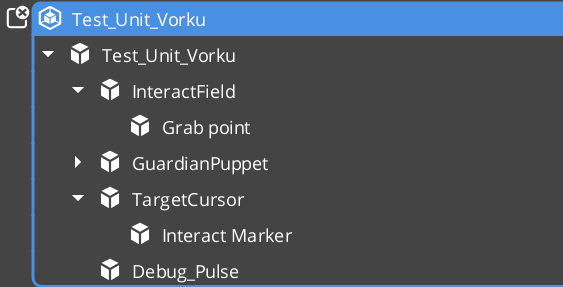
Entity arrangement
Collision Setup
Units require properly configured PhysX collision layers to interact with the environment and other units. If you have not set up collision layers yet, refer to the Simple Project Setup guide.
Typical collision layer assignments:
| Layer | Purpose |
|---|---|
| Unit layer | The unit’s own collider. Collides with environment geometry and other units. |
| Ground detection layer | Used by grounder raycasts. Collides with terrain and walkable surfaces only. |
Movement
The Movement feature set is a composable stack where each component handles one concern of character locomotion. Movers define core behavior (free, strafe, grid, slide), the MoverContext manages movement state and selects the active mover, Grounders report ground state, and Influence components apply external forces like wind or currents.
Quick Reference
| Need | Bus | Method |
|---|---|---|
| Assign a controller to this unit | UnitRequestBus (ById) | Possess(controllerEntityId) |
| Release the current controller | UnitRequestBus (ById) | DePossess() |
| Get the possessing controller | UnitRequestBus (ById) | GetController() |
| Get the unit’s unique name | UnitRequestBus (ById) | GetUniqueName() |
| Event | Bus | Fired When |
|---|---|---|
UnitPossessed | UnitNotificationBus | A controller takes possession of this unit. |
UnitEnteringStandby | UnitNotificationBus | The unit is entering standby (level transition). |
UnitExitingStandby | UnitNotificationBus | The unit is exiting standby and resuming. |
Glossary
| Term | Meaning |
|---|---|
| Unit | Any entity with a GS_UnitComponent — the controllable body in gameplay |
| Controller | The intelligence (player or AI) that possesses and drives a unit |
| Possession | The act of a controller claiming ownership of a unit via Possess() |
| Standby | A paused state units enter during level transitions, coordinated by the Unit Manager |
| Unique Name | An identifier generated at activation used to look up a unit by name |
For full definitions, see the Glossary.
See Also
For the full API, component properties, and C++ extension guide:
For related systems:
Get GS_Unit
GS_Unit — Explore this gem on the product page and add it to your project.