Widgets
Categories:
Widgets are standalone UI components that handle specific game scenarios outside the page navigation model. They activate and deactivate in response to game events rather than player navigation — a load screen appears during a stage transition, a pause menu overlays gameplay when the player pauses.
For component properties and the full API, see the Framework API reference.
Contents
Load Screen
GS_LoadScreenComponent shows a loading canvas during stage transitions and hides it when loading is complete. Place it on the Game Manager entity and configure a LyShine canvas to use as the loading screen.
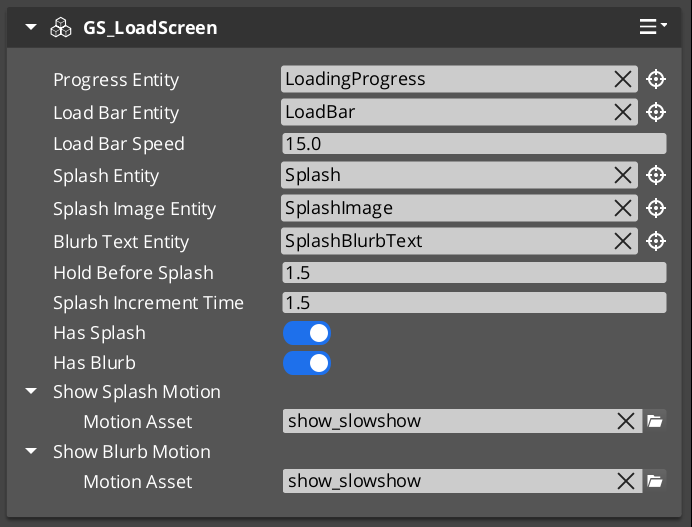
The component listens for StageManagerNotificationBus events and drives the canvas visibility automatically — no ScriptCanvas or manual triggers required.
Pause Menu
PauseMenuComponent handles the pause overlay. It listens for the configured pause input action and toggles a designated pause canvas on and off, broadcasting events so other systems know to yield control.
Glossary
| Term | Meaning |
|---|---|
| Widget | A standalone UI component that activates in response to game events rather than player navigation |
| Load Screen | A canvas displayed during stage transitions, managed by GS_LoadScreenComponent |
| Pause Menu | An overlay canvas displayed when the game is paused, managed by PauseMenuComponent |
For full definitions, see the Glossary.
See Also
For the full API, component properties, and C++ extension guide:
For related systems:
Get GS_UI
GS_UI — Explore this gem on the product page and add it to your project.