Stage Composition
Categories:
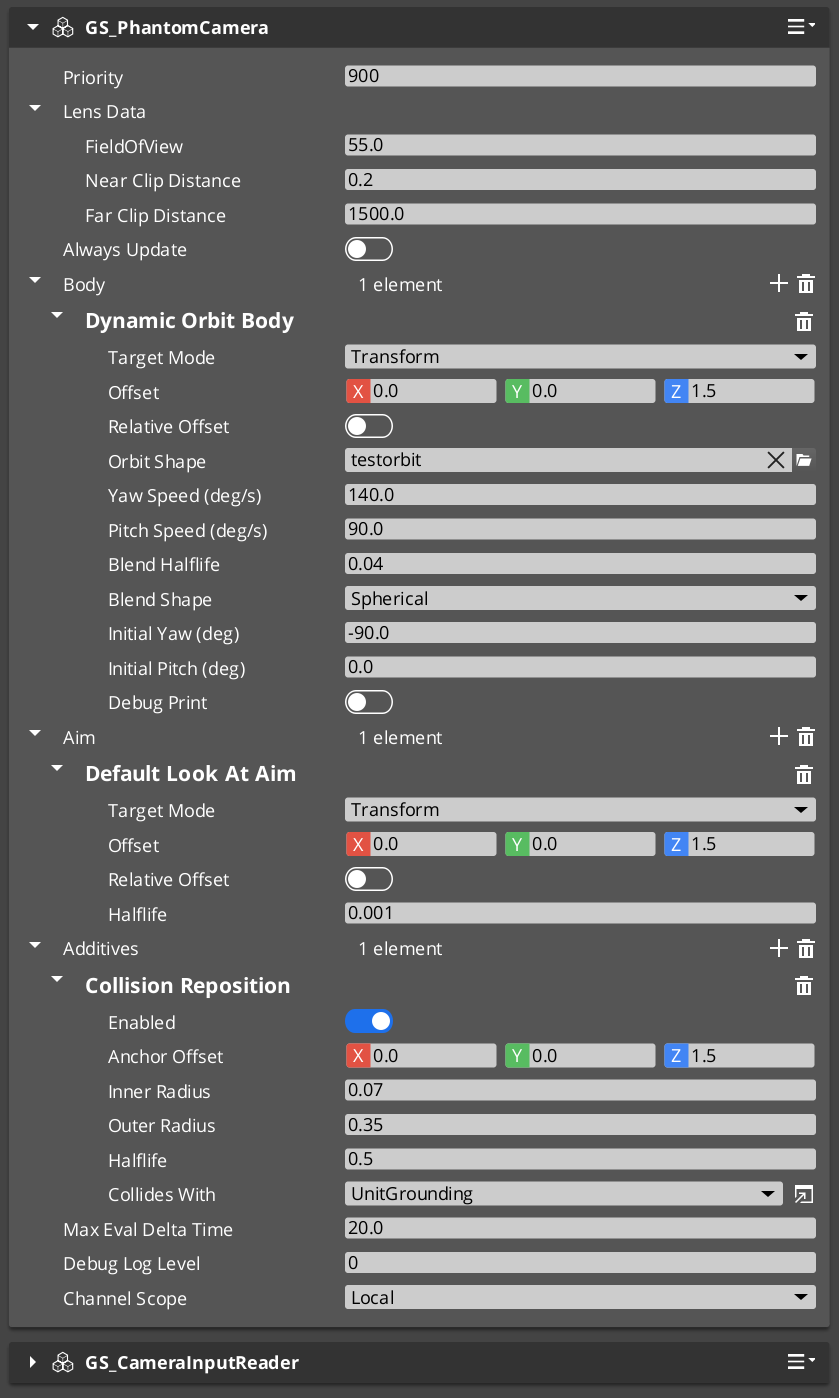
A Phantom Camera’s behavior is the composition of one Body stage, one Aim stage, and zero-or-more Additive stages. The same GS_PhantomCameraComponent becomes a follow cam, an orbital cam, a tracking dolly, or a third-person shoulder cam depending on what is slotted from the editor’s type-picker.
This page is a concept primer for the composition model. For step-by-step recipes (third-person shoulder cam, orbital player cam, static showcase, first-person clamped look, tracking dolly, group-framing cam) see the recipes collection.
PhantomCam Configurations (Recipes) API
For the per-variant fields and kinematic models, see the Stage Pipeline API reference.
Contents
The Pipeline at a Glance
Each tick, the cam runs:
Body → Aim → Reposition additives → Noise additives → Finalize
| Slot | What it does | When you change it |
|---|---|---|
| Body | Writes the cam’s position. | Different follow behavior — orbit vs. spring-damped follow vs. spline-bound. |
| Aim | Writes the cam’s rotation. | Different look behavior — free look vs. clamped envelope. |
| Reposition additives | Correct the smoothed pose (collision pushback, magnetic tug). Run BEFORE noise. | When the cam needs to avoid geometry or be pulled by spatial cues. |
| Noise additives | Perturb the final pose (handheld sway, event-triggered shake). Run AFTER reposition. | Game feel — adding life or punch. |
Each stage owns its own damping. There is no separate “smoothing” stage.
Where to Go Next
| If you want to… | Go here |
|---|---|
| Configure a specific cam type (shoulder, orbital, static showcase, first-person, tracking dolly, group-framing) | PhantomCam Configurations |
| Add camera shake (handheld feel or event-triggered impact) | Camera Noise Configurations and The Basics: Noise & Impulse |
| Pull the cam toward a vista point | Camera Tug Configurations and The Basics: Tug Fields |
| Frame multiple subjects | Group Target Configurations and The Basics: Group Targets |
| See the full per-variant kinematic model | Framework API: Stage Pipeline |
See Also
Recipes for stage composition:
- PhantomCam Configurations — the step-by-step builds.
For the full per-variant API and kinematic models:
- Framework API: Stage Pipeline
- Framework API: Body Stage Variants
- Framework API: Aim Stage Variants
- Framework API: Additive Stage Variants
Related basics pages:
- The Basics: Phantom Cameras — base component fields and lifecycle.
- The Basics: Blend Profiles — how transitions between cams are authored.
Get GS_PhantomCam
GS_PhantomCam — Explore this gem on the product page and add it to your project.