Influence Fields
Categories:
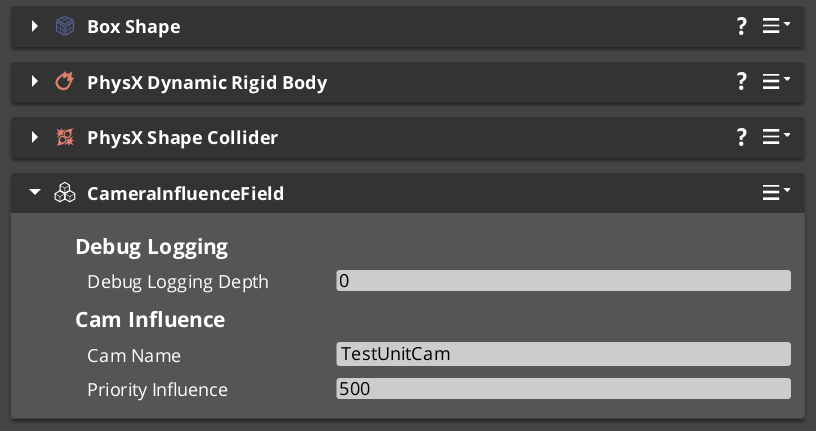
Influence Fields are modifiers that change camera priority dynamically beyond what any individual Phantom Camera’s base prioerity specifies. Two types are available: global components that apply unconditionally, and spatial field components that apply only when the player enters a defined volume.
For architecture details, component properties, and extending the system in C++, see the Framework API reference.
Contents
Types of Influence Fields
| Component | Scope | When It Applies |
|---|---|---|
GlobalCameraInfluenceComponent | Global | Always active. Applies priority effects to the system unconditionally. Usually placed on SceneData entity |
CameraInfluenceFieldComponent | Spatial | Active when the player is inside the associated physics trigger volume. |
Both types use CamInfluenceData records to describe what they modify. Multiple fields can be active at the same time — their effects are resolved by priority stacking.
Priority Stacking
When multiple influence fields are active at the same time, their priority changes add to the target camera’s priority. This enables growingly more granular spaces to regularly shift in, by adding a new influence field, and shift out, when you exit and are in a more general space.
Quick Reference
| Need | Component | How |
|---|---|---|
| Apply a camera prioerity always | GlobalCameraInfluenceComponent | Add to any entity, preferably the StageData entity |
| Apply a priority in a zone | CameraInfluenceFieldComponent | Add with a PhysX trigger collider; player entering activates it |
Glossary
| Term | Meaning |
|---|---|
| Influence Field | A modifier that adjusts camera behavior dynamically on top of the dominant Phantom Camera |
| Priority Stacking | The effect of taking the camera base priority, then additively applying influence field changes ontop to eventually determine the dominant phantom camera |
| Global Influence | An unconditional priority modifier that applies regardless of spatial position |
| Spatial Influence | A volume-based modifier that activates when the player enters its physics trigger |
For full definitions, see the Glossary.
See Also
For the full API, component properties, and C++ extension guide:
For related systems:
- The Basics: Phantom Cameras
- The Basics: Cam Core
- The Basics: Cam Manager
- The Basics: Stage Data
- Utility: Physics Trigger Volume
Get GS_PhantomCam
GS_PhantomCam — Explore this gem on the product page and add it to your project.