Locomotion
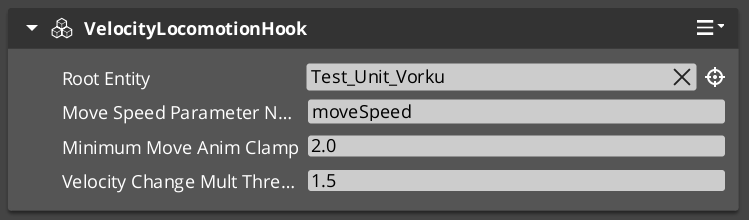
The Velocity Locomotion Hook automatically drives animation blend parameters from an entity’s velocity. Instead of manually scripting animation state transitions, you attach this component and it reads the entity’s physics velocity each frame, writing the appropriate blend values to the animation system.
For component properties, see the Framework API reference.
Contents
How It Works
The VelocityLocomotionHookComponent runs on the tick bus. Each frame it:
- Reads the entity’s current velocity from the physics system.
- Extracts speed, direction, and vertical velocity.
- Writes these as blend parameters to the entity’s EMotionFX animation graph.
This creates a seamless connection between movement and animation — walk, run, idle, and fall transitions happen automatically based on physics state.
When to Use
| Scenario | Result |
|---|---|
| Character walking | Speed parameter drives walk/run blend |
| Character idle | Zero velocity triggers idle state |
| Character falling | Vertical velocity drives fall animation |
| Character stopping | Deceleration naturally transitions to idle |
The component is stateless and lightweight — it reads velocity and writes parameters each frame with no internal state machine.
Glossary
| Term | Meaning |
|---|---|
| Velocity Locomotion Hook | A component that reads entity velocity and writes animation blend parameters each frame |
| Blend Parameter | A named value sent to the animation graph that controls state transitions and blending |
For full definitions, see the Glossary.
See Also
For the full API, component properties, and C++ extension guide:
For related systems:
Get GS_Performer
GS_Performer — Explore this gem on the product page and add it to your project.