World Triggers
Categories:
World Triggers are a data-driven system for firing game responses when conditions are met. A TriggerSensorComponent defines the condition side — physics overlap, player interact, record check. A WorldTriggerComponent defines the response side — changing stage, toggling an entity, writing a record, logging a message. Each component holds an array of polymorphic type objects, so any combination of conditions and responses can be composed on a single entity without scripting.
For architecture details, component properties, and extending the system in C++, see the Framework API reference.
Contents
- How World Triggers Work
- Sensor Types
- Trigger Types
- Reset and Re-Arming
- ScriptCanvas Usage
- Editor Setup Pattern
- Quick Reference
- Glossary
- See Also
How World Triggers Work
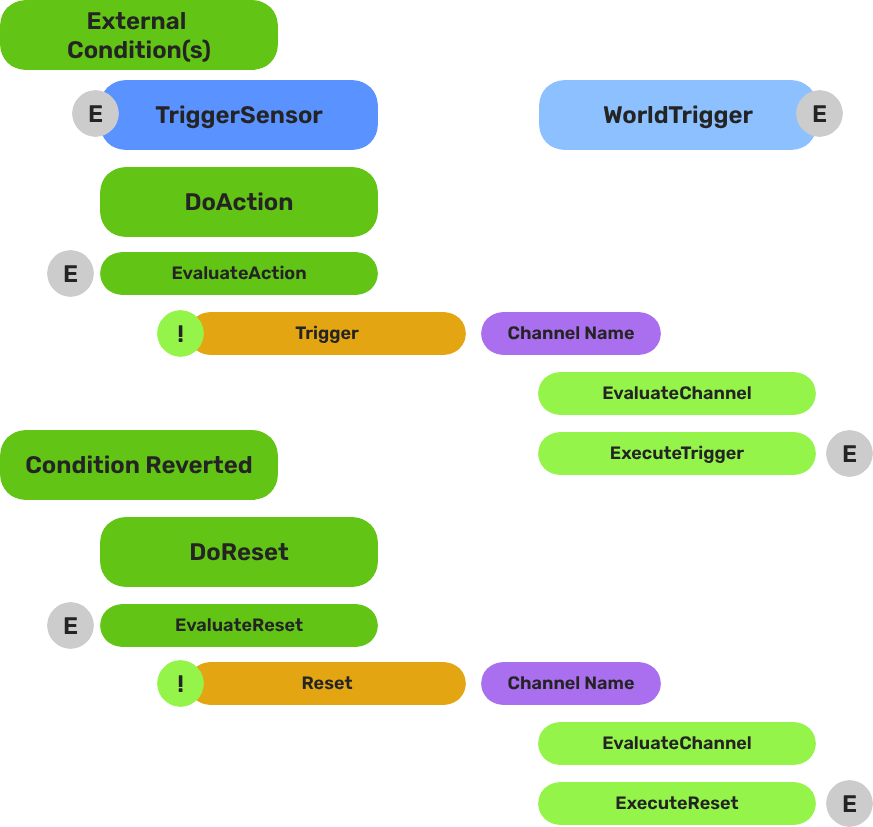
Breakdown
Each trigger is split into two container components. Logic lives in type objects held by each component:
| Part | Role |
|---|---|
| TriggerSensorComponent | Holds andConditions and orConditions arrays of TriggerSensorType objects. When conditions pass, fires WorldTriggerRequestBus::Trigger on the same entity. |
| WorldTriggerComponent | Holds a triggerTypes array of WorldTriggerType objects. On Trigger(), calls Execute() on every type. On Reset(), calls OnReset(). |
You can add any mix of sensor types and trigger types — for example, a door that requires both a physics overlap AND a record flag (andConditions) before it opens (TriggerType_ToggleEntities), then sets a quest record (TriggerType_SetRecord).
E Indicates extensible classes and methods.
Patterns - Complete list of system patterns used in GS_Play.
Sensor Types
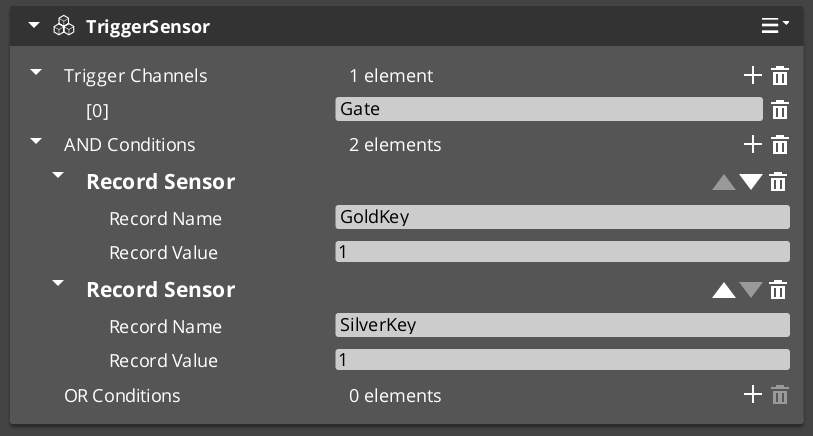
Add sensor types to the andConditions or orConditions arrays on a TriggerSensorComponent. The four built-in types cover the most common condition patterns:
| Sensor Type | Condition | Notes |
|---|---|---|
SensorType_Interact | Any unit with targeting interacts with this entity. | Requires GS_TargetComponent or GS_InteractTargetComponent on the entity. |
SensorType_PlayerInteract | The player-controlled unit specifically interacts with this entity. | Extends SensorType_Interact; filters to entities with the "Player" tag. |
SensorType_Collider | A physics collider enters the entity’s trigger volume. | Automatically activates a PhysicsTriggerComponent — no manual setup needed. |
SensorType_Record | A game record reaches a configured value. | Connects to RecordKeeper automatically; fires without polling. |
Trigger Types
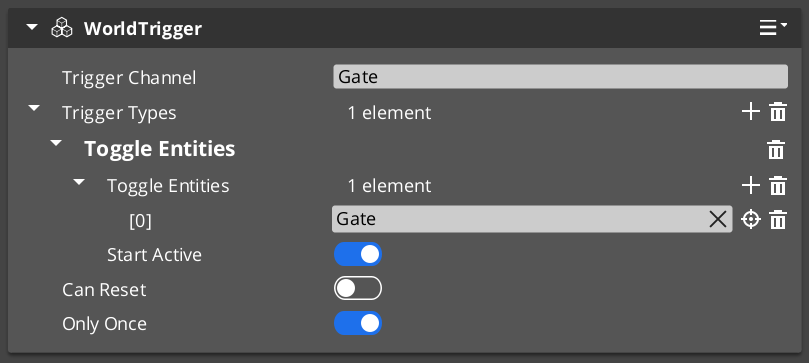
Add trigger types to the triggerTypes array on a WorldTriggerComponent. The four built-in types handle the most common response patterns:
| Trigger Type | Response | Notes |
|---|---|---|
TriggerType_PrintLog | Prints a message to the development log. | Development and debugging use. |
TriggerType_SetRecord | Writes a value to the Record Keeper by name. | Useful for setting quest flags, unlock states, or counters. |
TriggerType_ToggleEntities | Enables or disables referenced entities. Seeds initial state at startup via startActive. | Works with any entity in the level — doors, pickups, blockers. |
TriggerType_ChangeStage | Transitions the game to a different stage (level). | Queued on next tick; coordinates with Stage Manager automatically. |
Reset and Re-Arming
Calling Reset() on WorldTriggerRequestBus calls OnReset() on every trigger type in the component. Each type can reverse its effect or prepare for re-activation:
TriggerType_ToggleEntitiesinverts entity states on bothExecuteandOnReset, enabling toggle behavior.- Switches that cycle on repeat interaction.
- Area triggers that fire each time a player re-enters.
- Multi-step sequences where earlier steps re-arm later ones.
ScriptCanvas Usage
WorldTriggerRequestBus exposes both core methods directly to scripts:
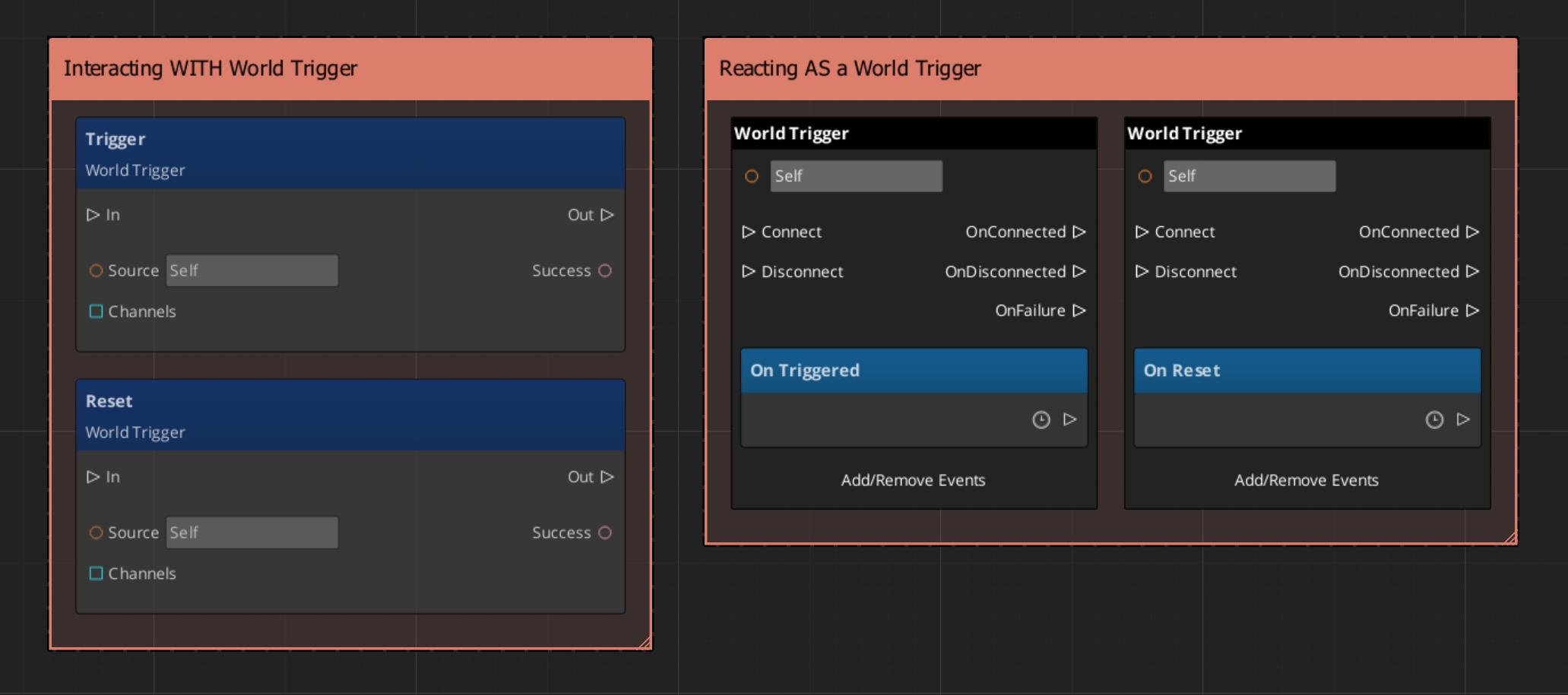
A common script pattern is to use a SensorType_Record condition to gate a sequence, then script the reset from a separate event so the trigger only re-arms after additional conditions are met:
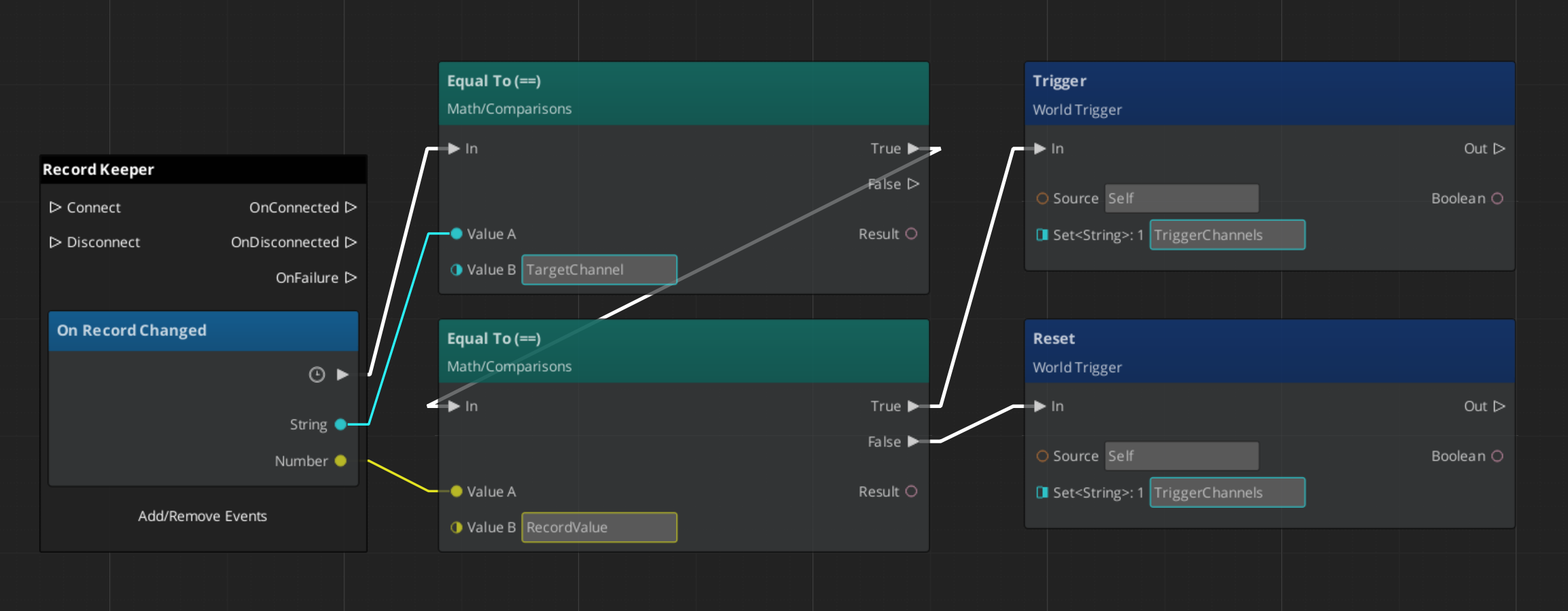
You can also bypass the sensor component entirely and call Trigger() directly from any script when you need to fire a world trigger response programmatically — for example, from a dialogue completion callback or an animation event.
Editor Setup Pattern
Most interactive world objects follow this assembly in the editor:
- Create an entity for the interactive object (door, switch, collectible, zone border).
- Add a
TriggerSensorComponentto the entity. - Add the appropriate sensor type(s) to
andConditionsororConditions(e.g.SensorType_PlayerInteractfor interact,SensorType_Colliderfor proximity). - Add a
WorldTriggerComponentto the same entity. - Add the appropriate trigger type(s) to
triggerTypes(e.g.TriggerType_ToggleEntitiesto open a door,TriggerType_SetRecordto record the event). - Configure each type’s properties in the editor — no scripting needed for these patterns.
For interact-based sensors, also add GS_TargetComponent or GS_InteractTargetComponent so the Targeting system can select this entity.
Quick Reference
| Need | Bus | Method |
|---|---|---|
| Fire a trigger response from script | WorldTriggerRequestBus (ById) | Trigger() |
| Re-arm a trigger after it has fired | WorldTriggerRequestBus (ById) | Reset() |
| Fire sensor evaluation from event-driven type | TriggerSensorRequestBus (ById) | DoAction() / DoResetAction() |
| Condition Type | Sensor Type |
|---|---|
| Any unit interacts | SensorType_Interact |
| Player only interacts | SensorType_PlayerInteract |
| Physics overlap | SensorType_Collider |
| Record/flag state | SensorType_Record |
| Response Type | Trigger Type |
|---|---|
| Log a debug message | TriggerType_PrintLog |
| Write a game record | TriggerType_SetRecord |
| Toggle an entity on/off | TriggerType_ToggleEntities |
| Change stage/level | TriggerType_ChangeStage |
Glossary
| Term | Meaning |
|---|---|
| TriggerSensorComponent | Container component that owns sensor type objects and evaluates them on each event |
| WorldTriggerComponent | Container component that owns trigger type objects and calls Execute on each Trigger() |
| TriggerSensorType | A type object that defines one condition — extend this to create custom sensor logic |
| WorldTriggerType | A type object that defines one response — extend this to create custom trigger logic |
| andConditions | Array on TriggerSensorComponent where all types must pass for the trigger to fire |
| orConditions | Array on TriggerSensorComponent where any one type passing is sufficient |
| Re-Arming | Calling Reset() on a WorldTriggerComponent so its types can fire again on the next Trigger() |
For full definitions, see the Glossary.
See Also
For the full API, component properties, and C++ extension guide:
- Framework API: World Triggers
- Framework API: Trigger Sensors
- Framework API: World Trigger Types
- Framework API: Record Sensor Type
For related systems:
Get GS_Interaction
GS_Interaction — Explore this gem on the product page and add it to your project.