Motion System
GS_Motion is a track-based animation engine built into GS_Core. It drives timed property changes — position, rotation, scale, color, opacity — through authored data assets rather than hand-coded interpolation scripts. Domain gems extend GS_Motion with their own track types: GS_UI adds 8 LyShine-specific tracks for UI animation, and GS_Juice adds transform and material tracks for game feel feedback.
For architecture details, the domain extension pattern, and all track types, see the Framework API reference.
Contents
- Key Concepts
- How It Works
- Domain Extensions
- Easing Curves
- Proxy Targeting
- Quick Reference
- Glossary
- See Also
Key Concepts
| Concept | What It Is |
|---|---|
| Track | A single animated property — what changes, how long, and which easing curve. |
| Motion | A collection of tracks that play together. Tracks can start at different times within the motion. |
| Motion Asset | A data asset authored in the O3DE Asset Editor containing the tracks and their configuration. |
| Proxy | An optional entity redirect — lets a track target a child entity instead of the motion’s owner. |
| Composite | The runtime instance created from an asset. Each entity gets its own deep copy. |
How It Works
- Author a motion asset in the Asset Editor. Each domain has its own asset type (
.uiamfor UI,.feedbackmotionfor Juice). - Assign the asset to a component or embed it in a serialized field (e.g., a page’s show/hide transitions).
- Play the motion from ScriptCanvas or C++. The system initializes a runtime composite, resolves proxies, and ticks all tracks.
- Each track receives an eased progress value (0 → 1) every frame and applies its property change to the target entity.
- When all tracks complete, the motion fires its OnComplete callback.
Easing Curves
Every track can use any of the 40+ easing curves from the GS_Core curves library. Curves are configured per-track in the asset editor.
Available families: Linear, Quad, Cubic, Sine, Expo, Circ, Back, Elastic, Bounce — each with In, Out, and InOut variants.
Proxy Targeting
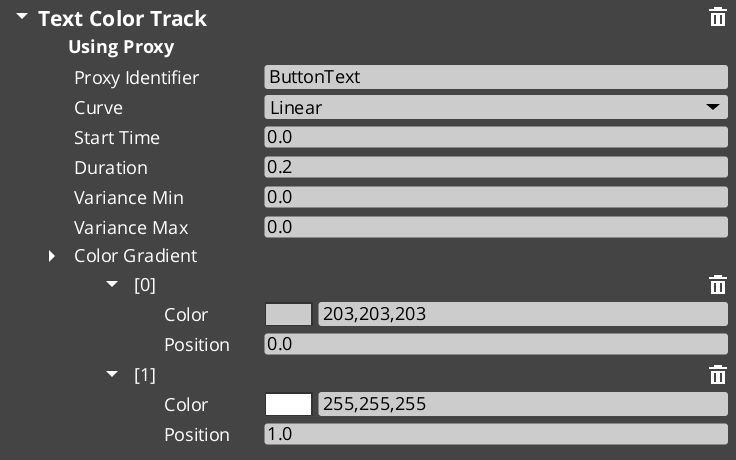
When a motion asset has tracks with identifiers (named labels), those tracks appear in the proxy list on the component. Proxies let you redirect a track to a different entity in the hierarchy — for example, a page show animation might animate the background separately from the content panel.
Each proxy entry maps a track label to a target entity. If no proxy is set, the track targets the motion’s owner entity.
Domain Extensions
GS_Motion is not used directly — it provides the base system that domain gems extend with concrete track types.
UI Animation (GS_UI)
Eight tracks for LyShine UI elements (position, scale, rotation, alpha, color, text). Asset extension: .uiam. Used for page transitions, button hover/select effects, and standalone UI animation.
Feedback Motions (GS_Juice)
Two tracks for game feel effects — transform (position, scale, rotation) and material (opacity, emissive, color tint). Asset extension: .feedbackmotion. Used for screen shake, hit flash, and visual feedback.
Quick Reference
| Need | Where |
|---|---|
| Animate UI elements | Use .uiam assets with UiAnimationMotionComponent or page transitions |
| Create feedback effects | Use .feedbackmotion assets with FeedbackEmitter component |
| Change easing curve | Edit the curve type on individual tracks in the asset editor |
| Redirect a track to another entity | Configure proxy entries on the component |
| Loop an animation | Enable loop on the motion asset |
Glossary
| Term | Meaning |
|---|---|
| Track | A single animated property within a motion — defines what changes, duration, and easing |
| Motion | A collection of tracks that play together as a single animation |
| Motion Asset | A data asset authored in the Asset Editor containing track configurations |
| Proxy | An entity redirect that lets a track target a child entity instead of the motion’s owner |
| Composite | The runtime instance created from a motion asset — each entity gets its own deep copy |
| Domain Extension | A gem-specific set of track types that extends GS_Motion for a particular use case |
For full definitions, see the Glossary.
See Also
For the full API, component properties, and C++ extension guide:
For related systems:
Get GS_Core
GS_Core — Explore this gem on the product page and add it to your project.