Performances
Categories:
Performances are polymorphic actions that move or reposition actors during dialogue sequences. The sequencer triggers a performance when it reaches a PerformanceNodeData node and waits for OnPerformanceComplete before advancing. This async model lets multi-step actor choreography complete fully before dialogue continues. Three built-in performance types cover direct movement, navmesh navigation, and instant teleportation. Custom types can be created by extending the base class.
For architecture details, component properties, and extending the system in C++, see the Framework API reference.
Contents
- How Performances Work
- Built-in Performance Types
- MoveTo_DialoguePerformance
- PathTo_DialoguePerformance
- RepositionPerformer_DialoguePerformance
- Async Completion
- Extending with Custom Performances
- ScriptCanvas Usage
- Quick Reference
- Glossary
- See Also
How Performances Work
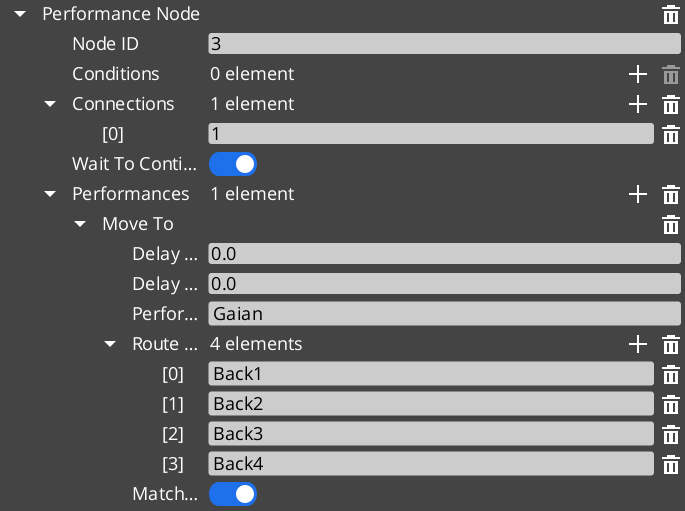
When the sequencer encounters a PerformanceNodeData node, it:
- Resolves the named performer entity via
DialogueManagerRequestBus → GetPerformer. - Instantiates the performance object specified on the node.
- Calls
DoPerformance()— the public entry point. - Waits. The sequencer does not advance until the performance broadcasts
OnPerformanceComplete. - Resumes from the next node once completion is received.
The performance itself handles the movement logic, monitors completion, and signals back through its notification bus. This means a single PerformanceNodeData can represent any action that takes time — walking to a spot, running a path, playing an animation, triggering a VFX sequence — as long as it broadcasts completion when done.
Built-in Performance Types
| Performance Type | Movement Method | When to Use |
|---|---|---|
MoveTo_DialoguePerformance | Direct translation to marker(s) | Open areas, stylized movement, non-physical traversal. |
PathTo_DialoguePerformance | RecastNavigation pathfinding | Realistic navigation around obstacles and geometry. |
RepositionPerformer_DialoguePerformance | Instant teleport to marker | Off-screen repositioning between scenes, no visible movement needed. |
All three extend DialoguePerformance, the abstract base class. The base class provides DoPerformance(), ExecutePerformance(), and FinishPerformance() hooks, plus TickBus integration for per-frame movement updates.
MoveTo_DialoguePerformance
MoveTo_DialoguePerformance translates an actor toward one or more named stage markers using direct movement — no obstacle avoidance, no navmesh. It broadcasts movement requests over MoveTo_PerformanceNotificationBus. Listening systems (typically the performer’s movement component) receive those requests and execute the actual translation. When the actor reaches the final marker, the performance calls FinishPerformance() and broadcasts completion.
Use this for stylized games where physical path correctness is less important than snappy, predictable actor placement, or for any case where the path between actor and marker is guaranteed to be clear.
| Bus | Purpose |
|---|---|
MoveTo_PerformanceRequestBus | Query state of the performance. |
MoveTo_PerformanceNotificationBus | Receives move-to-marker requests from the performance. |
PathTo_DialoguePerformance
PathTo_DialoguePerformance navigates an actor to one or more named stage markers using the RecastNavigation navmesh. It requests a path from the navmesh, walks the actor along that path, and completes when the actor arrives at the final marker. Use this in games with detailed geometry where actors must walk around walls, furniture, and obstacles rather than moving in a straight line.
RecastNavigation must be enabled in the project and a navmesh must be baked in any level where PathTo performances are used.
| Bus | Purpose |
|---|---|
PathTo_PerformanceRequestBus | Query state of the performance. |
PathTo_PerformanceNotificationBus | Receives path-to-marker requests from the performance. |
RepositionPerformer_DialoguePerformance
RepositionPerformer_DialoguePerformance teleports an actor instantly to a named stage marker. It does not animate, translate, or navigate — it sets position directly. Useful for placing actors at the start of a new scene, recovering from a previous sequence that ended far from the required starting point, or repositioning actors that are off-camera and do not need visible movement.
| Bus | Purpose |
|---|---|
RepositionPerformer_PerformanceNotificationBus | Receives teleport requests from the performance. |
Async Completion
All performances signal completion asynchronously. The sequencer does not poll or time out — it simply waits for the performance to call FinishPerformance(), which broadcasts OnPerformanceComplete over the appropriate notification bus. This means:
- A performance can take any amount of time.
- A performance can be driven by external events — animation callbacks, physics arrival, etc.
- Multiple performances can run in parallel if the node graph is structured to fork, because each notifies independently.
When writing custom performance types, always call FinishPerformance() when the action is done. Forgetting to do so will stall the sequencer indefinitely.
Extending with Custom Performances
Custom performance types are discovered automatically through O3DE serialization at startup. Extend DialoguePerformance, reflect it, and your custom type appears in the node editor’s performance picker and can be placed on any PerformanceNodeData node.
See the Framework API reference for the full base class interface and extension guide.
ScriptCanvas Usage
Performances are authored in the dialogue node graph and executed automatically by the sequencer. Most projects do not need to drive performances from ScriptCanvas directly. The common scripting patterns involve the movement side — receiving move or path requests from a performance and executing them on the performer entity.
Receiving a MoveTo Request
[MoveTo_PerformanceNotificationBus → StartMoveToMarker(markerEntity)]
    └─► [Move performer toward markerEntity position]
    └─► [When arrived → MoveTo_PerformanceRequestBus → ReportArrival]
Receiving a Reposition Request
[RepositionPerformer_PerformanceNotificationBus → RepositionToMarker(markerEntity)]
    └─► [Set performer transform to markerEntity transform]
Quick Reference
| Need | Bus | Method / Event |
|---|---|---|
| Receive a MoveTo move request | MoveTo_PerformanceNotificationBus | StartMoveToMarker |
| Receive a PathTo navigation request | PathTo_PerformanceNotificationBus | StartPathToMarker |
| Receive a reposition teleport request | RepositionPerformer_PerformanceNotificationBus | RepositionToMarker |
| Query active MoveTo state | MoveTo_PerformanceRequestBus | (see Framework API) |
| Query active PathTo state | PathTo_PerformanceRequestBus | (see Framework API) |
Glossary
| Term | Meaning |
|---|---|
| Performance | A polymorphic action that moves or repositions an actor during a dialogue sequence |
| PerformanceNodeData | A dialogue graph node that triggers a performance and waits for completion |
| Async Completion | The pattern where the sequencer waits for OnPerformanceComplete before advancing |
For full definitions, see the Glossary.
See Also
For the full API, component properties, and C++ extension guide:
For related systems:
Get GS_Cinematics
GS_Cinematics — Explore this gem on the product page and add it to your project.