Audio Manager
How to work with the GS_Play Audio Manager — engine initialization, bus routing, and master control.
Categories:
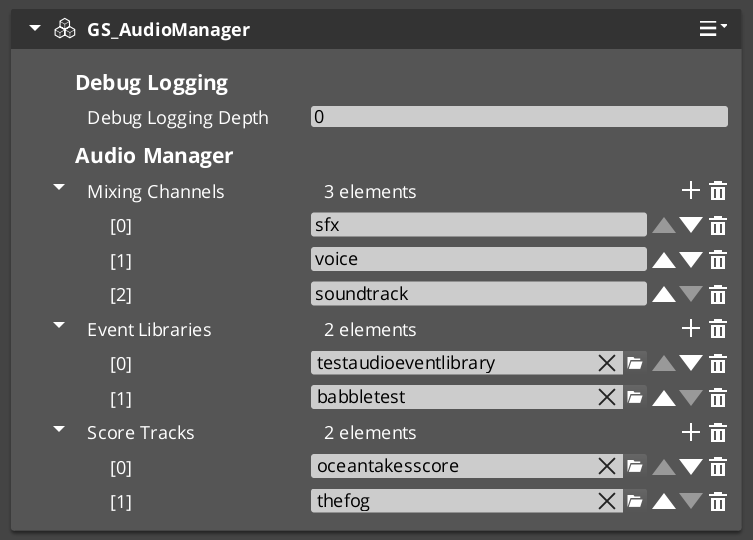
The Audio Manager is the singleton controller for the entire audio system. It initializes the MiniAudio engine, manages mixing buses, loads audio event libraries, and coordinates score track playback. Like all GS_Play managers, it extends the Manager base class and responds to the Game Manager lifecycle automatically.
For component properties and API details, see the Framework API reference.
Contents
What It Manages
| Responsibility | What It Does |
|---|---|
| Engine lifecycle | Initializes and shuts down the MiniAudio audio engine. |
| Mixing buses | Creates and routes named audio buses with effects chains. |
| Event libraries | Loads Audio Event Library assets at startup. |
| Score playback | Manages Score Arrangement Track assets for dynamic music. |
| Master volume | Controls global volume levels per bus. |
Quick Reference
| Need | Bus | Method |
|---|---|---|
| Audio management requests | AudioManagerRequestBus | PlayAudioEvent, StopAudioEvent, SetMixerVolume |
Glossary
| Term | Meaning |
|---|---|
| Audio Event Library | A data asset containing named audio event definitions loaded at startup |
| Mixing Bus | A named audio channel with an effects chain for routing and processing sounds |
| Score Arrangement | A multi-layer music asset managed by the Audio Manager for dynamic playback |
For full definitions, see the Glossary.
See Also
For the full API, component properties, and C++ extension guide:
For related systems:
Get GS_Audio
GS_Audio — Explore this gem on the product page and add it to your project.