Audio Events
Categories:
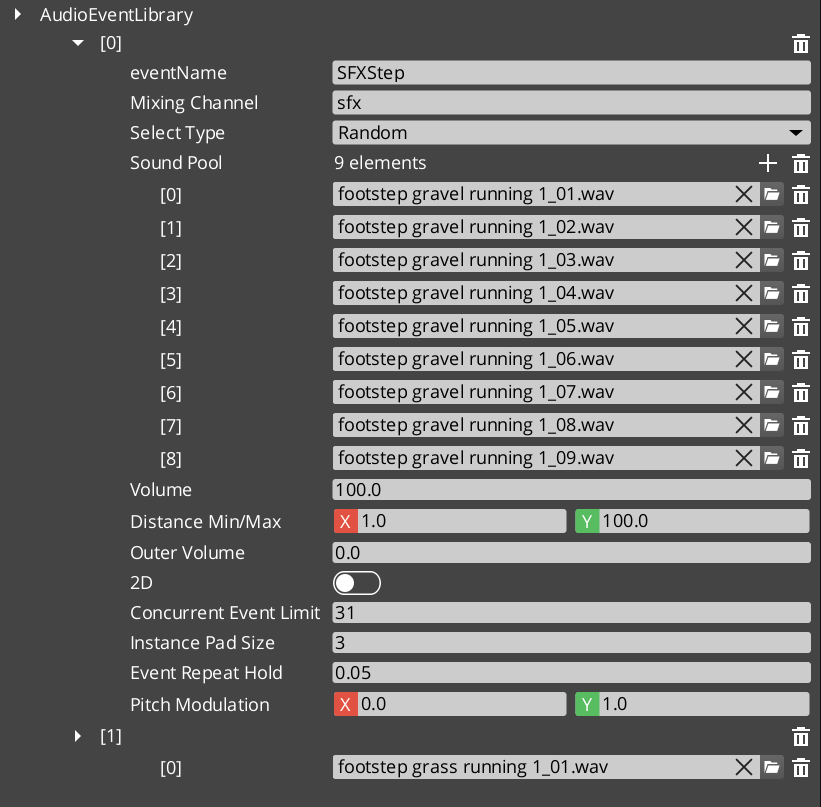
Audio Events are the primary way to play sounds in GS_Play. Each event defines a pool of audio clips with selection rules, playback mode (2D or 3D), concurrent instance limiting, and repeat-hold behavior. Events are grouped into Audio Event Library assets that the Audio Manager loads at startup.
For asset structure and component properties, see the Framework API reference.
Contents
How It Works
- Create an Audio Event Library asset in the O3DE Asset Editor.
- Define audio events — each with a name, clip pool, and playback settings.
- Load the library by assigning it to the Audio Manager.
- Play events by name from ScriptCanvas or C++.
Event Configuration
| Setting | What It Controls |
|---|---|
| Pool Selection | Random — picks a random clip from the pool. Increment — plays clips sequentially. |
| 2D / 3D | 2D plays without spatialization. 3D positions the sound in the world. |
| Concurrent Limit | Maximum instances of this event that can play simultaneously. |
| Repeat Hold | Minimum time between repeated plays of the same event. |
GS_AudioEventComponent
Place a GS_AudioEventComponent on any entity that needs to play sounds. The component references events by name from loaded libraries and handles 3D positioning automatically based on the entity’s transform.
Quick Reference
| Need | Bus | Method |
|---|---|---|
| Play a sound event | AudioManagerRequestBus | PlayAudioEvent(eventName) |
| Stop a sound event | AudioManagerRequestBus | StopAudioEvent(eventName) |
Glossary
| Term | Meaning |
|---|---|
| Audio Event | A named, data-driven sound definition with clip pool, playback mode, and concurrency settings |
| Audio Event Library | A data asset grouping multiple audio events for batch loading |
| Pool Selection | The strategy for choosing clips — Random or Increment |
| Concurrent Limit | Maximum simultaneous instances of the same event |
For full definitions, see the Glossary.
See Also
For the full API, component properties, and C++ extension guide:
For related systems:
Get GS_Audio
GS_Audio — Explore this gem on the product page and add it to your project.