Movement
Categories:
The Movement subsystem handles all unit locomotion. It is mode-driven: a single named mode is active at a time, and only the mover and grounder whose mode name matches will run each tick. This makes locomotion fully composable without any mover combining logic.
The subsystem has four layers:
- Mover Context — Central hub. Transforms raw input into camera-relative and ground-projected vectors, owns mode switching, context states, and profile management.
- Movers — Translate MoverContext input into physics forces on the rigid body. One mover is active at a time per mode.
- Grounders — Detect ground contact, slope, and surface normal. Write results to the MoverContext and trigger mode switches.
- Movement Influence — Spatial zones and global fallbacks that supply the active
GS_UnitMovementProfile.
For usage guides and setup examples, see The Basics: GS_Unit.
Contents
Architecture
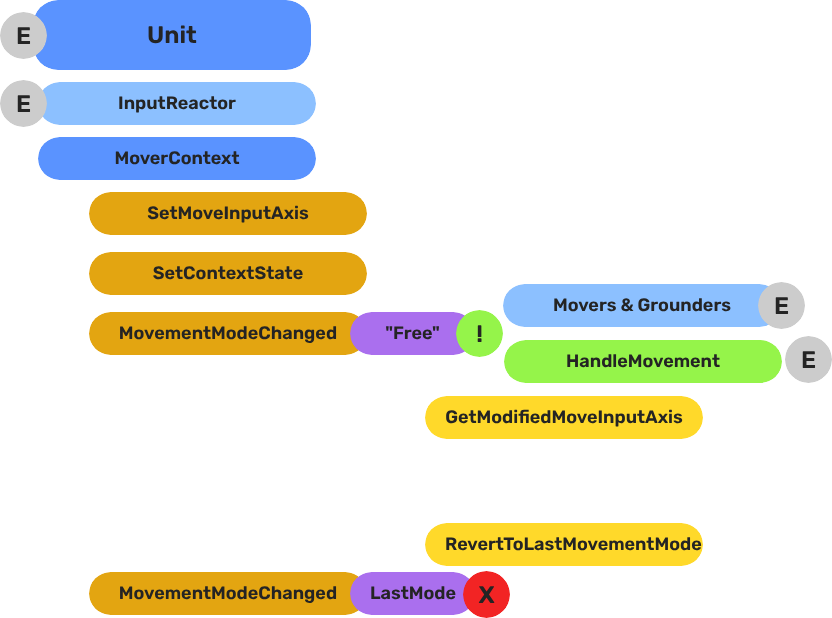
Breakdown
Movers and Grounders are multiple components on a Unit that are constantly changing activation based on the units state. When a mover is active, it freely processes the unit’s movement based on it’s functionality. At any moment, through internal or external forces, the Movement, Rotation, or Grounding state can change, which disables the old movers, and activates the new one to continue controlling the Unit.
Input
    ↓  InputDataNotificationBus::InputStateChanged
Input Reactor Components
    ↓  MoverContextRequestBus::SetMoveInputAxis
GS_MoverContextComponent
    ↓  ModifyInputAxis() → camera-relative
    ↓  GroundInputAxis() → ground-projected
    ↓  MoverContextNotificationBus::MovementModeChanged("Free")
GS_3DFreeMoverComponent  [active when mode == "Free"]
    ↓  AccelerationSpringDamper → rigidBody->SetLinearVelocity
GS_PhysicsRayGrounderComponent  [active when grounding mode == "Free"]
    ↓  MoverContextRequestBus::SetGroundNormal / SetContextState("grounding", ...)
    ↓  MoverContextRequestBus::ChangeMovementMode("Slide")  ← when slope too steep
GS_3DSlideMoverComponent  [active when mode == "Slide"]
The Slide mover activates when the Unit is walking on too steep an angle. It takes control over the unit, slides down the hill, then restores the previous movement behaviour.
- The Basics: Mover Context — Movement modes, grounding states, and configuration.
- The Basics: Movement — Mover types, grounder types, and ScriptCanvas usage.
- Framework API: Input Reactor — InputDataComponent schema, reactor base class, and C++ extension.
- Framework API: Mover Context — Context state, mode authority, and C++ extension.
- Framework API: Movers — Mover and grounder components, movement APIs, and C++ extension.
Movement Profile
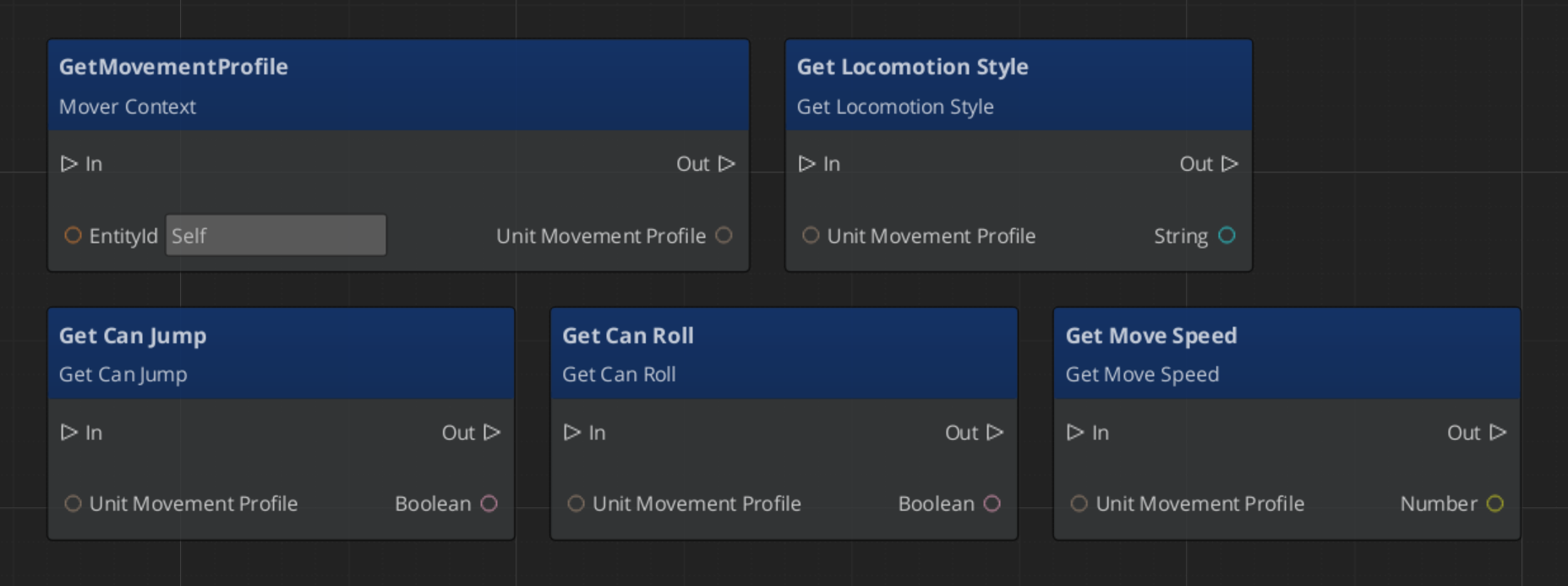
GS_UnitMovementProfile is an asset that holds locomotion parameters. Movers read from the active profile via activeProfile pointer, which the MoverContext updates whenever the profile changes.
| Field | Type | Description |
|---|---|---|
LocomotionStyle | enum | Movement style archetype (affects animation matching). |
moveSpeed | float | Target movement speed (m/s). |
speedChangeSmoothing | float | Lerp factor for speed transitions between profiles. |
canSprint | bool | Whether this profile allows sprinting. |
canJump | bool | Whether this profile allows jumping. |
canRoll | bool | Whether this profile allows rolling. |
Create movement profiles as data assets in the Asset Editor. Assign a default profile to the GS_MoverContextComponent in the Inspector. Spatial influence zones can override the active profile at runtime.
Reading Movement Profile Data - ScriptCanvas
Movement Influence
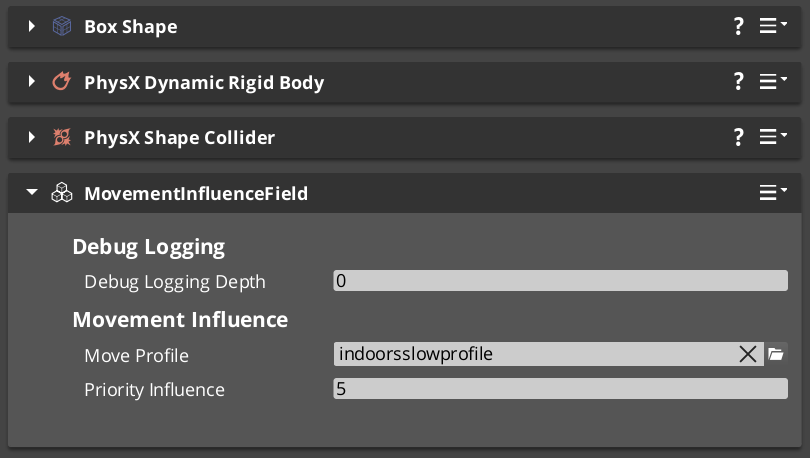
The MoverContext selects the active profile by priority:
- Influence list —
MovementInfluenceFieldComponentadds its profile when the unit enters its trigger volume. Multiple fields stack by priority. - Global fallback — if the influence list is empty and
allowGlobalInfluenceis true, falls back toGlobalMovementRequestBus::GetGlobalMovementProfile. - Default profile — the
defaultMoveProfileassigned directly on theGS_MoverContextComponent.
MovementInfluenceFieldComponent
Inherits PhysicsTriggerComponent. On TriggerEnter, calls MoverContextRequestBus::AddMovementProfile(entityId, profile*) on the entering unit. On TriggerExit, calls RemoveMovementProfile(entityId).
Request Bus: MovementInfluenceRequestBus
ById bus — addressed by the influence field’s entity ID.
| Method | Parameters | Returns | Description |
|---|---|---|---|
GetPriority | — | int | Returns this field’s priority. Higher values take precedence when multiple fields overlap. |
GlobalMovementRequestBus
Broadcast bus — single global instance.
| Method | Parameters | Returns | Description |
|---|---|---|---|
GetGlobalMovementProfile | — | GS_UnitMovementProfile* | Returns the global fallback movement profile. Used by the MoverContext when no influence fields are active. |
Sub-Sections
- Mover Context — Input transformation, mode switching, context states, profile management
- Movers — Mover base class and concrete movers (
GS_3DFreeMoverComponent,GS_3DSlideMoverComponent) - Grounders — Grounder base class and concrete grounders (
GS_PhysicsRayGrounderComponent)
See Also
- Units — Unit entity setup and
GS_UnitComponent - Unit Controllers — Controllers that manage possession and drive input routing
- Input Data — The input pipeline that feeds movement reactors
- Stage Data — Handler for current stage functionality and global effects
- Springs Utility — Spring-damper functions used by movers and grounders
- Physics Trigger Volume — Physics overlap that triggers functionality.
Get GS_Unit
GS_Unit — Explore this gem on the product page and add it to your project.