Unit Controllers
Categories:
Unit Controllers are the decision-making layer in the GS_Unit architecture. A controller “possesses” a unit entity, giving it authority over that unit’s actions. This possession model cleanly separates the what (the unit with its movement, abilities, and stats) from the who (the controller providing intent — player input or AI logic).
The system provides three controller components:
- GS_UnitControllerComponent – The base controller with possession logic, placement helpers, and the virtual interface for extension.
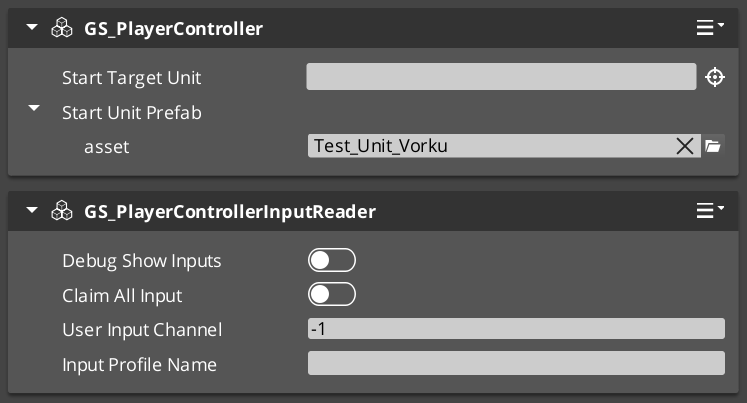
- GS_PlayerControllerComponent – A player-specific controller that integrates with the Input Data subsystem to translate player input into unit commands.
- GS_AIControllerComponent – An AI controller for NPC units, providing hooks for behavior trees or custom AI logic.
For usage guides and setup examples, see The Basics: GS_Unit.
Contents
How It Works
Possession Model
Breakdown
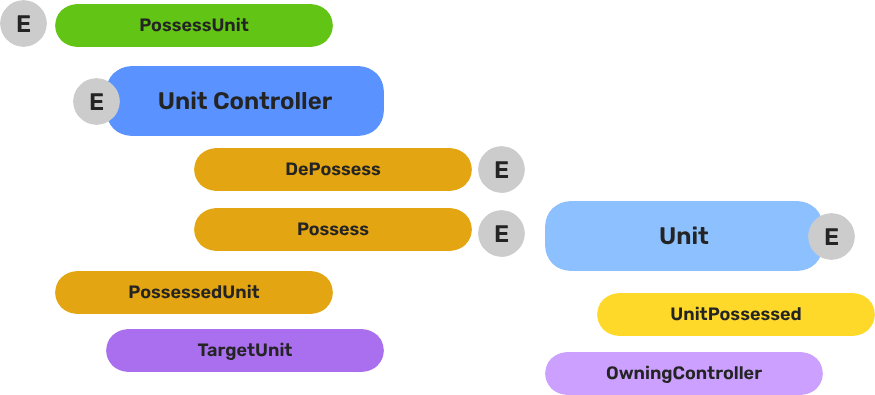
Every unit has exactly one controller at a time, or no controller at all. Possession is established by calling Possess on the unit and released by calling DePossess. The unit fires UnitPossessed on UnitNotificationBus whenever ownership changes so other systems can react.
| Concept | Description |
|---|---|
| Possession | A controller attaches to a unit. The unit accepts input and movement commands from that controller only. |
| DePossession | The controller releases the unit. The unit halts input processing and enters a neutral state. |
| UnitPossessed event | Fires on UnitNotificationBus (addressed by entity ID) whenever a unit’s controller changes. |
| GetController | Returns the entity ID of the current controller, or an invalid ID if none. |
| GetUniqueName | Returns the string name assigned by the Unit Manager when this unit was spawned. |
- The Basics: Controllers — Possession, input routing, and controller assignment.
- Framework API: Unit Controllers — Controller components, possession API, and C++ extension.
Unit Placement
Controllers provide helper methods for positioning their possessed unit:
PlaceUnitAtExit– Places the unit at the level’s designated exit point.PlaceUnitAtEntity– Places the unit at a specific entity’s world position.
Unique Names
Both controllers and units maintain a unique name string. The base controller provides a virtual SetUniqueName() method that subclasses override to generate names from their specific context (e.g., player slot number, AI template name).
Component Reference
GS_UnitControllerComponent (Base)
The base controller class. All controller types inherit from this. It handles possession, placement, unique name generation, and the notification plumbing. Extend this class to create custom controller types.
GS_PlayerControllerComponent
Extends AZ::Component. The player controller adds input handling on top of the base controller pattern. It registers itself with the Unit Manager via RegisterPlayerController and integrates with the Input Data subsystem to feed player input into the possessed unit’s movement and action systems.
Typical entity setup for a player controller:
GS_PlayerControllerComponentGS_InputDataComponent– Holds the current input stateGS_PlayerControllerInputReaderComponent– Reads raw input into InputData- One or more
InputReactorComponents– Translate input data into movement vectors or action triggers
GS_AIControllerComponent
Extends AZ::Component. The AI controller provides the same possession interface as the player controller but is driven by AI logic rather than player input. It does not connect to the input subsystem. Instead, it exposes hooks for behavior trees, scripted sequences, or custom AI decision-making to issue commands to the possessed unit.
API Reference
Request Bus: UnitControllerRequestBus
Commands sent to a specific controller. ById bus — addressed by the controller’s entity ID.
| Method | Parameters | Returns | Description |
|---|---|---|---|
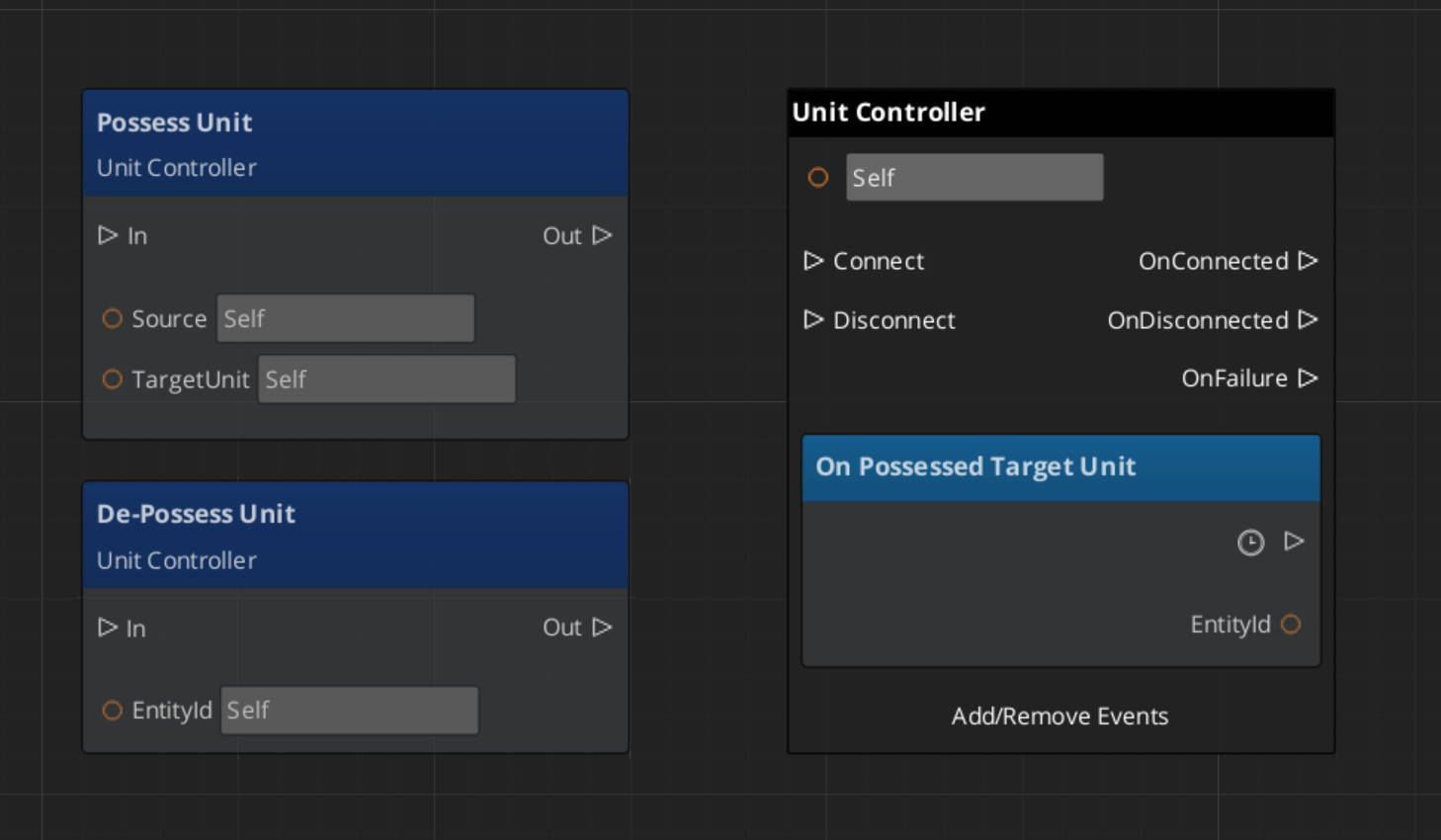
PossessUnit | AZ::EntityId targetUnit | void | Possesses the target unit. Broadcasts PossessedTargetUnit notification. |
DePossessUnit | — | void | Releases the currently possessed unit. |
PlaceUnitAtExit | — | void | Moves the possessed unit to the level’s exit point. |
PlaceUnitAtEntity | AZ::EntityId targetEntity | void | Moves the possessed unit to the world position of the target entity. |
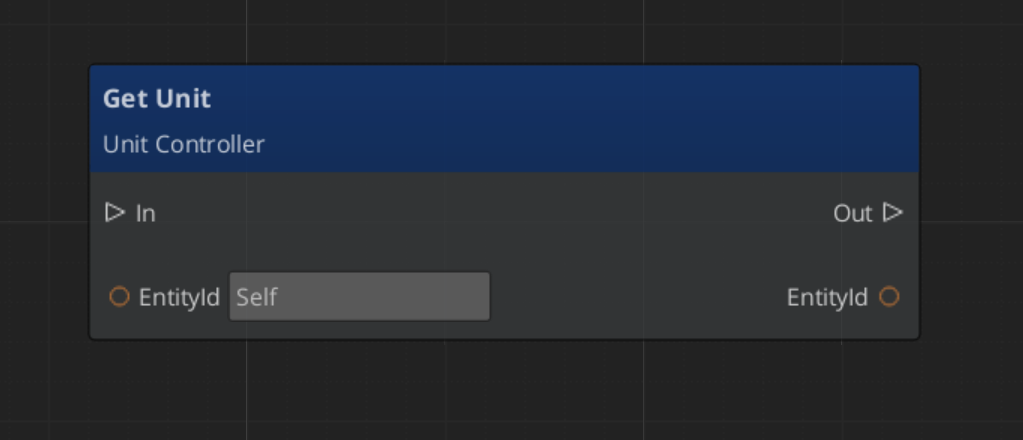
GetUnit | — | AZ::EntityId | Returns the entity ID of the currently possessed unit. |
GetUniqueName | — | AZStd::string | Returns the unique name of this controller. |
Notification Bus: UnitControllerNotificationBus
Events broadcast by a controller. ById bus — addressed by the controller’s entity ID. Subscribe to receive updates about controller state changes.
| Event | Parameters | Description |
|---|---|---|
PossessedTargetUnit | AZ::EntityId unitId | Fired when this controller possesses a unit. GS_PlayerControllerInputReaderComponent listens to this to begin routing input to the new unit. |
Virtual Methods
Override these when extending the base controller. Always call the base implementation.
| Method | Parameters | Returns | Description |
|---|---|---|---|
PostActivateProcessing() | — | void | Called after the controller’s Activate() completes. Override to add custom initialization that depends on the controller being fully active. |
SetUniqueName() | — | void | Called during initialization to set the controller’s unique name. Override to generate names from your project’s naming scheme. |
Usage Examples
C++ – Possessing a Unit
#include <GS_Unit/GS_UnitBus.h>

// From a controller, possess a unit
GS_Unit::UnitControllerRequestBus::Event(
    GetEntityId(),
    &GS_Unit::UnitControllerRequestBus::Events::PossessUnit,
    targetUnitEntityId
);
C++ – Querying a Controller’s Unit
#include <GS_Unit/GS_UnitBus.h>

AZ::EntityId possessedUnit;
GS_Unit::UnitControllerRequestBus::EventResult(
    possessedUnit,
    controllerEntityId,
    &GS_Unit::UnitControllerRequestBus::Events::GetUnit
);
Script Canvas
Possessing and de-possessing a unit from a controller:
Getting the unit possessed by a controller:
Extension Guide
Use the UnitController ClassWizard template to generate a new controller with boilerplate already in place — see GS_Unit Templates.
Create custom controllers by extending GS_UnitControllerComponent. This is the standard approach for game-specific controller logic such as party management, vehicle control, or specialized AI behaviors.
Header (.h)
#pragma once
#include <GS_Unit/GS_UnitBus.h>
#include <Source/Controllers/GS_UnitControllerComponent.h>

namespace MyProject
{
    class MyCustomController : public GS_Unit::GS_UnitControllerComponent
    {
    public:
        AZ_COMPONENT_DECL(MyCustomController);

        static void Reflect(AZ::ReflectContext* context);

    protected:
        void PostActivateProcessing() override;
        void SetUniqueName() override;
    };
}
Implementation (.cpp)
#include "MyCustomController.h"
#include <AzCore/Serialization/SerializeContext.h>

namespace MyProject
{
    AZ_COMPONENT_IMPL(MyCustomController, "MyCustomController", "{YOUR-UUID-HERE}");

    void MyCustomController::Reflect(AZ::ReflectContext* context)
    {
        if (auto serializeContext = azrtti_cast<AZ::SerializeContext*>(context))
        {
            serializeContext->Class<MyCustomController, GS_Unit::GS_UnitControllerComponent>()
                ->Version(0);

            if (AZ::EditContext* editContext = serializeContext->GetEditContext())
            {
                editContext->Class<MyCustomController>(
                    "My Custom Controller", "Project-specific controller logic")
                    ->ClassElement(AZ::Edit::ClassElements::EditorData, "")
                        ->Attribute(AZ::Edit::Attributes::Category, "MyProject")
                        ->Attribute(AZ::Edit::Attributes::AppearsInAddComponentMenu, AZ_CRC_CE("Game"));
            }
        }
    }

    void MyCustomController::PostActivateProcessing()
    {
        GS_UnitControllerComponent::PostActivateProcessing();
        // Custom post-activation logic — connect to AI systems, load profiles, etc.
    }

    void MyCustomController::SetUniqueName()
    {
        // Generate a unique name from your project's naming scheme
        uniqueName = AZStd::string::format("CustomController_%d", m_controllerIndex);
    }
}
See Also
For component references:
- Unit Manager – Spawning and lifecycle management
- Units – Unit entity setup and the GS_UnitComponent
- Input Data – Input state and reaction components used by player controllers
- Movement – Movement components driven by controller input
Get GS_Unit
GS_Unit — Explore this gem on the product page and add it to your project.