Input Data
Categories:
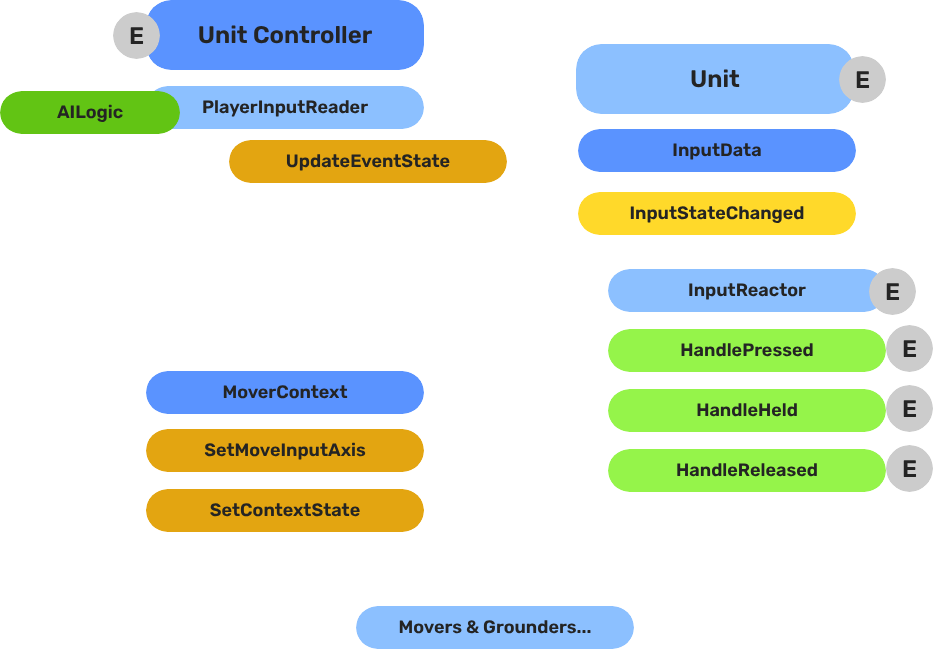
The Input Data subsystem bridges the controller entity (where hardware input is read) and the unit entity (where input is acted on). The controller reads raw device events and routes named event values into the unit’s GS_InputDataComponent. Reactor components on the unit then convert that stored state into movement vectors or game actions.
This separation keeps units ignorant of input bindings — any controller can possess any unit without the unit needing to change.
For usage guides and setup examples, see The Basics: GS_Unit.
Contents
How It Works
Breakdown
The input pipeline has three stages. Each stage is a separate component on the unit entity, and they run in order every frame:
| Stage | Component | What It Does |
|---|---|---|
| 1 — Read | GS_PlayerControllerInputReaderComponent | Reads raw input events from the active input profile and writes them into GS_InputDataComponent. |
| 2 — Store | GS_InputDataComponent | Holds the current frame’s input state — button presses, axis values — as structured data. |
| 3 — React | Reactor components | Read from GS_InputDataComponent and produce intent: movement vectors, action triggers, etc. |
All reactor components downstream of the store stage read from the same GS_InputDataComponent, so there is no duplicated hardware polling and no risk of two reactors seeing different input states for the same frame.
- The Basics: Controllers — Possession, input routing, and controller assignment.
- The Basics: Core Input — Input profiles, action mappings, and options setup.
- The Basics: Unit Input — Input readers, axis configuration, and ScriptCanvas usage.
- Framework API: Unit Controllers — Controller components, possession API, and C++ extension.
- Framework API: Input Reader — Profile binding, action event reading, and C++ extension.
- Framework API: Input Reactor — InputDataComponent schema, reactor base class, and C++ extension.
- Framework API: Mover Context — Context state, mode authority, and C++ extension.
Component Reference
GS_InputDataComponent
Stores the current input state for a unit as a name-value map. Receives input from the controller via InputDataRequestBus. Broadcasts state changes to reactor components via InputDataNotificationBus.
Data: AZStd::unordered_map<AZStd::string, float> inputEventStates
Also listens to UnitNotificationBus::UnitPossessed to store the owning controller reference.
GS_InputReactorComponent (Base)
Listens to InputDataNotificationBus. Tracks a set of event names (inputReactEvents). Fires the correct virtual based on zero-crossing:
| Virtual | Trigger |
|---|---|
HandlePressed(stateName) | Value changed 0 → non-zero |
HandleHeld(stateName) | Value remains non-zero |
HandleReleased(stateName) | Value changed non-zero → 0 |
GS_InputAxisReactorComponent (Base)
Variant for analogue axis input. Fires HandleAxisChanged(stateName, value) whenever the value changes, without pressed/held/released semantics.
KeyboardMovement_InputReactorComponent
Converts four discrete key events into a 2D movement axis. Maps moveUp/moveDown/moveLeft/moveRight event names to +1/-1 contributions on X and Y, then calls MoverContextRequestBus::SetMoveInputAxis("x"/"y", value).
| Field | Description |
|---|---|
moveUpEvent | Event name for the forward/up key |
moveDownEvent | Event name for the back/down key |
moveLeftEvent | Event name for the left key |
moveRightEvent | Event name for the right key |
JoyAxisMovement_AxisReactorComponent
Directly maps two joystick axis event names to the mover context X and Y axes via SetMoveInputAxis.
| Field | Description |
|---|---|
xAxisName | Input event name for the horizontal axis |
yAxisName | Input event name for the vertical axis |
GS_PlayerControllerInputReaderComponent
Extends GS_Core::GS_InputReaderComponent. Sits on the controller entity. Routes input to the possessed unit on HandleFireInput. Updates its possessedUnit reference when PossessedTargetUnit fires. See Player Input Reader for full details.
API Reference
Request Bus: InputDataRequestBus
Commands sent to a specific unit’s input data component. ById bus — addressed by unit entity ID.
| Method | Parameters | Returns | Description |
|---|---|---|---|
UpdateEventState | AZStd::string stateName, float value | void | Writes the value for the named event and broadcasts InputStateChanged. |
ClearInputState | — | void | Zeros all stored values and broadcasts ClearInput. |
GetEventState | AZStd::string stateName | float | Returns the current float value for the named event. |
Notification Bus: InputDataNotificationBus
Events broadcast to reactor components on the unit. ById bus — addressed by unit entity ID.
| Event | Parameters | Description |
|---|---|---|
InputStateChanged | AZStd::string stateName, float value | Fired when any input event value changes. Reactor components compare against their tracked events and respond. |
ClearInput | — | Fired when all input states are cleared. |
See Also
For detailed component pages:
- Input Reactor — Reactor base classes and concrete keyboard/joystick implementations
- Player Input Reader — Controller-side input reading component
For related components:
- Unit Controllers — The controller that routes input to the unit
- Mover Context — Receives
SetMoveInputAxiscalls from reactors - GS_Unit Overview
Get GS_Unit
GS_Unit — Explore this gem on the product page and add it to your project.