UI Animation
Categories:
UI Animation is a domain extension of the GS_Motion system, purpose-built for animating LyShine UI elements. It provides eight concrete track types that target LyShine component properties (position, scale, rotation, alpha, color, text), a data asset format (.uiam) for authoring animations, and a standalone component for playing them on any entity.
The architecture follows the GS_Motion domain extension pattern: UiMotionTrack extends GS_MotionTrack as the domain base, each concrete track type targets a specific LyShine property, and UiAnimationMotionAsset extends GS_MotionAsset to bundle tracks into a single asset file.
For usage guides and setup examples, see The Basics: GS_UI.
Contents
- Domain Extension Pattern
- Track Types
- UiAnimationMotionAsset
- UiAnimationMotion
- UiAnimationMotionComponent
- Usage Examples
- See Also
Domain Extension Pattern
To add a custom track type, use the UiMotionTrack ClassWizard template — see GS_UI Templates. The template generates the header and source, and the only manual step is adding a Reflect(context) call in UIDataAssetsSystemComponent.cpp. Once reflected, the new track type appears automatically in the asset editor type picker via EnumerateDerived.
GS_Motion is designed to be extended per domain. GS_UI provides the UI domain extension:
| GS_Motion Base | GS_UI Extension |
|---|---|
GS_MotionTrack | UiMotionTrack – Domain base for all UI tracks |
GS_MotionAsset | UiAnimationMotionAsset – Asset container for UI tracks |
GS_MotionComposite | Used internally by UiAnimationMotion for multi-track playback |
GS_MotionProxy | Used internally by UiAnimationMotion for asset instance binding |
See GS_Motion for the full base system reference.
Track Types
UiMotionTrack
The domain base class that all UI-specific tracks extend. Inherits from GS_Core::GS_MotionTrack and provides LyShine entity targeting common to all UI tracks.
Concrete Tracks
Each track type animates a specific LyShine component property. All tracks are authored inside a .uiam asset.
| Track Type | Target Component | Property Animated | Value Type |
|---|---|---|---|
UiPositionTrack | UiTransform2dComponent | Position offset | AZ::Vector2 |
UiScaleTrack | UiTransform2dComponent | Scale | AZ::Vector2 |
UiRotationTrack | UiTransform2dComponent | Rotation | float |
UiElementAlphaTrack | UiElementComponent | Element-level alpha | float |
UiImageAlphaTrack | UiImageComponent | Image alpha | float |
UiImageColorTrack | UiImageComponent | Color tint | AZ::Color |
UiTextColorTrack | UiTextComponent | Text color | AZ::Color |
UiTextSizeTrack | UiTextComponent | Font size | float |
UiAnimationMotionAsset
The data asset that holds a complete UI animation. Extends GS_Core::GS_MotionAsset → AZ::Data::AssetData. Requires GS_AssetReflectionIncludes.h when reflecting — see Serialization Helpers.
| Property | Type | Description |
|---|---|---|
| Extension | — | .uiam |
| Motion Name | AZStd::string | A human-readable name for this animation. |
| Loop | bool | Whether this animation loops continuously after completing. |
| Tracks | AZStd::vector<UiMotionTrack*> | The list of animation tracks that make up this motion. Each track targets a specific LyShine property on a specific entity. |
To understand how to author Feedback Motions, refer to UI Animation: Authoring UIAnimation Motions
UiAnimationMotion
A serializable wrapper struct that bridges a .uiam asset to runtime playback. This is not a component – it is a data struct used as a field type in other components (such as GS_UIPageComponent’s m_onShow, m_onHide, and GS_ButtonComponent’s hover/select fields).
| Field | Type | Description |
|---|---|---|
| Asset | AZ::Data::Asset<UiAnimationMotionAsset> | Reference to the .uiam asset to play. |
| Motion Proxies | AZStd::vector<GS_MotionProxy> | Instance-specific bindings that map track targets to actual entities at runtime. |
| Motion Composite | AZStd::unique_ptr<GS_MotionComposite> | The runtime composite that coordinates multi-track playback. Created automatically from the asset data. |
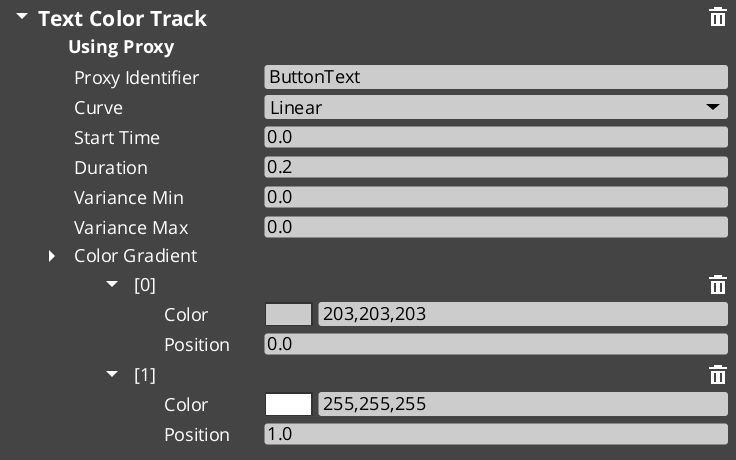
UiAnimationMotionComponent
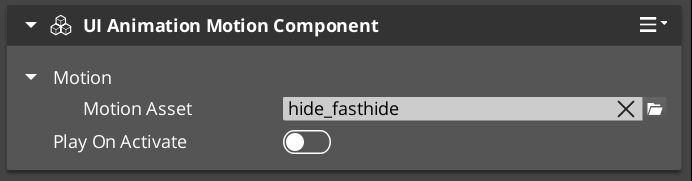
A standalone component that plays a UiAnimationMotion on any entity. Use this when you need to trigger a UI animation outside of the page navigation or button systems – for example, an ambient animation on a background element, or a custom transition triggered from ScriptCanvas.
The component exposes the UiAnimationMotion struct in the Inspector, allowing you to assign a .uiam asset and configure it directly on any entity.
Adding Custom Tracks
Use the UIMotionTrack ClassWizard template to generate a new world-space track — see GS_UI Templates. The only manual step after generation is adding a Reflect(context) call in your {$Gem}DataAssetSystemComponent.cpp. Once reflected, the new track type is discovered automatically and appears in the asset editor type picker.
Override Init(ownerEntityId) to cache entity context, and Update(easedProgress) to drive the target property via its bus.
void ${Custom}Track::Init(AZ::EntityId ownerEntity)
{
    // Always call the base first — it sets m_owner.
    GS_UI::UiMotionTrack::Init(ownerEntity);

    // Cache the element's origin value so the track can apply additive offsets.
    // Example:
    //   UiTransformBus::EventResult(m_originPosition, ownerEntity, &UiTransformBus::Events::GetLocalPosition);
}

void ${Custom}Track::Update(float easedProgress)
{
    // Evaluate the gradient at the current eased progress and apply to the element.
    // easedProgress is in [0, 1] and already passed through the track's CurveType.
    // Example:
    //   const AZ::Vector2 offset = valueGradient.Evaluate(easedProgress);
    //   UiTransformBus::Event(m_owner, &UiTransformBus::Events::SetLocalPosition, m_originPosition + offset);
}
Usage Examples
Typical Animation Setup
A page fade-in animation might use two tracks in a single .uiam asset:
- A
UiElementAlphaTrackthat fades from 0 to 1 over 0.3 seconds. - A
UiPositionTrackthat slides the element 20 pixels upward over the same duration.
Assign this asset to a page’s On Show field and the page will automatically play the animation whenever it becomes visible.
Button Hover Animation
A button scale-bounce on hover:
- A
UiScaleTrackthat scales from 1.0 to 1.1 and back to 1.0 over 0.15 seconds.
Assign this to the button’s Hover Motion field. Assign the reverse (scale from current back to 1.0) to Unhover Motion.
See Also
For component references:
- Page Navigation – Pages use UiAnimationMotion for show/hide transitions
- Buttons – Buttons use UiAnimationMotion for hover/select animations
For conceptual overviews and usage guides:
- GS_UI Overview – Full gem overview and installation
For related resources:
- GS_Motion – The base motion system that UI Animation extends
Get GS_UI
GS_UI — Explore this gem on the product page and add it to your project.