Page Navigation
Categories:
For usage guides and setup examples, see The Basics: GS_UI.

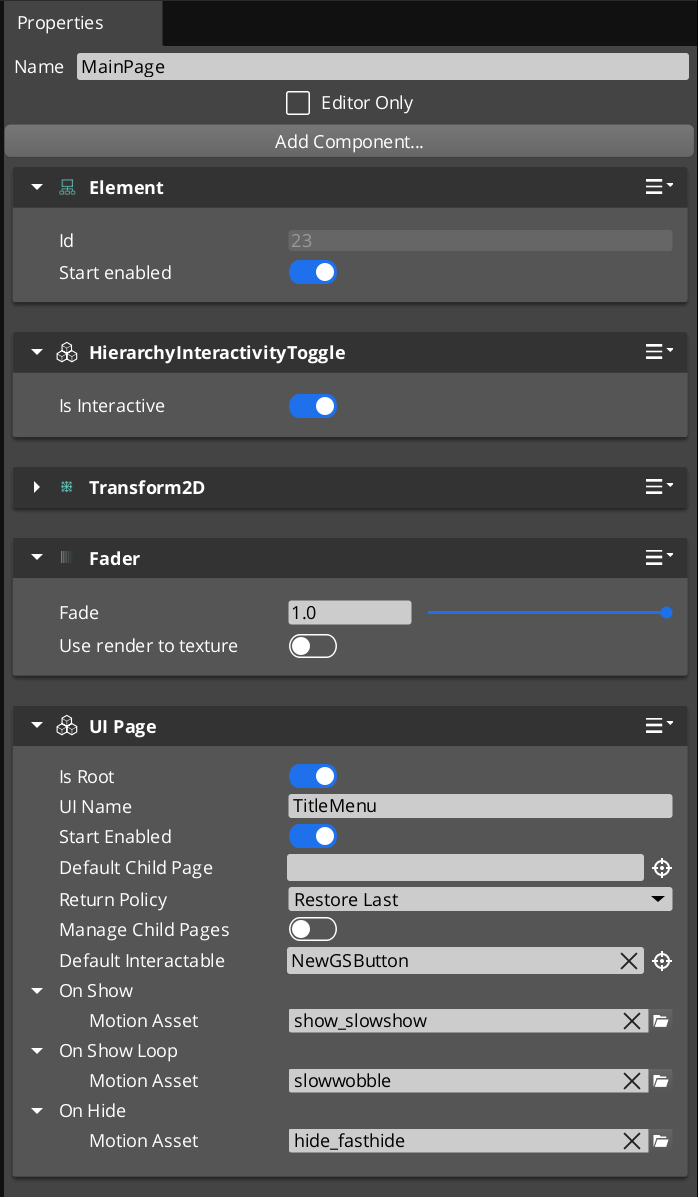
The GS_UIPageComponent in the UI Editor, configured as a root page with a default child page assigned.
GS_UIPageComponent is the core navigation component of the GS_UI system. It replaces the legacy multi-tier Hub/Window/Page hierarchy with a single, unified component that handles all levels of UI navigation. A single GS_UIPageComponent can serve as a root canvas entry point, a mid-level container, or a leaf page – its role is determined entirely by configuration.
When m_isRoot is set to true, the page registers itself with the UI Manager as the root entry point for its canvas. Non-root pages are nested as children of other pages and managed through their parent’s child page system. This creates a single-tier model where any depth of navigation is achieved through recursive nesting of the same component.
Focus management uses push/pop stacks at each level. When a child page is focused, it is pushed onto its parent’s focus stack. Navigating back pops the stack and restores the previous child. The NavigationReturnPolicy enum controls whether returning to a page restores the last focused child or always resets to the default.
Required Companion Components
Root pages depend on two O3DE components placed on the same entity:
| Component | Purpose |
|---|---|
| FaderComponent | Drives alpha-based fade transitions during show/hide animations. Required for UiAnimationMotion tracks that animate element alpha. |
| HierarchicalInteractionToggleComponent | Enables or disables the entire interactable subtree when the page shows or hides. Prevents input from reaching hidden page elements. |
These are standard LyShine/LmbrCentral components — add them alongside GS_UIPageComponent on every root page entity.
Contents
- Required Companion Components
- How It Works
- Data Types
- Inspector Properties
- API Reference
- Usage Examples
- Companion Component Pattern
- See Also
How It Works
Root Pages
A root page (m_isRoot = true) is the entry point for a UI canvas. During activation, it calls RegisterRootPage(m_uiName, entityId) on the UIManagerRequestBus to register itself. The m_uiName field must match the name used when the canvas was loaded via LoadGSUI.
When m_startEnabled is true, the root page shows itself immediately upon registration. Otherwise, it remains hidden until the UI Manager calls FocusUI for its canvas name.
Child Page Management
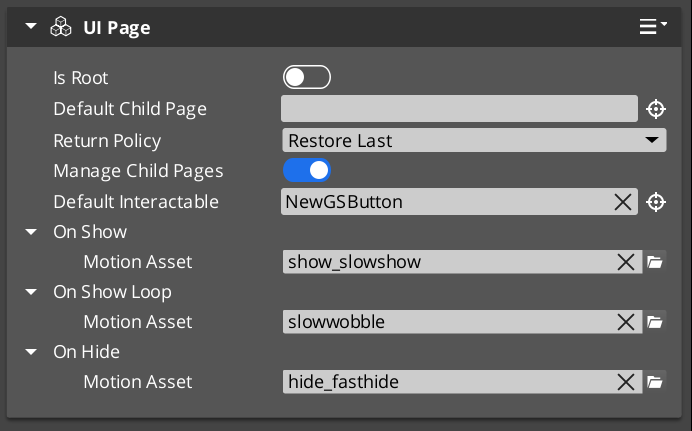
When m_manageChildPages is true, the page acts as a container for child pages. Child pages register themselves with their parent during activation via RegisterChildPage(entity). The parent tracks all registered children and manages which one is currently visible and focused.
Each page maintains its own focus stack. When a child is focused, it is pushed onto the parent’s stack via PushFocus. PopFocus restores the previous child. The m_returnPolicy field controls behavior when navigating back to this page:
- RestoreLast – Restores the last child that was focused before navigating away.
- AlwaysDefault – Always resets to
m_defaultChildPage, ignoring the focus history.
NavigateTo Algorithm
NavigateTo(forced) navigates the UI to show the calling page, regardless of where focus currently sits in the page tree. The algorithm works by building a path from the calling page up to the root, then cascading focus changes downward:
- Build path – Walk up from the calling page to the root, collecting each ancestor into a path array.
- Find divergence point – Starting from the highest ancestor, find the first level where the parent’s currently focused child does not match the path node. This is the “push point.”
- Change pages – From the push point downward, call
ChangePageat each level to switch the visible child to the path node. - Push focus – At the push point, call
PushFocusto record the new child on the parent’s focus stack. - Cascade – Continue down the path to the target page, focusing each level.
This algorithm ensures that navigating to a deeply nested page correctly updates every intermediate level.
NavigateBack Algorithm
NavigateBack() walks up from the calling page to find the first ancestor with a non-empty focus stack, then pops it:
- Walk up – Starting from the calling page, check each ancestor’s focus stack.
- Pop focus – At the first ancestor with a non-empty stack, call
PopFocusto restore the previous child. - Fallback to UI Manager – If no ancestor has a non-empty stack (the user has navigated all the way back to the root), call
NavLastUI()on the UIManagerRequestBus to return to the previous canvas in the global focus stack.
Show/Hide Transitions
Each page can have three UiAnimationMotion assets assigned:
- m_onShow – Played when the page becomes visible.
- m_onShowLoop – Played in a loop after the show animation completes.
- m_onHide – Played when the page is hidden.
These motion assets drive LyShine property animations (position, scale, rotation, alpha, color) to create smooth transitions between pages.
Data Types
NavigationReturnPolicy
Controls how a page restores child focus when navigated back to.
| Value | Description |
|---|---|
RestoreLast | Restores the last focused child page from the focus stack. |
AlwaysDefault | Always resets to m_defaultChildPage, clearing focus history. |
FocusEntry
A single entry in a page’s focus stack.
| Field | Type | Description |
|---|---|---|
focusedChild | AZ::EntityId | The entity ID of the child page that was focused. |
Inspector Properties
| Property | Type | Description |
|---|---|---|
| Is Root | bool | When true, this page registers itself with the UI Manager as a root canvas entry point. |
| UI Name | AZStd::string | (Root only) The name this root page registers under. Must match the name used in LoadGSUI. |
| Start Enabled | bool | (Root only) When true, the root page shows itself immediately upon registration. |
| Page Name | AZStd::string | A human-readable name for this page, used for identification and debugging. |
| Default Child Page | AZ::EntityId | The child page entity to show by default when this page is focused. |
| Return Policy | NavigationReturnPolicy | Controls whether returning to this page restores the last child or always resets to the default. |
| Manage Child Pages | bool | When true, this page acts as a container that manages nested child pages. |
| Default Interactable | AZ::EntityId | The LyShine interactable element to focus by default when this page is shown (e.g. the first button). |
| On Show | UiAnimationMotion | Animation played when this page becomes visible. |
| On Show Loop | UiAnimationMotion | Looping animation played after the show animation completes. |
| On Hide | UiAnimationMotion | Animation played when this page is hidden. |
API Reference
Request Bus: UIPageRequestBus
Commands sent to a specific page by entity ID. Addressed bus – addressed by EntityId.
User-Facing Methods
These methods are intended to be called from gameplay code, ScriptCanvas, or other UI components to drive navigation.
| Method | Parameters | Returns | Description |
|---|---|---|---|
NavigateTo | bool forced | void | Navigates the entire page tree to show this page. Builds a path to root and cascades focus changes downward. When forced is true, bypasses transition guards. |
NavigateBack | — | void | Walks up from this page to find the first ancestor with focus history and pops it. Falls back to NavLastUI if no ancestor has history. |
ChangePage | AZ::EntityId target, bool takeFocus, bool forced | void | Switches this page’s visible child to the target entity. When takeFocus is true, the target also receives interactable focus. |
ToggleShow | bool on | void | Shows or hides this page. Plays the appropriate show/hide animation. |
ChangeUI | const AZStd::string& targetUI, bool takeFocus, bool hideThis | void | Switches to a different UI canvas by name. Optionally hides this page and gives focus to the target canvas. |
FocusChildPageByName | const AZStd::string& name, bool forced | void | Finds a child page by its m_pageName and focuses it. |
Internal Methods
These methods are used internally by the navigation system. They can be called from C++ when building custom navigation behavior, but are not typically called from ScriptCanvas.
| Method | Parameters | Returns | Description |
|---|---|---|---|
FocusPage | bool forced | void | Activates this page, shows it, and focuses its default interactable. Called as part of the NavigateTo cascade. |
PushFocus | AZ::EntityId child, bool forced | void | Pushes a child page onto this page’s focus stack and focuses it. |
PopFocus | — | void | Pops the top entry from this page’s focus stack and restores the previous child. Respects m_returnPolicy. |
ClearFocusHistory | — | void | Clears this page’s entire focus stack. |
RegisterChildPage | AZ::EntityId entity | void | Registers a child page entity with this parent. Called by child pages during their activation. |
NotifyInteractableFocused | AZ::EntityId entity | void | Notifies this page that a LyShine interactable has received focus. Used for tracking the current interactable selection. |
GetResolvedInteractable | — | AZ::EntityId | Returns the currently resolved default interactable for this page, accounting for child page focus state. |
Usage Examples
C++ – Navigating to a Specific Page
#include <GS_UI/GS_UIBus.h>

// Navigate to a specific page entity, forcing the transition
GS_UI::UIPageRequestBus::Event(
    settingsPageEntityId,
    &GS_UI::UIPageRequestBus::Events::NavigateTo,
    true  // forced
);
C++ – Navigating Back
// Navigate back from the current page
GS_UI::UIPageRequestBus::Event(
    currentPageEntityId,
    &GS_UI::UIPageRequestBus::Events::NavigateBack
);
C++ – Switching Between UI Canvases
// From the title screen, switch to the gameplay HUD
GS_UI::UIPageRequestBus::Event(
    titlePageEntityId,
    &GS_UI::UIPageRequestBus::Events::ChangeUI,
    AZStd::string("GameplayHUD"),
    true,  // takeFocus
    true   // hideThis
);
Companion Component Pattern
GS_UIPageComponent handles navigation structure, but it does not contain game-specific logic. The intended pattern is to place a companion component on the same entity as the page component. The companion component listens for page show/hide events and drives game-specific behavior (populating lists, starting timers, sending analytics events).
This separation keeps the navigation system generic and reusable while allowing each page to have unique behavior through its companion.
See Also
For component references:
- UI Manager – The singleton that owns canvases and drives the global focus stack
- UI Animation – Motion assets used for page show/hide transitions
For conceptual overviews and usage guides:
- GS_UI Overview – Full gem overview and installation
- The Basics: UI – Scripting-level overview
Get GS_UI
GS_UI — Explore this gem on the product page and add it to your project.