Orbit Profiles
Categories:
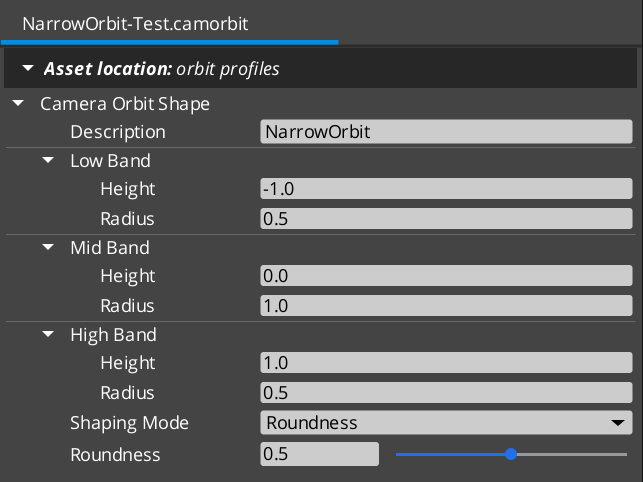
A Camera Orbit Profile is a .camorbit data asset that defines a parametric orbit surface around a target. It is consumed by the DynamicOrbitBody Body stage variant. Authors define three bands (low / mid / high) of (radius, height) and a Roundness slider that walks a power-bulge family — diamond → sphere → cube — across them. Arc-length reparameterization keeps spatial speed constant as the cam traces the shape, for any roundness value.
Profiles are registered through PhantomCamDataAssetsSystemComponent alongside .camblendprofile and .camnoiseprofile. The asset reflects with EnableForAssetEditor so the Asset Editor opens it directly.
Contents
- Three-Band Authoring Model
- Pitch Convention
- Shape Family — Roundness Power-Bulge
- Curve Mode (Advanced)
- Arc-Length Reparameterization
- Evaluation Entry Point
- Authored Fields
- Creating an Orbit Profile
- See Also
Three-Band Authoring Model
Authors define three (height, radius) bands around the target:
struct OrbitBand {
    float m_height = 0.0f;   // local-Z offset from cam target (meters)
    float m_radius = 5.0f;   // XY-plane distance from cam target (meters)
};
| Band | Default | Selected at pitch |
|---|---|---|
m_lowBand | (-2.0, 4.0) | −π/2 (cam below pivot) |
m_midBand | ( 0.0, 5.0) | 0 (the “centered / level” rest position) |
m_highBand | ( 3.0, 3.0) | +π/2 (cam above pivot) |
Z-up convention. m_height is the local-Z offset from the cam target; m_radius is the XY-plane distance.
Pitch Convention
Pitch ∈ [-π/2, +π/2] radians. Pitch is decoupled from the bands’ authored geometry:
pitch = 0→ mid band exactly (the “centered / level” rest pose).pitch = +π/2→ high band.pitch = −π/2→ low band.
Authors can put m_midBand.m_height at any value — pitch = 0 always selects mid regardless. Positive pitch always moves the cam toward high; negative always toward low. The bands’ actual heights / radii determine the cam’s spatial position; pitch is a band-interpolation parameter, NOT a literal elevation angle.
This decoupling lets authors think in spatial terms (mid is where the cam rests; low / high are the framing extremes) without needing mid.height = 0 for pitch = 0 to mean “level.”
Shape Family — Roundness Power-Bulge
A single m_roundness slider walks a power-bulge family:
pos(t) = chord(t) + p(t) · offset
where:
    chord(t) = lerp(endpoint, opposite endpoint, t)   // straight line low → high
    offset   = mid − midpoint(low, high)              // how far the bulge pokes out at mid
    p(t)     = 1 − |2t − 1|^n                         // bulge envelope
    n        = piecewise-linear in m_roundness         // 0 → 1 → kMaxBulge
p(t) is 0 at endpoints (t = 0 and t = 1) and 1 at midpoint (t = 0.5) for any n.
m_roundness | n | Shape | Description |
|---|---|---|---|
0.0 | 1 | Diamond | Piecewise linear. Sharp corner at mid. Bulge envelope is 1 − |2t − 1| — a tent. |
0.5 | 2 | Sphere | Smooth quadratic through low / mid / high. Bulge envelope is 1 − (2t − 1)². Default. |
1.0 | ~6 (kMaxBulge) | Square / rounded-square | Flat sides, sharp tapers near low / high. Bulge envelope is 1 − |2t − 1|^6 — almost a square wave. |
Mid is always the apex of the bulge for any n. pitch = 0 always lands exactly on mid. Angular velocity stays smooth throughout the slider’s range — no derivative discontinuities.
Curve Mode (Advanced)
For non-monotonic shapes (Bounce, Elastic, Back) that the power-bulge family cannot produce, authors can switch to ShapingMode::Curve and pick a GS_Core::CurveType enum value:
enum class ShapingMode : AZ::u8 {
    Roundness,  // power-bulge family (default)
    Curve,      // CurveType enum (advanced, supports overshoot)
};
When m_shapingMode == Curve, m_curve is consulted instead of m_roundness. The asset’s IsRoundnessVisible / IsCurveVisible predicates hide whichever field doesn’t match the current mode.
Curve mode skips arc-length reparameterization. Overshooting curves expressly want temporal shape, not constant spatial speed.
Arc-Length Reparameterization
EvaluateAtPitch treats input pitch as an arc-length fraction along the (radius, height) curve, not the curve’s intrinsic parameter t.
Why: without reparameterization, the cam covers wildly unequal spatial distances per unit pitch input. On a square shape (high roundness), constant pitch would whip past the tapers near low / high and crawl along the flat sides — feels broken.
With reparameterization:
- Internally sample the raw curve at 64 t-points, building a cumulative-length table.
- For a requested pitch fraction
s ∈ [0, 1], resolve thetsuch that cumulative arc length up to thattequalss · total length. - Evaluate the raw curve at that
t.
Result: constant pitch input → constant spatial speed of the cam along the orbit surface, for any roundness value.
Arc-length reparameterization is applied in Roundness mode only. Curve mode skips it.
Evaluation Entry Point
void CameraOrbitShape::EvaluateAtPitch(
    float  pitchRad,
    float& outRadius,
    float& outHeight) const;
pitchRadis clamped to[kPitchAtLow, kPitchAtHigh]=[-π/2, +π/2].- Returns
(radius, height)— XY-plane distance from the cam target plus local-Z offset.
The DynamicOrbitBody consumer wraps the call:
shape->EvaluateAtPitch(m_targetPitch, radius, height);
desiredPos = pivot + Vector3(radius * cos(m_targetYaw),
                             radius * sin(m_targetYaw),
                             height);
Constants
static constexpr float kPitchAtLow  = -π/2;
static constexpr float kPitchAtMid  =  0.0;
static constexpr float kPitchAtHigh =  π/2;
Available for editor visualization, body pitch clamping, and adoption-time pitch clamping.
Authored Fields
| Field | Default | Purpose |
|---|---|---|
m_lowBand | (-2.0, 4.0) | (height, radius) at pitch = −π/2. |
m_midBand | ( 0.0, 5.0) | (height, radius) at pitch = 0. The rest pose. |
m_highBand | ( 3.0, 3.0) | (height, radius) at pitch = +π/2. |
m_shapingMode | Roundness | Roundness or Curve. |
m_roundness | 0.5 | 0..1. Only visible when m_shapingMode == Roundness. 0 = diamond, 0.5 = sphere, 1 = square. |
m_curve | Linear | GS_Core::CurveType enum. Only visible when m_shapingMode == Curve. |
m_description | "" | Free-form author description. |
Creating an Orbit Profile
- Open the Asset Editor in O3DE.
- Select New and choose CameraOrbitShape from the asset type list.
- Set the three bands:
- Low Band —
(height, radius)for the cam-below-pivot extreme. - Mid Band —
(height, radius)for the cam’s level / rest pose. - High Band —
(height, radius)for the cam-above-pivot extreme.
- Low Band —
- Choose a Shaping Mode:
- Roundness (default) — set the slider between 0 (diamond), 0.5 (sphere), 1 (square).
- Curve (advanced) — pick a
CurveTypeenum value for overshoot / bounce effects. Note that curve mode skips arc-length reparameterization.
- Set the Description to record the preset’s intent.
- Save the asset.
- Assign the asset to a
DynamicOrbitBodystage’s Orbit Shape slot.
See Also
Consumer:
- Body Stage Variants — DynamicOrbitBody — the only consumer of this asset.
Math primitive:
- Orbital Solver Utility —
BlendPositionAroundPivot, used byDynamicOrbitBodyand Cam Core blend execution.
Related assets:
- Noise Profiles —
.camnoiseprofile. - Blend Profiles —
.camblendprofile.
Get GS_PhantomCam
GS_PhantomCam — Explore this gem on the product page and add it to your project.