Feedback System
The Feedback System provides the concrete implementation of GS_Juice’s game feel effects. It includes the FeedbackEmitter component for playback, FeedbackMotionAsset for data storage, and two concrete track types for transform and material animation.
For usage guides and setup examples, see The Basics: GS_Juice.
Contents
FeedbackEmitter
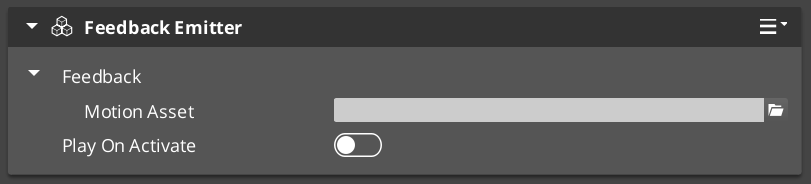
The FeedbackEmitter component plays a Feedback Motion on its entity or on a specified target entity.
Inspector Properties
| Property | Type | Description |
|---|---|---|
| FeedbackMotion | FeedbackMotion | The motion instance — holds the asset reference, proxy list, and runtime composite. |
| playOnActivate | bool | When true, the motion plays automatically when the entity activates. |
API Reference
| Method | Parameters | Returns | Description |
|---|---|---|---|
Play | — | void | Plays the feedback motion on the owning entity. |
PlayOnTarget | AZ::EntityId target | void | Plays the feedback motion on a different entity. |
Stop | — | void | Stops the currently playing motion. |
FeedbackMotionAsset
The data asset that defines a feedback effect. Created and edited in the O3DE Asset Editor with the .feedbackmotion extension. Extends GS_Core::GS_MotionAsset → AZ::Data::AssetData. Requires GS_AssetReflectionIncludes.h when reflecting — see Serialization Helpers.
Properties
| Property | Type | Description |
|---|---|---|
| m_tracks | vector<FeedbackMotionTrack*> | The tracks in this motion. |
| motionName | AZStd::string | Display name for the motion. |
| loop | bool | Whether the motion loops. |
Methods
| Method | Returns | Description |
|---|---|---|
GetTrackInfos | vector<GS_TrackInfo> | Returns track UUID + label pairs for proxy sync. |
CreateRuntimeComposite | GS_MotionComposite* | Creates a deep-copy runtime instance of all tracks. |
To understand how to author Feedback Motions, refer to Feedback: Authoring Feedback Motions
FeedbackTransformTrack
Animates entity transform properties. All fields use gradient types for full curve control.
| Field | Type | What It Animates |
|---|---|---|
| Position | Vector2Gradient | XY offset from origin (additive). |
| Scale | FloatGradient | Uniform scale factor over time. |
| Rotation | FloatGradient | Rotation angle over time. |
The track captures the entity’s origin transform on Init() and applies offsets relative to it. Effects are additive — multiple transform tracks on the same entity stack correctly.
FeedbackMaterialTrack
Animates entity material properties via the render component.
| Field | Type | What It Animates |
|---|---|---|
| Opacity | FloatGradient | Material opacity. |
| Emissive | FloatGradient | Emissive intensity. |
| Color | ColorGradient | Color tint. |
Adding Custom Tracks
Use the FeedbackMotionTrack ClassWizard template to generate a new world-space track — see GS_Juice Templates. The only manual step after generation is adding a Reflect(context) call in {$Gem}DataAssetSystemComponent.cpp. Once reflected, the new track type is discovered automatically and appears in the asset editor type picker.
Override Init(ownerEntityId) to cache entity context, and Update(easedProgress) to drive the target property via its bus.
void ${Custom}Track::Init(AZ::EntityId ownerEntity)
{
    // Always call the base first — it sets m_owner.
    GS_Juice::FeedbackMotionTrack::Init(ownerEntity);

    // Cache the entity's origin value so the track can apply additive offsets.
    // Example:
    //   AZ::TransformBus::EventResult(m_originPosition, ownerEntity, &AZ::TransformInterface::GetWorldTranslation);
    //   AZ::TransformBus::EventResult(m_originRotation, ownerEntity, &AZ::TransformInterface::GetWorldRotationQuaternion);
}

void ${Custom}Track::Update(float easedProgress)
{
    // Evaluate the gradient at the current eased progress and apply to the entity.
    // easedProgress is in [0, 1] and already passed through the track's CurveType.
    // Example:
    //   const AZ::Vector3 offset = valueGradient.Evaluate(easedProgress);
    //   AZ::TransformBus::Event(m_owner, &AZ::TransformInterface::SetWorldTranslation, m_originPosition + offset);
}
See Also
For conceptual overviews and usage guides:
For component references:
For related resources:
Get GS_Juice
GS_Juice — Explore this gem on the product page and add it to your project.