Reactor Types
Categories:
Reactor types define how a PulseReactorComponent responds to incoming pulses. Each reactor type is a data class extending the abstract ReactorType base. The PulseReactorComponent holds an array of reactor types and processes all of them when a matching pulse arrives.
For usage guides and setup examples, see The Basics: GS_Interaction.
Component
PulseReactorComponent
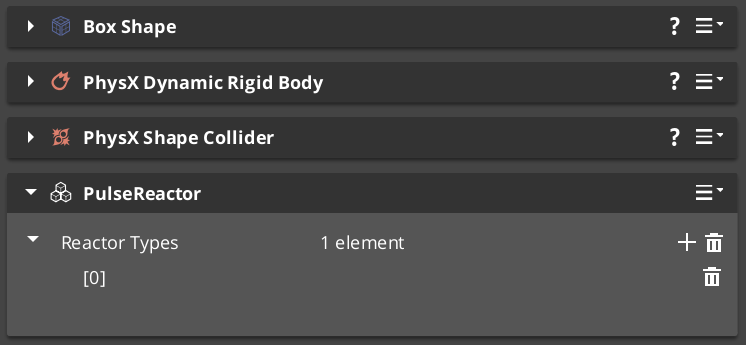
Owns and processes reactor types when pulses arrive from PulsorComponent instances. Extends AZ::Component.
Bus: PulseReactorRequestBus (ById, Multiple)
| Field | Type | Description |
|---|---|---|
reactorTypes | vector<ReactorType*> | Reactor types evaluated and executed when a pulse is received. |
| Method | Returns | Description |
|---|---|---|
IsReactor | bool | Returns true if this component has active reactor types. The PulsorComponent checks this before calling ReceivePulses. |
ReceivePulses | void | Processes incoming pulse events. Iterates all reactor types and calls React() on types whose channel matches the incoming pulse. |
The PulsorComponent queries IsReactor() first — only components that return true have ReceivePulses() called. This allows entities with no reactor types to be skipped without iterating all types.
Base Class
ReactorType
Abstract base class for all reactor types. Not a component — discovered automatically at startup via EnumerateDerived and reflected into the editor dropdown.
| Field / Virtual | Type | Description |
|---|---|---|
TypeId | {9B2C3D4E-5F6A-7B8C-9D0E-1F2A3B4C5D6E} | RTTI identifier. Each subclass must define its own unique TypeId. |
GetChannel() | AZStd::string | Returns the channel string this reactor listens on. Matched against incoming pulse channel strings at runtime. |
React(pulse, sourceEntity) | void | Override to implement the reaction behavior when a matching pulse is received. |
Subclass ReactorType to define custom reaction behavior for a specific channel. The channel string must match the emitting PulseType’s channel exactly.
Built-in Types
Debug_Reactor
Test and debug reactor for verifying reactor setups during development. Logs a message when it receives a Debug_Pulse.
| Field | TypeId |
|---|---|
| TypeId | {38CC0EA0-0975-497A-B2E5-299F5B4222F7} |
Destructable_Reactor
Handles destruction responses — processes Destruct_Pulse events on the receiving entity.
| Field | TypeId |
|---|---|
| TypeId | {47C9B959-2A9F-4E06-8187-E32DDA3449EC} |
Add this to any entity that should respond to destruction pulses — props, breakables, or enemy characters.
Creating Custom Reactor Types
Use the ClassWizard PulsorReactor template to scaffold a new ReactorType subclass with boilerplate already in place — see GS_Interaction Templates. Supply the pulse_channel input var — the channel string is baked into the generated header at generation time.
To create a custom reactor type manually:
- Create a class extending
ReactorTypewith a unique RTTI TypeId. - Override
GetChannel()to return the channel name this reactor listens on. - Override
React(pulse, sourceEntity)to implement the reaction logic. - Reflect the class using O3DE’s
SerializeContextandEditContext. The system discovers the type automatically viaEnumerateDerived— no registration step required. - Add the custom reactor type to
PulseReactorComponentinstances on entities that should respond.
The channel string in GetChannel() must exactly match the GetChannel() return value of the PulseType you want to receive.
See Also
Get GS_Interaction
GS_Interaction — Explore this gem on the product page and add it to your project.