Pulse Types
Categories:
Pulse types define what kind of interaction a PulsorComponent emits. Each pulse type is a data class extending the abstract PulseType base. The PulsorComponent holds an array of pulse types and emits all of them simultaneously when its physics trigger fires.
For usage guides and setup examples, see The Basics: GS_Interaction.
Component
PulsorComponent
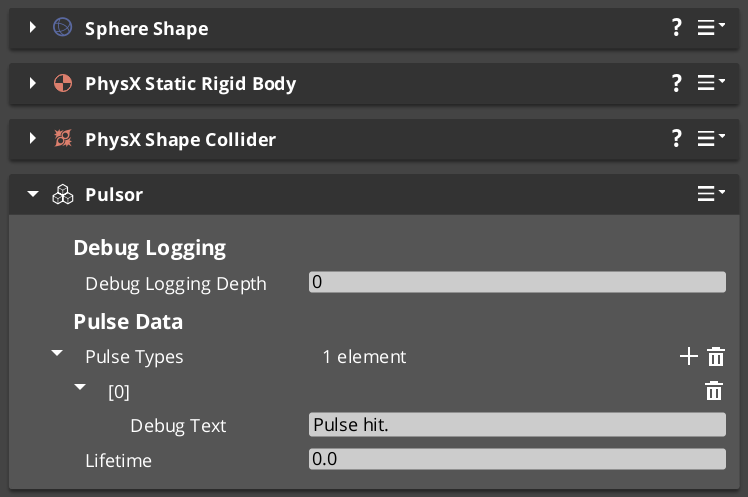
Emits configured pulse types when its physics trigger fires. Extends AZ::Component and PhysicsTriggeringVolume.
| Field | Type | Description |
|---|---|---|
pulseTypes | vector<PulseType*> | Pulse types emitted to all PulseReactorComponent instances on any entering entity. |
All pulse types in the array fire simultaneously on a single trigger event. Configure multiple pulse types to target reactors on different channels in one emission.
Base Class
PulseType
Abstract base class for all pulse types. Not a component — discovered automatically at startup via EnumerateDerived and reflected into the editor dropdown.
| Field / Virtual | Type | Description |
|---|---|---|
TypeId | {8A1B2C3D-4E5F-6A7B-8C9D-0E1F2A3B4C5D} | RTTI identifier. Each subclass must define its own unique TypeId. |
GetChannel() | AZStd::string | Returns the channel string this pulse is sent on. Matched against reactor channel strings at runtime. |
Subclass PulseType to define custom pulse data (damage values, force vectors, status effect references) and a unique channel name.
Built-in Types
Debug_Pulse
Test and debug pulse for verifying pulsor setups during development.
| Field | TypeId |
|---|---|
| TypeId | {123D83FD-027C-4DA4-B44B-3E0520420E44} |
Use Debug_Reactor on the receiving entity to verify the pulse is arriving correctly.
Destruct_Pulse
Destruction pulse — triggers destructible reactions on receiving entities.
| Field | TypeId |
|---|---|
| TypeId | {98EC44DA-C838-4A44-A37A-FA1A502A506B} |
Pair with Destructable_Reactor on entities that should respond to destruction events.
Creating Custom Pulse Types
Use the ClassWizard PulsorPulse template to scaffold a new PulseType subclass with boilerplate already in place — see GS_Interaction Templates. Supply type_display_name and type_category input vars to control how the type appears in the editor dropdown.
To create a custom pulse type manually:
- Create a class extending
PulseTypewith a unique RTTI TypeId. - Override
GetChannel()to return a unique channel name string. - Add any data fields your pulse carries (damage values, force vectors, status effect references).
- Reflect the class using O3DE’s
SerializeContextandEditContext. The system discovers the type automatically viaEnumerateDerived— no registration step required. - Configure
PulsorComponentinstances to emit your custom pulse type.
Keep the channel string consistent between your pulse type and the reactor types that should receive it.
See Also
Get GS_Interaction
GS_Interaction — Explore this gem on the product page and add it to your project.