Time Manager
Categories:
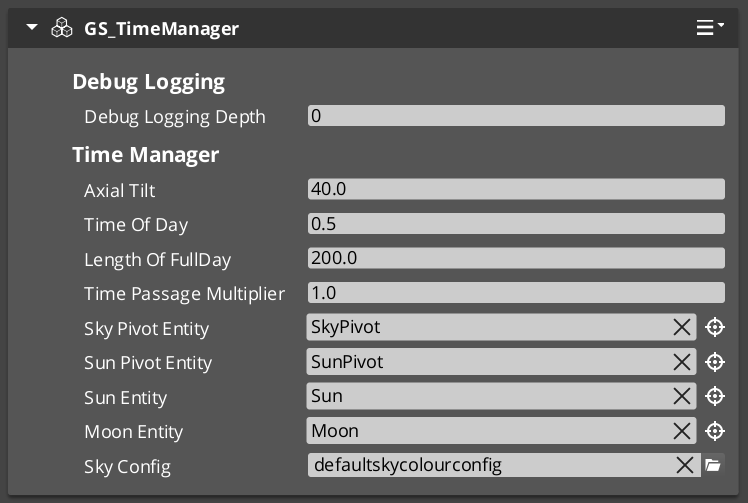
The Time Manager is the singleton world clock for every GS_Play project. It extends GS_ManagerComponent and participates in the standard two-stage initialization managed by the Game Manager. On activation it begins advancing a time-of-day value each frame, determines whether the current time falls within the configured day window, and registers the active main camera for sky positioning calculations.
Listeners subscribe to TimeManagerNotificationBus to react to per-frame ticks or the day/night boundary crossing.
For usage guides and setup examples, see The Basics: Time Manager.
Contents
How It Works
Time Progression
Each frame the Time Manager advances the current time-of-day value by deltaTime × timePassageSpeed. A speed of 0 freezes the clock at the configured initial time; positive values run the clock forward in real time.
Day/Night State
The Time Manager compares the current time against a configured day window (start and end values). When the time crosses either threshold it fires DayNightChanged once. IsDay() returns the cached state and is safe to call every tick.
Sky Integration
Call SetMainCam with the active camera entity after stage startup. The Time Manager uses this reference to pass sky positioning data to the SkyColourConfiguration asset used by the Atom renderer.
Inspector Properties
| Property | Type | Description |
|---|---|---|
| Day Start | float | Normalized time value (0.0–1.0) at which day begins. |
| Day End | float | Normalized time value (0.0–1.0) at which night begins. |
| Initial Time | float | Starting time-of-day value when the component activates. |
| Time Passage Speed | float | Multiplier controlling how fast time advances each frame. Set to 0 for a static clock. |
| Sky Colour Config | AZ::Data::Asset<SkyColourConfiguration> | Sky colour configuration asset used by the Atom renderer integration. |
API Reference
GS_TimeManagerComponent
| Field | Value |
|---|---|
| Extends | GS_Core::GS_ManagerComponent |
| Header | GS_Environment/GS_TimeManagerBus.h |
Request Bus: TimeManagerRequestBus
Commands sent to the Time Manager. Singleton bus – Single address, single handler.
| Method | Parameters | Returns | Description |
|---|---|---|---|
SetTimeOfDay | float time | void | Sets the current time of day (0.0–1.0 normalized range). |
GetTimeOfDay | – | float | Returns the current time of day value. |
GetWorldTime | – | float | Returns the total elapsed world time since startup. |
SetTimePassageSpeed | float speed | void | Sets the multiplier controlling how fast time advances each frame. |
IsDay | – | bool | Returns whether the current time falls within the configured day window. |
SetMainCam | AZ::EntityId entityId | void | Registers the active main camera entity for sky positioning calculations. |
Notification Bus: TimeManagerNotificationBus
Events broadcast by the Time Manager. Multiple handler bus – any number of components can subscribe.
| Event | Parameters | Description |
|---|---|---|
WorldTick | float deltaTime | Fired every frame while the Time Manager is active. Use for time-dependent per-frame updates. |
DayNightChanged | bool isDay | Fired once when the time-of-day crosses the day/night boundary in either direction. |
SkyColourConfiguration
Asset class for sky colour settings. Referenced by GS_TimeManagerComponent and consumed by the Atom renderer integration to drive sun, moon, and ambient colour values across the day/night cycle.
See Also
For conceptual overviews and usage guides:
- GS_Environment Overview – Top-level environment gem documentation
- The Basics: Time Manager – Setup and scripting guide
For component references:
- Manager Base Class – The base class pattern for all managers
- Environment System – Runtime system component and environment request bus
Get GS_Environment
GS_Environment — Explore this gem on the product page and add it to your project.