GS_StageManager
Categories:
The Stage Manager system handles the process of changing levels, loading and unloading their assets, and starting up levels in the correct sequence. It supports incremental loading so that complex levels with generative components can spin up reliably without massive frame-time spikes.
Each level contains a Stage Data component that acts as the level’s anchor — connecting the Stage Manager to level-specific references, startup sequences, and navigation data. Exit Points mark spawn positions for player placement when transitioning between stages.
For usage guides and setup examples, see The Basics: GS_Core.
Contents
Architecture
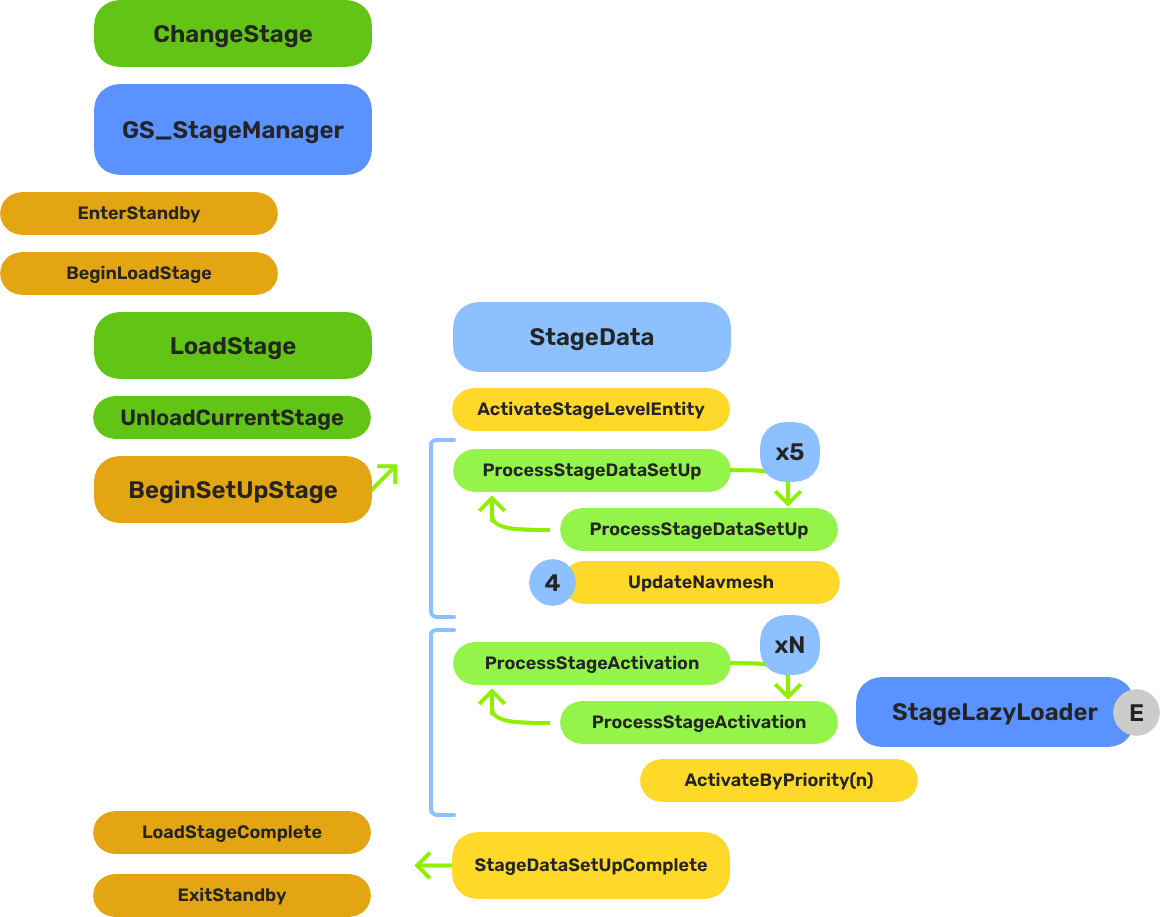
Breakdown
When a stage change is requested, the system follows a five-step sequence before gameplay resumes in the new level:
| Step | Broadcast Event | What It Means |
|---|---|---|
| 1 — Standby | OnEnterStandby | Game Manager enters standby, halting all gameplay systems. |
| 2 — Unload | (internal) | The current stage’s entities are torn down. |
| 3 — Spawn | (internal) | The target stage prefab is instantiated. |
| 4 — Set Up | OnBeginSetUpStage | Stage Data runs its layered startup: SetUpStage → ActivateByPriority → Complete. |
| 5 — Complete | LoadStageComplete | Stage Manager broadcasts completion. Standby exits. Gameplay resumes. |
The Stage Data startup is layered so heavy levels can initialize incrementally without causing frame-time spikes.
E Indicates extensible classes and methods.
Patterns - Complete list of system patterns used in GS_Play.
Components
| Component | Purpose | Documentation |
|---|---|---|
| GS_StageManagerComponent | Singleton level controller. Manages the Stages list, handles change requests, coordinates loading/unloading. | Stage Manager |
| GS_StageDataComponent | Per-level anchor. Holds stage name, NavMesh reference, and runs the level’s startup sequence. | Stage Data |
| StageExitPointComponent | Marks spawn/exit positions within a level. Registered by name for cross-stage entity placement. | Stage Manager: Exit Points |
| StageLazyLoaderComponent | Priority-based entity activation during level load. Spreads heavy initialization across frames. | Stage Data: Priority Loading |
Quick Start
- Create a Stage Manager prefab with the GS_StageManagerComponent.
- Add stage entries to the Stages list (name + spawnable prefab for each level).
- Set the Default Stage to your starting level.
- Add the Stage Manager
.spawnableto the Game Manager’s Startup Managers list. - In each level prefab, add a Stage Data component as the level’s anchor.
- Optionally place Exit Points in each level for spawn positioning.
See Also
For conceptual overviews and usage guides:
For component references:
For related resources:
Get GS_Core
GS_Core — Explore this gem on the product page and add it to your project.