Manager
Categories:
For usage guides and setup examples, see The Basics: GS_Core.
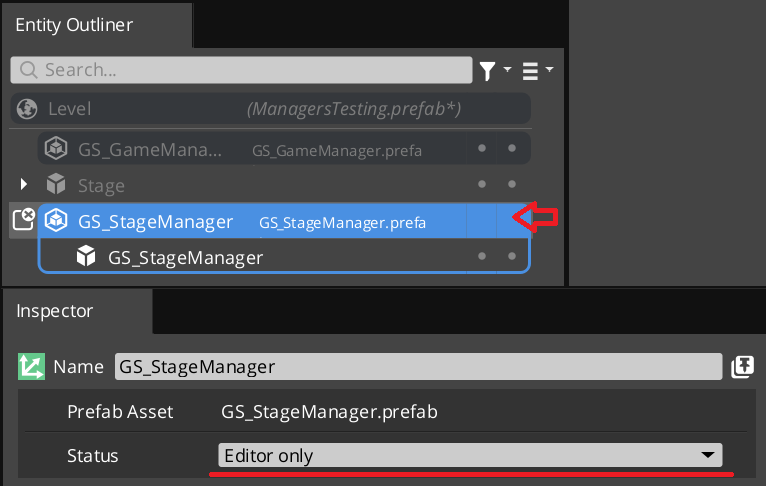
A Manager prefab with the wrapper entity set as Editor-Only inside Prefab Edit Mode.
GS_GameManager
  └── (spawns) GS_ManagerComponent ◄ you are here — and all other managers extend this
The GS_ManagerComponent is the base class that all game system managers inherit from. It handles the two-stage initialization pattern with the Game Manager automatically, so you can focus on your system’s logic without worrying about startup ordering.
Every built-in GS_Play manager (Save, Stage, Options, UI, Unit, Camera, Audio, Performer) extends this class. When you need a custom game system manager, you extend it too.
Contents
- How It Works
- Headless Managers
- Setup
- Inspector Properties
- API Reference
- Usage Examples
- Extending the Manager Class
- See Also
How It Works
The Game Manager drives startup in stages. At each stage it calls out to every manager over GameManagerNotificationBus, each manager performs its own logic, and each reports back over GameManagerRequestBus when it is done. The Game Manager counts those reports and only advances to the next stage once every manager has answered.
That counting handshake is the point of the system: no manager advances until every manager has registered, which is what makes cross-manager dependencies safe without you having to specify an order.
Activate — The component initializes itself (connects to buses, sets up internal state). When done it broadcasts
OnRegisterManagerInit()to tell the Game Manager it is ready.OnSetupManagers — Called by the Game Manager once every manager has reported initialized. Connect to other managers and set up cross-references here. When done it broadcasts
OnRegisterManagerSetup().OnStartupComplete — Broadcast by the Game Manager once every manager has reported setup. The framework is fully ready. The base implementation is empty — override it to begin runtime operation.
OnBeginGame — Broadcast when the game itself begins. This is a cue, not a state: it is fired when your project decides play has actually started, which is a separate question from whether the managers finished starting up.
OnEnterStandby / OnExitStandby — Called when the Game Manager enters or exits standby mode. Pause and resume your subsystem here.
OnShutdownManagers — Called when the game is shutting down. Clean up resources and disconnect buses. When done it broadcasts
OnRegisterManagerShutdown().
The base class handles the registration side of steps 1, 2 and 6 for you. Override the hooks to add your logic, then call the base implementation to complete the handshake.
Headless Managers
Headless is the second way to run a manager, and it is a full alternative to the Game Manager — not a reduced one.
Every manager carries a Headless checkbox. Tick it and that manager takes responsibility for its own startup instead of being driven by a Game Manager:
Activate()
  └── calls OnSetupManagers() itself
        └── calls OnStartupComplete() itself

Deactivate()
  └── calls OnShutdownManagers() itself, then disconnects
The registration calls are skipped entirely — there is no Game Manager to report to, so the manager simply advances itself through each stage.
It reaches startup-complete under its own power, with no Game Manager in the project and no startup sequence to participate in. Everything the manager does after that point behaves exactly as it does under the Game Manager.
Why you would use it
The Game Manager path exists because a GS_Play game wants one coordinated startup across a stack of managers. A project that only wants one feature does not need any of that.
Headless is how a GS feature gem is deployed into a project that is not built on GS_Play:
- Deploying a single feature manager. A project that wants GS_Audio’s audio system — and nothing else — adds the Audio Manager, ticks Headless, and has a working audio system. No Game Manager, no manager stack, no game-flow layer, no dependency on the GS_Play startup sequence.
- Adding GS features to an existing project that already has its own game lifecycle, title flow and save system. Those responsibilities stay where they are; the GS manager simply starts itself and does its job.
- Adopting the framework in stages. Take one manager now, headless. Add a Game Manager later and switch it over when the project is ready for the full lifecycle.
- Runtimes with no game session at all — servers, tools, editor-side scenes.
Both routes are supported deployments. Use the Game Manager when you want the coordinated startup it provides; use Headless when a manager should simply run.
What you take on
The Game Manager’s counting handshake is what guarantees that no manager reaches setup until every manager has initialized. A headless manager has no such barrier — it drives straight through its own chain the moment it activates, independently of anything else in the level.
For a single deployed manager that is exactly what you want. If you run several headless managers that depend on each other, sequencing between them becomes your project’s responsibility. At that point, consider a Game Manager instead — coordinating a manager stack is the problem it exists to solve.
OnBeginGame is never self-fired. Setup and startup are infrastructure a manager can honestly resolve alone, but “the game has begun” is a cue rather than a state — it stays a signal the host project fires when it decides play has started. A headless manager reaches startup-complete and waits.
A headless manager does not report to the Game Manager at all — it self-drives instead of registering, so it takes no part in the counting handshake and cannot disturb one that is running. A project is free to have a Game Manager coordinating a manager stack and a headless manager running alongside it.
The flag lives on the base class, so it is inherited by every manager — Audio, Options, Cam, Save, Stage and any custom manager you write. One uniform mechanism, no per-gem variation.
A subclass that overrides OnSetupManagers, OnStartupComplete or OnShutdownManagers must still chain to the base implementation exactly as before. Headless changes who calls the hooks, not the contract.
Setup
The Manager wrapper entity set as Editor-Only inside Prefab Edit Mode.
- Create an entity. Attach your Manager component (built-in or custom) to it.
- Configure any properties needed in the Entity Inspector.
- Turn the entity into a prefab.
- Enter prefab edit mode. Set the wrapper entity (parent of your Manager entity) to Editor Only. Save.
- Delete the Manager entity from the level (it will be spawned by the Game Manager at runtime).
- In the Game Manager prefab, add your Manager
.spawnableto the Startup Managers list.
The premade manager prefabs for each GS_Play gem are located in that gem’s
Assets/Prefabsdirectory.
Inspector Properties
The base GS_ManagerComponent contributes two properties to every manager that inherits it. All other properties are defined by the inheriting component (e.g. the Save Manager exposes a Save System Version Number, the Stage Manager exposes a Stages list).
| Property | Type | Default | Description |
|---|---|---|---|
| Headless | bool | false | This manager drives its own startup, with no Game Manager in the project. See Headless Managers. |
| Logging Depth | int | 0 | Verbosity of this manager’s lifecycle logging. Above 0, the manager prints its entity name as it activates, sets up and shuts down — useful for diagnosing startup order on a single manager without making the whole framework chatty. |
API Reference
Lifecycle Events: GameManagerNotificationBus
The Manager base class automatically subscribes to these events from the Game Manager:
| Event | When It Fires | What You Do |
|---|---|---|
OnSetupManagers | All managers have reported initialized | Connect to other managers, set up cross-references, then call base to report. |
OnStartupComplete | All managers have reported setup | Begin runtime operation. |
OnBeginGame | The project fires it to signal play has started | Start gameplay-only behaviour. Not fired by startup, and never self-fired in headless mode. |
OnEnterStandby | Game is entering standby | Pause your subsystem (stop ticks, halt processing). |
OnExitStandby | Game is exiting standby | Resume your subsystem. |
OnShutdownManagers | Game is shutting down | Clean up resources, disconnect buses, then call base to report. |
Registration Methods
Called by the Manager base class to report back to the Game Manager over GameManagerRequestBus. Do not call these manually — call the base class method instead and it reports for you.
| Method | Description |
|---|---|
OnRegisterManagerInit() | Called at the end of Activate(). Reports that this manager has initialized. |
OnRegisterManagerSetup() | Called at the end of OnSetupManagers(). Reports that this manager has completed setup. |
OnRegisterManagerShutdown() | Called at the end of OnShutdownManagers(). Reports that this manager has shut down. |
Manager Base Buses
Separate from the Game Manager handshake, GS_ManagerBus.h declares a small pair of buses that let non-manager components react to their gem’s manager without participating in the startup count.
ManagerBaseNotifications:
| Event | Meaning |
|---|---|
HandleStartup | This gem’s manager has finished starting up. Components that need the manager ready before they wire themselves in listen here. |
HandleShutdown | This gem’s manager is shutting down. |
EnterStandby / ExitStandby | Standby propagated to dependent components. |
ManagerBaseRequests:
| Method | Returns | Description |
|---|---|---|
ManagerExists() | bool | Whether this gem’s manager is present. Lets a component degrade gracefully instead of assuming. |
Usage Examples
C++ — Checking if the Game Manager Is Ready
#include <GS_Core/GS_CoreBus.h>

bool isStarted = false;
GS_Core::GameManagerRequestBus::BroadcastResult(
    isStarted,
    &GS_Core::GameManagerRequestBus::Events::IsStarted
);

if (isStarted)
{
    // Safe to access all managers
}
Extending the Manager Class
Create a custom manager whenever you need a singleton game system that initializes with the rest of the framework. Extension is done in C++.
Header (.h)
#pragma once
#include <GS_Core/GS_Manager/GS_ManagerComponent.h>

// Define your EBus interface for other systems to call your manager
class MyManagerRequests
{
public:
    AZ_RTTI(MyManagerRequests, "{YOUR-UUID-HERE}");
    virtual ~MyManagerRequests() = default;

    virtual int GetSomeValue() = 0;
    virtual void DoSomething() = 0;
};

class MyManagerBusTraits : public AZ::EBusTraits
{
public:
    static constexpr AZ::EBusHandlerPolicy HandlerPolicy = AZ::EBusHandlerPolicy::Single;
    static constexpr AZ::EBusAddressPolicy AddressPolicy = AZ::EBusAddressPolicy::Single;
};

using MyManagerRequestBus = AZ::EBus<MyManagerRequests, MyManagerBusTraits>;

namespace MyProject
{
    class MyManagerComponent
        : public GS_Core::GS_ManagerComponent
        , protected MyManagerRequestBus::Handler
    {
    public:
        AZ_COMPONENT_DECL(MyManagerComponent);

        static void Reflect(AZ::ReflectContext* context);

    protected:
        // Manager lifecycle
        void Activate() override;
        void Deactivate() override;
        void OnSetupManagers() override;
        void OnEnterStandby() override;
        void OnExitStandby() override;

        // Your bus implementation
        int GetSomeValue() override;
        void DoSomething() override;

    private:
        int m_someValue = 0;
    };
}
Implementation (.cpp)
#include "MyManagerComponent.h"
#include <AzCore/Serialization/SerializeContext.h>

namespace MyProject
{
    AZ_COMPONENT_IMPL(MyManagerComponent, "MyManagerComponent", "{YOUR-UUID-HERE}");

    void MyManagerComponent::Reflect(AZ::ReflectContext* context)
    {
        if (auto serializeContext = azrtti_cast<AZ::SerializeContext*>(context))
        {
            serializeContext->Class<MyManagerComponent, GS_Core::GS_ManagerComponent>()
                ->Version(0)
                ->Field("SomeValue", &MyManagerComponent::m_someValue);

            if (AZ::EditContext* editContext = serializeContext->GetEditContext())
            {
                editContext->Class<MyManagerComponent>("My Manager", "A custom game system manager")
                    ->ClassElement(AZ::Edit::ClassElements::EditorData, "")
                        ->Attribute(AZ::Edit::Attributes::Category, "MyProject")
                        ->Attribute(AZ::Edit::Attributes::AppearsInAddComponentMenu, AZ_CRC_CE("Game"))
                    ->DataElement(AZ::Edit::UIHandlers::Default,
                        &MyManagerComponent::m_someValue, "Some Value", "Description of this property");
            }
        }
    }

    void MyManagerComponent::Activate()
    {
        MyManagerRequestBus::Handler::BusConnect();

        // IMPORTANT: Call base Activate last — it reports OnRegisterManagerInit()
        GS_ManagerComponent::Activate();
    }

    void MyManagerComponent::Deactivate()
    {
        MyManagerRequestBus::Handler::BusDisconnect();
        GS_ManagerComponent::Deactivate();
    }

    void MyManagerComponent::OnSetupManagers()
    {
        // Access other managers here — they are all initialized by now

        // IMPORTANT: Call base last — it reports OnRegisterManagerSetup()
        GS_ManagerComponent::OnSetupManagers();
    }

    void MyManagerComponent::OnEnterStandby()
    {
        // Pause your subsystem
    }

    void MyManagerComponent::OnExitStandby()
    {
        // Resume your subsystem
    }

    int MyManagerComponent::GetSomeValue()
    {
        return m_someValue;
    }

    void MyManagerComponent::DoSomething()
    {
        // Your game system logic
    }
}
Module Registration
m_descriptors.insert(m_descriptors.end(), {
    MyProject::MyManagerComponent::CreateDescriptor(),
});
Then create a prefab for your manager and add it to the Game Manager’s Startup Managers list.
See Also
For conceptual overviews and usage guides:
For component references:
For related resources:
Get GS_Core
GS_Core — Explore this gem on the product page and add it to your project.