GS_Managers
Categories:
The Managers system is the backbone of every GS_Play project. It provides a controlled startup sequence that initializes game systems in the correct order, global access to those systems via EBus, and systemic navigation (New Game, Load Game, Quit) from a single point of control.
Every GS_Play gem that has a manager component (Save, Stage, UI, Unit, Camera, Audio, etc.) plugs into this system automatically.
For usage guides and setup examples, see The Basics: GS_Core.
Contents
Architecture
Breakdown
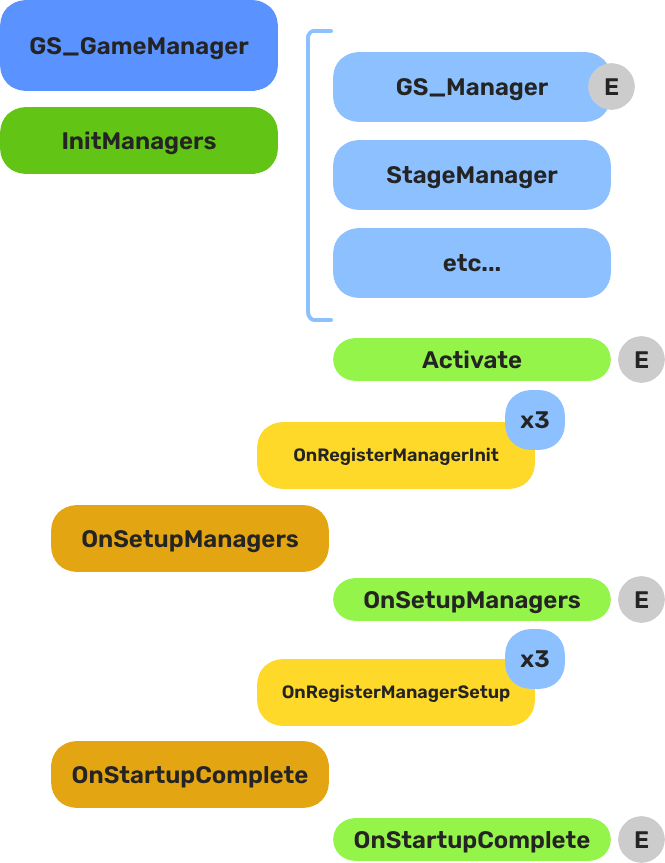
When the project starts, the Game Manager runs three stages before the game is considered ready:
| Stage | Broadcast Event | What It Means |
|---|---|---|
| 1 — Initialize | (internal) | Each manager is spawned. They activate, then report ready. |
| 2 — Setup | OnSetupManagers | Setup stage. Now safe to query other managers. |
| 3 — Complete | OnStartupComplete | Last stage. Everything is ready. Do any last minute things. Now safe to begin gameplay. |
For most scripts, you only need OnStartupComplete. Wait for this event before doing anything that depends on managers to be completely setup.
E Indicates extensible classes and methods.
Patterns - Complete list of system patterns used in GS_Play.
Components
| Component | Purpose | Reference |
|---|---|---|
| GS_GameManagerComponent | Top-level lifecycle controller. Spawns managers, handles New Game / Load / Quit / Standby. | Game Manager |
| GS_ManagerComponent | Base class for all game system managers. Handles the two-stage init pattern automatically. | Manager |
Quick Start
For step-by-step setup, see Game Manager — Setup and Manager — Setup.
For creating custom managers, see Manager — Extending the Manager Class.
See Also
For conceptual overviews and usage guides:
For component references:
For related resources:
Get GS_Core
GS_Core — Explore this gem on the product page and add it to your project.