Dialogue UI
Categories:
The Dialogue UI layer handles all player-facing presentation of dialogue content. It is completely decoupled from the sequencer through the DialogueUIBridgeComponent – the sequencer never talks to a UI component directly. This page documents the seven components that make up the built-in UI system.
| Component | Purpose |
|---|---|
| DialogueUIComponent | Screen-space dialogue text display. |
| WorldDialogueUIComponent | World-space speech bubble display. |
| DialogueUISelectionComponent | Screen-space player choice display. |
| WorldDialogueUISelectionComponent | World-space player choice display. |
| DialogueSelectButtonComponent | Individual selection button within a choice menu. |
| TypewriterComponent | Character-by-character text reveal. |
| BabbleComponent | Procedural audio babble synchronized to text reveal. |
For usage guides and setup examples, see The Basics: GS_Cinematics.
Contents
- DialogueUIComponent
- WorldDialogueUIComponent
- DialogueUISelectionComponent
- WorldDialogueUISelectionComponent
- DialogueSelectButtonComponent
- TypewriterComponent
- BabbleComponent
- Setup Guide
- See Also
DialogueUIComponent
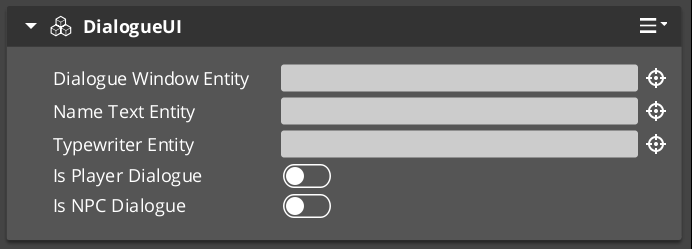
The standard screen-space dialogue display. Receives dialogue payloads from the UI Bridge and renders speaker name, portrait, and text lines using LyShine UI canvases.
Request Bus: DialogueUIRequestBus
| Method | Parameters | Returns | Description |
|---|---|---|---|
DoDialogue | const DialogueTextPayload& payload | void | Processes a full dialogue payload: sets speaker name, portrait, and begins text display through the typewriter. |
ShowDialogue | – | void | Makes the dialogue UI canvas visible. |
HideDialogue | – | void | Hides the dialogue UI canvas without destroying it. |
CloseUI | – | void | Fully closes and cleans up the dialogue UI. |
GetTypewriter | – | AZ::EntityId | Returns the entity that holds the TypewriterComponent used by this UI. |
WorldDialogueUIComponent
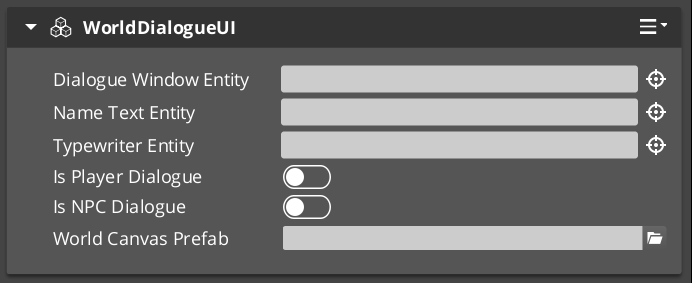
Extends DialogueUIComponent for world-space rendering. Displays speech bubbles attached to performer entities in 3D space. Shares the same DialogueUIRequestBus interface as the base class. The world-space variant tracks the performer entity’s position and orients the UI element toward the camera.
Use WorldDialogueUIComponent when you want dialogue to appear as in-world speech bubbles rather than as a screen overlay.
DialogueUISelectionComponent
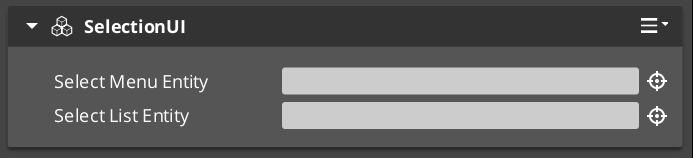
Screen-space player choice display. Builds a list of selectable options from a DialogueSelectionPayload, spawns DialogueSelectButtonComponent instances for each valid option, and waits for the player to pick one.
Request Bus: DialogueUISelectionRequestBus
| Method | Parameters | Returns | Description |
|---|---|---|---|
DoSelection | const DialogueSelectionPayload& payload | void | Builds and displays the selection menu from the provided options. |
OnSelection | int selectedIndex | void | Called when a button is pressed. Processes the selection and notifies the bridge. |
ShowSelection | – | void | Makes the selection UI canvas visible. |
ClearSelection | – | void | Removes all spawned option buttons and resets the selection state. |
CloseUI | – | void | Fully closes and cleans up the selection UI. |
WorldDialogueUISelectionComponent
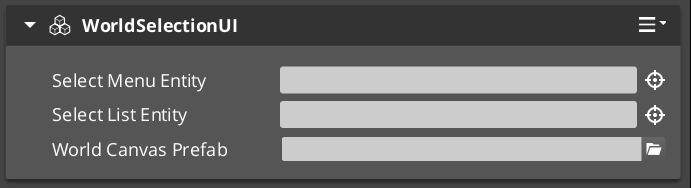
Extends DialogueUISelectionComponent for world-space rendering. Displays selection options as in-world UI elements attached to performer entities. Shares the same DialogueUISelectionRequestBus interface as the base class.
DialogueSelectButtonComponent
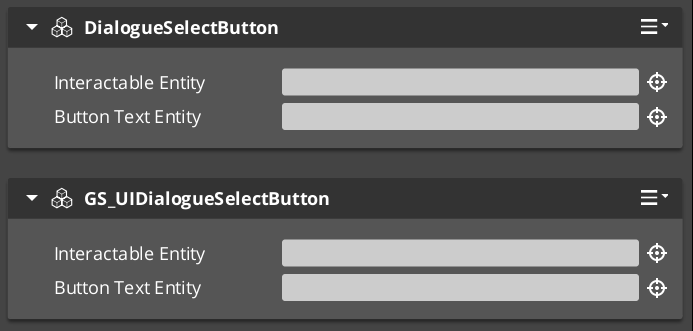
An individual button within a selection menu. One instance is spawned per valid option. The button displays option text and forwards press events to the parent selection component.
Event Bus: DialogueUISelectionEventBus
| Method | Parameters | Returns | Description |
|---|---|---|---|
SetupOption | const SelectionOption& option, int index | void | Configures the button with display text and its index in the selection list. |
GetInteractableEntity | – | AZ::EntityId | Returns the LyShine interactable entity used for input detection. |
TypewriterComponent
Character-by-character text reveal system. The typewriter receives a full text string and reveals it one character at a time at a configurable speed. It fires events on each character reveal and when the full text has been displayed. The typewriter is used internally by DialogueUIComponent but can also be used independently for any text reveal effect.
For detailed usage and standalone setup, see the Typewriter sub-page.
Request Bus: TypewriterRequestBus
| Method | Parameters | Returns | Description |
|---|---|---|---|
StartTypewriter | const AZStd::string& text, float speed | void | Begins revealing the given text at the specified characters-per-second speed. |
ForceComplete | – | void | Immediately reveals all remaining text. Fires OnTypewriterComplete. |
ClearTypewriter | – | void | Clears all displayed text and resets the typewriter state. |
Notification Bus: TypewriterNotificationBus
Multiple handler bus.
| Event | Parameters | Description |
|---|---|---|
OnTypeFired | char character | Fired each time a character is revealed. Used by the BabbleComponent to synchronize audio. |
OnTypewriterComplete | – | Fired when all characters have been revealed, either naturally or via ForceComplete. |
BabbleComponent
Procedural audio babble that plays in sync with the typewriter. Each character reveal from OnTypeFired can trigger a short audio event, creating a character-by-character speech sound. Different speakers can have different babble tones.
Request Bus: BabbleRequestBus
| Method | Parameters | Returns | Description |
|---|---|---|---|
GetBabbleEvent | const AZStd::string& speakerName | BabbleToneEvent | Returns the babble audio event associated with the given speaker. |
Data Types
| Type | Description |
|---|---|
| BabbleToneEvent | A single audio event reference (FMOD or Wwise event) that represents one character’s babble sound. |
| SpeakerBabbleEvents | A mapping of speaker names to BabbleToneEvent instances. Stored on the BabbleComponent and queried at runtime. |
Setup Guide
Screen-Space Dialogue
- Create a UI canvas entity with your dialogue layout (speaker name text, portrait image, dialogue text area).
- Attach a DialogueUIComponent to the entity.
- Attach a TypewriterComponent to the text entity (or the same entity).
- Optionally attach a BabbleComponent and configure speaker babble events.
- Attach a DialogueUISelectionComponent to a separate entity (or the same canvas) for player choices.
- Register the UI entity with
DialogueUIBridgeRequestBus::RegisterDialogueUI(uiEntityId).
World-Space Dialogue
- Follow the same steps as screen-space, but use WorldDialogueUIComponent and WorldDialogueUISelectionComponent instead.
- The world-space components will track the performer entity’s position automatically.
- Register the UI entity with the bridge the same way.
Swapping between screen-space and world-space at runtime requires only changing which UI entity is registered with the bridge. No sequencer or dialogue data changes are needed.
See Also
For conceptual overviews and usage guides:
- Dialogue System Overview – Architecture
For component references:
- Typewriter – Detailed TypewriterComponent reference
- Dialogue Sequencer – UI Bridge routing
- Dialogue Actors – Performer markers for world-space tracking
For related resources:
- Dialogue Data Structure – SelectionOption, text payload data
Get GS_Cinematics
GS_Cinematics — Explore this gem on the product page and add it to your project.