Dialogue Data Structure
Categories:
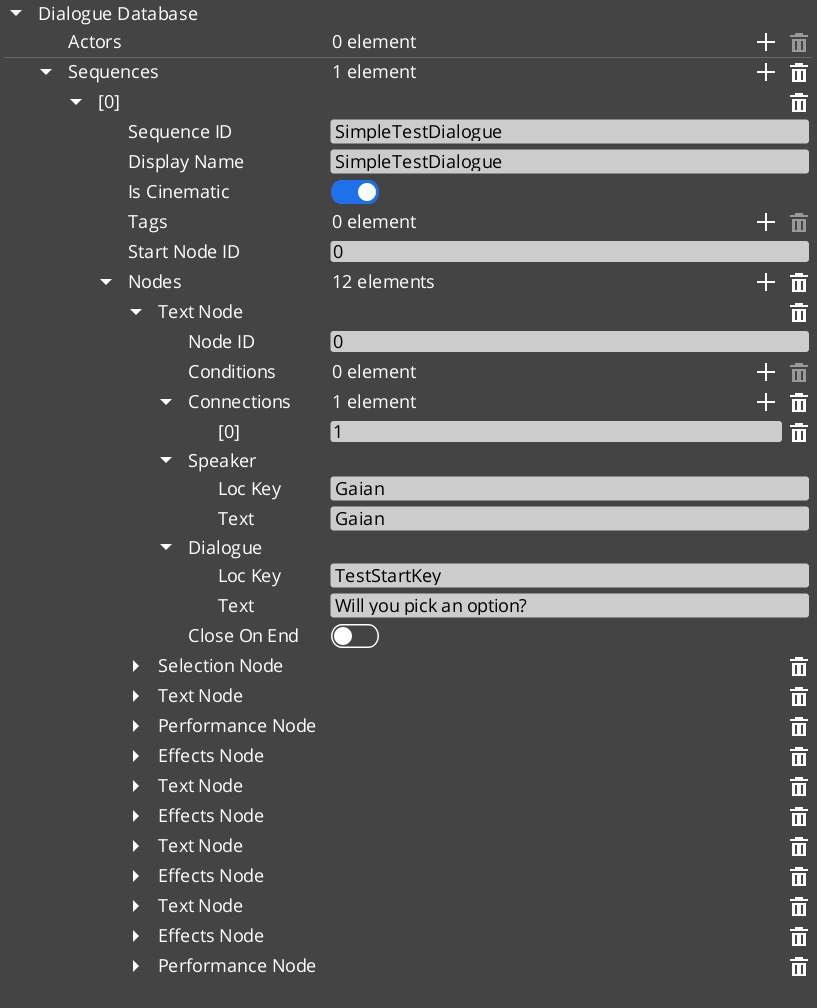
All dialogue content lives in a .dialoguedb asset file. This page documents the complete data model: the database container, sequences, actor definitions, every node type, the polymorphic condition and effect hierarchies, and the localization pipeline. It also provides an extension guide for registering custom conditions and effects from external gems.
For usage guides and setup examples, see The Basics: GS_Cinematics.
Contents
- DialogueDatabase
- DialogueSequence
- ActorDefinition
- Node Types
- Conditions
- Effects
- Localization
- Complete Type Reference
- Extension Guide
- See Also
DialogueDatabase
The top-level asset that contains all data for a set of dialogue encounters.
| Property | Type | Description |
|---|---|---|
| Asset Extension | .dialoguedb | Custom O3DE asset type. |
| TypeId | {4C5D6E7F-8A9B-0C1D-2E3F-4A5B6C7D8E9F} | Registered asset type identifier. |
| Actors | AZStd::unordered_map<AZStd::string, ActorDefinition> | Named actor definitions. Keyed by actor name. |
| Sequences | AZStd::unordered_map<AZStd::string, DialogueSequence> | Named dialogue sequences. Keyed by sequence name. |
| Metadata | Various | Database-level settings (default delays, typewriter speed, UI profiles). |
The Dialogue Manager loads one database at a time. You can swap databases at runtime via DialogueManagerRequestBus::ChangeDialogueDatabase.
DialogueSequence
A single dialogue encounter within the database. Contains a linear or branching graph of nodes.
| Property | Type | Description |
|---|---|---|
| TypeId | {2B3C4D5E-6F7A-8B9C-0D1E-2F3A4B5C6D7E} | |
| metadata | Various | Sequence name, description, and editor settings. |
| nodes | AZStd::vector<DialogueNodeData*> | Polymorphic vector of node data. Ownership is held by the sequence. |
| startNodeId | AZStd::string | The ID of the first node the sequencer processes when this sequence begins. |
ActorDefinition
Defines a named character that appears in dialogue.
| Property | Type | Description |
|---|---|---|
| TypeId | {1A2B3C4D-5E6F-7A8B-9C0D-1E2F3A4B5C6D} | |
| Actor Name | AZStd::string | Internal name used for lookups and performer matching. |
| Portrait | Asset reference | Default portrait image for this actor. |
| Metadata | Various | Display name, emotion categories, pose sets, profile image sets. |
The actor name in the database is matched against the performer name registered by a DialoguePerformerMarkerComponent in the level. This links authored data to a world-space entity.
Node Types
All nodes inherit from the abstract DialogueNodeData base class. The sequencer uses the concrete type to determine processing behavior.
DialogueNodeData (Abstract Base)
| Property | Type | Description |
|---|---|---|
| TypeId | {D1E2F3A4-B5C6-7D8E-9F0A-1B2C3D4E5F6A} | |
| nodeId | AZStd::string | Unique identifier within the sequence. |
| connections | AZStd::vector<NodeConnection> | Outgoing connections, each with a target node ID, optional conditions, and optional weight. |
Concrete Node Types
| Type | TypeId | Description |
|---|---|---|
| TextNodeData | {A2B3C4D5-E6F7-8901-2345-6789ABCDEF01} | Displays dialogue text. Contains speaker name, localized text, portrait override, close-text flag, and continue settings (display-and-delay, wait-for-input, after-seconds). |
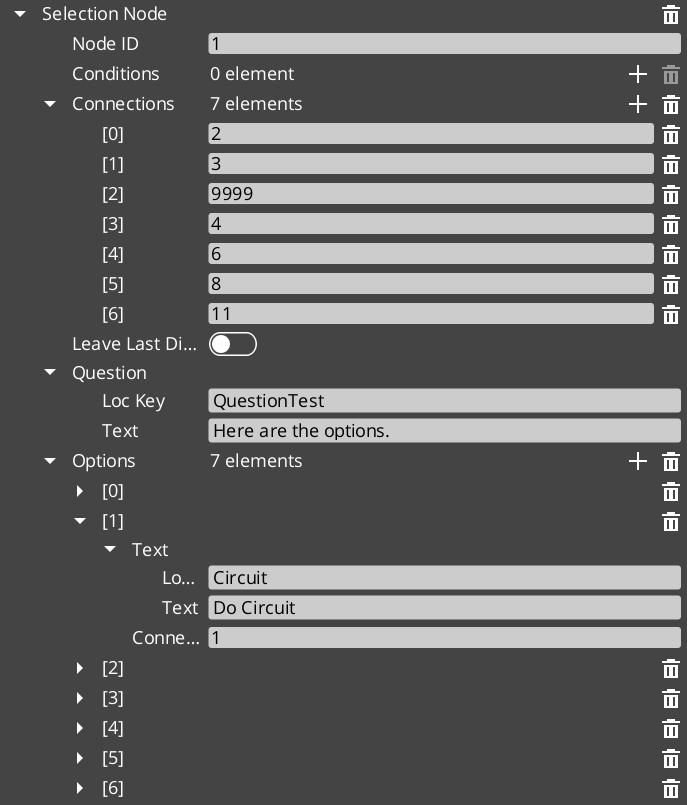
| SelectionNodeData | {C4D5E6F7-A890-1234-5678-9ABCDEF01234} | Presents player choices. Contains a vector of SelectionOption objects. Each option has its own text, conditions, and outgoing connections. |
| RandomNodeData | {D5E6F7A8-B901-2345-6789-ABCDEF012345} | Picks a random outgoing connection. Supports pure random and weighted modes. Does not pause for input. |
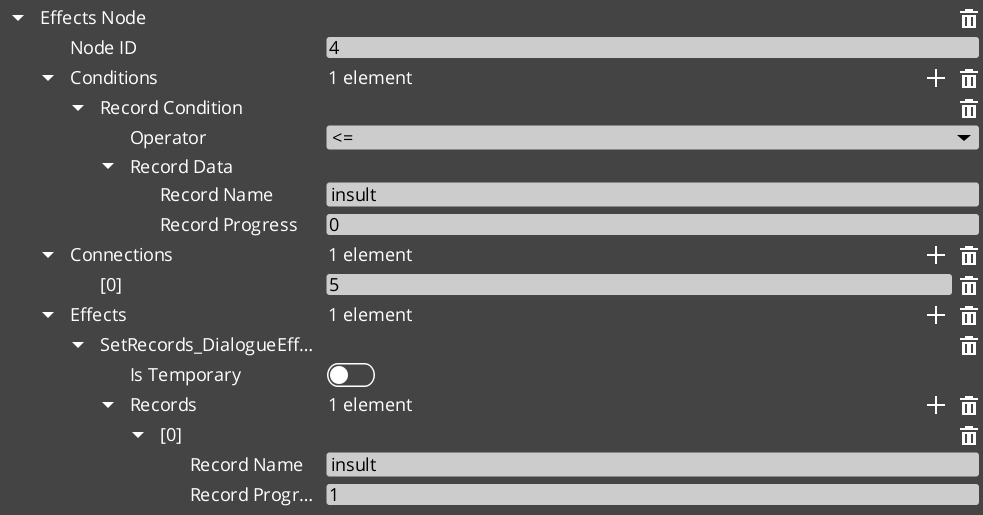
| EffectsNodeData | {E6F7A8B9-C012-3456-789A-BCDEF0123456} | Executes a list of DialogueEffect instances. Processing continues immediately after all effects fire. |
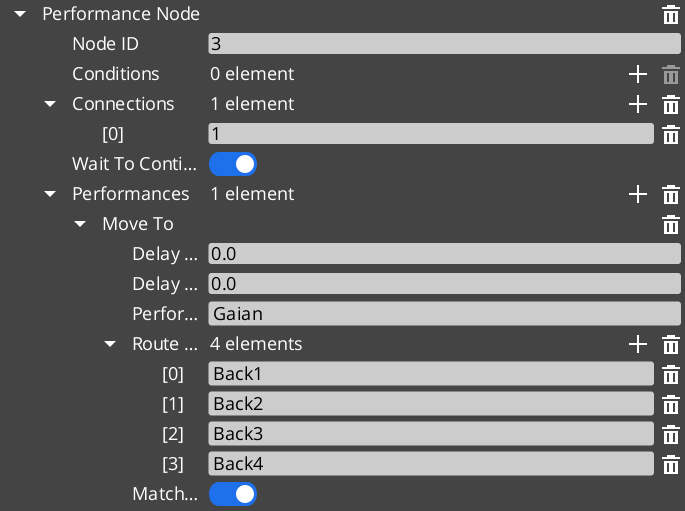
| PerformanceNodeData | {F7A8B9C0-D123-4567-89AB-CDEF01234567} | Starts a DialoguePerformance on a named performer. The sequencer waits for the performance to complete before advancing. |
SelectionOption
A single choice within a SelectionNodeData.
| Property | Type | Description |
|---|---|---|
| TypeId | {B3C4D5E6-F7A8-9012-3456-789ABCDEF012} | |
| text | LocalizedStringId | The display text for this option. |
| conditions | AZStd::vector<DialogueCondition*> | Conditions that must pass for this option to appear. |
| connections | AZStd::vector<NodeConnection> | Outgoing connections followed when this option is selected. |
Conditions
Conditions are polymorphic evaluators attached to node connections and selection options. They are registered automatically by extending the base class.
DialogueCondition (Abstract Base)
| Property | Type | Description |
|---|---|---|
| TypeId | {E44DAD9C-F42B-458B-A44E-1F15971B8F4C} | |
| Method | EvaluateCondition() | Returns bool. Called by the sequencer to determine whether a connection or option is valid. |
Built-in Conditions
| Type | TypeId | Description |
|---|---|---|
| Boolean_DialogueCondition | {34040E77-A58F-48CD-AC36-B3FE0017AA1F} | Base boolean comparison. Evaluates a simple true/false state. |
| Record_DialogueCondition | {E9C5C06D-B2C7-42EF-98D0-2290DE23635D} | Checks game records via the GS_Save RecordKeeper system. Supports greater-than, less-than, equal, and not-equal operators against integer record values. |
Effects
Effects are polymorphic actions triggered by EffectsNodeData nodes. Each effect can also be reversed. They are registered automatically by extending the base class.
DialogueEffect (Abstract Base)
| Property | Type | Description |
|---|---|---|
| TypeId | {71E2E05E-A7A3-4EB3-8954-2F75B26D5E3A} | |
| Methods | DoEffect(), ReverseEffect() | DoEffect() executes the effect. ReverseEffect() undoes it (used for rollback or undo scenarios). |
Built-in Effects
| Type | TypeId | Description |
|---|---|---|
| SetRecords_DialogueEffect | {FFCACF63-0625-4EE5-A74B-86C809B7BF80} | Sets one or more game records in the GS_Save RecordKeeper system. Commonly used to flag quest progress, NPC disposition, or world state changes. |
| ToggleEntitiesActive_DialogueEffect | {F97E1B87-EE7A-4D26-814C-D2F9FA810B28} | Activates or deactivates entities in the level. Used to show/hide objects, enable/disable triggers, or change the world during dialogue. |
Localization
All player-visible text in the dialogue system passes through the localization layer.
LocalizedStringId
A reference to a localizable string.
| Property | Type | Description |
|---|---|---|
| TypeId | {7D8E9F0A-1B2C-3D4E-5F6A-7B8C9D0E1F2A} | |
| key | AZStd::string | Lookup key into the active LocalizedStringTable. |
| defaultText | AZStd::string | Fallback text returned when no localized entry exists for the key. |
| Resolve() | – returns AZStd::string | Resolves the string: looks up key in the active table, falls back to defaultText. |
LocalizedStringTable
Runtime lookup table loaded alongside the active dialogue database.
| Property | Type | Description |
|---|---|---|
| TypeId | {3D4E5F6A-7B8C-9D0E-1F2A-3B4C5D6E7F8A} | |
| Entries | AZStd::unordered_map<AZStd::string, AZStd::string> | Key-value pairs mapping string keys to localized text. |
Complete Type Reference
| Type | TypeId | Category |
|---|---|---|
DialogueDatabase | {4C5D6E7F-8A9B-0C1D-2E3F-4A5B6C7D8E9F} | Asset |
DialogueSequence | {2B3C4D5E-6F7A-8B9C-0D1E-2F3A4B5C6D7E} | Data |
ActorDefinition | {1A2B3C4D-5E6F-7A8B-9C0D-1E2F3A4B5C6D} | Data |
DialogueNodeData | {D1E2F3A4-B5C6-7D8E-9F0A-1B2C3D4E5F6A} | Node (Abstract) |
TextNodeData | {A2B3C4D5-E6F7-8901-2345-6789ABCDEF01} | Node |
SelectionNodeData | {C4D5E6F7-A890-1234-5678-9ABCDEF01234} | Node |
RandomNodeData | {D5E6F7A8-B901-2345-6789-ABCDEF012345} | Node |
EffectsNodeData | {E6F7A8B9-C012-3456-789A-BCDEF0123456} | Node |
PerformanceNodeData | {F7A8B9C0-D123-4567-89AB-CDEF01234567} | Node |
SelectionOption | {B3C4D5E6-F7A8-9012-3456-789ABCDEF012} | Data |
DialogueCondition | {E44DAD9C-F42B-458B-A44E-1F15971B8F4C} | Condition (Abstract) |
Boolean_DialogueCondition | {34040E77-A58F-48CD-AC36-B3FE0017AA1F} | Condition |
Record_DialogueCondition | {E9C5C06D-B2C7-42EF-98D0-2290DE23635D} | Condition |
DialogueEffect | {71E2E05E-A7A3-4EB3-8954-2F75B26D5E3A} | Effect (Abstract) |
SetRecords_DialogueEffect | {FFCACF63-0625-4EE5-A74B-86C809B7BF80} | Effect |
ToggleEntitiesActive_DialogueEffect | {F97E1B87-EE7A-4D26-814C-D2F9FA810B28} | Effect |
DialoguePerformance | {BCCF5C52-42C3-49D4-8202-958120EA8743} | Performance (Abstract) |
MoveTo_DialoguePerformance | {6033A69D-F46F-40DF-A4A0-A64C4E28D6D5} | Performance |
PathTo_DialoguePerformance | {C0DF4B0E-924D-4C38-BD26-5A286161D95C} | Performance |
RepositionPerformer_DialoguePerformance | {DE1E0930-F0A4-4F60-A741-4FB530610AEE} | Performance |
LocalizedStringId | {7D8E9F0A-1B2C-3D4E-5F6A-7B8C9D0E1F2A} | Localization |
LocalizedStringTable | {3D4E5F6A-7B8C-9D0E-1F2A-3B4C5D6E7F8A} | Localization |
Extension Guide
Use the ClassWizard templates to generate new dialogue extension classes — see GS_Cinematics Templates:
DialogueCondition— generates a condition stub (Basic or Boolean variant). Requires aReflect(context)call inDialogueSequencerComponent.cpp.DialogueEffect— generates an effect stub withDoEffect()/ReverseEffect(). Same manual registration step.DialoguePerformance— generates a performance stub with the fullExecutePerformance()/FinishPerformance()lifecycle. Same manual registration step.
All three types are polymorphic and discovered automatically.
External gems can add custom conditions, effects, and performances without modifying GS_Cinematics. The process is the same for all three categories.
Adding a Custom Condition
1. Define the class
#pragma once
#include <GS_Cinematics/Dialogue/Conditions/DialogueCondition.h>

namespace MyGem
{
    class HasItem_DialogueCondition : public GS_Cinematics::DialogueCondition
    {
    public:
        AZ_RTTI(HasItem_DialogueCondition, "{YOUR-UUID-HERE}", GS_Cinematics::DialogueCondition);
        AZ_CLASS_ALLOCATOR(HasItem_DialogueCondition, AZ::SystemAllocator);

        static void Reflect(AZ::ReflectContext* context);

        bool EvaluateCondition() override;

    private:
        AZStd::string m_itemName;
    };
}
2. Implement and reflect
#include "HasItem_DialogueCondition.h"
#include <AzCore/Serialization/SerializeContext.h>

namespace MyGem
{
    void HasItem_DialogueCondition::Reflect(AZ::ReflectContext* context)
    {
        if (auto sc = azrtti_cast<AZ::SerializeContext*>(context))
        {
            sc->Class<HasItem_DialogueCondition, GS_Cinematics::DialogueCondition>()
                ->Version(1)
                ->Field("ItemName", &HasItem_DialogueCondition::m_itemName);

            if (auto ec = sc->GetEditContext())
            {
                ec->Class<HasItem_DialogueCondition>("Has Item", "Checks if the player has a specific item.")
                    ->ClassElement(AZ::Edit::ClassElements::EditorData, "")
                        ->Attribute(AZ::Edit::Attributes::Category, "MyGem/Conditions")
                    ->DataElement(AZ::Edit::UIHandlers::Default, &HasItem_DialogueCondition::m_itemName, "Item Name", "");
            }
        }
    }

    bool HasItem_DialogueCondition::EvaluateCondition()
    {
        // Query your inventory system
        bool hasItem = false;
        // MyGem::InventoryRequestBus::BroadcastResult(hasItem, ...);
        return hasItem;
    }
}
The same pattern applies to custom effects (inherit DialogueEffect, implement DoEffect() / ReverseEffect()) and custom performances (inherit DialoguePerformance, implement DoPerformance() / ExecutePerformance() / FinishPerformance()).
See Also
For conceptual overviews and usage guides:
- Dialogue System Overview – Architecture
For component references:
- Dialogue Sequencer – Runtime node processing
- Dialogue Actors – Performer markers and actor definitions
- Performances – Built-in performance types
- Dialogue UI – Display components
For related resources:
- Dialogue Editor – Authoring GUI
Get GS_Cinematics
GS_Cinematics — Explore this gem on the product page and add it to your project.