Dialogue Actors
Categories:
Dialogue Actors connect authored character data in the .dialoguedb asset to world-space entities in the level. The system has two halves:
- ActorDefinition – The data side. Defined in the DialogueDatabase, it holds the actor’s name, portrait, and metadata.
- DialoguePerformerMarkerComponent – The world side. Attached to an entity in the level, it registers a named performer with the Dialogue Manager so the sequencer can find it at runtime.
When a dialogue sequence references an actor by name, the sequencer looks up the matching performer entity through DialogueManagerRequestBus::GetPerformer(name). This links the authored text, portraits, and performance instructions to a specific entity in the world.
For usage guides and setup examples, see The Basics: GS_Cinematics.
DialoguePerformerMarkerComponent
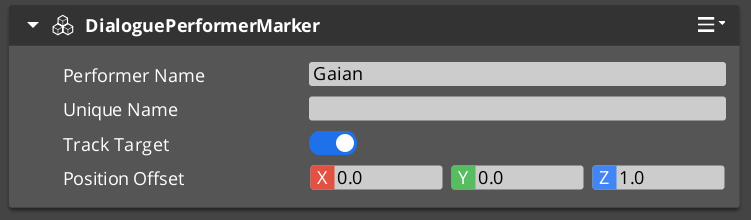
A component placed on any entity that represents a dialogue performer in the level. On Activate(), the marker registers itself with the Dialogue Manager by name. Multiple performers with the same name can exist in different levels, but only one should be active at a time within a single level.
Request Bus: PerformerMarkerRequestBus
Entity-addressed bus – each marker entity responds on its own address.
| Method | Parameters | Returns | Description |
|---|---|---|---|
GetPerformerName | – | AZStd::string | Returns the performer’s registered name. This name must match the actor name in the dialogue database. |
GetPosEntity | – | AZ::EntityId | Returns the entity to use as the performer’s position source. Typically the marker entity itself, but can point to a child entity for offset control. |
GetPosPoint | – | AZ::Vector3 | Returns the performer’s current world-space position. |
ShouldTrackTarget | – | bool | Returns whether the performer entity should continuously track and face its dialogue target during a sequence. |
ActorDefinition Data Model
The ActorDefinition is the authored data for a single character, stored inside the DialogueDatabase.
| Property | Type | Description |
|---|---|---|
| TypeId | {1A2B3C4D-5E6F-7A8B-9C0D-1E2F3A4B5C6D} | |
| Actor Name | AZStd::string | Internal lookup name. Must match the performer marker name in the level. |
| Display Name | AZStd::string | The name shown to the player in dialogue UI. Can differ from the internal name. |
| Portrait | Asset reference | Default portrait image. Overridden per-node in TextNodeData when needed. |
| Emotion Categories | AZStd::vector | Groupings of emotional states (e.g. happy, angry, sad). Used to organize profile images and poses. |
| Profile Image Sets | AZStd::vector | Sets of portrait images keyed by emotion or attitude. The sequencer can switch profiles during dialogue. |
| Pose Sets | AZStd::vector | Sets of body poses and idle animations keyed by attitude. Referenced by performance nodes. |
Performer Registration and Lookup
Registration Flow
- A
DialoguePerformerMarkerComponentactivates on an entity in the level. - During
Activate(), the component callsDialogueManagerRequestBus::RegisterPerformerMarker(name, entityId). - The Dialogue Manager stores the mapping from name to entity ID.
- When the component deactivates, it unregisters itself.
Lookup Flow
- The sequencer processes a node that references an actor name (e.g. a
TextNodeDatawith speaker “perry” or aPerformanceNodeDatatargeting “perry”). - The sequencer calls
DialogueManagerRequestBus::GetPerformer("perry"). - The Dialogue Manager returns the registered entity ID.
- The sequencer (or performance) can now query the performer’s position, facing, and tracking state through
PerformerMarkerRequestBus.
Multiple Performers
The actorTargetId field on node data allows a sequence to target a specific instance of a performer when multiple entities share the same actor name. This supports scenarios like having the same NPC appear in multiple locations across different levels while keeping the same actor definition in the database.
Setup
- In your
.dialoguedbasset, define an actor with a unique name (e.g. “perry”) using the Dialogue Editor. - In your level, create an entity and attach a DialoguePerformerMarkerComponent.
- Set the marker’s performer name to match the actor name in the database (e.g. “perry”).
- Position the entity where the performer should appear in the world.
- Optionally, add child entities for position offsets or attach visual representation (mesh, animation) to the same entity.
The marker entity will self-register with the Dialogue Manager on activation. The sequencer can now find this performer when processing sequences that reference the matching actor name.
Script Canvas Examples
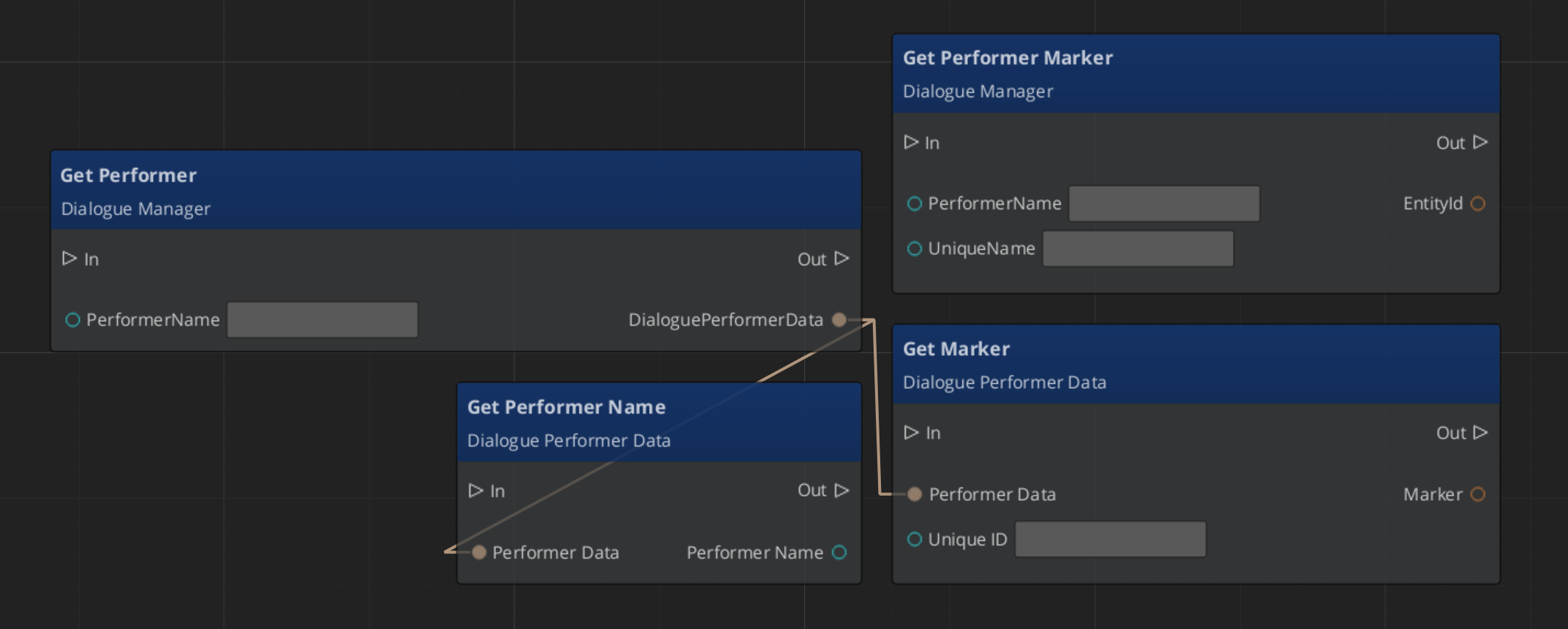
Getting a performer’s name and world position:
See Also
- Dialogue Data Structure – ActorDefinition in the database
- Dialogue System Overview – Dialogue Manager registration API
- Dialogue Sequencer – How the sequencer looks up performers
- Performances – Performance types that drive performer entities
- Dialogue UI – World-space UI that tracks performer positions
Get GS_Cinematics
GS_Cinematics — Explore this gem on the product page and add it to your project.