Dialogue System
Categories:
The Dialogue System is the runtime engine inside GS_Cinematics that drives all authored narrative experiences. It connects a persistent .dialoguedb asset to a node-graph sequencer, world-space and screen-space UI display, and an extensible set of polymorphic conditions, effects, and performances. Every piece is a standalone component communicating through EBus interfaces, so you can replace or extend any layer without modifying the gem itself.
The system is managed by the GS_DialogueManagerComponent, which participates in the standard Game Manager startup sequence.
For usage guides and setup examples, see The Basics: GS_Cinematics.
Contents
- Architecture
- Dialogue Manager
- Dialogue Sequencer
- Data Structure
- Effects
- Performances
- Dialogue UI
- Actors
- Editor
- See Also
Architecture
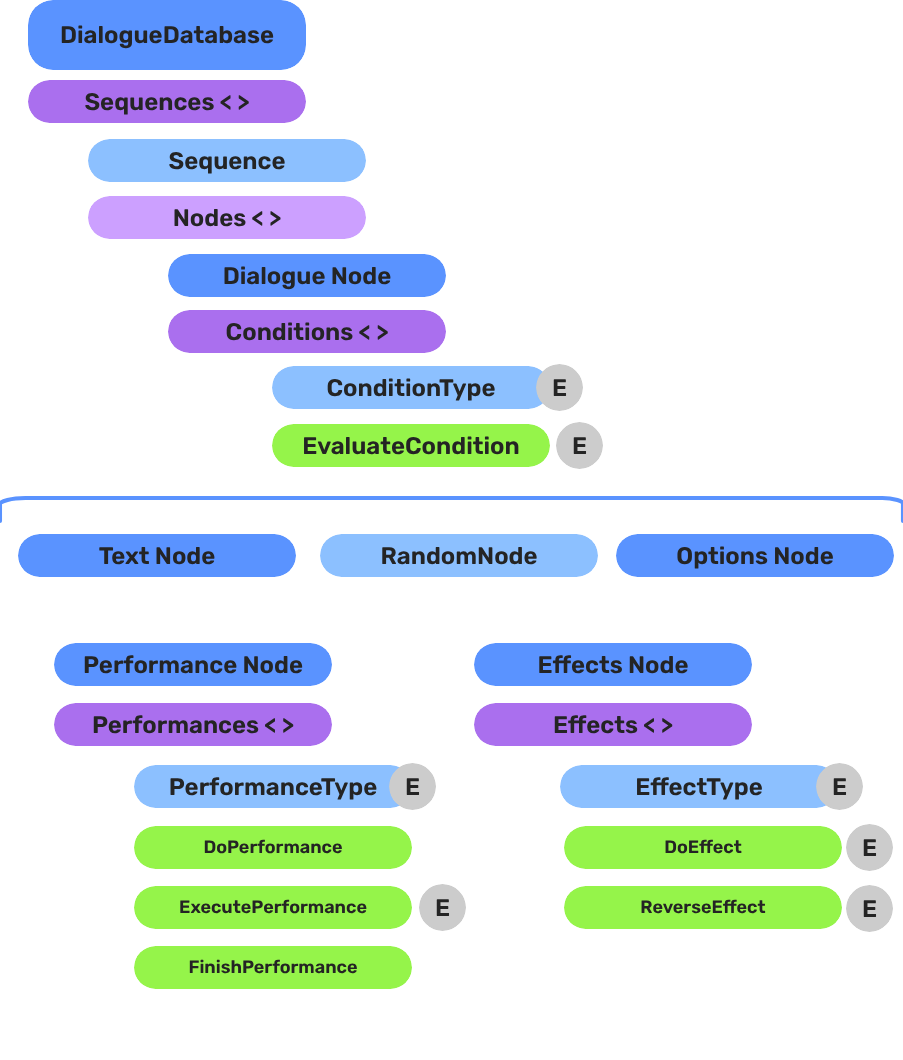
Breakdown
A dialogue sequence is authored in the node editor, stored in a .dialoguedb asset, and driven at runtime by the Dialogue Manager and Sequencer:
| Layer | What It Means |
|---|---|
| DialogueDatabase | Stores named actors and sequences. Loaded at runtime by the Dialogue Manager. |
| DialogueSequence | A directed node graph. The Sequencer walks from startNodeId through Text, Selection, Effects, and Performance nodes. |
| Conditions | Polymorphic evaluators on branches. Failed conditions skip that branch automatically. |
| Effects | Polymorphic actions at EffectsNodeData nodes — set records, toggle entities. |
| Performers | Named actor anchors in the level. Resolved from database actor names via DialoguePerformerMarkerComponent. |
Conditions, effects, and performances are discovered automatically at startup — custom types from any gem appear in the editor without modifying GS_Cinematics.
E Indicates extensible classes and methods.
Patterns - Complete list of system patterns used in GS_Play.
Dialogue Manager
GS_DialogueManagerComponent owns the active dialogue database and performer registry. Extends GS_Core::GS_ManagerComponent.
Dialogue Sequencer
DialogueSequencerComponent traverses a node graph at runtime. The DialogueUIBridgeComponent routes dialogue and selection events to whichever UI is registered.
Data Structure
The .dialoguedb asset format, DialogueSequence, ActorDefinition, all node types, the polymorphic condition hierarchy, and localization types.
Effects
Polymorphic DialogueEffect types executed synchronously from EffectsNodeData nodes. Built-in: SetRecords_DialogueEffect, ToggleEntitiesActive_DialogueEffect. Fully extensible.
Performances
Polymorphic DialoguePerformance types executed asynchronously from PerformanceNodeData nodes. Built-in: MoveTo, PathTo, RepositionPerformer. Fully extensible.
Dialogue UI
Screen-space and world-space dialogue display, selection menus, the typewriter text-reveal system, and the babble audio system.
Actors
DialoguePerformerMarkerComponent places named performer anchors in the world, plus the ActorDefinition data model.
Editor
The in-engine GUI for authoring dialogue databases, sequences, and node graphs.
See Also
For conceptual overviews and usage guides:
For related references:
- Cinematics Manager – Cinematic lifecycle and stage markers
- GS_Cinematics Overview – Top-level gem reference
- GS_Core Managers – Manager base system
Get GS_Cinematics
GS_Cinematics — Explore this gem on the product page and add it to your project.