Audio Events
Categories:
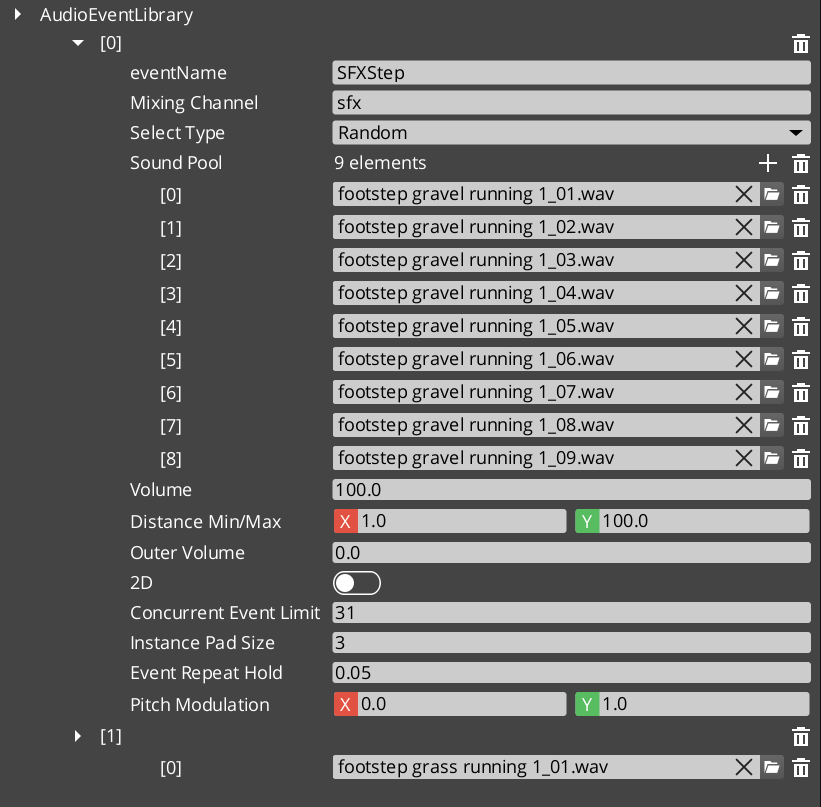
Audio Events are the primary mechanism for playing sounds in GS_Play. A GS_AudioEvent defines a single sound event with a pool of audio clips, selection rules (random or sequential), 2D/3D spatialization mode, concurrent playback limits, and repeat-hold behavior. Events are grouped into AudioEventLibrary assets that the Audio Manager loads at startup or on demand.
When an event is triggered, the system selects a clip from the pool according to the configured selection type, checks concurrent limits, and routes the output through the appropriate mixing bus.
For usage guides and setup examples, see The Basics: GS_Audio.
Contents
Data Model
GS_AudioEvent
A single audio event definition containing all playback configuration.
| Field | Value |
|---|---|
| TypeId | {2A6E337B-2B9A-4CB2-8760-BF3A12C50CA0} |
| Field | Type | Description |
|---|---|---|
| Event Name | AZStd::string | Unique identifier for this event within its library. Used by PlayAudioEvent calls. |
| Audio Clips | AZStd::vector<AudioClipAsset> | Pool of audio clip assets available for this event. |
| Pool Selection Type | PoolSelectionType | How clips are chosen from the pool: Random or Increment (sequential). |
| Is 3D | bool | When true, audio is spatialized in 3D space relative to the emitting entity. When false, audio plays as 2D (non-positional). |
| Max Concurrent | int | Maximum number of simultaneous instances of this event. Additional triggers are ignored until a slot opens. 0 means unlimited. |
| Repeat Hold Time | float | Minimum time in seconds before this event can be retriggered. Prevents rapid-fire repetition of the same sound. |
| Mixing Bus | AZStd::string | Name of the mixing bus to route this event’s output through. |
| Volume | float | Base volume level for this event (0.0 to 1.0). |
| Pitch Variance | float | Random pitch variation range applied each time the event plays. 0.0 means no variation. |
AudioEventLibrary
An asset containing a collection of GS_AudioEvent definitions. Libraries are loaded by the Audio Manager at startup or at runtime via LoadEventLibrary.
| Field | Value |
|---|---|
| TypeId | {04218A1E-4399-4A7F-9649-ED468B5EF76B} |
| Extends | AZ::Data::AssetData |
| Reflection | Requires GS_AssetReflectionIncludes.h — see Serialization Helpers |
| Field | Type | Description |
|---|---|---|
| Events | AZStd::vector<GS_AudioEvent> | The collection of audio events defined in this library. |
PoolSelectionType (Enum)
Determines how audio clips are selected from an event’s clip pool.
| Field | Value |
|---|---|
| TypeId | {AF10C5C8-E54E-41DA-917A-6DF12CA89CE3} |
| Value | Description |
|---|---|
Random | A random clip is chosen from the pool each time the event plays. |
Increment | Clips are played sequentially, advancing to the next clip in the pool on each trigger. Wraps around at the end. |
GS_AudioEventComponent
Per-entity component that provides audio event playback with optional 3D positioning. Attach this component to any entity that needs to emit sounds.
| Field | Type | Description |
|---|---|---|
| Audio Events | AZStd::vector<AZStd::string> | List of event names this component can play. Events must exist in a loaded library. |
| Auto Play | bool | When true, the first event in the list plays automatically on activation. |
See Also
For conceptual overviews and usage guides:
- GS_Audio Overview – Top-level audio gem documentation
- The Basics: GS_Audio – Scripting-level usage guide
For component references:
- Audio Manager – Engine initialization and event library loading
For related resources:
- Mixing & Effects – Mixing buses that events route through
Get GS_Audio
GS_Audio — Explore this gem on the product page and add it to your project.