Units
What makes an entity a unit — the GS_UnitComponent, entity configuration, collision setup, possession, standby, and movement.
A “unit” in GS_Play is any entity that can be possessed by a controller and driven through gameplay. The GS_UnitComponent is the marker that transforms an ordinary entity into a unit — it provides the possession interface, unique naming, standby awareness, and automatic registration with the Unit Manager.
Units are the characters, vehicles, creatures, or any other controllable actors in your game. They do not contain decision-making logic themselves — that comes from the controller that possesses them. A unit provides the body: movement, collision, and visuals. The controller provides the brain: player input or AI logic.
For architecture details, component properties, and extending the system in C++, see the Framework API reference.

Contents
How Units Work
Registration
When a GS_UnitComponent activates, it registers itself with the Unit Manager. The manager tracks all active units and responds to CheckIsUnit queries. When the component deactivates, it unregisters automatically.
Possession
Units are possessed by controllers through the UnitRequestBus:
- A controller calls
Possess(controllerEntityId) on the unit. - The unit stores the controller reference and broadcasts
UnitPossessed on UnitNotificationBus. - The controller can now drive the unit’s subsystems (movement, actions, etc.).
- Calling
DePossess() clears the controller reference and releases the unit.
Standby
Units participate in the standby system for clean level transitions. When the Unit Manager signals standby, the unit broadcasts UnitEnteringStandby on its notification bus. Child components — movers, input reactors, and others — listen for this signal and pause their processing. UnitExitingStandby reverses the process.
Entity Configuration
A minimal unit entity requires:
- GS_UnitComponent — Registers the entity as a unit and provides the possession interface.
- Movement components — At least a mover and optionally a grounder for ground detection.
- PhysX collider — For physics interaction and ground detection raycasts.
A fully featured unit entity typically includes:
| Component | Role |
|---|
GS_UnitComponent | Marks the entity as a unit; handles possession and standby. |
GS_MoverContextComponent | Coordinates movers and grounders; holds the Movement Profile. |
A mover (e.g. GS_3DSlideMoverComponent) | Defines how the unit moves each frame. |
A grounder (e.g. GS_PhysicsRayGrounderComponent) | Detects surface contact and reports ground state. |
| PhysX Rigid Body + Collider | Physics presence in the world. |
| Mesh or Actor component | Visual representation. |
Entity Arrangement
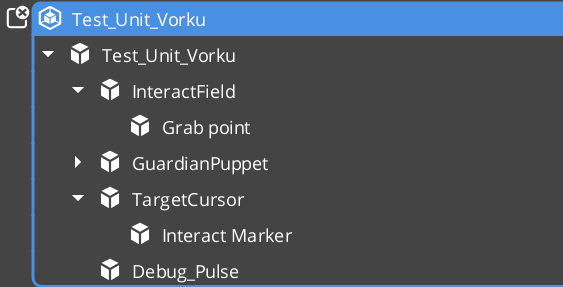
Entity arrangement
Collision Setup
Units require properly configured PhysX collision layers to interact with the environment and other units. If you have not set up collision layers yet, refer to the Simple Project Setup guide.
Typical collision layer assignments:
| Layer | Purpose |
|---|
| Unit layer | The unit’s own collider. Collides with environment geometry and other units. |
| Ground detection layer | Used by grounder raycasts. Collides with terrain and walkable surfaces only. |
Movement
The Movement feature set is a composable stack where each component handles one concern of character locomotion. Movers define core behavior (free, strafe, grid, slide), the MoverContext manages movement state and selects the active mover, Grounders report ground state, and Influence components apply external forces like wind or currents.
Movement
API
Quick Reference
| Need | Bus | Method |
|---|
| Assign a controller to this unit | UnitRequestBus (ById) | Possess(controllerEntityId) |
| Release the current controller | UnitRequestBus (ById) | DePossess() |
| Get the possessing controller | UnitRequestBus (ById) | GetController() |
| Get the unit’s unique name | UnitRequestBus (ById) | GetUniqueName() |
| Event | Bus | Fired When |
|---|
UnitPossessed | UnitNotificationBus | A controller takes possession of this unit. |
UnitEnteringStandby | UnitNotificationBus | The unit is entering standby (level transition). |
UnitExitingStandby | UnitNotificationBus | The unit is exiting standby and resuming. |
Glossary
| Term | Meaning |
|---|
| Unit | Any entity with a GS_UnitComponent — the controllable body in gameplay |
| Controller | The intelligence (player or AI) that possesses and drives a unit |
| Possession | The act of a controller claiming ownership of a unit via Possess() |
| Standby | A paused state units enter during level transitions, coordinated by the Unit Manager |
| Unique Name | An identifier generated at activation used to look up a unit by name |
For full definitions, see the Glossary.
See Also
For the full API, component properties, and C++ extension guide:
For related systems:
Get GS_Unit
GS_Unit — Explore this gem on the product page and add it to your project.
1 - Mover Context
Movement state coordinator for GS_Unit — manages movement modes, context states, input axis transformation, and movement profile priority.
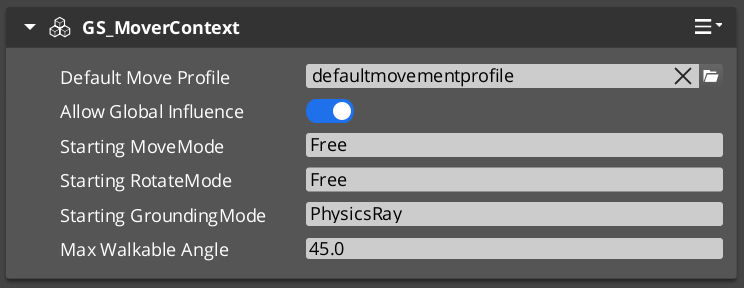
GS_MoverContextComponent is the coordinator that sits above the movers and owns the movement state for a unit. It does not move the character itself — it decides which mover runs, transforms input into the correct movement vector, and exposes state to every other system that needs to know what the character is doing.
Add exactly one GS_MoverContextComponent to any unit that uses movers.
For architecture details, component properties, and extending the system in C++, see the Framework API: Mover Context.
Contents
Movement Modes
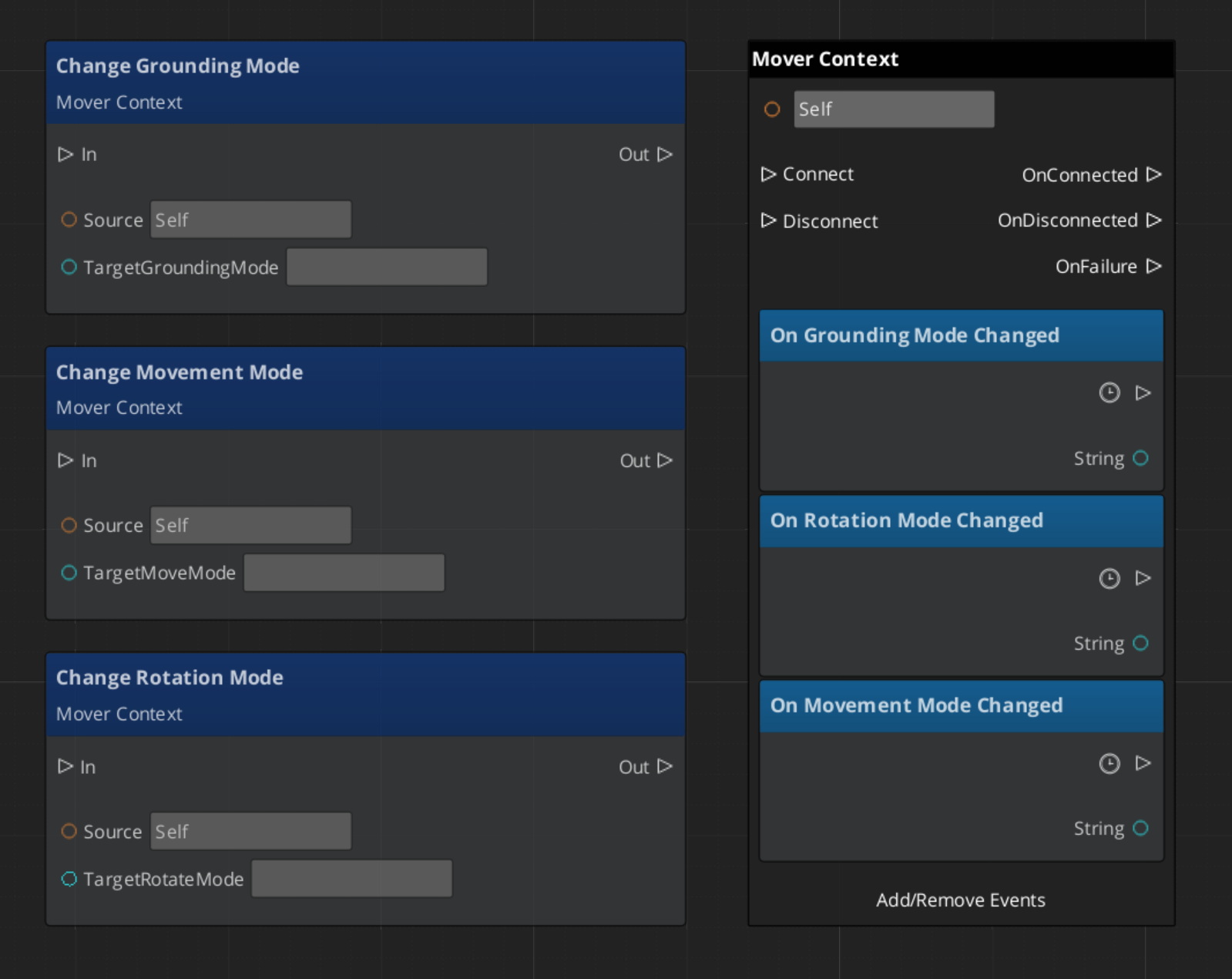
The Mover Context uses three independent mode tracks — movement, rotation, and grounding — each holding a named string. Only the mover or grounder whose assigned mode name matches the active mode on that track will run. All others stay dormant.
| Track | Controls | Example modes |
|---|
| Movement | Which mover applies velocity each frame | "Free", "Slide" |
| Rotation | Which component rotates the character | "Free", "Locked" |
| Grounding | Which grounder runs surface detection | "Free", "Disabled" |
The three tracks are independent — changing the movement mode does not reset rotation or grounding.
Reverting Modes
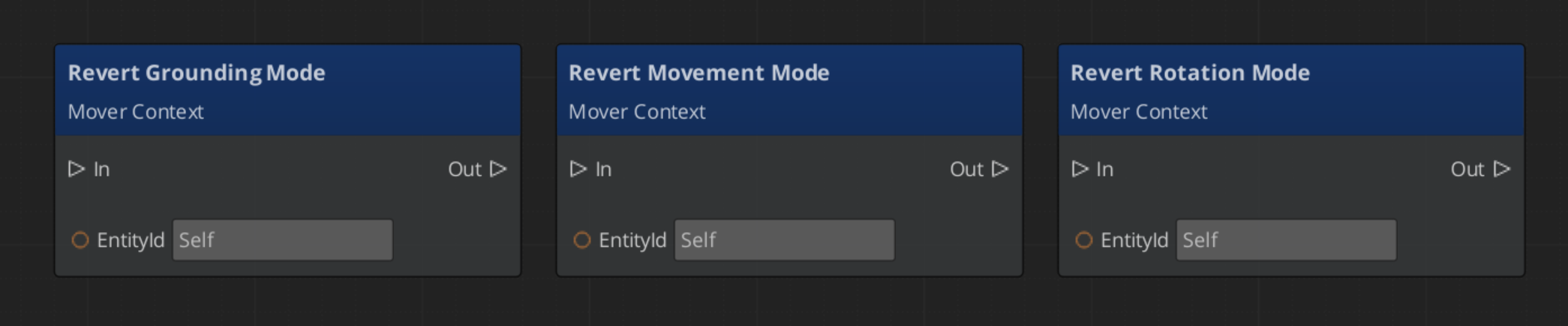
Every mode change stores the previous value. Calling RevertToLastMovementMode, RevertToLastRotationMode, or RevertToLastGroundingMode restores it. This is how the Slide mover hands control back to Free movement after a slope is cleared — without needing to know what mode was active before.
Context States
Context states are named key/value pairs stored on the Mover Context. Any component can write or read them via MoverContextRequestBus. They provide a lightweight shared blackboard for movement systems to coordinate without direct dependencies.
| Built-in State | Values | Meaning |
|---|
"grounding" | 0 — Falling | No surface contact. |
| 1 — Grounded | Stable surface contact. |
| 2 — Sliding | Surface too steep to stand. Slide mover will activate. |
"StopMovement" | 1 — Active | Halts all mover velocity processing for this frame. |
The grounder writes "grounding" each frame. The Slide mover writes it back to 0 or 1 when the slope clears. Your own companion components can write custom states in the same way.
The Mover Context processes raw input through two transformations before handing it to the active mover.
| Step | Method | What It Does |
|---|
| Raw input | SetMoveInputAxis | Written by the input reactor. Screen-space direction. |
| 1 — Camera-relative | ModifyInputAxis() | Rotates the axis to align with the active camera’s facing. |
| 2 — Ground-projected | GroundInputAxis() | Projects onto the contact surface to prevent skating above or below terrain. |
Movers read the ground-projected axis. Both intermediate values are available via bus if a component needs an earlier stage.
Movement Profile Priority
The Mover Context resolves which GS_UnitMovementProfile governs the unit’s locomotion parameters at runtime using a priority stack:
- Influence fields — Any
MovementInfluenceFieldComponent or GlobalMovementInfluenceComponent that has added a profile to the unit. Highest priority. Multiple influences are stacked additively. - Global profile — The scene-level default from
GlobalMovementRequestBus. Applied when no influence overrides are active. - Default profile — The profile assigned directly to the
GS_MoverContextComponent. Used as the final fallback.
To change a unit’s movement feel in a specific area, place a MovementInfluenceFieldComponent with a volume shape and assign an alternate profile to it. The unit’s own component property does not need to change.
Script Canvas Examples
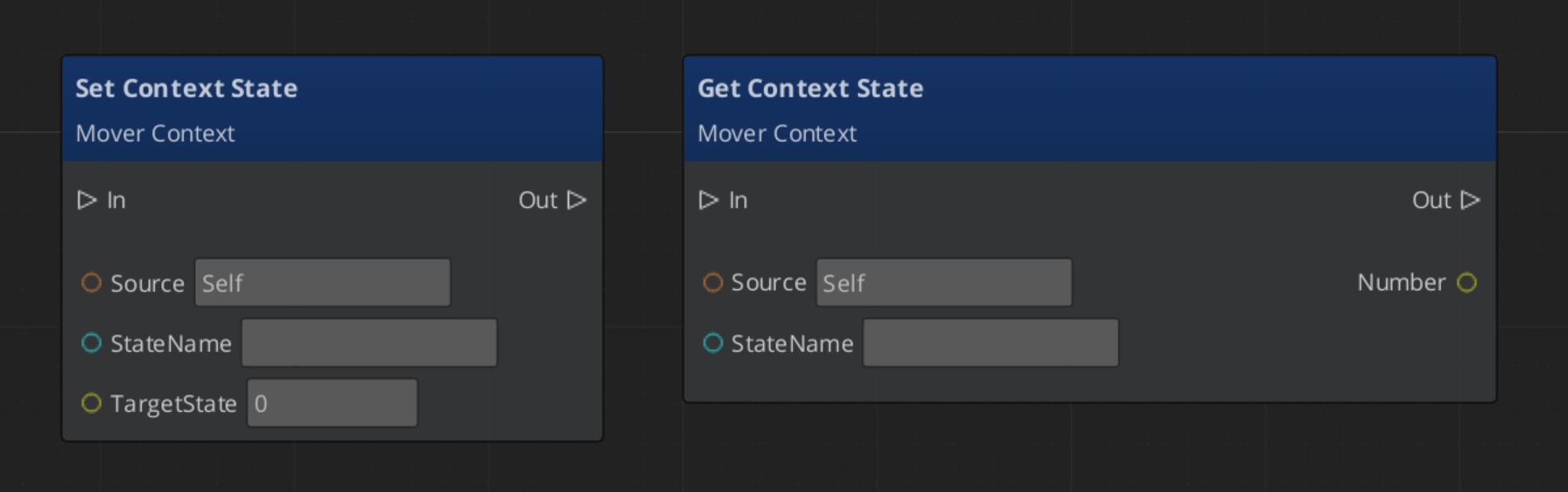
Changing movement mode:
Reverting to the previous movement mode:
Setting a context state flag:
Quick Reference
| Need | Bus | Method |
|---|
| Change active movement mode | MoverContextRequestBus | ChangeMovementMode(modeName) |
| Restore previous movement mode | MoverContextRequestBus | RevertToLastMovementMode() |
| Read the ground-projected input | MoverContextRequestBus | GetGroundMoveInputAxis() |
| Write a context state | MoverContextRequestBus | SetMoverState(name, value) |
| Read a context state | MoverContextRequestBus | GetMoverState(name) |
| Push a movement profile override | MoverContextRequestBus | AddMovementProfile(influencer, profile) |
| Remove a profile override | MoverContextRequestBus | RemoveMovementProfile(influencer) |
| Listen for mode changes | MoverContextNotificationBus | MovementModeChanged, GroundingModeChanged |
| Listen for state changes | MoverContextNotificationBus | MoverStateChanged |
Glossary
| Term | Meaning |
|---|
| Mover Context | The coordinator component that owns movement state, selects the active mover, and transforms input each frame |
| Movement Mode | A named string on a mode track that determines which mover or grounder is active |
| Context State | A named key/value pair on the Mover Context used as a shared blackboard between movement components |
| Input Axis | The movement direction written by input reactors, transformed through camera-relative and ground-projected stages |
| Movement Profile | A data asset storing locomotion parameters (speed, acceleration, jump force) for a unit |
For full definitions, see the Glossary.
See Also
For the full API, component properties, and C++ extension guide:
For related systems:
Get GS_Unit
GS_Unit — Explore this gem on the product page and add it to your project.
2 - Movement
How to work with GS_Unit movement — mover types, mover context, grounders, movement profiles, and influence fields.
The Movement system is a composable stack of components that each handle one concern of character locomotion. Movers define the core behavior, grounders report surface contact, the Mover Context manages which mover is active and what movement state the character is in, influence fields apply external forces, and Movement Profiles store the parameters that govern all of it. You assemble what you need — most characters use two or three components — and replace individual pieces without touching anything else.
For architecture details, component properties, and extending the system in C++, see the Framework API reference.
Contents
How it Works
Breakdown
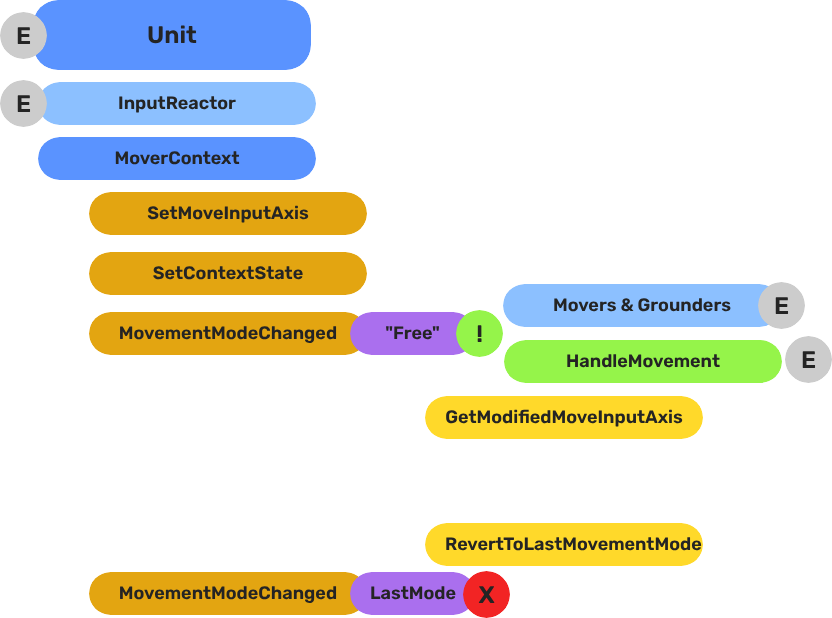
Movers and Grounders are multiple components on a Unit that are constantly changing activation based on the units state. When a mover is active, it freely processes the unit’s movement based on it’s functionality. At any moment, through internal or external forces, the Movement, Rotation, or Grounding state can change, which disables the old movers, and activates the new one to continue controlling the Unit.
Input
    ↓  InputDataNotificationBus::InputStateChanged
Input Reactor Components
    ↓  MoverContextRequestBus::SetMoveInputAxis
GS_MoverContextComponent
    ↓  ModifyInputAxis() → camera-relative
    ↓  GroundInputAxis() → ground-projected
    ↓  MoverContextNotificationBus::MovementModeChanged("Free")
GS_3DFreeMoverComponent  [active when mode == "Free"]
    ↓  AccelerationSpringDamper → rigidBody->SetLinearVelocity
GS_PhysicsRayGrounderComponent  [active when grounding mode == "Free"]
    ↓  MoverContextRequestBus::SetGroundNormal / SetContextState("grounding", ...)
    ↓  MoverContextRequestBus::ChangeMovementMode("Slide")  ← when slope too steep
GS_3DSlideMoverComponent  [active when mode == "Slide"]
The Slide mover activates when the Unit is walking on too steep an angle. It takes control over the unit, slides down the hill, then restores the previous movement behaviour.
- The Basics: Mover Context — Movement modes, grounding states, and configuration.
- The Basics: Movement — Mover types, grounder types, and ScriptCanvas usage.
- Framework API: Input Reactor — InputDataComponent schema, reactor base class, and C++ extension.
- Framework API: Mover Context — Context state, mode authority, and C++ extension.
- Framework API: Movers — Mover and grounder components, movement APIs, and C++ extension.
Mover Types
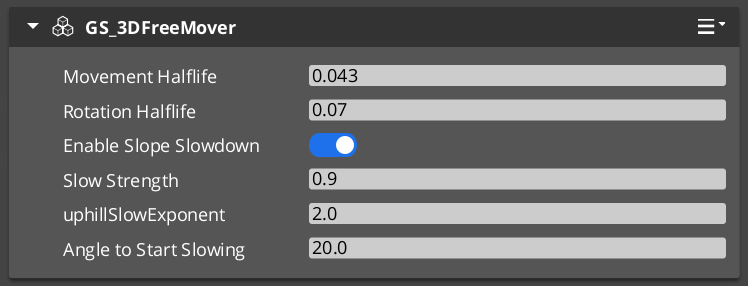
Each mover defines one locomotion behavior. A unit has one active mover at a time, selected by the Mover Context. All movers read from the unit’s movement vector (produced by the input pipeline) and translate it into entity movement each frame.
| Component | Best For | How It Moves |
|---|
GS_3DFreeMoverComponent | Flying, swimming, zero-gravity | Unconstrained motion in all three axes. No ground contact required. |
GS_3DSlideMoverComponent | Ground-bound characters on uneven terrain | Slides the character along the contact surface, maintaining ground contact smoothly. |
GS_PhysicsMoverComponent | Characters needing full collision response | Drives an O3DE physics rigid body. Forces and impulses apply normally. |
Choosing a Mover
- Use
GS_3DFreeMoverComponent for any character that needs to move through air or water without ground contact. - Use
GS_3DSlideMoverComponent for most ground-bound characters. It handles slopes and steps without requiring physics simulation. - Use
GS_PhysicsMoverComponent when the character must interact physically with the world — pushing objects, being knocked back by forces, or responding to physics joints.
Mover Context
GS_MoverContextComponent sits above the movers and coordinates everything: it selects which mover runs each frame, owns the movement mode tracks, transforms raw input into camera-relative and ground-projected vectors, and manages the movement profile priority stack.
Add exactly one to any unit that uses movers.
Mover Context →
Grounders
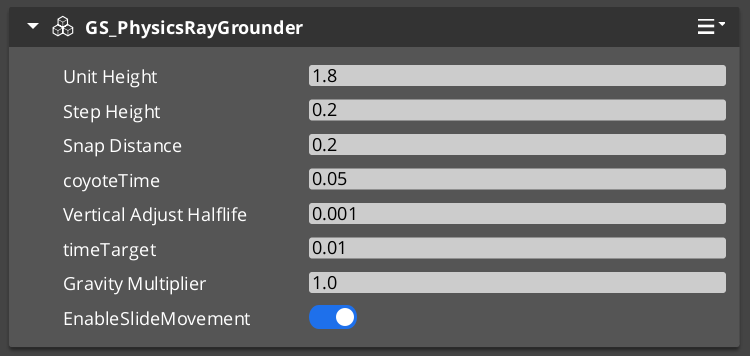
Grounders detect whether the character has contact with a surface and report that information to the Mover Context. Without a grounder, the Context cannot distinguish ground-bound from airborne states.
| Component | Method | Notes |
|---|
GS_GrounderComponent | Base class — extend for custom detection logic. | Not used directly. |
GS_PhysicsRayGrounderComponent | Fires a downward raycast each frame. | Suitable for most characters. Configurable ray length and collision layer. |
Add one grounder to a unit that uses GS_3DSlideMoverComponent or any mover that needs ground awareness. GS_3DFreeMoverComponent does not require a grounder because it never needs ground contact.
Movement Profiles
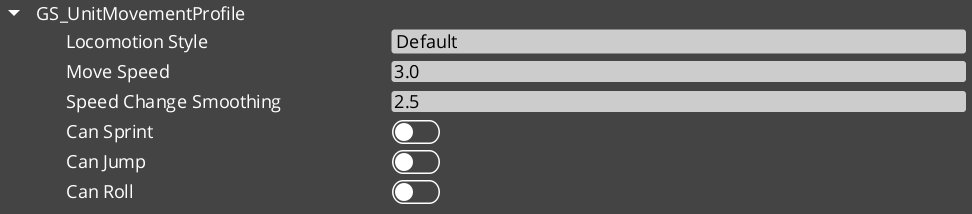
GS_UnitMovementProfile is a data asset that stores all locomotion parameters for a unit configuration: walk speed, run speed, acceleration, deceleration, air control, jump force, and any mover-specific values. The Mover Context component holds a reference to a profile asset, so multiple prefabs can share the same profile or each have their own without duplicating inline values.
Creating a Profile
- In the O3DE Asset Browser, right-click and select Create Asset → GS_UnitMovementProfile.
- Configure the parameters in the asset editor.
- Assign the asset to the Movement Profile slot on
GS_MoverContextComponent.
Changing a profile asset at runtime allows you to alter all locomotion parameters at once — for example, switching a character between normal and encumbered movement profiles without touching individual component properties.
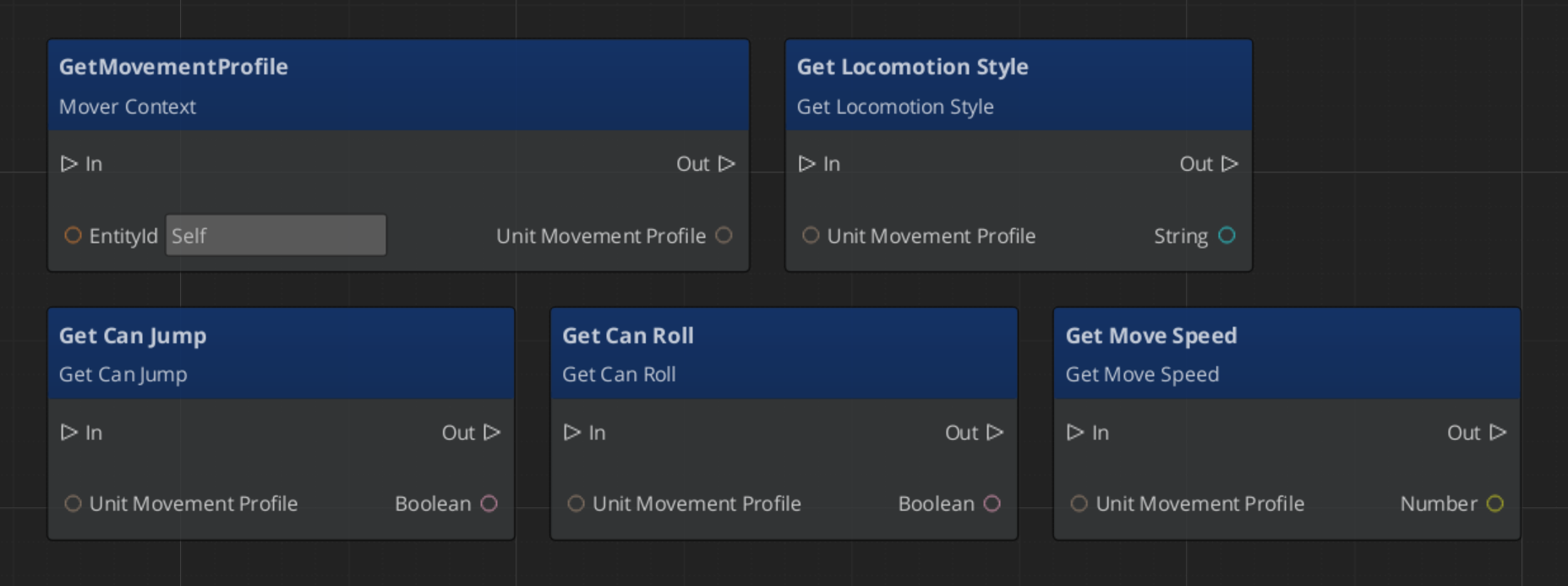
Reading Movement Profile Data - ScriptCanvas
Influence Fields
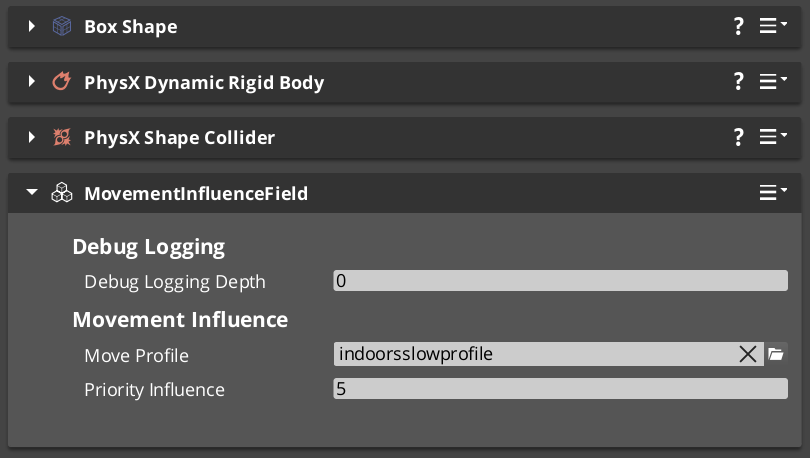
Influence components dynamically apply priority that change a units dominant movement profile. Priority values are additive — a unit accumulates priority values from all active sources and evaluate the final priority to determine the acting movement profile.
| Component | Scope | Typical Use |
|---|
GlobalMovementInfluenceComponent | All units globally | Standard movement for the region. |
MovementInfluenceFieldComponent | Units inside a spatial volume | Open fields, narrow channels, indoors and outdoors transitions. |
GlobalMovementInfluenceComponent is placed once in the level, usually on the Stage Data entity. MovementInfluenceFieldComponent uses a shape component to define its volume — place one wherever you need to change movement priority.
Assembly Guide
A typical ground-bound player character uses this component combination:
| Component | Role |
|---|
GS_InputDataComponent | Holds input state — movement vector written here each frame. |
GS_PlayerControllerInputReaderComponent | Reads input profile and fills GS_InputDataComponent. |
KeyboardMovement_InputReactorComponent | Converts keyboard input to movement vector. |
JoyAxisMovement_AxisReactorComponent | Converts joystick input to movement vector. |
GS_PhysicsRayGrounderComponent | Detects ground contact below the character. |
GS_MoverContextComponent | Coordinates grounders and movers, holds the Movement Profile. |
GS_3DSlideMoverComponent | Moves the character along the contact surface. |
A flying or swimming character replaces the grounder and slide mover with GS_3DFreeMoverComponent and removes the grounder entirely.
Quick Reference
| Need | Component | Notes |
|---|
| Free 3D movement (fly / swim) | GS_3DFreeMoverComponent | No ground contact required. |
| Surface-hugging ground movement | GS_3DSlideMoverComponent | Smooth contact on slopes and steps. |
| Physics-simulated movement | GS_PhysicsMoverComponent | Full rigid body collision response. |
| Coordinate movers and state | GS_MoverContextComponent | Required on any unit with movers. |
| Raycast ground detection | GS_PhysicsRayGrounderComponent | Used with slide and physics movers. |
| Shared locomotion parameters | GS_UnitMovementProfile (asset) | Referenced by GS_MoverContextComponent. |
| Global force on all units | GlobalMovementInfluenceComponent | Standard movement values. |
| Localized force in a volume | MovementInfluenceFieldComponent | Narrow paths, roughage, indoors to outdoors. |
Glossary
| Term | Meaning |
|---|
| Mover | A component that defines one locomotion behavior (free flight, surface sliding, physics-driven) |
| Mover Context | The coordinator that tracks movement state and selects the active mover each frame |
| Grounder | A component that detects surface contact and reports ground state to the Mover Context |
| Movement Profile | A data asset storing all locomotion parameters (speed, acceleration, jump force) for a unit |
| Influence Field | A component that applies additive priority to a units active movement profile |
For full definitions, see the Glossary.
See Also
For the full API, component properties, and C++ extension guide:
For related systems:
Get GS_Unit
GS_Unit — Explore this gem on the product page and add it to your project.