The Input Data system is the pipeline that converts raw hardware signals into structured intent your movement code can consume. It sits between the active input profile and the mover stack, so controllers, movement components, and action systems all read from a single consistent source rather than polling hardware directly. Swapping input profiles at runtime — for remapping, controller switching, or accessibility options — requires no change to any downstream component.
For architecture details, component properties, and extending the system in C++, see the Framework API reference.
Contents
- Pipeline Overview
- Input Data Component
- Input Reader
- Input Reactors
- Adding Custom Reactors
- Quick Reference
- Glossary
- See Also
Pipeline Overview
Breakdown
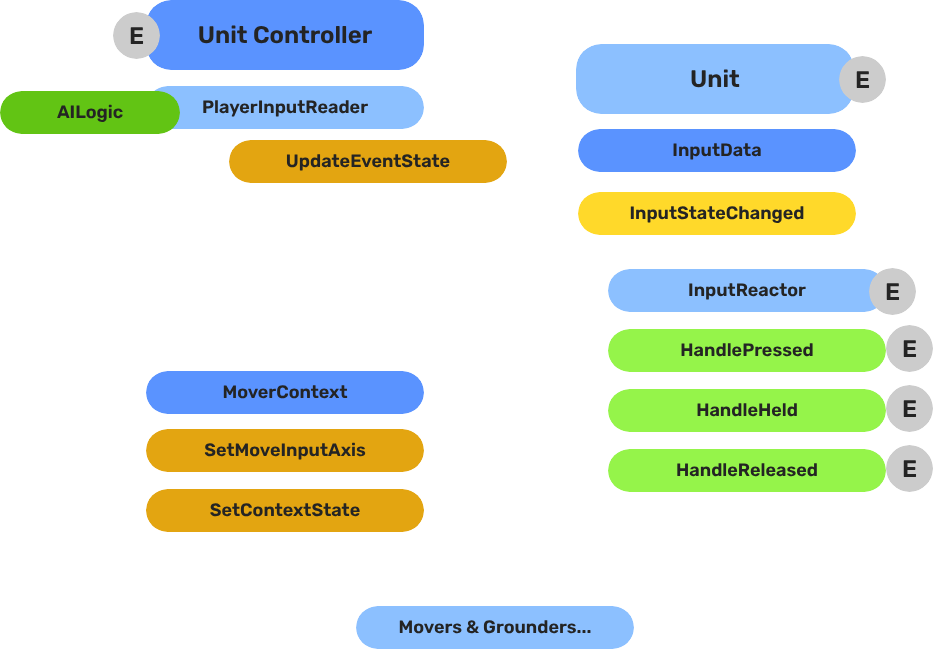
The input pipeline has three stages. Each stage is a separate component on the unit entity, and they run in order every frame:
| Stage | Component | What It Does |
|---|---|---|
| 1 — Read | GS_PlayerControllerInputReaderComponent | Reads raw input events from the active input profile and writes them into GS_InputDataComponent. |
| 2 — Store | GS_InputDataComponent | Holds the current frame’s input state — button presses, axis values — as structured data. |
| 3 — React | The Input Reactor component | Classifies the event’s phase and dispatches it to the reaction types in its profile, which produce intent. |
All reactor components downstream of the store stage read from the same GS_InputDataComponent, so there is no duplicated hardware polling and no risk of two reactors seeing different input states for the same frame.
- The Basics: Controllers — Possession, input routing, and controller assignment.
- The Basics: Core Input — Input profiles, action mappings, and options setup.
- The Basics: Unit Input — Input readers, axis configuration, and ScriptCanvas usage.
- Framework API: Unit Controllers — Controller components, possession API, and C++ extension.
- Framework API: Input Reader — Profile binding, action event reading, and C++ extension.
- Framework API: Unit Input Reactors — the shipped reaction types and their fields.
- Framework API: Input Reactors — the mechanism, profiles, phases and writing your own.
- Framework API: Mover Context — Context state, mode authority, and C++ extension.
Input Data Component
GS_InputDataComponent is the shared state store. It does not read hardware — it only holds the values written by the Reader and consumed by Reactors.
Add it to any unit entity that needs to process input. A unit should have exactly one GS_InputDataComponent. All input reactors on the same entity read from it automatically.
Input Reader
GS_PlayerControllerInputReaderComponent connects the unit to the game’s active input profile. It receives input events from the profile and writes the resulting state into the unit’s GS_InputDataComponent each frame.
When the player controller possesses the unit, the reader activates. When the unit is depossessed or control is handed to an AI controller, the reader goes silent and the Input Data component retains its last-written state until overwritten.
Setup
Add GS_PlayerControllerInputReaderComponent to the unit entity alongside GS_InputDataComponent. No additional configuration is required — it picks up the active input profile automatically.
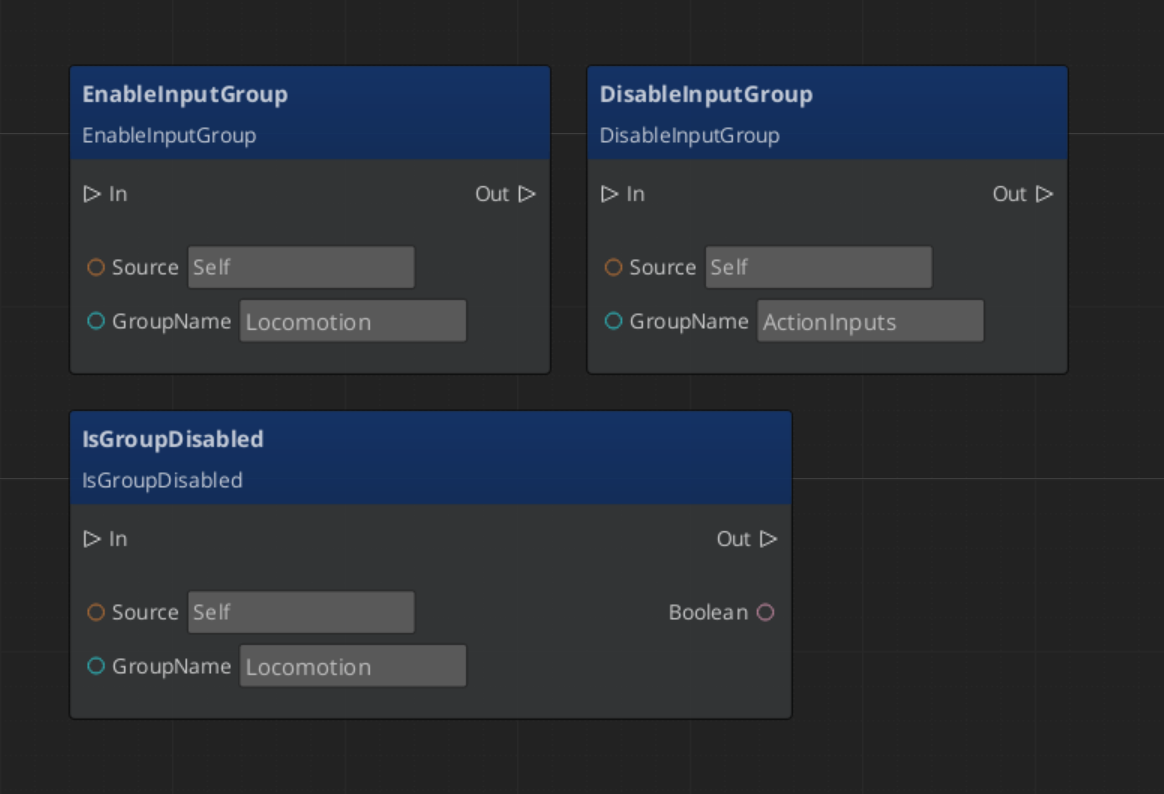
Script Canvas - Enabling and Disabling Input Groups
Input Reactors
Reactors turn named input events into movement intent. They are a GS_Core mechanism — your unit carries an Input Reactor component holding a reactor profile asset, and the profile lists the reactions that unit has.
GS_Unit ships three reaction types:
| Reactor type | What it does |
|---|---|
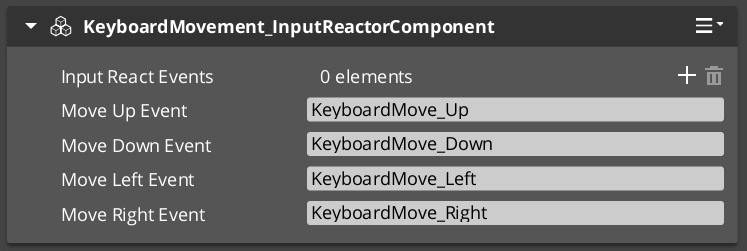
| KeyboardMovement_InputReactor | Four directional events to movement. Releasing one direction while holding the opposite re-routes rather than stopping. |
| JoypadMovement_InputReactor | Two analog stick axes to movement, so how far you push is how fast you go. |
| Jump_InputReactor | Sets the jump state on press, clears it on release. |
Each one has editable event name fields, which must match the event names in your input profile.
A typical player unit has all three in one profile. The keyboard and joypad reactors coexist happily — they listen to different events, so the unit responds to whichever device the player picks up, with no separate prefabs.
Adding Custom Reactors
To handle input the shipped reactors do not cover — sprinting, interaction, ability activation — you have two options.
For one-off behaviour, listen instead of extending. The reactor component emits every event it dispatches on a notification bus, so a ScriptCanvas graph or another component on the unit can respond to "Interact" without any C++ at all.
For a reusable reaction, write a reactor type. Derive from the reactor base, declare which event names you listen to and what to do when they fire, and reflect it. It then appears in the reactor profile’s type dropdown alongside the shipped ones — there is nothing to register.
For the extension guide, see Framework API: Input Reactors.
Quick Reference
| Need | Component | Notes |
|---|---|---|
| Store input state on a unit | GS_InputDataComponent | Required on every unit that processes input. |
| Read from active input profile | GS_PlayerControllerInputReaderComponent | Activates automatically when player controller possesses. |
| Keyboard → movement vector | KeyboardMovement_InputReactorComponent | Reads WASD / arrow keys from input data. |
| Joystick → movement vector | JoyAxisMovement_AxisReactorComponent | Reads axis pair, applies deadzone and scale. |
| Custom button or axis handler | Extend GS_InputReactorComponent (C++) | Reads from GS_InputDataComponent same as built-ins. |
| Inspect movement vector | GS_InputDataComponent → GetMovementVector | Vector3, current frame’s movement intent. |
Glossary
| Term | Meaning |
|---|---|
| Input Data Component | The shared state store that holds the current frame’s input values for a unit |
| Input Reader | The component that reads raw input events from the active input profile and writes them into the Input Data Component |
| Input Reactor | A component that reads from the Input Data Component and produces intent values (movement vectors, action triggers) |
| Movement Vector | A normalized 3D direction produced by input reactors and consumed by movers |
For full definitions, see the Glossary.
See Also
For the full API, component properties, and C++ extension guide:
For related systems:
Get GS_Unit
GS_Unit — Explore this gem on the product page and add it to your project.