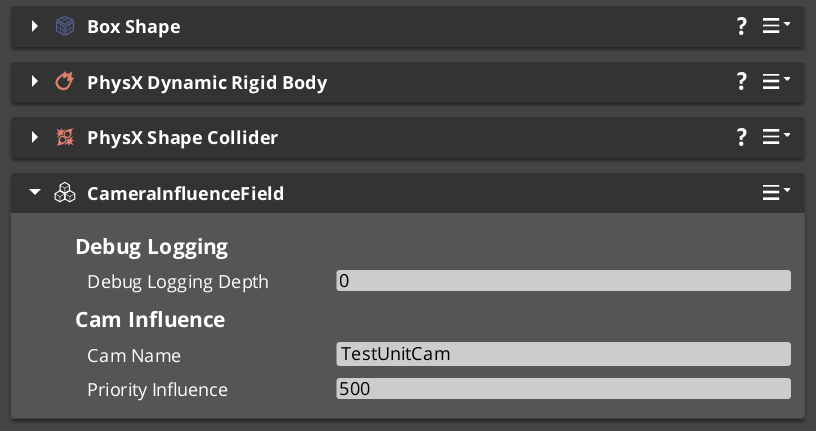
Influence Fields modify the effective priority of Phantom Cameras without changing their base priority values. Two types are available: global components that apply for their entire active lifetime, and spatial components that apply only while an entity is inside a PhysX trigger volume.
In multi-player / multi-channel projects, the spatial form is channel-aware — the influence is routed to the channel that owns the entity that triggered it, so player 1 walking into a field does not affect player 2’s cameras.
For step-by-step composition recipes (boost a cam inside a room, always-on cinematic boost), see the recipes collection.
Influence Field Configurations (Recipes) API
For component properties, the bus signature, and C++ extension guide, see the Framework API reference.
Contents
Types of Influence Fields
| Component | Scope | When it applies |
|---|---|---|
GlobalCameraInfluenceComponent | Global | Active for the component’s entire lifetime. Typically placed on the StageData entity so the influence is scoped to a level. |
CameraInfluenceFieldComponent | Spatial | Active while an entity (typically a player) is inside the field’s PhysX trigger volume. Channel-aware. |
Both use a CamInfluenceData record to describe what they modify (camera name + influence magnitude). Multiple fields can be active simultaneously — their effects stack additively.
Priority Stacking
When multiple influences are active on the same camera within a channel, their values sum with the cam’s base priority. This lets you build layered authoring:
- A general fallback priority on the cam itself.
- A stage-wide global influence that boosts a cinematic cam for the level.
- A spatial field that boosts further when the player enters a specific room.
The same cam gets base + global + spatial = effective priority during arbitration. Exiting the spatial field drops the spatial term; ending the stage drops the global term.
Channel Routing
The influence bus signature carries two entity arguments:
| Argument | Meaning |
|---|---|
sourceEntity | The field volume itself (the entity emitting the influence). Used as the per-channel storage key — multiple overlapping fields applied to the same channel don’t collide. |
targetEntity | The entity that triggered the influence (typically the player unit that walked into the trigger). Used as the routing key — the Cam Manager looks up which channel owns this entity. |
| Resolution result | Behavior |
|---|---|
| Target is bound to a channel | Influence is stored in that channel’s priority table. Only that channel’s arbitration sees the boost. |
| Target is not bound to any channel | Influence is silently dropped. |
This gives clean isolation between players in co-op. A CameraInfluenceFieldComponent triggered by player 1 only affects player 1’s cameras; player 2’s view is unaffected. It also gives natural behavior for non-player triggers — an enemy walking into a player-cam field doesn’t influence anything.
Global influence in multi-channel projects
GlobalCameraInfluenceComponent has no specific target. In multi-channel projects, the global form currently routes through channel 0 as a fallback. For per-channel global influences, author one Global component per channel that you want to affect.
Quick Reference
| Need | Component | How |
|---|---|---|
| Always-on priority boost for a level | GlobalCameraInfluenceComponent | Add to the StageData entity. Scopes the influence to the stage lifecycle. |
| Priority boost inside a spatial zone | CameraInfluenceFieldComponent | Add with a PhysX trigger collider. Entity entering the volume triggers the boost. |
| Per-player isolation in co-op | (automatic) | CameraInfluenceFieldComponent routes by the entity that crossed the trigger — only that entity’s channel sees the boost. |
| Multiple overlapping fields on the same cam | (automatic) | Each field is keyed by its source entity, so overlaps stack additively without colliding. |
Glossary
| Term | Meaning |
|---|---|
| Influence Field | A component that adjusts camera priority dynamically without modifying the cam’s base priority. |
| Priority Stacking | Influences sum with the base priority during arbitration — multiple active influences on the same cam add their values. |
| Global Influence | An unconditional priority modifier active for the component’s lifetime. |
| Spatial Influence | A volume-based modifier active while an entity is inside the PhysX trigger volume. |
| Source Entity | The field volume entity, used as the per-channel storage key. |
| Target Entity | The entity that triggered the influence, used as the routing key (channel lookup). |
For full definitions, see the Glossary.
See Also
Recipes:
- Influence Field Configurations — boost a cam inside a room, always-on cinematic boost.
Framework API:
- Camera Influence Fields — Framework API — bus signature, channel routing semantics, component reference.
Related basics pages:
- The Basics: Phantom Cameras — base cam priority authoring.
- The Basics: Cam Manager — manager lifecycle.
- The Basics: Channels & Instancing — multi-channel routing context.
- The Basics: Tug Fields — alternative spatial reposition system (different mechanism — modulates pose directly rather than priority).
Related utilities:
Get GS_PhantomCam
GS_PhantomCam — Explore this gem on the product page and add it to your project.