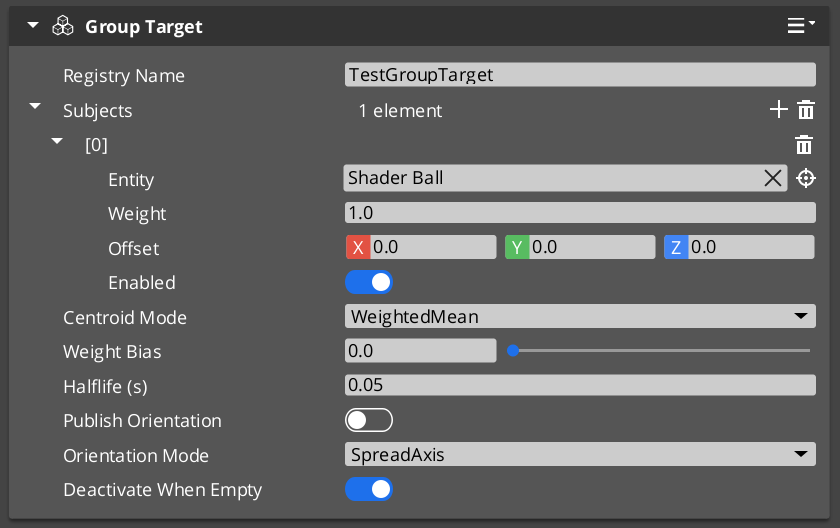
A Group Target is an entity whose world transform is the weighted centroid of a runtime-editable subject list. You point a camera at it like any other target, and the cam frames “where the group is” rather than chasing any single subject. The Cam Manager hosts a name-based registry so cameras can reference a group by string name without holding a direct entity reference.
For step-by-step composition recipes (two-player party cam, combat encounter frame, collapse to single view), see the recipes collection.
Group Target Configurations (Recipes) API
For the full per-field reference and the registry bus, see the Framework API reference.
Contents
Common Use Cases
| Use case | What you author | Recipe |
|---|---|---|
| Party / co-op cam frames all players | Group Target with one subject per player; cam uses GroupTarget mode. | Two-Player Party Cam |
| Combat encounter cam frames the fight | Group Target whose subjects are dynamically added / removed as combatants enter / leave. | Combat Encounter Frame |
| Cinematic “collapse to single view” trigger in split-screen | Group Target + a shared TrueUnique cam. When all channels’ rigs converge on the shared cam, UI receives a collapse signal. | Collapse to Single View |
| Aim ahead of a moving formation | Group Target on a moving leader’s “look-ahead” point with subjects weighted by formation position. | — |
Centroid Modes — Which One to Pick
| Mode | When to use it |
|---|---|
| WeightedMean (default) | Most cases. Each subject contributes by weight. Simple, predictable. |
| BoundingBoxCenter | When you want the framing point to track the extent of the group, not just the average position. With WeightBias = 0, the cam centers on the bounding-box midpoint; raising the bias blends toward the weighted mean. |
| BoundingSphereCenter | Same intent as bounding-box but spherical — useful when subjects are evenly distributed in all axes. |
The WeightBias slider (0..1) on the bbox / sphere modes lets you tune the geometric / weighted mix to taste:
| WeightBias | Effect |
|---|---|
| 0 | Pure geometric center (ignore weights). |
| 0.5 | Half geometric, half weighted. |
| 1 | Pure weighted mean (the bbox / sphere effectively ignored). |
Subject Management at Runtime
The full subject-management API is exposed on GroupTargetRequestBus (per-entity addressed by the group’s id). Common operations:
| Operation | Use |
|---|---|
AddSubject(entity, weight) | Add a subject. |
RemoveSubject(entity) | Remove a subject. |
SetSubjectWeight(entity, weight) | Adjust priority without removing. |
SetSubjectEnabled(entity, enabled) | Temporary include / exclude without removing — cheaper than Remove + Add since cadence rebind is skipped. |
ClearSubjects() | Remove all. |
SetCentroidMode(mode) | Swap mode at runtime — e.g. tighten framing when an encounter starts. |
SetSmoothingHalflife(halflife) | Tighten or loosen centroid response at runtime. |
Cadence (PhysX post-sim vs TickBus) is re-evaluated automatically whenever the subject list changes.
Pitfalls
Empty subject list with DeactivateWhenEmpty = false
If you author m_deactivateWhenEmpty = false and the subject list goes empty (all enemies dead, all players despawned), the group target’s centroid sits at world origin — cams pointed at it will swing to (0, 0, 0). Set the flag to its default true to fall back gracefully to hold-last-pose instead.
Group cam targeting the group’s own entity
If you accidentally add the group target entity itself to its own subject list, you create a feedback loop: the centroid moves toward where it already is, which moves it again, etc. Don’t.
Centroid lag on physics subjects
By default the component uses TickBus cadence. If your subjects are physics-driven and you see the cam lagging by a frame, the component should auto-detect this and switch to PhysX post-simulate cadence — but you can verify with IsEvaluatingPostSim() (returns true when post-sim is bound). If it’s stuck on TickBus, file a bug — the auto-detection should have triggered.
See Also
Recipes:
- Group Target Configurations — two-player party cam, combat encounter frame, collapse to single view.
Framework API:
- Group Targets — Framework API — full per-field reference, registry bus, evaluation algorithm.
- Phantom Cameras — Target Routing —
CamTargetMode::GroupTarget.
Related basics pages:
- The Basics: Channels & Instancing — collapse-to-single-view pattern.
- The Basics: Phantom Cameras — base cam authoring.
Get GS_PhantomCam
GS_PhantomCam — Explore this gem on the product page and add it to your project.