Performers
The character rendering entity types in GS_Performer — billboard 2.5D paper performers and fully-rigged 3D avatar performers.
Performers are the character entity types in GS_Performer. Each type defines how a character’s visual layer is structured and rendered — whether a flat sprite quad that rotates to face the camera, or a fully-rigged 3D mesh driven by EMotionFX. Choose the performer type that fits your character pipeline, then add Performer Features to layer in additional capabilities.
For component details and C++ extension, see the Framework API: Performers.
GS_Performer is in Early Development. Full support planned soon: 2026.
The Paper Performer is a billboard-based character type for 2.5D and top-down games. The PaperFacingHandlerComponent orients the entity’s sprite quad toward the active camera each frame, accounting for movement direction to prevent visual artifacts. It is the simplest performer type — lightweight, with no animation graph required.
Paper Performer
API
The Avatar Performer is the full 3D character pipeline. It drives a rigged EMotionFX actor and integrates with Skin Slots and the Velocity Locomotion Hook for a complete character presentation layer. Use this for characters with full 3D rigs, animation blend trees, and runtime equipment swapping.
Avatar Performer
API
See Also
For the full API, component properties, and C++ extension guide:
For related systems:
Get GS_Performer
GS_Performer — Explore this gem on the product page and add it to your project.
1 - Avatar Performer
How to work with GS_Play avatar performers — 3D pipeline, animation, equipment.
Avatar Performer Under Construction
Get GS_Performer
GS_Performer — Explore this gem on the product page and add it to your project.
2 - Paper Performer
How to work with GS_Play paper performers — billboard-style 2.5D character rendering with camera-aware facing.
The Paper Performer system provides billboard-style character rendering for 2.5D games. The Paper Facing Handler rotates sprite-based characters to always face the active camera while maintaining proper orientation relative to movement direction. This prevents the visual artifacts that occur when a flat sprite is viewed from the side.
For component properties and the facing algorithm, see the Framework API reference.
GS_Performer is in Early Development. Full support planned soon: 2026.
Contents
How It Works
The PaperFacingHandlerComponent is placed on any entity that uses sprite-based or flat-mesh character rendering. Each frame, it calculates the optimal facing direction based on:
- The active camera’s position (via CamCore notifications).
- The entity’s movement direction.
- Configurable facing rules.
The result is a character that always presents its front face to the camera without snapping or popping during movement direction changes.
Camera-Aware Variant
The CamCorePaperFacingHandlerComponent (in GS_Complete) extends the base paper facing with direct camera core integration. It listens to CamCoreNotificationBus for camera position updates, ensuring the facing calculation uses the exact camera state rather than a cached position.
Entity Configuration
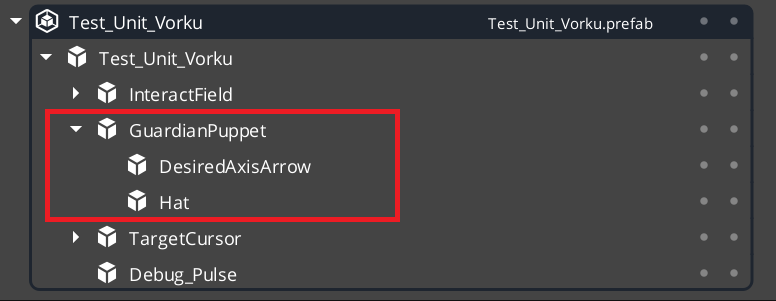
Note this has been put inside a GS_Unit prefab.
Glossary
| Term | Meaning |
|---|
| Paper Performer | A billboard-style character that always faces the camera for 2.5D rendering |
| Paper Facing Handler | The component that calculates optimal facing direction each frame |
For full definitions, see the Glossary.
See Also
For the full API, component properties, and C++ extension guide:
For related systems:
Get GS_Performer
GS_Performer — Explore this gem on the product page and add it to your project.