Performer Features
Universal capabilities that extend any performer type — modular equipment via skin slots, and velocity-driven animation via locomotion.
Performer Features are components that layer onto any performer entity, regardless of type. They are not tied to how a character is rendered — they extend what any performer can do. Skin Slots give any character modular equipment slots. Locomotion connects physics movement to the animation graph automatically.
For component details and C++ extension, see the Framework API: Performer Features.
GS_Performer is in Early Development. Full support planned soon: 2026.
Skin Slots
The Skin Slot system provides modular equipment and appearance management. Each PerformerSkinSlotComponent represents one equipment position on the character — helm, chest, weapon — holding a swappable actor mesh and material set. The SkinSlotHandlerComponent coordinates all slots on a character and supports preset profiles for NPC archetypes or full equipment sets.
Skin Slots
API
Locomotion
The Velocity Locomotion Hook connects entity movement to animation automatically. It reads the entity’s physics velocity each frame and writes blend parameters — speed and direction — directly into the EMotionFX animation graph, driving walk, run, idle, and fall transitions without manual state machine scripting.
Locomotion
API
See Also
For the full API, component properties, and C++ extension guide:
For related systems:
Get GS_Performer
GS_Performer — Explore this gem on the product page and add it to your project.
1 - Skin Slots
How to work with GS_Play skin slots — modular character appearance with swappable actor meshes and materials.
The Skin Slot system provides modular character appearance. Each slot represents an equipment position on a character (head, body, arms, weapon) and holds an actor mesh with its materials. The Skin Slot Handler manages the full collection of slots for a character, enabling runtime equipment swapping through data changes rather than entity restructuring.
For component properties and data structures, see the Framework API reference.
Contents
How It Works
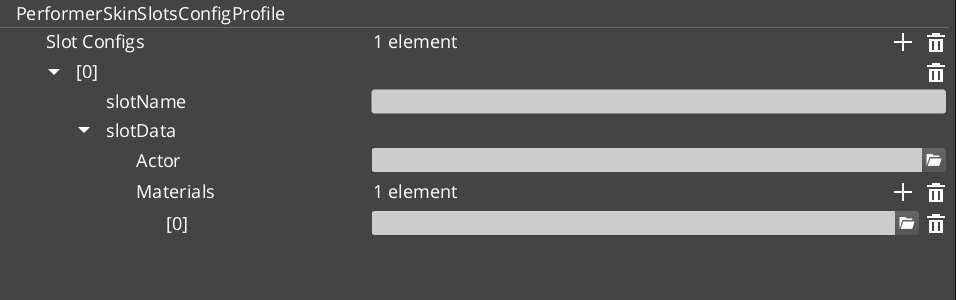
Each character entity has one SkinSlotHandlerComponent and multiple PerformerSkinSlotComponent children — one per equipment position.
| Component | What It Does |
|---|
| SkinSlotHandler | Manages the full set of skin slots for a character. Provides batch operations. |
| PerformerSkinSlot | Individual slot. Holds a SkinSlotData (actor asset + material assets). |
When you equip a new item, you update the slot’s SkinSlotData — the system swaps the actor mesh and materials automatically.
Skin Slot Data
| Field | What It Is |
|---|
| Actor Asset | The 3D mesh for this equipment slot. |
| Material Assets | Materials applied to the mesh. |
| Slot Name | Named identifier for the slot (e.g., “Helmet”, “Chest”, “MainHand”). |
Skin Slot Configuration Profiles are preset assets that define complete character appearances — useful for NPC archetypes or equipment sets.
Quick Reference
| Need | Bus | Method |
|---|
| Access a skin slot | PerformerSkinSlotRequestBus | Per-slot queries and updates |
| Manage all slots | SkinSlotHandlerRequestBus | Batch operations on all slots |
Glossary
| Term | Meaning |
|---|
| Skin Slot | An equipment position on a character that holds an actor mesh and materials |
| SkinSlotHandler | The manager component that coordinates all skin slots on a single character |
| SkinSlotData | The data structure containing actor asset, materials, and slot name |
| Skin Slot Configuration Profile | A preset asset defining a complete character appearance for batch application |
For full definitions, see the Glossary.
See Also
For the full API, component properties, and C++ extension guide:
For related systems:
Get GS_Performer
GS_Performer — Explore this gem on the product page and add it to your project.
2 - Locomotion
How to work with GS_Play velocity locomotion — automatic animation parameter driving from entity velocity.
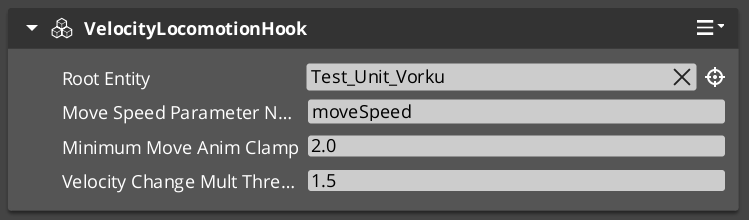
The Velocity Locomotion Hook automatically drives animation blend parameters from an entity’s velocity. Instead of manually scripting animation state transitions, you attach this component and it reads the entity’s physics velocity each frame, writing the appropriate blend values to the animation system.
For component properties, see the Framework API reference.
Contents
How It Works
The VelocityLocomotionHookComponent runs on the tick bus. Each frame it:
- Reads the entity’s current velocity from the physics system.
- Extracts speed, direction, and vertical velocity.
- Writes these as blend parameters to the entity’s EMotionFX animation graph.
This creates a seamless connection between movement and animation — walk, run, idle, and fall transitions happen automatically based on physics state.
When to Use
| Scenario | Result |
|---|
| Character walking | Speed parameter drives walk/run blend |
| Character idle | Zero velocity triggers idle state |
| Character falling | Vertical velocity drives fall animation |
| Character stopping | Deceleration naturally transitions to idle |
The component is stateless and lightweight — it reads velocity and writes parameters each frame with no internal state machine.
Glossary
| Term | Meaning |
|---|
| Velocity Locomotion Hook | A component that reads entity velocity and writes animation blend parameters each frame |
| Blend Parameter | A named value sent to the animation graph that controls state transitions and blending |
For full definitions, see the Glossary.
See Also
For the full API, component properties, and C++ extension guide:
For related systems:
Get GS_Performer
GS_Performer — Explore this gem on the product page and add it to your project.