GS_Performer
Character rendering and animation for GS_Play — modular skin slots, billboard 2.5D rendering, and velocity-driven locomotion parameters.
GS_Performer is the character presentation layer for GS_Play. It handles the visual side of any entity that needs to look like a character — whether that is a fully-rigged 3D mesh swapping equipment, a sprite-based billboard character, or an animated unit whose blend parameters track real movement velocity. GS_Performer sits above GS_Unit and GS_Core, consuming movement and game state events to keep visual output in sync with gameplay.
For architecture details, component properties, and extending the system in C++, see the GS_Performer API.
GS_Performer is in Early Development. Full support planned soon: 2026.
Quick Navigation
| I want to… | Feature | API |
|---|
| Manage registered performers or query them by name | Performer Manager | API |
| Swap equipment visuals at runtime with modular slot-based assets | Skin Slots | API |
| Render billboard-style 2.5D characters that face the camera correctly | Paper Performer | API |
| Drive animation blend parameters from entity velocity automatically | Locomotion | API |
Installation
GS_Performer requires GS_Core. EMotionFX and GS_Unit are optional dependencies for animation and velocity-driven locomotion.
For a full guided walkthrough, follow the Simple Project Setup guide.
Quick Installation Summary
- Enable the GS_Performer gem in your project configuration.
- Create a Performer Manager prefab and add it to the Game Manager’s Managers list.
- Place PerformerSkinSlotComponent and SkinSlotHandlerComponent on character entities.
- For 2.5D characters, add a PaperFacingHandlerComponent.
The Performer Manager is the singleton coordinator for all registered performers in the active scene. It follows the GS_Core manager pattern — spawned by the Game Manager, participates in standby, and is accessible globally via its request bus. Systems that need to enumerate or query active performers route through this component.
Performer Manager
API
Skin Slots
The Skin Slot system is the modular equipment and appearance layer for characters. Each PerformerSkinSlotComponent represents an equipment slot holding an actor asset and material overrides. The SkinSlotHandlerComponent manages the full collection for one character, providing batch operations and appearance-changed notifications. This makes character visual configuration composable rather than monolithic.
Skin Slots
API
The Paper Performer system provides billboard-style 2.5D character rendering. The PaperFacingHandlerComponent rotates the entity’s mesh to face the active camera each frame, accounting for movement direction to prevent visual artifacts from naive always-face-camera implementations. Custom facing logic can be substituted without modifying the core component.
Paper Performer
API
Locomotion
The Locomotion feature set connects an entity’s physical movement to its animation layer. The VelocityLocomotionHookComponent reads velocity from the physics system each tick and drives animation blend parameters — speed and direction — that EMotionFX or Simple Motion components consume. Animations stay tightly synchronized with gameplay movement without manual state machine scripts.
Locomotion
API
See Also
For the full API, component properties, and C++ extension guide:
For step-by-step project setup:
Get GS_Performer
GS_Performer — Explore this gem on the product page and add it to your project.
1 - Performer Manager
How to work with the GS_Play Performer Manager — performer registration and lifecycle.
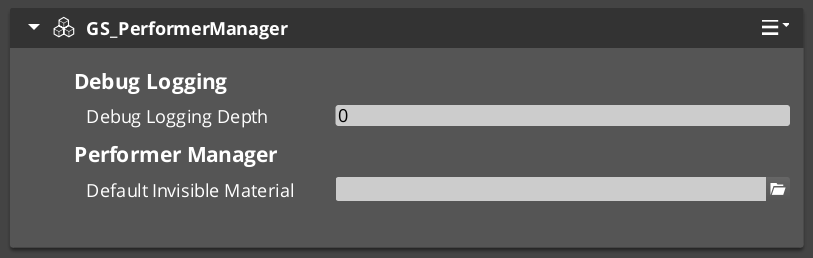
The Performer Manager is the singleton controller for the performer system. It tracks all active performers in the scene, handles registration and lookup, and responds to the Game Manager’s lifecycle events automatically.
For component properties and API details, see the Framework API reference.
Contents
How It Works
Performers register with the Performer Manager when they activate. The manager provides lookup by name so that other systems — dialogue, cinematics, AI — can find performers without maintaining their own references.
The Performer Manager responds to standby and shutdown broadcasts from the Game Manager, coordinating performer state across level transitions.
Quick Reference
| Need | Bus | Method |
|---|
| Query performer management | PerformerManagerRequestBus | Manager-level queries |
Glossary
| Term | Meaning |
|---|
| Performer | An entity that represents a character in the world with visual, animation, and interaction capabilities |
| Performer Manager | The singleton that tracks all active performers and provides lookup by name |
For full definitions, see the Glossary.
See Also
For the full API, component properties, and C++ extension guide:
For related systems:
Get GS_Performer
GS_Performer — Explore this gem on the product page and add it to your project.
2 - Performers
The character rendering entity types in GS_Performer — billboard 2.5D paper performers and fully-rigged 3D avatar performers.
Performers are the character entity types in GS_Performer. Each type defines how a character’s visual layer is structured and rendered — whether a flat sprite quad that rotates to face the camera, or a fully-rigged 3D mesh driven by EMotionFX. Choose the performer type that fits your character pipeline, then add Performer Features to layer in additional capabilities.
For component details and C++ extension, see the Framework API: Performers.
GS_Performer is in Early Development. Full support planned soon: 2026.
The Paper Performer is a billboard-based character type for 2.5D and top-down games. The PaperFacingHandlerComponent orients the entity’s sprite quad toward the active camera each frame, accounting for movement direction to prevent visual artifacts. It is the simplest performer type — lightweight, with no animation graph required.
Paper Performer
API
The Avatar Performer is the full 3D character pipeline. It drives a rigged EMotionFX actor and integrates with Skin Slots and the Velocity Locomotion Hook for a complete character presentation layer. Use this for characters with full 3D rigs, animation blend trees, and runtime equipment swapping.
Avatar Performer
API
See Also
For the full API, component properties, and C++ extension guide:
For related systems:
Get GS_Performer
GS_Performer — Explore this gem on the product page and add it to your project.
2.1 - Avatar Performer
How to work with GS_Play avatar performers — 3D pipeline, animation, equipment.
Avatar Performer Under Construction
Get GS_Performer
GS_Performer — Explore this gem on the product page and add it to your project.
2.2 - Paper Performer
How to work with GS_Play paper performers — billboard-style 2.5D character rendering with camera-aware facing.
The Paper Performer system provides billboard-style character rendering for 2.5D games. The Paper Facing Handler rotates sprite-based characters to always face the active camera while maintaining proper orientation relative to movement direction. This prevents the visual artifacts that occur when a flat sprite is viewed from the side.
For component properties and the facing algorithm, see the Framework API reference.
GS_Performer is in Early Development. Full support planned soon: 2026.
Contents
How It Works
The PaperFacingHandlerComponent is placed on any entity that uses sprite-based or flat-mesh character rendering. Each frame, it calculates the optimal facing direction based on:
- The active camera’s position (via CamCore notifications).
- The entity’s movement direction.
- Configurable facing rules.
The result is a character that always presents its front face to the camera without snapping or popping during movement direction changes.
Camera-Aware Variant
The CamCorePaperFacingHandlerComponent (in GS_Complete) extends the base paper facing with direct camera core integration. It listens to CamCoreNotificationBus for camera position updates, ensuring the facing calculation uses the exact camera state rather than a cached position.
Entity Configuration
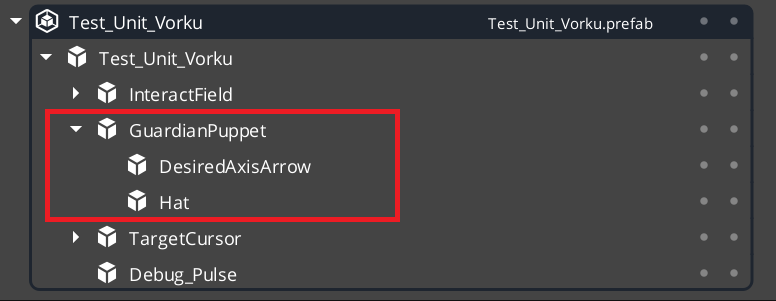
Note this has been put inside a GS_Unit prefab.
Glossary
| Term | Meaning |
|---|
| Paper Performer | A billboard-style character that always faces the camera for 2.5D rendering |
| Paper Facing Handler | The component that calculates optimal facing direction each frame |
For full definitions, see the Glossary.
See Also
For the full API, component properties, and C++ extension guide:
For related systems:
Get GS_Performer
GS_Performer — Explore this gem on the product page and add it to your project.
3 - Performer Features
Universal capabilities that extend any performer type — modular equipment via skin slots, and velocity-driven animation via locomotion.
Performer Features are components that layer onto any performer entity, regardless of type. They are not tied to how a character is rendered — they extend what any performer can do. Skin Slots give any character modular equipment slots. Locomotion connects physics movement to the animation graph automatically.
For component details and C++ extension, see the Framework API: Performer Features.
GS_Performer is in Early Development. Full support planned soon: 2026.
Skin Slots
The Skin Slot system provides modular equipment and appearance management. Each PerformerSkinSlotComponent represents one equipment position on the character — helm, chest, weapon — holding a swappable actor mesh and material set. The SkinSlotHandlerComponent coordinates all slots on a character and supports preset profiles for NPC archetypes or full equipment sets.
Skin Slots
API
Locomotion
The Velocity Locomotion Hook connects entity movement to animation automatically. It reads the entity’s physics velocity each frame and writes blend parameters — speed and direction — directly into the EMotionFX animation graph, driving walk, run, idle, and fall transitions without manual state machine scripting.
Locomotion
API
See Also
For the full API, component properties, and C++ extension guide:
For related systems:
Get GS_Performer
GS_Performer — Explore this gem on the product page and add it to your project.
3.1 - Skin Slots
How to work with GS_Play skin slots — modular character appearance with swappable actor meshes and materials.
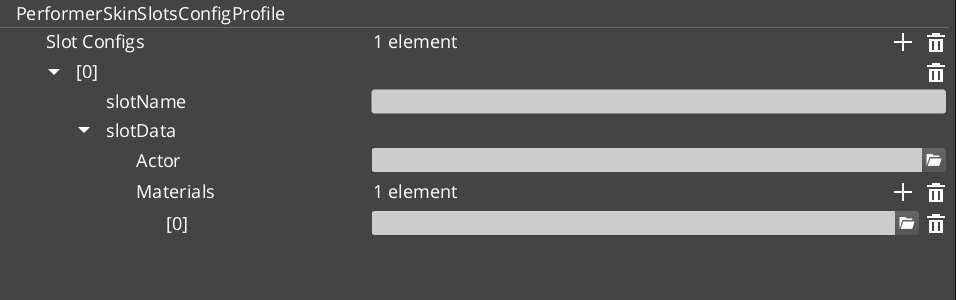
The Skin Slot system provides modular character appearance. Each slot represents an equipment position on a character (head, body, arms, weapon) and holds an actor mesh with its materials. The Skin Slot Handler manages the full collection of slots for a character, enabling runtime equipment swapping through data changes rather than entity restructuring.
For component properties and data structures, see the Framework API reference.
Contents
How It Works
Each character entity has one SkinSlotHandlerComponent and multiple PerformerSkinSlotComponent children — one per equipment position.
| Component | What It Does |
|---|
| SkinSlotHandler | Manages the full set of skin slots for a character. Provides batch operations. |
| PerformerSkinSlot | Individual slot. Holds a SkinSlotData (actor asset + material assets). |
When you equip a new item, you update the slot’s SkinSlotData — the system swaps the actor mesh and materials automatically.
Skin Slot Data
| Field | What It Is |
|---|
| Actor Asset | The 3D mesh for this equipment slot. |
| Material Assets | Materials applied to the mesh. |
| Slot Name | Named identifier for the slot (e.g., “Helmet”, “Chest”, “MainHand”). |
Skin Slot Configuration Profiles are preset assets that define complete character appearances — useful for NPC archetypes or equipment sets.
Quick Reference
| Need | Bus | Method |
|---|
| Access a skin slot | PerformerSkinSlotRequestBus | Per-slot queries and updates |
| Manage all slots | SkinSlotHandlerRequestBus | Batch operations on all slots |
Glossary
| Term | Meaning |
|---|
| Skin Slot | An equipment position on a character that holds an actor mesh and materials |
| SkinSlotHandler | The manager component that coordinates all skin slots on a single character |
| SkinSlotData | The data structure containing actor asset, materials, and slot name |
| Skin Slot Configuration Profile | A preset asset defining a complete character appearance for batch application |
For full definitions, see the Glossary.
See Also
For the full API, component properties, and C++ extension guide:
For related systems:
Get GS_Performer
GS_Performer — Explore this gem on the product page and add it to your project.
3.2 - Locomotion
How to work with GS_Play velocity locomotion — automatic animation parameter driving from entity velocity.
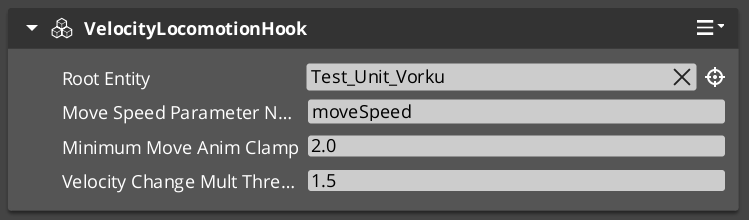
The Velocity Locomotion Hook automatically drives animation blend parameters from an entity’s velocity. Instead of manually scripting animation state transitions, you attach this component and it reads the entity’s physics velocity each frame, writing the appropriate blend values to the animation system.
For component properties, see the Framework API reference.
Contents
How It Works
The VelocityLocomotionHookComponent runs on the tick bus. Each frame it:
- Reads the entity’s current velocity from the physics system.
- Extracts speed, direction, and vertical velocity.
- Writes these as blend parameters to the entity’s EMotionFX animation graph.
This creates a seamless connection between movement and animation — walk, run, idle, and fall transitions happen automatically based on physics state.
When to Use
| Scenario | Result |
|---|
| Character walking | Speed parameter drives walk/run blend |
| Character idle | Zero velocity triggers idle state |
| Character falling | Vertical velocity drives fall animation |
| Character stopping | Deceleration naturally transitions to idle |
The component is stateless and lightweight — it reads velocity and writes parameters each frame with no internal state machine.
Glossary
| Term | Meaning |
|---|
| Velocity Locomotion Hook | A component that reads entity velocity and writes animation blend parameters each frame |
| Blend Parameter | A named value sent to the animation graph that controls state transitions and blending |
For full definitions, see the Glossary.
See Also
For the full API, component properties, and C++ extension guide:
For related systems:
Get GS_Performer
GS_Performer — Explore this gem on the product page and add it to your project.