GS_Interaction
Physics-based pulse events, proximity targeting with cursors, and data-driven world trigger zones.
GS_Interaction provides three independent but composable systems for making the world respond to entities. Pulsors broadcast typed events via physics volumes, the Targeting system finds and locks onto the best interactable in proximity with a cursor overlay, and World Triggers fire configurable responses from zones and conditions without requiring script code.
For architecture details, component properties, and extending the system in C++, see the GS_Interaction API.
Quick Navigation
| I want to… | Feature | API |
|---|
| Broadcast typed physics events from trigger volumes to receiving entities | Pulsors | API |
| Find and lock onto the best interactable entity in proximity with a cursor overlay | Targeting | API |
| Fire configurable responses from zones and conditions without scripting | World Triggers | API |
Installation
GS_Interaction requires GS_Core, LmbrCentral, LyShine, and CommonFeaturesAtom. Add all required gems to your project before placing Interaction components in a level.
For a full guided walkthrough, follow the Simple Project Setup guide.
Quick Installation Summary
- Enable the GS_Interaction gem in your project configuration.
- Configure physics collision layers for trigger volumes.
- Place Pulsor, Targeting, or World Trigger components on entities as needed.
Pulsors
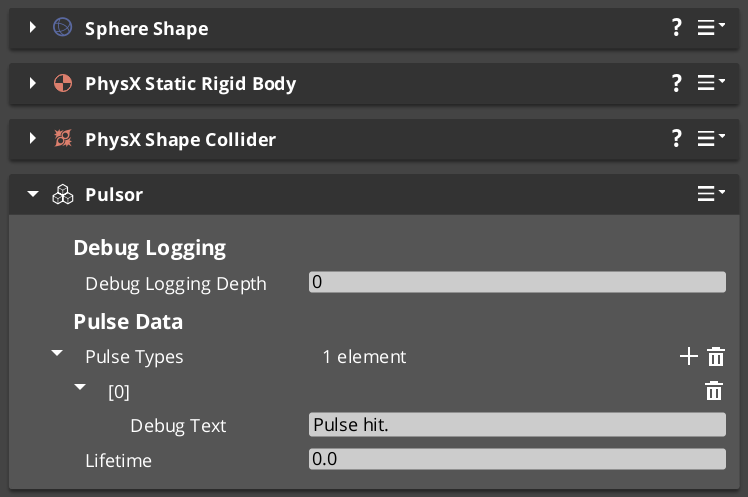
The Pulsor system is a physics-driven event broadcast layer. A PulsorComponent on any entity with a trigger collider emits a typed pulse event when another entity enters or exits that volume. PulseReactorComponents on the receiving entity listen for those events and respond. Pulse types are polymorphic and registered at runtime, so project-specific types can be added without modifying GS_Interaction.
Pulsors
API
Targeting
The Targeting system handles “which interactable entity is the player looking at or closest to right now?” A TargetingHandler on the player maintains a live registry of nearby targets, evaluates candidates on demand, and exposes the current target via bus events. Cursor components render a tracking reticle on screen that updates based on the selected target’s properties.
Targeting
API
World Triggers
World Triggers are a data-driven system for firing game responses when conditions are met, with no script boilerplate required. TriggerSensor components define the condition side (interact, collider overlap, record check), and WorldTrigger components define the response (set record, toggle entity, change stage, print log). The combination lets most interactive world objects be authored entirely in the editor.
World Triggers
API
See Also
For the full API, component properties, and C++ extension guide:
For step-by-step project setup:
Get GS_Interaction
GS_Interaction — Explore this gem on the product page and add it to your project.
1 - Pulsors
How to work with the GS_Interaction Pulsor system — emitting typed physics-based pulse events and reacting to them from scripts.
The Pulsor system is a physics-driven event broadcast layer. A PulsorComponent lives on any entity with a trigger collider and emits a typed pulse event when another entity enters or exits that volume. PulseReactorComponent instances on the receiving entity listen for those events and respond. Because pulse types are polymorphic and registered at runtime, you can define project-specific pulse types without modifying the Pulsor or Reactor components themselves.
For architecture details, component properties, and extending the system in C++, see the Framework API reference.
Contents
How Pulses Work
Breakdown
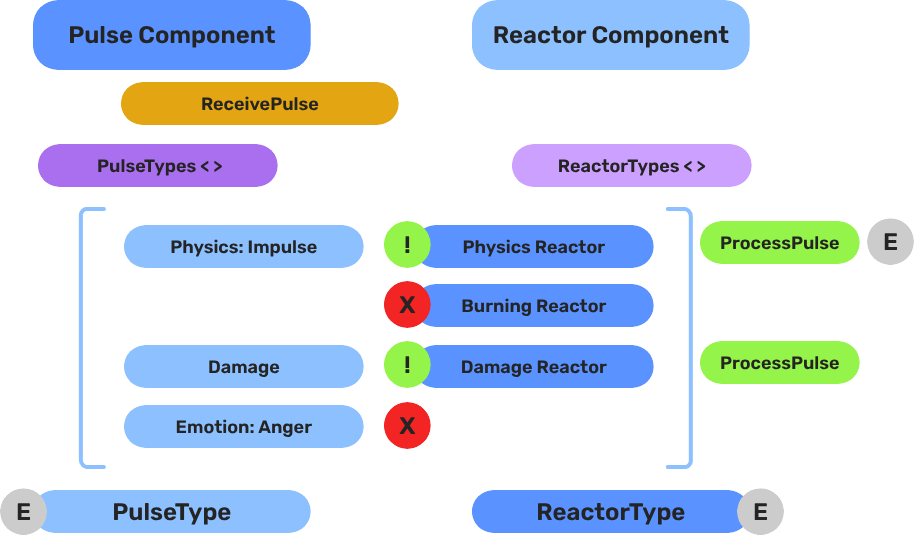
When a physics trigger fires, the PulsorComponent iterates all PulseReactorComponent instances on the entering entity and calls ReceivePulses() on each one that returns true from IsReactor() for the emitted pulse type. Each reactor independently decides whether it handles a given pulse, so multiple reactors on one entity can each respond to a different subset of pulse types without interfering with each other.
| Step | What Happens |
|---|
| 1 — Collider overlap | Physics system detects entity entering the Pulsor’s trigger volume. |
| 2 — Pulse emit | PulsorComponent reads its configured PulseType and prepares the event. |
| 3 — Reactor query | Each PulseReactorComponent on the entering entity is called with IsReactor() for that type. |
| 4 — Reaction | Reactors that return true have ReceivePulses() called and execute their response. |
E Indicates extensible classes and methods.
Patterns - Complete list of system patterns used in GS_Play.
Pulse Types
A pulse type is a class derived from the abstract PulseType base. It carries no payload — the type itself is the signal. Reactors match on type identity, so adding a new type automatically makes it distinct from all existing ones.
Built-In Pulse Types
| Type | Purpose |
|---|
Debug_Pulse | Test and development use. Logs or prints when received. |
Destruct_Pulse | Signals that the receiving entity should be destroyed or deactivated. |
Reactor Types
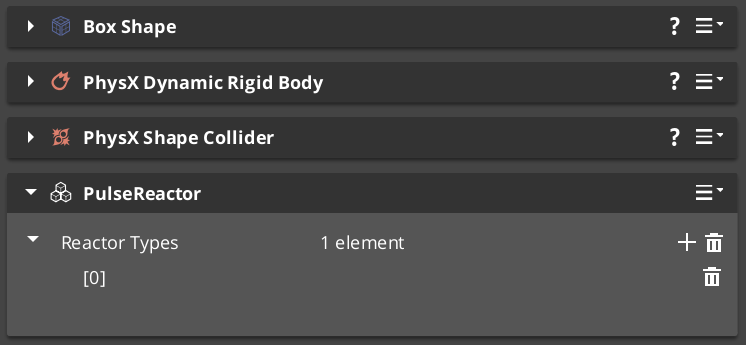
A reactor type is a class derived from the abstract ReactorType base. It defines what the receiving entity does when a matching pulse arrives. One entity can carry multiple reactors — one for each pulse type it needs to handle.
Built-In Reactor Types
| Type | Paired With | Behavior |
|---|
Debug_Reactor | Debug_Pulse | Outputs a debug message when it receives a matching pulse. |
Destructable_Reactor | Destruct_Pulse | Handles entity destruction or deactivation on pulse receipt. |
Extending with Custom Pulse Types
Custom pulse and reactor types are discovered automatically through O3DE serialization at startup. Any team or plugin can add new interaction semantics — damage types, pickup types, status effects — by extending the base class and reflecting it, without modifying GS_Interaction itself. Custom types appear automatically as options in the editor’s component property dropdowns and are available to all Pulsors and Reactors in the project.
For the full extension guide and C++ interface, see Framework API: Pulsors and Framework API: Pulses.
Components
| Component | Role | Key Bus |
|---|
PulsorComponent | Emits a typed pulse when its trigger volume fires. | — |
PulseReactorComponent | Receives pulses and executes a reaction if the type matches. | PulseReactorRequestBus (ById) |
ScriptCanvas Usage
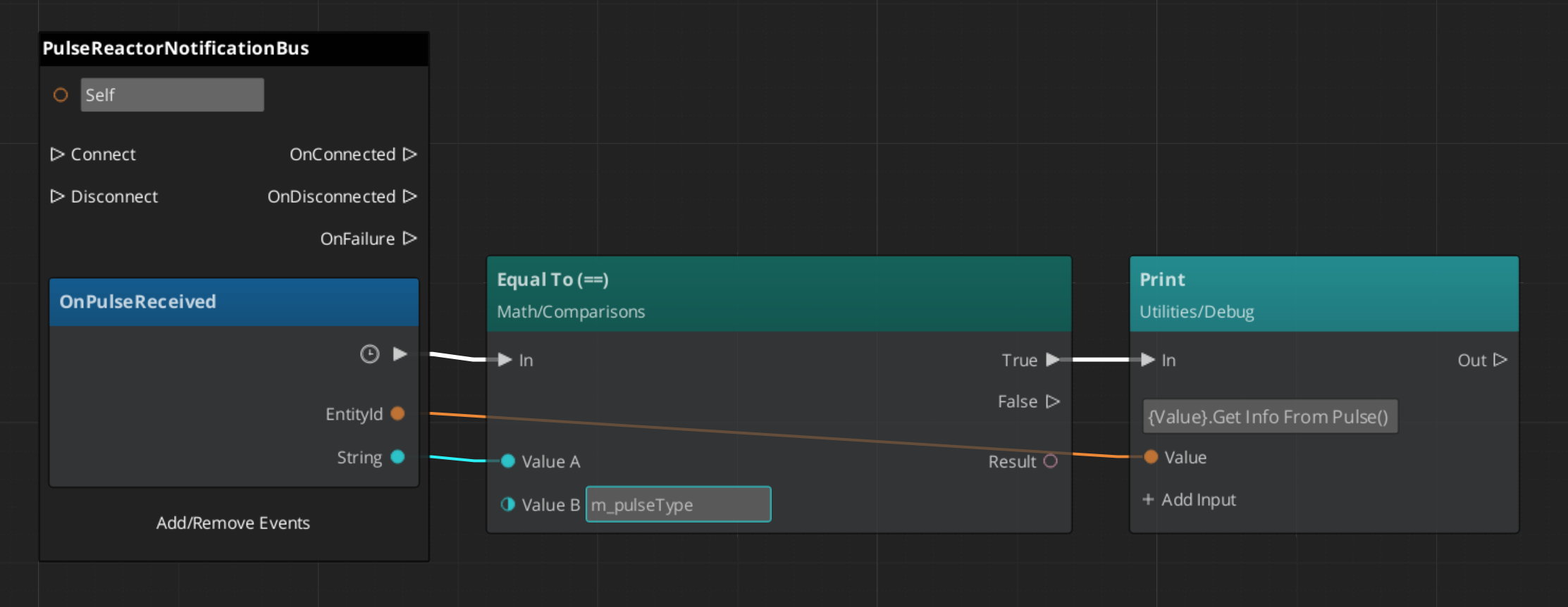
PulseReactorNotificationBus exposes the reactor’s state for script-driven queries. A common pattern is to wait for a Reactor to receive a pulse, then process its incoming data for your own pulse processing.
Quick Reference
| Need | Bus | Method |
|---|
| Check if entity handles a pulse type | PulseReactorRequestBus (ById) | IsReactor() |
| Manually trigger pulse processing | PulseReactorRequestBus (ById) | ReceivePulses() |
Glossary
| Term | Meaning |
|---|
| Pulsor | A component that emits a typed pulse event when its trigger volume fires |
| Pulse Reactor | A component that receives pulses and executes a response if the type matches |
| Pulse Type | A polymorphic class that identifies the kind of pulse being emitted |
For full definitions, see the Glossary.
See Also
For the full API, component properties, and C++ extension guide:
For related systems:
Get GS_Interaction
GS_Interaction — Explore this gem on the product page and add it to your project.
2 - Targeting
How to work with the GS_Interaction Targeting system — selecting interactable entities, managing cursor display, and handling interaction input from scripts.
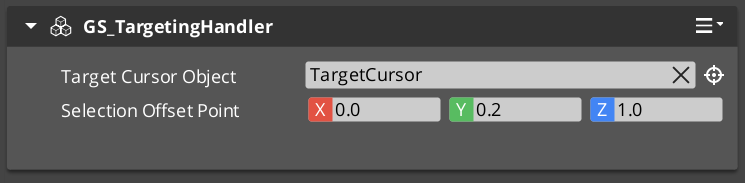
The Targeting system answers the question “which interactable entity should the player act on right now?” A GS_TargetingHandlerComponent on the player maintains a live registry of nearby targets. Proximity detection volumes populate that registry automatically as the player moves. When the handler evaluates candidates, it selects the best target and broadcasts the result so the cursor layer and any downstream logic stay in sync.
For architecture details, component properties, and extending the system in C++, see the Framework API reference.
Contents
How Targeting Works
The targeting pipeline runs across four layers — proximity detection, target registration, target selection, and cursor display. Each layer is a separate component so they can be mixed and matched for different entity configurations.
| Layer | Component | What It Does |
|---|
| Proximity detection | GS_TargetingInteractionFieldComponent | Physics trigger volume on targetable entities. Registers and unregisters with the handler as the player enters and exits range. |
| Target data | GS_TargetComponent / GS_InteractTargetComponent | Defines the target’s visual properties — size, spatial offset, colour, and sprite. |
| Target selection | GS_TargetingHandlerComponent | Maintains the candidate list, evaluates it, and exposes the selected target via GetInteractTarget. |
| Cursor display | GS_CursorComponent + GS_CursorCanvasComponent | Reads the selected target’s visual properties and renders a cursor on screen or in world space. |
Target Components
GS_TargetComponent is the base marker that makes an entity targetable. It carries four properties the cursor layer reads to display correctly:
| Property | Purpose |
|---|
| Size | How large the targeting cursor appears over this entity. |
| Offset | Spatial offset from the entity’s origin, used to position the cursor at a sensible point (e.g. centre of a character’s torso). |
| Colour | Tint applied to the cursor sprite when this target is selected. |
| Sprite | The cursor image to display for this target. |
GS_InteractTargetComponent extends GS_TargetComponent with specialised interaction semantics. Use it for any entity that can be interacted with via the InteractInputReaderComponent.
Targeting Handler
The GS_TargetingHandlerComponent is the central coordinator. It tracks all currently-registered candidates and determines which one is the best target at any given moment.
Notifications
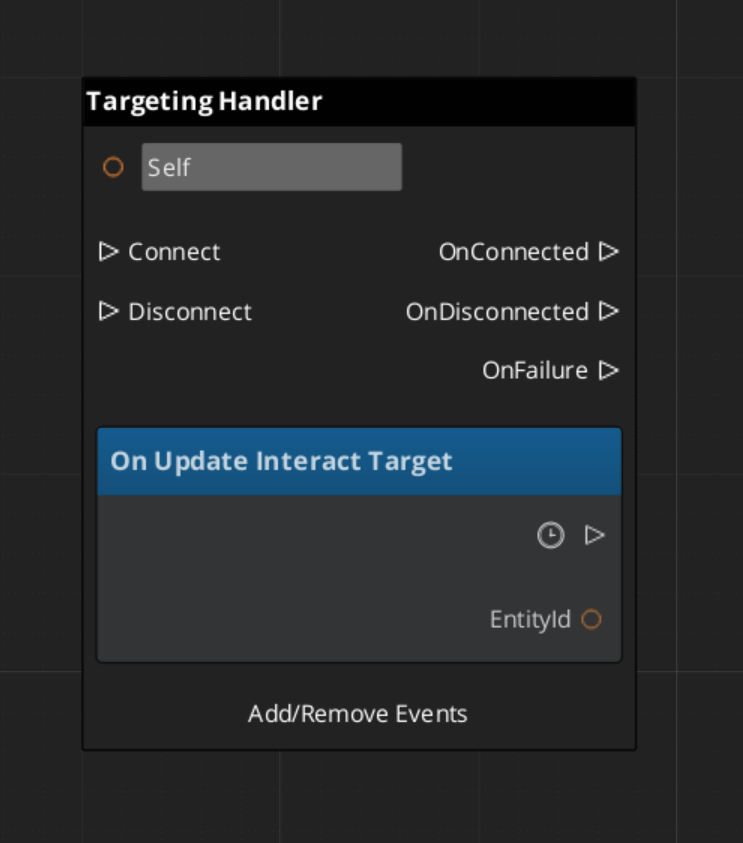
Subscribe to GS_TargetingHandlerNotificationBus to react to targeting state changes:
| Notification | When It Fires |
|---|
OnUpdateInteractTarget | The selected target has changed. Payload is the new target entity id (or invalid if none). |
OnEnterStandby | The targeting handler has suspended evaluation (e.g. during a cutscene or level transition). |
OnExitStandby | The targeting handler has resumed evaluation. |
ScriptCanvas — Listening for Target Changes
ScriptCanvas — Querying the Current Target
Interaction Fields
GS_TargetingInteractionFieldComponent is a physics trigger volume placed on targetable entities. When the player’s collider overlaps the field, it calls RegisterTarget on the handler. When the player leaves, it calls UnregisterTarget. The handler never has to poll — the field layer pushes updates automatically.
The field’s volume shape (sphere, box, capsule) determines the interaction range independently of the entity’s visual or physics collision bounds, so you can have a large detection range with a small visible object.
Cursor System
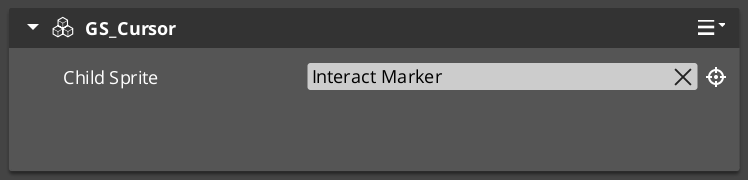
The cursor layer visualizes the current target selection on screen. It is composed of two components that work together:
| Component | Bus | Role |
|---|
GS_CursorComponent | GS_CursorRequestBus (Single) | Global cursor coordinator. Manages canvas registration, visibility, offset, and position. |
GS_CursorCanvasComponent | GS_CursorCanvasRequestBus (ById) | Per-canvas cursor. Renders the sprite and responds to hide/show instructions. |
ScriptCanvas — Cursor Control
[GS_CursorRequestBus → SetCursorVisuals]
    └─► Updates the sprite and colour from the selected target's properties.

[GS_CursorRequestBus → SetCursorPosition]
    └─► Moves the cursor to track the target's world position.

[GS_CursorRequestBus → HideCursor]
    └─► Hides the cursor when no target is selected or targeting is suspended.
UI Cursor Canvas

A LyShine ui canvas that pairs with the in-world CursorComponent.
The cursor canvas applies visuals to the UI image in behalf of the targeting system.
InteractInputReaderComponent extends GS_Core::GS_InputReaderComponent to map raw button input to interaction events.
Place it on the same entity as the GS_TargetingHandlerComponent. When the player presses the configured interact button, the reader fires an event the handler can act on to confirm the current selection or trigger the target’s interact action.
This keeps input handling decoupled from targeting logic — you can swap input mappings or replace the reader component without touching the handler.
Quick Reference
| Need | Bus | Method / Event |
|---|
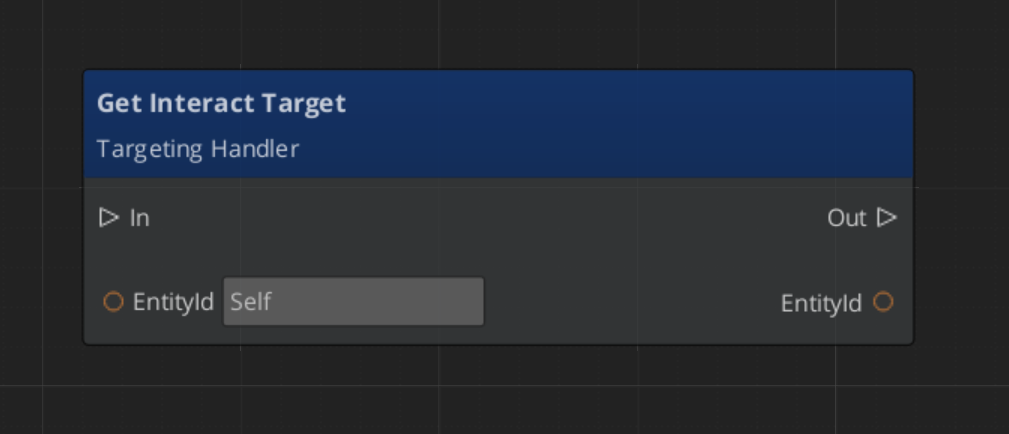
| Get the current target | GS_TargetingHandlerRequestBus (ById) | GetInteractTarget |
| Manually register a target | GS_TargetingHandlerRequestBus (ById) | RegisterTarget |
| Manually unregister a target | GS_TargetingHandlerRequestBus (ById) | UnregisterTarget |
| Know when the target changes | GS_TargetingHandlerNotificationBus (ById) | OnUpdateInteractTarget |
| Know when targeting suspends | GS_TargetingHandlerNotificationBus (ById) | OnEnterStandby |
| Know when targeting resumes | GS_TargetingHandlerNotificationBus (ById) | OnExitStandby |
| Hide the cursor | GS_CursorRequestBus | HideCursor |
| Update cursor position | GS_CursorRequestBus | SetCursorPosition |
| Update cursor appearance | GS_CursorRequestBus | SetCursorVisuals |
Glossary
| Term | Meaning |
|---|
| Targeting Handler | The coordinator component on the player that maintains the candidate list and selects the best target |
| Interaction Field | A physics trigger volume on a targetable entity that registers/unregisters with the handler automatically |
| Target Component | A marker component that makes an entity targetable with visual properties for the cursor |
| Cursor | The visual overlay that tracks the selected target on screen or in world space |
For full definitions, see the Glossary.
See Also
For the full API, component properties, and C++ extension guide:
For related systems:
Get GS_Interaction
GS_Interaction — Explore this gem on the product page and add it to your project.
3 - World Triggers
How to work with the GS_Interaction World Trigger system — configuring sensor types and trigger types to create event-driven world responses without scripting.
World Triggers are a data-driven system for firing game responses when conditions are met. A TriggerSensorComponent defines the condition side — physics overlap, player interact, record check. A WorldTriggerComponent defines the response side — changing stage, toggling an entity, writing a record, logging a message. Each component holds an array of polymorphic type objects, so any combination of conditions and responses can be composed on a single entity without scripting.
For architecture details, component properties, and extending the system in C++, see the Framework API reference.
Contents
How World Triggers Work
Breakdown
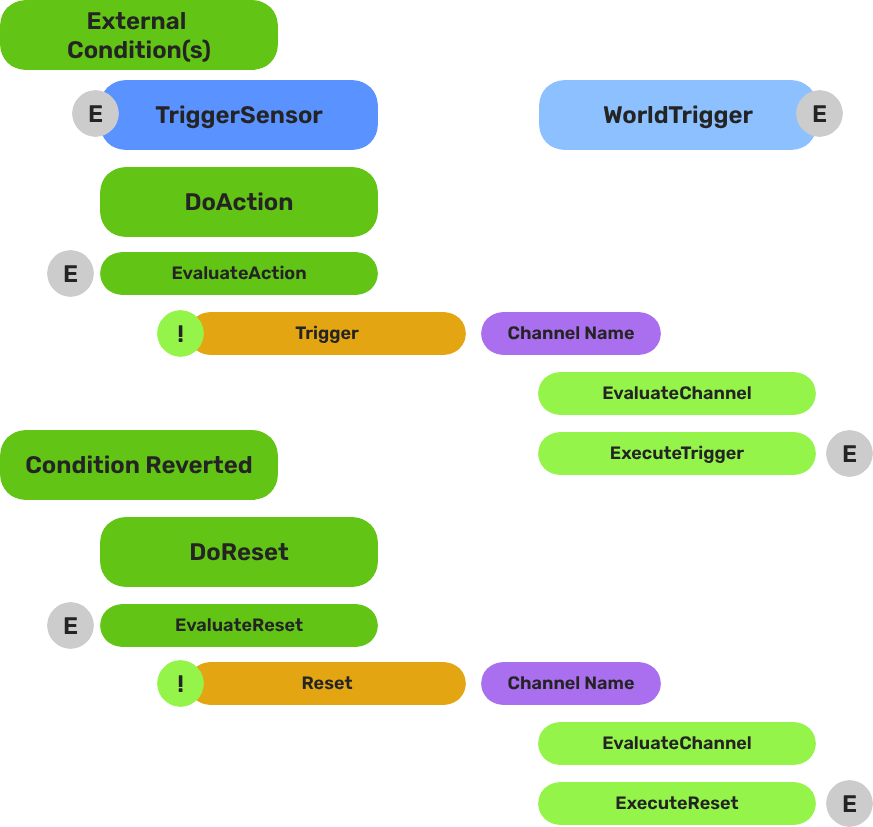
Each trigger is split into two container components. Logic lives in type objects held by each component:
| Part | Role |
|---|
| TriggerSensorComponent | Holds andConditions and orConditions arrays of TriggerSensorType objects. When conditions pass, fires WorldTriggerRequestBus::Trigger on the same entity. |
| WorldTriggerComponent | Holds a triggerTypes array of WorldTriggerType objects. On Trigger(), calls Execute() on every type. On Reset(), calls OnReset(). |
You can add any mix of sensor types and trigger types — for example, a door that requires both a physics overlap AND a record flag (andConditions) before it opens (TriggerType_ToggleEntities), then sets a quest record (TriggerType_SetRecord).
E Indicates extensible classes and methods.
Patterns - Complete list of system patterns used in GS_Play.
Sensor Types
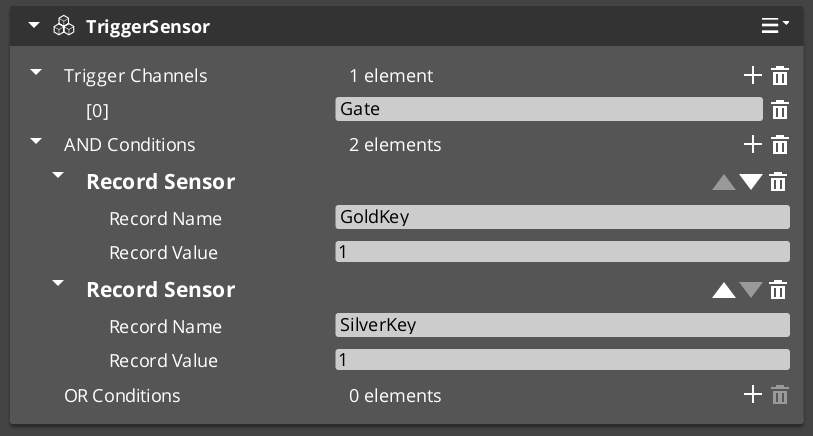
Add sensor types to the andConditions or orConditions arrays on a TriggerSensorComponent. The four built-in types cover the most common condition patterns:
| Sensor Type | Condition | Notes |
|---|
SensorType_Interact | Any unit with targeting interacts with this entity. | Requires GS_TargetComponent or GS_InteractTargetComponent on the entity. |
SensorType_PlayerInteract | The player-controlled unit specifically interacts with this entity. | Extends SensorType_Interact; filters to entities with the "Player" tag. |
SensorType_Collider | A physics collider enters the entity’s trigger volume. | Automatically activates a PhysicsTriggerComponent — no manual setup needed. |
SensorType_Record | A game record reaches a configured value. | Connects to RecordKeeper automatically; fires without polling. |
Trigger Types
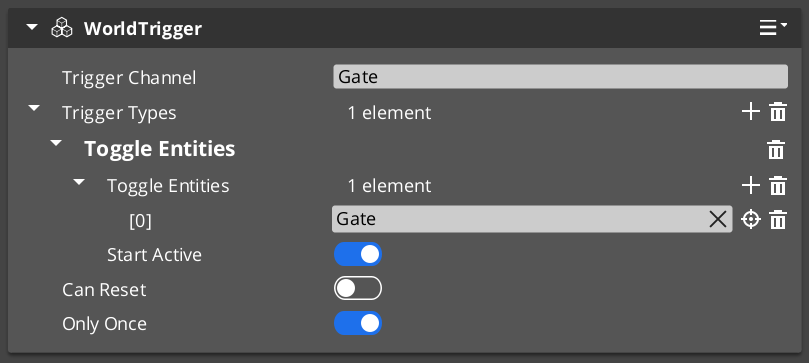
Add trigger types to the triggerTypes array on a WorldTriggerComponent. The four built-in types handle the most common response patterns:
| Trigger Type | Response | Notes |
|---|
TriggerType_PrintLog | Prints a message to the development log. | Development and debugging use. |
TriggerType_SetRecord | Writes a value to the Record Keeper by name. | Useful for setting quest flags, unlock states, or counters. |
TriggerType_ToggleEntities | Enables or disables referenced entities. Seeds initial state at startup via startActive. | Works with any entity in the level — doors, pickups, blockers. |
TriggerType_ChangeStage | Transitions the game to a different stage (level). | Queued on next tick; coordinates with Stage Manager automatically. |
Reset and Re-Arming
Calling Reset() on WorldTriggerRequestBus calls OnReset() on every trigger type in the component. Each type can reverse its effect or prepare for re-activation:
TriggerType_ToggleEntities inverts entity states on both Execute and OnReset, enabling toggle behavior.- Switches that cycle on repeat interaction.
- Area triggers that fire each time a player re-enters.
- Multi-step sequences where earlier steps re-arm later ones.
ScriptCanvas Usage
WorldTriggerRequestBus exposes both core methods directly to scripts:
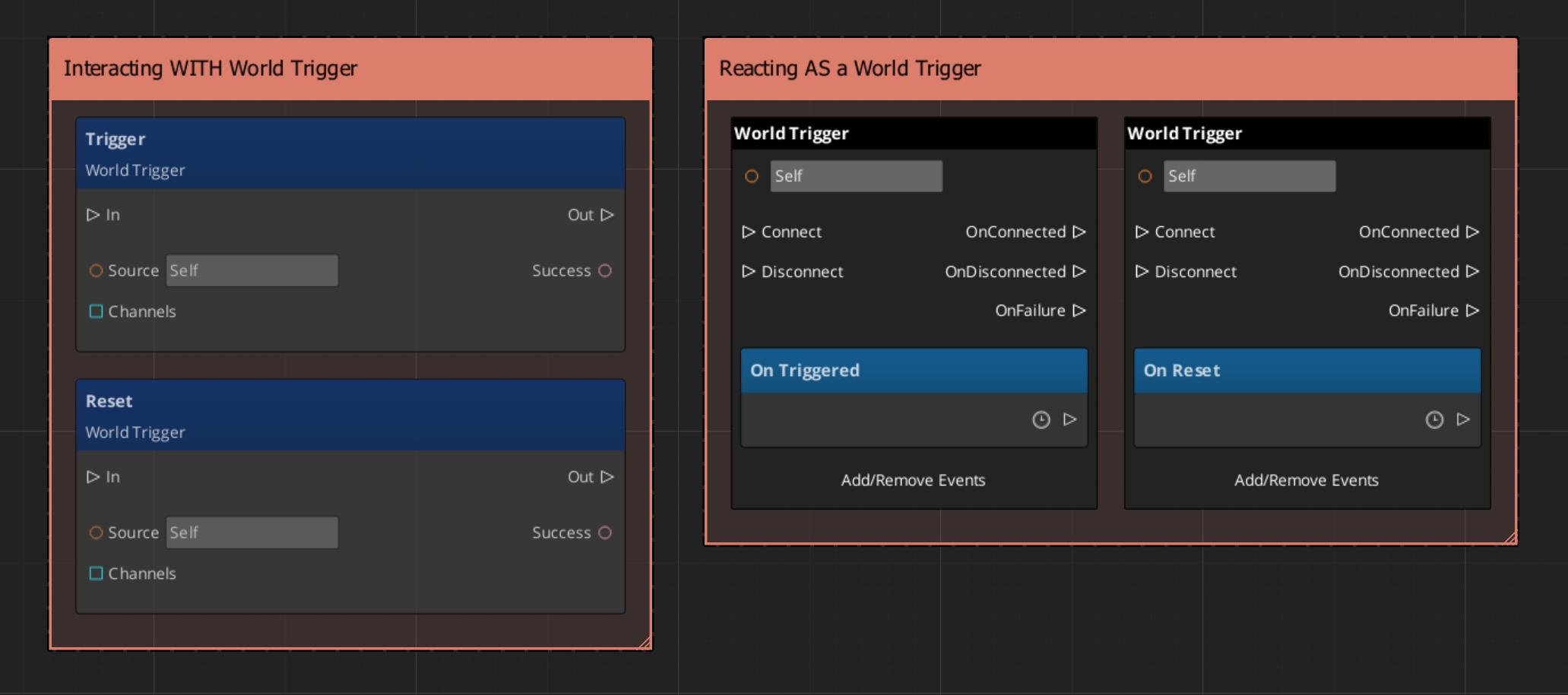
A common script pattern is to use a SensorType_Record condition to gate a sequence, then script the reset from a separate event so the trigger only re-arms after additional conditions are met:
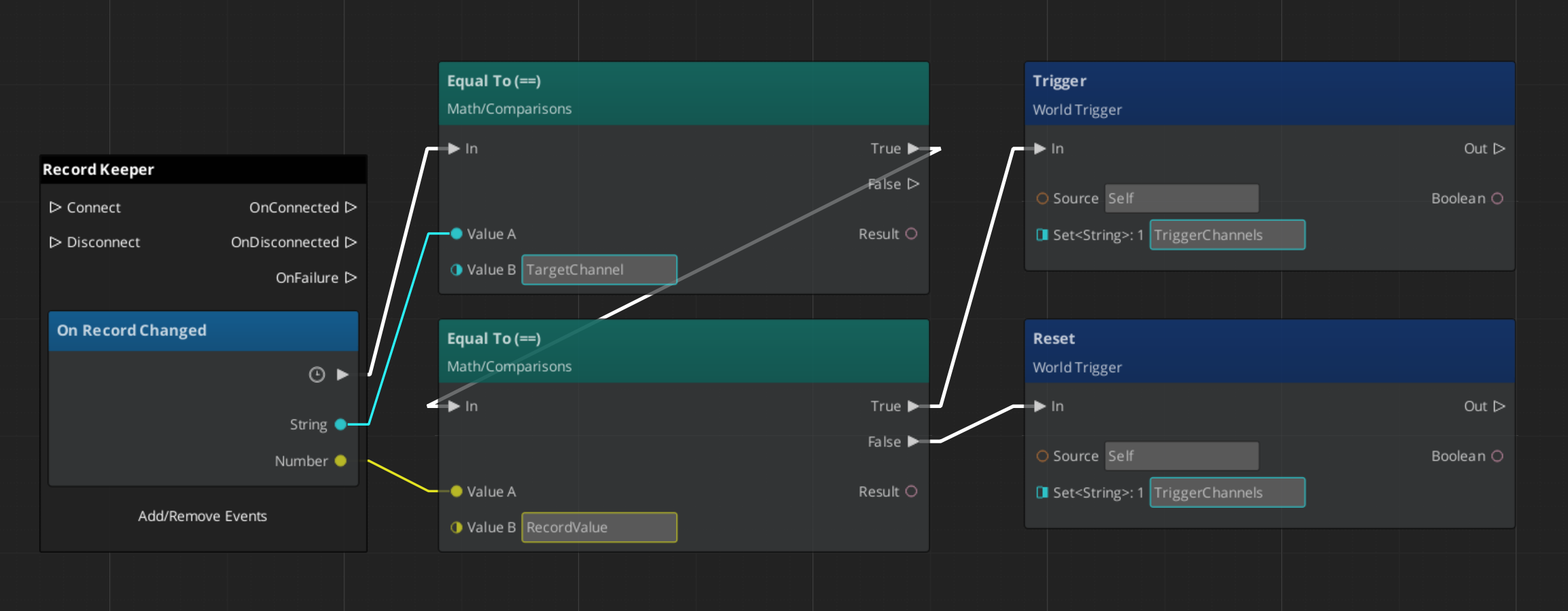
You can also bypass the sensor component entirely and call Trigger() directly from any script when you need to fire a world trigger response programmatically — for example, from a dialogue completion callback or an animation event.
Editor Setup Pattern
Most interactive world objects follow this assembly in the editor:
- Create an entity for the interactive object (door, switch, collectible, zone border).
- Add a
TriggerSensorComponent to the entity. - Add the appropriate sensor type(s) to
andConditions or orConditions (e.g. SensorType_PlayerInteract for interact, SensorType_Collider for proximity). - Add a
WorldTriggerComponent to the same entity. - Add the appropriate trigger type(s) to
triggerTypes (e.g. TriggerType_ToggleEntities to open a door, TriggerType_SetRecord to record the event). - Configure each type’s properties in the editor — no scripting needed for these patterns.
For interact-based sensors, also add GS_TargetComponent or GS_InteractTargetComponent so the Targeting system can select this entity.
Quick Reference
| Need | Bus | Method |
|---|
| Fire a trigger response from script | WorldTriggerRequestBus (ById) | Trigger() |
| Re-arm a trigger after it has fired | WorldTriggerRequestBus (ById) | Reset() |
| Fire sensor evaluation from event-driven type | TriggerSensorRequestBus (ById) | DoAction() / DoResetAction() |
| Condition Type | Sensor Type |
|---|
| Any unit interacts | SensorType_Interact |
| Player only interacts | SensorType_PlayerInteract |
| Physics overlap | SensorType_Collider |
| Record/flag state | SensorType_Record |
| Response Type | Trigger Type |
|---|
| Log a debug message | TriggerType_PrintLog |
| Write a game record | TriggerType_SetRecord |
| Toggle an entity on/off | TriggerType_ToggleEntities |
| Change stage/level | TriggerType_ChangeStage |
Glossary
| Term | Meaning |
|---|
| TriggerSensorComponent | Container component that owns sensor type objects and evaluates them on each event |
| WorldTriggerComponent | Container component that owns trigger type objects and calls Execute on each Trigger() |
| TriggerSensorType | A type object that defines one condition — extend this to create custom sensor logic |
| WorldTriggerType | A type object that defines one response — extend this to create custom trigger logic |
| andConditions | Array on TriggerSensorComponent where all types must pass for the trigger to fire |
| orConditions | Array on TriggerSensorComponent where any one type passing is sufficient |
| Re-Arming | Calling Reset() on a WorldTriggerComponent so its types can fire again on the next Trigger() |
For full definitions, see the Glossary.
See Also
For the full API, component properties, and C++ extension guide:
For related systems:
Get GS_Interaction
GS_Interaction — Explore this gem on the product page and add it to your project.