Systems
Core framework systems — the GS_Actions triggerable behavior system and the GS_Motion track-based animation engine.
GS_Core provides a growing number of standalone systems that are used across multiple gems. Currently, the GS_Motion track-based animation engine powers UIAnimation and Juice Feedback playback.
For architecture details, component properties, and C++ extension guides, see the Framework API: Systems.
Contents
GS_Motion
Provides tween-style Motion Track components for animating transforms, colors, and values over time. Multiple tracks on the same entity run in parallel; chains are configured by setting an On Complete motion name.
GS_Motion
API
See Also
For the full API, component properties, and C++ extension guides:
For related systems:
Get GS_Core
GS_Core — Explore this gem on the product page and add it to your project.
1 - Actions System
How to work with the GS_Play action system — triggerable, composable behaviors that fire from scripts, triggers, or code.
The Actions system provides a universal pattern for attaching discrete, reusable behaviors to entities and triggering them from any source — ScriptCanvas, World Triggers, UI buttons, or C++ code. Actions are data-driven components that fire on named channels, enabling composition without custom scripting.
For architecture details, component properties, and creating custom actions in C++, see the Framework API reference.
Contents
How Actions Work
An Action is a component you attach to an entity. Each Action has a channel name. When something calls DoAction(channelName) on that entity’s bus, every Action component whose channel matches the name will execute.
This decoupling is the core value — the system that fires DoAction does not need to know what kind of action is attached. You can change, add, or remove action components on an entity without modifying any calling code.
| Concept | What It Means |
|---|
| Channel | A named string. Actions on the same channel fire together. |
| Composition | Multiple actions on the same channel execute in parallel — stack components to compose behaviors. |
| Chaining | An action can fire a different channel on completion, enabling lightweight sequences. |
Triggering Actions
ScriptCanvas
[ActionRequestBus → DoAction(channelName)]
    └─► All Action components on this entity with matching channel execute
To know when an action completes:
[ActionNotificationBus → OnActionComplete]
    └─► Action has finished executing
Built-In Actions
GS_Core ships with these ready-to-use actions:
| Action | What It Does |
|---|
| PrintLog | Logs a configurable message to the console. Useful for debugging trigger chains. |
| ToggleMouseCursor | Shows or hides the system mouse cursor. |
Additional actions are available in other gems (e.g., World Trigger actions in GS_Interaction, dialogue effects in GS_Cinematics).
Common Patterns
World Trigger → Action
A World Trigger detects a collision or interaction event and fires DoAction on its entity. Action components on the same entity respond — one might play a sound, another might set a record, another might toggle an entity.
A UI button press fires DoAction with a channel name. Actions handle the response — navigate to a different UI page, start a new game, or toggle the pause menu.
Chaining Actions
Set an action’s “Chain Channel” property to fire a different channel when it completes:
Channel "OpenDoor" → [ToggleEntity action] → chains to "PlayDoorSound" → [AudioEvent action]
Quick Reference
| Need | Bus | Method / Event |
|---|
| Fire an action | ActionRequestBus | DoAction(channelName) |
| Know when an action completes | ActionNotificationBus | OnActionComplete |
Glossary
| Term | Meaning |
|---|
| Action | A component that executes a discrete behavior when triggered on a named channel |
| Channel | A named string identifier that groups actions — all actions on the same channel fire together |
| Chaining | Configuring an action to fire a different channel on completion, creating lightweight sequences |
For full definitions, see the Glossary.
See Also
For the full API, component properties, and C++ extension guide:
For related systems:
Get GS_Core
GS_Core — Explore this gem on the product page and add it to your project.
2 - Motion System
How to work with GS_Motion — the track-based animation and tween system that powers UI transitions, feedback effects, and custom animations.
GS_Motion is a track-based animation engine built into GS_Core. It drives timed property changes — position, rotation, scale, color, opacity — through authored data assets rather than hand-coded interpolation scripts. Domain gems extend GS_Motion with their own track types: GS_UI adds 8 LyShine-specific tracks for UI animation, and GS_Juice adds transform and material tracks for game feel feedback.
For architecture details, the domain extension pattern, and all track types, see the Framework API reference.
Contents
Key Concepts
| Concept | What It Is |
|---|
| Track | A single animated property — what changes, how long, and which easing curve. |
| Motion | A collection of tracks that play together. Tracks can start at different times within the motion. |
| Motion Asset | A data asset authored in the O3DE Asset Editor containing the tracks and their configuration. |
| Proxy | An optional entity redirect — lets a track target a child entity instead of the motion’s owner. |
| Composite | The runtime instance created from an asset. Each entity gets its own deep copy. |
How It Works
- Author a motion asset in the Asset Editor. Each domain has its own asset type (
.uiam for UI, .feedbackmotion for Juice). - Assign the asset to a component or embed it in a serialized field (e.g., a page’s show/hide transitions).
- Play the motion from ScriptCanvas or C++. The system initializes a runtime composite, resolves proxies, and ticks all tracks.
- Each track receives an eased progress value (0 → 1) every frame and applies its property change to the target entity.
- When all tracks complete, the motion fires its OnComplete callback.
Easing Curves
Every track can use any of the 40+ easing curves from the GS_Core curves library. Curves are configured per-track in the asset editor.
Available families: Linear, Quad, Cubic, Sine, Expo, Circ, Back, Elastic, Bounce — each with In, Out, and InOut variants.
Proxy Targeting
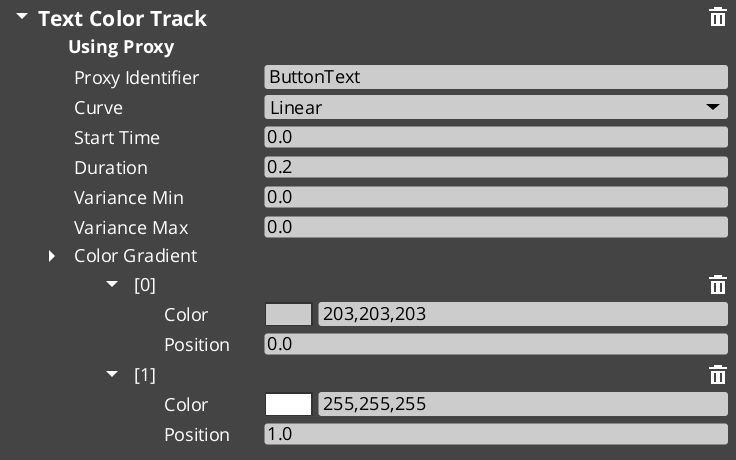
When a motion asset has tracks with identifiers (named labels), those tracks appear in the proxy list on the component. Proxies let you redirect a track to a different entity in the hierarchy — for example, a page show animation might animate the background separately from the content panel.
Each proxy entry maps a track label to a target entity. If no proxy is set, the track targets the motion’s owner entity.
Domain Extensions
GS_Motion is not used directly — it provides the base system that domain gems extend with concrete track types.
UI Animation (GS_UI)
Eight tracks for LyShine UI elements (position, scale, rotation, alpha, color, text). Asset extension: .uiam. Used for page transitions, button hover/select effects, and standalone UI animation.
UI Animation API
Feedback Motions (GS_Juice)
Two tracks for game feel effects — transform (position, scale, rotation) and material (opacity, emissive, color tint). Asset extension: .feedbackmotion. Used for screen shake, hit flash, and visual feedback.
Feedback Motions API
Quick Reference
| Need | Where |
|---|
| Animate UI elements | Use .uiam assets with UiAnimationMotionComponent or page transitions |
| Create feedback effects | Use .feedbackmotion assets with FeedbackEmitter component |
| Change easing curve | Edit the curve type on individual tracks in the asset editor |
| Redirect a track to another entity | Configure proxy entries on the component |
| Loop an animation | Enable loop on the motion asset |
Glossary
| Term | Meaning |
|---|
| Track | A single animated property within a motion — defines what changes, duration, and easing |
| Motion | A collection of tracks that play together as a single animation |
| Motion Asset | A data asset authored in the Asset Editor containing track configurations |
| Proxy | An entity redirect that lets a track target a child entity instead of the motion’s owner |
| Composite | The runtime instance created from a motion asset — each entity gets its own deep copy |
| Domain Extension | A gem-specific set of track types that extends GS_Motion for a particular use case |
For full definitions, see the Glossary.
See Also
For the full API, component properties, and C++ extension guide:
For related systems:
Get GS_Core
GS_Core — Explore this gem on the product page and add it to your project.