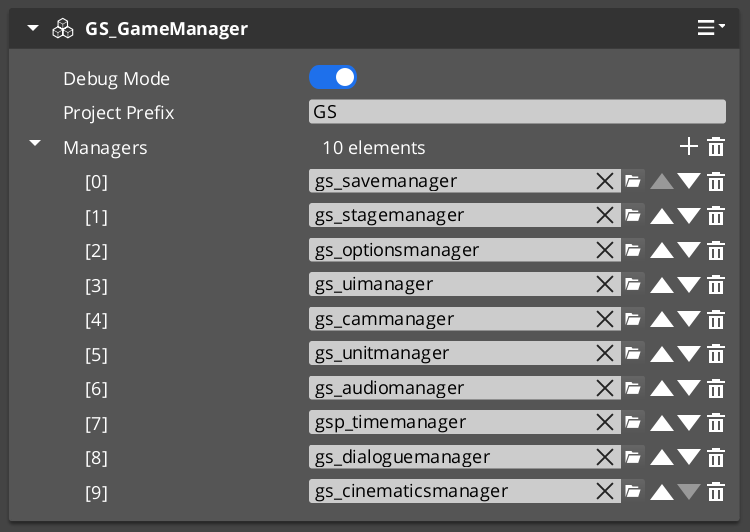
The Managers system is how GS_Play starts your game. The Game Manager spawns all other managers in a guaranteed order, coordinates their initialization stages, and then broadcasts events that signal when each stage is complete and when the game is fully ready to run.
This gives you the ability to ensure startup happens as expected, can create your own managers of any type, and can toggle full-game standby.
For architecture details, component properties, and extending the system in C++, see the GS_Managers API.
Contents
- Startup Sequence
- Headless Managers
- Responding to Startup
- Game Navigation
- Standby Mode
- Debug Mode
- Quick Reference
- Glossary
- See Also
Startup Sequence
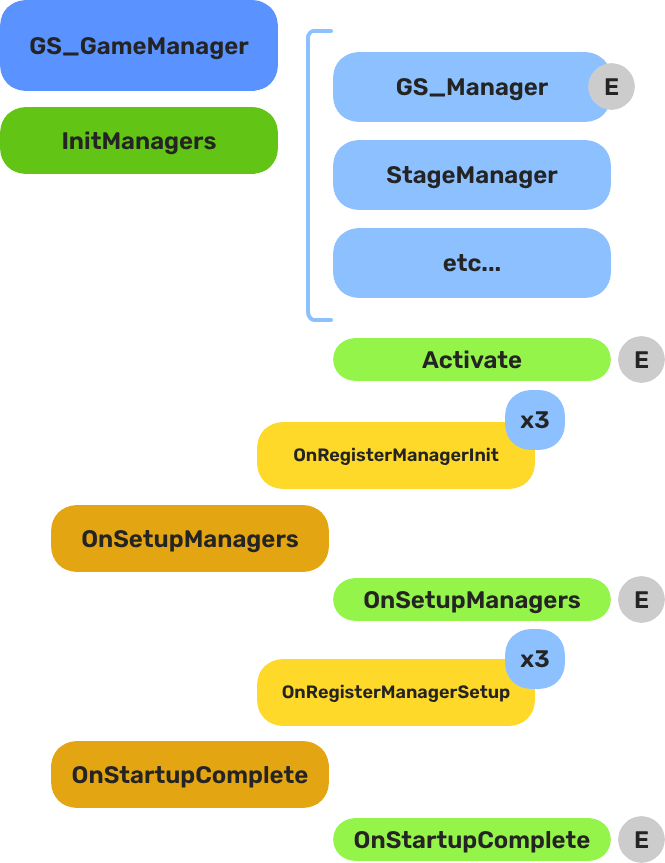
Breakdown
When the project starts, the Game Manager runs three stages before the game is considered ready:
| Stage | Broadcast Event | What It Means |
|---|---|---|
| 1 — Initialize | (internal) | Each manager is spawned. They activate, then report ready. |
| 2 — Setup | OnSetupManagers | Setup stage. Now safe to query other managers. |
| 3 — Complete | OnStartupComplete | Last stage. Everything is ready. Do any last minute things. Now safe to begin gameplay. |
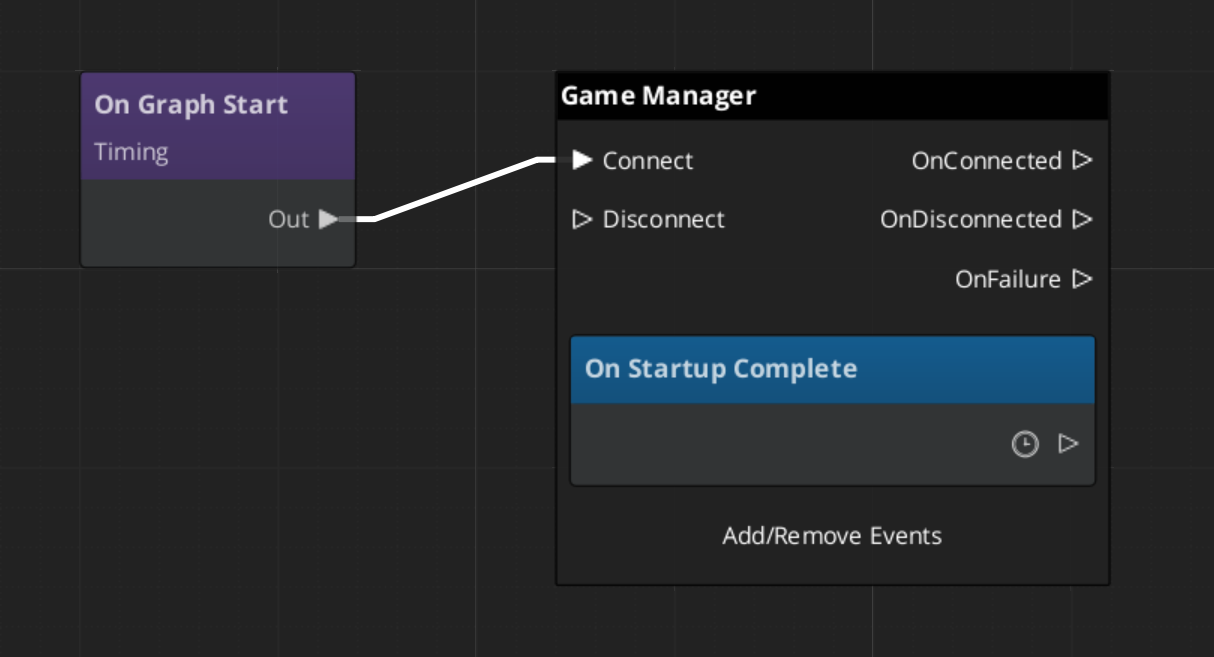
For most scripts, you only need OnStartupComplete. Wait for this event before doing anything that depends on managers to be completely setup.
E Indicates extensible classes and methods.
Patterns - Complete list of system patterns used in GS_Play.
Headless Managers
There are two ways to run a manager, and the startup sequence above is only one of them.
Under a Game Manager, managers are spawned and coordinated as a stack. Headless is the alternative: tick the checkbox on a manager and it drives its own startup instead — no Game Manager anywhere in the project, no startup sequence to join.
- Add the manager component to an entity in your level.
- Tick Headless in the Entity Inspector.
- Press play. The manager sets itself up and reaches startup-complete on its own.
This is how you deploy a single GS feature into a project that is not built on GS_Play. A project that wants GS_Audio’s audio system and nothing else adds the Audio Manager, ticks Headless, and has working audio — no manager stack, no game-flow layer, no dependency on the Game Manager’s startup. The same applies to a project that already has its own lifecycle, title flow and save system: those stay where they are, and the GS manager simply runs.
It also covers adopting the framework in stages — take one manager headless now, and switch it onto a Game Manager later if the project grows into the full lifecycle.
A headless manager does not report to the Game Manager, so it stays out of the startup count entirely. You can run one alongside a Game Manager that is coordinating everything else without the two interfering.
Two things to know when you go headless. A headless manager starts as soon as it activates, so the guarantee that every manager is initialized before any manager reaches setup does not apply — if you run several headless managers that depend on each other, that sequencing is yours to arrange, and a Game Manager is usually the better answer. And OnBeginGame is never self-fired: reaching startup-complete says the manager is ready, while saying the game has begun stays your project’s call.
Responding to Startup
ScriptCanvas
Connect to GameManagerNotificationBus and handle OnStartupComplete to know when the game is fully ready:
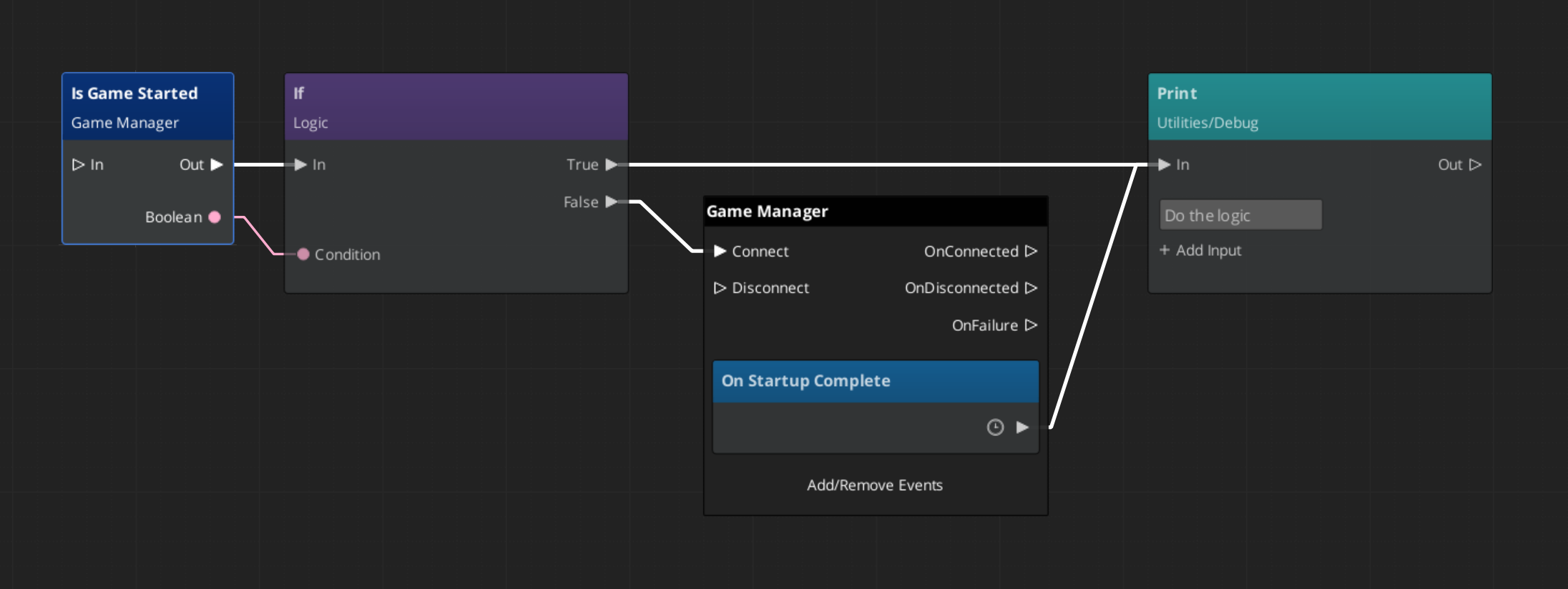
To check at any point whether the game has already finished starting, use the IsStarted request:
Game Navigation
The Game Manager owns the top-level game flow. Call these from title screens, pause menus, and end-game sequences. They coordinate the Save Manager and Stage Manager automatically.
| ScriptCanvas Node | What It Does |
|---|---|
TriggerNewGame | Starts a new game with the default save name. |
TriggerNewGameWithName(saveName) | Starts a new game and writes to a named save file. |
TriggerContinueGame | Loads the most recent save and continues from it. |
TriggerLoadGame(saveName) | Loads a specific save file by name. |
TriggerReturnToTitle | Returns to the title stage, tearing down the current session. |
TriggerSaveAndExitGame | Saves the current state and exits the application. |
TriggerExitGame | Exits the application without saving. |
Standby Mode
Standby is a global pause. The Game Manager enters standby automatically during level transitions and other blocking operations. It broadcasts OnEnterStandby to halt all gameplay systems, and OnExitStandby when the operation completes.
Listen to these in any script that drives continuous logic — timers, ticks, or animation sequences:
| Event | What to Do |
|---|---|
OnEnterStandby | Pause timers, halt ticks, stop animations. |
OnExitStandby | Resume timers, re-enable ticks. |
Both events are on GameManagerNotificationBus.
Debug Mode
When Debug Mode is enabled on the Game Manager component in the editor, the game starts in the current level instead of navigating to your title stage. This allows rapid iteration on any level without going through the full boot flow.
Debug Mode only changes startup navigation. All manager initialization and event broadcasting proceed normally.
Quick Reference
| Need | Bus | Method / Event |
|---|---|---|
| Know when startup is complete | GameManagerNotificationBus | OnStartupComplete |
| Know when the game itself begins | GameManagerNotificationBus | OnBeginGame |
| Deploy a manager with no Game Manager | (component property) | Headless checkbox |
| Check if game has started | GameManagerRequestBus | IsStarted |
| Start a new game | GameManagerRequestBus | NewGame / TriggerNewGame (SC) |
| Continue from last save | GameManagerRequestBus | ContinueGame / TriggerContinueGame (SC) |
| Load a specific save | GameManagerRequestBus | LoadGame / TriggerLoadGame (SC) |
| Return to title | GameManagerRequestBus | ReturnToTitle / TriggerReturnToTitle (SC) |
| Pause all systems | GameManagerRequestBus | EnterStandby |
| Resume all systems | GameManagerRequestBus | ExitStandby |
| Know when standby changes | GameManagerNotificationBus | OnEnterStandby / OnExitStandby |
Glossary
| Term | Meaning |
|---|---|
| Standby | Global pause broadcast to all managers and their subsystems |
| Startup Sequence | The three-stage lifecycle (Initialize → SetupManagers → StartupComplete) before gameplay is ready |
| Manager | A component that extends GS_ManagerComponent and registers with the Game Manager |
| Headless | A manager that drives its own startup, deployed with no Game Manager in the project |
| Debug Mode | Starts the game in the current editor level instead of navigating to the title stage |
For full definitions, see the Glossary.
See Also
For the full API, component properties, and C++ extension guide:
For step-by-step project setup:
Get GS_Core
GS_Core — Explore this gem on the product page and add it to your project.