Base — ships in GS_Audio.
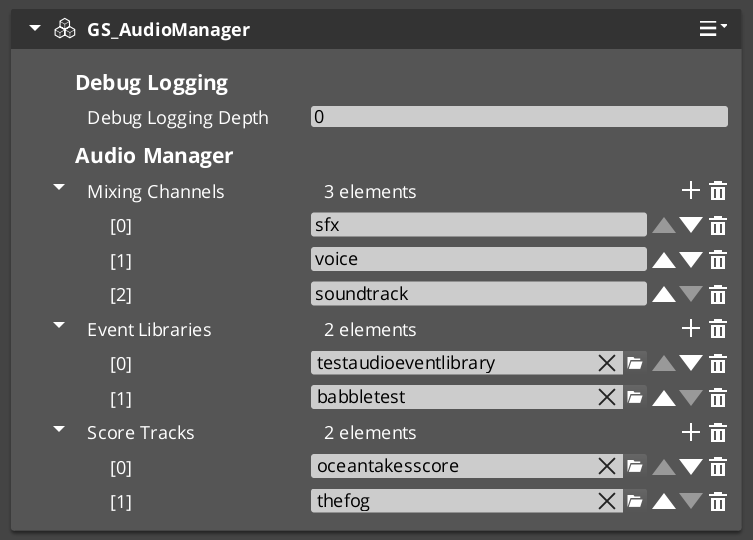
The Audio Manager is the one component the audio system needs. It starts the engine, holds your volume channels, loads your event libraries, and carries the listener that every positioned sound is measured against.
It is a GS manager, so it plugs into the Game Manager’s startup like the rest — or runs on its own if your project does not have one.
For component properties and the full API, see the Framework API reference.
Contents
- Setting It Up
- Using Audio Without a Game Manager
- What It Manages
- Setting the Listener
- Quick Reference
- Glossary
- See Also
Setting It Up
- Create an entity and add the GS_AudioManagerComponent.
- Configure your volume channels — a named list such as Music, SFX, Voice, Ambience.
- Assign your event libraries.
- Turn the entity into a prefab, set the wrapper entity to Editor Only, and save.
- Add the prefab to the Game Manager’s Startup Managers list.
This is the same prefab pattern every GS manager uses — see The Basics: GS_Managers if you have not set one up before.
Using Audio Without a Game Manager
If audio is the only GS feature your project uses, you do not need the manager stack at all.
Add the Audio Manager to your level, tick Headless on it, and press play. It starts itself, and everything on these pages works exactly as documented. No Game Manager, no startup sequence, no other managers.
This is the intended path for dropping GS_Audio into a project that is not otherwise built on GS_Play.
What It Manages
| Responsibility | What it does |
|---|---|
| Engine lifecycle | Starts and shuts down the audio engine. |
| Volume channels | Holds the named channel list and their levels. |
| Event libraries | Loads your .aev libraries so events can be fired by name. |
| The listener | Carries the point the player hears from. |
| Spatial audio setup | Project-wide spatialization mode and distance defaults. |
Music, graphs and voices are Audio Pro
Score arrangements, the Audio Event Graph and Klatt voice synthesis are GS_AudioPro features, and each has its own bus. Calls likePlayScore and PlayAudioGraph are not on the Audio Manager’s bus — see the Audio Pro overview for the bus map.Setting the Listener
There is no listener component. The manager holds the listener and you point it at an entity.
For first person, point it at your camera or player and you are finished. For third person, split it — distance measured from your character, direction from your camera. See Spatial Audio for why that combination is the one you want.
If you never set a listener, the manager uses its own entity and warns. Audio will work, but it will be positioned from wherever your manager prefab happens to be.
Quick Reference
| Need | Bus | Method |
|---|---|---|
| Set master volume | AudioManagerRequestBus | ChangeMasterVolume |
| Set a channel’s volume | AudioManagerRequestBus | ChangeChannelVolume |
| List channels | AudioManagerRequestBus | GetMixingChannelNames |
| Set the listener | AudioManagerRequestBus | SetListener |
| Split the listener | AudioManagerRequestBus | SetListenerSpatialTarget / SetListenerOrientationTarget |
| Load an event library | AudioManagerRequestBus | AddAudioLibrary |
Glossary
| Term | Meaning |
|---|---|
| Volume Channel | A named group of sound types with its own level |
| Event Library | A .aev asset holding named audio events |
| Listener | The point in the world the player hears from |
| Headless | A manager that starts itself, with no Game Manager in the project |
See Also
For the full API:
For related systems:
- The Basics: Audio Events — what the libraries hold
- The Basics: Mixing & Effects — the channels it owns
- The Basics: Spatial Audio — what the listener feeds
- The Basics: GS_Managers — the manager pattern
Get GS_Audio
GS_Audio — Explore this gem on the product page and add it to your project.