This is the multi-page printable view of this section. Click here to print.

Return to the regular view of this page.

Index

Fast references to speed up docs navigation — feature lists, patterns, glossary, templates, changelogs, and utilities.

Quick-access references for the GS_Play documentation. Use this section when you know what you are looking for and need a fast lookup — a term definition, the right template name, a feature comparison, or the changelog for a specific gem.


How This Section Is Organized

Change Log — Version history for GS_Play gems and the documentation itself.

Feature List — A complete index of every GS_Play feature, with links to both its Basics usage guide and Framework API reference.

Patterns — Diagrams and explanations of the core structural patterns used across GS_Play feature sets. A useful orientation before diving into a new gem.

Templates List — All ClassWizard extension templates for generating new conditions, effects, performances, trigger types, and other polymorphic extension classes across GS_Play gems.

Powerful Utilities — Cross-cutting utilities available across multiple feature gems.

Glossary — Definitions for GS_Play-specific terminology and commonly used O3DE concepts in the framework context.

Links — External links to community resources, the asset store, and Genome Studios.


Sections

1 - Change Logs

Version changelogs for all GS_Play gems and documentation.

Logs


GS_Audio

Latest version: 0.5.0

Summary: First official base release. Audio manager, event playback, mixing buses, multi-layer score arrangement, and Klatt voice synthesis.

GS_Audio Logs


GS_Cinematics

Latest version: 0.5.0

Summary: First official base release. Full dialogue system with node graph sequencer, polymorphic conditions/effects/performances, world and screen-space UI, typewriter, babble, localization, and the in-engine dialogue editor.

GS_Cinematics Logs


GS_Core

Latest version: 0.5.0

Summary: First official base release. Ready for continued development and support. On the way to 1.0!

GS_Core Logs


GS_Environment

Latest version: 0.5.0

Summary: First official base release. Time of day management, time passage speed, day/night cycle notifications, and sky color configuration assets.

GS_Environment Logs


GS_Interaction

Latest version: 0.5.0

Summary: First official base release. Physics pulse emitters and reactors, proximity targeting and cursor, and composable world trigger sensors.

GS_Interaction Logs


GS_Juice

Latest version: 0.5.0

Summary: First official base release (Early Development). Feedback motion system with transform and material tracks for screen shake, bounce, flash, and glow effects.

GS_Juice Logs


GS_Performer

Latest version: 0.5.0

Summary: First official base release (Early Development). Performer manager, skin slot swapping, paper billboard rendering, velocity locomotion, head tracking, and babble.

GS_Performer Logs


GS_PhantomCam

Latest version: 0.5.0

Summary: First official base release. Priority-based camera system with follow/look-at behaviors, blend profiles, and spatial influence fields.

GS_PhantomCam Logs


GS_UI

Latest version: 0.5.0

Summary: First official base release. Single-tier page navigation, GS_Motion UI animation, enhanced buttons, input interception, load screen, and pause menu.

GS_UI Logs


GS_Unit

Latest version: 0.5.0

Summary: First official base release. Mode-driven unit movement system with player/AI controllers, 3-stage input pipeline, multiple mover types, grounders, and movement influence fields.

GS_Unit Logs


Documentation

Latest version: 1.0.0

Summary: First official base release. Ready to be developed, updated, and refined over the continued development of GS_Play!

Docs Logs


1.1 - Audio Change Log

GS_Audio version changelog.

Logs


Audio 0.5.0

First official base release of GS_Audio.

Audio Manager

  • GS_AudioManagerComponent — audio engine lifecycle management, event library loading
  • AudioManagerRequestBus / AudioManagerNotificationBus
  • Master volume control and engine-level audio settings

Audio Events

  • AudioEventLibrary asset — pools of named audio events
  • GS_AudioEvent — pool selection, concurrent instance limiting, and 3D spatialization
  • AudioManagerRequestBus playback interface

Mixing & Effects

  • GS_MixingBus — mixing bus component with configurable effects chain
  • Filters, EQ, and environmental influence effects per bus

Score Arrangement

  • ScoreArrangementTrack — multi-layer music system
  • ScoreLayer — individual music layers toggled by gameplay state
  • TimeSignatures enum for bar-aligned transitions

Klatt Voice Synthesis

  • KlattVoiceSystemComponent — shared SoLoud engine, 3D listener management
  • KlattVoiceComponent — per-entity text-to-speech with phoneme mapping and segment queue
  • KlattVoiceRequestBus / KlattVoiceNotificationBus / KlattVoiceSystemRequestBus
  • Full 3D spatial voice audio with configurable voice parameters

1.2 - Cinematics Change Log

GS_Cinematics version changelog.

Logs


Cinematics 0.5.0

First official base release of GS_Cinematics.

Cinematics Manager

  • GS_CinematicsManagerComponent — cinematic mode lifecycle (BeginCinematic / EndCinematic)
  • CinematicsManagerRequestBus / CinematicsManagerNotificationBus (EnterCinematic / ExitCinematic)
  • CinematicStageMarkerComponent — named world-space anchor, self-registers on activate

Dialogue Manager

  • GS_DialogueManagerComponent — active .dialoguedb asset ownership and performer registry
  • DialogueManagerRequestBusStartDialogueSequenceByName, ChangeDialogueDatabase, RegisterPerformerMarker, GetPerformer
  • DialoguePerformerMarkerComponent — named NPC world anchor, PerformerMarkerRequestBus

Dialogue Sequencer

  • DialogueSequencerComponent — node graph traversal, runtime token management
  • DialogueUIBridgeComponent — routes active dialogue to whichever UI is registered, decouples sequencer from presentation
  • DialogueSequencerNotificationBusOnDialogueTextBegin, OnDialogueSequenceComplete

Data Structure

  • DialogueDatabase (.dialoguedb) — named actors and sequences asset
  • DialogueSequence — directed node graph with startNodeId
  • ActorDefinition — actor name, portrait, and metadata
  • Node types: TextNodeData, SelectionNodeData, RandomNodeData, EffectsNodeData, PerformanceNodeData
  • SelectionOption — per-choice text, conditions, and connections

Conditions

  • DialogueCondition (abstract base) — EvaluateCondition()
  • Boolean_DialogueCondition — base boolean comparison
  • Record_DialogueCondition — checks GS_Save records with comparison operators
  • Polymorphic discovery: extend base class, no manual registration

Effects

  • DialogueEffect (abstract base) — DoEffect() / ReverseEffect()
  • SetRecords_DialogueEffect — sets GS_Save records during dialogue
  • ToggleEntitiesActive_DialogueEffect — activates or deactivates entities in the level
  • Polymorphic discovery: extend base class, no manual registration

Performances

  • DialoguePerformance (abstract base, AZ::TickBus::Handler) — DoPerformance() / ExecutePerformance() / FinishPerformance()
  • MoveTo_DialoguePerformance — interpolated movement to stage marker
  • PathTo_DialoguePerformance — navmesh path navigation to stage marker (requires RecastNavigation)
  • RepositionPerformer_DialoguePerformance — instant teleport to stage marker
  • Polymorphic discovery: extend base class, no manual registration

Dialogue UI

  • DialogueUIComponent — screen-space dialogue text, speaker name, and portrait display
  • WorldDialogueUIComponent — world-space speech bubble display
  • DialogueUISelectionComponent — screen-space player choice menu
  • WorldDialogueUISelectionComponent — world-space selection display
  • TypewriterComponent — character-by-character text reveal, configurable speed, OnTypeFired / OnTypewriterComplete
  • BabbleComponent — procedural audio babble synchronized to typewriter output

Localization

  • LocalizedStringId — key + default fallback text, Resolve() method
  • LocalizedStringTable — runtime key-value string lookup table

Dialogue Editor

  • Node-based in-engine GUI for authoring .dialoguedb assets and sequence graphs

Type Registry

  • DialogueTypeRegistry — factory registration for conditions, effects, and performances
  • DialogueTypeDiscoveryBus — external gems register custom types without modifying GS_Cinematics

1.3 - Environment Change Log

GS_Environment version changelog.

Logs


Environment 0.5.0

First official base release of GS_Environment.

Time Manager

  • GS_TimeManagerComponent — world time ownership, time of day control
  • TimeManagerRequestBusSetTimeOfDay, SetTimePassageSpeed, GetTimeOfDay, GetWorldTime, IsDay
  • TimeManagerNotificationBusWorldTick (per-frame), DayNightChanged (on threshold cross)
  • GS_EnvironmentSystemComponent — system-level environment registration

Sky Configuration

  • SkyColourConfiguration — data asset defining sky color at different times of day
  • Authored as an asset and assigned to the environment for day/night color blending

1.4 - Core Change Log

Changelog.

Logs


Core 0.5.0

  • COOOOREEEEE

1.5 - Interaction Change Log

GS_Interaction version changelog.

Logs


Interaction 0.5.0

First official base release of GS_Interaction.

Pulsors

  • PulsorComponent — physics trigger volume that broadcasts typed pulse events
  • PulseReactorComponent — receives pulses and executes reactor types
  • PulseType (abstract base) — extensible pulse payload type
  • Built-in types: Debug_Pulse, Destruct_Pulse
  • PulseTypeRegistry — auto-discovery of all reflected pulse types

Targeting

  • GS_TargetComponent — marks an entity as a targetable object
  • GS_InteractTargetComponent — marks an entity as interactable
  • GS_CursorComponent — world-space cursor and proximity scan
  • GS_TargetingHandlerComponent — finds and locks the best interactable in range
  • GS_TargetingHandlerRequestBus / GS_TargetingHandlerNotificationBus

World Triggers

  • TriggerSensorComponent — base for all condition-side trigger sensors
  • WorldTriggerComponent — base for all response-side world triggers
  • Built-in sensors: InteractTriggerSensorComponent, PlayerInteractTriggerSensorComponent, ColliderTriggerSensorComponent, RecordTriggerSensorComponent
  • WorldTriggerRequestBus — trigger enable/disable interface
  • Sensors renamed from TriggerAction to TriggerSensor (2026-03)
  • 22 components total across all subsystems

1.6 - Juice Change Log

GS_Juice version changelog.

Logs


Juice 0.5.0

First official base release of GS_Juice. Early Development — full support planned 2026.

Feedback System

  • FeedbackEmitter — component that plays authored feedback motions on its entity
  • FeedbackMotionAsset — data asset containing one or more feedback tracks
  • FeedbackMotion — runtime instance wrapper for a FeedbackMotionAsset
  • FeedbackMotionTrack — domain base class extending GS_Core’s GS_Motion system

Feedback Tracks

  • FeedbackTransformTrack — drives position, scale, and rotation offsets (screen shake, bounce)
  • FeedbackMaterialTrack — drives opacity, emissive intensity, and color (flash, glow, pulse)

PostProcessing

  • Planned for future release. Not yet implemented.

1.7 - Performer Change Log

GS_Performer version changelog.

Logs


Performer 0.5.0

First official base release of GS_Performer. Early Development — full support planned 2026.

Performer Manager

  • GS_PerformerManagerComponent — performer registration and name-based lookup
  • PerformerManagerRequestBus
  • GS_PerformerSystemComponent — system-level lifecycle component

Skin Slots

  • PerformerSkinSlotComponent — manages a named visual slot on a character entity
  • SkinSlotHandlerComponent — handles asset swapping for a given slot
  • PerformerSkinSlotsConfigProfile — asset class defining slot configurations
  • SkinSlotData / SkinSlotNameDataPair — slot data types

Paper Performer

  • PaperFacingHandlerBaseComponent — base for billboard-style rendering handlers
  • PaperFacingHandlerComponent — orients a 2.5D billboard character to face the camera correctly

Locomotion

  • VelocityLocomotionHookComponent — reads entity velocity and drives animation blend tree parameters automatically

Head Tracking

  • Procedural head bone orientation toward a world-space look-at target

Babble

  • BabbleComponent — generates procedural vocalisation tones synchronized to GS_Cinematics typewriter output
  • BabbleToneEvent / SpeakerBabbleEvents — tone data structures per speaker identity

1.8 - PhantomCam Change Log

GS_PhantomCam version changelog.

Logs


PhantomCam 0.5.0

First official base release of GS_PhantomCam.

Cam Manager

  • GS_CamManagerComponent — camera system lifecycle, active camera tracking
  • CamManagerRequestBus / CamManagerNotificationBus
  • GS_PhantomCamSystemComponent — system-level registration

Phantom Cameras

  • GS_PhantomCameraComponent — virtual camera with follow target, look-at, FOV, and priority
  • PhantomCameraRequestBus
  • PhantomCamData — camera configuration data structure
  • Priority-based switching: highest priority active phantom camera drives the real camera

Cam Core

  • GS_CamCoreComponent — reads from the active phantom camera each frame and applies to the engine camera
  • CamCoreRequestBus / CamCoreNotificationBus

Camera Behaviors

  • ClampedLook_PhantomCamComponent — look-at with clamped angle limits
  • StaticOrbitPhantomCamComponent — fixed-distance orbit around a target
  • Track_PhantomCamComponent — follows a spline or path track
  • AlwaysFaceCameraComponent — keeps an entity billboard-facing the active camera

Blend Profiles

  • GS_PhantomCamBlendProfile — asset defining camera transition easing and duration
  • Smooth interpolation between camera positions on priority switch

Influence Fields

  • GlobalCameraInfluenceComponent — global persistent camera modifier
  • CameraInfluenceFieldComponent — spatial zone that modifies camera behavior on entry
  • CamInfluenceData — influence configuration data (offset, FOV shift, tilt)

1.9 - UI Change Log

GS_UI version changelog.

Logs


UI 0.5.0

First official base release of GS_UI.

UI Manager

  • GS_UIManagerComponent — canvas lifecycle management, focus stack, startup focus assignment
  • UIManagerRequestBus
  • Single-tier page navigation: Manager → Page (no hub layer)
  • GS_UIPageComponent — root canvas registration, nested page management
  • NavigationReturnPolicyRestoreLast or AlwaysDefault back navigation behavior
  • FocusEntry — focus state data for page transitions
  • Cross-canvas boundary navigation support
  • Companion Component Pattern: domain-specific page logic lives on companion components that react to page bus events

UI Interaction

  • GS_ButtonComponent — enhanced button with hover and select UiAnimationMotion support
  • GS_UIInputInterceptorComponent — input capture and blocking for UI canvases
  • GS_UIInputProfile — input mapping configuration for UI contexts

UI Animation

  • UiMotionTrack (domain base) — extends GS_Core’s GS_Motion system
  • 8 concrete tracks: UiPositionTrack, UiScaleTrack, UiRotationTrack, UiElementAlphaTrack, UiImageAlphaTrack, UiImageColorTrack, UiTextColorTrack, UiTextSizeTrack
  • UiAnimationMotionAsset — authored animation asset
  • UiAnimationMotion — runtime instance wrapper

Load Screen

  • GS_LoadScreenComponent — manages load screen display during level transitions

Pause Menu

  • PauseMenuComponent — pause state management and pause menu page coordination

Removed

  • GS_UIWindowComponent — removed entirely
  • GS_UIHubComponent / GS_UIHubBus — deprecated legacy layer

1.10 - Unit Change Log

GS_Unit version changelog.

Logs


Unit 0.5.0

First official base release of GS_Unit.

Unit Manager

  • GS_UnitManagerComponent — unit registration and lifecycle tracking
  • UnitManagerRequestBus

Unit Component

  • GS_UnitComponent — unit identity and state component
  • UnitRequestBus

Controllers

  • GS_UnitControllerComponent — abstract controller base, possess/release pattern
  • GS_PlayerControllerComponent — human player possession
  • GS_AIControllerComponent — AI-driven possession
  • GS_PlayerControllerInputReaderComponent — reads hardware input and routes to the possessed unit

Input Pipeline

  • 3-stage architecture: controller entity reads hardware → routes to InputDataComponent on the unit → reactor components act on the structured state
  • InputDataRequestBus / InputDataNotificationBus
  • GS_InputReactorComponent — reacts to binary input states (button/action)
  • GS_InputAxisReactorComponent — reacts to axis input values (sticks, triggers)

MoverContext

  • GS_MoverContextComponent — transforms raw input into movement intent, manages active mode and profiles
  • MoverContextRequestBus / MoverContextNotificationBus
  • Mode-driven movement: one named mode active at a time; only the mover and grounder matching that mode run

Movers

  • GS_MoverComponent — mode-aware mover base class
  • GS_PhysicsMoverComponent — physics-driven movement via PhysX
  • GS_3DFreeMoverComponent — unconstrained 3D free movement
  • GS_3DSlideMoverComponent — slide-and-collide surface movement

Grounders

  • GS_PhysicsRayGrounderComponent — raycast-based grounding for the “Free” movement mode

Movement Influence

  • MovementInfluenceFieldComponent — spatial zone that modifies unit movement within its bounds
  • GlobalMovementRequestBus — global movement modifier interface

Profiles

  • GS_UnitMovementProfile — per-mode speed, acceleration, and movement parameter configuration

1.11 - Docs Change Log

Updated changelog.

Logs


Docs 1.0.0

  • Welcome page finalized.

  • Get Started and Index sections finalized.

  • No missing pages. Final organization.

  • Patterns Complete.

  • Feature List, Glossary fully updated.

  • Get Started T1 page filled.

  • Index T1 page filled.

  • Final Logs format and arrangement.

  • Print page + print section links.

  • Homepage complete.

  • About Us complete.

  • Product pages complete.


Docs 0.9.0

Full first implementation of direct documentation formatting and content. With this release we have our first fully working catalogue of featuresets, functionality, and API.

Feature Roots are called “Tier 2”. They are overviews with quick indexes for their subsystems. Content Pages are called “Tier 3”. They carry the body and substance of any given feature or subfeature. Nested pages below these tiers are combinations of both T2, and T3, depending on the depth an overview needs to be to segue into the child pages.

Established base organization of information.

  • Get Started is very thin and for user onboarding.
  • Index replaces Get Started for regular users. Allowing for easy navigation across categorical necessities for users.
  • Basics is conceptual and script driven knowledge for the framework.
  • Framework API is the engineering and veteran user knowledgebase.
  • Learn is for Youtube video funnelling, or text driven Guide access.

Cross linking is prioritized to move users to the knowledge they seek, asap.

Agentic Guidelines is an LLM based seed for how to use GS_Play and navigate the documentation for information access. The website has been optimized behind the scenes for LLM scraping.

Basics

Basics Implemented.

  • Implemented Core
  • Implemented Audio
  • Implemented Cinematics
  • Implemented Environment
  • Implemented Interaction
  • Implemented Juice
  • Implemented Performer
  • Implemented PhantomCam
  • Implemented UI
  • Implemented Unit

Framework API

Framework API Implemented.

  • Implemented Core
  • Implemented Audio
  • Implemented Cinematics
  • Implemented Environment
  • Implemented Interaction
  • Implemented Juice
  • Implemented Performer
  • Implemented PhantomCam
  • Implemented UI
  • Implemented Unit

2 - Feature List

Quick index of all GS_Play Features.

Contents


GS_Core

FeatureAPIDoes
GS_ManagersAPIStart a new game, continue from a save, load a specific file, or return to the title screen
GS_SaveAPISave and load game data, or track persistent flags and counters across sessions
GS_StageManagerAPIMove between levels, or configure per-level spawn points and navigation settings
GS_OptionsAPIRead player input, disable input during menus, or swap control schemes at runtime
UtilitiesAPIUse easing curves, detect physics zones, smooth values, pick randomly, or work with splines
GS_ActionsAPITrigger a reusable behavior on an entity from a script, physics zone, or another action
GS_MotionAPIAnimate a transform, color, or value smoothly over time

GS_Audio

FeatureAPIDoes
Audio ManagerAPIManage the audio engine, load event libraries, or control master volume
Audio EventsAPIPlay sounds with pooling, 3D spatialization, and concurrency control
Mixing & EffectsAPIConfigure mixing buses with filters, EQ, and environmental influence effects
Score ArrangementAPILayer music tracks dynamically based on gameplay state
Klatt VoiceAPIGenerate text-to-speech with configurable voice parameters and 3D spatial audio

GS_Cinematics

FeatureAPIDoes
Cinematics ManagerAPICoordinate cinematic sequences and manage stage markers for actor positioning
Dialogue SystemAPIAuthor branching dialogue with conditions, effects, and performances
Dialogue UIAPIDisplay dialogue text, player choices, and speech babble on screen or in world space
PerformancesAPIMove actors to stage markers during dialogue with navigation or teleport
Timeline ExpansionAPIExtend the sequence timeline with custom track and key types

GS_Environment

FeatureAPIDoes
Time ManagerAPIControl world time, time passage speed, or respond to day/night changes
Sky ConfigurationAPIDefine how the sky looks at different times of day with data assets

GS_Interaction

FeatureAPIDoes
PulsorsAPIBroadcast typed physics events from trigger volumes to receiving entities
TargetingAPIFind and lock onto the best interactable entity in proximity with a cursor overlay
World TriggersAPIFire configurable responses from zones and conditions without scripting

GS_Juice

FeatureAPIDoes
Feedback SystemAPIPlay screen shake, bounce, flash, or material glow effects on entities

GS_Performer

FeatureAPIDoes
Performer ManagerAPIManage registered performers or query them by name
Skin SlotsAPISwap equipment visuals at runtime with modular slot-based assets
Paper PerformerAPIRender billboard-style 2.5D characters that face the camera correctly
LocomotionAPIDrive animation blend parameters from entity velocity automatically
Head TrackingAPIProcedurally orient a character’s head bone toward a world-space look-at target
BabbleAPIGenerate procedural vocalisation tones synchronized to dialogue typewriter output

GS_PhantomCam

FeatureAPIDoes
Cam ManagerAPIManage the camera system lifecycle and know which camera is active
Phantom CamerasAPIPlace virtual cameras with follow targets, look-at, and priority-based switching
Cam CoreAPIControl how the real camera reads from the active phantom camera each frame
Blend ProfilesAPIDefine smooth transitions between cameras with custom easing
Influence FieldsAPICreate spatial zones that modify camera behavior dynamically

GS_UI

FeatureAPIDoes
UI ManagerAPILoad and unload UI canvases, manage focus stack, or set startup focus
Page NavigationAPINavigate between pages, handle back navigation, or cross canvas boundaries
UI InteractionAPIButton animations and input interception for UI canvases
UI AnimationAPIAnimate UI elements with position, scale, rotation, alpha, and color tracks
WidgetsAPIReusable UI building blocks for counters, sliders, and interactive controls

GS_Unit

FeatureAPIDoes
Unit ManagerAPIRegister units, track active controllers, or spawn units at runtime
ControllersAPIPossess and release units with player or AI controllers
Input DataAPICapture raw input and convert it into structured movement intent
MovementAPIMove characters with movers, grounders, and movement influence fields

3 - Patterns

Patterns associated with the GS_Play featuresets.

Outline

The strength of the GS_Play framework is in it’s straightforward, and intuitive patterns.

By creating simple ways to look at certain featuresets, you can reliably expand your gameplay knowing you’re always going to properly connect with the underlying system.

Using our extensive list of templates, you can even more rapidly develop the features that make your project unique.

Use this quick list to jump to the features you want to look at.

You can expect a diagram outlining the relationships between feature elements, and then explanations on how the pattern plays out.

Have fun!


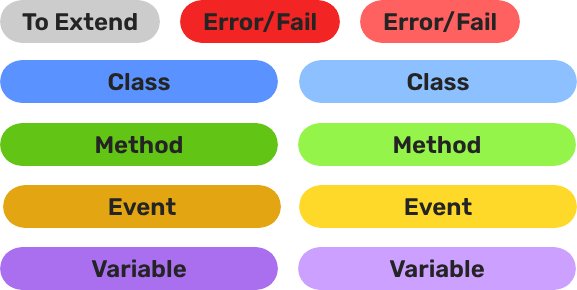
Legend

Colour Legend for pattern diagrams


Contents


Managers & Startup - GS_Core

Game Manager Startup Pattern Graph

Breakdown

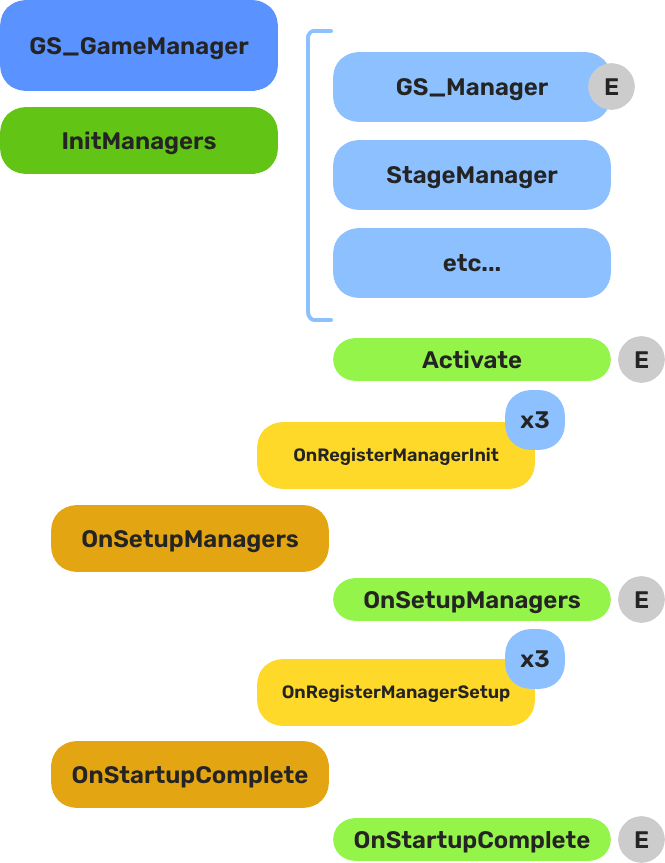
When the project starts, the Game Manager runs three stages before the game is considered ready:

StageBroadcast EventWhat It Means
1 — Initialize(internal)Each manager is spawned. They activate, then report ready.
2 — SetupOnSetupManagersSetup stage. Now safe to query other managers.
3 — CompleteOnStartupCompleteLast stage. Everything is ready.
Do any last minute things. Now safe to begin gameplay.

For most scripts, you only need OnStartupComplete. Wait for this event before doing anything that depends on managers to be completely setup.

Back to top…


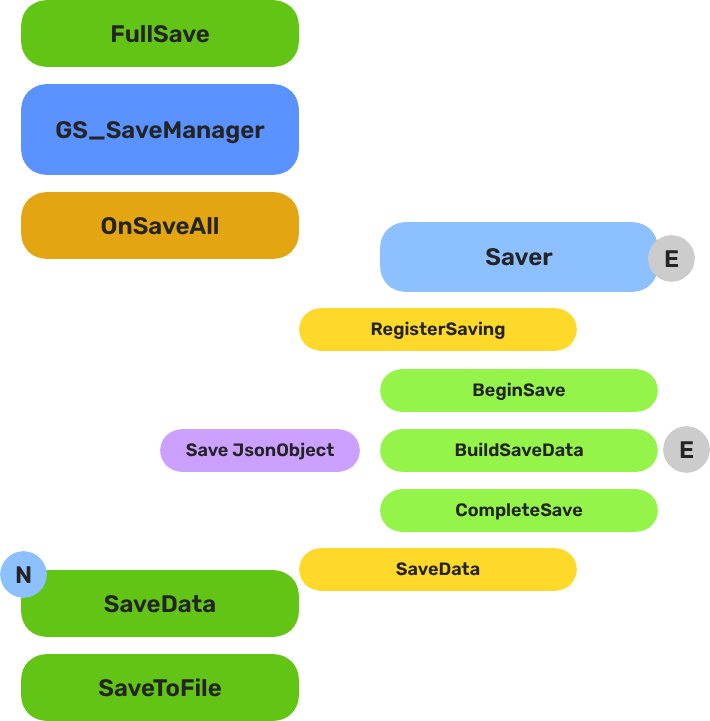
Save - GS_Core

Save System Pattern Graph

Breakdown

When a save or load is triggered, the Save Manager broadcasts to every Saver in the scene. Each Saver independently handles its own entity’s state. The Record Keeper persists flat progression data alongside the save file.

PartBroadcast EventWhat It Means
Save ManagerOnSaveAllBroadcasts to all Savers on save. Each serializes its entity state.
Save ManagerOnLoadAllBroadcasts to all Savers on load. Each restores its entity state.
Record KeeperRecordChangedFires when any progression flag is created, updated, or deleted.

Savers are per-entity components — add them to anything that needs to persist across sessions. The Record Keeper is a global singleton for flags and counters.

Back to top…


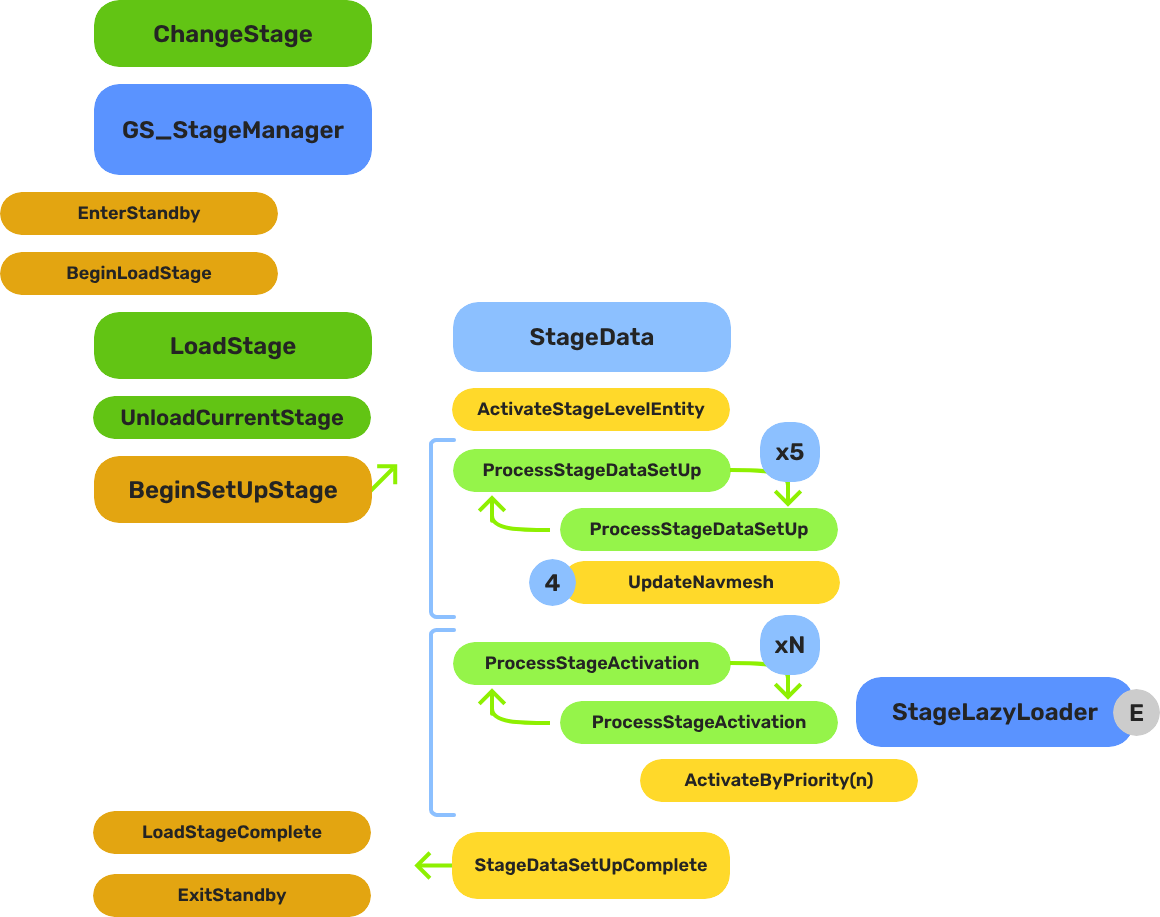
Stage Change - GS_Core

Stage Change Pattern Graph

Breakdown

When a stage change is requested, the system follows a five-step sequence before gameplay resumes in the new level:

StepBroadcast EventWhat It Means
1 — StandbyOnEnterStandbyGame Manager enters standby, halting all gameplay systems.
2 — Unload(internal)The current stage’s entities are torn down.
3 — Spawn(internal)The target stage prefab is instantiated.
4 — Set UpOnBeginSetUpStageStage Data runs its layered startup: SetUpStage → ActivateByPriority → Complete.
5 — CompleteLoadStageCompleteStage Manager broadcasts completion. Standby exits. Gameplay resumes.

The Stage Data startup is layered — OnBeginSetUpStage, ActivateByPriority, then OnLoadStageComplete — so heavy levels can initialize incrementally without causing frame-time spikes.

Back to top…


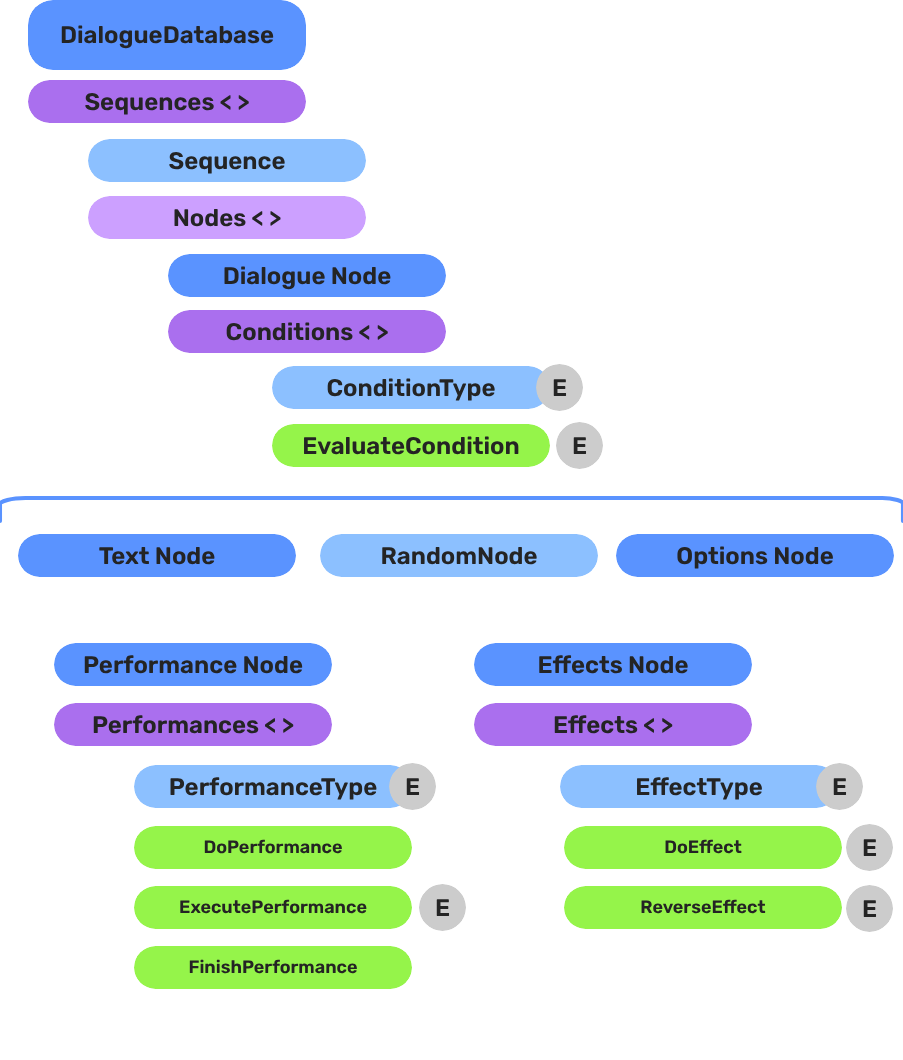
Dialogue Authoring - GS_Cinematics

Dialogue Authoring Pattern Graph

Breakdown

A dialogue sequence is authored in the node editor, stored in a .dialoguedb asset, and driven at runtime by the Dialogue Manager and Sequencer:

LayerWhat It Means
DialogueDatabaseStores named actors and sequences. Loaded at runtime by the Dialogue Manager.
DialogueSequenceA directed node graph. The Sequencer walks from startNodeId through Text, Selection, Effects, and Performance nodes.
ConditionsPolymorphic evaluators on branches. Failed conditions skip that branch automatically.
EffectsPolymorphic actions at EffectsNodeData nodes — set records, toggle entities.
PerformersNamed actor anchors in the level. Resolved from database actor names via DialoguePerformerMarkerComponent.

Conditions, effects, and performances are discovered automatically at startup — custom types from any gem appear in the editor without modifying GS_Cinematics.

Back to top…


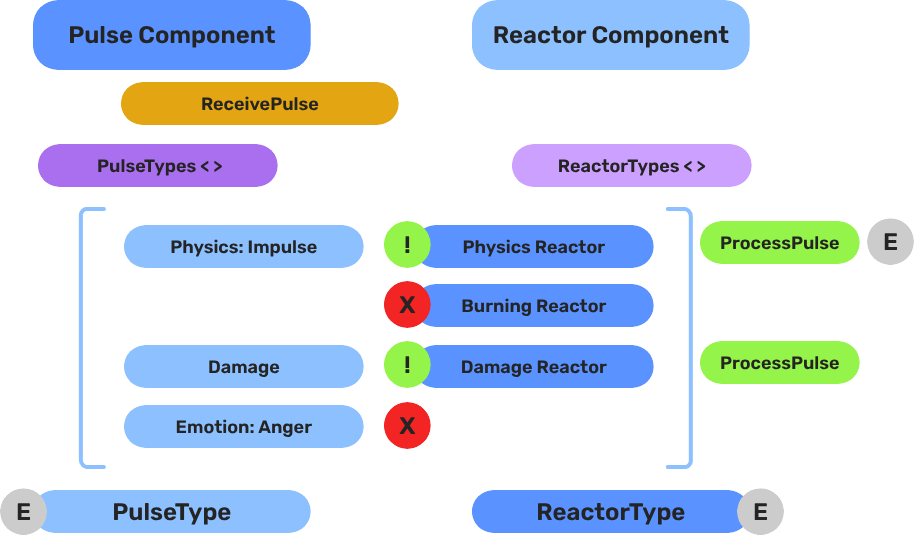
Pulse - GS_Interaction

Pulse Pattern Graph

Breakdown

When an entity enters a Pulsor’s trigger volume, the Pulsor emits its configured pulse type to all Reactors on the entering entity:

StepWhat It Means
1 — Collider overlapPhysics detects an entity entering the Pulsor’s trigger volume.
2 — Pulse emitPulsorComponent reads its configured PulseType and prepares the event.
3 — Reactor queryEach PulseReactorComponent on the entering entity is checked with IsReactor().
4 — ReactionReactors returning true have ReceivePulses() called and execute their response.

Pulse types are polymorphic — new types are discovered automatically at startup. Any gem can define custom interaction semantics without modifying GS_Interaction.

Back to top…


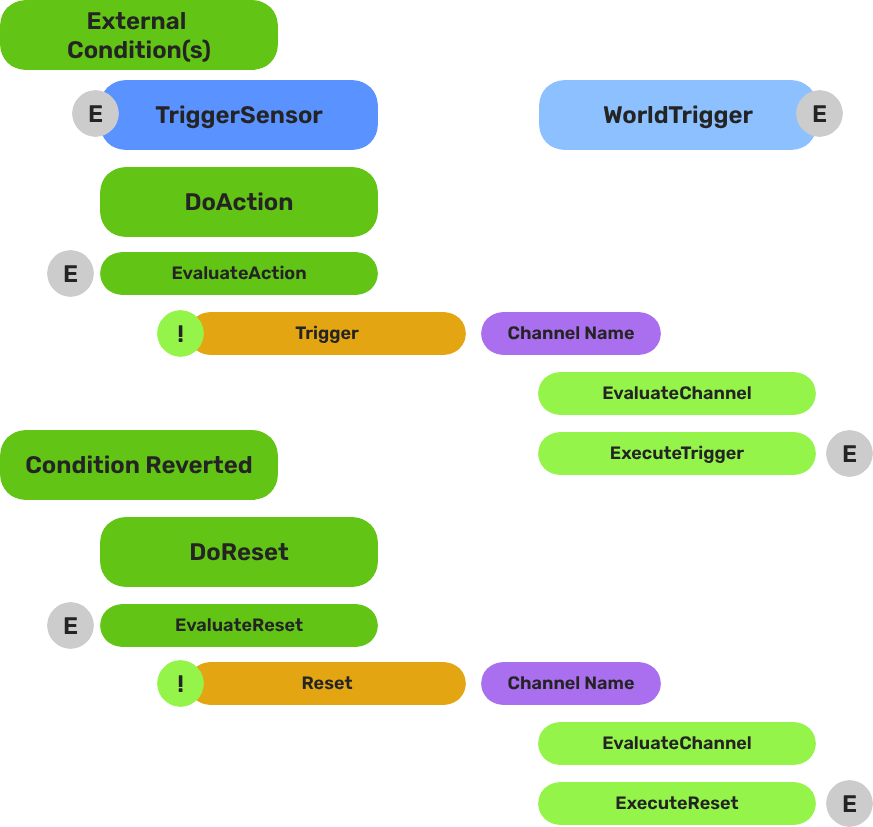
World Triggers - GS_Interaction

World Trigger Pattern Graph

Breakdown

World Triggers split conditions from responses. Any number of World Triggers can stack on a single entity — each fires its own response independently when the condition is met.

PartWhat It Means
Trigger SensorMonitors for a condition. When satisfied, calls Trigger() on all WorldTriggerComponent instances on the same entity.
World TriggerExecutes a response when Trigger() is called. Can be reset with Reset() to re-arm for the next activation.

No scripting is required for standard patterns. Compose Trigger Sensors and World Triggers in the editor to cover the majority of interactive world objects without writing any code.

Back to top…


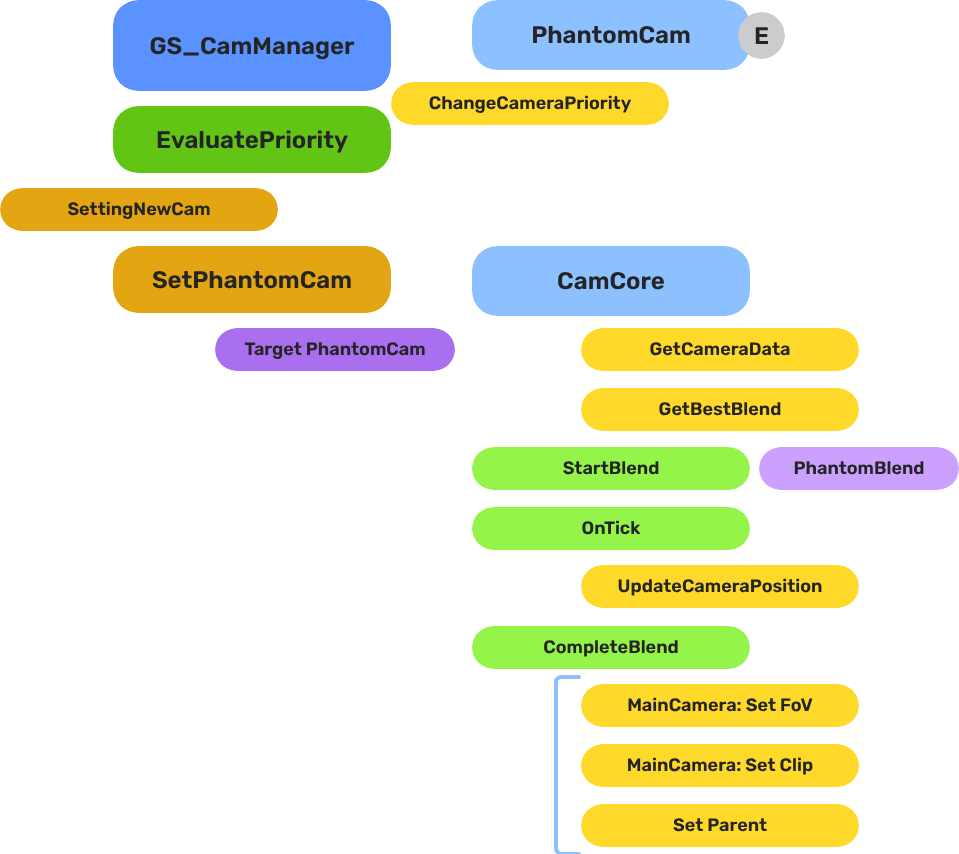
Camera Blend - GS_PhantomCam

Camera Blend Pattern Graph

Breakdown

When the dominant Phantom Camera changes, the Cam Manager queries the Blend Profile to determine transition timing and easing:

StepWhat It Means
1 — Priority changeA Phantom Camera gains highest priority or is activated.
2 — Profile queryCam Manager calls GetBestBlend(fromCam, toCam) on the assigned GS_PhantomCamBlendProfile asset.
3 — Entry matchEntries are checked by specificity: exact match → any-to-specific → specific-to-any → default fallback.
4 — InterpolationCam Core blends position, rotation, and FOV over the matched entry’s BlendTime using the configured EasingType.

Because Blend Profiles are shared assets, editing one profile updates every camera that references it.

Back to top…


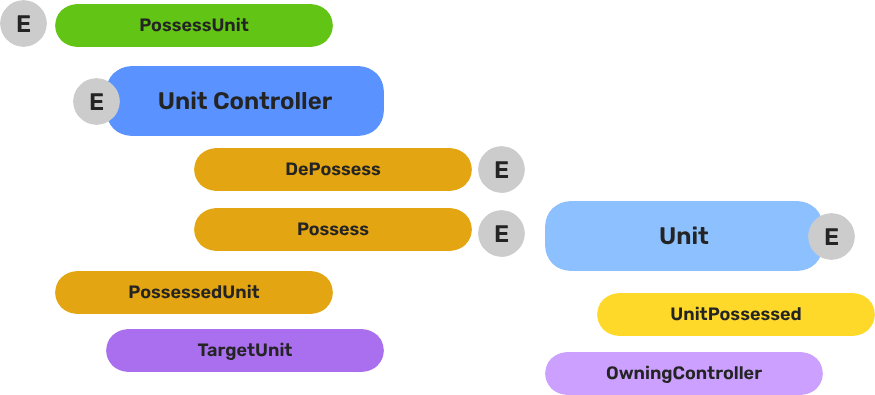
Unit Possession - GS_Unit

Unit Possession Pattern Graph

Breakdown

Every unit has exactly one controller at a time, or no controller at all. Possession is established by calling Possess on the unit and released by calling DePossess. The unit fires UnitPossessed on UnitNotificationBus whenever ownership changes so other systems can react.

ConceptDescription
PossessionA controller attaches to a unit. The unit accepts input and movement commands from that controller only.
DePossessionThe controller releases the unit. The unit halts input processing and enters a neutral state.
UnitPossessed eventFires on UnitNotificationBus (addressed by entity ID) whenever a unit’s controller changes.
GetControllerReturns the entity ID of the current controller, or an invalid ID if none.
GetUniqueNameReturns the string name assigned by the Unit Manager when this unit was spawned.

Back to top…


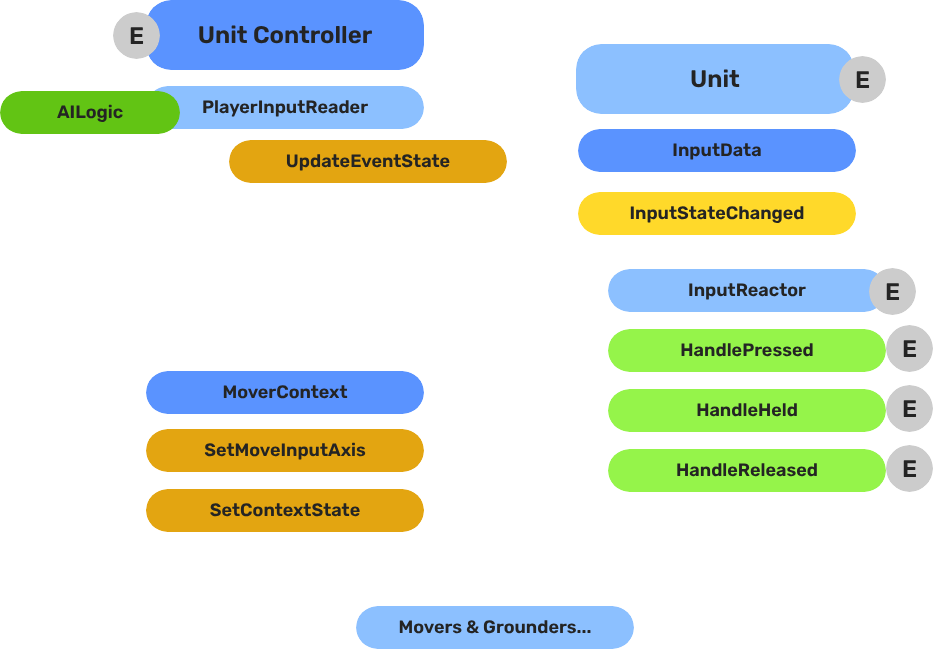
Unit Input Handling - GS_Unit

Unit Input Handling Pattern Graph

Breakdown

The input pipeline has three stages. Each stage is a separate component on the unit entity, and they run in order every frame:

StageComponentWhat It Does
1 — ReadGS_PlayerControllerInputReaderComponentReads raw input events from the active input profile and writes them into GS_InputDataComponent.
2 — StoreGS_InputDataComponentHolds the current frame’s input state — button presses, axis values — as structured data.
3 — ReactReactor componentsRead from GS_InputDataComponent and produce intent: movement vectors, action triggers, etc.

All reactor components downstream of the store stage read from the same GS_InputDataComponent, so there is no duplicated hardware polling and no risk of two reactors seeing different input states for the same frame.

Back to top…


Movers & Grounders - GS_Unit

Movers & Grounders Pattern Graph

Breakdown

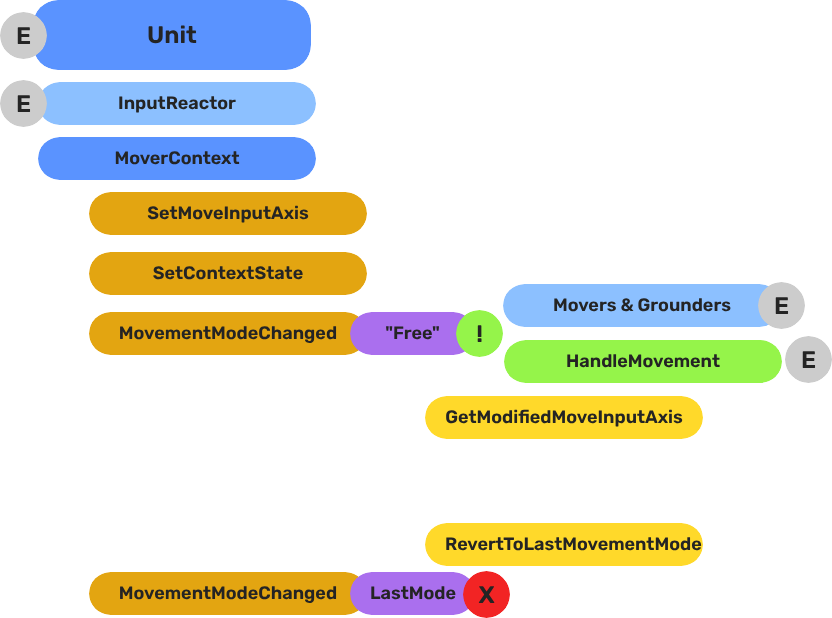
Movers and Grounders are multiple components on a Unit that are constantly changing activation based on the units state. When a mover is active, it freely processes the unit’s movement based on it’s functionality. At any moment, through internal or external forces, the Movement, Rotation, or Grounding state can change, which disables the old movers, and activates the new one to continue controlling the Unit.

Input
    ↓  InputDataNotificationBus::InputStateChanged
Input Reactor Components
    ↓  MoverContextRequestBus::SetMoveInputAxis
GS_MoverContextComponent
    ↓  ModifyInputAxis() → camera-relative
    ↓  GroundInputAxis() → ground-projected
    ↓  MoverContextNotificationBus::MovementModeChanged("Free")
GS_3DFreeMoverComponent  [active when mode == "Free"]
    ↓  AccelerationSpringDamper → rigidBody->SetLinearVelocity
GS_PhysicsRayGrounderComponent  [active when grounding mode == "Free"]
    ↓  MoverContextRequestBus::SetGroundNormal / SetContextState("grounding", ...)
    ↓  MoverContextRequestBus::ChangeMovementMode("Slide")  ← when slope too steep
GS_3DSlideMoverComponent  [active when mode == "Slide"]

The Slide mover activates when the Unit is walking on too steep an angle. It takes control over the unit, slides down the hill, then restores the previous movement behaviour.

Back to top…

4 - Templates List

All ClassWizard templates for GS_Play gems — one-stop reference for generating extension classes across every gem.

All GS_Play extension types are generated through the ClassWizard CLI. The wizard handles UUID generation, cmake file-list registration, and module descriptor injection automatically. Never create these files from scratch.

python ClassWizard.py \
    --template <TemplateName> \
    --gem <GemPath> \
    --name <SymbolName> \
    [--input-var key=value ...]


Contents


GS_Core

Full details: GS_Core Templates

TemplateGeneratesUse For
GS_ManagerComponent${Name}ManagerComponent.h/.cpp + optional ${Name}Bus.hManager-pattern components with EBus interface
SaverComponent${Name}SaverComponent.h/.cppCustom save/load handlers via the GS_Save system
GS_InputReaderComponent${Name}InputReaderComponent.h/.cppController-side hardware input readers
PhysicsTriggerComponent${Name}PhysicsTriggerComponent.h/.cppPhysX trigger volumes with enter/hold/exit callbacks

GS_Interaction

Full details: GS_Interaction Templates

TemplateGeneratesUse For
PulsorPulse${Name}_Pulse.h/.cppNew pulse type for the Pulsor emitter/reactor system
PulsorReactor${Name}_Reactor.h/.cppNew reactor type that responds to a named channel
WorldTrigger${Name}_WorldTrigger.h/.cppNew world trigger that fires a named event
TriggerSensor${Name}_TriggerSensor.h/.cppNew trigger sensor that listens and responds to events

GS_Unit

Full details: GS_Unit Templates

TemplateGeneratesUse For
UnitController${Name}ControllerComponent.h/.cppCustom controller for player or AI possession logic
InputReactor${Name}InputReactorComponent.h/.cppUnit-side input translation from named event to bus call
Mover${Name}PhysicsMoverComponent.h/.cpp or ${Name}MoverComponent.h/.cppCustom locomotion mode (walk, swim, climb, etc.)
Grounder${Name}PhysicsRayGrounderComponent.h/.cpp or ${Name}GrounderComponent.h/.cppCustom ground state detection (ray, capsule, custom)

GS_UI

Full details: GS_UI Templates

TemplateGeneratesUse For
UiMotionTrack${Name}Track.h + .cppNew LyShine property animation track for .uiam assets

GS_Juice

Full details: GS_Juice Templates

TemplateGeneratesUse For
FeedbackMotionTrack${Name}Track.h + .cppNew world-space entity property animation track for .feedbackmotion assets

GS_PhantomCam

Full details: GS_PhantomCam Templates

TemplateGeneratesUse For
PhantomCamera${Name}PhantomCamComponent.h/.cppCustom camera behaviour (follow, look-at, tick overrides)

GS_Cinematics

Full details: GS_Cinematics Templates

TemplateGeneratesUse For
DialogueCondition${Name}_DialogueCondition.h/.cppGate dialogue node connections — return true to allow
DialogueEffect${Name}_DialogueEffect.h/.cppFire world events from Effects nodes; optionally reversible
DialoguePerformance${Name}_DialoguePerformance.h/.cppDrive world-space NPC actions; sequencer waits for completion

Registration Quick Reference

TemplateAuto-registered by CLIManual step required
Manager ComponentYes (cmake + module)None
Saver ComponentYes (cmake + module)None
InputReader ComponentYes (cmake + module)None
Physics Trigger ComponentYes (cmake + module)None
Pulsor PulseYes (cmake)None
Pulsor ReactorYes (cmake)None
World TriggerYes (cmake)None
Trigger SensorYes (cmake)None
Unit ControllerYes (cmake + module)None
Input ReactorYes (cmake + module)None
Mover ComponentYes (cmake + module)Set mode name strings in Activate()
Grounder ComponentYes (cmake + module)Set mode name string in Activate()
Phantom CameraYes (cmake + module)None
UiMotionTrackYes (cmake)Add Reflect(context) to UIDataAssetsSystemComponent
FeedbackMotionTrackYes (cmake)Add Reflect(context) to GS_JuiceDataAssetSystemComponent
DialogueConditionYes (cmake)Add Reflect(context) to DialogueSequencerComponent
DialogueEffectYes (cmake)Add Reflect(context) to DialogueSequencerComponent
DialoguePerformanceYes (cmake)Add Reflect(context) to DialogueSequencerComponent

5 - Powerful Utilities

Powerful Utilities associated with the GS_Play featuresets.

Powerful Utilities Outline

Powerful Utilities

6 - Glossary

Descriptions and resources around common terminology used in the documentation.

GS_Play Definitions


Action

An Action is a reusable, entity-scoped behavior triggered by name. Actions are authored as ActionComponent instances and fired via ActionRequestBus. Any trigger source — a physics zone, dialogue effect, another action, or scripted logic — can invoke an action by name without needing a direct reference to the target component.


Babble

Babble is procedural audio vocalisation synchronized to the Typewriter text display system in GS_Cinematics. The BabbleComponent generates tones keyed to a speaker’s identity and tone configuration, producing low-fidelity speech sounds as each character is revealed. See Babble API.


Controller

See Unit Controller.


Coyote Time

Coyote Time is a grace period during which a grounded jump remains valid for a brief window after the unit walks off a ledge. It prevents the frustrating experience of pressing jump a frame too late when stepping off an edge. Configured per mover component as a float duration in seconds.


Debug Mode

Debug Mode is a setting on the Game Manager component that makes the game start in the current editor level instead of navigating to the title stage. All manager initialization and event broadcasting proceed normally — only the startup navigation changes. Use it for rapid iteration on any level without going through the full boot flow.


Extensible

Extensible means able to be inherited from to augment and expand on the core functionality. Extensible classes and components, identified by the extensible tag in the documentation, are those available on the public Gem API build target and usable across gem and project boundaries. Extensible classes usually have ClassWizard templates to rapidly generate child classes.


Feedback Sequence

A Feedback Sequence is a data asset (.feedbackmotion) that drives world-space entity property animations — position, rotation, scale, material parameters — over time. Sequences are played on entities via GS_FeedbackRequestBus. Track types within a sequence are polymorphic and extensible via the FeedbackMotionTrack ClassWizard template. See Feedback System API.


Grounder

A Grounder is a component that detects whether a unit is standing on a surface and reports the ground normal, surface material, and grounded state. Grounders feed data to movers and to coyote time logic. The built-in GS_PhysicsRayGrounderComponent uses a downward raycast. Custom grounders can be created with the Grounder ClassWizard template. See Movement API.


Input Data

Input Data is a structured snapshot of a player’s current input state: movement vectors, button states, and action flags. It is held by GS_InputDataComponent on the controller entity and updated each frame by an InputReaderComponent. Input Reactor components read from this snapshot to translate intent into unit commands. See Input Data API.


Input Profile

An Input Profile is a named mapping between hardware input events and GS_InputData fields. Profiles are defined in the GS_Options system and can be swapped at runtime to support multiple control schemes (gamepad, keyboard/mouse, accessibility layouts). See GS_Options API.


Input Reactor

An Input Reactor is a component on the unit entity that reads GS_InputData from the controller and translates it into movement vectors or action bus calls. Input Reactors are the bridge between the controller’s intent and the unit’s subsystems. Custom reactors are created with the InputReactor ClassWizard template. See Input Data API.


Input Reader

An Input Reader is a component on the controller entity that polls hardware input events and writes them into GS_InputDataComponent. It is the hardware-facing end of the input pipeline. The built-in GS_PlayerControllerInputReaderComponent handles standard gamepad and keyboard events. Custom readers are created with the GS_InputReaderComponent ClassWizard template. See Input Data API.


Manager

A Manager is a component that extends GS_ManagerComponent and registers with the Game Manager at startup. Managers are spawned by the Game Manager, initialized in a guaranteed two-stage sequence, and made globally accessible via EBus. Each GS_Play gem that provides a system component (Save, Stage, UI, Audio, etc.) includes a manager.


Modular

Modular describes a system or feature that is self-contained with clear boundaries between its internal structure and external integrations. Base functionality has no outside dependencies beyond GS_Core, ensuring that when you interface with it, no additional gems are required for it to work. GS_Core itself is the sole shared dependency across all GS_Play gems. Some modular features optionally integrate with O3DE subsystems (for example, GS_UI depends on LyShine).


Motion Composite

A Motion Composite is a named grouping of motion layers within GS_Motion that play and blend together. Composites allow multiple concurrent animations (e.g., a camera shake layered over a position tween) to be authored, started, and stopped as a unit.


Motion Proxy

A Motion Proxy is a lightweight target object used by GS_Motion to animate values that are not directly addressable on a component. Proxies act as intermediate containers; the animation writes into them, and a binding reads the proxy value each frame and applies it to the real target.


Motion Track

A Motion Track is a single animatable property lane within a Feedback Sequence or UI Animation asset. Each track drives one property (e.g., position X, material tint alpha) over time using keyframe curves. Custom track types are registered via Reflect(context) and authored with a ClassWizard template (FeedbackMotionTrack or UiMotionTrack). See Feedback API and UI Animation API.


Mover

A Mover is a component that implements one locomotion mode for a unit: walking, swimming, climbing, floating, and so on. Each mover processes movement input and outputs a velocity or transform delta. The active mover is selected by name at runtime. Multiple movers can coexist on one entity; only one is active at a time. Custom movers are created with the Mover ClassWizard template. See Movement API.


Movement Mode

A Movement Mode is the named identifier of a mover component. Units switch modes by calling SetMovementMode with the mode string defined in the mover’s Activate(). Common examples: "Walk", "Swim", "Fly".


MoverContext

GS_MoverContextComponent transforms raw input intent into mode-aware movement commands and manages which movement mode is active at any given moment. It holds movement profiles and routes input to the correct mover. Only one mover runs at a time — mode switches activate a different mover, not a blend of multiple. See Movement API.


Paper Performer

A Paper Performer is a billboard-based character rendering approach for 2.5D and top-down games. The PaperFacingHandlerComponent keeps a sprite quad oriented toward the active camera or a configurable facing target each tick. Custom facing strategies can be created by extending PaperFacingHandlerBaseComponent. See Paper Performer API.


Performer

A Performer is a character entity registered with the GS_PerformerManagerComponent. Performers are addressable by a unique name string and support skin slot swapping, locomotion hook binding, and optional head tracking. The Performer Manager is the lookup point for retrieving performer entities by name at runtime. See Performer API.


Phantom Camera

A Phantom Camera is a virtual camera component (GS_PhantomCameraComponent) that holds a complete camera state: FOV, clip planes, follow target, look-at target, offsets, and priority. Phantom cameras do not render — they are candidate states. The Cam Core blends the real camera toward the highest-priority phantom. Custom behavior is added by extending the component with the PhantomCamera ClassWizard template. See Phantom Cameras API.


Possession

Possession is the relationship between a Unit Controller and a Unit. A controller possesses a unit by calling Possess, gaining authority over its movement and actions. A unit can only be possessed by one controller at a time. Possession is released by calling DePossess. See Unit Controllers API.


Pulse / Pulsor

A Pulse is a typed data payload broadcast from an emitter trigger volume into the Pulsor system. A Pulsor Emitter fires pulses when triggered; Pulsor Reactors on other entities receive pulses on a matching named channel. New pulse types are created with the PulsorPulse ClassWizard template. See Pulsors API.


Reactor

A Reactor is a component that receives Pulses on a named channel from the Pulsor system and executes a response. Reactors subscribe to a specific pulse type and channel name. Multiple reactors can listen on the same channel simultaneously. New reactor types are created with the PulsorReactor ClassWizard template. See Pulsors API.


Record / RecordKeeper

A Record is a named integer value stored persistently in the GS_Save system as a flat key-value entry. Records are used for progression flags and counters — quest state, NPC disposition, collected items, and similar global data. The RecordKeeperRequestBus provides HasRecord, SetRecord, GetRecord, and DeleteRecord. Records persist alongside the save file and survive level transitions. See GS_Save API.


Skin Slot

A Skin Slot is one addressable mesh layer in a modular character’s appearance composition. Each slot holds an actor asset and a list of material overrides. PerformerSkinSlotComponent manages one slot; SkinSlotHandlerComponent manages the full set for a character and applies PerformerSkinSlotsConfigProfile presets. See Performer API.


Stage Marker

A Stage Marker is a named world-space anchor entity used by GS_Cinematics to position NPCs during dialogue sequences. A Performance navigates or teleports the assigned NPC to the marker’s transform. Markers are registered by name with the Cinematics Manager. See Cinematics Manager API.


Standby

Standby is a global pause broadcast to all managers and their subsystems. The Game Manager enters standby automatically during level transitions and other blocking operations, broadcasting OnEnterStandby to halt gameplay systems and OnExitStandby when the operation completes.


Startup Sequence

The Startup Sequence is the three-stage lifecycle the Game Manager runs before gameplay is ready: Stage 1 (Initialize) — each manager activates internally; Stage 2 (SetupManagers) — all managers connect to each other; Stage 3 (StartupComplete) — the game is fully ready. Listen to OnStartupComplete on GameManagerNotificationBus to know when it is safe to begin gameplay.


Timeline Expansion

Timeline Expansion refers to the extensibility layer of GS_Cinematics that allows new track and key types to be added to the dialogue sequence timeline. Custom tracks register via Reflect(context) and integrate with the sequencer’s playback engine. See Timeline Expansion API.


Trigger Channel

A Trigger Channel is the named string key used to match World Triggers to Trigger Sensors. A trigger fires events on its channel name; any sensor listening to the same channel name receives the event. Channels are free-form strings authored in the component properties.


Trigger Sensor

A Trigger Sensor is a component that listens on a named Trigger Channel and executes a response when an event fires on that channel. New sensor types are created with the TriggerSensor ClassWizard template. See World Triggers API.


Unit

A Unit is any entity possessable by a controller. The GS_UnitComponent marker transforms an ordinary entity into a unit, registering it with the Unit Manager and exposing the possession interface. The unit provides the body (movement, collision, visuals); the controller provides the brain (input or AI). See Units API.


Unit Controller

A Unit Controller is a component that possesses a unit entity and drives its behavior. The base GS_UnitControllerComponent handles possession, placement helpers, and unique naming. GS_PlayerControllerComponent adds player input integration; GS_AIControllerComponent adds AI hooks. Custom controllers are created with the UnitController ClassWizard template. See Unit Controllers API.


World Trigger

A World Trigger is a component that fires a named event on a Trigger Channel when its activation condition is met — volume entry, exit, proximity, or custom logic. New trigger types are created with the WorldTrigger ClassWizard template. See World Triggers API.


O3DE Source Definitions


AZ::Component

AZ::Component is the base class for all O3DE components. All GS_Play components ultimately inherit from it, either directly or through a GS_Play base class. It provides the Activate(), Deactivate(), GetProvidedServices(), and Reflect() interface that the O3DE component system calls at runtime.


AZ::Data::AssetData

AZ::Data::AssetData is the base class for O3DE asset types. Custom data assets in GS_Play (such as FeedbackMotionAsset, PerformerSkinSlotsConfigProfile, save records) derive from this class and are serialized by the Asset Processor.


AZ::EntityId

AZ::EntityId is the unique identifier for an entity in O3DE. It is the primary address type for ById EBus calls. An invalid (null) entity ID evaluates as AZ::EntityId::IsValid() == false. Most GS_Play bus calls take an AZ::EntityId as their address.


Class Wizard

The Class creation utility built natively into the O3DE codebase. Use the Class Wizard to create many common classes needed for O3DE project development. GS_Play extends the Class Wizard with gem-specific templates for generating extension classes. See ClassWizard reference.


Component

A Component in O3DE is a discrete unit of behavior or data that lives on an Entity. Components are authored in C++ as classes inheriting from AZ::Component, reflected into the engine’s serialization and editing systems, and added to entities in the Editor. GS_Play provides pre-built component types for all its subsystems.


EBus

An EBus (Event Bus) is O3DE’s primary inter-component communication mechanism. It is a typed, address-routed publish/subscribe bus. “Request” buses carry method calls to a handler; “Notification” buses broadcast events to listeners. Buses can be addressed by entity ID (ById), by a custom address, or broadcast to all handlers. All GS_Play public APIs are exposed as EBus interfaces.


EditContext

AZ::EditContext is the O3DE reflection context that controls how a type appears in the Editor Inspector. EditContext entries define display names, category, tooltip, slider limits, and which fields are visible. It is accessed from inside Reflect(context) after the SerializeContext block. See O3DE Reflection Rules in project instructions for placement constraints.


Entity

An Entity in O3DE is a container of components. Entities themselves have no behavior — all behavior comes from the components attached to them. Entities are identified by an AZ::EntityId and can be loaded from prefabs, spawned at runtime via EntitySpawnTicket, or created procedurally.


EntitySpawnTicket

An AZ::EntitySpawnTicket is the runtime handle for a spawned entity or prefab instance in O3DE. It keeps the spawned entity alive as long as the ticket is held. Releasing the ticket destroys the spawned entities. GS_Play’s Unit Manager and Stage Manager use spawn tickets to manage spawned unit and manager entities.


Gem

A Gem is O3DE’s modular project extension unit — equivalent to a plugin or package. Each GS_Play subsystem is packaged as a gem (GS_Core, GS_Unit, GS_UI, etc.). Gems declare their public API via build targets, and projects opt in by listing gems in their project configuration.


Module Descriptor

A Module Descriptor is the O3DE gem entry point — a class derived from AZ::Module that registers component type descriptors with the engine on startup. Every GS_Play gem has a module descriptor, and the ClassWizard templates automatically add new component descriptors to it when generating extension classes.


O3DE

Open 3D Engine — the open-source 3D engine on which GS_Play is built. Maintained by the Linux Foundation. O3DE provides the entity-component framework, asset pipeline, physics integration (PhysX), UI system (LyShine), animation (EMotionFX), and scripting (Script Canvas, Lua) that GS_Play builds upon.


Prefab

A Prefab in O3DE is a reusable, nestable entity hierarchy saved as a .prefab file. Prefabs are the O3DE equivalent of Unity prefabs or Unreal Blueprints at the entity composition level. GS_Play’s Game Manager, unit templates, and manager entities are typically authored and spawned as prefabs.


ReflectContext

AZ::ReflectContext is the base class for all O3DE reflection contexts. The Reflect(AZ::ReflectContext* context) static method on each component is called by the engine during startup and accepts a ReflectContext that may be cast to SerializeContext, EditContext, BehaviorContext, or others. Each context controls a different aspect of how the type is surfaced to the engine.


SerializeContext

AZ::SerializeContext is the O3DE reflection context that controls how a type is serialized — to .prefab files, save data, and asset files. It defines which fields are persisted, the type version, and the class hierarchy. It is the first context accessed in a Reflect() implementation. Placing ->Attribute(AZ::Edit::Attributes::EnableForAssetEditor, true) in SerializeContext (not EditContext) is required for asset types to appear in the Asset Editor.


Templates

Templates are pre-designed packages that allow the generative creation of gems, components, classes, and file types by copying and modifying template files to meet systemic needs. In GS_Play, ClassWizard templates handle UUID generation, cmake file-list registration, and module descriptor injection automatically. See the Templates List for all available GS_Play templates.


TypeId / UUID

A TypeId (also called UUID in O3DE context) is the globally unique identifier assigned to every reflected C++ type. It is a 128-bit value expressed as a hex string in braces, e.g. {A1B2C3D4-...}. The ClassWizard generates a new random UUID for each class it creates. UUIDs must be unique across all gems in a project; never duplicate them. They appear in AZ_COMPONENT_IMPL and in SerializeContext ->Class<>() declarations.
7 - Links

Useful links.

Genome Studios

GS_HUB discord link

GS_Play Asset Store Page

gs_play branding guidelines

gs_play site terms of service

gs_play EULA

gs_play socials

genome socials

o3de site

o3de documentation

o3de branding guidelines