Units
What makes an entity a unit — the GS_UnitComponent, entity configuration, collision setup, and links to movement subsystems.
A “unit” in GS_Play is any entity that can be possessed by a controller and driven through gameplay. The GS_UnitComponent is the marker that transforms an ordinary entity into a unit. It provides the possession interface, unique naming, standby awareness, and registration with the Unit Manager.
Units are the characters, vehicles, creatures, or any other controllable actors in your game. They do not contain decision-making logic themselves — that comes from the controller that possesses them. A unit provides the body: movement, collision, visuals, and stats. The controller provides the brain: player input or AI logic.
For usage guides and setup examples, see The Basics: GS_Unit.

Contents
How It Works
Registration
When a GS_UnitComponent activates, it registers itself with the Unit Manager. This allows the manager to track all active units and respond to CheckIsUnit queries. When the component deactivates, it unregisters.
Possession
Units are possessed by controllers through the UnitRequestBus:
- A controller calls
Possess(controllerEntityId) on the unit. - The unit stores the controller reference and broadcasts
UnitPossessed on UnitNotificationBus. - The controller can now issue commands to the unit’s subsystems (movement, actions, etc.).
- Calling
DePossess() clears the controller reference.
Standby
Units receive standby signals from the Unit Manager. When entering standby, the unit broadcasts UnitEnteringStandby on its notification bus. Child components (movers, input reactors, etc.) listen for this and pause their processing. UnitExitingStandby reverses the process.
GS_UnitComponent Reference
Request Bus: UnitRequestBus
Commands sent to a specific unit. ById bus — addressed by the unit’s entity ID, multiple handlers.
| Method | Parameters | Returns | Description |
|---|
Possess | AZ::EntityId possessingController | void | Assigns a controller to this unit. |
DePossess | — | void | Removes the current controller from this unit. |
GetController | — | AZ::EntityId | Returns the entity ID of the currently possessing controller. |
GetUniqueName | — | AZStd::string | Returns the unique name assigned to this unit. |
Notification Bus: UnitNotificationBus
Events broadcast by a unit. ById bus — addressed by the unit’s entity ID.
| Event | Parameters | Description |
|---|
UnitPossessed | AZ::EntityId controller | Fired when a controller possesses this unit. |
UnitEnteringStandby | — | Fired when this unit enters standby. |
UnitExitingStandby | — | Fired when this unit exits standby. |
Virtual Methods
| Method | Parameters | Returns | Description |
|---|
SetUniqueName() | — | void | Called during initialization to generate the unit’s unique name. Override in subclasses to use project-specific naming. |
Setup
Unit Entity Configuration
A minimal unit entity requires:
- GS_UnitComponent – Registers the entity as a unit and provides the possession interface.
- Movement components – At least a mover and optionally a grounder for ground detection.
- PhysX collider – For physics interaction and ground detection.
A fully featured unit entity typically includes:
GS_UnitComponentGS_MoverContextComponent – Aggregates movement input from movers- A mover component (e.g.,
GS_3DFreeMoverComponent, GS_3DSlideMoverComponent, or GS_PhysicsMoverComponent) - A grounder component (e.g.,
GS_PhysicsRayGrounderComponent) for surface detection - PhysX Rigid Body and Collider components
- Mesh or Actor component for visuals
Unit Collider Configuration

Collision layers used for a unit collider, as seen in the Entity Inspector.
Units require properly configured PhysX collision layers to interact with the environment and other units. If you have not set up your PhysX Collision Layers or Groups yet, refer to the Setting Up Your Project Environment guide.
Typical collision layer assignments:
- Unit layer – The unit’s own collider. Collides with environment and other units.
- Ground detection layer – Used by grounder raycasts. Collides with terrain and walkable surfaces only.
See Also
For component references:
Get GS_Unit
GS_Unit — Explore this gem on the product page and add it to your project.
1 - Movement
The complete movement subsystem — movers, grounders, movement influence, and the movement profile asset for configuring unit locomotion.
The Movement subsystem handles all unit locomotion. It is mode-driven: a single named mode is active at a time, and only the mover and grounder whose mode name matches will run each tick. This makes locomotion fully composable without any mover combining logic.
The subsystem has four layers:
- Mover Context — Central hub. Transforms raw input into camera-relative and ground-projected vectors, owns mode switching, context states, and profile management.
- Movers — Translate MoverContext input into physics forces on the rigid body. One mover is active at a time per mode.
- Grounders — Detect ground contact, slope, and surface normal. Write results to the MoverContext and trigger mode switches.
- Movement Influence — Spatial zones and global fallbacks that supply the active
GS_UnitMovementProfile.
For usage guides and setup examples, see The Basics: GS_Unit.
Contents
Architecture
Breakdown
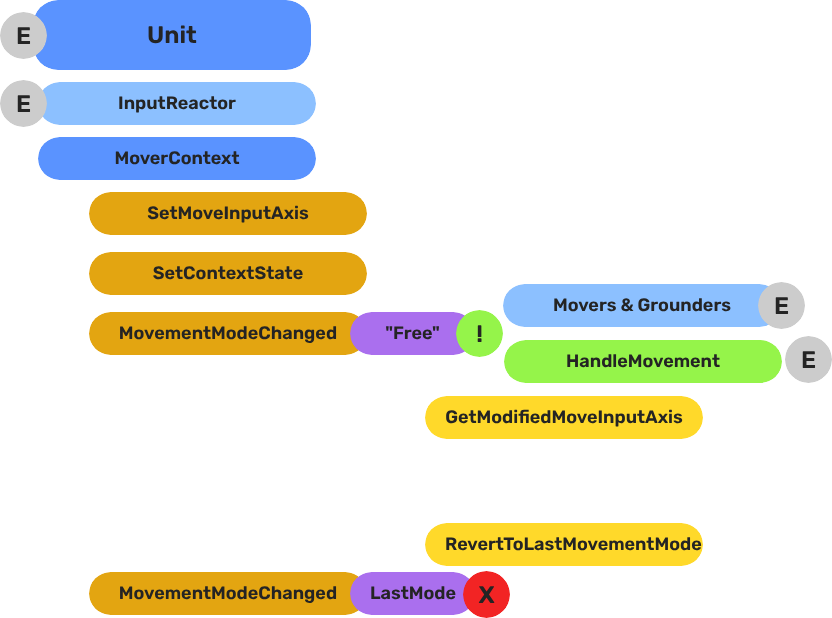
Movers and Grounders are multiple components on a Unit that are constantly changing activation based on the units state. When a mover is active, it freely processes the unit’s movement based on it’s functionality. At any moment, through internal or external forces, the Movement, Rotation, or Grounding state can change, which disables the old movers, and activates the new one to continue controlling the Unit.
Input
    ↓  InputDataNotificationBus::InputStateChanged
Input Reactor Components
    ↓  MoverContextRequestBus::SetMoveInputAxis
GS_MoverContextComponent
    ↓  ModifyInputAxis() → camera-relative
    ↓  GroundInputAxis() → ground-projected
    ↓  MoverContextNotificationBus::MovementModeChanged("Free")
GS_3DFreeMoverComponent  [active when mode == "Free"]
    ↓  AccelerationSpringDamper → rigidBody->SetLinearVelocity
GS_PhysicsRayGrounderComponent  [active when grounding mode == "Free"]
    ↓  MoverContextRequestBus::SetGroundNormal / SetContextState("grounding", ...)
    ↓  MoverContextRequestBus::ChangeMovementMode("Slide")  ← when slope too steep
GS_3DSlideMoverComponent  [active when mode == "Slide"]
The Slide mover activates when the Unit is walking on too steep an angle. It takes control over the unit, slides down the hill, then restores the previous movement behaviour.
- The Basics: Mover Context — Movement modes, grounding states, and configuration.
- The Basics: Movement — Mover types, grounder types, and ScriptCanvas usage.
- Framework API: Input Reactor — InputDataComponent schema, reactor base class, and C++ extension.
- Framework API: Mover Context — Context state, mode authority, and C++ extension.
- Framework API: Movers — Mover and grounder components, movement APIs, and C++ extension.
Movement Profile
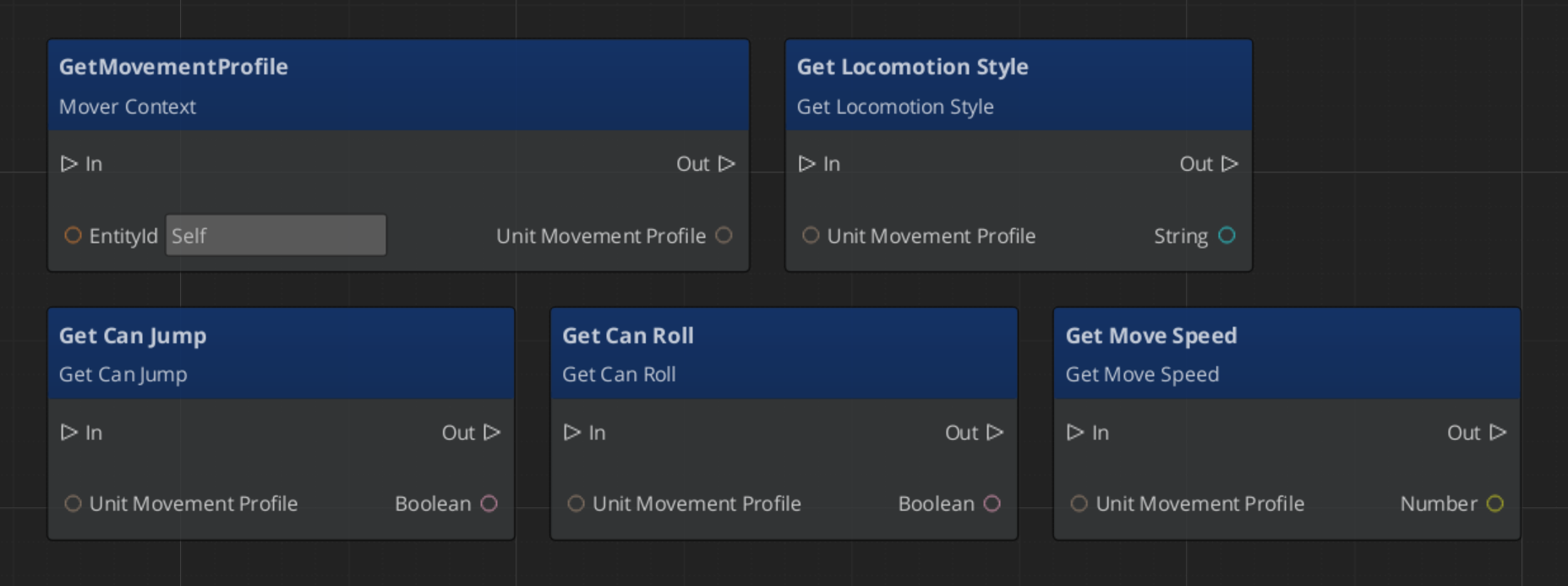
GS_UnitMovementProfile is an asset that holds locomotion parameters. Movers read from the active profile via activeProfile pointer, which the MoverContext updates whenever the profile changes.
| Field | Type | Description |
|---|
LocomotionStyle | enum | Movement style archetype (affects animation matching). |
moveSpeed | float | Target movement speed (m/s). |
speedChangeSmoothing | float | Lerp factor for speed transitions between profiles. |
canSprint | bool | Whether this profile allows sprinting. |
canJump | bool | Whether this profile allows jumping. |
canRoll | bool | Whether this profile allows rolling. |
Create movement profiles as data assets in the Asset Editor. Assign a default profile to the GS_MoverContextComponent in the Inspector. Spatial influence zones can override the active profile at runtime.
Reading Movement Profile Data - ScriptCanvas
Movement Influence
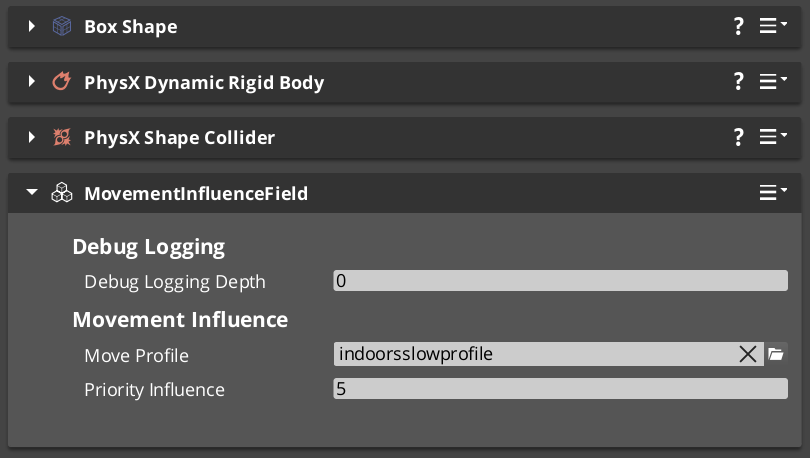
The MoverContext selects the active profile by priority:
- Influence list —
MovementInfluenceFieldComponent adds its profile when the unit enters its trigger volume. Multiple fields stack by priority. - Global fallback — if the influence list is empty and
allowGlobalInfluence is true, falls back to GlobalMovementRequestBus::GetGlobalMovementProfile. - Default profile — the
defaultMoveProfile assigned directly on the GS_MoverContextComponent.
MovementInfluenceFieldComponent
Inherits PhysicsTriggerComponent. On TriggerEnter, calls MoverContextRequestBus::AddMovementProfile(entityId, profile*) on the entering unit. On TriggerExit, calls RemoveMovementProfile(entityId).
Request Bus: MovementInfluenceRequestBus
ById bus — addressed by the influence field’s entity ID.
| Method | Parameters | Returns | Description |
|---|
GetPriority | — | int | Returns this field’s priority. Higher values take precedence when multiple fields overlap. |
GlobalMovementRequestBus
Broadcast bus — single global instance.
| Method | Parameters | Returns | Description |
|---|
GetGlobalMovementProfile | — | GS_UnitMovementProfile* | Returns the global fallback movement profile. Used by the MoverContext when no influence fields are active. |
Sub-Sections
- Mover Context — Input transformation, mode switching, context states, profile management
- Movers — Mover base class and concrete movers (
GS_3DFreeMoverComponent, GS_3DSlideMoverComponent) - Grounders — Grounder base class and concrete grounders (
GS_PhysicsRayGrounderComponent)
See Also
- Units — Unit entity setup and
GS_UnitComponent - Unit Controllers — Controllers that manage possession and drive input routing
- Input Data — The input pipeline that feeds movement reactors
- Stage Data — Handler for current stage functionality and global effects
- Springs Utility — Spring-damper functions used by movers and grounders
- Physics Trigger Volume — Physics overlap that triggers functionality.
Get GS_Unit
GS_Unit — Explore this gem on the product page and add it to your project.
1.1 - Mover Context
The central movement hub — transforms raw input into camera-relative and ground-projected vectors, manages mode switching, context states, and movement profiles.
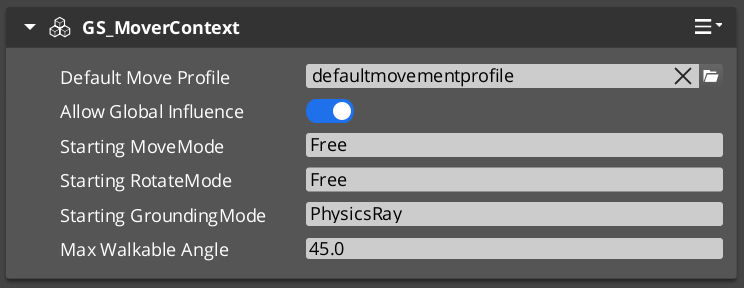
GS_MoverContextComponent is the central state store for all movement on a unit. It sits between the input layer and the mover/grounder layer, holds all shared movement data, owns the mode-switching logic, and manages the active movement profile.
Movers and Grounders never communicate directly — they all read from and write to the MoverContext.
For usage guides and setup examples, see The Basics: GS_Unit.
Contents
Raw input from reactor components arrives as a Vector2 (rawMoveInput). The MoverContext applies two sequential transformations each time input changes.
For a player unit (detected by “Player” tag): fetches the active camera’s world transform, flattens its forward and right vectors to the XY plane, then computes:
modifiedMoveInput = camForward * rawInput.Y + camRight * rawInput.X
For AI units (or when inputOverride = true): uses world cardinal axes (Y=forward, X=right).
Projects modifiedMoveInput onto the ground plane using the current groundNormal:
groundedMoveInput = modifiedMoveInput - groundNormal * dot(modifiedMoveInput, groundNormal)
Direction is then normalized and the original magnitude is restored. Movers use groundedMoveInput so movement always follows the surface contour, even on slopes.
Both steps run automatically whenever SetMoveInputAxis is called and again whenever SetGroundNormal is called (ground changed under a moving unit).
Mode Switching
The MoverContext maintains three independent mode strings, each with a current and last value:
| Mode Type | Current | Last |
|---|
| Movement mode | currentMoveMode | lastMoveMode |
| Rotation mode | currentRotateMode | lastRotateMode |
| Grounding mode | currentGroundingMode | lastGroundingMode |
ChangeMovementMode("Free") updates the string and broadcasts MoverContextNotificationBus::MovementModeChanged("Free"). Each Mover and Grounder component checks whether its own named mode matches the broadcast and activates or deactivates itself accordingly.
RevertToLastMovementMode() swaps current and last — enabling one-step undo (e.g., return from “Slide” to whatever was active before).
Context States
A generic key-value store for runtime state flags used by movers and grounders:
AZStd::unordered_map<AZStd::string, AZ::u32> contextStates
SetContextState(name, value) writes and broadcasts MoverContextNotificationBus::ContextStateChanged.
Known state keys:
| Key | Set by | Values | Meaning |
|---|
"grounding" | PhysicsRayGrounder | 0 = Falling, 1 = Grounded, 2 = Sliding | Ground contact state |
"StopMovement" | Various | 1 = stop | Signals the Free Mover to zero velocity |
Movement Profile Management
The MoverContext selects the active GS_UnitMovementProfile* by priority:
- Influence list —
AddMovementProfile(influencer, profile*) is called by MovementInfluenceFieldComponent when the unit enters a trigger volume. Multiple fields stack additively by priority via MovementInfluenceRequestBus::GetPriority. - Global fallback — if
influenceList is empty and allowGlobalInfluence is true, checks GlobalMovementRequestBus::GetGlobalMovementProfile. - Default profile — the asset-configured
defaultMoveProfile on the component.
When the profile changes, MoverContextNotificationBus::MovementProfileChanged(profile*) is broadcast. Movers update their cached activeProfile pointer.
Standby behavior:
UnitEnteringStandby → clears the influence list, broadcasts empty mode names (disables all movers/grounders)UnitExitingStandby → re-evaluates profile priority, re-broadcasts current mode names to re-enable the correct movers
Editor-Exposed Fields
| Field | Description |
|---|
defaultMoveProfile | Asset reference to the fallback GS_UnitMovementProfile |
allowGlobalInfluence | Whether to accept the global movement profile as a fallback |
startingMoveMode | Mode name to broadcast on activate (one-frame delayed to allow all components to start first) |
startingRotateMode | Rotation mode name to start with |
startingGroundingMode | Grounding mode name to start with |
maxWalkDegrees | Slope angle (degrees) above which movement is no longer considered grounded |
API Reference
Request Bus: MoverContextRequestBus
Commands sent to a specific unit’s MoverContext. ById bus — addressed by unit entity ID.
Input Axis:
| Method | Parameters | Returns | Description |
|---|
SetMoveInputAxis | AZStd::string axisName, float axisValue | void | Sets the raw input on “x” or “y”. Triggers ModifyInputAxis() and GroundInputAxis(). Clamps total magnitude to 1.0. |
GetMoveInputAxis | — | AZ::Vector2* | Returns pointer to rawMoveInput. |
GetModifiedMoveInputAxis | — | AZ::Vector3* | Returns pointer to camera-relative modifiedMoveInput. |
GetGroundMoveInputAxis | — | AZ::Vector3* | Returns pointer to ground-projected groundedMoveInput. |
Ground State:
| Method | Parameters | Returns | Description |
|---|
SetGroundNormal | AZ::Vector3 newNormal | void | Updates the ground normal and re-projects modifiedMoveInput. |
GetGroundNormal | — | AZ::Vector3* | Returns pointer to current ground normal. |
GetSlopeDirection | — | AZ::Vector3* | Returns pointer to the current slope direction vector. |
GetSlopeAngle | — | float* | Returns pointer to the current slope angle (dot product with up). |
GetMaxWalkAngle | — | float* | Returns pointer to the cosine of maxWalkDegrees. |
Context States:
| Method | Parameters | Returns | Description |
|---|
SetContextState | AZStd::string stateName, AZ::u32 stateValue | void | Writes a state value and broadcasts ContextStateChanged. |
GetContextState | AZStd::string stateName | AZ::u32 | Returns the current value for the named state. |
Mode Switching:
| Method | Parameters | Returns | Description |
|---|
ChangeMovementMode | AZStd::string targetMoveMode | void | Sets current move mode and broadcasts MovementModeChanged. |
RevertToLastMovementMode | — | void | Swaps current and last move mode. |
ChangeRotationMode | AZStd::string targetRotateMode | void | Sets current rotation mode and broadcasts RotationModeChanged. |
RevertToLastRotationMode | — | void | Swaps current and last rotation mode. |
ChangeGroundingMode | AZStd::string targetGroundingMode | void | Sets current grounding mode and broadcasts GroundingModeChanged. |
RevertToLastGroundingMode | — | void | Swaps current and last grounding mode. |
Profile Management:
| Method | Parameters | Returns | Description |
|---|
AddMovementProfile | AZ::EntityId influencer, GS_UnitMovementProfile* profile | void | Adds an influence-field profile to the priority list and re-evaluates. |
RemoveMovementProfile | AZ::EntityId influencer | void | Removes an influence-field profile and re-evaluates. |
Notification Bus: MoverContextNotificationBus
Events broadcast by the MoverContext. ById bus — addressed by unit entity ID. Movers and Grounders subscribe to this.
| Event | Parameters | Description |
|---|
MovementModeChanged | AZStd::string modeName | Fired when the movement mode changes. Movers activate or deactivate based on their m_moveModeName. |
RotationModeChanged | AZStd::string modeName | Fired when the rotation mode changes. |
GroundingModeChanged | AZStd::string modeName | Fired when the grounding mode changes. Grounders activate or deactivate based on their m_groundModeName. |
ContextStateChanged | AZStd::string stateName, AZ::u32 value | Fired when a context state value changes. |
MovementProfileChanged | GS_UnitMovementProfile* profile | Fired when the active movement profile is replaced. Movers update their activeProfile pointer. |
Virtual Methods
Override these when extending the MoverContext.
| Method | Description |
|---|
ModifyInputAxis() | Transforms rawMoveInput into modifiedMoveInput (camera-relative). Override for custom camera or axis mapping. |
GroundInputAxis() | Projects modifiedMoveInput onto the ground plane into groundedMoveInput. Override for custom surface projection. |
Script Canvas Examples
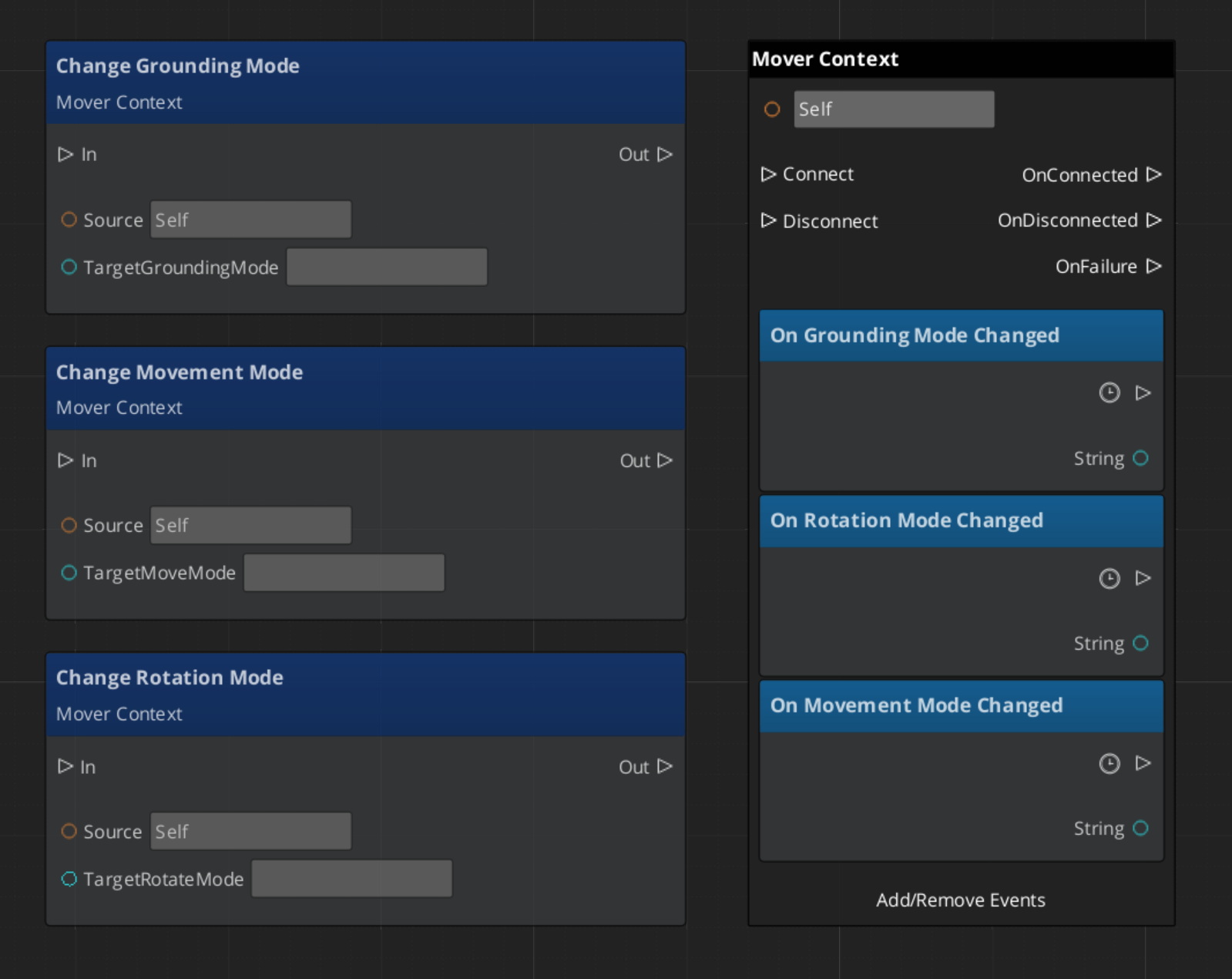
Changing movement mode:
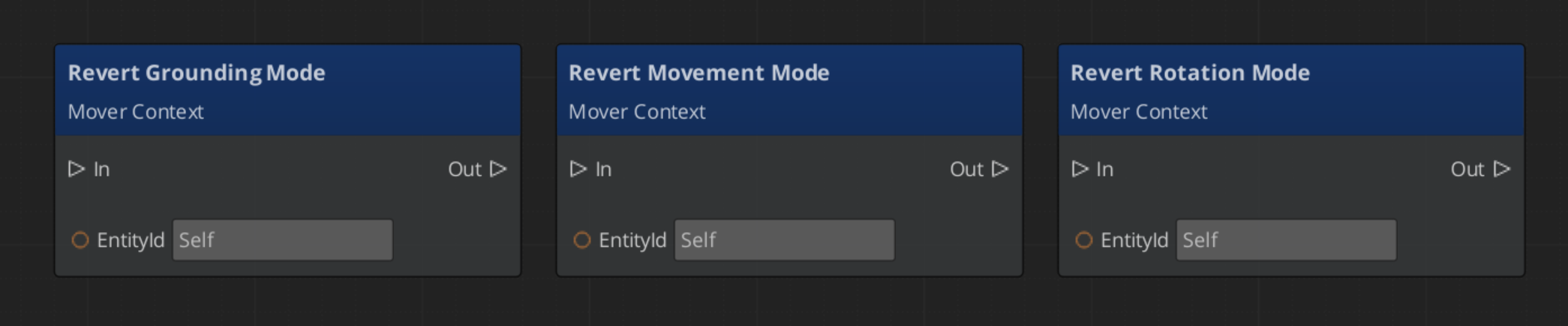
Reverting to the previous movement mode:
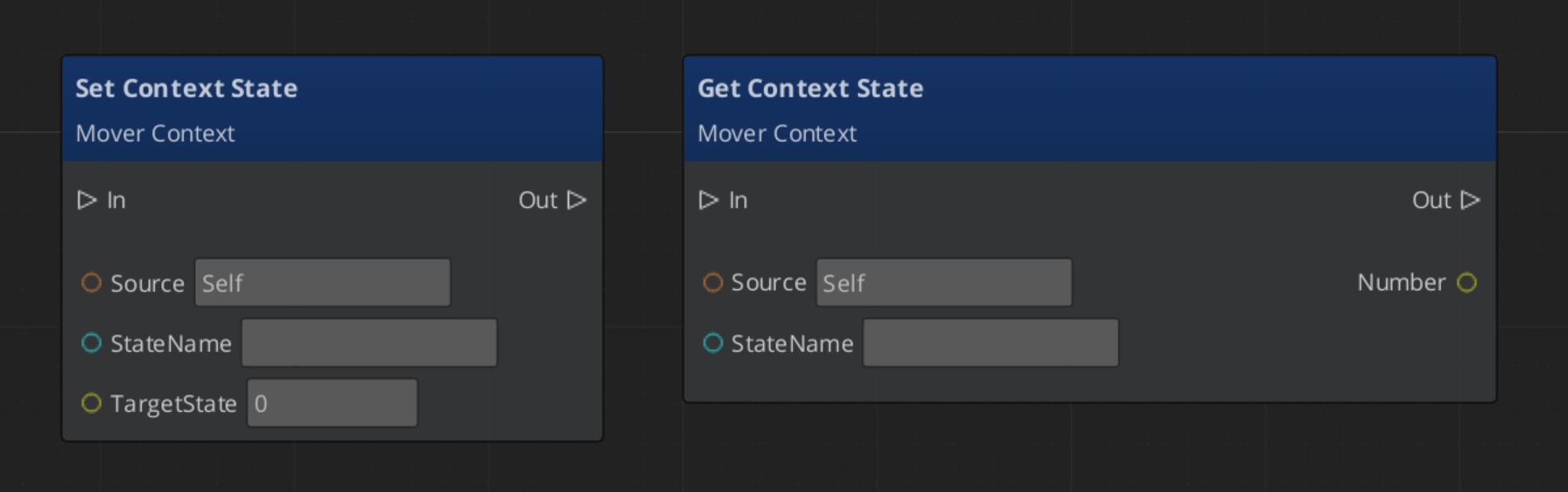
Setting a context state flag:
See Also
- Movers — Mover components that read from the MoverContext
- Grounders — Grounder components that write ground state to the MoverContext
- Movement — Movement system overview
- Input Data — The input pipeline that feeds
SetMoveInputAxis
Get GS_Unit
GS_Unit — Explore this gem on the product page and add it to your project.
1.2 - Movers
Mover base class and concrete mover components — translate MoverContext input into physics-based unit motion via named mode activation.
Movers translate the processed movement input from the MoverContext into physics forces on the unit’s rigid body. Each mover activates for a specific named mode — when the MoverContext broadcasts MovementModeChanged("Free"), only the mover whose m_moveModeName matches "Free" activates. All others deactivate. This makes the locomotion system fully mode-driven and composable.
For usage guides and setup examples, see The Basics: GS_Unit.

Contents
Class Hierarchy
GS_MoverComponent (base — mode-aware activation, tick management)
  └── GS_PhysicsMoverComponent (adds RigidBody cache + validity check)
        ├── GS_3DFreeMoverComponent    (mode: "Free")
        └── GS_3DSlideMoverComponent   (mode: "Slide")
GS_MoverComponent (Base)
Tick: AzPhysics::SystemEvents::OnPostSimulateEvent (after the physics step). Optional debugForceTick uses AZ::TickBus for debugging without physics.
Mode-Aware Activation
Listens to MoverContextNotificationBus::MovementModeChanged and RotationModeChanged. Compares the broadcast mode name against its own m_moveModeName and m_rotateModeName. Calls ToggleMovement(true/false) and ToggleRotation(true/false) accordingly. The physics post-simulate handler is only registered when the mover is active, saving ticks when inactive.
Per-Tick Processing
Each tick:
CheckCanOperate() — validates that the required pointers and state are validHandleMovement() — calculates and applies movement (no-op in base)HandleRotation() — calculates and applies rotation (no-op in base)
Key Fields
| Field | Description |
|---|
m_moveModeName | Mode string this mover activates for (set in Activate()) |
m_rotateModeName | Mode string this mover’s rotation activates for |
movementActive / rotationActive | Whether movement/rotation processing is currently running |
delta | Cached frame delta time |
activeProfile | Pointer to current GS_UnitMovementProfile (updated via MovementProfileChanged) |
debugForceTick | If true, uses game tick instead of post-simulate (for debugging without physics) |
GS_PhysicsMoverComponent
Extends GS_MoverComponent. On activate, fetches AzPhysics::RigidBody* from the entity. CheckCanOperate() verifies the rigid body pointer is valid before allowing tick processing.
Concrete Movers
| Component | Mode Name | Description |
|---|
| GS_3DFreeMoverComponent | "Free" | Standard 3D locomotion — camera-relative, spring-damped velocity and rotation |
| GS_3DSlideMoverComponent | "Slide" | Slope-sliding locomotion — activated by the grounder when slope exceeds maxWalkAngle |
API Reference
Movers consume two buses and produce one:
Consumed
| Bus | Event | Description |
|---|
MoverContextNotificationBus | MovementModeChanged(modeName) | Activates or deactivates movement processing based on mode name match. |
MoverContextNotificationBus | RotationModeChanged(modeName) | Activates or deactivates rotation processing based on mode name match. |
MoverContextNotificationBus | ContextStateChanged(stateName, value) | Allows movers to react to state flags (e.g. "StopMovement"). |
MoverContextNotificationBus | MovementProfileChanged(profile*) | Updates the cached activeProfile pointer. |
Virtual Methods
Override these when extending any mover:
| Method | Parameters | Returns | Description |
|---|
ToggleMovement | bool on | void | Called when the movement mode activates or deactivates. |
ToggleRotation | bool on | void | Called when the rotation mode activates or deactivates. |
HandleMovement | — | void | Called each tick when movement is active. Override to implement movement logic. |
HandleRotation | — | void | Called each tick when rotation is active. Override to implement rotation logic. |
CheckCanOperate | — | bool | Returns true if the mover has everything it needs to run this tick. |
Extension Guide
Use the Mover ClassWizard template to generate a new mover with boilerplate already in place — see GS_Unit Templates. The template offers two base class options: Physics Mover (default) for rigid-body locomotion, and Base Mover for transform-only movement.
Extend GS_PhysicsMoverComponent to create a custom physics-driven mover.
#pragma once
#include <Source/Unit/Mover/GS_PhysicsMoverComponent.h>

namespace MyProject
{
    class MyCustomMover : public GS_Unit::GS_PhysicsMoverComponent
    {
    public:
        AZ_COMPONENT_DECL(MyCustomMover);
        static void Reflect(AZ::ReflectContext* context);

    protected:
        void Activate() override;

        void HandleMovement() override;
        void HandleRotation() override;

    private:
        // Mode name must be set in Activate():
        // m_moveModeName = "MyMode";
        // m_rotateModeName = "MyMode";
    };
}
In HandleMovement(), read from the MoverContext and write to the rigid body:
void MyCustomMover::HandleMovement()
{
    AZ::Vector3* groundedInput = nullptr;
    GS_Unit::MoverContextRequestBus::EventResult(
        groundedInput, GetEntityId(),
        &GS_Unit::MoverContextRequestBus::Events::GetGroundMoveInputAxis
    );

    if (!groundedInput || groundedInput->IsZero()) return;

    AZ::Vector3 targetVelocity = *groundedInput * activeProfile->moveSpeed;
    m_rigidBody->SetLinearVelocity(targetVelocity);
}
See Also
Get GS_Unit
GS_Unit — Explore this gem on the product page and add it to your project.
1.2.1 - 3D Free Mover
Standard 3D locomotion — camera-relative movement and rotation driven by spring-damped physics, with optional slope slowdown.
GS_3DFreeMoverComponent is the standard mover for walking characters. It reads the ground-projected input vector from the MoverContext, applies optional slope attenuation, computes a destination velocity, and drives the rigid body via AccelerationSpringDamper. Rotation is handled separately using QuaternionSpringDamper to face the last non-zero movement direction.
Mode names: "Free" (both movement and rotation)
For usage guides and setup examples, see The Basics: GS_Unit.

Contents
How It Works
HandleMovement()
Called each post-physics tick while movement mode is "Free":
- Reads
groundedMoveInput pointer from MoverContextRequestBus::GetGroundMoveInputAxis. - If
EnableSlopeSlowdown is true, attenuates the input vector on steep slopes (see Slope Slowdown). - Multiplies the attenuated direction by
CalculateSpeed() to get destinationVelocity. - Fetches
rigidBody->GetLinearVelocity() as the current velocity. - Calls
GS_Core::Springs::AccelerationSpringDamper(position, velocity, cachedAcceleration, destinationVelocity, moveHalflife, delta). - Applies the result:
rigidBody->SetLinearVelocity(velocity).
The cachedAcceleration is a member field that persists between frames to produce smooth acceleration response even on sudden direction changes.
HandleRotation()
- Reads
groundedMoveInput from the MoverContext. - Updates
lastDirection only when groundedMoveInput is non-zero — so the unit keeps facing the last direction when stopped. - Computes target yaw from
lastDirection using atan2f. - Calls
GS_Core::Springs::QuaternionSpringDamper(currentRotation, cachedAngularVelocity, targetRotation, rotateHalflife, delta). - Applies
cachedAngularVelocity.Z to rigidBody->SetAngularVelocity().
StopMovement State
When ContextStateChanged("StopMovement", 1) fires, the mover zeros both velocity and cached acceleration, then clears the state back to 0. This allows other systems (e.g. landing from a jump, ability wind-up) to cleanly halt the unit.
Slope Slowdown
When EnableSlopeSlowdown is true, the mover reduces movement speed as the slope angle increases toward maxWalkAngle. The attenuation curve uses an exponent applied to the dot product of the movement direction against the uphill slope direction:
attenuation = 1.0 - uphillSlowStrength * pow(dot(moveDir, slopeDir), uphillSlowExponent)
              × remap(slopeAngle, startSlowAngle, maxWalkAngle, 0, 1)
The slowdown begins at startSlowAngle degrees and reaches maximum reduction at maxWalkAngle. At or beyond maxWalkAngle, the grounder will switch the unit to "Slide" mode regardless.
Speed Calculation
CalculateSpeed() lerps curSpeed toward activeProfile->moveSpeed each frame:
curSpeed = AZ::Lerp(curSpeed, activeProfile->moveSpeed, expf(-speedChangeSmoothing * delta));
speedChangeSmoothing is read from activeProfile. This produces a smooth speed transition when the movement profile changes (e.g. entering a slow zone).
Editor-Exposed Settings
| Field | Default | Description |
|---|
moveHalflife | 0.1 | Spring halflife for movement velocity. Smaller = snappier acceleration. |
rotateHalflife | 0.2 | Spring halflife for rotation. Smaller = faster turn response. |
EnableSlopeSlowdown | true | Whether steep slopes reduce movement speed. |
uphillSlowStrength | 0.5 | Maximum speed reduction factor at the max walkable angle (0 = no reduction, 1 = full stop). |
uphillSlowExponent | 2.5 | Curve shape of the slowdown ramp. Higher = slower onset, steeper drop near max. |
startSlowAngle | 30° | Slope angle at which slowdown begins. |
Extension Guide
Extend GS_3DFreeMoverComponent to override movement or rotation behavior while keeping the base spring physics.
#pragma once
#include <Source/Unit/Mover/GS_3DFreeMoverComponent.h>

namespace MyProject
{
    class MyFreeMove : public GS_Unit::GS_3DFreeMoverComponent
    {
    public:
        AZ_COMPONENT_DECL(MyFreeMove);
        static void Reflect(AZ::ReflectContext* context);

    protected:
        void HandleMovement() override;
    };
}
void MyFreeMove::HandleMovement()
{
    // Call base for standard spring movement
    GS_3DFreeMoverComponent::HandleMovement();

    // Add custom post-processing (e.g. strafe penalty, footstep IK correction)
}
See Also
Get GS_Unit
GS_Unit — Explore this gem on the product page and add it to your project.
1.2.2 - Slide Mover
Slope-sliding locomotion — automatically activated when slope exceeds maxWalkAngle, drives the unit down the slope via spring-damped physics with optional input resistance and automatic recovery.
GS_3DSlideMoverComponent handles slope-sliding locomotion. It activates automatically when the grounder detects a slope angle exceeding maxWalkAngle, and deactivates when the slope eases or the unit slows enough to recover.
Mode names: "Slide" (both movement and rotation)
For usage guides and setup examples, see The Basics: GS_Unit.
Contents
How It Works
HandleMovement()
Called each post-physics tick while movement mode is "Slide":
- Reads
slopeDir from MoverContextRequestBus::GetSlopeDirection. - Computes
destinationVelocity = slopeDir * baseSlideSpeed. - If
EnableInputSlideResistance is true, reads groundedMoveInput and applies an opposing influence:destinationVelocity += groundedMoveInput * InputResistanceInfluence
- Fetches
rigidBody->GetLinearVelocity() as the current velocity. - Calls
GS_Core::Springs::AccelerationSpringDamper(position, velocity, cachedAcceleration, destinationVelocity, moveHalflife, delta). - Applies the result:
rigidBody->SetLinearVelocity(velocity). - Calls
FinishSliding() to check whether the slide should end.
HandleRotation()
- Reads
slopeDir from the MoverContext. - Computes target yaw from slope direction using
atan2f — unit faces down the slope. - Calls
GS_Core::Springs::QuaternionSpringDamper(currentRotation, cachedAngularVelocity, targetRotation, rotateHalflife, delta). - Applies
cachedAngularVelocity.Z to rigidBody->SetAngularVelocity().
Finish Sliding
FinishSliding() is called every movement tick. It returns true and triggers recovery when both conditions are met:
- The current slope angle is below
minSlideAngle - The unit’s current speed is below
minSpeedToStop
On recovery:
MoverContextRequestBus::ChangeMovementMode(recoveryMoveMode);
MoverContextRequestBus::ChangeRotationMode(recoveryRotateMode);
Both modes default to "Free", returning the unit to standard locomotion.
Editor-Exposed Settings
| Field | Default | Description |
|---|
moveHalflife | 0.1 | Spring halflife for slide velocity. |
rotateHalflife | 0.15 | Spring halflife for rotation toward slope direction. |
baseSlideSpeed | 8.0 | Target speed along the slope direction (m/s). |
EnableInputSlideResistance | true | Whether player input can partially resist or redirect the slide. |
InputResistanceInfluence | 2.0 | Scalar applied to groundedMoveInput when computing resistance. Higher = more player control. |
minSlideAngle | 20° | Slope angle below which the unit may recover (if also slow enough). |
minSpeedToStop | 1.5 | Speed threshold below which the unit may recover (if also on shallow slope). |
recoveryMoveMode | "Free" | Movement mode to switch to on recovery. |
recoveryRotateMode | "Free" | Rotation mode to switch to on recovery. |
Extension Guide
Extend GS_3DSlideMoverComponent to override slide behavior while keeping the base spring physics and recovery logic.
#pragma once
#include <Source/Unit/Mover/GS_3DSlideMoverComponent.h>

namespace MyProject
{
    class MySlide : public GS_Unit::GS_3DSlideMoverComponent
    {
    public:
        AZ_COMPONENT_DECL(MySlide);
        static void Reflect(AZ::ReflectContext* context);

    protected:
        void HandleMovement() override;
    };
}
void MySlide::HandleMovement()
{
    // Call base for standard slope physics
    GS_3DSlideMoverComponent::HandleMovement();

    // Add custom post-processing (e.g. audio trigger, particle effect on slide)
}
See Also
Get GS_Unit
GS_Unit — Explore this gem on the product page and add it to your project.
1.2.3 - 3D Strafe Mover
Aim-relative strafing movement for first-person and third-person units. Not yet implemented.
The 3D Strafe Mover provides aim-relative movement where the unit strafes relative to its facing direction. This is the standard movement model for first-person and third-person shooters where the camera or aim direction determines the movement frame.
This component is not yet implemented. This page will be updated with full API reference and usage documentation when the component is available.
For usage guides and setup examples, see The Basics: GS_Unit.
See Also
Get GS_Unit
GS_Unit — Explore this gem on the product page and add it to your project.
1.2.4 - Side Scroller Mover
2D side-scrolling movement constrained to a horizontal plane. Not yet implemented.
The Side Scroller Mover provides two-dimensional movement constrained to a horizontal plane with vertical jump support. This is the standard movement model for side-scrolling platformers, beat-em-ups, and other 2D gameplay projected in a 3D environment.
This component is not yet implemented. This page will be updated with full API reference and usage documentation when the component is available.
For usage guides and setup examples, see The Basics: GS_Unit.
See Also
- Movement – Movement subsystem overview
- Movers – All available mover components
Get GS_Unit
GS_Unit — Explore this gem on the product page and add it to your project.
1.2.5 - Grid Step Mover
Tile-based grid movement for turn-based or grid-locked unit locomotion. Not yet implemented.
The Grid Step Mover provides discrete, tile-based movement for units that move in fixed steps along a grid. This is the standard movement model for turn-based RPGs, tactics games, puzzle games, and any project that uses grid-locked locomotion.
This component is not yet implemented. This page will be updated with full API reference and usage documentation when the component is available.
For usage guides and setup examples, see The Basics: GS_Unit.
See Also
- Movement – Movement subsystem overview
- Movers – All available mover components
Get GS_Unit
GS_Unit — Explore this gem on the product page and add it to your project.
1.3 - Grounders
Grounder base class and concrete grounder components — detect ground contact, compute ground normals and slope data, and drive mode switching on the MoverContext.
Grounders run each physics tick to determine whether the unit is in contact with the ground, what the slope looks like, and whether the surface is walkable. They write their findings to the MoverContext and switch movement modes when the ground state changes.
For usage guides and setup examples, see The Basics: GS_Unit.

Contents
Class Hierarchy
GS_GrounderComponent (base — mode-aware activation, tick management)
  └── GS_PhysicsRayGrounderComponent  (grounding mode: "Free")
GS_GrounderComponent (Base)
Tick: AzPhysics::SystemEvents::OnPostSimulateEvent (after the physics step).
Mode-Aware Activation
Listens to MoverContextNotificationBus::GroundingModeChanged. Compares the broadcast mode name against its own m_groundModeName. Calls ToggleGrounder(true/false) accordingly. The physics post-simulate handler is only registered when the grounder is active.
Per-Tick Processing
Each tick:
CheckCanOperate() — validates required pointers and stateHandleGrounding() — performs ground detection and updates MoverContext (no-op in base)
Key Fields
| Field | Description |
|---|
m_groundModeName | Grounding mode string this grounder activates for |
delta | Cached frame delta time |
Concrete Grounders
API Reference
Virtual Methods
Override these when extending any grounder:
| Method | Parameters | Returns | Description |
|---|
ToggleGrounder | bool on | void | Called when the grounding mode activates or deactivates. |
HandleGrounding | — | void | Called each tick when the grounder is active. Override to implement ground detection logic. |
GroundingStateChange | AZ::u32 newState | void | Called when ground contact state changes. Override to react to grounding transitions. |
CheckCanOperate | — | bool | Returns true if the grounder has everything it needs to run this tick. |
Consumed Buses
| Bus | Event | Description |
|---|
MoverContextNotificationBus | GroundingModeChanged(modeName) | Activates or deactivates this grounder based on mode name match. |
Produced Calls
| Bus | Method | Description |
|---|
MoverContextRequestBus | SetGroundNormal(normal) | Updates the ground normal used by the MoverContext for input projection. |
MoverContextRequestBus | SetContextState("grounding", value) | Sets grounding state: 0 = Falling, 1 = Grounded, 2 = Sliding. |
MoverContextRequestBus | ChangeMovementMode(modeName) | Switches to "Slide" when slope exceeds maxWalkAngle, or back to "Free" on recovery. |
Extension Guide
Use the Grounder ClassWizard template to generate a new grounder with boilerplate already in place — see GS_Unit Templates. The template offers two base class options: Physics Ray Grounder (default, includes raycast, coyote time, and gravity) or Base Grounder for fully custom detection.
Extend GS_GrounderComponent to implement custom ground detection.
#pragma once
#include <Source/Unit/Grounder/GS_GrounderComponent.h>

namespace MyProject
{
    class MyGrounder : public GS_Unit::GS_GrounderComponent
    {
    public:
        AZ_COMPONENT_DECL(MyGrounder);
        static void Reflect(AZ::ReflectContext* context);

    protected:
        void Activate() override;

        void HandleGrounding() override;
        void GroundingStateChange(AZ::u32 newState) override;

    private:
        // Set in Activate():
        // m_groundModeName = "Free";
    };
}
In HandleGrounding(), run your detection and write results to the MoverContext:
void MyGrounder::HandleGrounding()
{
    AZ::Vector3 groundNormal = AZ::Vector3::CreateAxisZ();
    bool isGrounded = false;

    // ... custom detection logic ...

    GS_Unit::MoverContextRequestBus::Event(
        GetEntityId(),
        &GS_Unit::MoverContextRequestBus::Events::SetGroundNormal,
        groundNormal
    );

    AZ::u32 state = isGrounded ? 1 : 0;
    GS_Unit::MoverContextRequestBus::Event(
        GetEntityId(),
        &GS_Unit::MoverContextRequestBus::Events::SetContextState,
        "grounding", state
    );
}
See Also
Get GS_Unit
GS_Unit — Explore this gem on the product page and add it to your project.
1.3.1 - 3D Free Grounder
Raycast-based grounder for standard 3D locomotion — detects ground contact with coyote time, applies manual gravity when airborne, switches to Slide mode on steep slopes.
GS_PhysicsRayGrounderComponent is the standard grounder for walking characters. Each physics tick it casts a ray downward from the unit’s capsule base, evaluates the slope, applies gravity when airborne, and updates the MoverContext with ground normal and grounding state.
Grounding mode name: "Free"
For usage guides and setup examples, see The Basics: GS_Unit.

Contents
How It Works
Each post-physics tick, the grounder runs two operations in order:
GroundCheck() — determines contact, slope, and normalGroundingMove() — applies gravity or snap force based on contact result
Ground Check
GroundCheck() casts a sphere (matching the capsule base radius) downward from the unit’s feet:
- If the ray hits geometry within
groundCheckDistance:- Computes slope angle from the hit normal vs. world up.
- Updates
MoverContextRequestBus::SetGroundNormal(hitNormal). - If slope angle ≤
maxWalkAngle (from the MoverContext): reports Grounded. - If slope angle >
maxWalkAngle: reports Sliding. - Resets coyote timer.
- If no hit:
- Increments
coyoteTimer. - If
coyoteTimer < coyoteTime: still reports Grounded (coyote grace period). - If
coyoteTimer ≥ coyoteTime: reports Falling.
Grounding Move
GroundingMove() applies vertical forces based on the current state:
Grounded: Applies a downward TimedSpringDamper to keep the unit snapped to the surface without bouncing.
Falling: Applies manual gravity — adds gravityScale * AZ::Physics::DefaultGravity to the rigid body’s linear velocity each frame:
AZ::Vector3 velocity = rigidBody->GetLinearVelocity();
velocity.SetZ(velocity.GetZ() + gravity * delta);
rigidBody->SetLinearVelocity(velocity);
Sliding: Does not override vertical velocity — the Free Mover’s AccelerationSpringDamper handles the slide direction entirely.
Grounding State Changes
GroundingStateChange(newState) is called whenever the ground state changes:
| State | Value | Trigger | Action |
|---|
| Falling | 0 | Lost ground contact beyond coyote time | SetContextState("grounding", 0) |
| Grounded | 1 | Ray hit within walkable angle | SetContextState("grounding", 1) |
| Sliding | 2 | Ray hit but slope > maxWalkAngle | SetContextState("grounding", 2), ChangeMovementMode("Slide") |
When returning to Grounded from Sliding, the grounder calls ChangeMovementMode("Free") to restore locomotion.
Editor-Exposed Settings
| Field | Default | Description |
|---|
groundCheckDistance | 0.15 | Raycast distance below the capsule base to detect ground. |
capsuleRadius | 0.3 | Radius of the sphere used for the downward cast (should match capsule). |
coyoteTime | 0.12 | Seconds of grace period before reporting Falling after losing ground contact. |
gravityScale | 1.0 | Multiplier on AZ::Physics::DefaultGravity applied when airborne. |
snapHalflife | 0.05 | Spring halflife for the ground-snap TimedSpringDamper. Smaller = tighter snap. |
Extension Guide
Extend GS_PhysicsRayGrounderComponent to add custom ground detection or state reactions.
#pragma once
#include <Source/Unit/Grounder/GS_PhysicsRayGrounderComponent.h>

namespace MyProject
{
    class MyGrounder : public GS_Unit::GS_PhysicsRayGrounderComponent
    {
    public:
        AZ_COMPONENT_DECL(MyGrounder);
        static void Reflect(AZ::ReflectContext* context);

    protected:
        void GroundingStateChange(AZ::u32 newState) override;
    };
}
void MyGrounder::GroundingStateChange(AZ::u32 newState)
{
    // Call base to handle mode switching
    GS_PhysicsRayGrounderComponent::GroundingStateChange(newState);

    if (newState == 0)
    {
        // Unit became airborne — trigger jump animation, etc.
    }
}
See Also
Get GS_Unit
GS_Unit — Explore this gem on the product page and add it to your project.