Input Data
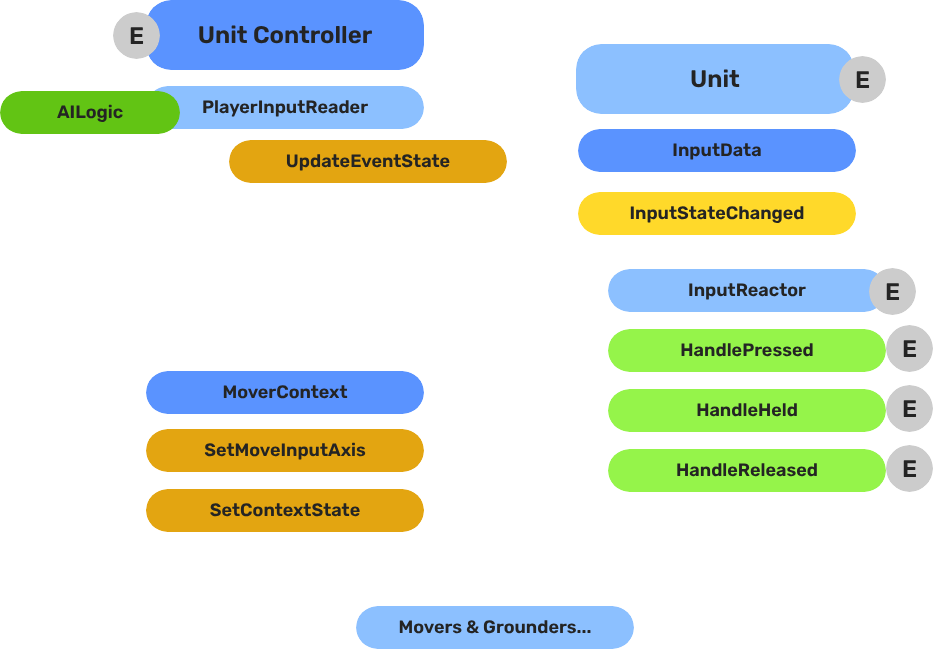
The decoupled input pipeline — reading hardware events on the controller, storing state on the unit, and reacting to state changes through reactor components.
The Input Data subsystem bridges the controller entity (where hardware input is read) and the unit entity (where input is acted on). The controller reads raw device events and routes named event values into the unit’s GS_InputDataComponent. Reactor components on the unit then convert that stored state into movement vectors or game actions.
This separation keeps units ignorant of input bindings — any controller can possess any unit without the unit needing to change.
For usage guides and setup examples, see The Basics: GS_Unit.
Contents
How It Works
Breakdown
The input pipeline has three stages. Each stage is a separate component on the unit entity, and they run in order every frame:
| Stage | Component | What It Does |
|---|
| 1 — Read | GS_PlayerControllerInputReaderComponent | Reads raw input events from the active input profile and writes them into GS_InputDataComponent. |
| 2 — Store | GS_InputDataComponent | Holds the current frame’s input state — button presses, axis values — as structured data. |
| 3 — React | Reactor components | Read from GS_InputDataComponent and produce intent: movement vectors, action triggers, etc. |
All reactor components downstream of the store stage read from the same GS_InputDataComponent, so there is no duplicated hardware polling and no risk of two reactors seeing different input states for the same frame.
- The Basics: Controllers — Possession, input routing, and controller assignment.
- The Basics: Core Input — Input profiles, action mappings, and options setup.
- The Basics: Unit Input — Input readers, axis configuration, and ScriptCanvas usage.
- Framework API: Unit Controllers — Controller components, possession API, and C++ extension.
- Framework API: Input Reader — Profile binding, action event reading, and C++ extension.
- Framework API: Input Reactor — InputDataComponent schema, reactor base class, and C++ extension.
- Framework API: Mover Context — Context state, mode authority, and C++ extension.
Component Reference
Stores the current input state for a unit as a name-value map. Receives input from the controller via InputDataRequestBus.
Data: AZStd::unordered_map<AZStd::string, float> inputEventStates
The owning controller reference is established when a controller takes possession, observed through the GS_Core PossessionEmissionBus (see Player Input Reader).
Reactors
Reacting to input is a GS_Core mechanism. A unit carries a GS_InputReactorComponent holding a reactor profile asset — a list of authored reaction types — and the component classifies each incoming event’s phase (pressed, held, released, analog) before dispatching it to whichever reactors subscribed to that event name.
GS_Unit supplies the reaction types for the movement domain:
| Reactor type | Drives |
|---|
| KeyboardMovement_InputReactor | Four directional event names to the mover context X and Y axes, with stacking-aware release. |
| JoypadMovement_InputReactor | Two analog axis event names straight to the mover context X and Y axes. |
| Jump_InputReactor | The mover context’s jump state — set on press, cleared on release. |
See Unit Input Reactors for their authored fields, and Input Reactors for the component, profiles, phases and how to write a reaction type of your own.
Extends GS_Core::GS_InputReaderComponent. Sits on the controller entity. Routes input to the possessed unit on HandleFireInput. Updates its possessedUnit reference when OnPossessedUnit fires on the GS_Core PossessionEmissionBus (controller entity). See Player Input Reader for full details.
API Reference
Commands sent to a specific unit’s input data component. ById bus — addressed by unit entity ID.
| Method | Parameters | Returns | Description |
|---|
UpdateEventState | AZStd::string stateName, float value | void | Writes the value for the named event and broadcasts InputStateChanged. |
ClearInputState | — | void | Zeros all stored values and broadcasts ClearInput. |
GetEventState | AZStd::string stateName | float | Returns the current float value for the named event. |
Events broadcast to reactor components on the unit. ById bus — addressed by unit entity ID.
| Event | Parameters | Description |
|---|
InputStateChanged | AZStd::string stateName, float value | Fired when any input event value changes. |
ClearInput | — | Fired when all input states are cleared. |
See Also
For detailed component pages:
For related components:
Get GS_Unit
GS_Unit — Explore this gem on the product page and add it to your project.
1 - Unit Input Reactors
The reactor types GS_Unit ships — keyboard and joypad movement, and jump — and how they drive a unit’s mover context.
GS_Unit ships the reactor types that turn input events into unit movement. They are ordinary Input Reactors — GS_Core owns the mechanism, and GS_Unit supplies the reactions that belong to the movement domain.
Each one writes to the unit’s Mover Context, which is what the movement system reads. Reactors never move a unit themselves; they set intent, and the movers act on it.
For usage guides and setup examples, see The Basics: GS_Unit.

Contents
Setup
- Create an Input Reactor Profile asset.
- Add the reactor types your unit needs, and fill in the event names each one listens to — they must match the event names in your Input Profile.
- Add the Input Reactor component to your unit and assign the profile.
The event names are authored rather than fixed, so a project that calls its jump event "Jump" and one that calls it "Ability_Jump" both work without code changes.
Shipped Reactor Types
KeyboardMovement_InputReactor
Maps four directional event names to the mover context’s X and Y axis input.
| Field | Purpose |
|---|
| Move Up Event | Event name for forward movement. |
| Move Down Event | Event name for backward movement. |
| Move Left Event | Event name for left movement. |
| Move Right Event | Event name for right movement. |
Release handling is stacking-aware: if a player is holding both left and right and releases one, movement re-routes to the direction still held rather than stopping. This is what makes keyboard movement feel correct when a player rolls between direction keys, and it is the reason this reactor keeps per-instance state.
JoypadMovement_InputReactor
Routes two analog axis event values straight to the mover context’s X and Y axis input.
| Field | Purpose |
|---|
| X Axis Event | Event name for the horizontal stick axis. |
| Y Axis Event | Event name for the vertical stick axis. |
Because stick input arrives as an analog value, this reactor passes it through directly — the magnitude of the stick deflection becomes the magnitude of the movement input, so walking and running fall out of how far the player pushes.
Jump_InputReactor
Drives the mover context’s jump state.
| Field | Purpose |
|---|
| Jump Event | Event name for jumping. |
It sets the state when the event is pressed and clears it when released — a clear illustration of why input phases exist, since the whole reactor is those two responses.
Choosing Between Keyboard and Joypad
Both movement reactors write to the same mover context axes, so a unit can carry both and respond to whichever device the player is using. The keyboard reactor only reacts to its four discrete events and the joypad reactor only to its two analog ones, so they do not fight over the same input.
That is the usual setup: one profile with both movement reactors and a jump reactor, assigned to your player unit.
See Also
For the mechanism these build on:
For related systems:
For conceptual overviews and usage guides:
Get GS_Unit
GS_Unit — Explore this gem on the product page and add it to your project.
2 - Player Input Reader
Controller-side component that reads hardware input events and routes them to the possessed unit’s input data component.
GS_PlayerControllerInputReaderComponent is the bridge between the O3DE input system and the GS_Unit input pipeline. It sits on the controller entity alongside GS_PlayerControllerComponent and is responsible for reading raw hardware events and routing them to whichever unit is currently possessed.
For usage guides and setup examples, see The Basics: GS_Unit.

Contents
How It Works
Inheritance Chain
GS_PlayerControllerInputReaderComponent extends GS_Core::GS_InputReaderComponent, which listens to AzFramework::InputChannelNotificationBus. When a hardware input fires, the base class matches the event against the configured GS_InputProfile and calls HandleFireInput(eventName, value).
HandleFireInput(eventName, value) checks whether a unit is currently possessed. If so, it routes the event to the unit:
GS_Unit::InputDataRequestBus::Event(
    possessedUnit,
    &GS_Unit::InputDataRequestBus::Events::UpdateEventState,
    eventName, value
);
If no unit is possessed, the input is silently dropped.
Tracking the Possessed Unit
The component handles the GS_Core PossessionEmissionBus on its own controller entity and overrides OnPossessedUnit. When the controller possesses a new unit, this callback fires and the component updates its local possessedUnit reference. All future input calls then route to the new unit automatically.
Setup
Add GS_PlayerControllerInputReaderComponent to the controller entity alongside:
GS_PlayerControllerComponent — the controller that manages possession- A
GS_InputProfile asset assigned to the input reader’s inspector slot — defines which input events to listen for and their names
The input reader does not need to be configured per-unit. Changing possession automatically redirects all future input.
API Reference
GS_PlayerControllerInputReaderComponent does not expose a public request bus. It consumes two buses and produces one:
Consumed
| Bus | Event | Description |
|---|
AzFramework::InputChannelNotificationBus | OnInputChannelEvent | Receives raw hardware input from O3DE. Matched against the GS_InputProfile. |
GS_Core::PossessionEmissionBus | OnPossessedUnit(unit) | Updates the local possessedUnit reference when the controller possesses a new unit. Handled on the controller’s own entity. |
Produced
| Bus | Method | Description |
|---|
InputDataRequestBus | UpdateEventState(eventName, value) | Routes matched input events to the possessed unit’s GS_InputDataComponent. |
Virtual Methods
| Method | Parameters | Description |
|---|
HandleFireInput | AZStd::string eventName, float value | Called by the base class when a matched input event fires. Routes to the possessed unit if valid. |
See Also
Get GS_Unit
GS_Unit — Explore this gem on the product page and add it to your project.