Input Data
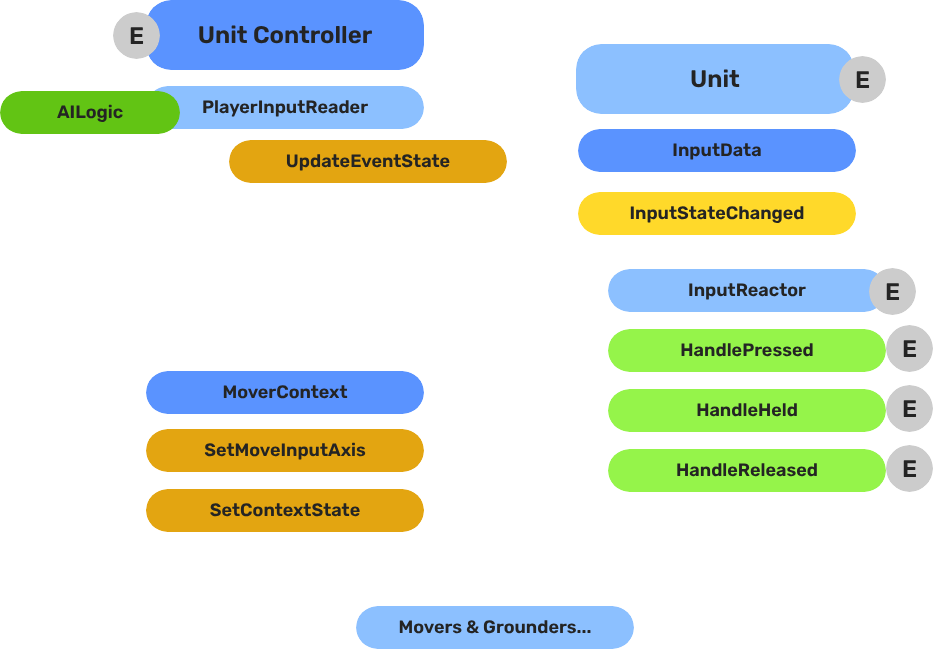
The decoupled input pipeline — reading hardware events on the controller, storing state on the unit, and reacting to state changes through reactor components.
The Input Data subsystem bridges the controller entity (where hardware input is read) and the unit entity (where input is acted on). The controller reads raw device events and routes named event values into the unit’s GS_InputDataComponent. Reactor components on the unit then convert that stored state into movement vectors or game actions.
This separation keeps units ignorant of input bindings — any controller can possess any unit without the unit needing to change.
For usage guides and setup examples, see The Basics: GS_Unit.
Contents
How It Works
Breakdown
The input pipeline has three stages. Each stage is a separate component on the unit entity, and they run in order every frame:
| Stage | Component | What It Does |
|---|
| 1 — Read | GS_PlayerControllerInputReaderComponent | Reads raw input events from the active input profile and writes them into GS_InputDataComponent. |
| 2 — Store | GS_InputDataComponent | Holds the current frame’s input state — button presses, axis values — as structured data. |
| 3 — React | Reactor components | Read from GS_InputDataComponent and produce intent: movement vectors, action triggers, etc. |
All reactor components downstream of the store stage read from the same GS_InputDataComponent, so there is no duplicated hardware polling and no risk of two reactors seeing different input states for the same frame.
- The Basics: Controllers — Possession, input routing, and controller assignment.
- The Basics: Core Input — Input profiles, action mappings, and options setup.
- The Basics: Unit Input — Input readers, axis configuration, and ScriptCanvas usage.
- Framework API: Unit Controllers — Controller components, possession API, and C++ extension.
- Framework API: Input Reader — Profile binding, action event reading, and C++ extension.
- Framework API: Input Reactor — InputDataComponent schema, reactor base class, and C++ extension.
- Framework API: Mover Context — Context state, mode authority, and C++ extension.
Component Reference
Stores the current input state for a unit as a name-value map. Receives input from the controller via InputDataRequestBus. Broadcasts state changes to reactor components via InputDataNotificationBus.
Data: AZStd::unordered_map<AZStd::string, float> inputEventStates
Also listens to UnitNotificationBus::UnitPossessed to store the owning controller reference.
Listens to InputDataNotificationBus. Tracks a set of event names (inputReactEvents). Fires the correct virtual based on zero-crossing:
| Virtual | Trigger |
|---|
HandlePressed(stateName) | Value changed 0 → non-zero |
HandleHeld(stateName) | Value remains non-zero |
HandleReleased(stateName) | Value changed non-zero → 0 |
Variant for analogue axis input. Fires HandleAxisChanged(stateName, value) whenever the value changes, without pressed/held/released semantics.
KeyboardMovement_InputReactorComponent
Converts four discrete key events into a 2D movement axis. Maps moveUp/moveDown/moveLeft/moveRight event names to +1/-1 contributions on X and Y, then calls MoverContextRequestBus::SetMoveInputAxis("x"/"y", value).
| Field | Description |
|---|
moveUpEvent | Event name for the forward/up key |
moveDownEvent | Event name for the back/down key |
moveLeftEvent | Event name for the left key |
moveRightEvent | Event name for the right key |
JoyAxisMovement_AxisReactorComponent
Directly maps two joystick axis event names to the mover context X and Y axes via SetMoveInputAxis.
| Field | Description |
|---|
xAxisName | Input event name for the horizontal axis |
yAxisName | Input event name for the vertical axis |
Extends GS_Core::GS_InputReaderComponent. Sits on the controller entity. Routes input to the possessed unit on HandleFireInput. Updates its possessedUnit reference when PossessedTargetUnit fires. See Player Input Reader for full details.
API Reference
Commands sent to a specific unit’s input data component. ById bus — addressed by unit entity ID.
| Method | Parameters | Returns | Description |
|---|
UpdateEventState | AZStd::string stateName, float value | void | Writes the value for the named event and broadcasts InputStateChanged. |
ClearInputState | — | void | Zeros all stored values and broadcasts ClearInput. |
GetEventState | AZStd::string stateName | float | Returns the current float value for the named event. |
Events broadcast to reactor components on the unit. ById bus — addressed by unit entity ID.
| Event | Parameters | Description |
|---|
InputStateChanged | AZStd::string stateName, float value | Fired when any input event value changes. Reactor components compare against their tracked events and respond. |
ClearInput | — | Fired when all input states are cleared. |
See Also
For detailed component pages:
For related components:
Get GS_Unit
GS_Unit — Explore this gem on the product page and add it to your project.
1 - Input Reactor
Base and concrete reactor components — convert unit input state into pressed/held/released events or axis changes for movement and actions.
Input reactor components sit on the unit entity and listen to InputDataNotificationBus. They are the unit-side response layer that turns stored input state into game actions — movement vectors, ability triggers, UI navigation, etc.
For usage guides and setup examples, see The Basics: GS_Unit.

Contents
How It Works
Each reactor declares which event names it cares about (inputReactEvents). When InputDataNotificationBus::InputStateChanged fires, the reactor compares the incoming stateName against its list. If it matches, it compares the new value against the previously stored value and calls the correct virtual method:
- 0 → non-zero →
HandlePressed - non-zero → non-zero →
HandleHeld - non-zero → 0 →
HandleReleased - any change →
HandleAxisChanged (axis variant only)
Reactors store lastInputValues per event name to track zero-crossings between frames.
Base Classes
GS_InputReactorComponent
Base class for discrete button/key input. Extend this to react to named input events with press, hold, and release semantics.
Virtual methods to override:
| Method | Parameters | Description |
|---|
HandlePressed | AZStd::string stateName | Called when the event value crosses from 0 to non-zero. |
HandleHeld | AZStd::string stateName | Called each frame while the event value remains non-zero. |
HandleReleased | AZStd::string stateName | Called when the event value crosses from non-zero to 0. |
Fields:
| Field | Description |
|---|
inputReactEvents | List of event name strings this reactor listens for |
lastInputValues | Map of {eventName → float} tracking previous values for zero-crossing detection |
GS_InputAxisReactorComponent
Base class for analogue axis input. Extend this for joystick, trigger, or any continuous value that should not use pressed/held/released semantics.
Virtual methods to override:
| Method | Parameters | Description |
|---|
HandleAxisChanged | AZStd::string stateName, float value | Called whenever the axis value changes. |
Concrete Reactors
KeyboardMovement_InputReactorComponent
Converts four discrete directional key events into a 2D movement axis. Maps moveUp/moveDown/moveLeft/moveRight to +1/-1 contributions on the X and Y axes. On any key press or release, recomputes the combined axis and calls MoverContextRequestBus::SetMoveInputAxis("x"/"y", value) on the unit.
| Field | Description |
|---|
moveUpEvent | Event name for the forward/up key |
moveDownEvent | Event name for the back/down key |
moveLeftEvent | Event name for the left key |
moveRightEvent | Event name for the right key |
Internal accumulation fields:
| Field | Description |
|---|
xAxisPositive / xAxisNegative | Accumulated +X and -X contributions |
yAxisPositive / yAxisNegative | Accumulated +Y and -Y contributions |
JoyAxisMovement_AxisReactorComponent
Directly maps two joystick axis event names to the Mover Context X and Y movement axes. Calls MoverContextRequestBus::SetMoveInputAxis("x"/"y", value) directly from HandleAxisChanged.
| Field | Description |
|---|
xAxisName | Input event name for the horizontal axis |
yAxisName | Input event name for the vertical axis |
API Reference
Reactors themselves do not expose a request bus. They consume InputDataNotificationBus and produce calls to MoverContextRequestBus or other action buses.
InputDataNotificationBus (consumed)
| Event | Description |
|---|
InputStateChanged(stateName, value) | Triggers zero-crossing comparison and calls HandlePressed/HandleHeld/HandleReleased/HandleAxisChanged. |
ClearInput() | Resets all lastInputValues to zero, triggering releases for any held inputs. |
MoverContextRequestBus (produced by movement reactors)
| Call | Description |
|---|
SetMoveInputAxis("x", value) | Sets the horizontal axis input (−1 to 1) on the unit’s MoverContext. |
SetMoveInputAxis("y", value) | Sets the vertical axis input (−1 to 1) on the unit’s MoverContext. |
Extension Guide
Use the InputReactor ClassWizard template to generate a new input reactor with boilerplate already in place — see GS_Unit Templates.
Create custom reactor components by extending GS_InputReactorComponent or GS_InputAxisReactorComponent.
#pragma once
#include <GS_Unit/InputData/GS_InputReactorComponent.h>

namespace MyProject
{
    class AbilityInputReactor : public GS_Unit::GS_InputReactorComponent
    {
    public:
        AZ_COMPONENT_DECL(AbilityInputReactor);
        static void Reflect(AZ::ReflectContext* context);

    protected:
        void HandlePressed(const AZStd::string& stateName) override;
        void HandleReleased(const AZStd::string& stateName) override;
    };
}
In Reflect(), add the event names you want to listen to:
// In your component's activation or reflection, populate inputReactEvents:
inputReactEvents.push_back("ability_primary");
inputReactEvents.push_back("ability_secondary");
See Also
Get GS_Unit
GS_Unit — Explore this gem on the product page and add it to your project.
2 - Player Input Reader
Controller-side component that reads hardware input events and routes them to the possessed unit’s input data component.
GS_PlayerControllerInputReaderComponent is the bridge between the O3DE input system and the GS_Unit input pipeline. It sits on the controller entity alongside GS_PlayerControllerComponent and is responsible for reading raw hardware events and routing them to whichever unit is currently possessed.
For usage guides and setup examples, see The Basics: GS_Unit.

Contents
How It Works
Inheritance Chain
GS_PlayerControllerInputReaderComponent extends GS_Core::GS_InputReaderComponent, which listens to AzFramework::InputChannelNotificationBus. When a hardware input fires, the base class matches the event against the configured GS_InputProfile and calls HandleFireInput(eventName, value).
HandleFireInput(eventName, value) checks whether a unit is currently possessed. If so, it routes the event to the unit:
GS_Unit::InputDataRequestBus::Event(
    possessedUnit,
    &GS_Unit::InputDataRequestBus::Events::UpdateEventState,
    eventName, value
);
If no unit is possessed, the input is silently dropped.
Tracking the Possessed Unit
The component listens to UnitControllerNotificationBus::PossessedTargetUnit on its own controller entity. When the controller possesses a new unit, this callback fires and the component updates its local possessedUnit reference. All future input calls then route to the new unit automatically.
Setup
Add GS_PlayerControllerInputReaderComponent to the controller entity alongside:
GS_PlayerControllerComponent — the controller that manages possession- A
GS_InputProfile asset assigned to the input reader’s inspector slot — defines which input events to listen for and their names
The input reader does not need to be configured per-unit. Changing possession automatically redirects all future input.
API Reference
GS_PlayerControllerInputReaderComponent does not expose a public request bus. It consumes two buses and produces one:
Consumed
| Bus | Event | Description |
|---|
AzFramework::InputChannelNotificationBus | OnInputChannelEvent | Receives raw hardware input from O3DE. Matched against the GS_InputProfile. |
UnitControllerNotificationBus | PossessedTargetUnit(unitId) | Updates the local possessedUnit reference when the controller possesses a new unit. |
Produced
| Bus | Method | Description |
|---|
InputDataRequestBus | UpdateEventState(eventName, value) | Routes matched input events to the possessed unit’s GS_InputDataComponent. |
Virtual Methods
| Method | Parameters | Description |
|---|
HandleFireInput | AZStd::string eventName, float value | Called by the base class when a matched input event fires. Routes to the possessed unit if valid. |
See Also
Get GS_Unit
GS_Unit — Explore this gem on the product page and add it to your project.