Tug Fields are a spatial reposition system that modulates the camera’s pose (position and / or rotation) when a designated proxy entity enters a defined volume. Used for environmental cinematography — pulling the cam toward a vista point when the player walks past a railing, slerping the aim toward a focal point as the player passes a mantle, etc.
The system is three-part decoupled:
CameraTugVolumeComponent— spatial gate. Lives on an entity with a PhysX trigger collider on theTugFieldlayer.CameraTugSourceComponent— geometric pull configuration. Decoupled from the volume so the activation region and the focal point can be physically apart.TugFieldProxyComponent— opt-in marker on entities that should engage tug fields. Lives on the target (or its descendant, or a cam-side descendant).
The cam-side consumers are reposition-phase additives:
TugAimListener— slerpsstate.rotationtoward the smoothed source point.TugBodyListener— lerpsstate.positiontoward the smoothed source point.
No central registry. Filtering happens at PhysX layer config (TugProxy ↔ TugField collision-group pair). Tug volumes broadcast on a per-proxy TugProxyNotificationBus address; listeners maintain their own active-source cache. Per-tick cost is O(volumes the proxy is in) — independent of total world volume count.
Tug-field
m_channels≠ instancingChannelId. Tug-field channels are arbitrary string tags (“Cinematic”, “Combat”) that match volumes to listeners. They are unrelated to the integerChannelIds on the Channels & Instancing page despite the shared word. The codebase reuses the identifier name; the docs make the distinction prominent here.
Contents
- CameraTugVolumeComponent
- CameraTugSourceComponent
- TugFieldProxyComponent
- TugProxyNotificationBus
- Listener Stages
- Per-Tick Algorithm
- Proxy Rebind Walk
- PhysX Layer Setup
- Authoring Workflow
- See Also
CameraTugVolumeComponent
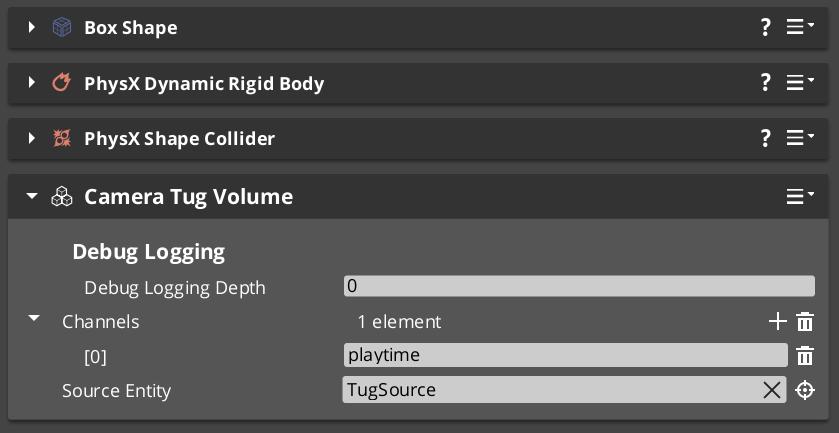
Spatial gate. Wraps GS_Core::PhysicsTriggerComponent. Lives on an entity with a PhysX trigger collider configured on the dedicated TugField layer.
Source resolution rules
The volume’s authored m_sourceEntity:
- Unset → falls back to self (the volume’s own entity).
- Valid + source resolved → uses that entity’s
CameraTugSourceComponent. - Set but unresolvable → field is INERT. Warns once at Activate;
TriggerEnterearly-returns without notifying.
Authored fields
| Field | Default | Purpose |
|---|---|---|
m_channels | {} | List of channel tag strings (“env”, “cinematic”, etc.). Hashed to Crc32 once at Activate. Listeners filter by intersection. |
m_sourceEntity | (entity slot) | Optional. Unset → use self. |
Per-trigger broadcast
TriggerEnter(proxyEntity):
    if not m_resolvedSource:  return false (inert)
    TugProxyNotificationBus::Event(
        proxyEntity,
        &TugProxyNotifications::OnVolumeEnter,
        GetEntityId() /*volume*/,
        m_channelHashes,
        m_resolvedSource);
    return true

TriggerExit(proxyEntity):
    TugProxyNotificationBus::Event(
        proxyEntity,
        &TugProxyNotifications::OnVolumeExit,
        GetEntityId());
    return true
OnVolumeExit broadcasts unconditionally — listeners that didn’t cache the volume on enter erase a non-existent key (silent no-op).
Request bus
CameraTugVolumeRequestBus — per-entity addressed.
| Method | Use |
|---|---|
IsProxyInContact(proxyEntity) | Predicate — does this volume currently contain the proxy? |
GetChannelHashes() | Returns the cached Crc32 channel hashes. |
GetResolvedSource() | Returns the resolved source component (or null if inert). |
GetVolumeEntityId() | Returns the volume’s own entity id. |
Used by listeners during proxy rebind to discover volumes already containing a newly-resolved proxy — PhysX doesn’t re-fire enters when the bus reconnects mid-overlap. See Proxy Rebind Walk.
CameraTugSourceComponent
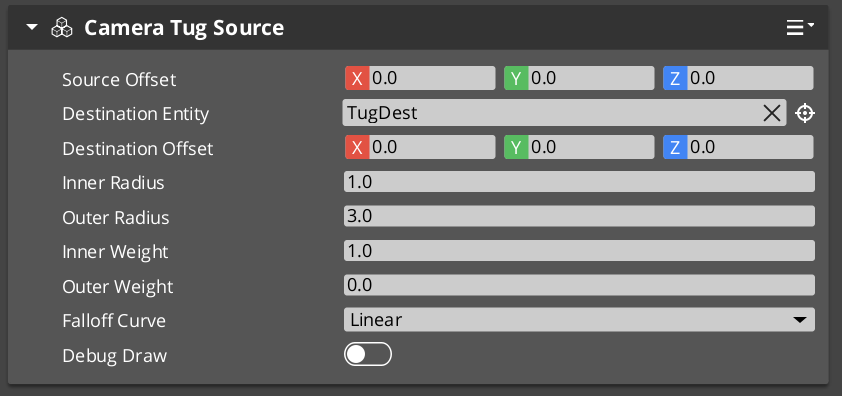
Pure data + helpers that resolve source and destination world-space points. No collider, no triggering.
Source vs. destination — fully decoupled
| Concept | Meaning |
|---|---|
| Source point | Where proximity is measured FROM. The radii are centered on this point; the gravity-well falloff evaluates against the proxy’s distance to it. |
| Destination point | Where the cam is pulled TOWARD. Modulation drags the cam (Body) or its forward (Aim) toward this point, weighted by the proximity-derived influence. |
| Case | Setup |
|---|---|
| Common — source == destination | Cam pulls toward where proximity is measured. Leave m_destinationEntity unset. |
| Decoupled | Source measured around a doorway threshold; destination 10 m past the doorway pointing at a vista. Set m_destinationEntity to the destination point’s entity. |
| Fallback | If m_destinationEntity is unset, destination = source point. |
Authored fields
| Field | Default | Purpose |
|---|---|---|
m_tugPointOffset | (0, 0, 0) | Local-space offset from THIS entity’s transform — places the proximity-reference point distinct from the entity’s pivot. |
m_destinationEntity | (entity slot) | Optional. Valid → destination = that entity’s world TM × m_destinationOffset. |
m_destinationOffset | (0, 0, 0) | Local-space offset from m_destinationEntity. Ignored when unset. |
m_innerRadius | 1.0 m | Deadzone. distance ≤ this = full influence. |
m_outerRadius | 8.0 m | Zero-influence boundary. distance ≥ this = no contribution. |
m_innerWeight | 1.0 | Influence at deadzone (full strength). |
m_outerWeight | 0.0 | Influence at outer boundary. Default zero so engagement ramps smoothly. |
m_falloffCurve | EaseInOutQuadratic | GS_Core::CurveType applied across the outer → inner falloff span. |
Helper methods
AZ::Vector3 GetSourcePoint()      const;
AZ::Vector3 GetDestinationPoint() const;
float GetInnerRadius()  const;
float GetOuterRadius()  const;
float GetInnerWeight()  const;
float GetOuterWeight()  const;
GS_Core::CurveType GetFalloffCurve() const;
Listeners read these directly via a cached pointer (no per-tick bus call).
TugFieldProxyComponent
Lightweight opt-in marker. Functions as a marker + bus address. No fields. No logic beyond existing.
The PhysX trigger collider that actually overlaps tug volumes must be authored alongside this component on the same entity, set to the dedicated TugProxy collision layer.
Authoring placements
| Placement | Use for |
|---|---|
| On the target entity directly (player root, boss root) | Simple cases. |
| On a child entity of the target | When the proxy should be at chest height, vehicle COM, etc. Tug listeners walk target descendants to find proxies. |
| On the cam entity (or its child) | Fallback for cams that should react to environmental fields without target cooperation. |
TugProxyNotificationBus
Per-entity addressed (the proxy entity’s id).
class TugProxyNotifications : public AZ::EBusTraits
{
public:
    using BusIdType = AZ::EntityId;
    static const AZ::EBusAddressPolicy AddressPolicy = AZ::EBusAddressPolicy::ById;
    static const AZ::EBusHandlerPolicy HandlerPolicy = AZ::EBusHandlerPolicy::Multiple;

    virtual void OnVolumeEnter(
        AZ::EntityId volumeEntity,
        const AZStd::vector<AZ::Crc32>& volumeChannels,
        const CameraTugSourceComponent* source) {}

    virtual void OnVolumeExit(AZ::EntityId volumeEntity) {}
};
Multi-handler so multiple listeners (Body + Aim on the same cam, plus diagnostic tooling) can subscribe at the same proxy address.
Listener Stages
TugAimListener and TugBodyListener are reposition-phase additives — see Additive Stage Variants. Both derive from a shared TugListenerBase that holds the channel-matching, proxy resolution, active-source cache, smoothed-influence state, and the per-tick algorithm.
Shared authored fields
| Field | Default | Purpose |
|---|---|---|
m_enabled | true | Master toggle. |
m_channels | {} | Channel tag strings to match against volume channels. Empty = match all. |
m_blendHalflife | 0.25 | Smoothing on engagement / disengagement. |
m_strength | 1.0 | Overall multiplier. |
A cam can run only the aim listener, only the body listener, both, or neither — each is independent.
Per-Tick Algorithm
1. ResolveProxy(ctx)
     Walk target descendants → cam-self descendants → inert.
     If changed since last tick, rebind bus + RepopulateFromVolumeWorld.

2. Sum contributions from m_activeSources:
     For each (volume, source) in m_activeSources:
         distance = (proxy.worldPos - source.GetSourcePoint()).length
         if distance >= source.outerRadius:    skip
         t = (source.outerRadius - distance)
             / (source.outerRadius - source.innerRadius)
         t = ApplyCurve(clamp(t, 0, 1), source.falloffCurve)
         weight = lerp(source.outerWeight, source.innerWeight, t) * m_strength
         contribute (weight, source.GetDestinationPoint())
     totalInfluence, weightedSourcePoint = combined

3. Dormancy check:
     If totalInfluence == 0 AND m_smoothedInfluence ≈ 0:
         m_dormant = true; return.   // full early-exit when settled

4. Dormant → engaged seeding (if transitioning):
     m_smoothedSourcePoint = derived.GetSeedSourcePoint(state)
     // Aim:  point along cam's current forward — zero-displacement transition.
     // Body: state.position — zero-displacement transition.

5. Damping:
     alpha = HalflifeAlpha(m_blendHalflife, dt)
     m_smoothedInfluence   = lerp(m_smoothedInfluence,   totalInfluence,      alpha)
     m_smoothedSourcePoint = lerp(m_smoothedSourcePoint, weightedSourcePoint, alpha)

6. derived.ApplyModulation(state, ctx, m_smoothedInfluence, m_smoothedSourcePoint)
TugAimListener.ApplyModulation
Derives the natural rotation directly from ctx (cam → primary target forward), not from state.rotation. This prevents compound-feedback where prior tug modifications would loop into the next tick’s blend source.
naturalFwd   = (ctx.targetTM.translation - ctx.camInitialTM.translation).normalized
naturalRot   = LookAt(naturalFwd, +Z)
modulatedRot = LookAt((sourcePoint - ctx.camInitialTM.translation).normalized, +Z)
state.rotation = Slerp(naturalRot, modulatedRot, smoothedInfluence * m_strength)
TugBodyListener.ApplyModulation
Derives natural pose source from ctx.targetTM / the Body’s state.bodyAnchor sidecar, not state.position.
naturalPos = state.bodyAnchor       // or ctx.targetTM.translation + body offset
state.position = Lerp(naturalPos, smoothedSourcePoint, smoothedInfluence * m_strength)
Proxy Rebind Walk
When the listener’s resolved proxy changes (target switched, proxy entity destroyed), the listener:
- Unbinds from the old proxy’s
TugProxyNotificationBus. - Clears
m_activeSourcescache. - Binds to the new proxy’s bus address.
RepopulateFromVolumeWorld— walks allCameraTugVolumeRequestBushandlers and synthesizesOnVolumeEnterfor any that already contain the new proxy.
PhysX does not re-fire enter events when a bus reconnects mid-overlap, so this catchup walk is essential. Without it, a switched proxy would miss every volume it’s already inside until it leaves and re-enters.
PhysX Layer Setup
The system requires a specific PhysX collision-group preset configured at project setup time:
| Layer | Used by | Pair with |
|---|---|---|
TugProxy | TugFieldProxyComponent’s sibling collider | TugField |
TugField | CameraTugVolumeComponent’s sibling collider (trigger) | TugProxy |
Both layers overlap only with each other in the collision-group preset. This ensures tug volumes fire triggers only for registered proxies — no general-world filtering needed at runtime.
This is the single most common authoring failure. If you set up volumes and listeners but nothing fires, the PhysX layer config is the first thing to verify. Without the
TugProxy↔TugFieldpair, no triggers ever fire.
Authoring Workflow
- Set up PhysX layers (one-time project setup): create
TugProxyandTugFieldlayers; pair them via collision-group preset. - On the player entity (or child): Add
TugFieldProxyComponent+ a PhysX trigger collider on theTugProxylayer. - On each level entity that should be a tug field: Add
CameraTugVolumeComponent+ a PhysX trigger collider (trigger mode) on theTugFieldlayer. Setm_channelsfor filtering. - For decoupled source / destination: Add
CameraTugSourceComponentto a separate entity at the focal point; point the volume’sm_sourceEntityat it. Set itsm_destinationEntityif the pull point differs from the source. - On the cam: Add
TugAimListenerand / orTugBodyListenerto the cam’sm_additives. Set the listener’sm_channelsto match the volumes’ channels (or leave empty to match all).
See Also
Related PhantomCam pages:
- Additive Stage Variants — Tug Listeners — listener stages’ kinematic models.
- Camera Influence Fields — alternative priority-modifier-based spatial system (different mechanism).
- Channels & Instancing — note the channel-naming disambiguation above.
Basics-side authoring guide:
- The Basics: Tug Fields — PhysX layer setup walkthrough + three-component placement.
Get GS_PhantomCam
GS_PhantomCam — Explore this gem on the product page and add it to your project.