A Camera Noise Profile is a .camnoiseprofile data asset that defines a layered Perlin-noise shape. It is consumed by the PerlinNoise (continuous) and ImpulseNoise (event-triggered) additive stages. Profiles are reusable — one “Handheld_subtle” profile can drive both a baseline sway and a triggered impact burst at different intensities by adjusting per-stage gains.
Profiles are registered through PhantomCamDataAssetsSystemComponent alongside .camblendprofile and .camorbit. The asset reflects with EnableForAssetEditor so the Asset Editor opens it directly.
Contents
- Authoring Model — Six Per-Axis Layer Stacks
- NoiseLayer
- Unit Conventions
- Authored Fields
- Consumption Pattern
- Shipped Presets
- Creating a Noise Profile
- See Also
Authoring Model — Six Per-Axis Layer Stacks
Six independent layer lists, one per axis:
using LayerList = AZStd::vector<GS_Core::Noise::NoiseLayer>;

LayerList m_posX, m_posY, m_posZ;   // position (world-space meters)
LayerList m_rotX, m_rotY, m_rotZ;   // rotation (Euler degrees, applied as multiplicative deltas)
Each layer is a GS_Core::Noise::NoiseLayer carrying amplitude, frequency, and phase. At evaluate time, the noise stage sums every layer’s Perlin1D contribution per axis, scaled by amplitude.
Layered noise is the common authoring rhythm — three layers per axis: one slow / low-frequency layer for sway, one mid layer for flutter, one fast / low-amplitude layer for micro-jitter. Each layer composes additively at evaluate time.
NoiseLayer
The primitive lives in GS_Core:
namespace GS_Core::Noise {
    struct NoiseLayer {
        float m_amplitude = 0.0f;
        float m_frequency = 1.0f;
        float m_phase     = 0.0f;
    };

    // Sums layers via GS_Core::Noise::LayeredPerlin1D.
    // Each layer samples Perlin1D(time * freq + phase) * amp.
}
The same NoiseLayer primitive is used elsewhere in the engine — UI wobble, unit idle jitter, etc. — so multiple subsystems share the underlying Noise utility. The full per-axis evaluation goes through GS_Core::Noise::LayeredPerlin1D documented there.
Unit Conventions
| Axis group | Units | Typical amplitude |
|---|---|---|
| Position layers | meters | 0.01 – 0.2 |
| Rotation layers | degrees | 0.1 – 8 |
| Frequency (any axis) | Hz | Handheld profiles 0.1 – 2 Hz; shake / impact 3 – 60 Hz |
Authored Fields
| Field | Default | Purpose |
|---|---|---|
m_posX / m_posY / m_posZ | {} | Layer stacks for translation noise (meters). |
m_rotX / m_rotY / m_rotZ | {} | Layer stacks for rotation noise (degrees). |
m_description | "" | Free-form note for preset identity, intent, tweak history. |
Consumption Pattern
A profile is shared across multiple cams / stages. Per-cam intensity dialing happens on the additive stage, not on the profile:
// On a PerlinNoise additive:
m_profile        = (asset slot)            // shared profile reference
m_amplitudeGain  = 1.0                     // per-cam intensity multiplier
m_frequencyGain  = 1.0                     // per-cam speed multiplier
So a single “Handheld_subtle” profile can drive both a subtle baseline sway (m_amplitudeGain = 0.3) and a full-strength impact shake (m_amplitudeGain = 2.0) without re-authoring the profile.
Both consumers honor the same fields:
| Stage | Use | Time source |
|---|---|---|
PerlinNoise | Continuous handheld sway, drift | m_time += deltaTime, accumulated since activation |
ImpulseNoise | Event-triggered burst | m_elapsed += deltaTime since Trigger(strength), gated by ADSR envelope |
See Additive Stage Variants for the per-stage kinematic model.
Shipped Presets
The gem ships a starter library of .camnoiseprofile assets in gs_phantomcam/Assets/Noise Profiles/. Drop a preset onto a PerlinNoise or ImpulseNoise stage’s Profile slot for an immediate baseline, then either tune intensity per cam via the stage’s m_amplitudeGain / m_frequencyGain or author project-specific profiles.
Handheld lens family
Three lens characters × two intensities. Rotation-dominant; long-period sway with mid-frequency flutter and a touch of micro-jitter.
| Asset | Use for |
|---|---|
Normal_Mild.camnoiseprofile | Normal-lens handheld baseline — balanced position and rotation, moderate frequencies. |
Normal_Intense.camnoiseprofile | Aggressive normal-lens handheld — same shape, larger amplitudes. |
Telephoto_Mild.camnoiseprofile | Telephoto-lens handheld baseline — tighter angular response, low position amplitude. |
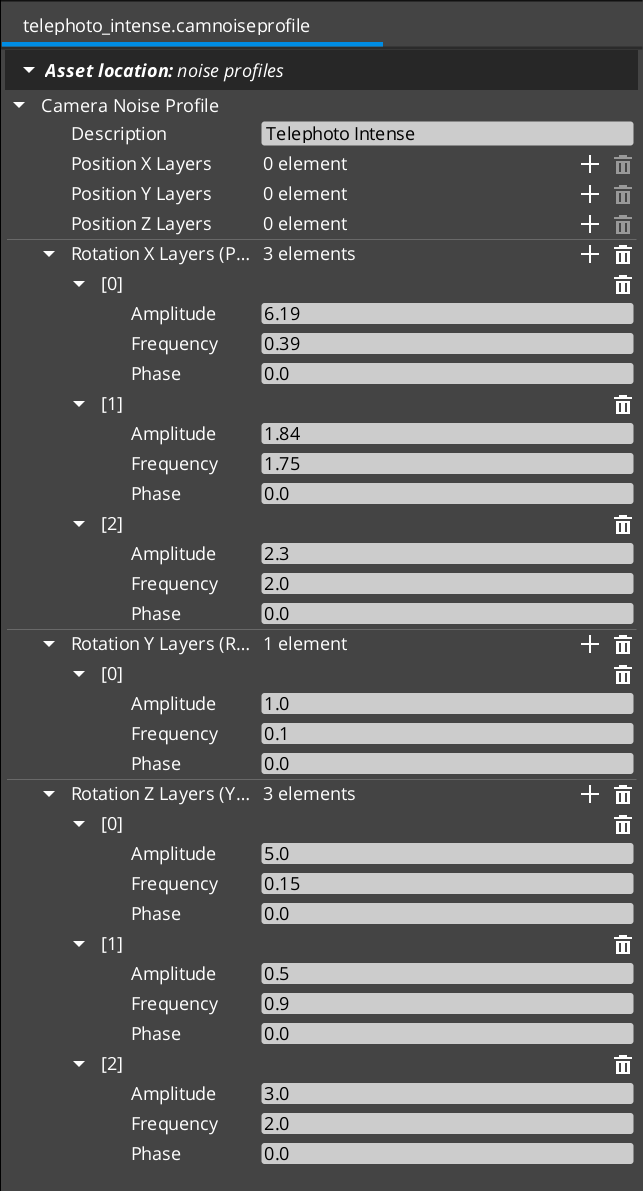
Telephoto_Intense.camnoiseprofile | Aggressive telephoto handheld — same shape, larger amplitudes. |
Wide_Mild.camnoiseprofile | Wide-lens handheld baseline — translation dominates; rotation low. |
Wide_Intense.camnoiseprofile | Aggressive wide-lens handheld — larger translation amplitudes. |
All-axes shake family
Position + rotation across all six axes. Use for event-triggered impulses (ImpulseNoise) or aggressive ambient shake.
| Asset | Use for |
|---|---|
6D_Shake.camnoiseprofile | Earthquake / impact aftermath — all six axes, high-frequency micro-jitter on top of mid-frequency sway. |
6D_Wobble.camnoiseprofile | Floaty / dreamlike — all six axes, low-frequency long sway. |
Authoring more
The full per-axis layer values are inspectable in the Asset Editor when you open any preset. To author additional characters — fast-handheld for chase sequences, ultra-mild for cutscenes, gunfire impulse profiles — follow the authoring conventions above starting from a copy of the closest shipped preset.
Creating a Noise Profile
- Open the Asset Editor in O3DE.
- Select New and choose CameraNoiseProfile from the asset type list.
- For each axis where you want noise, add layers via the + button. Three layers per axis is the typical authoring rhythm (slow / mid / fast).
- For each layer:
- Set the Amplitude in axis-appropriate units (meters for position, degrees for rotation).
- Set the Frequency in Hz.
- Optionally set a Phase offset (decorrelates layers from each other when they share frequency).
- Set the Description to record the preset’s intent or tuning history.
- Save the asset.
- Assign the asset to a
PerlinNoiseorImpulseNoiseadditive stage’s Profile slot.
See Also
Consumers:
- Additive Stage Variants —
PerlinNoiseandImpulseNoisekinematic models. - Phantom Cameras —
TriggerCameraImpulseentry point for firing impulse bursts.
Underlying utility:
- GS_Core Noise — the Perlin primitives,
NoiseLayerstruct, andLayeredPerlin1Dthat this asset stores and feeds.
Related assets:
- Blend Profiles —
.camblendprofilefor transitions. - Orbit Profiles —
.camorbitfor orbital body shape.
Basics-side authoring guide:
Get GS_PhantomCam
GS_PhantomCam — Explore this gem on the product page and add it to your project.