A channel is one player viewpoint slot. Each channel owns its own rig (spawned from a prefab), its own Cam Core, zero or more Phantom Cameras registered to it, a bound target, and its own priority table. Channel 0 (DefaultChannelId) is the implicit default for all legacy / single-player flows.
The channel system progressively discloses across three authoring tiers — Tier 1 single-cam, Tier 2 single-player rig, Tier 3 multi-channel. The per-cam authoring surface is identical across tiers; only the Cam Manager configuration changes.
Pending — multi-view rendering (I.9b). The channel system architecturally supports per-channel render targets via AttachmentImage assets, but the Atom RPI binding has not landed yet. Until it does, the engine renders one channel at a time even when multiple are arbitrating internally. The active main-view selector decides which channel reaches the engine framebuffer; see Active Main View.
Contents
- Three Authoring Tiers
- ChannelId
- Cam Channel Scope
- ChannelStampComponent
- Rig Prefab Resolution
- Spawn Pipeline
- Stamp-Walk Registration
- Shared Cams and Collapse Detection
- Cross-Channel Dispatch
- Active Main View
- Runtime Channel API
- Notifications
- Tier 3 Author Workflow
- Naming Collision Callout
- See Also
Three Authoring Tiers
The Cam Manager exposes three top-level inspector fields that control the system tier. See Cam Manager — Authoring Tiers for the full author surface.
| Tier | Master Gate | Channel Count | Use case |
|---|---|---|---|
| Tier 1 — Single player | m_enableInstancedChannels = false, m_primaryRigPrefab set | 1 (channel 0) | Most projects. Spawn one rig from the primary prefab. |
| Tier 2 — Single player, level-placed CamCore | m_enableInstancedChannels = false, no primary prefab | 1 (channel 0) | Legacy. Author hand-places Cam Core in the level. |
| Tier 3 — Multi-channel | m_enableInstancedChannels = true, m_channelConfigs populated | N (lobby-driven) | Split-screen, per-player rigs, cross-channel cinematic dispatch. |
The Master Gate is m_enableInstancedChannels. When OFF, channel-aware fields are hidden in the inspector and only the legacy bus signatures (SetTarget, SettingNewCam) route through. When ON, the full channel surface is live and channel-aware notifications (SettingNewCamOnChannel) replace the legacy ones.
ChannelId
using ChannelId = AZ::u32;
static constexpr ChannelId InvalidChannelId = static_cast<ChannelId>(-1);
static constexpr ChannelId DefaultChannelId = 0;
Channel ids are integers (0 … max − 1). The default channel id is 0. Legacy single-arg bus calls (SetTarget(target), RegisterPhantomCam(cam)) forward to channel 0.
Logical cam names — the entity names of phantom cameras inside a rig prefab — are scoped within their channel. The same name can appear in all four channels’ rigs without collision. Authors never type _i1 / _i2 suffixes.
Cam Channel Scope
Each Phantom Camera authors a CamChannelScope that decides how it participates in the channel system:
enum class CamChannelScope : AZ::u8 {
    Local       = 0,  // Default. Lives in its owning channel's scope.
    AllChannels = 1,  // In-rig natural duplicate — every rig instance carries one.
    TrueUnique  = 2,  // Exactly one instance total; bound or shared.
};
| Scope | Stamp-walk behavior | Use for |
|---|---|---|
Local (default) | Walks ancestors for a ChannelStampComponent. Found → registers to that channel via RegisterPhantomCamForChannel. No stamp → legacy RegisterPhantomCam (channel 0). | Cams inside a rig prefab. Each spawned rig instance hosts its own copy. |
AllChannels | Same stamp-walk as Local for the in-rig case. Out-of-rig (no stamp ancestor) warns and falls back to channel 0 (full runtime cloning is deferred). | Per-player tailored broadcast cam inside a rig prefab. |
TrueUnique | Bypasses the stamp-walk. Sub-modes via the fields below. | Hero-perspective or shared cinematic cams that need explicit binding. |
TrueUnique sub-fields (visible only when scope is TrueUnique):
| Field | Visibility | Purpose |
|---|---|---|
m_boundChannelId | Always when TrueUnique | Explicit channel binding for direct mode. |
m_allChannelsShare | When m_showAdvanced is true | Shared mode — cam appears in every active channel’s priority table. |
m_showAdvanced | When TrueUnique | Reveals advanced fields. |
Author recipes:
- Cam inside a rig prefab — leave as
Local. - Per-player tailored broadcast cam in the level —
AllChannels(in-rig); deferred for out-of-rig. - Hero-perspective cam for a specific player —
TrueUnique+m_boundChannelId = N. - Shared cinematic collapse cam —
TrueUnique+ advanced +m_allChannelsShare = true. Pair with a Group Target to triggerOnAllChannelsActivatedSharedCam.
ChannelStampComponent
Pure runtime plumbing. Marks an entity (typically a rig root) with a (ChannelId, stampToken) pair. Phantom Camera and Cam Core components walk transform ancestors looking for this stamp at activate time to determine which channel they belong to.
Authored visibility: none. The stamp is reflected for serialization only — no EditContext block. The author never sees or sets it; the Cam Manager auto-attaches one during the spawn pre-insertion callback and calls StampChannel(channelId) to bump the token.
Why the token
m_stampToken bumps on every StampChannel(id) call (including idempotent re-stamps). The Cam Manager validates the supplied (channelId, token) against the live stamp on every registration call — mismatched tokens are rejected with a warning. This prevents stale messages from a previous stamp generation overwriting fresh bindings.
Buses
| Bus | Type | Purpose |
|---|---|---|
ChannelStampRequestBus | Per-entity, read-side | GetStampedChannelId, GetStampToken, IsStamped. Presence-tested via HasHandlers. |
ChannelStampNotificationBus | Per-entity, multi-handler | OnStamped(channelId, token) — every PhantomCam / CamCore beneath the stamp subscribes. |
Static helper
static AZ::EntityId ChannelStampComponent::FindStampAncestor(AZ::EntityId start);
Walks transform ancestors via the request bus and returns the closest stamped entity (or invalid id if no stamp ancestor).
Rig Prefab Resolution
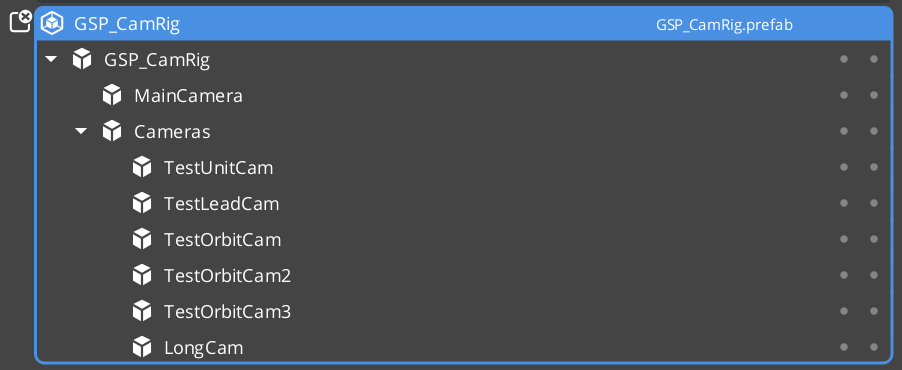
Three inspector fields on the Cam Manager control where each channel’s rig comes from:
| Field | Tier | Purpose |
|---|---|---|
m_primaryRigPrefab | Always visible | The default rig. Tier 1 / 2 single-rig source. In Tier 3 it is the universal fallback for any channel whose own override is empty. |
m_channelConfigs[i].m_rigPrefab | Tier 3 (master gate ON) | Per-channel override. Inspector label: “Rig Override Prefab”. Leave empty to inherit the primary. |
m_enableInstancedChannels | Always visible | Master gate. |
The Cam Manager’s GetEffectiveRigPrefab(channelId) returns:
m_channelConfigs[channelId].m_rigPrefabif set.- Else
m_primaryRigPrefab. - Else invalid (the channel emits a warning at spawn time and stays inert).
Symmetric multi-channel co-op (all players use the same rig) sets the primary once; every channel inherits. Asymmetric setups (e.g. P1 third-person, P2 top-down) set per-channel overrides.
Spawn Pipeline
The Cam Manager spawns configured rigs on startup (driven by OnStartupComplete) and re-spawns them on stage transitions.
OnStartupComplete:
  if m_enableInstancedChannels == false:
    Tier 1: m_primaryRigPrefab valid → SpawnChannelRig(DefaultChannelId, m_primaryRigPrefab)
    Tier 2: no spawn (assumes level-placed CamCore)
  else:
    Tier 3: iterate m_channelConfigs[0 .. min(size, m_activeChannelCount)]
      for each PerChannelInstance config with m_enabledByDefault and valid prefab:
        SpawnChannelRig(channelId, GetEffectiveRigPrefab(channelId))
SpawnChannelRig uses an EntitySpawnTicket with two callbacks:
- Pre-insertion callback (entities created, not yet activated):
- Cam Manager identifies the spawn root (first entity in the spawn container).
- Attaches a
ChannelStampComponentto it. - Calls
StampChannel(channelId)— bumps the token, firesOnStampedto any subscribers.
- Completion callback (entities activated):
- Cam Manager walks activated entities into
channel.m_rigSpawnedEntities. - Marks the channel
m_active = true. - Folds any
TrueUnique-shared cams into the new channel’s priority table. - Validates that a Cam Core registered (warns if not).
- Broadcasts
ChannelSpawned(channelId, camCoreEntity). - Re-runs
EvaluatePriority(channelId)so the channel’s arbitration result reaches its Cam Core.
- Cam Manager walks activated entities into
Stage transitions
BeginLoadStage    → DespawnAllChannelRigs (lock arbitration first)
LoadStageComplete → SpawnAllConfiguredRigs BEFORE broadcasting HandleStartup
                    so fresh-stage cams come up in the startup wave.
Stamp-Walk Registration
When a Phantom Camera (or Cam Core) activates, it walks ancestors for a ChannelStampComponent and branches:
RegisterWithCamManager:
   branch on m_channelScope (PhantomCam only — CamCore is always Local-equivalent):

   ┌── Local:
   │      stamp = FindStampAncestor(myEntity)
   │      if stamp valid:
   │         RegisterPhantomCamForChannel(myEntity, stamp, channelId, token)
   │         registrationMode = StampAware
   │      else:
   │         RegisterPhantomCam(myEntity)             // legacy channel 0
   │         registrationMode = LegacyChan0
   │
   ├── AllChannels:
   │      stamp = FindStampAncestor(myEntity)
   │      if stamp valid:
   │         RegisterPhantomCamForChannel(myEntity, stamp, channelId, token)
   │         registrationMode = StampAware
   │      else:
   │         warn (out-of-rig cloning deferred)
   │         fall back to legacy channel 0
   │         registrationMode = LegacyChan0
   │
   └── TrueUnique:
          if m_boundChannelId valid AND !m_allChannelsShare:
             RegisterPhantomCamDirect(myEntity, m_boundChannelId)
             registrationMode = Direct
          elif !m_boundChannelId AND m_allChannelsShare:
             RegisterPhantomCamShared(myEntity)
             registrationMode = (Shared, stored as Direct for unregister routing)
          else:
             warn (fragile manual-control mode)
             stay unregistered
             registrationMode = None
registrationMode is cached on the component so UnregisterFromCamManager can route symmetrically.
OnStamped — mid-session re-stamp handling
If a rig is re-stamped mid-session (rare; typically only during stage transitions or hot-reload), the cam handles it:
OnStamped(newChannelId, newToken):
   Only acts in StampAware or None modes.
   In Direct or LegacyChan0 modes, the signal is ignored — author intent
   takes precedence over stamps.

   UnregisterFromCamManager (old binding)
   m_resolvedChannelId  = newChannelId
   m_resolvedStampToken = newToken
   RegisterWithCamManager (new binding)
The Cam Core mirrors the same pattern.
Shared Cams and Collapse Detection
RegisterPhantomCamShared(cam) adds the cam to every active channel’s priority table. The Cam Manager tracks the list in m_sharedCams. A shared cam:
- Wins arbitration in every channel where it has the highest priority.
- Gains focus from any channel selecting it.
- Never DROPS focus via channel notifications — a shared cam losing in channel N doesn’t preclude winning in channel M.
Collapse detection
EvaluatePriority collects per-channel winners. If every active channel picked the same cam AND that cam is in m_sharedCams, the Cam Manager edge-triggers OnAllChannelsActivatedSharedCam(sharedCam) via m_lastSharedCollapsedCam — fires once on entry into the condition, and once on cam-A → cam-B shared-cam transitions.
Typical use case: a shared cinematic cam paired with a Group Target tracking all players. When players converge such that the shared cam wins in every channel, UI receives the collapse signal and can switch from split-screen layout to single-view layout.
No counterpart “uncollapsed” event exists — listeners dedupe locally if they care about exit.
Cross-Channel Dispatch
For cinematic / cross-channel scenarios — e.g. player 3’s wide cam should temporarily render on player 1’s Cam Core — the Cam Manager exposes a dispatch override.
| Method | Use |
|---|---|
FindCamForTarget(logicalName, targetEntity) | Multi-tier resolution. (1) if targetEntity is channel-bound, look up logicalName in that channel’s m_logicalToEntity. (2) Walk m_sharedCams matching by entity name. (3) Reserved for AllChannels-duplicate fallback. Returns invalid EntityId on no match. |
DispatchCamToCamCore(cam, camCoreEntity) | Force the Cam Core to render the specified cam. Persists until release. Fires OnCamCoreDispatched. |
ReleaseCamCoreDispatch(camCoreEntity) | Clear the override; re-run arbitration so the Cam Core routes back to its arbitrated winner. Fires OnCamCoreDispatchReleased. |
Channel arbitration still runs internally during dispatch. SettingNewCamOnChannel continues to fire with the arbitrated winner — only the physical Cam Core route is overridden. This means downstream listeners still see what “would have” arbitrated, useful for HUD or AI behavior that shouldn’t follow the cinematic override.
Active Main View
Wraps O3DE’s AzFramework::Camera::CameraRequests::MakeActiveView so the channel system can orchestrate “this player’s view is on main right now” without callers reaching into camera bus plumbing. Orthogonal to dispatch (what cam) and render-target binding (where pixels go).
| Method | Use |
|---|---|
SetActiveChannel(channelId) | Resolves the channel’s Cam Core, delegates to SetActiveCamCore. |
SetActiveCamCore(camCoreEntity) | Calls MakeActiveView. Idempotent — silently no-ops if already active. |
GetActiveChannel() | Reverse query: returns the channel owning the engine’s active camera, or InvalidChannelId if the active cam isn’t channel-bound. |
GetActiveCamCore() | Direct passthrough to the engine. |
Listeners receive OnActiveCameraChanged(channelId, camCoreEntity). channelId == InvalidChannelId when the active cam isn’t channel-bound (e.g. a direct SetActiveCamCore to an external entity). External MakeActiveView calls made outside this API are not observed — subscribe to AzFramework::Camera::CameraNotificationBus directly if you need to detect engine-level changes.
Runtime Channel API
| Method | Use |
|---|---|
SetActiveChannelCount(count) | Lobby-driven cap. Pre-startup only. Mid-session calls warn and are ignored — use EnableChannel / DisableChannel instead. |
GetActiveChannelCount() | Query. |
EnableChannel(channelId) | Spawn a configured channel mid-session. Validates id in bounds, not already spawned, policy is PerChannelInstance, rig prefab assigned. Fires ChannelSpawned. |
DisableChannel(channelId) | Despawn. Fires ChannelDespawned. No-op if not spawned. |
GetChannelCamCore(channelId) | Returns the bound Cam Core EntityId, invalid if no Cam Core. |
Intended lobby flow: author sets m_channelConfigs to N (primed max), pre-startup the lobby calls SetActiveChannelCount(actualPlayerCount), then OnStartupComplete spawns just actualPlayerCount rigs. Mid-session join / drop uses EnableChannel / DisableChannel.
Notifications
Channel-related events on CamManagerNotificationBus. See Cam Manager — Notifications for the full notification surface.
| Event | When |
|---|---|
SettingNewCamOnChannel(channelId, targetCam) | Per-channel arbitration produced a new winner. Replaces legacy SettingNewCam when instancing is ON. |
ChannelSpawned(channelId, camCoreEntity) | A configured channel finished spawning AND its Cam Core self-registered. Ready-to-render signal. |
ChannelDespawned(channelId) | Fires before entity teardown when a channel rig is despawned. |
OnAllChannelsActivatedSharedCam(sharedCam) | Edge-triggered. Every active channel simultaneously selected the same shared TrueUnique cam. |
OnCamCoreDispatched(camCoreEntity, dispatchedCam) | A cross-channel dispatch override was applied. |
OnCamCoreDispatchReleased(camCoreEntity) | Dispatch override cleared. |
OnActiveCameraChanged(channelId, camCoreEntity) | Engine main-view active camera changed via this API. |
Tier 3 Author Workflow
- On the Cam Manager: toggle
m_enableInstancedChannels = true. - Set
m_primaryRigPrefabto the project’s default rig (used as universal fallback). - Populate
m_channelConfigswith one entry per supported player slot:- Set
m_channelNamefor inspector readability (“P1”, “P2”, …). - Optionally set
m_rigPrefab(the “Rig Override Prefab”) — leave empty to inherit the primary. - Set
m_enabledByDefault = truefor slots that should spawn on startup.
- Set
- Optionally set
m_activeChannelCountfor the lobby cap, or callSetActiveChannelCountat runtime before startup. - Per-player cams placed inside the rig prefab will auto-stamp on spawn — no per-cam authoring required for normal
Local-scope cams. - For shared cinematic cams (one cam to rule them all), set the cam’s
m_channelScope = TrueUnique+m_showAdvanced = true+m_allChannelsShare = true. - For author-explicit per-channel cams (rare), use
m_channelScope = TrueUnique+m_boundChannelId = N+m_allChannelsShare = false.
For the basics-side walkthrough with screenshots and step-by-step recipes, see The Basics: Channels & Instancing.
Naming Collision Callout
Tug-field
m_channels≠ instancingChannelId. Tug-field channels are arbitrary string tags (“Cinematic”, “Combat”) that match tug volumes to listeners — see Tug Fields. Instancing channels documented on this page are integerChannelIds for per-player viewpoint routing. The two systems are unrelated despite the shared word. The system uses the same identifier name in the codebase for both; the docs make the distinction prominent here and in the tug-fields page.
See Also
For related PhantomCam pages:
- Cam Manager — the owning component.
- Phantom Cameras —
CamChannelScopeis authored on each cam. - Cam Core — one Cam Core per channel.
- Group Targets — pair with shared
TrueUniquecams for collapse-to-single-view scenarios. - Tug Fields — note the channel naming disambiguation above.
For the basics-side walkthrough:
Get GS_PhantomCam
GS_PhantomCam — Explore this gem on the product page and add it to your project.