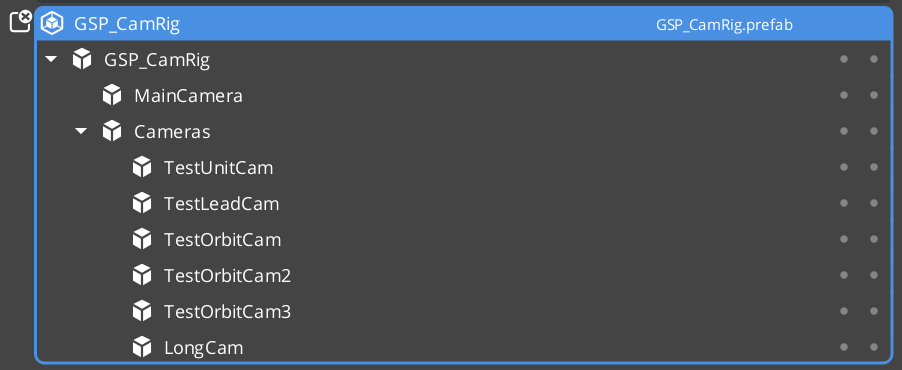
The Cam Manager is the singleton controller for the GS_PhantomCam camera system. It extends GS_ManagerComponent and owns the full lifecycle of virtual cameras: per-channel registration of phantom cameras and Cam Cores, per-channel priority arbitration, channel-aware target binding, influence routing, the named Group Target registry, cross-channel cinematic dispatch, and engine main-view selection.
When a phantom camera activates, it walks transform ancestors looking for a ChannelStampComponent, identifies its channel, and self-registers with the Cam Manager. When priorities change — through direct calls, enable/disable toggling, or influence fields — the Cam Manager re-evaluates the affected channel(s) and notifies the channel’s Cam Core to begin blending toward the new winner.
For usage guides and setup examples, see The Basics: GS_PhantomCam.
Contents
- How It Works
- Authoring Tiers
- Channels
- Group Target Registry
- Dispatch Overrides
- Active Main View
- Spawn Lifecycle
- Setup
- API Reference
- Extending the Cam Manager
- See Also
How It Works
Camera Registration
Every Phantom Camera registers with the Cam Manager on activation and unregisters on deactivation. The registration path depends on the cam’s CamChannelScope and whether it lives under a ChannelStampComponent ancestor — see Channels. For legacy / single-player flows (no stamp ancestor), the cam routes through channel 0 via the legacy RegisterPhantomCam method.
Priority Evaluation
When any camera’s priority changes, the Cam Manager calls EvaluatePriority(), which iterates every active channel. Each channel computes effective = base + sum(influences) per cam and picks the highest. A change in a channel’s winner triggers SettingNewCamOnChannel(channelId, targetCam) (when channel instancing is enabled) or the legacy SettingNewCam(targetCam) (when it is not). The channel’s Cam Core listens for this to begin its blend transition.
Camera Influences
Camera influences are named priority modifiers that shift a camera’s effective priority. They are added and removed through AddCameraInfluence(sourceEntity, targetEntity, camName, influence) and RemoveCameraInfluence(sourceEntity, targetEntity). The sourceEntity is the storage key (so multiple overlapping fields don’t collide); the targetEntity is the routing key — the Cam Manager looks up the channel via GetChannelForTarget(targetEntity). Influences whose target isn’t bound to any channel are silently dropped. See Camera Influence Fields.
Target Assignment
Each channel holds its own target binding. SetChannelTarget(channelId, target) sets the target for one channel; the legacy SetTarget(target) forwards to channel 0. Setting a valid target on a channel propagates it to every cam in the channel via SetCameraTarget and pushes a synchronous SnapCameraNow so the cam’s evaluated pose lands before downstream consumers query its transform. Clearing the target (invalid EntityId) does not push snap — this preserves the depossess-guard pose-hold behavior.
Authoring Tiers
The Cam Manager exposes a tiered author surface via progressive disclosure. Three top-level inspector fields control which tier is active:
| Tier | Configuration | Behavior |
|---|---|---|
| Tier 1 — Standard single-player | m_primaryRigPrefab set; m_enableInstancedChannels = false | Cam Manager spawns one rig from the primary prefab on startup; everything routes through channel 0. Most projects use this tier. |
| Tier 2 — Legacy level-placed | No m_primaryRigPrefab; m_enableInstancedChannels = false | The CamCore is hand-placed in the level instead of spawned from a rig prefab. Legacy author flow — supported but not preferred. |
| Tier 3 — Multi-channel | m_enableInstancedChannels = true; m_channelConfigs populated | Per-channel rig spawning, per-channel arbitration, channel-aware notifications, cross-channel cinematic dispatch. Split-screen and co-op projects use this tier. |
| Inspector field | Visibility | Purpose |
|---|---|---|
m_primaryRigPrefab | Always | Default rig prefab. Universal fallback for any channel with no override. |
m_enableInstancedChannels | Always | Master gate. When OFF, channel-aware fields are hidden and legacy bus signatures are routed. When ON, the full channel surface is live. |
m_channelConfigs | When master gate is ON | Array of CameraChannelConfig rows. |
m_activeChannelCount | When master gate is ON | Lobby-driven cap. Channels configured beyond this count stay dormant at startup. |
CameraChannelConfig per-row fields:
| Field | Inspector label | Purpose |
|---|---|---|
m_channelName | Channel Name | Display label (“P1”, “P2”). Not a lookup key. |
m_policy | Channel Policy | PerChannelInstance (default — Cam Manager spawns this channel’s rig) or LegacyLevelPlaced (channel uses level-placed cams, channel 0 only). |
m_rigPrefab | Rig Override Prefab | Per-channel rig. Leave empty to inherit m_primaryRigPrefab. |
m_enabledByDefault | Enabled By Default | Whether this channel spawns on startup. |
Channels
A channel is one player viewpoint slot. Each channel owns its own rig, target binding, priority table, active influence set, and Cam Core. Channel 0 (DefaultChannelId) is the implicit default for legacy / single-player flows.
Channel addressing covers most of the Cam Manager’s runtime surface. The bus exposes paired methods — a legacy single-arg form that forwards to channel 0, and a channel-aware multi-arg form for Tier 3:
| Concern | Legacy | Channel-aware |
|---|---|---|
| Set the target | SetTarget(entity) | SetChannelTarget(channelId, entity) |
| Get the target | GetTarget() | GetChannelTarget(channelId) |
| Register a cam | RegisterPhantomCam(cam) | RegisterPhantomCamForChannel(cam, stampEntity, channelId, token) |
| Register a CamCore | RegisterCamCore(camCore) | RegisterCamCoreToChannel(camCore, stampEntity, channelId, token) |
| Dominance notification | SettingNewCam(cam) | SettingNewCamOnChannel(channelId, cam) |
Direct registration variants (RegisterPhantomCamDirect, RegisterPhantomCamShared) cover author-explicit CamChannelScope::TrueUnique cams that bypass the stamp-walk path. See Channels & Instancing for the full scope enum and stamp-walk semantics.
| Method | Use |
|---|---|
GetChannelForTarget(target) | Reverse lookup — returns the channel an entity is bound to (or InvalidChannelId). Used by influence routing. |
SetActiveChannelCount(count) | Pre-startup lobby cap. Configured-but-extra channels stay dormant. |
EnableChannel(channelId) | Spawn a configured channel mid-session. Fires ChannelSpawned. |
DisableChannel(channelId) | Despawn a spawned channel. Fires ChannelDespawned. |
GetChannelCamCore(channelId) | Query the bound CamCore entity for a channel. |
Group Target Registry
The Cam Manager is the single global authority for named Group Targets. A GroupTargetComponent self-registers on activate; stages with CamTargetMode::GroupTarget resolve the group’s entity by name.
| Method | Use |
|---|---|
RegisterGroupTarget(name, groupEntity) | Called by GroupTargetComponent::Activate. |
UnregisterGroupTarget(groupEntity) | Called by GroupTargetComponent::Deactivate. |
FindGroupTargetByName(name) | Stages query this to resolve a group entity. |
GetRegisteredGroupTargetNames() | Returns the full list. Used by editor dropdowns and debug. |
Dispatch Overrides
For cinematic / cross-channel scenarios — e.g. player 3’s wide cam should temporarily render on player 1’s Cam Core — the Cam Manager exposes a dispatch override. Channel arbitration still runs internally during dispatch (SettingNewCamOnChannel still fires with the arbitrated winner); only the physical Cam Core route is overridden.
| Method | Use |
|---|---|
FindCamForTarget(logicalName, targetEntity) | Resolves a cam by logical (entity) name with multi-tier fallback: channel-of-target match → shared-cam scan → reserved AllChannels duplicate path. |
DispatchCamToCamCore(cam, camCoreEntity) | Force the Cam Core to render the specified cam. Persists until release. Fires OnCamCoreDispatched. |
ReleaseCamCoreDispatch(camCoreEntity) | Clear the override. Re-runs arbitration so the Cam Core routes back to its arbitrated winner. Fires OnCamCoreDispatchReleased. |
Active Main View
Wraps O3DE’s AzFramework::Camera::CameraRequests::MakeActiveView so the channel system can orchestrate which Cam Core is the engine’s main view. Orthogonal to dispatch (what cam) and render-target binding (where pixels go).
| Method | Use |
|---|---|
SetActiveChannel(channelId) | Resolves the channel’s Cam Core, delegates to SetActiveCamCore. |
SetActiveCamCore(camCoreEntity) | Calls MakeActiveView on the Cam Core. Idempotent. |
GetActiveChannel() | Reverse query — returns the channel that owns the engine’s active camera, or InvalidChannelId if the active cam isn’t channel-bound. |
GetActiveCamCore() | Direct passthrough to the engine. |
Listeners receive OnActiveCameraChanged(channelId, camCoreEntity). External MakeActiveView calls made outside this API are not observed — subscribe to AzFramework::Camera::CameraNotificationBus directly if you need to detect engine-level changes.
Spawn Lifecycle
The Cam Manager’s OnStartupComplete hook (driven by the Game Manager) spawns all configured rigs before broadcasting HandleStartup so spawned cams settle into the same startup wave. Stage transitions (BeginLoadStage / LoadStageComplete) despawn and respawn rigs cleanly.
OnStartupComplete:
  if m_enableInstancedChannels == false:
    Tier 1: if m_primaryRigPrefab valid → spawn one rig for channel 0
    Tier 2: no spawn (assumes level-placed CamCore)
  else:
    Tier 3: iterate m_channelConfigs[0 .. min(size, m_activeChannelCount)]
      for each PerChannelInstance config with valid prefab and m_enabledByDefault:
        SpawnChannelRig(channelId, GetEffectiveRigPrefab(channelId))
SpawnChannelRig uses an EntitySpawnTicket with two callbacks:
- Pre-insertion — Cam Manager attaches a
ChannelStampComponentto the spawn root and callsStampChannel(channelId). This bumps the channel’s stamp token and firesOnStampedto any subscribers. - Completion — Entities activate. Cam Cores and PhantomCams walk ancestors, find the stamp, and self-register to the channel via token-aware methods. Cam Manager then walks activated entities into
channel.m_rigSpawnedEntities, marks the channel active, folds shared TrueUnique cams into the channel’s priority table, validates a Cam Core registered, broadcastsChannelSpawned(channelId, camCoreEntity), and re-runsEvaluatePriorityso the arbitration result reaches the Cam Core.
Mid-session EnableChannel / DisableChannel reuse the same spawn / despawn paths and fire the same notifications.
Setup
- Add GS_CamManagerComponent to a dedicated entity (commonly inside a Cam Manager prefab).
- Register the manager prefab in the Game Manager Startup Managers list.
- Choose your tier:
- Tier 1 — Assign a rig prefab (containing a Cam Core entity and your phantom cameras) to
m_primaryRigPrefab. Leavem_enableInstancedChannelsoff. - Tier 2 — Place the Cam Core entity as a child of the Cam Manager entity directly. Leave
m_primaryRigPrefabempty andm_enableInstancedChannelsoff. - Tier 3 — Toggle
m_enableInstancedChannelson and populatem_channelConfigswith one row per supported player slot. Usem_primaryRigPrefabas the universal default and per-rowRig Override Prefabfor asymmetric setups.
- Tier 1 — Assign a rig prefab (containing a Cam Core entity and your phantom cameras) to
- Place or author phantom cameras with priorities, target modes, and stage compositions.
For a full walkthrough, see the PhantomCam Set Up Guide.
API Reference
Request Bus: CamManagerRequestBus
Commands sent to the Cam Manager. Global bus — single address, single handler. Extends GS_Core::ManagerBaseRequests.
Registration
| Method | Parameters | Returns | Description |
|---|---|---|---|
RegisterPhantomCam | AZ::EntityId cam | void | Legacy registration. Routes the cam through channel 0. Used by cams without a ChannelStampComponent ancestor. |
UnRegisterPhantomCam | AZ::EntityId cam | void | Legacy unregister. |
RegisterPhantomCamForChannel | AZ::EntityId cam, AZ::EntityId stampEntity, ChannelId claimedChannelId, AZ::u32 claimedToken | void | Stamp-aware registration. Cam Manager verifies the (channelId, token) against the live stamp on stampEntity before mutating channel tables — mismatched tokens are rejected. |
UnRegisterPhantomCamFromChannel | AZ::EntityId cam, AZ::EntityId stampEntity, ChannelId, AZ::u32 token | void | Stamp-aware unregister. |
RegisterPhantomCamDirect | AZ::EntityId cam, ChannelId channelId | void | Author-explicit binding via CamChannelScope::TrueUnique + m_boundChannelId. Bypasses stamp-walk. |
UnRegisterPhantomCamDirect | AZ::EntityId cam, ChannelId channelId | void | Direct unregister. |
RegisterPhantomCamShared | AZ::EntityId cam | void | Adds the cam to every active channel’s priority table. Used by CamChannelScope::TrueUnique + m_allChannelsShare. |
UnRegisterPhantomCamShared | AZ::EntityId cam | void | Shared unregister. |
RegisterCamCore | AZ::EntityId camCore | void | Legacy Cam Core registration (channel 0). |
UnregisterCamCore | AZ::EntityId camCore | void | Legacy unregister. |
RegisterCamCoreToChannel | AZ::EntityId camCore, AZ::EntityId stampEntity, ChannelId, AZ::u32 token | void | Stamp-aware Cam Core registration. |
UnregisterCamCoreFromChannel | AZ::EntityId camCore, AZ::EntityId stampEntity, ChannelId, AZ::u32 token | void | Stamp-aware unregister. |
Priority and influence
| Method | Parameters | Returns | Description |
|---|---|---|---|
ChangeCameraPriority | AZ::EntityId cam, AZ::u32 priority | void | Sets base priority. Cam Manager walks every channel where the cam is registered and re-evaluates. |
AddCameraInfluence | AZ::EntityId sourceEntity, AZ::EntityId targetEntity, AZStd::string camName, AZ::u32 influence | void | Channel-routed. sourceEntity is the per-channel storage key; targetEntity is the routing key (channel resolved via GetChannelForTarget). Silently dropped if the target isn’t channel-bound. |
RemoveCameraInfluence | AZ::EntityId sourceEntity, AZ::EntityId targetEntity | void | Channel-routed removal by (source, target) key. |
Targets
| Method | Parameters | Returns | Description |
|---|---|---|---|
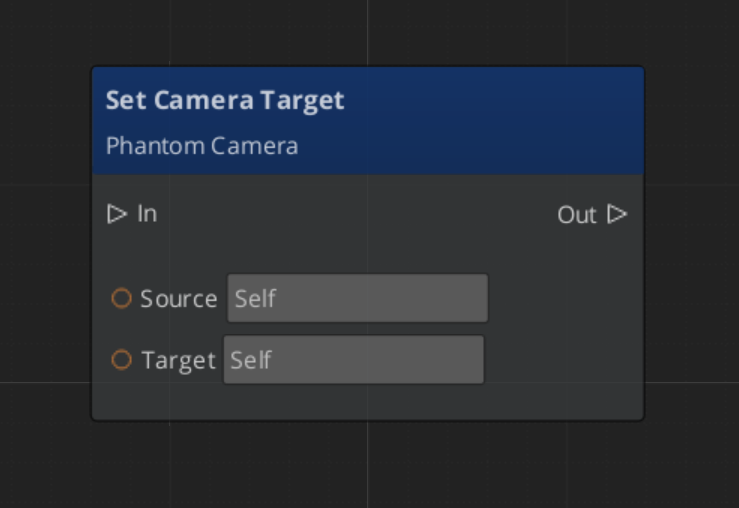
SetTarget | AZ::EntityId target | void | Legacy. Forwards to SetChannelTarget(DefaultChannelId, target). |
GetTarget | — | AZ::EntityId | Legacy. Returns channel 0’s target. |
SetChannelTarget | ChannelId, AZ::EntityId target | void | Channel-aware. Propagates the new target to every cam in the channel via SetCameraTarget, and pushes SnapCameraNow when binding to a valid target so evaluated pose lands before downstream queries. Clearing the target does not push snap. |
GetChannelTarget | ChannelId | AZ::EntityId | Returns the channel’s current target binding. |
GetChannelForTarget | AZ::EntityId target | ChannelId | Reverse lookup. Returns InvalidChannelId if the entity isn’t bound. |
GetCamManager | — | AZ::EntityId | Returns the Cam Manager’s own entity id. |
GetPhantomCam | AZStd::string camName | AZ::EntityId | Resolves a cam by entity name. |
Runtime channel management
| Method | Parameters | Returns | Description |
|---|---|---|---|
SetActiveChannelCount | AZ::u32 count | void | Pre-startup only. Lobby-driven cap. Mid-session calls warn and are ignored — use EnableChannel / DisableChannel instead. |
GetActiveChannelCount | — | AZ::u32 | Query. |
EnableChannel | ChannelId | void | Spawn a configured channel mid-session. Fires ChannelSpawned. |
DisableChannel | ChannelId | void | Despawn. Fires ChannelDespawned. No-op if not spawned. |
GetChannelCamCore | ChannelId | AZ::EntityId | Returns the bound Cam Core entity, invalid if none. |
Dispatch and active view
| Method | Parameters | Returns | Description |
|---|---|---|---|
FindCamForTarget | AZStd::string logicalName, AZ::EntityId targetEntity | AZ::EntityId | Multi-tier resolution. Channel-of-target first, then shared-cam scan. |
DispatchCamToCamCore | AZ::EntityId cam, AZ::EntityId camCoreEntity | void | Force a Cam Core to render the specified cam. Persists until release. |
ReleaseCamCoreDispatch | AZ::EntityId camCoreEntity | void | Clear override; restore arbitration. |
SetActiveChannel | ChannelId | void | Resolves the channel’s Cam Core and delegates to SetActiveCamCore. |
SetActiveCamCore | AZ::EntityId camCoreEntity | void | Calls MakeActiveView. Idempotent. |
GetActiveChannel | — | ChannelId | Returns the channel owning the engine’s active camera. |
GetActiveCamCore | — | AZ::EntityId | Direct passthrough to the engine. |
Group target registry
| Method | Parameters | Returns | Description |
|---|---|---|---|
RegisterGroupTarget | AZStd::string name, AZ::EntityId groupEntity | void | Called by GroupTargetComponent::Activate. |
UnregisterGroupTarget | AZ::EntityId groupEntity | void | Called by GroupTargetComponent::Deactivate. |
FindGroupTargetByName | AZStd::string name | AZ::EntityId | Resolves a group entity for stages set to CamTargetMode::GroupTarget. |
GetRegisteredGroupTargetNames | — | AZStd::vector<AZStd::string> | Returns the full list. |
Notification Bus: CamManagerNotificationBus
Events broadcast by the Cam Manager. Multiple handler bus — any number of components can subscribe. Extends GS_Core::ManagerBaseNotifications.
Legacy (instancing OFF)
| Event | Description |
|---|---|
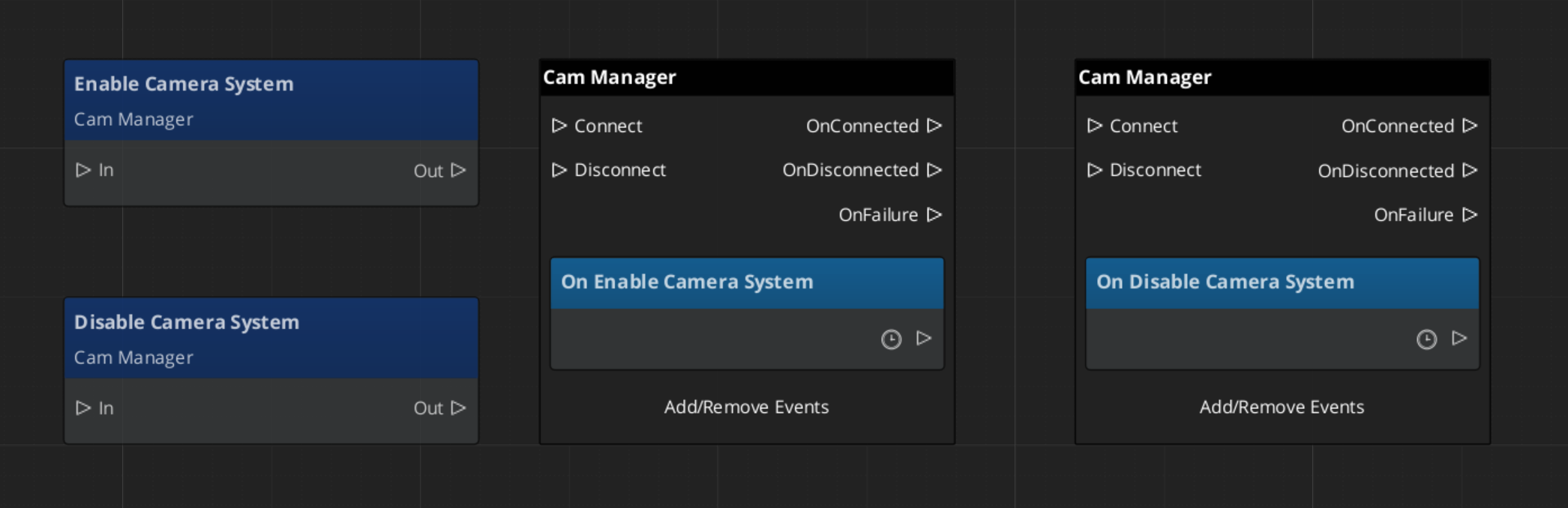
EnableCameraSystem | Fired when the camera system is fully initialized. |
DisableCameraSystem | Fired when the camera system is shutting down. |
SettingNewCam(targetCam) | A new phantom camera became dominant in channel 0. The Cam Core listens for this to begin blending. |
Channel-aware (instancing ON)
| Event | Description |
|---|---|
SettingNewCamOnChannel(channelId, targetCam) | Per-channel arbitration produced a new winner. Replaces the legacy SettingNewCam when instancing is on. |
ChannelSpawned(channelId, camCoreEntity) | A configured channel finished spawning AND its Cam Core self-registered. Listeners can treat this as a ready-to-render signal. |
ChannelDespawned(channelId) | Fires before entity teardown when a channel rig is despawned. |
OnAllChannelsActivatedSharedCam(sharedCam) | Edge-triggered: every active channel simultaneously selected the same shared TrueUnique cam. Typical cause: a shared cinematic cam paired with a Group Target at convergence radius. |
OnCamCoreDispatched(camCoreEntity, dispatchedCam) | A cross-channel dispatch override was applied. |
OnCamCoreDispatchReleased(camCoreEntity) | Dispatch override cleared. |
OnActiveCameraChanged(channelId, camCoreEntity) | The engine’s main-view active camera changed via this API. channelId == InvalidChannelId when the active cam isn’t channel-bound. External MakeActiveView calls outside this API are not observed. |
Virtual Methods
Override these when extending the Cam Manager. Always call the base implementation.
| Method | Parameters | Returns | Description |
|---|---|---|---|
EvaluatePriority() | — | void | Top-level arbitration entry point. Iterates every active channel. Override to add system-wide rules (gameplay-state gates, distance weighting, lock rules). |
EvaluatePriorityForChannel(channelId) | ChannelId | AZ::EntityId | Per-channel arbitration. Computes effective = base + sum(influences) and returns the winner. Override for per-channel custom logic in Tier 3 projects. |
Extending the Cam Manager
Extend the Cam Manager to add custom priority logic, additional registration behavior, or project-specific camera selection rules. Extension is done in C++.
Header (.h)
#pragma once
#include <GS_PhantomCam/GS_CamManagerBus.h>
#include <Source/GS_CamManagerComponent.h>

namespace MyProject
{
    class MyCamManager : public GS_PhantomCam::GS_CamManagerComponent
    {
    public:
        AZ_COMPONENT_DECL(MyCamManager);

        static void Reflect(AZ::ReflectContext* context);

    protected:
        void EvaluatePriority() override;
        AZ::EntityId EvaluatePriorityForChannel(GS_PhantomCam::ChannelId channelId) override;
    };
}
Implementation (.cpp)
#include "MyCamManager.h"
#include <AzCore/Serialization/SerializeContext.h>

namespace MyProject
{
    AZ_COMPONENT_IMPL(MyCamManager, "MyCamManager", "{YOUR-UUID-HERE}");

    void MyCamManager::Reflect(AZ::ReflectContext* context)
    {
        if (auto serializeContext = azrtti_cast<AZ::SerializeContext*>(context))
        {
            serializeContext->Class<MyCamManager, GS_PhantomCam::GS_CamManagerComponent>()
                ->Version(0);

            if (AZ::EditContext* editContext = serializeContext->GetEditContext())
            {
                editContext->Class<MyCamManager>("My Cam Manager", "Custom camera manager")
                    ->ClassElement(AZ::Edit::ClassElements::EditorData, "")
                        ->Attribute(AZ::Edit::Attributes::Category, "MyProject")
                        ->Attribute(AZ::Edit::Attributes::AppearsInAddComponentMenu, AZ_CRC_CE("Game"));
            }
        }
    }

    void MyCamManager::EvaluatePriority()
    {
        // Call base to run standard per-channel arbitration.
        GS_CamManagerComponent::EvaluatePriority();

        // Custom system-wide logic here.
    }

    AZ::EntityId MyCamManager::EvaluatePriorityForChannel(GS_PhantomCam::ChannelId channelId)
    {
        // Apply per-channel rules before falling back to base arbitration.
        // Example: lock to a specific cam during a scripted sequence.
        // if (m_lockedCam.IsValid()) return m_lockedCam;
        return GS_CamManagerComponent::EvaluatePriorityForChannel(channelId);
    }
}
Script Canvas Examples
Enabling and disabling the camera system:
Setting the global camera target:
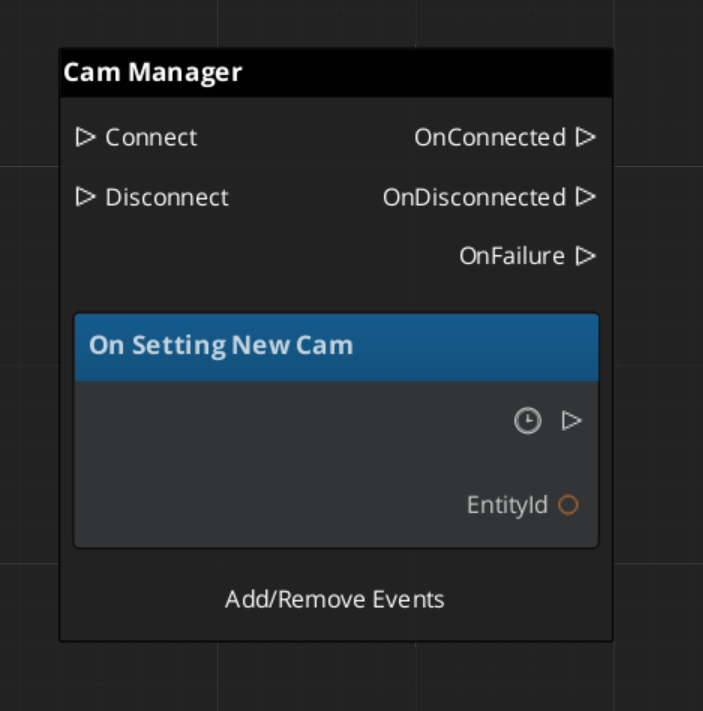
Reacting to a new dominant camera:
See Also
For related PhantomCam components:
For foundational systems:
For conceptual overviews and usage guides:
Get GS_PhantomCam
GS_PhantomCam — Explore this gem on the product page and add it to your project.