GS_PhantomCam
Priority-based virtual camera framework — composable stage pipeline, channel-aware instancing, blend profiles, influence fields, group targets, tug fields, and noise.
Rather than moving a single camera directly, GS_PhantomCam lets you place lightweight virtual cameras — “phantoms” — throughout the scene. Each phantom holds a complete camera state and a priority value. The Cam Core component drives the real camera to match whichever phantom currently has the highest effective priority. Transitions are animated by Blend Profiles that specify duration, easing, blend shape, and optional state inheritance. Influence Fields modify camera selection spatially or globally without changing base priorities.
Each phantom is not a fixed-behavior camera. It hosts a composable Body → Aim → Reposition additives → Noise additives stage pipeline — so the same component drives follow cams, orbital cams, tracking dollies, third-person shoulder cams, and cinematic stingers depending on which stages are slotted. The framework also runs a channel system that scales from arcade single-cam through 4-player split-screen co-op with no changes to the per-cam authoring surface.
For usage guides and setup examples, see The Basics: GS_PhantomCam.
Contents
Architecture
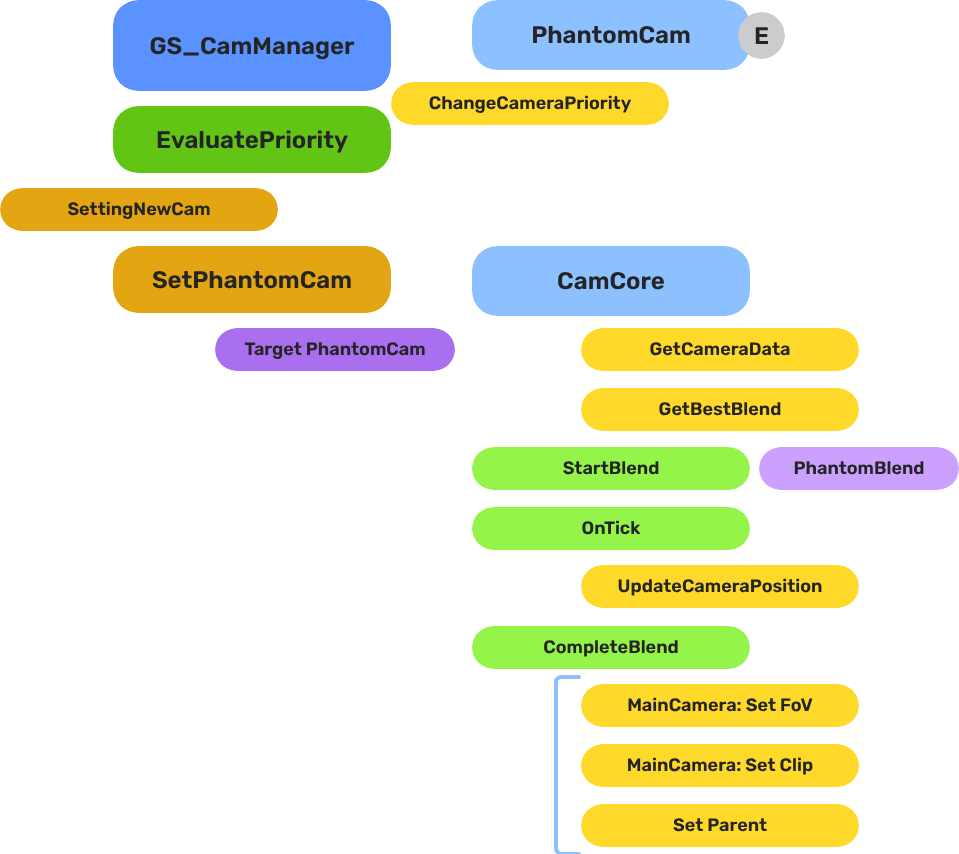
Breakdown
Each phantom camera publishes a pose every tick by running its stage pipeline. The Cam Manager arbitrates priority across all registered phantoms inside a channel and notifies the channel’s Cam Core when the winner changes. The Cam Core then blends from the outgoing pose to the new one, optionally inheriting pose state across the transition and applying mid-blend interrupt correction when a new winner appears before the current blend completes.
| Step | What it means |
|---|
| 1 — Per-tick pipeline | Each phantom threads a CameraState through Body → Aim → Reposition additives → Noise additives → Finalize. The committed transform is published to the entity. |
| 2 — Priority arbitration | The Cam Manager re-evaluates base + sum(influences) per channel. Channel 0 covers all legacy / single-player flows. |
| 3 — Dominance change | When a channel’s winner changes, the Cam Manager fires SettingNewCam (or SettingNewCamOnChannel when channel instancing is on). |
| 4 — Profile query | Cam Core calls GetBestBlend(fromCam, toCam) on the assigned Blend Profile. The matched entry returns blend time, easing curve, blend shape (Linear / Spherical / Cylindrical), an inherit-state flag, and a pivot source selector. |
| 5 — State inheritance | If inherit-state is set, the outgoing cam publishes a CamPoseSnapshot; the incoming cam’s Body adopts it through its own kinematic interpretation (orbit yaw/pitch, track param, lead-follow seed). |
| 6 — Interpolation | Cam Core blends position, rotation, and FOV over the entry’s blend time using the configured easing + shape. If a new blend interrupts this one, a correction window pulls the new start curve back from the rendered TM. |
E Indicates extensible classes and methods.
Patterns - Complete list of system patterns used in GS_Play.
Cam Manager
The Cam Manager is the singleton controller for the entire camera system. It extends GS_ManagerComponent and now owns six responsibilities:
- Registration — Every phantom camera and Cam Core self-registers on activate; the Cam Manager holds authoritative per-channel tables.
- Priority evaluation — When any camera’s priority changes,
EvaluatePriority re-sorts each channel and determines its dominant camera. A dominance change fires SettingNewCam (instancing off) or SettingNewCamOnChannel (instancing on). - Influence routing — Priority influences from Influence Fields or gameplay code are routed to the channel of the affected target via
AddCameraInfluence(sourceEntity, targetEntity, camName, influence). Influences whose target isn’t bound to any channel are silently dropped. - Target system — Per-channel target bindings via
SetChannelTarget(channelId, target). Legacy single-arg SetTarget forwards to channel 0. - Group target registry — Named Group Targets self-register on activate so stages can resolve them by name.
- Dispatch overrides & active main-view — Cross-channel cinematic dispatch (
DispatchCamToCamCore) and engine main-view selection (SetActiveChannel / SetActiveCamCore) wrap O3DE’s MakeActiveView for orchestrated multi-view flows.
| Component | Purpose |
|---|
| GS_CamManagerComponent | Singleton manager. Channel registries, priority arbitration, influence routing, group-target registry, dispatch, active-view selection, rig spawning. |
Cam Manager API
Cam Core
The Cam Core is the per-frame driver that makes the real O3DE camera match the dominant phantom for its channel. It lives on the main camera entity, which must be a child entity of the Cam Manager entity (or of a rig-prefab root in Tier 3) so it spawns and despawns with the camera system.
Every frame, when locked to a phantom, the Cam Core parents the main camera to that phantom entity and reads its position, rotation, and FOV directly. During a blend transition:
- The Cam Core receives
SettingNewCam (or SettingNewCamOnChannel) from the Cam Manager. - It queries the assigned Blend Profile for the best matching entry between the outgoing and incoming cameras.
- The matched entry returns duration, easing, blend shape, an inherit-state flag, and a pivot source. If no profile entry matches, the Cam Core falls back to its own default blend time, easing, and shape.
- If inherit-state is set, the outgoing cam’s Body publishes a
CamPoseSnapshot and the incoming cam’s Body adopts it before the blend executes. - Over the blend duration, position, rotation, and FOV are interpolated using the configured easing curve and shape (Linear / Spherical-around-pivot / Cylindrical-around-pivot).
- If a new blend starts mid-flight, a mid-blend correction window pulls the new start curve back from the rendered TM so the camera does not snap.
- On completion, the Cam Core parents the main camera to the new dominant phantom, locking them together until the next transition.
| Component | Purpose |
|---|
| GS_CamCoreComponent | Core camera driver. Blend execution (including interrupt correction), inheritance handoff site, drives the engine view, channel-aware via CamCoreRequestBus. |
Cam Core API
Phantom Cameras
A Phantom Camera is a single entity component — GS_PhantomCameraComponent — that holds priority, lens, snap/focus state, target routing, and one stage pipeline slot authored by the user. It does not render anything. It registers with the Cam Manager on activation (auto-routing to the correct channel via its ChannelStampComponent ancestor) and publishes a per-tick pose from its Body + Aim + Additive stages.
Where previous versions of GS_PhantomCam shipped separate components per behavior (clamped-look, static-orbit, track, etc.), all of those behaviors are now stage variants layered on top of the single base component. Authors pick a Body stage, an Aim stage, and zero-or-more Additive stages from the editor’s type-picker.
| Component | Purpose |
|---|
| GS_PhantomCameraComponent | Base virtual camera. Carries the stage pipeline slot, priority, target routing, lens, snap/focus/blendingOut state. |
| AlwaysFaceCameraComponent | Billboard utility — keeps an entity facing the active camera. Not a camera type itself. |
Phantom Cameras API
Retired components. StaticOrbit_PhantomCamComponent, ClampedLook_PhantomCamComponent, and Track_PhantomCamComponent no longer exist as separate components. Their behavior is now provided by Body / Aim stage variants. Legacy URLs redirect to the matching stage docs.
Stage Pipeline
Every phantom camera runs the same fixed pipeline per tick:
Body → Aim → Reposition additives → Noise additives → Finalize
- Body writes
state.position. Examples: DefaultFollowBody, OrbitBody, DynamicOrbitBody, LeadingFollowBody, TrackBody. - Aim writes
state.rotation. Examples: DefaultAim, ClampedLookAim. (Other gems — notably gs_performer — register additional aim variants.) - Reposition additives correct the smoothed pose. Run BEFORE noise so noise can’t be undone. Examples: collision pushback, occlusion, tug listeners.
- Noise additives perturb the final pose. Examples: PerlinNoise (continuous handheld shake), ImpulseNoise (event-triggered ADSR burst).
- Finalize publishes the committed transform and lens.
Each stage owns its own damping. Stages are reflected polymorphic types — derived from IBodyStage / IAimStage / IAdditiveStage, not AZ::Component. The editor’s type-picker enumerates all registered derivations from the SerializeContext class hierarchy, so other gems can extend the catalog cleanly.
Stage Pipeline API
Channels & Instancing
A channel is one player viewpoint slot. Each channel owns its own rig (spawned from a prefab), its own Cam Core, its own target binding, its own priority table, and its own active influence set. Channel 0 is the implicit default for all single-player flows.
The system progressively discloses across three authoring tiers:
| Tier | Setup | Behavior |
|---|
| Tier 1 — Arcade | Drop CamCore + PhantomCams in the level. Call SetTarget(player). | Legacy fallback. Cam Manager synthesizes channel 0 around level-placed cams. |
| Tier 2 — Standard single-player | Set m_primaryRigPrefab on the Cam Manager. Call SetTarget(player). | Cam Manager spawns the rig at startup; the prefab’s CamCore + cams self-register to channel 0. |
| Tier 3 — Co-op / split-screen / cinematic | Toggle m_enableInstancedChannels = true. Fill m_channelConfigs. | Per-channel arbitration, channel-aware influence routing, cross-channel dispatch, active-main toggling. |
| Concept | Purpose |
|---|
| Channel system | Scope enum (Local / AllChannels / TrueUnique), ChannelStampComponent runtime plumbing, spawn lifecycle, cross-channel dispatch, active-view selection. |
Channels & Instancing API
Pending — multi-view rendering. Multi-view rendering ships with the AttImage render-target binding work. Until then, the engine renders one channel at a time even when multiple are arbitrating internally.
Blend Profiles
Blend Profiles are data assets (.camblendprofile) that define how the Cam Core transitions between phantom cameras. Each profile contains a list of blend entries. Each entry specifies a From camera, a To camera, a blend duration, an easing curve, a blend shape, an inherit-state flag, and a pivot source. This allows every camera-to-camera transition in your project to have unique timing, feel, and geometry.
Entry Resolution Order
- Exact match — From name and To name both match.
- Any-to-specific — From is blank/“any”, To matches the incoming camera.
- Specific-to-any — From matches the outgoing camera, To is blank/“any”.
- Default fallback — The Cam Core’s own default blend settings.
Blend Entry Fields
| Field | Description |
|---|
FromCamera | Outgoing phantom camera entity name. Blank/“any” matches all. |
ToCamera | Incoming phantom camera entity name. Blank/“any” matches all. |
BlendTime | Transition duration in seconds. |
EasingType | Interpolation curve applied during the blend. See Curves Utility. |
BlendShape | Linear, Spherical-around-pivot, or Cylindrical-around-pivot. Spherical sweeps the camera through a great-circle arc around a pivot; cylindrical does the same but only on the yaw axis. |
InheritState | When set, the outgoing cam publishes a CamPoseSnapshot and the incoming cam’s Body adopts it before the blend executes. See State Inheritance. |
PivotSource | Which point the shape uses as its pivot — target world position, body anchor, or look-at point. |
Camera names correspond to entity names of the phantom camera entities in the scene.
| Asset | Purpose |
|---|
| GS_PhantomCamBlendProfile | Blend settings asset. Per-pair transition duration, easing, shape, inherit-state, pivot source. |
Blend Profiles API
Camera Influence Fields
Influence components modify the effective priority of phantom cameras without touching their base priority values. They work by calling AddCameraInfluence(sourceEntity, targetEntity, camName, influence) on the Cam Manager bus, identified by camera name. Multiple influences on the same camera stack additively.
The signature carries two entity arguments: the source (the field emitting the influence — used as the per-channel storage key so overlapping fields don’t collide) and the target (the entity that triggered the influence — used as the routing key to look up which channel the influence applies to). Influences whose target isn’t bound to any channel are silently dropped, which gives clean isolation between players in co-op.
GlobalCameraInfluenceComponent
Applies a constant priority modifier for its entire active lifetime. Useful for gameplay states that should always favor a particular camera — boosting a cutscene camera’s priority during a scripted sequence, for example.
Placement: Place GlobalCameraInfluenceComponent on the StageData entity. It activates and deactivates automatically with the stage, keeping camera influence scoped to the level that defines it.
CameraInfluenceFieldComponent
Applies a priority modifier only when the camera subject enters a defined spatial volume. Requires a PhysX Collider (set as trigger) on the same entity to define the volume. On entry, the influence is added; on exit, it is removed. See Physics Trigger Volume Utility for setup details.
Useful for level design — switching to an overhead camera when the player enters a room, or boosting a scenic camera in a vista area.
Camera Influence Fields API
Group Targets
A Group Target is a target entity whose world transform is the weighted centroid of a subject set. Phantom Cameras point at it like any other target. The Cam Manager hosts a named registry so stages can resolve a group entity by string name.
| Component | Purpose |
|---|
| GroupTargetComponent | Weighted multi-subject focal entity. Centroid modes (weighted mean, bbox center, sphere center). Optional derived rotation. Physics-aware cadence. |
Group Targets API
Tug Fields
Tug Fields are collider-driven spatial reposition sources. A volume in the world pulls the camera’s body position and/or aim rotation toward a configured destination while a proxy attached to the rig is in contact with the volume. The system is decoupled into three components — CameraTugVolumeComponent (the trigger volume), CameraTugSourceComponent (the falloff geometry and destination), and TugFieldProxyComponent (the cam-side receiver) — and is PhysX-paired through dedicated TugProxy / TugField collision layers so the engine itself filters contacts. No registry, no Cam Manager involvement.
Naming note. Tug-field m_channels are arbitrary string tags (“Cinematic”, “Combat”) that match volumes to listeners. They are not the same as instancing ChannelIds, which are integer per-player slots — see Channels & Instancing.
| Components | Purpose |
|---|
| Tug Fields | Volume / source / proxy three-component model, tug listeners (TugAimListener, TugBodyListener), PhysX layer contract. |
Tug Fields API
Noise & Impulse
Noise stages perturb the final pose in the Noise phase of the pipeline, autonomous from Body / Aim. Two stages ship: PerlinNoise (continuous handheld / idle shake driven by a .camnoiseprofile asset) and ImpulseNoise (event-triggered ADSR burst). Multiple noise stages compose freely on one cam.
| Asset | Purpose |
|---|
| CameraNoiseProfile | .camnoiseprofile — layered Perlin noise definitions for the NoiseStage. Six per-axis layer lists (position xyz, rotation xyz). |
Noise Profiles API
Orbit Profiles
CameraOrbitShape is a .camorbit asset that defines the shape of an orbital sweep — a power-bulge family that smoothly interpolates between a diamond (Roundness 0), a sphere (Roundness 0.5), and a cube (Roundness 1). Arc-length reparameterization keeps spatial speed constant as the camera traces the shape. Consumed by DynamicOrbitBody.
| Asset | Purpose |
|---|
| CameraOrbitShape | .camorbit — power-bulge orbit shape with arc-length reparameterization. |
Orbit Profiles API
State Inheritance
State inheritance lets the incoming cam in a transition start from a kinematic interpretation of the outgoing cam’s pose, rather than its own ideal. The protocol is universal: every Body stage may publish a CamPoseSnapshot (TryGetPoseSnapshot) and may adopt one (TryAdoptPoseSnapshot). Orbit back-derives yaw / pitch from the snapshot. Track projects to its spline. LeadingFollow seeds at the band-natural distance from the source’s facing.
Inheritance is opt-in per blend entry via the InheritState flag on the matched Blend Profile entry. The default is OFF; enable it only when the smoother handoff is worth the kinematic cost.
State Inheritance API
The Camera Input Reader provides yaw / pitch input deltas to Body and Aim stages that drive their pose from player input (notably DynamicOrbitBody). It implements the OrbitInputProvider interface and integrates with PlayerControllerInputReader from gs_unit. It distinguishes sensitivity (raw input scale) from halflife (damping rate) and applies ResetPendingInput semantics so a stage that didn’t tick this frame doesn’t accumulate a stale input buffer.
Camera Input Reader API
Cross-Gem Contracts
The Cam Core exposes the camera as an observable service through the GS_Core Interfaces layer — the observable-service trio: learn a core exists (Emit), query it (Exchange), observe its updates (Emit):
| Contract | Kind | Used for |
|---|
CamCoreEmissionBus | Emit | UpdateCameraPosition (per-frame pose), OnCamCoreRegistered / OnCamCoreUnregistered (rig lifetime). Global broadcast. |
CamCoreExchangeBus | Exchange | GetCamCore — resolve the active Cam Core’s entity. |
The internal SetPhantomCam command stays an in-gem bus (Cam Manager → Cam Core), not a cross-gem contract. See the Contract Reference for details.
Installation
GS_PhantomCam requires only GS_Core.
- Enable GS_PhantomCam in Project Manager or
project.json. - Add GS_CamManagerComponent to a dedicated entity and register it in the Game Manager Startup Managers list. Save this entity as a prefab.
- Author a rig prefab containing GS_CamCoreComponent on a main O3DE camera entity plus the phantom cameras you want to ship with the rig. Assign this prefab to the Cam Manager’s
m_primaryRigPrefab for Tier 2 (single-player) or to m_channelConfigs[i].m_rigPrefab for Tier 3 (per-channel). For Tier 1 / legacy, hand-place the CamCore as a child of the Cam Manager entity instead. - Assign a Blend Profile asset to the Cam Core’s Blend Profile slot. Configure default blend time, easing, and shape on the component for fallback transitions.
- Place phantom camera entities (either in the rig prefab or in the level). Author their Body, Aim, and Additive stages from the type-picker.
- For spatial influence zones, add CameraInfluenceFieldComponent alongside a PhysX Collider (trigger) to define the volume.
- For global per-stage influence, add GlobalCameraInfluenceComponent to the StageData entity.
- For multi-player or split-screen, toggle
m_enableInstancedChannels = true on the Cam Manager and populate m_channelConfigs. See Channels & Instancing.
For a full guided walkthrough, see the PhantomCam Set Up Guide.
See Also
For conceptual overviews and usage guides:
For related resources:
Get GS_PhantomCam
GS_PhantomCam — Explore this gem on the product page and add it to your project.
1 - Cam Manager
Camera system lifecycle controller — channel registry, per-channel priority arbitration, group target registry, influence routing, dispatch overrides, and active main-view selection.
The Cam Manager is the singleton controller for the GS_PhantomCam camera system. It extends GS_ManagerComponent and owns the full lifecycle of virtual cameras: per-channel registration of phantom cameras and Cam Cores, per-channel priority arbitration, channel-aware target binding, influence routing, the named Group Target registry, cross-channel cinematic dispatch, and engine main-view selection.
When a phantom camera activates, it walks transform ancestors looking for a ChannelStampComponent, identifies its channel, and self-registers with the Cam Manager. When priorities change — through direct calls, enable/disable toggling, or influence fields — the Cam Manager re-evaluates the affected channel(s) and notifies the channel’s Cam Core to begin blending toward the new winner.
For usage guides and setup examples, see The Basics: GS_PhantomCam.
Contents
How It Works
Camera Registration
Every Phantom Camera registers with the Cam Manager on activation and unregisters on deactivation. The registration path depends on the cam’s CamChannelScope and whether it lives under a ChannelStampComponent ancestor — see Channels. For legacy / single-player flows (no stamp ancestor), the cam routes through channel 0 via the legacy RegisterPhantomCam method.
Priority Evaluation
When any camera’s priority changes, the Cam Manager calls EvaluatePriority(), which iterates every active channel. Each channel computes effective = base + sum(influences) per cam and picks the highest. A change in a channel’s winner triggers SettingNewCamOnChannel(channelId, targetCam) (when channel instancing is enabled) or the legacy SettingNewCam(targetCam) (when it is not). The channel’s Cam Core listens for this to begin its blend transition.
Camera Influences
Camera influences are named priority modifiers that shift a camera’s effective priority. They are added and removed through AddCameraInfluence(sourceEntity, targetEntity, camName, influence) and RemoveCameraInfluence(sourceEntity, targetEntity). The sourceEntity is the storage key (so multiple overlapping fields don’t collide); the targetEntity is the routing key — the Cam Manager looks up the channel via GetChannelForTarget(targetEntity). Influences whose target isn’t bound to any channel are silently dropped. See Camera Influence Fields.
Target Assignment
Each channel holds its own target binding. SetChannelTarget(channelId, target) sets the target for one channel; the legacy SetTarget(target) forwards to channel 0. Setting a valid target on a channel propagates it to every cam in the channel via SetCameraTarget and pushes a synchronous SnapCameraNow so the cam’s evaluated pose lands before downstream consumers query its transform. Clearing the target (invalid EntityId) does not push snap — this preserves the depossess-guard pose-hold behavior.
Authoring Tiers
The Cam Manager exposes a tiered author surface via progressive disclosure. Three top-level inspector fields control which tier is active:
| Tier | Configuration | Behavior |
|---|
| Tier 1 — Standard single-player | m_primaryRigPrefab set; m_enableInstancedChannels = false | Cam Manager spawns one rig from the primary prefab on startup; everything routes through channel 0. Most projects use this tier. |
| Tier 2 — Legacy level-placed | No m_primaryRigPrefab; m_enableInstancedChannels = false | The CamCore is hand-placed in the level instead of spawned from a rig prefab. Legacy author flow — supported but not preferred. |
| Tier 3 — Multi-channel | m_enableInstancedChannels = true; m_channelConfigs populated | Per-channel rig spawning, per-channel arbitration, channel-aware notifications, cross-channel cinematic dispatch. Split-screen and co-op projects use this tier. |
| Inspector field | Visibility | Purpose |
|---|
m_primaryRigPrefab | Always | Default rig prefab. Universal fallback for any channel with no override. |
m_enableInstancedChannels | Always | Master gate. When OFF, channel-aware fields are hidden and legacy bus signatures are routed. When ON, the full channel surface is live. |
m_channelConfigs | When master gate is ON | Array of CameraChannelConfig rows. |
m_activeChannelCount | When master gate is ON | Lobby-driven cap. Channels configured beyond this count stay dormant at startup. |
CameraChannelConfig per-row fields:
| Field | Inspector label | Purpose |
|---|
m_channelName | Channel Name | Display label (“P1”, “P2”). Not a lookup key. |
m_policy | Channel Policy | PerChannelInstance (default — Cam Manager spawns this channel’s rig) or LegacyLevelPlaced (channel uses level-placed cams, channel 0 only). |
m_rigPrefab | Rig Override Prefab | Per-channel rig. Leave empty to inherit m_primaryRigPrefab. |
m_enabledByDefault | Enabled By Default | Whether this channel spawns on startup. |
Channels
A channel is one player viewpoint slot. Each channel owns its own rig, target binding, priority table, active influence set, and Cam Core. Channel 0 (DefaultChannelId) is the implicit default for legacy / single-player flows.
Channel addressing covers most of the Cam Manager’s runtime surface. The bus exposes paired methods — a legacy single-arg form that forwards to channel 0, and a channel-aware multi-arg form for Tier 3:
| Concern | Legacy | Channel-aware |
|---|
| Set the target | SetTarget(entity) | SetChannelTarget(channelId, entity) |
| Get the target | GetTarget() | GetChannelTarget(channelId) |
| Register a cam | RegisterPhantomCam(cam) | RegisterPhantomCamForChannel(cam, stampEntity, channelId, token) |
| Register a CamCore | RegisterCamCore(camCore) | RegisterCamCoreToChannel(camCore, stampEntity, channelId, token) |
| Dominance notification | SettingNewCam(cam) | SettingNewCamOnChannel(channelId, cam) |
Direct registration variants (RegisterPhantomCamDirect, RegisterPhantomCamShared) cover author-explicit CamChannelScope::TrueUnique cams that bypass the stamp-walk path. See Channels & Instancing for the full scope enum and stamp-walk semantics.
| Method | Use |
|---|
GetChannelForTarget(target) | Reverse lookup — returns the channel an entity is bound to (or InvalidChannelId). Used by influence routing. |
SetActiveChannelCount(count) | Pre-startup lobby cap. Configured-but-extra channels stay dormant. |
EnableChannel(channelId) | Spawn a configured channel mid-session. Fires ChannelSpawned. |
DisableChannel(channelId) | Despawn a spawned channel. Fires ChannelDespawned. |
GetChannelCamCore(channelId) | Query the bound CamCore entity for a channel. |
Group Target Registry
The Cam Manager is the single global authority for named Group Targets. A GroupTargetComponent self-registers on activate; stages with CamTargetMode::GroupTarget resolve the group’s entity by name.
| Method | Use |
|---|
RegisterGroupTarget(name, groupEntity) | Called by GroupTargetComponent::Activate. |
UnregisterGroupTarget(groupEntity) | Called by GroupTargetComponent::Deactivate. |
FindGroupTargetByName(name) | Stages query this to resolve a group entity. |
GetRegisteredGroupTargetNames() | Returns the full list. Used by editor dropdowns and debug. |
Dispatch Overrides
For cinematic / cross-channel scenarios — e.g. player 3’s wide cam should temporarily render on player 1’s Cam Core — the Cam Manager exposes a dispatch override. Channel arbitration still runs internally during dispatch (SettingNewCamOnChannel still fires with the arbitrated winner); only the physical Cam Core route is overridden.
| Method | Use |
|---|
FindCamForTarget(logicalName, targetEntity) | Resolves a cam by logical (entity) name with multi-tier fallback: channel-of-target match → shared-cam scan → reserved AllChannels duplicate path. |
DispatchCamToCamCore(cam, camCoreEntity) | Force the Cam Core to render the specified cam. Persists until release. Fires OnCamCoreDispatched. |
ReleaseCamCoreDispatch(camCoreEntity) | Clear the override. Re-runs arbitration so the Cam Core routes back to its arbitrated winner. Fires OnCamCoreDispatchReleased. |
Active Main View
Wraps O3DE’s AzFramework::Camera::CameraRequests::MakeActiveView so the channel system can orchestrate which Cam Core is the engine’s main view. Orthogonal to dispatch (what cam) and render-target binding (where pixels go).
| Method | Use |
|---|
SetActiveChannel(channelId) | Resolves the channel’s Cam Core, delegates to SetActiveCamCore. |
SetActiveCamCore(camCoreEntity) | Calls MakeActiveView on the Cam Core. Idempotent. |
GetActiveChannel() | Reverse query — returns the channel that owns the engine’s active camera, or InvalidChannelId if the active cam isn’t channel-bound. |
GetActiveCamCore() | Direct passthrough to the engine. |
Listeners receive OnActiveCameraChanged(channelId, camCoreEntity). External MakeActiveView calls made outside this API are not observed — subscribe to AzFramework::Camera::CameraNotificationBus directly if you need to detect engine-level changes.
Spawn Lifecycle
The Cam Manager’s OnStartupComplete hook (driven by the Game Manager) spawns all configured rigs before broadcasting HandleStartup so spawned cams settle into the same startup wave. Stage transitions (BeginLoadStage / LoadStageComplete) despawn and respawn rigs cleanly.
OnStartupComplete:
  if m_enableInstancedChannels == false:
    Tier 1: if m_primaryRigPrefab valid → spawn one rig for channel 0
    Tier 2: no spawn (assumes level-placed CamCore)
  else:
    Tier 3: iterate m_channelConfigs[0 .. min(size, m_activeChannelCount)]
      for each PerChannelInstance config with valid prefab and m_enabledByDefault:
        SpawnChannelRig(channelId, GetEffectiveRigPrefab(channelId))
SpawnChannelRig uses an EntitySpawnTicket with two callbacks:
- Pre-insertion — Cam Manager attaches a
ChannelStampComponent to the spawn root and calls StampChannel(channelId). This bumps the channel’s stamp token and fires OnStamped to any subscribers. - Completion — Entities activate. Cam Cores and PhantomCams walk ancestors, find the stamp, and self-register to the channel via token-aware methods. Cam Manager then walks activated entities into
channel.m_rigSpawnedEntities, marks the channel active, folds shared TrueUnique cams into the channel’s priority table, validates a Cam Core registered, broadcasts ChannelSpawned(channelId, camCoreEntity), and re-runs EvaluatePriority so the arbitration result reaches the Cam Core.
Mid-session EnableChannel / DisableChannel reuse the same spawn / despawn paths and fire the same notifications.
Setup
- Add GS_CamManagerComponent to a dedicated entity (commonly inside a Cam Manager prefab).
- Register the manager prefab in the Game Manager Startup Managers list.
- Choose your tier:
- Tier 1 — Assign a rig prefab (containing a Cam Core entity and your phantom cameras) to
m_primaryRigPrefab. Leave m_enableInstancedChannels off. - Tier 2 — Place the Cam Core entity as a child of the Cam Manager entity directly. Leave
m_primaryRigPrefab empty and m_enableInstancedChannels off. - Tier 3 — Toggle
m_enableInstancedChannels on and populate m_channelConfigs with one row per supported player slot. Use m_primaryRigPrefab as the universal default and per-row Rig Override Prefab for asymmetric setups.
- Place or author phantom cameras with priorities, target modes, and stage compositions.
For a full walkthrough, see the PhantomCam Set Up Guide.
API Reference
Request Bus: CamManagerRequestBus
Commands sent to the Cam Manager. Global bus — single address, single handler. Extends GS_Core::ManagerBaseRequests.
Registration
| Method | Parameters | Returns | Description |
|---|
RegisterPhantomCam | AZ::EntityId cam | void | Legacy registration. Routes the cam through channel 0. Used by cams without a ChannelStampComponent ancestor. |
UnRegisterPhantomCam | AZ::EntityId cam | void | Legacy unregister. |
RegisterPhantomCamForChannel | AZ::EntityId cam, AZ::EntityId stampEntity, ChannelId claimedChannelId, AZ::u32 claimedToken | void | Stamp-aware registration. Cam Manager verifies the (channelId, token) against the live stamp on stampEntity before mutating channel tables — mismatched tokens are rejected. |
UnRegisterPhantomCamFromChannel | AZ::EntityId cam, AZ::EntityId stampEntity, ChannelId, AZ::u32 token | void | Stamp-aware unregister. |
RegisterPhantomCamDirect | AZ::EntityId cam, ChannelId channelId | void | Author-explicit binding via CamChannelScope::TrueUnique + m_boundChannelId. Bypasses stamp-walk. |
UnRegisterPhantomCamDirect | AZ::EntityId cam, ChannelId channelId | void | Direct unregister. |
RegisterPhantomCamShared | AZ::EntityId cam | void | Adds the cam to every active channel’s priority table. Used by CamChannelScope::TrueUnique + m_allChannelsShare. |
UnRegisterPhantomCamShared | AZ::EntityId cam | void | Shared unregister. |
RegisterCamCore | AZ::EntityId camCore | void | Legacy Cam Core registration (channel 0). |
UnregisterCamCore | AZ::EntityId camCore | void | Legacy unregister. |
RegisterCamCoreToChannel | AZ::EntityId camCore, AZ::EntityId stampEntity, ChannelId, AZ::u32 token | void | Stamp-aware Cam Core registration. |
UnregisterCamCoreFromChannel | AZ::EntityId camCore, AZ::EntityId stampEntity, ChannelId, AZ::u32 token | void | Stamp-aware unregister. |
Priority and influence
| Method | Parameters | Returns | Description |
|---|
ChangeCameraPriority | AZ::EntityId cam, AZ::u32 priority | void | Sets base priority. Cam Manager walks every channel where the cam is registered and re-evaluates. |
AddCameraInfluence | AZ::EntityId sourceEntity, AZ::EntityId targetEntity, AZStd::string camName, AZ::u32 influence | void | Channel-routed. sourceEntity is the per-channel storage key; targetEntity is the routing key (channel resolved via GetChannelForTarget). Silently dropped if the target isn’t channel-bound. |
RemoveCameraInfluence | AZ::EntityId sourceEntity, AZ::EntityId targetEntity | void | Channel-routed removal by (source, target) key. |
Targets
| Method | Parameters | Returns | Description |
|---|
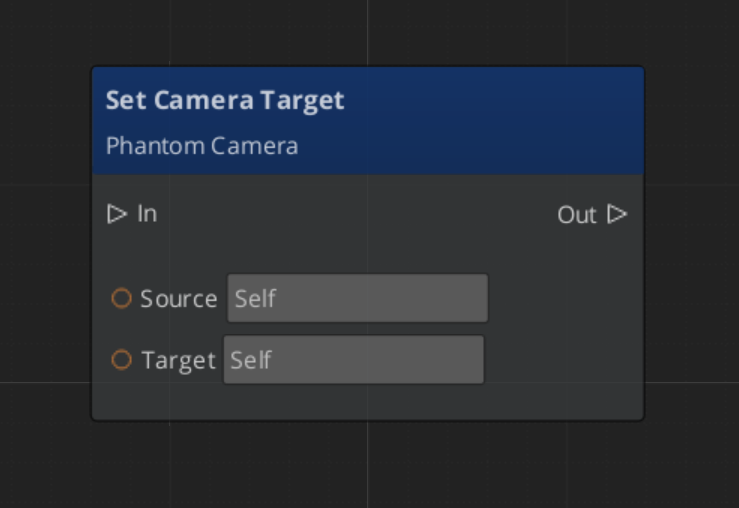
SetTarget | AZ::EntityId target | void | Legacy. Forwards to SetChannelTarget(DefaultChannelId, target). |
GetTarget | — | AZ::EntityId | Legacy. Returns channel 0’s target. |
SetChannelTarget | ChannelId, AZ::EntityId target | void | Channel-aware. Propagates the new target to every cam in the channel via SetCameraTarget, and pushes SnapCameraNow when binding to a valid target so evaluated pose lands before downstream queries. Clearing the target does not push snap. |
GetChannelTarget | ChannelId | AZ::EntityId | Returns the channel’s current target binding. |
GetChannelForTarget | AZ::EntityId target | ChannelId | Reverse lookup. Returns InvalidChannelId if the entity isn’t bound. |
GetCamManager | — | AZ::EntityId | Returns the Cam Manager’s own entity id. |
GetPhantomCam | AZStd::string camName | AZ::EntityId | Resolves a cam by entity name. |
Runtime channel management
| Method | Parameters | Returns | Description |
|---|
SetActiveChannelCount | AZ::u32 count | void | Pre-startup only. Lobby-driven cap. Mid-session calls warn and are ignored — use EnableChannel / DisableChannel instead. |
GetActiveChannelCount | — | AZ::u32 | Query. |
EnableChannel | ChannelId | void | Spawn a configured channel mid-session. Fires ChannelSpawned. |
DisableChannel | ChannelId | void | Despawn. Fires ChannelDespawned. No-op if not spawned. |
GetChannelCamCore | ChannelId | AZ::EntityId | Returns the bound Cam Core entity, invalid if none. |
Dispatch and active view
| Method | Parameters | Returns | Description |
|---|
FindCamForTarget | AZStd::string logicalName, AZ::EntityId targetEntity | AZ::EntityId | Multi-tier resolution. Channel-of-target first, then shared-cam scan. |
DispatchCamToCamCore | AZ::EntityId cam, AZ::EntityId camCoreEntity | void | Force a Cam Core to render the specified cam. Persists until release. |
ReleaseCamCoreDispatch | AZ::EntityId camCoreEntity | void | Clear override; restore arbitration. |
SetActiveChannel | ChannelId | void | Resolves the channel’s Cam Core and delegates to SetActiveCamCore. |
SetActiveCamCore | AZ::EntityId camCoreEntity | void | Calls MakeActiveView. Idempotent. |
GetActiveChannel | — | ChannelId | Returns the channel owning the engine’s active camera. |
GetActiveCamCore | — | AZ::EntityId | Direct passthrough to the engine. |
Group target registry
| Method | Parameters | Returns | Description |
|---|
RegisterGroupTarget | AZStd::string name, AZ::EntityId groupEntity | void | Called by GroupTargetComponent::Activate. |
UnregisterGroupTarget | AZ::EntityId groupEntity | void | Called by GroupTargetComponent::Deactivate. |
FindGroupTargetByName | AZStd::string name | AZ::EntityId | Resolves a group entity for stages set to CamTargetMode::GroupTarget. |
GetRegisteredGroupTargetNames | — | AZStd::vector<AZStd::string> | Returns the full list. |
Notification Bus: CamManagerNotificationBus
Events broadcast by the Cam Manager. Multiple handler bus — any number of components can subscribe. Extends GS_Core::ManagerBaseNotifications.
Legacy (instancing OFF)
| Event | Description |
|---|
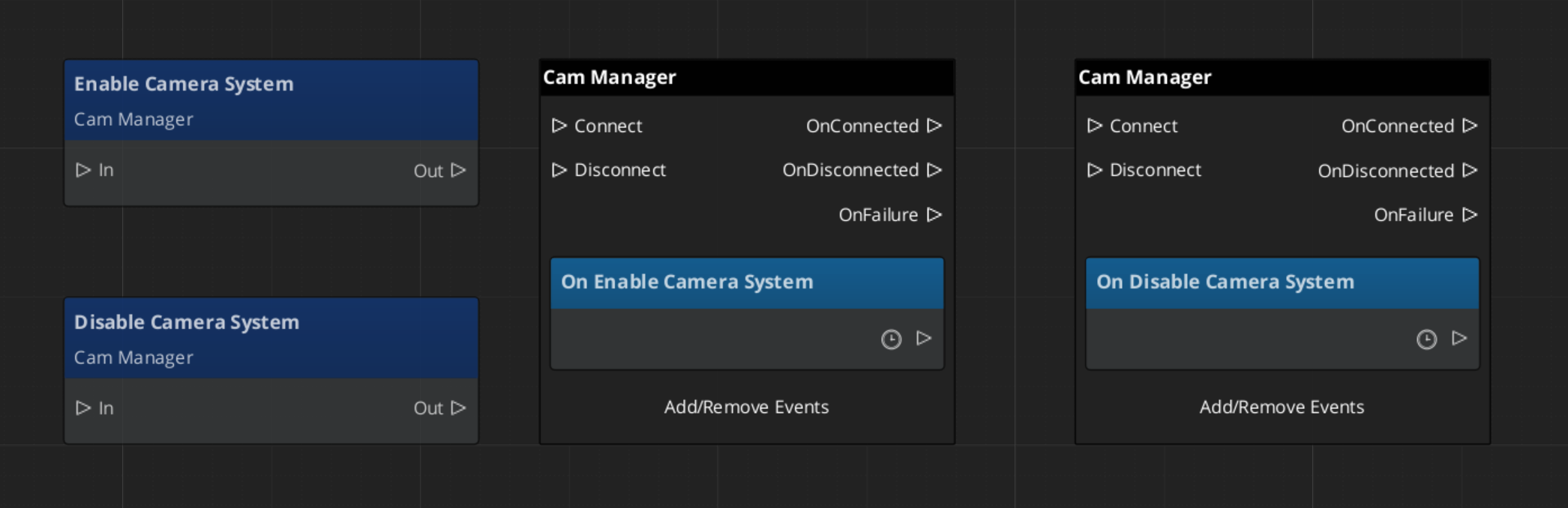
EnableCameraSystem | Fired when the camera system is fully initialized. |
DisableCameraSystem | Fired when the camera system is shutting down. |
SettingNewCam(targetCam) | A new phantom camera became dominant in channel 0. The Cam Core listens for this to begin blending. |
Channel-aware (instancing ON)
| Event | Description |
|---|
SettingNewCamOnChannel(channelId, targetCam) | Per-channel arbitration produced a new winner. Replaces the legacy SettingNewCam when instancing is on. |
ChannelSpawned(channelId, camCoreEntity) | A configured channel finished spawning AND its Cam Core self-registered. Listeners can treat this as a ready-to-render signal. |
ChannelDespawned(channelId) | Fires before entity teardown when a channel rig is despawned. |
OnAllChannelsActivatedSharedCam(sharedCam) | Edge-triggered: every active channel simultaneously selected the same shared TrueUnique cam. Typical cause: a shared cinematic cam paired with a Group Target at convergence radius. |
OnCamCoreDispatched(camCoreEntity, dispatchedCam) | A cross-channel dispatch override was applied. |
OnCamCoreDispatchReleased(camCoreEntity) | Dispatch override cleared. |
OnActiveCameraChanged(channelId, camCoreEntity) | The engine’s main-view active camera changed via this API. channelId == InvalidChannelId when the active cam isn’t channel-bound. External MakeActiveView calls outside this API are not observed. |
Virtual Methods
Override these when extending the Cam Manager. Always call the base implementation.
| Method | Parameters | Returns | Description |
|---|
EvaluatePriority() | — | void | Top-level arbitration entry point. Iterates every active channel. Override to add system-wide rules (gameplay-state gates, distance weighting, lock rules). |
EvaluatePriorityForChannel(channelId) | ChannelId | AZ::EntityId | Per-channel arbitration. Computes effective = base + sum(influences) and returns the winner. Override for per-channel custom logic in Tier 3 projects. |
Extending the Cam Manager
Extend the Cam Manager to add custom priority logic, additional registration behavior, or project-specific camera selection rules. Extension is done in C++.
#pragma once
#include <GS_PhantomCam/GS_CamManagerBus.h>
#include <Source/GS_CamManagerComponent.h>

namespace MyProject
{
    class MyCamManager : public GS_PhantomCam::GS_CamManagerComponent
    {
    public:
        AZ_COMPONENT_DECL(MyCamManager);

        static void Reflect(AZ::ReflectContext* context);

    protected:
        void EvaluatePriority() override;
        AZ::EntityId EvaluatePriorityForChannel(GS_PhantomCam::ChannelId channelId) override;
    };
}
Implementation (.cpp)
#include "MyCamManager.h"
#include <AzCore/Serialization/SerializeContext.h>

namespace MyProject
{
    AZ_COMPONENT_IMPL(MyCamManager, "MyCamManager", "{YOUR-UUID-HERE}");

    void MyCamManager::Reflect(AZ::ReflectContext* context)
    {
        if (auto serializeContext = azrtti_cast<AZ::SerializeContext*>(context))
        {
            serializeContext->Class<MyCamManager, GS_PhantomCam::GS_CamManagerComponent>()
                ->Version(0);

            if (AZ::EditContext* editContext = serializeContext->GetEditContext())
            {
                editContext->Class<MyCamManager>("My Cam Manager", "Custom camera manager")
                    ->ClassElement(AZ::Edit::ClassElements::EditorData, "")
                        ->Attribute(AZ::Edit::Attributes::Category, "MyProject")
                        ->Attribute(AZ::Edit::Attributes::AppearsInAddComponentMenu, AZ_CRC_CE("Game"));
            }
        }
    }

    void MyCamManager::EvaluatePriority()
    {
        // Call base to run standard per-channel arbitration.
        GS_CamManagerComponent::EvaluatePriority();

        // Custom system-wide logic here.
    }

    AZ::EntityId MyCamManager::EvaluatePriorityForChannel(GS_PhantomCam::ChannelId channelId)
    {
        // Apply per-channel rules before falling back to base arbitration.
        // Example: lock to a specific cam during a scripted sequence.
        // if (m_lockedCam.IsValid()) return m_lockedCam;
        return GS_CamManagerComponent::EvaluatePriorityForChannel(channelId);
    }
}
Script Canvas Examples
Enabling and disabling the camera system:
Setting the global camera target:
Reacting to a new dominant camera:
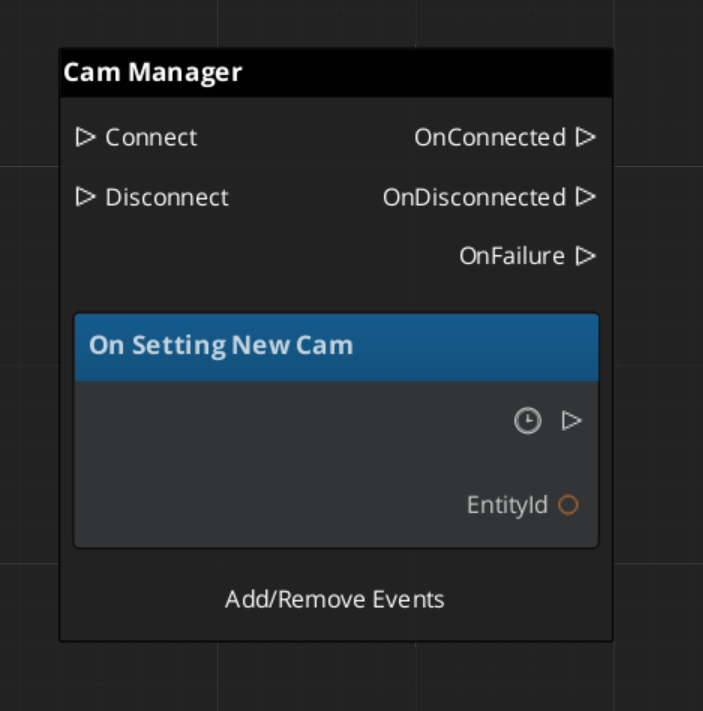
See Also
For related PhantomCam components:
For foundational systems:
For conceptual overviews and usage guides:
Get GS_PhantomCam
GS_PhantomCam — Explore this gem on the product page and add it to your project.
1.1 - Channels & Instancing
PhantomCam channel system — per-player viewpoint slots, scope enum, ChannelStampComponent, rig spawn lifecycle, cross-channel dispatch, active main-view selection.
A channel is one player viewpoint slot. Each channel owns its own rig (spawned from a prefab), its own Cam Core, zero or more Phantom Cameras registered to it, a bound target, and its own priority table. Channel 0 (DefaultChannelId) is the implicit default for all legacy / single-player flows.
The channel system progressively discloses across three authoring tiers — Tier 1 single-cam, Tier 2 single-player rig, Tier 3 multi-channel. The per-cam authoring surface is identical across tiers; only the Cam Manager configuration changes.
Pending — multi-view rendering (I.9b). The channel system architecturally supports per-channel render targets via AttachmentImage assets, but the Atom RPI binding has not landed yet. Until it does, the engine renders one channel at a time even when multiple are arbitrating internally. The active main-view selector decides which channel reaches the engine framebuffer; see Active Main View.
Contents
Three Authoring Tiers
The Cam Manager exposes three top-level inspector fields that control the system tier. See Cam Manager — Authoring Tiers for the full author surface.
| Tier | Master Gate | Channel Count | Use case |
|---|
| Tier 1 — Single player | m_enableInstancedChannels = false, m_primaryRigPrefab set | 1 (channel 0) | Most projects. Spawn one rig from the primary prefab. |
| Tier 2 — Single player, level-placed CamCore | m_enableInstancedChannels = false, no primary prefab | 1 (channel 0) | Legacy. Author hand-places Cam Core in the level. |
| Tier 3 — Multi-channel | m_enableInstancedChannels = true, m_channelConfigs populated | N (lobby-driven) | Split-screen, per-player rigs, cross-channel cinematic dispatch. |
The Master Gate is m_enableInstancedChannels. When OFF, channel-aware fields are hidden in the inspector and only the legacy bus signatures (SetTarget, SettingNewCam) route through. When ON, the full channel surface is live and channel-aware notifications (SettingNewCamOnChannel) replace the legacy ones.
ChannelId
using ChannelId = AZ::u32;
static constexpr ChannelId InvalidChannelId = static_cast<ChannelId>(-1);
static constexpr ChannelId DefaultChannelId = 0;
Channel ids are integers (0 … max − 1). The default channel id is 0. Legacy single-arg bus calls (SetTarget(target), RegisterPhantomCam(cam)) forward to channel 0.
Logical cam names — the entity names of phantom cameras inside a rig prefab — are scoped within their channel. The same name can appear in all four channels’ rigs without collision. Authors never type _i1 / _i2 suffixes.
Cam Channel Scope
Each Phantom Camera authors a CamChannelScope that decides how it participates in the channel system:
enum class CamChannelScope : AZ::u8 {
    Local       = 0,  // Default. Lives in its owning channel's scope.
    AllChannels = 1,  // In-rig natural duplicate — every rig instance carries one.
    TrueUnique  = 2,  // Exactly one instance total; bound or shared.
};
| Scope | Stamp-walk behavior | Use for |
|---|
Local (default) | Walks ancestors for a ChannelStampComponent. Found → registers to that channel via RegisterPhantomCamForChannel. No stamp → legacy RegisterPhantomCam (channel 0). | Cams inside a rig prefab. Each spawned rig instance hosts its own copy. |
AllChannels | Same stamp-walk as Local for the in-rig case. Out-of-rig (no stamp ancestor) warns and falls back to channel 0 (full runtime cloning is deferred). | Per-player tailored broadcast cam inside a rig prefab. |
TrueUnique | Bypasses the stamp-walk. Sub-modes via the fields below. | Hero-perspective or shared cinematic cams that need explicit binding. |
TrueUnique sub-fields (visible only when scope is TrueUnique):
| Field | Visibility | Purpose |
|---|
m_boundChannelId | Always when TrueUnique | Explicit channel binding for direct mode. |
m_allChannelsShare | When m_showAdvanced is true | Shared mode — cam appears in every active channel’s priority table. |
m_showAdvanced | When TrueUnique | Reveals advanced fields. |
Author recipes:
- Cam inside a rig prefab — leave as
Local. - Per-player tailored broadcast cam in the level —
AllChannels (in-rig); deferred for out-of-rig. - Hero-perspective cam for a specific player —
TrueUnique + m_boundChannelId = N. - Shared cinematic collapse cam —
TrueUnique + advanced + m_allChannelsShare = true. Pair with a Group Target to trigger OnAllChannelsActivatedSharedCam.
ChannelStampComponent
Pure runtime plumbing. Marks an entity (typically a rig root) with a (ChannelId, stampToken) pair. Phantom Camera and Cam Core components walk transform ancestors looking for this stamp at activate time to determine which channel they belong to.
Authored visibility: none. The stamp is reflected for serialization only — no EditContext block. The author never sees or sets it; the Cam Manager auto-attaches one during the spawn pre-insertion callback and calls StampChannel(channelId) to bump the token.
Why the token
m_stampToken bumps on every StampChannel(id) call (including idempotent re-stamps). The Cam Manager validates the supplied (channelId, token) against the live stamp on every registration call — mismatched tokens are rejected with a warning. This prevents stale messages from a previous stamp generation overwriting fresh bindings.
Buses
| Bus | Type | Purpose |
|---|
ChannelStampRequestBus | Per-entity, read-side | GetStampedChannelId, GetStampToken, IsStamped. Presence-tested via HasHandlers. |
ChannelStampNotificationBus | Per-entity, multi-handler | OnStamped(channelId, token) — every PhantomCam / CamCore beneath the stamp subscribes. |
Static helper
static AZ::EntityId ChannelStampComponent::FindStampAncestor(AZ::EntityId start);
Walks transform ancestors via the request bus and returns the closest stamped entity (or invalid id if no stamp ancestor).
Rig Prefab Resolution
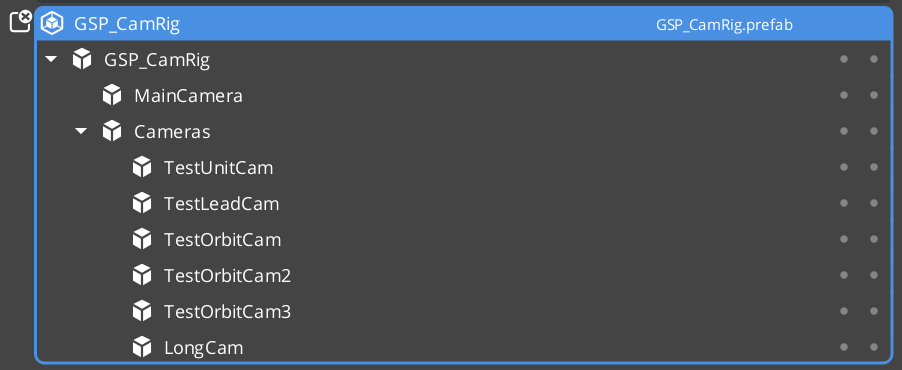
Three inspector fields on the Cam Manager control where each channel’s rig comes from:
| Field | Tier | Purpose |
|---|
m_primaryRigPrefab | Always visible | The default rig. Tier 1 / 2 single-rig source. In Tier 3 it is the universal fallback for any channel whose own override is empty. |
m_channelConfigs[i].m_rigPrefab | Tier 3 (master gate ON) | Per-channel override. Inspector label: “Rig Override Prefab”. Leave empty to inherit the primary. |
m_enableInstancedChannels | Always visible | Master gate. |
The Cam Manager’s GetEffectiveRigPrefab(channelId) returns:
m_channelConfigs[channelId].m_rigPrefab if set.- Else
m_primaryRigPrefab. - Else invalid (the channel emits a warning at spawn time and stays inert).
Symmetric multi-channel co-op (all players use the same rig) sets the primary once; every channel inherits. Asymmetric setups (e.g. P1 third-person, P2 top-down) set per-channel overrides.
Spawn Pipeline
The Cam Manager spawns configured rigs on startup (driven by OnStartupComplete) and re-spawns them on stage transitions.
OnStartupComplete:
  if m_enableInstancedChannels == false:
    Tier 1: m_primaryRigPrefab valid → SpawnChannelRig(DefaultChannelId, m_primaryRigPrefab)
    Tier 2: no spawn (assumes level-placed CamCore)
  else:
    Tier 3: iterate m_channelConfigs[0 .. min(size, m_activeChannelCount)]
      for each PerChannelInstance config with m_enabledByDefault and valid prefab:
        SpawnChannelRig(channelId, GetEffectiveRigPrefab(channelId))
SpawnChannelRig uses an EntitySpawnTicket with two callbacks:
- Pre-insertion callback (entities created, not yet activated):
- Cam Manager identifies the spawn root (first entity in the spawn container).
- Attaches a
ChannelStampComponent to it. - Calls
StampChannel(channelId) — bumps the token, fires OnStamped to any subscribers.
- Completion callback (entities activated):
- Cam Manager walks activated entities into
channel.m_rigSpawnedEntities. - Marks the channel
m_active = true. - Folds any
TrueUnique-shared cams into the new channel’s priority table. - Validates that a Cam Core registered (warns if not).
- Broadcasts
ChannelSpawned(channelId, camCoreEntity). - Re-runs
EvaluatePriority(channelId) so the channel’s arbitration result reaches its Cam Core.
Stage transitions
BeginLoadStage    → DespawnAllChannelRigs (lock arbitration first)
LoadStageComplete → SpawnAllConfiguredRigs BEFORE broadcasting HandleStartup
                    so fresh-stage cams come up in the startup wave.
Stamp-Walk Registration
When a Phantom Camera (or Cam Core) activates, it walks ancestors for a ChannelStampComponent and branches:
RegisterWithCamManager:
   branch on m_channelScope (PhantomCam only — CamCore is always Local-equivalent):

   ┌── Local:
   │      stamp = FindStampAncestor(myEntity)
   │      if stamp valid:
   │         RegisterPhantomCamForChannel(myEntity, stamp, channelId, token)
   │         registrationMode = StampAware
   │      else:
   │         RegisterPhantomCam(myEntity)             // legacy channel 0
   │         registrationMode = LegacyChan0
   │
   ├── AllChannels:
   │      stamp = FindStampAncestor(myEntity)
   │      if stamp valid:
   │         RegisterPhantomCamForChannel(myEntity, stamp, channelId, token)
   │         registrationMode = StampAware
   │      else:
   │         warn (out-of-rig cloning deferred)
   │         fall back to legacy channel 0
   │         registrationMode = LegacyChan0
   │
   └── TrueUnique:
          if m_boundChannelId valid AND !m_allChannelsShare:
             RegisterPhantomCamDirect(myEntity, m_boundChannelId)
             registrationMode = Direct
          elif !m_boundChannelId AND m_allChannelsShare:
             RegisterPhantomCamShared(myEntity)
             registrationMode = (Shared, stored as Direct for unregister routing)
          else:
             warn (fragile manual-control mode)
             stay unregistered
             registrationMode = None
registrationMode is cached on the component so UnregisterFromCamManager can route symmetrically.
OnStamped — mid-session re-stamp handling
If a rig is re-stamped mid-session (rare; typically only during stage transitions or hot-reload), the cam handles it:
OnStamped(newChannelId, newToken):
   Only acts in StampAware or None modes.
   In Direct or LegacyChan0 modes, the signal is ignored — author intent
   takes precedence over stamps.

   UnregisterFromCamManager (old binding)
   m_resolvedChannelId  = newChannelId
   m_resolvedStampToken = newToken
   RegisterWithCamManager (new binding)
The Cam Core mirrors the same pattern.
Shared Cams and Collapse Detection
RegisterPhantomCamShared(cam) adds the cam to every active channel’s priority table. The Cam Manager tracks the list in m_sharedCams. A shared cam:
- Wins arbitration in every channel where it has the highest priority.
- Gains focus from any channel selecting it.
- Never DROPS focus via channel notifications — a shared cam losing in channel N doesn’t preclude winning in channel M.
Collapse detection
EvaluatePriority collects per-channel winners. If every active channel picked the same cam AND that cam is in m_sharedCams, the Cam Manager edge-triggers OnAllChannelsActivatedSharedCam(sharedCam) via m_lastSharedCollapsedCam — fires once on entry into the condition, and once on cam-A → cam-B shared-cam transitions.
Typical use case: a shared cinematic cam paired with a Group Target tracking all players. When players converge such that the shared cam wins in every channel, UI receives the collapse signal and can switch from split-screen layout to single-view layout.
No counterpart “uncollapsed” event exists — listeners dedupe locally if they care about exit.
Cross-Channel Dispatch
For cinematic / cross-channel scenarios — e.g. player 3’s wide cam should temporarily render on player 1’s Cam Core — the Cam Manager exposes a dispatch override.
| Method | Use |
|---|
FindCamForTarget(logicalName, targetEntity) | Multi-tier resolution. (1) if targetEntity is channel-bound, look up logicalName in that channel’s m_logicalToEntity. (2) Walk m_sharedCams matching by entity name. (3) Reserved for AllChannels-duplicate fallback. Returns invalid EntityId on no match. |
DispatchCamToCamCore(cam, camCoreEntity) | Force the Cam Core to render the specified cam. Persists until release. Fires OnCamCoreDispatched. |
ReleaseCamCoreDispatch(camCoreEntity) | Clear the override; re-run arbitration so the Cam Core routes back to its arbitrated winner. Fires OnCamCoreDispatchReleased. |
Channel arbitration still runs internally during dispatch. SettingNewCamOnChannel continues to fire with the arbitrated winner — only the physical Cam Core route is overridden. This means downstream listeners still see what “would have” arbitrated, useful for HUD or AI behavior that shouldn’t follow the cinematic override.
Active Main View
Wraps O3DE’s AzFramework::Camera::CameraRequests::MakeActiveView so the channel system can orchestrate “this player’s view is on main right now” without callers reaching into camera bus plumbing. Orthogonal to dispatch (what cam) and render-target binding (where pixels go).
| Method | Use |
|---|
SetActiveChannel(channelId) | Resolves the channel’s Cam Core, delegates to SetActiveCamCore. |
SetActiveCamCore(camCoreEntity) | Calls MakeActiveView. Idempotent — silently no-ops if already active. |
GetActiveChannel() | Reverse query: returns the channel owning the engine’s active camera, or InvalidChannelId if the active cam isn’t channel-bound. |
GetActiveCamCore() | Direct passthrough to the engine. |
Listeners receive OnActiveCameraChanged(channelId, camCoreEntity). channelId == InvalidChannelId when the active cam isn’t channel-bound (e.g. a direct SetActiveCamCore to an external entity). External MakeActiveView calls made outside this API are not observed — subscribe to AzFramework::Camera::CameraNotificationBus directly if you need to detect engine-level changes.
Runtime Channel API
| Method | Use |
|---|
SetActiveChannelCount(count) | Lobby-driven cap. Pre-startup only. Mid-session calls warn and are ignored — use EnableChannel / DisableChannel instead. |
GetActiveChannelCount() | Query. |
EnableChannel(channelId) | Spawn a configured channel mid-session. Validates id in bounds, not already spawned, policy is PerChannelInstance, rig prefab assigned. Fires ChannelSpawned. |
DisableChannel(channelId) | Despawn. Fires ChannelDespawned. No-op if not spawned. |
GetChannelCamCore(channelId) | Returns the bound Cam Core EntityId, invalid if no Cam Core. |
Intended lobby flow: author sets m_channelConfigs to N (primed max), pre-startup the lobby calls SetActiveChannelCount(actualPlayerCount), then OnStartupComplete spawns just actualPlayerCount rigs. Mid-session join / drop uses EnableChannel / DisableChannel.
Notifications
Channel-related events on CamManagerNotificationBus. See Cam Manager — Notifications for the full notification surface.
| Event | When |
|---|
SettingNewCamOnChannel(channelId, targetCam) | Per-channel arbitration produced a new winner. Replaces legacy SettingNewCam when instancing is ON. |
ChannelSpawned(channelId, camCoreEntity) | A configured channel finished spawning AND its Cam Core self-registered. Ready-to-render signal. |
ChannelDespawned(channelId) | Fires before entity teardown when a channel rig is despawned. |
OnAllChannelsActivatedSharedCam(sharedCam) | Edge-triggered. Every active channel simultaneously selected the same shared TrueUnique cam. |
OnCamCoreDispatched(camCoreEntity, dispatchedCam) | A cross-channel dispatch override was applied. |
OnCamCoreDispatchReleased(camCoreEntity) | Dispatch override cleared. |
OnActiveCameraChanged(channelId, camCoreEntity) | Engine main-view active camera changed via this API. |
Tier 3 Author Workflow
- On the Cam Manager: toggle
m_enableInstancedChannels = true. - Set
m_primaryRigPrefab to the project’s default rig (used as universal fallback). - Populate
m_channelConfigs with one entry per supported player slot:- Set
m_channelName for inspector readability (“P1”, “P2”, …). - Optionally set
m_rigPrefab (the “Rig Override Prefab”) — leave empty to inherit the primary. - Set
m_enabledByDefault = true for slots that should spawn on startup.
- Optionally set
m_activeChannelCount for the lobby cap, or call SetActiveChannelCount at runtime before startup. - Per-player cams placed inside the rig prefab will auto-stamp on spawn — no per-cam authoring required for normal
Local-scope cams. - For shared cinematic cams (one cam to rule them all), set the cam’s
m_channelScope = TrueUnique + m_showAdvanced = true + m_allChannelsShare = true. - For author-explicit per-channel cams (rare), use
m_channelScope = TrueUnique + m_boundChannelId = N + m_allChannelsShare = false.
For the basics-side walkthrough with screenshots and step-by-step recipes, see The Basics: Channels & Instancing.
Naming Collision Callout
Tug-field m_channels ≠ instancing ChannelId. Tug-field channels are arbitrary string tags (“Cinematic”, “Combat”) that match tug volumes to listeners — see Tug Fields. Instancing channels documented on this page are integer ChannelIds for per-player viewpoint routing. The two systems are unrelated despite the shared word. The system uses the same identifier name in the codebase for both; the docs make the distinction prominent here and in the tug-fields page.
See Also
For related PhantomCam pages:
For the basics-side walkthrough:
Get GS_PhantomCam
GS_PhantomCam — Explore this gem on the product page and add it to your project.
2 - Cam Core
The runtime camera driver — applies phantom camera state to the real camera with blend interpolation, mid-blend interrupt correction, state inheritance handoff, and orbital blend shapes.
The Cam Core is the runtime driver of the GS_PhantomCam system. It lives on a camera entity (the main O3DE camera entity for single-player, or a per-channel Cam Core entity for multi-channel projects) and is responsible for one job: making the engine’s camera match the dominant Phantom Camera for its channel. Every frame, the Cam Core reads the target phantom camera’s position, rotation, and field of view, then applies those values to the actual camera entity — either instantly (when locked) or through a timed blend transition.
When the Cam Manager determines a new dominant phantom camera for the Cam Core’s channel, it fires a per-channel notification and routes the new cam to the Cam Core via SetPhantomCam. The Cam Core then looks up the best matching blend in the active Blend Profile, optionally inherits state from the outgoing cam, and begins interpolating toward the new phantom camera over the specified duration, easing curve, and blend shape. If a new transition starts before the current blend completes, a small correction window pulls the new blend back from the rendered TM so the cam does not snap. Once a blend completes, the main camera locks to the phantom camera as a child entity, matching its transforms exactly until the next transition.
For usage guides and setup examples, see The Basics: GS_PhantomCam.
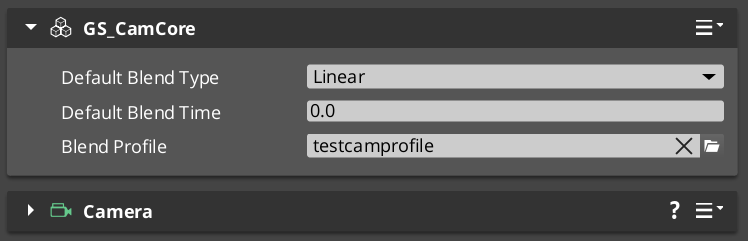
Contents
How It Works
Blend Transitions
When a camera transition is triggered:
- The Cam Core receives
SetPhantomCam(targetCam) from the Cam Manager, routed to its own entity address. - It queries the assigned Blend Profile for the best matching blend entry between the outgoing and incoming cameras (by entity name).
- The matched entry returns duration, easing curve, blend shape (Linear / Spherical / Cylindrical), an inherit-state flag, and a pivot source. If no entry matches, the Cam Core falls back to its own defaults.
- If the entry’s inherit-state is set, the state inheritance handoff runs before the blend starts so the destination cam’s body adopts a kinematic interpretation of the outgoing cam’s pose.
- The outgoing cam’s
m_blendingOut flag is set so it continues ticking through the transition (keeps the source pose live if the target is moving). - Over the blend duration, the Cam Core interpolates position (using the chosen shape), rotation (slerp), and lens (FOV / near / far) from the outgoing state to the incoming state.
- If a new blend interrupts this one, the interrupt correction window pulls the new start curve back so the cam doesn’t snap.
- On completion, the Cam Core parents the main camera to the new dominant phantom, locking them together until the next transition.
Blend Profile Resolution
The Cam Core holds a reference to a GS_PhantomCamBlendProfile asset. When a transition occurs, it calls GetBestBlend(fromCam, toCam) on the profile to find the most specific matching entry. Resolution order:
- Exact match — From camera name to To camera name.
- Any-to-specific — “Any” to the To camera name.
- Specific-to-any — From camera name to “Any”.
- Default fallback — The Cam Core’s own default blend time, easing, and shape.
See Blend Profiles for full details.
Camera Locking
Once a blend completes, the main camera becomes a child of the dominant phantom camera entity. All position, rotation, and property updates from the phantom camera are reflected immediately on the real camera. This lock persists until the next transition begins.
Blend Shape and Pivot
Each blend entry specifies a shape that controls how position interpolates:
| Shape | Behavior |
|---|
Linear | Straight-line lerp from source to destination. The default and the cheapest. No pivot used. |
Cylindrical | Sweeps through a yaw arc around a pivot, preserving the heading change as a rotation rather than a translation. Pitch and radius interpolate independently. |
Spherical | Sweeps through a great-circle arc around a pivot. Both yaw and pitch animate around the pivot, producing an orbital flight path between source and destination. |
The pivot point is resolved by the entry’s pivot source:
| Pivot source | Resolution |
|---|
Shared | Midpoint of both cams’ published pivots. Falls back gracefully if either is missing. |
Source | Outgoing cam’s pivot. Falls back to the incoming cam, then to Linear if neither publishes. |
Destination | Incoming cam’s pivot. Falls back to the outgoing cam, then to Linear. |
Cams publish their pivot as the pivotPos field on CamPoseSnapshot (see State Inheritance). Stages that don’t publish a pivot disqualify themselves from being the pivot source.
The math is implemented by the Orbital Solver Utility in GS_Core — BlendPositionAroundPivot(from, to, pivot, alpha, shape, axis).
State Inheritance Handoff
When a blend entry has m_inheritState = true, the Cam Core runs a handoff between the outgoing and incoming cams before starting the blend:
- Pull a
CamPoseSnapshot from the outgoing cam via PhantomCameraRequests::TryGetPoseSnapshot. - If the snapshot is valid, push it to the incoming cam via
PhantomCameraRequests::TryAdoptPoseSnapshot.
The Get / Adopt calls forward to the cam’s Body stage. Bodies that don’t implement the protocol return false; the handoff is a silent no-op and the blend proceeds normally.
The handoff runs before StartBlend, so by the time the blend captures source and destination poses, the destination cam’s body has already adopted the seed pose. This makes inherited blends feel like a continuation of the outgoing cam’s motion rather than a clean start.
See State Inheritance for the full protocol and per-stage adoption semantics.
Interrupt Correction
When a blend A → B is in flight and a new blend A’ → C kicks off, snapping the cam’s source TM produces a perceptible velocity jolt — the cam visibly changes direction at the interrupt moment. The Cam Core’s mid-blend correction window prevents this.
Mechanism
- Capture the cam’s currently-rendered TM at the interrupt moment →
m_interruptSnapshotTM. - Compute
T_natural = 1 - oldBlendFactor — the curve point on the new blend at which the cam’s velocity matches its current motion. - Compute
T_start = max(0, T_natural − m_interruptCorrection) — pull the new blend back by the correction window. - Seed the new blend at curve point
T_start. - Over the window
[T_start, T_natural], the rendered pose is a Y-blend between the snapshot and the new blend’s natural pose, with the Y factor sweeping 0 → 1. - After
T_natural, the Y-blend yields fully to the new blend; pure new-blend interpolation continues with live source / destination TMs.
The cam starts in the snapshot pose at the interrupt, ramps gracefully into the new trajectory across the correction window, and proceeds normally.
Window width
m_interruptCorrection is authored on the Cam Core, default 0.03 (3% of the new blend’s curve). Larger windows feel smoother but produce more visible lag in the handoff territory; smaller windows feel snappier but reintroduce the velocity jolt. Setting it to 0 degenerates to legacy hard-anchor behavior.
Channel Addressing
The Cam Core self-registers with the Cam Manager on activate. It walks transform ancestors looking for a ChannelStampComponent to determine its channel:
- Stamp found — Registers via
RegisterCamCoreToChannel(camCore, stampEntity, channelId, token). Listens at its own entity address on CamCoreRequestBus so the Cam Manager can route per-channel SetPhantomCam calls. - No stamp — Registers via the legacy
RegisterCamCore. Routes through channel 0 in single-player projects.
If the Cam Core’s parent rig is re-stamped (rare; typically during stage transitions or hot-reload), the ChannelStampNotificationBus::OnStamped handler un-registers from the old channel and re-registers to the new one. The Cam Manager’s token validation rejects mismatched stamp tokens to prevent stale messages from overwriting fresh bindings.
One Cam Core per channel. Multi-channel projects (Tier 3) spawn one per active channel; single-player projects use a single Cam Core at channel 0.
Setup
- Add GS_CamCoreComponent to a camera entity. For Tier 1 / Tier 2 (single-player), this is the main O3DE camera entity, parented under the Cam Manager entity. For Tier 3 (multi-channel), include one Cam Core per rig inside the rig prefab.
- Create a Blend Profile data asset in the Asset Editor and assign it to the Cam Core’s Blend Profile slot.
- Configure default blend time, easing, and blend shape on the Cam Core for cases where no profile entry matches. See Curves Utility for available easing types.
- Optionally adjust Interrupt Correction (default
0.03) if your project has unusually short or long blends.
API Reference
Request Bus: CamCoreRequestBus
Internal command bus, Cam Manager → Cam Core. Per-entity — each Cam Core listens at its own entity id so the Cam Manager can route per-channel events; Broadcast hits every connected Cam Core (stage-transition global clear). This is not a cross-gem contract and is not script-reflected — external systems observe the camera through the two GS_Core contracts below.
| Method | Parameters | Returns | Description |
|---|
SetPhantomCam | AZ::EntityId targetCam | void | Sets the phantom camera that the Cam Core should blend toward or lock to. Called by the Cam Manager when arbitration produces a new winner. Triggers the inheritance handoff and blend start. EntityId() clears it. |
Cross-Gem Contract: CamCoreExchangeBus
The query half of the camera’s observable-service trio, housed in GS_Core. Addressed by the Cam Core’s EntityId; single provider.
| Method | Parameters | Returns | Description |
|---|
GetCamCore | — | AZ::EntityId | Resolves the Cam Core’s entity (late-joiner / poll for the current core). Was CamCoreRequestBus::GetCamCore before the interfaces migration. |
Cross-Gem Contract: CamCoreEmissionBus
The emit half of the trio, housed in GS_Core. Global broadcast, multiple handlers — any number of components can subscribe without depending on GS_PhantomCam. Was CamCoreNotificationBus before the interfaces migration; the ScriptCanvas-facing name is preserved by GS_PhantomCam’s binder, so existing graphs keep resolving.
| Event | Parameters | Description |
|---|
UpdateCameraPosition | camPos, camFacing, deltaTime | Fired each tick with the committed camera position, forward vector, and frame delta. Subscribe to react to camera movement in real time (audio, UI, gameplay readback). |
OnCamCoreRegistered | AZ::EntityId camCore | A Cam Core came online (rig lifetime). Pair with GetCamCore to resolve it, then observe its updates. |
OnCamCoreUnregistered | AZ::EntityId camCore | A Cam Core went away. |
Inspector Fields
| Field | Default | Purpose |
|---|
defaultBlendType | CurveType::Linear | Easing curve used when no Blend Profile entry matches. |
defaultBlendTime | 1.0 | Fallback blend duration in seconds. |
defaultBlendShape | BlendShape::Linear | Fallback blend shape when no profile entry matches. |
activeBlendProfileAsset | — | The active .camblendprofile asset. |
m_interruptCorrection | 0.03 | Width of the mid-blend interrupt correction window as a fraction of the new blend’s curve. See Interrupt Correction. |
Usage Examples
C++ — Querying the Main Camera Entity
#include <GS_Core/Interfaces/Camera/CamCoreExchangeBus.h>

AZ::EntityId mainCameraId;
GS_Core::CamCoreExchangeBus::BroadcastResult(
    mainCameraId,
    &GS_Core::CamCoreExchange::GetCamCore);
For a multi-channel project, query the Cam Manager for a specific channel’s Cam Core instead:
#include <GS_PhantomCam/GS_CamManagerBus.h>

AZ::EntityId p1CamCore;
GS_PhantomCam::CamManagerRequestBus::BroadcastResult(
    p1CamCore,
    &GS_PhantomCam::CamManagerRequests::GetChannelCamCore,
    GS_PhantomCam::ChannelId(0));
C++ — Listening for Camera Updates
#include <GS_Core/Interfaces/Camera/CamCoreEmissionBus.h>

class MyCameraListener
    : public AZ::Component
    , protected GS_Core::CamCoreEmissionBus::Handler
{
protected:
    void Activate() override
    {
        GS_Core::CamCoreEmissionBus::Handler::BusConnect();
    }

    void Deactivate() override
    {
        GS_Core::CamCoreEmissionBus::Handler::BusDisconnect();
    }

    void UpdateCameraPosition(
        const AZ::Vector3& camPos,
        const AZ::Vector3& camFacing,
        float deltaTime) override
    {
        // React to per-tick camera position / facing changes.
    }
};
Script Canvas
Reacting to camera position updates:
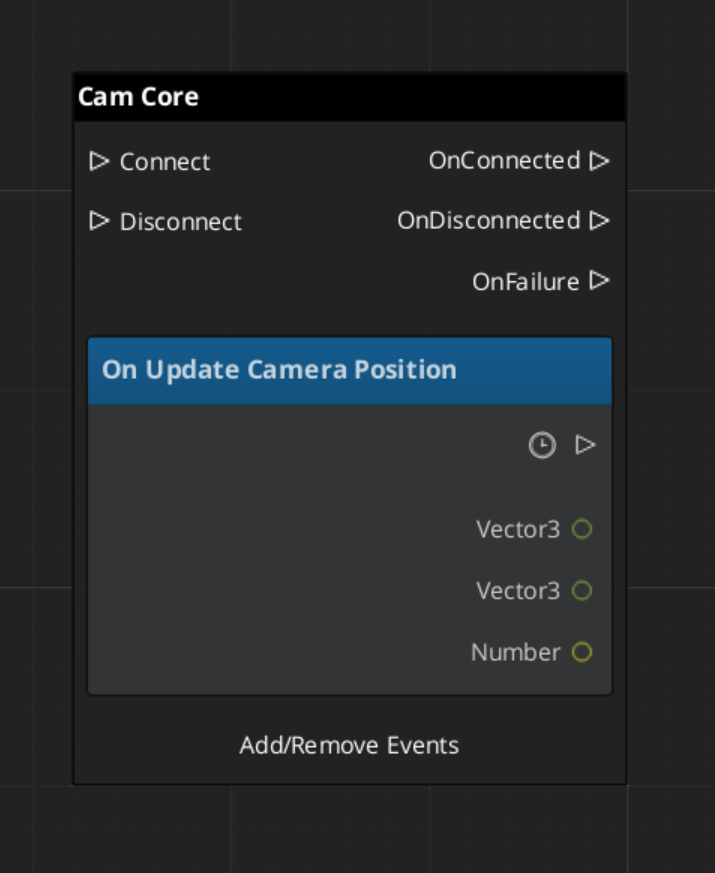
Extending the Cam Core
The Cam Core can be extended in C++ to customize blend behavior, add post-processing logic, or integrate with external camera systems.
#pragma once
#include <GS_PhantomCam/Core/GS_CamCoreBus.h>
#include <Source/Core/GS_CamCoreComponent.h>

namespace MyProject
{
    class MyCamCore : public GS_PhantomCam::GS_CamCoreComponent
    {
    public:
        AZ_COMPONENT_DECL(MyCamCore);

        static void Reflect(AZ::ReflectContext* context);
    };
}
Implementation (.cpp)
#include "MyCamCore.h"
#include <AzCore/Serialization/SerializeContext.h>

namespace MyProject
{
    AZ_COMPONENT_IMPL(MyCamCore, "MyCamCore", "{YOUR-UUID-HERE}");

    void MyCamCore::Reflect(AZ::ReflectContext* context)
    {
        if (auto serializeContext = azrtti_cast<AZ::SerializeContext*>(context))
        {
            serializeContext->Class<MyCamCore, GS_PhantomCam::GS_CamCoreComponent>()
                ->Version(0);

            if (AZ::EditContext* editContext = serializeContext->GetEditContext())
            {
                editContext->Class<MyCamCore>("My Cam Core", "Custom camera core driver")
                    ->ClassElement(AZ::Edit::ClassElements::EditorData, "")
                        ->Attribute(AZ::Edit::Attributes::Category, "MyProject")
                        ->Attribute(AZ::Edit::Attributes::AppearsInAddComponentMenu, AZ_CRC_CE("Game"));
            }
        }
    }
}
See Also
For related PhantomCam components:
For utilities used by the blend math:
For conceptual overviews and usage guides:
Get GS_PhantomCam
GS_PhantomCam — Explore this gem on the product page and add it to your project.
2.1 - Blend Profiles
Data assets defining camera transition behavior — blend duration, easing curves, blend shape, pivot source, and state inheritance per camera pair.
Blend Profiles are data assets that control how the Cam Core transitions between Phantom Cameras. Each profile contains a list of blend entries. Each entry defines a From camera, a To camera, a blend duration, an easing curve, a blend shape, a pivot source, and an inherit-state flag. This allows every camera-to-camera transition in your project to have unique timing, feel, and geometry.
The GS_PhantomCamBlendProfile asset is authored in the Asset Editor as a .camblendprofile file. It is registered at startup by PhantomCamDataAssetsSystemComponent and assigned to the Cam Core component. When a camera transition occurs, the Cam Core queries the profile for the best matching blend entry.
For usage guides and setup examples, see The Basics: GS_PhantomCam.
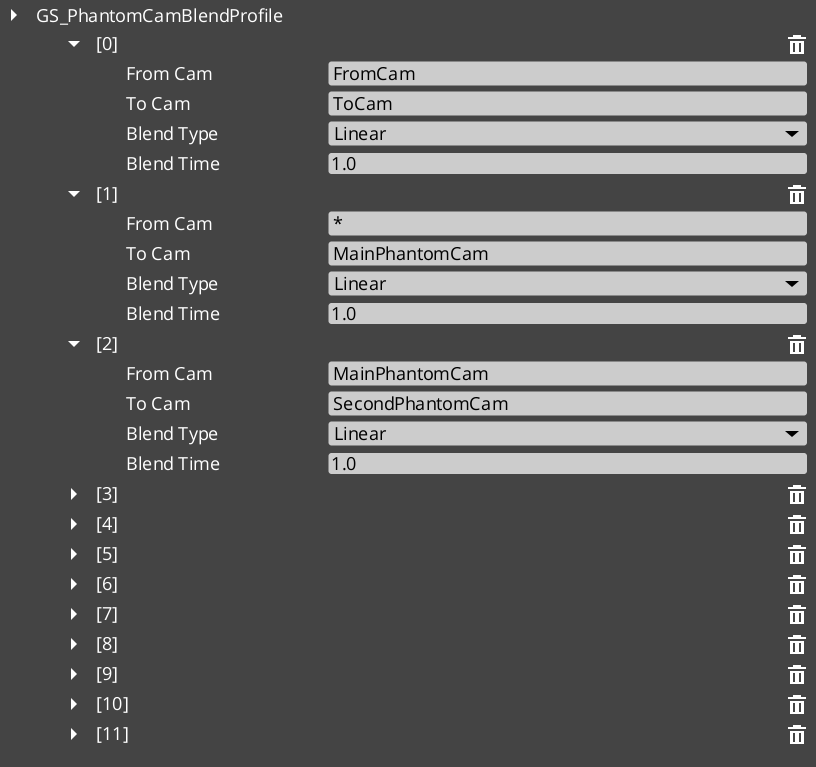
Contents
How It Works
Blend Entries
Each entry in a Blend Profile defines a single transition rule:
- From Camera — The name of the outgoing camera (the entity name of the phantom camera being left).
- To Camera — The name of the incoming camera (the entity name of the phantom camera being transitioned to).
- Blend Time — The duration of the transition in seconds.
- Blend Type — The interpolation curve applied during the blend. See Curves Utility for the full list.
- Blend Shape — Linear, Cylindrical, or Spherical. See Blend Shape.
- Pivot Source — Source, Destination, or Shared. See Pivot Source. Only consulted when blend shape is not Linear.
- Inherit State — Opt-in cam-to-cam pose handoff. See Inherit State.
Camera names correspond to the entity names of your phantom camera entities in the scene.
Best Target Blend
When the Cam Core needs to transition, it calls GetBestBlend(fromCam, toCam) on the assigned Blend Profile. The system evaluates blend entries in order of specificity:
- Exact match — An entry with both the From and To camera names matching exactly.
- Any-to-specific — An entry with From set to blank or “any” and To matching the incoming camera name.
- Specific-to-any — An entry with From matching the outgoing camera name and To set to blank or “any”.
- Default fallback — If no entry matches, the Cam Core uses its own default blend time, easing, and shape configured on the component.
This layered resolution allows you to define broad defaults (“any” to “any” at 1.0 seconds) while overriding specific transitions (“MenuCam” to “GameplayCam” at 2.5 seconds with ease-in-out and a spherical sweep).
The first match within a specificity tier wins (no further tie-breaking).
Blend Shape
The blend shape controls how the camera’s position interpolates between source and destination. Defaults to Linear so unconfigured / pre-v3 assets retain straight-lerp behavior.
| Shape | Behavior |
|---|
Linear | Straight world-space lerp. No orbital math. The default. |
Cylindrical | Arc around the resolved pivot on the yaw axis. Pitch and radius interpolate independently. Right for ground cams sharing a target. |
Spherical | Full 3D arc around the resolved pivot. Right when source and destination cams sit at different heights around a shared target. |
When the shape is not Linear, the Cam Core calls the Orbital Solver Utility — BlendPositionAroundPivot(from, to, pivot, alpha, shape, axis) — to compute each tick’s position.
Auto-fallback to Linear. When neither cam reports a pivot (e.g. environmental cams without follow / lookAt targets), the orbital solver isn’t called and the blend lerps straight regardless of the authored shape.
Rotation always slerps; the shape only affects position.
Pivot Source
The pivot is the world-space point that Cylindrical / Spherical shapes arc around. It is resolved at blend start from the cams’ pivots. The pivot source selects which cam’s pivot to use:
| Pivot Source | Behavior |
|---|
Source | Outgoing cam’s pivot. “Leave A elegantly” — the source cam’s framing reference defines the arc. |
Destination | Incoming cam’s pivot. “Arrive at B elegantly” — the destination’s framing reference defines the arc. |
Shared (default) | Midpoint of both pivots. Collapses identically when both cams target the same point. |
Pivots come from the cams’ bodies via GetCameraPivot. A cam that doesn’t publish a pivot disqualifies itself from being the pivot source; Cam Core falls back to whichever cam does publish one, or to Linear if neither does.
This field is ignored when Blend Shape is Linear.
Inherit State
Setting Inherit State opts the matched pair into the state inheritance protocol. When the Cam Core is about to start this blend, it:
- Calls
TryGetPoseSnapshot on the outgoing cam — the body publishes a CamPoseSnapshot. - Calls
TryAdoptPoseSnapshot on the incoming cam — the body consumes the snapshot, re-deriving its internal kinematic state to start from a continuation of the outgoing pose. - Bodies that don’t speak the protocol silently no-op and the blend proceeds without inheritance.
The blend then runs from the source cam’s pose to the destination cam’s already-inherited pose — reads as a small smooth drift rather than a swing.
Default is false so cinematic shots authored at specific poses land at those poses unless the author opts in.
Authoring gotcha. If the inherit flag is unchecked on a matched pair, the destination cam falls through to its snap-on-activation seed. For a LeadingFollowBody this looks like “cam orients behind player’s travel direction regardless of source facing.” For DynamicOrbitBody or OrbitBody the cam swings to authored yaw / pitch and blends from there. Both symptoms point at the same root cause — verify the flag in the asset.
Data Model
GS_PhantomCamBlendProfile
The top-level asset class. Extends AZ::Data::AssetData. Registered through PhantomCamDataAssetsSystemComponent. Authored as .camblendprofile.
| Field | Type | Description |
|---|
BlendList | AZStd::vector<PhantomBlend> | The list of blend entries defining camera transitions. |
PhantomBlend
A single blend entry within the profile. Reflected at Version 4 with a version converter that defaults Blend Shape / Pivot Source to Linear / Shared (pre-v3 assets) and Inherit State to false (pre-v4 assets).
| Field | Type | Default | Description |
|---|
FromCamera | AZStd::string | "" | Entity name of the outgoing phantom camera. Blank or “any” matches all outgoing cameras. |
ToCamera | AZStd::string | "" | Entity name of the incoming phantom camera. Blank or “any” matches all incoming cameras. |
BlendTime | float | 1.0 | Duration of the blend transition in seconds. |
BlendType | GS_Core::CurveType | Linear | The easing curve. See Curves Utility for the full enum. |
BlendShape | GS_Core::Math::BlendShape | Linear | Path geometry — Linear / Cylindrical / Spherical. See Blend Shape. |
PivotSource | GS_Core::Math::PivotSource | Shared | Which cam’s pivot to use — Source / Destination / Shared. See Pivot Source. |
InheritState | bool | false | Opt-in cam-to-cam pose handoff. See Inherit State. |
API Reference
GS_PhantomCamBlendProfile Methods
| Method | Parameters | Returns | Description |
|---|
GetBestBlend | AZStd::string fromCam, AZStd::string toCam | const PhantomBlend* | Returns the best matching blend entry for the given camera pair, or nullptr if no match is found. Resolution follows the specificity hierarchy. |
Creating a Blend Profile
- Open the Asset Editor in O3DE.
- Select New and choose GS_PhantomCamBlendProfile from the asset type list.
- Add blend entries using the + button on the Blend List array.
- For each entry:
- Set the From Camera name (or leave blank for “any”).
- Set the To Camera name (or leave blank for “any”).
- Set the Blend Time in seconds.
- Choose a Blend Type (easing curve) from the dropdown.
- Choose a Blend Shape (Linear / Cylindrical / Spherical).
- Choose a Pivot Source (Source / Destination / Shared) — ignored when Blend Shape is Linear.
- Tick Inherit State if you want the incoming cam’s body to seed from the outgoing cam’s pose.
- Save the asset.
- Assign the asset to the Cam Core component’s Blend Profile inspector slot.
For a full walkthrough, see the PhantomCam Set Up Guide.
See Also
For related PhantomCam components:
For related utilities:
For conceptual overviews and usage guides:
Get GS_PhantomCam
GS_PhantomCam — Explore this gem on the product page and add it to your project.
2.2 - State Inheritance
PhantomCam cam-to-cam pose handoff protocol — CamPoseSnapshot universal trait, m_inheritState blend toggle, per-body-stage Get/Adopt implementations, ANGULAR vs POSITION mode, consumedAdoption gate.
State inheritance is a universal pose-handoff protocol: when the Cam Core transitions cam A → cam B, the matched Blend Profile entry may opt into inheritance via the InheritState flag. The outgoing cam publishes a CamPoseSnapshot; the incoming cam consumes it through its own kinematic model. The blend then reads as a small smooth drift instead of a swing.
Inheritance is body-only by design. Aim and additive stages don’t participate — the destination cam’s aim runs fresh on the inherited body pose.
Contents
The CamPoseSnapshot Trait
Universal pose-handoff struct. Runtime only — not serialized.
struct CamPoseSnapshot
{
    // Universal — every cam can produce this from its committed transform.
    AZ::Vector3  worldPos = Vector3::Zero();
    AZ::Vector3  worldFwd = Vector3::AxisY();

    // Source cam's resolved pivot in world space at the time of Get.
    // Orbit-style adopters use this to back-derive angular state in the
    // SOURCE cam's frame — preserves orientation even when the incoming
    // cam resolves a different pivot.
    AZ::Vector3  pivotPos      = Vector3::Zero();
    bool         pivotPosValid = false;

    AZ::EntityId pivotEntity;

    // Orbit-specific authored angular state. Populated by orbit-style Get
    // implementations; consumed by orbit-style Adopters directly, bypassing
    // back-derivation. Preserves A's exact yaw / pitch on B across different
    // orbit shapes — angular continuity wins over spatial back-fit.
    float        yawRad             = 0.0f;
    float        pitchRad           = 0.0f;
    bool         angularStateValid  = false;

    // Producer signal — set by TryGetPoseSnapshot when the snapshot is usable.
    bool         valid = false;

    static void Reflect(AZ::ReflectContext* context);
};
A snapshot may carry partial information. worldPos + worldFwd are always populated when valid is true. pivotPos is populated by bodies that publish a pivot (orbit-style, lead-follow). angularStateValid is set only by orbit-style bodies that publish authored yaw / pitch directly.
Opting In — The Blend Profile Toggle
Authored per-pair on PhantomBlend entries inside a .camblendprofile:
struct PhantomBlend {
    // ... other fields ...
    bool m_inheritState = false;
};
Default false so cinematic shots authored at specific poses land at those poses unless the author opts in. See Blend Profiles — Inherit State for the authoring surface.
The IBodyStage Virtuals
class IBodyStage {
public:
    // ... other interface ...

    // Default returns false — stage doesn't speak the protocol.
    virtual bool TryGetPoseSnapshot(CamPoseSnapshot& out)        const { return false; }
    virtual bool TryAdoptPoseSnapshot(const CamPoseSnapshot& in)       { return false; }
};
A body stage may implement only one side of the protocol. Static-shot bodies (OrbitBody) implement Get but leave Adopt at default false — their authored angles define their identity. Other body stages typically implement both.
Forwarders on the Phantom Camera
The component forwards both calls to the body slot:
bool GS_PhantomCameraComponent::TryGetPoseSnapshot(CamPoseSnapshot& out) const {
    if (IBodyStage* body = GetBody()) {
        return body->TryGetPoseSnapshot(out);
    }
    return false;
}

bool GS_PhantomCameraComponent::TryAdoptPoseSnapshot(const CamPoseSnapshot& in) {
    if (IBodyStage* body = GetBody()) {
        return body->TryAdoptPoseSnapshot(in);
    }
    return false;
}
Exposed on PhantomCameraRequestBus so the Cam Core can address cams uniformly.
Cam Core Handoff Site
Inside SetPhantomCam, after lastCam / currentCam are determined and before StartBlend:
const bool wantInherit = (bestBlend && bestBlend->m_inheritState
                          && lastCam.IsValid() && currentCam.IsValid());

if (wantInherit)
{
    CamPoseSnapshot snap;
    bool gotPose = false;
    PhantomCameraRequestBus::EventResult(gotPose, lastCam,
        &PhantomCameraRequests::TryGetPoseSnapshot, snap);

    if (gotPose && snap.valid)
    {
        bool adopted = false;
        PhantomCameraRequestBus::EventResult(adopted, currentCam,
            &PhantomCameraRequests::TryAdoptPoseSnapshot, snap);
        (void)adopted;
    }
}

// ... then StartBlend.
The handoff runs before StartBlend, so by the time the blend captures source and destination poses, the destination cam’s body has already adopted the seed pose. The blend then interpolates from the source’s literal position to the destination’s already-inherited pose.
Bodies that don’t speak the protocol (or that reject the inbound pose) return false; the handoff is silent and the blend proceeds normally.
Per-Variant Implementations
DefaultFollowBody
| Side | Behavior |
|---|
Get | Not implemented (default false). |
Adopt | Not implemented (default false). |
Inheritance into a Default Follow falls through to the Blend Profile’s visual bridge.
OrbitBody (Get-only)
| Side | Behavior |
|---|
Get | Publishes the cleanest snapshot in the framework. worldPos = m_idealPosition, worldFwd toward cached pivot, pivotPos = m_lastPivot (post-offset target, pre-orbit), AND direct authored yawRad / pitchRad + angularStateValid = true. Orbit-style adopters receive ANGULAR-mode handoff with no back-derivation. |
Adopt | Disabled (default false). The authored yaw / pitch define the static shot’s identity; accepting inbound pose would defeat author intent. |
DynamicOrbitBody (full Get + Adopt)
Get:
out.worldPos          = m_idealPosition;
out.worldFwd          = (m_lastResolvedPivot - m_idealPosition).GetNormalizedSafe();
out.pivotPos          = m_lastResolvedPivot;
out.pivotPosValid     = true;
out.pivotEntity       = m_lastResolvedPivotEntity;
out.yawRad            = m_targetYaw;
out.pitchRad          = m_targetPitch;
out.angularStateValid = true;
out.valid             = true;
return true;
Requires a committed pose AND a cached pivot. First-tick adopters that haven’t ticked yet return false.
Adopt stashes the snapshot. The actual derivation happens in the next Evaluate where pivot resolution has run:
if (m_hasPendingAdoption && m_orbitShape.Get())
{
    if (m_pendingAdoption.angularStateValid)
    {
        // ANGULAR mode (preferred). Inherit raw yaw / pitch directly.
        m_targetYaw   = WrapYawToPi(
            ShortestYawTarget(m_targetYaw, m_pendingAdoption.yawRad));
        m_targetPitch = AZ::GetClamp(m_pendingAdoption.pitchRad,
                                     CameraOrbitShape::kPitchAtLow,
                                     CameraOrbitShape::kPitchAtHigh);
    }
    else
    {
        // POSITION mode (fallback). Back-derive yaw from worldPos.
        const AZ::Vector3 referencePivot = m_pendingAdoption.pivotPosValid
            ? m_pendingAdoption.pivotPos
            : pivot;
        const AZ::Vector3 off = m_pendingAdoption.worldPos - referencePivot;

        const float yawObserved    = std::atan2(off.GetY(), off.GetX());
        const float radiusObserved = std::sqrt(off.GetX()*off.GetX() + off.GetY()*off.GetY());
        const float heightObserved = off.GetZ();

        m_targetYaw   = WrapYawToPi(ShortestYawTarget(m_targetYaw, yawObserved));
        m_targetPitch = FindPitchOnShape(*m_orbitShape.Get(), radiusObserved, heightObserved);
    }

    m_idealPosition       = m_pendingAdoption.worldPos;   // seed at adopted pose
    m_hasIdeal            = true;
    consumedAdoption      = true;
    m_hasPendingAdoption  = false;
}
The ANGULAR path is preferred — it preserves authored angular state across different orbit shape assets, which the position back-derivation cannot. The POSITION path is the safety net for source bodies that don’t publish angular state.
LeadingFollowBody (facing-seeded standoff)
Get returns m_idealPosition, world-forward toward cached target, pivotPos = m_lastTargetPoint. No angular state — lead-follow has no degree of freedom other than position-in-band.
Adopt stashes the snapshot. The consume block in Evaluate reads source worldFwd, flattens to the XY plane, and seeds the cam at band-natural standoff distance:
AZ::Vector3 inboundFwd = m_pendingAdoption.worldFwd;
inboundFwd.SetZ(0.0f);
inboundFwd = inboundFwd.GetNormalizedSafe();
if (inboundFwd.GetLengthSq() < epsilon)
    inboundFwd = GetHorizontalForward(stageTargetTM);   // fallback

const float seedDist = AZ::Lerp(m_innerRadius, m_outerRadius, 0.6f);
m_idealPosition = targetPoint - inboundFwd * seedDist;

m_hasIdeal           = true;
m_idleTimer          = 0.0f;
m_hasLastTarget      = true;
consumedAdoption     = true;
m_hasPendingAdoption = false;
Why facing-seeded, not position-seeded? Lead-follow is heading-agnostic. Seeding with the source’s literal worldPos would lock the cam at an off-band angle, defeating the body’s authored intent. The cam inherits the source’s facing at this body’s preferred standoff. Z naturally lands at targetPoint.Z (inboundFwd is XY-flattened) — a from-below source produces a band-natural pose, not stuck-below framing.
TrackBody (path-projection with threshold)
Get returns m_idealPosition plus world-forward toward cached target. No angular state, no pivot — the path is the kinematic reference, not a point.
Adopt stashes. The consume block projects the source’s position onto the spline and rejects when the source sits too far from the path:
EnsureSplineResolved();
if (!m_spline) { m_hasPendingAdoption = false; return; }

AZ::Vector3 nearestWorld;
const float dist = m_spline->FindClosestWorldPoint(
    m_pendingAdoption.worldPos, nearestWorld, /*outT*/);

if (dist > m_adoptionPathThreshold)
{
    // Source sits too far from path — reject, fall back to plain blend.
    m_hasPendingAdoption = false;
    return;
}

m_idealPosition  = m_pendingAdoption.worldPos;
m_springVelocity = AZ::Vector3::CreateZero();
m_hasIdeal       = true;
consumedAdoption = true;
m_hasPendingAdoption = false;
m_adoptionPathThreshold is authored on the TrackBody (default 5.0 m). Prevents teleport-snap when the source cam sits well off the dolly’s path.
The consumedAdoption Gate
Problem: With ctx.snapThisFrame = true on activation, every body’s damping clause snap-clobbers m_idealPosition = desiredPos, discarding the adoption seed. Symptom: cam jerks to its natural ideal then blends from there.
Fix: The snap-on-activation block in every body is gated on !consumedAdoption:
if ((ctx.snapThisFrame || !m_hasIdeal) && !consumedAdoption)
{
    // Snap-seed path. Skipped when adoption already placed m_idealPosition.
}
Adoption-tick uses standard damping from the adopted seed, not snap-seed. When inheritance fires, the seed pose is preserved through the activation tick.
Authoring Gotcha — Matched but Not Inheriting
If m_inheritState is unchecked on a matched blend pair, the destination cam falls through to its snap-on-activation seed instead of consuming the source’s pose. Symptoms vary by body type but all point to the same root cause:
| Body | Symptom |
|---|
LeadingFollowBody | “Cam orients behind player’s travel direction regardless of source facing.” The snap block uses GetHorizontalForward(stageTargetTM) = target’s BasisY. |
DynamicOrbitBody / OrbitBody | Cam swings to authored yaw / pitch then blends from there. |
TrackBody | Dolly starts at its untouched starting spline parameter. |
The fix is data-side: check the Inherit State flag on the matched blend entry inside the .camblendprofile asset.
If diagnostic prints are added during debugging, the smoking gun looks like:
Handoff: from=OrbitCam to=LeadCam inherit=0 (matched=1)
matched = 1, inherit = 0 means the blend pair IS in the asset, but m_inheritState is unchecked on it.
Adoption Coverage Matrix
| Body Variant | Get | Adopt | Source publishes |
|---|
DefaultFollowBody | — | — | — |
OrbitBody (static) | ✓ | — (Get-only) | worldPos, worldFwd, pivotPos, full angular |
DynamicOrbitBody | ✓ | ✓ (ANGULAR / POSITION) | worldPos, worldFwd, pivotPos, full angular |
LeadingFollowBody | ✓ | ✓ (facing-seeded standoff) | worldPos, worldFwd, pivotPos (= target), no angular |
TrackBody | ✓ | ✓ (path-project + threshold) | worldPos, worldFwd, no angular, no pivot |
See Also
Related PhantomCam pages:
Basics-side authoring guide:
Get GS_PhantomCam
GS_PhantomCam — Explore this gem on the product page and add it to your project.
2.3 - Interrupt Blending
Mid-blend interrupt correction window — m_interruptCorrection, T_start / T_natural derivation, snapshot Y-blend. Prevents velocity discontinuities when a new blend starts before the current one finishes.
When a blend A → B is in flight and a new blend A’ → C kicks off, snapping the cam’s source pose produces a perceptible velocity jolt — the cam visibly changes direction at the interrupt moment. The Cam Core’s mid-blend correction window prevents this by seeding the new blend at a velocity-matched curve point and Y-blending between the snapshot pose and the new blend’s natural pose across a small window.
This replaces the legacy BlendFromCore hard-anchor approach, which produced a velocity-zero discontinuity at every interrupt.
Contents
The Problem
Consider a blend A → B running at 50% progress. A new winner C is arbitrated; the system needs a new blend A’ → C. Two naive approaches both fail:
| Approach | Behavior | Failure |
|---|
| Snap to mid-blend pose, start new blend from there | Source pose = currently-rendered TM | The new blend’s start velocity is whatever its curve dictates at t=0 (often zero) — does not match the cam’s current motion vector. Visible direction change at interrupt. |
| Hard-anchor the snapshot as the new blend’s source for the entire duration | Source TM frozen at interrupt | The cam’s velocity drops to zero at t=0 of the new blend — instant velocity discontinuity. |
The legacy BlendFromCore flag implemented the second approach. The new correction window replaces it.
The Mechanism
The Cam Core introduces a small correction window at the start of the new blend during which the rendered TM is a Y-blend between the snapshot pose and the new blend’s natural pose. After the window, pure new blend with live source / destination TMs.
Step by step
- Capture the cam’s currently-rendered TM at the interrupt moment →
m_interruptSnapshotTM. - Compute
oldBlendFactor = oldCurTime / oldTargetTime (how far through the OLD blend we were). - Compute
T_natural = 1 − oldBlendFactor — the curve point on the new blend at which the cam’s velocity matches its current motion. - Compute
T_start = max(0, T_natural − m_interruptCorrection) — pull the new blend back by the configurable window width. - Seed
curBlendTime = T_start * blendTime so the new blend starts at curve-point T_start. - Over the window
[T_start, T_natural], the rendered pose is a Y-blend between m_interruptSnapshotTM and the new blend’s natural pose at the current curve point. The Y-factor sweeps 0 → 1 across the window. - After
T_natural, the Y-blend yields fully to the new blend; pure new-blend interpolation continues with live source / destination TMs.
Net effect: the rendered cam starts in the snapshot pose at the interrupt, ramps gracefully into the new blend’s natural trajectory across the correction window, and proceeds normally.
Window Width
m_interruptCorrection is authored on the Cam Core, default 0.03 (3% of the new blend’s curve duration). The tradeoff:
| Setting | Behavior |
|---|
| Larger window (e.g. 0.08) | Smoother handoff, but the cam is “stuck” in snapshot territory for longer — can feel like lag. |
| Smaller window (e.g. 0.01) | Quicker handoff, less smoothness. |
| 0 | Degenerates to legacy hard-anchor behavior with the perceptible jolt. |
3% is a balance that’s invisibly smooth for typical blend durations (~1s → 30ms correction window).
Edge Cases
Old blend nearly complete
If oldBlendFactor is close to 1 (the old blend was almost done), T_natural ≈ 0 and T_start ≈ −m_interruptCorrection. The window may compress to nothing — T_start clamps at 0:
T_start = max(0.0, T_natural - m_interruptCorrection);
When clamped, the new blend effectively starts from its natural beginning. The cam may still have a small handoff jolt because the correction can’t pull back further.
Old blend just started
If oldBlendFactor is close to 0 (old blend barely started), T_natural ≈ 1 and T_start ≈ 1 − m_interruptCorrection. Most of the new blend happens in pure new mode after a brief correction window. The snapshot influence is short-lived.
Non-blending interrupt (cold start of new blend)
If IsBlending == false when StartBlend is called, no interrupt — set m_inCorrectionWindow = false and run the new blend normally.
Cam Core State
class GS_CamCoreComponent {
    // ...
    float          m_interruptCorrection = 0.03f;     // authored

    bool           m_inCorrectionWindow   = false;
    float          m_correctionStart      = 0.0f;     // blendFactor where window begins
    float          m_correctionEnd        = 0.0f;     // blendFactor where window ends (= T_natural)
    AZ::Transform  m_interruptSnapshotTM  = AZ::Transform::CreateIdentity();
};
StartBlend Detection
void GS_CamCoreComponent::StartBlend(
    float blendTime,
    GS_Core::CurveType blendType,
    GS_Core::Math::BlendShape blendShape,
    GS_Core::Math::PivotSource pivotSource)
{
    if (IsBlending)
    {
        // Mid-blend interrupt.
        const float oldBlendFactor = curBlendTime / targetBlendTime;
        const float T_natural      = 1.0f - oldBlendFactor;
        const float T_start        = AZ::GetMax(0.0f, T_natural - m_interruptCorrection);

        // Snapshot current rendered TM.
        AZ::TransformBus::EventResult(m_interruptSnapshotTM, m_entityId,
            &AZ::TransformInterface::GetWorldTM);

        m_inCorrectionWindow = true;
        m_correctionStart    = T_start;
        m_correctionEnd      = T_natural;

        // Seed new blend's curve position so velocity matches.
        curBlendTime = T_start * blendTime;
    }
    else
    {
        // Cold start.
        m_inCorrectionWindow = false;
        curBlendTime = 0.0f;
    }

    // Capture source / dest poses, blend params.
    prevTransform      = ... ;          // cam's current world TM at this moment
    targetBlendTime    = blendTime;
    currentBlendType   = blendType;
    currentBlendShape  = blendShape;
    currentPivotSource = pivotSource;
    IsBlending         = true;
}
OnTick Application
void GS_CamCoreComponent::OnTick(float deltaTime, AZ::ScriptTimePoint)
{
    if (!IsBlending)
    {
        // Locked phase — read currentCam's TM, write it directly.
        return;
    }

    curBlendTime += deltaTime;
    const float blendFactor = AZ::GetMin(1.0f, curBlendTime / targetBlendTime);
    const float easedFactor = ApplyCurve(blendFactor, currentBlendType);

    // Compute the "natural" blended pose for this curve point.
    AZ::Vector3 blendedPos;
    if (currentBlendShape == BlendShape::Linear)
    {
        blendedPos = AZ::Vector3::Lerp(
            prevTransform.GetTranslation(),
            currentTM.GetTranslation(),
            easedFactor);
    }
    else
    {
        AZ::Vector3 pivot = ResolvePivot(currentPivotSource, lastCam, currentCam);
        blendedPos = GS_Core::Math::BlendPositionAroundPivot(
            prevTransform.GetTranslation(),
            currentTM.GetTranslation(),
            pivot, easedFactor, currentBlendShape, AZ::Vector3::CreateAxisZ());
    }
    AZ::Quaternion blendedRot = prevTransform.GetRotation().Slerp(
        currentTM.GetRotation(), easedFactor);

    AZ::Vector3    appliedPos;
    AZ::Quaternion appliedRot;

    if (m_inCorrectionWindow && blendFactor < m_correctionEnd)
    {
        // Y-blend the snapshot with the natural pose.
        float yFactor = (blendFactor - m_correctionStart) / m_interruptCorrection;
        yFactor = AZ::GetClamp(yFactor, 0.0f, 1.0f);

        appliedPos = AZ::Vector3::Lerp(
            m_interruptSnapshotTM.GetTranslation(), blendedPos, yFactor);
        appliedRot = m_interruptSnapshotTM.GetRotation().Slerp(blendedRot, yFactor);
    }
    else
    {
        // Past the correction window — pure new blend.
        appliedPos = blendedPos;
        appliedRot = blendedRot;
    }

    // Write final TM. Apply lens interpolation similarly.
    AZ::TransformBus::Event(m_entityId,
        &AZ::TransformInterface::SetWorldTranslation, appliedPos);
    AZ::TransformBus::Event(m_entityId,
        &AZ::TransformInterface::SetWorldRotationQuaternion, appliedRot);

    if (blendFactor >= 1.0f)
    {
        CompleteBlend();
    }
}
Inspector Field
| Field | Default | Purpose |
|---|
m_interruptCorrection | 0.03 | Fraction of the new blend’s curve over which the cam’s snapshot pose at interrupt blends to the new blend’s natural pose. Smaller = snappier interrupts but more visible jolts. 0 = legacy hard-anchor. |
What This Replaces
Pre-correction, the system used a BlendFromCore flag on the Cam Core. When set, the blend’s source pose was hard-anchored to the cam’s currently-rendered TM at the interrupt moment, for the entire duration of the new blend. The new blend’s velocity at t = 0 was therefore zero — an instant velocity discontinuity at the interrupt point.
The correction-window approach replaces this entirely. BlendFromCore is retained as a field on the Cam Core for back-compat but is not used in the new flow.
See Also
Related PhantomCam pages:
Get GS_PhantomCam
GS_PhantomCam — Explore this gem on the product page and add it to your project.
3 - Phantom Cameras
The base virtual camera component — priority, target routing, lens, channel scope, snap and focus state, and the composable Body / Aim / Additive stage pipeline.
A Phantom Camera is a single entity component — GS_PhantomCameraComponent — that publishes a candidate camera pose every tick. It holds priority, target routing, lens, channel scope, and snap / focus / blendingOut state, plus the stage pipeline slot that authors fill in to give the cam its behavior. Phantom cameras do not render anything themselves; they register with the Cam Manager and the Cam Core drives the engine view toward whichever phantom currently wins arbitration.
Where previous versions of GS_PhantomCam shipped separate components for each behavior (clamped-look, static-orbit, spline tracking, etc.), all of those behaviors now live as stage variants on the single base component. An author picks a Body stage, an Aim stage, and zero-or-more Additive stages from the type-picker, and the same GS_PhantomCameraComponent becomes a follow cam, an orbital cam, a tracking dolly, a third-person shoulder cam, or a cinematic stinger depending on which stages are slotted.
For usage guides and setup examples, see The Basics: GS_PhantomCam.
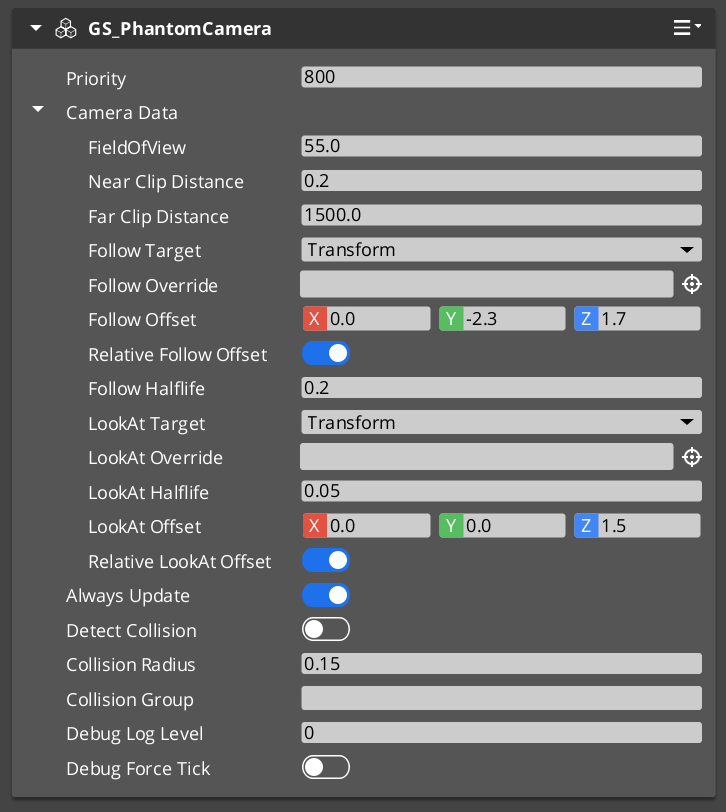
The Phantom Camera component in the Entity Inspector.
Contents
How It Works
Priority-Based Selection
Every phantom camera has a base priority. The camera with the highest effective priority (base plus any active influences) wins arbitration within its channel. You can control which camera wins through several strategies:
- Raise priority — Set the desired camera’s priority above all others via
SetCameraPriority. - Disable / Enable — Call
DisableCamera to drop the camera’s effective priority, EnableCamera to restore it. - Change priority directly — Call
ChangeCameraPriority on the Cam Manager bus. - Influence — Add temporary priority modifiers through Influence Fields without touching base priorities.
Follow and Look-At
Follow and look-at behavior is no longer hardcoded on the component; it is provided by the Body and Aim stages slotted on the pipeline. Each tick the cam threads a CameraState accumulator through:
Body → Aim → Reposition additives → Noise additives → Finalize
- The Body stage writes
state.position — different variants implement spring-damped follow, orbital sweep, spline traversal, etc. - The Aim stage writes
state.rotation — including angle-clamped look, head-tracking look, etc. - Additive stages correct or perturb the pose without poisoning Body / Aim ideals.
See Stage Pipeline for the per-tick contract.
Camera Data
Each phantom camera stores its lens and target configuration in a PhantomCamData structure. This data is read by the Cam Core during blending and by stages during evaluation. The stage list lives separately on the component (m_bodySlot, m_aimSlot, m_additives).
Stage Pipeline
Each phantom camera is a container for stages. The component owns three slots:
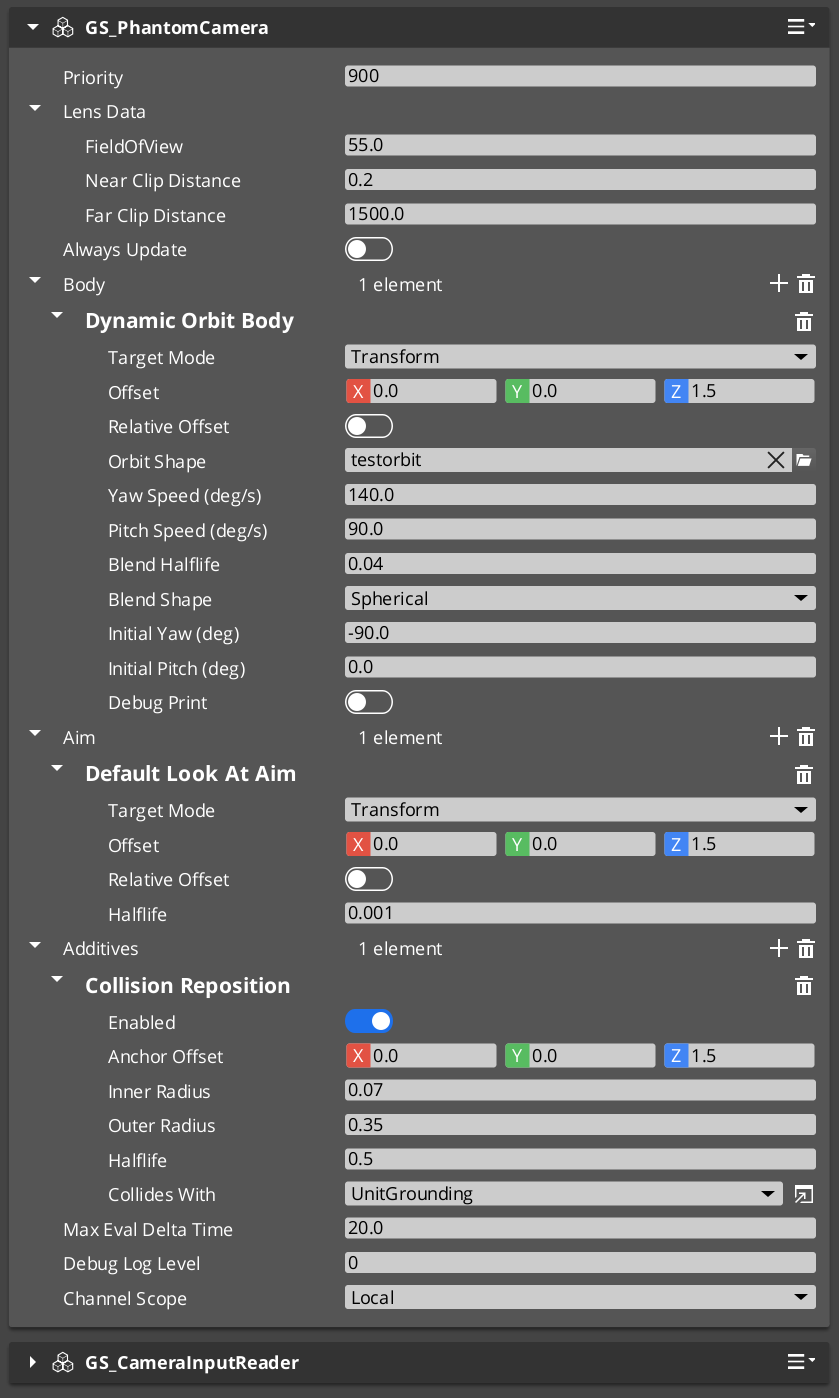
| Slot | Type | Cardinality | Examples |
|---|
m_bodySlot | IBodyStage | One per cam (single-element vector by policy) | DefaultFollowBody, OrbitBody, DynamicOrbitBody, LeadingFollowBody, TrackBody. |
m_aimSlot | IAimStage | One per cam (single-element vector by policy) | DefaultAim, ClampedLookAim. Other gems (notably gs_performer) register additional variants. |
m_additives | IAdditiveStage | Zero or more, each self-declares Reposition or Noise phase | NoiseStage (Perlin), ImpulseStage (ADSR), TugAimListener, TugBodyListener, collision / occlusion reposition. |
Stages are reflected polymorphic types — derived from IBodyStage / IAimStage / IAdditiveStage, not AZ::Component. The editor type-picker enumerates all registered derivations from the SerializeContext class hierarchy, so other gems can extend the catalog cleanly.
Per-tick orchestration (run by the component each OnTick):
EvaluateCamTick — eligibility check (see Execution States)
   │ tickActive == true
   ▼
EvaluatePose
   ├─► Build CameraContext (target, deltaTime, lifecycle flags, snapThisFrame)
   ├─► IBodyStage::Evaluate    → writes state.position, state.bodyAnchor
   ├─► IAimStage::Evaluate     → writes state.rotation, state.lookAtPoint
   ├─► snapshot m_desiredPose
   ├─► For each Reposition additive → corrects state
   ├─► snapshot m_stablePose
   ├─► For each Noise additive → perturbs state
   ├─► snapshot m_finalPose
   ├─► Resolve cached pivot (state.lookAtPoint, else target world position)
   └─► Commit m_finalPose to TransformBus + apply lens to engine Camera component
See Stage Pipeline reference for the full per-stage contract, init / asset-fresh-load semantics, and variant catalogs.
Channel Scope
Each phantom camera authors a CamChannelScope that decides how it participates in the channel system:
enum class CamChannelScope : AZ::u8 {
    Local,         // Default. Registers to ancestor stamp's channel, or channel 0 if no stamp.
    AllChannels,   // Stamped: per-rig-instance natural duplicate. Unstamped: warns + falls back.
    TrueUnique,    // Single instance. Either bound to a specific channel or shared across all.
};
| Field | Visibility | Purpose |
|---|
m_channelScope | Always | The scope mode. |
m_boundChannelId | When m_channelScope == TrueUnique | Explicit channel binding for direct mode. |
m_allChannelsShare | When m_channelScope == TrueUnique AND m_showAdvanced | Shared mode toggle — appears in every active channel’s priority table. |
m_showAdvanced | When m_channelScope == TrueUnique | Reveals advanced TrueUnique fields. |
Author recipes:
- Cam inside a rig prefab — leave as
Local. Each spawned rig instance hosts its own copy via the stamp-walk path. - Per-player tailored broadcast cam in the level —
AllChannels (works naturally for in-rig cams; out-of-rig duplication is deferred). - Hero-perspective cam for a specific player —
TrueUnique + m_boundChannelId = N. - Shared cinematic collapse cam —
TrueUnique + advanced + m_allChannelsShare = true. Paired with a Group Target, this triggers OnAllChannelsActivatedSharedCam when every channel selects the cam.
See Channels & Instancing for the resolution algorithm.
Execution States
A phantom camera carries three boolean states that gate whether it ticks each frame. The tick-eligibility predicate is:
tickActive = m_hasFocus || m_alwaysUpdate || m_blendingOut
When tickActive is false the cam is fully dormant — its stages don’t run, its body doesn’t integrate input, its damping doesn’t advance.
The three flags
| Flag | Origin | Meaning |
|---|
m_hasFocus | Runtime — set by SettingNewCam / SettingNewCamOnChannel notifications. | True while this cam is the channel’s currently-driven cam. |
m_alwaysUpdate | Authored on the component. | If true, the cam ticks every frame regardless of focus. Use for background-tracking cams that should be up-to-date the moment focus arrives, at the cost of constant CPU. |
m_blendingOut | Runtime — set by Cam Core via SetBlendingOut while this cam is the outgoing source of an in-flight blend. | Keeps a !alwaysUpdate outgoing cam ticking through the blend so its body can keep tracking the target — otherwise the blend’s “from” pose would freeze. |
snapThisFrame and m_snapNextEval
When a cam should bypass damping for a single tick — to commit its ideal pose directly without spring lag — the component sets m_snapNextEval = true. The next Evaluate consumes the flag, sets ctx.snapThisFrame = true, and resets m_snapNextEval.
m_snapNextEval is set on:
- Focus gain —
m_hasFocus flipped from false to true (gated on focus specifically; blend-out wake does NOT trigger snap, which would otherwise yank an outgoing cam back to its initial yaw). SetCameraTarget(validEntity) — new follow target.SetTargetFocusGroup(validEntity) — new group target.QueueSnapCamera() — explicit API call.- Mid-spawn channel binding — the Cam Manager pushes a synchronous
SnapCameraNow when a channel target is already present at registration time. See Cam Manager.
SnapCameraNow vs QueueSnapCamera
| Method | Timing |
|---|
QueueSnapCamera() | Sets m_snapNextEval = true. Honored on next Evaluate. Most code paths use this. |
SnapCameraNow() | Synchronous. Evaluates Body + Aim with dt = 0 and writes the snapped TM straight to the transform bus. Required when the Cam Core is about to read the cam’s TM on the same call stack (mid-spawn binding). Early-returns if neither follow target nor look-at target is set. |
Body stages that drive pose from input (notably DynamicOrbitBody) integrate input on the same predicate, mirrored into CameraContext:
integrateInput = ctx.hasFocus || ctx.alwaysUpdate || ctx.blendingOut
The body still polls the input reader every tick regardless of integrateInput — the poll drains Delta-mode buffers so they don’t accumulate during dormancy. The integration result is discarded when !integrateInput.
Staged Poses
The pipeline produces three pose snapshots per tick:
| Snapshot | Where it lands | Use it for… |
|---|
m_desiredPose | Post Body + Aim, pre-Reposition. “Clean” ideal — no collision correction, no shake. | Debug visualization of the cam’s ideal trajectory. |
m_stablePose | Post Reposition, pre-Noise. Collision-safe, shake-free. | Gameplay readback — Unit movement input driven by camera facing should use this. |
m_finalPose | Post Noise. What gets written to the transform bus. | Anything that needs the actual rendered pose (audio listener placement, screen-space UI). |
Three snapshots exist because consumers vary. A Unit that uses camera-forward to drive movement input should query GetStablePose — querying GetFinalPose would let the noise stage drag the character around.
The component also caches a pivot each tick (m_cachedPivot) resolved from the Aim stage’s state.lookAtPoint, falling back to the target’s world position. The Cam Core queries this via GetCameraPivot to drive orbital blend shapes.
Setup
- Create an entity and add GS_PhantomCameraComponent.
- Set the Priority value. Higher values take precedence within the channel.
- Configure FOV, near clip, and far clip on the lens fields.
- Assign a Cam Target entity (the follow target). Leave empty to inherit the channel target from the Cam Manager.
- From the Body type-picker, slot a body stage. Configure its target mode, offset, and damping halflife.
- From the Aim type-picker, slot an aim stage. Configure its target mode, offset, and damping halflife.
- Optionally add Additive stages — noise, impulse, tug listeners, collision reposition.
- Set the Channel Scope (Local is the default and almost always correct).
- Place the entity in your scene or inside a rig prefab. The component registers with the Cam Manager automatically on activation.
For a full walkthrough, see the PhantomCam Set Up Guide.
PhantomCamData Structure
The PhantomCamData structure holds the lens and priority configuration for a phantom camera. Stages are stored separately on the component.
| Field | Type | Description |
|---|
Priority | AZ::s32 | Base priority used in arbitration. |
FOV | float | Field of view in degrees. |
NearClip | float | Near clipping plane distance. |
FarClip | float | Far clipping plane distance. |
CamTarget | AZ::EntityId | The follow target. May be left empty to inherit the channel target. |
Follow / look-at offsets, damping halflives, and target modes now live on the stages, not on PhantomCamData.
API Reference
Request Bus: PhantomCameraRequestBus
Commands sent to a specific phantom camera. ById bus — addressed by entity ID, single handler per address.
Lifecycle
| Method | Parameters | Returns | Description |
|---|
EnableCamera | — | void | Restores the cam’s effective priority and registers it for evaluation. |
DisableCamera | — | void | Drops the cam’s effective priority to 0. |
IsCamEnabled | — | bool | Query. |
Priority and target
| Method | Parameters | Returns | Description |
|---|
SetCameraPriority | AZ::s32 newPriority | void | Sets base priority. Triggers Cam Manager re-evaluation. |
GetCameraPriority | — | AZ::s32 | Query. |
SetCameraTarget | AZ::EntityId targetEntity | void | Sets the follow target. Triggers a snap on next tick when the entity is valid. Clearing (invalid id) does NOT snap — preserves depossess pose-hold. |
SetTargetFocusGroup | AZ::EntityId targetFocusGroup | void | Sets the target to a Group Target entity. Body / aim stages with CamTargetMode::GroupTarget route through this. |
GetCameraData | — | const PhantomCamData* | Returns const pointer to the cam’s lens / priority / target data. Consumed by the Cam Core. |
Snap
| Method | Parameters | Returns | Description |
|---|
QueueSnapCamera | — | void | Sets m_snapNextEval = true. Honored on next Evaluate. |
SnapCameraNow | — | void | Synchronous snap. Evaluates Body + Aim with dt = 0 and writes the snapped TM. Early-returns if neither follow nor look-at target is set. |
Staged pose accessors
| Method | Parameters | Returns | Description |
|---|
GetDesiredPose | — | AZ::Transform | Post Body + Aim, pre-Reposition. |
GetStablePose | — | AZ::Transform | Post Reposition, pre-Noise. Recommended default for gameplay readback. |
GetFinalPose | — | AZ::Transform | Committed pose (post-Noise). |
GetCameraPivot | AZ::Vector3& outPivot, bool& outHasPivot | void | Returns the cam’s cached pivot. Used by Cam Core to drive non-Linear blend shapes. |
Impulse
| Method | Parameters | Returns | Description |
|---|
TriggerCameraImpulse | float strength | void | Fires every ImpulseNoise additive on this cam. strength multiplies each stage’s AmplitudeGain — typically pass distance-falloff values in 0..1. |
Inheritance forwarders
| Method | Parameters | Returns | Description |
|---|
TryGetPoseSnapshot | CamPoseSnapshot& out | bool | Forwards to the body stage’s virtual. The Cam Core invokes this on the outgoing cam during the inheritance handoff. Returns false if the body doesn’t implement the protocol. |
TryAdoptPoseSnapshot | const CamPoseSnapshot& in | bool | Forwards to the body stage’s virtual. The Cam Core invokes this on the incoming cam. |
Blend-out lifecycle
| Method | Parameters | Returns | Description |
|---|
SetBlendingOut | bool isBlendingOut | void | Cam Core sets this on the outgoing cam during a blend. While true, the cam ticks (and integrates input) even if !alwaysUpdate && !hasFocus. Cleared on blend completion. |
Camera Behavior Types
Retired components. ClampedLook_PhantomCamComponent, StaticOrbit_PhantomCamComponent, and Track_PhantomCamComponent no longer exist as separate components. Their behavior is now provided by stage variants on the base GS_PhantomCameraComponent. Legacy URLs for these subpages redirect to the matching stage docs.
| Retired component | Replacement |
|---|
StaticOrbit_PhantomCamComponent | OrbitBody Body stage variant. See Stage Pipeline. |
ClampedLook_PhantomCamComponent | ClampedLookAim Aim stage variant. See Stage Pipeline. |
Track_PhantomCamComponent | TrackBody Body stage variant. See Stage Pipeline. |
AlwaysFaceCameraComponent
A billboard helper component. Keeps the attached entity always facing the active camera. This is not a phantom camera type itself but a utility for objects that should always face the viewer (UI elements in world space, sprite-based effects, etc.). Unchanged by the refactor.
Usage Examples
Switching Cameras by Priority
To make a specific phantom camera dominant, raise its priority above all others:
#include <GS_PhantomCam/Cameras/GS_PhantomCameraBus.h>

GS_PhantomCam::PhantomCameraRequestBus::Event(
    myCameraEntityId,
    &GS_PhantomCam::PhantomCameraRequests::SetCameraPriority,
    100);
Disabling the Current Camera
Disable the current dominant camera to let the next-highest priority camera take over:
GS_PhantomCam::PhantomCameraRequestBus::Event(
    currentCameraEntityId,
    &GS_PhantomCam::PhantomCameraRequests::DisableCamera);
Triggering a Camera Impulse
Fire all ImpulseNoise additives on the active cam at a strength scaled by distance:
const float strength = AZ::GetClamp(1.0f - distance / radius, 0.0f, 1.0f);
GS_PhantomCam::PhantomCameraRequestBus::Event(
    activeCameraEntityId,
    &GS_PhantomCam::PhantomCameraRequests::TriggerCameraImpulse,
    strength);
Script Canvas
Enabling and disabling a phantom camera:
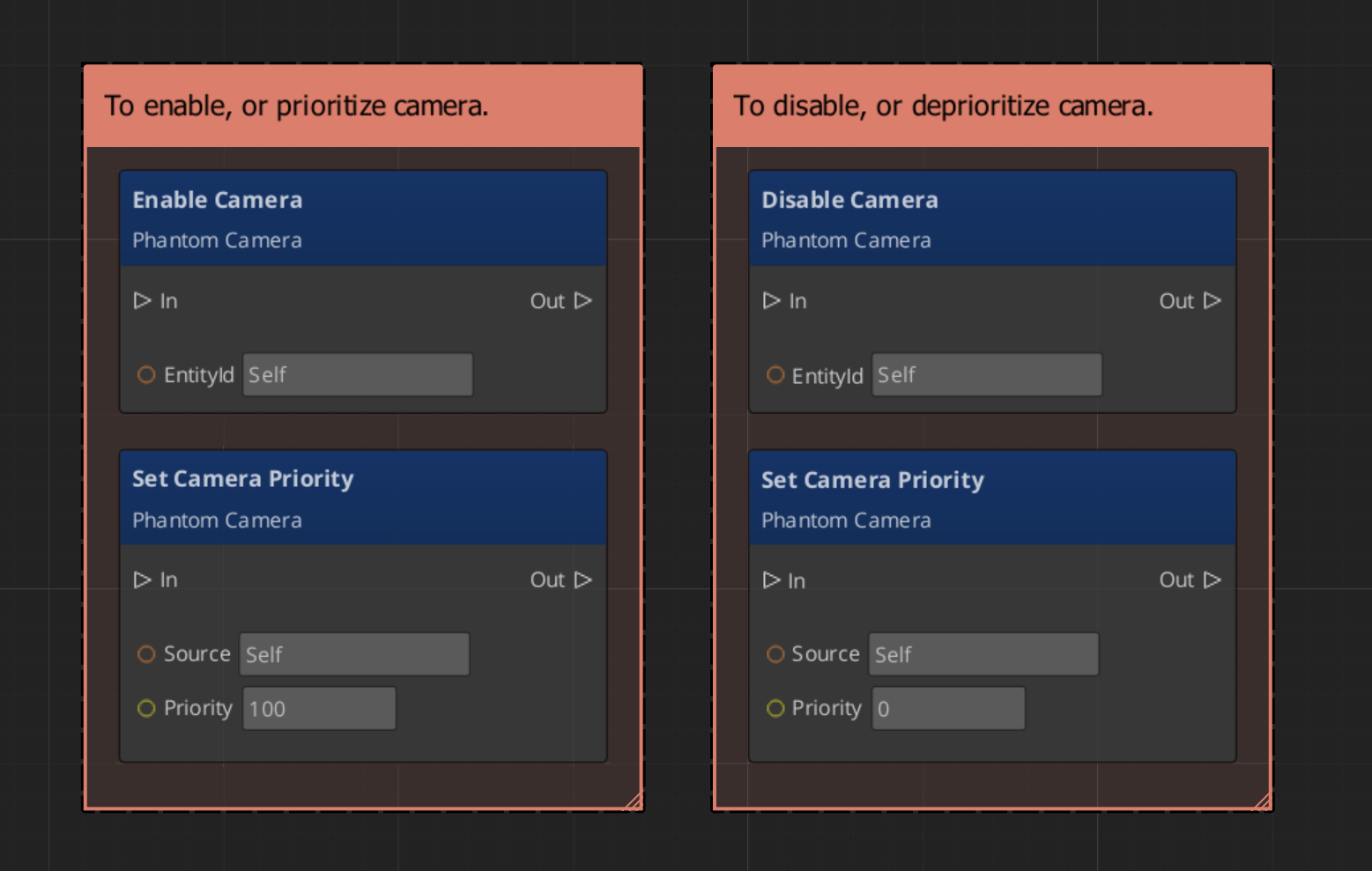
Getting a phantom camera’s data:
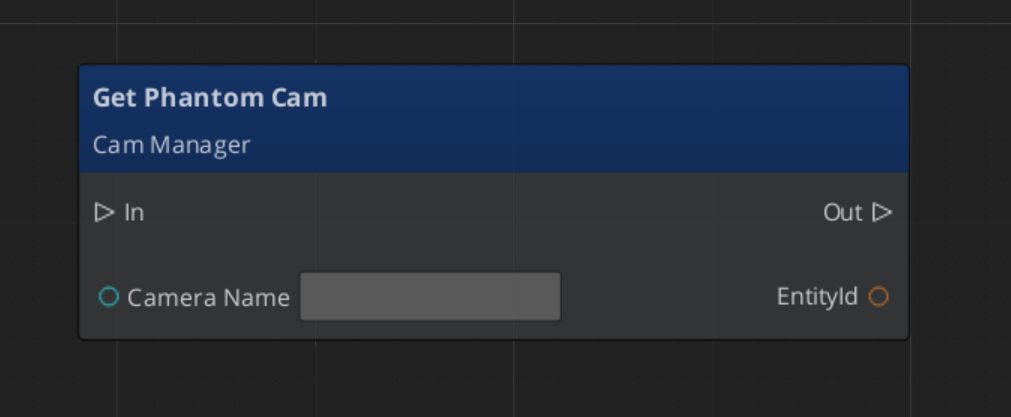
Extending Phantom Cameras
Most camera customization now happens by authoring a new stage variant rather than subclassing the component. Stages are reflected polymorphic types — derive from IBodyStage, IAimStage, or IAdditiveStage, register with AZ_RTTI + AZ_CLASS_ALLOCATOR, and reflect under the base interface’s class hierarchy. The editor type-picker discovers the new variant automatically.
Use the PhantomCamera ClassWizard template to generate a new camera component when you need component-level customization (rare) — see GS_PhantomCam Templates.
#pragma once
#include <GS_PhantomCam/Cameras/GS_PhantomCameraBus.h>
#include <Source/Cameras/GS_PhantomCameraComponent.h>

namespace MyProject
{
    class MyCustomCam : public GS_PhantomCam::GS_PhantomCameraComponent
    {
    public:
        AZ_COMPONENT_DECL(MyCustomCam);

        static void Reflect(AZ::ReflectContext* context);
    };
}
Implementation (.cpp)
#include "MyCustomCam.h"
#include <AzCore/Serialization/SerializeContext.h>

namespace MyProject
{
    AZ_COMPONENT_IMPL(MyCustomCam, "MyCustomCam", "{YOUR-UUID-HERE}");

    void MyCustomCam::Reflect(AZ::ReflectContext* context)
    {
        if (auto serializeContext = azrtti_cast<AZ::SerializeContext*>(context))
        {
            serializeContext->Class<MyCustomCam, GS_PhantomCam::GS_PhantomCameraComponent>()
                ->Version(0);

            if (AZ::EditContext* editContext = serializeContext->GetEditContext())
            {
                editContext->Class<MyCustomCam>("My Custom Camera", "Custom phantom camera component")
                    ->ClassElement(AZ::Edit::ClassElements::EditorData, "")
                        ->Attribute(AZ::Edit::Attributes::Category, "MyProject")
                        ->Attribute(AZ::Edit::Attributes::AppearsInAddComponentMenu, AZ_CRC_CE("Game"));
            }
        }
    }
}
For stage-level extension (the more common case), see the Stage Pipeline reference.
See Also
For related PhantomCam components:
For conceptual overviews and usage guides:
Get GS_PhantomCam
GS_PhantomCam — Explore this gem on the product page and add it to your project.
3.1 - Stage Pipeline
The composable per-tick pipeline each Phantom Camera runs — Body, Aim, Reposition additives, Noise additives. Stage interfaces, CameraState accumulator, target routing, decoupled-ideal pattern, init contract.
Every Phantom Camera runs the same fixed pipeline per tick:
Body → Aim → Reposition additives → Noise additives → Finalize
The Body and Aim stages produce the cam’s smoothed ideal pose; Reposition additives correct it for collision / tug volumes; Noise additives perturb it for shake and impulse; Finalize commits the result to the entity transform and the engine camera component.
Stages are not AZ::Components. They are reflected polymorphic types — derived from IBodyStage, IAimStage, or IAdditiveStage. The editor’s type-picker enumerates registered derivations from the SerializeContext class hierarchy, so other gems can extend the catalog cleanly without touching the base component.
For per-variant detail, see the catalog pages:
- Body Stage Variants —
DefaultFollowBody, OrbitBody, DynamicOrbitBody, LeadingFollowBody, TrackBody. - Aim Stage Variants —
DefaultLookAtAim, ClampedLookAim. Plus extensions from gs_performer. - Additive Stage Variants —
CollisionReposition, OcclusionReposition, TugAimListener, TugBodyListener, PerlinNoise, ImpulseNoise.
Contents
Per-Tick Model
Each tick, the owning Phantom Camera threads a CameraState accumulator through the pipeline:
GS_PhantomCameraComponent::EvaluatePose
   │
   ├─► Build CameraContext (target, deltaTime, lifecycle flags, snapThisFrame)
   │
   ├─► CameraState state;  // zero-initialized accumulator
   │
   ├─► IBodyStage::Evaluate(state, ctx, dt)
   │       writes state.position, state.bodyAnchor
   │
   ├─► IAimStage::Evaluate(state, ctx, dt)
   │       writes state.rotation, state.lookAtPoint
   │
   ├─► m_desiredPose = (state.position, state.rotation)
   │
   ├─► For each additive in m_repositionStages:
   │       Evaluate(state, ctx, dt) — may correct state.position/rotation
   │
   ├─► m_stablePose = (state.position, state.rotation)
   │
   ├─► For each additive in m_noiseStages:
   │       Evaluate(state, ctx, dt) — perturbs state.position/rotation
   │
   ├─► m_finalPose = (state.position, state.rotation)
   │
   ├─► Resolve cached pivot from state.lookAtPoint (else fallback to target world pos)
   │
   └─► Commit m_finalPose to TransformBus + apply lens to engine Camera component
The component partitions additives into m_repositionStages and m_noiseStages once at slot-assign time (or whenever the additive list changes) based on each additive’s GetStage() result — per-tick code does not re-check the enum each frame.
CamPipelineStage is a fixed ordered enum:
enum class CamPipelineStage {
    Body,
    Aim,
    Reposition,
    Noise,
    Finalize
};
Reposition and Noise are the values an additive may return from GetStage. Body, Aim, and Finalize exist for symmetry but are not author-selectable.
Stage Interfaces
IBodyStage
Single slot per cam. Computes the smoothed follow position.
class IBodyStage {
public:
    AZ_RTTI(IBodyStage, "{6A78E21A-9A5F-4AB5-8F20-08B4D09E5C01}");
    AZ_CLASS_ALLOCATOR(IBodyStage, AZ::SystemAllocator);

    virtual ~IBodyStage() = default;

    virtual void Init() {}

    virtual void Evaluate(CameraState& state, const CameraContext& ctx, float dt) = 0;
    virtual AZ::EntityId ResolveTarget(AZ::EntityId incoming, TargetSignalKind kind) = 0;
    virtual const char* GetDisplayName() const { return "Body Stage"; }

    // State inheritance — default returns false (no protocol).
    virtual bool TryGetPoseSnapshot(CamPoseSnapshot& out) const  { return false; }
    virtual bool TryAdoptPoseSnapshot(const CamPoseSnapshot& in) { return false; }

    static void Reflect(AZ::ReflectContext* context);
};
See Body Stage Variants for the catalog.
IAimStage
Single slot per cam. Computes the smoothed look rotation.
class IAimStage {
public:
    AZ_RTTI(IAimStage, "{9F37E4C6-04AD-4B1F-A9E2-0D3A4B8F1E02}");
    AZ_CLASS_ALLOCATOR(IAimStage, AZ::SystemAllocator);

    virtual ~IAimStage() = default;

    virtual void Init() {}

    virtual void Evaluate(CameraState& state, const CameraContext& ctx, float dt) = 0;
    virtual AZ::EntityId ResolveTarget(AZ::EntityId incoming, TargetSignalKind kind) = 0;
    virtual const char* GetDisplayName() const { return "Aim Stage"; }

    static void Reflect(AZ::ReflectContext* context);
};
Aim does not implement state inheritance — inheritance is body-only by design. See Aim Stage Variants.
IAdditiveStage
Stackable. Self-declares phase via GetStage.
class IAdditiveStage {
public:
    AZ_RTTI(IAdditiveStage, "{B7D2F618-3E44-4A71-9C21-0F3B7C5E0D04}");
    AZ_CLASS_ALLOCATOR(IAdditiveStage, AZ::SystemAllocator);

    virtual ~IAdditiveStage() = default;

    virtual void Init() {}

    virtual CamPipelineStage GetStage() const = 0;  // returns Reposition or Noise
    virtual void Evaluate(CameraState& state, const CameraContext& ctx, float dt) = 0;
    virtual const char* GetDisplayName() const { return "Additive Stage"; }

    static void Reflect(AZ::ReflectContext* context);
};
See Additive Stage Variants.
CameraState and CameraContext
CameraState
The mutable pose accumulator threaded through every stage. Not serialized.
struct CameraState {
    AZ::Vector3    position    = Vector3::Zero();        // accumulator
    AZ::Quaternion rotation    = Quaternion::Identity();

    // Sidecar hints populated by Body/Aim for downstream stages.
    AZ::Vector3    bodyAnchor  = Vector3::Zero();   // post-offset follow anchor
    AZ::Vector3    lookAtPoint = Vector3::Zero();   // world-space focal point
};
The two sidecar fields exist so Reposition additives can read the “natural” pose Body / Aim intended rather than the live state (which may have been displaced by an earlier additive). Tug listeners, for example, blend toward the source point starting from the Body’s bodyAnchor rather than the cam’s possibly-perturbed state.position — prevents compound feedback across ticks.
CameraContext
Read-only per-tick context. Not serialized.
struct CameraContext {
    GS_PhantomCameraComponent* owner;        // for owner helpers (WriteLensFieldOfView, QueueSnapCamera).

    AZ::EntityId               camEntityId;
    AZ::EntityId               targetEntityId;

    AZ::Transform              camInitialTM;     // cam TM read at start of tick
    AZ::Transform              targetTM;         // resolved target world TM
    AZ::Vector3                targetVelocity;

    bool                       targetIsPhysical;
    bool                       hasFocus;
    bool                       alwaysUpdate;
    bool                       blendingOut;
    bool                       snapThisFrame;    // bypass damping this tick

    float                      deltaTime;
};
hasFocus || alwaysUpdate || blendingOut is the input-integration gate — Body stages that drive pose from input (notably DynamicOrbitBody) integrate input only when any of these is true. See Execution States.
snapThisFrame is set on focus gain, target swap, queued snap, and a few other lifecycle events. Stages honor it by bypassing damping for the one tick it is true.
Target Routing
Every Body and Aim variant authors a CamTargetMode enum and (depending on mode) supporting fields. This is the front-end every variant uses to decide which entity it actually follows.
enum class CamTargetMode : AZ::u8 {
    None               = 0,  // no-op for target resolution
    Transform          = 1,  // follow / look at the dispatched CameraTarget
    TargetOffsetEntity = 2,  // reserved — not yet implemented
    // 3 was FocusGroup — removed; use GroupTarget.
    Head               = 4,  // reserved — not yet implemented
    Override           = 5,  // manually-set m_overrideEntity on this stage
    GroupTarget        = 6   // resolve a named GroupTargetComponent via CamManager
};
TargetSignalKind identifies which bus call dispatched the target signal. Lets stages filter by target mode:
enum class TargetSignalKind {
    CameraTarget,  // SetCameraTarget
    FocusGroup     // SetTargetFocusGroup
};
Legacy scenes storing FocusGroup = 3 deserialize as an unknown value; the author re-picks GroupTarget. The newer mode is the canonical way for a stage to track a named group via Group Targets.
Decoupled Ideal Pattern
A subtle but critical convention: each Body / Aim variant maintains an m_idealPosition / m_idealRotation independent of what gets committed to the entity transform.
Why: Reposition additives (collision, occlusion, tug) and Noise additives mutate state.position and state.rotation AFTER Body / Aim runs. If the Body read the committed transform back next tick, the spring would re-try its advance every frame against a collision clamp — producing shudder. By tracking an internal ideal, the Body’s spring runs in clean kinematic space; the committed transform may differ (clamped by collision, shaken by noise) but the Body’s trajectory stays smooth.
The same applies to Aim — m_idealRotation is the slerp’s working value; downstream rotation-modifying additives can freely displace state.rotation without poisoning next tick’s slerp trajectory.
m_idealPosition / m_idealRotation are also what state inheritance reads for TryGetPoseSnapshot and writes for TryAdoptPoseSnapshot — see State Inheritance.
Damping Convention
There is no separate Smoothing stage. Each stage owns its damping internally:
| Stage | What it damps |
|---|
| Body | Pursuit of the follow target — halflife on m_idealPosition. |
| Aim | Slerp toward the look-at rotation — halflife on m_idealRotation. |
| Reposition additives | Their own correction delta — collision pushback, tug-source approach. |
| Noise additives | Operate in their own time domain (noise time, ADSR envelope). |
Different halflives capture different physical slownesses and compose naturally. Damping uses the frame-rate-independent HalflifeAlpha(halflife, dt) = 1 - exp2(-dt / halflife) helper.
ctx.deltaTime is clamped at tick entry (maxEvalDeltaTime = 0.05s default) so editor hitches don’t spike damping.
Init Contract
Each stage’s Init() runs once per Activate, after the slot is populated, before any Evaluate. The default is a no-op.
Critical use case — asset-fresh-load. Stages holding asset references (e.g. DynamicOrbitBody.m_orbitShape, PerlinNoise.m_profile) override Init to force a fresh AssetManager load. The deserialized asset reference only carries an AssetId — without an explicit GetAsset call in Init, in-editor edits to the asset don’t propagate to the runtime instance.
Pattern:
void DynamicOrbitBody::Init()
{
    if (m_orbitShape.GetId().IsValid())
    {
        m_orbitShape = AZ::Data::AssetManager::Instance().GetAsset<CameraOrbitShape>(
            m_orbitShape.GetId(),
            AZ::Data::AssetLoadBehavior::PreLoad);
        m_orbitShape.BlockUntilLoadComplete();
    }
}
Any new stage you author that holds an AZ::Data::Asset<T> should follow this pattern.
Polymorphic-Array Convention
The component’s stage slots hold raw pointers in a vector:
AZStd::vector<IBodyStage*>     m_bodySlot;     // single-element conceptually
AZStd::vector<IAimStage*>      m_aimSlot;      // single-element conceptually
AZStd::vector<IAdditiveStage*> m_additives;
Why vectors instead of single pointers? The vector enables the editor’s type-picker for polymorphic types — the user picks from a dropdown of all registered derived classes. The runtime treats Body and Aim slots as single-element; the dropdown for those slots is constrained to one entry by policy.
The component owns the pointers (newed by the editor’s type instantiation; deleted by the component’s Deactivate / destructor).
StageHelpers Utility
StageHelpers.h provides free inline functions used by multiple variants:
| Helper | Purpose |
|---|
ResolveByMode(mode, incoming, override, kind, groupTargetName) | Resolves the actual tracked entity from a CamTargetMode. Shared by every Body and Aim variant. |
ResolveStageTargetTM(mode, groupTargetName, ctx) | Resolves the target world TM. Handles Transform (uses ctx.targetTM), Override (looks up m_overrideEntity), GroupTarget (calls Cam Manager’s group registry). |
ApplyFollowOffset(point, targetTM, offset, isRelative) | Adds the offset to the point. World axes or target-relative basis. |
HalflifeAlpha(halflife, deltaTime) | Frame-rate-independent damping alpha: 1 - exp2(-deltaTime / halflife). |
WrapYawToPi(yaw) | Wraps yaw into (-π, π]. |
ShortestYawTarget(currentYaw, desiredYaw) | Returns the equivalent of desiredYaw that is numerically closest to currentYaw (avoids 2π wraparound jumps for monotonic damping). |
FindPitchOnShape(shape, radiusObserved, heightObserved) | Inverse search on a CameraOrbitShape — given an observed (radius, height) pair, returns the pitch that produces that point on the curve. Used by DynamicOrbitBody’s POSITION-mode adoption fallback. |
Reflection Conventions
Every stage class follows the same Reflect pattern:
void MyStage::Reflect(AZ::ReflectContext* context)
{
    if (auto* sc = azrtti_cast<AZ::SerializeContext*>(context))
    {
        if (sc->FindClassData(azrtti_typeid<MyStage>())) { return; }  // guard

        sc->Class<MyStage, IBodyStage>()   // base = IBodyStage / IAimStage / IAdditiveStage
            ->Version(1)
            ->Field("TargetMode", &MyStage::m_targetMode)
            ->Field("Offset",     &MyStage::m_offset)
            // ...
            ;

        if (auto* ec = sc->GetEditContext())
        {
            ec->Class<MyStage>("Display Name", "Tooltip description")
                ->ClassElement(AZ::Edit::ClassElements::EditorData, "")
                    ->Attribute(AZ::Edit::Attributes::AutoExpand, true)
                    ->Attribute(AZ::Edit::Attributes::NameLabelOverride, "<h3>My Stage</h3>")
                ->DataElement(AZ::Edit::UIHandlers::ComboBox, &MyStage::m_targetMode, "Target Mode", "...")
                    ->EnumAttribute(CamTargetMode::Transform, "Transform")
                    // ...
                ;
        }
    }
}
Hard rules for stage authors:
- The
FindClassData guard is mandatory. Multiple stages reflect the shared curve type / common enums chain, and an unguarded reflect call triggers a double-registration crash. EnableForAssetEditor belongs under SerializeContext only, not EditContext. Stages don’t typically need this attribute, but it applies when reflecting asset types.- Members are named with the
m_ prefix per the O3DE code-style guideline; field strings inside Reflect keep the un-prefixed form for save-data compatibility.
See Also
Stage variant catalogs:
For related PhantomCam pages:
For conceptual overviews and usage guides:
Get GS_PhantomCam
GS_PhantomCam — Explore this gem on the product page and add it to your project.
3.1.1 - Body Stage Variants
Body stage catalog — DefaultFollowBody, OrbitBody, DynamicOrbitBody, LeadingFollowBody, TrackBody. Each variant’s kinematic model, authored fields, and state-inheritance support.
The Body stage owns state.position for each tick. Five variants ship with GS_PhantomCam — each with its own kinematic model (orbit math, spring damping, path interpolation, band response, etc.). All variants share a target-routing front-end via the CamTargetMode enum documented in Stage Pipeline. Per-variant state inheritance support is summarized below; see State Inheritance for the full protocol.
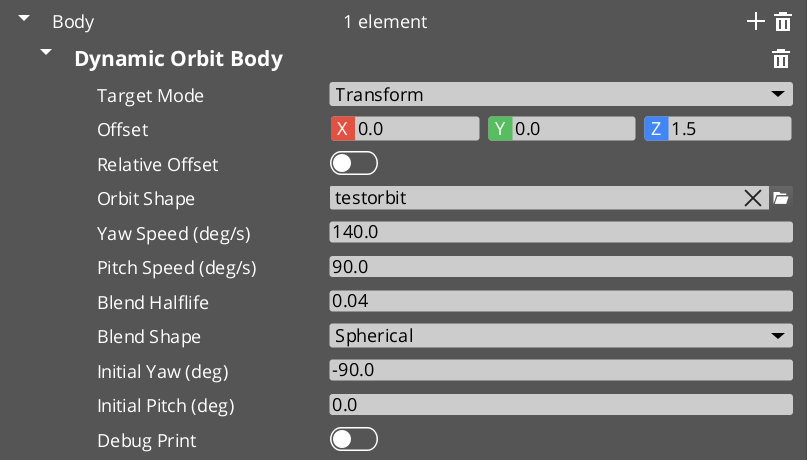
Contents
DefaultFollowBody
Simple follow camera. Tracks a target at an authored offset, position-space spring damped.
Kinematic model
destPos        = targetTM.translation + ApplyOffset(offset, targetTM, isRelative)
state.position = SimpleSpringDamperExact(m_idealPosition, m_springVelocity,
                                         destPos, halflife, dt)
Spring runs against an internal m_idealPosition per the decoupled-ideal pattern. On ctx.snapThisFrame, m_idealPosition = destPos directly.
Authored fields
| Field | Default | Purpose |
|---|
m_targetMode | Transform | How to resolve the follow target. |
m_overrideEntity | (entity slot) | Used when m_targetMode == Override. |
m_groupTargetName | "" | Used when m_targetMode == GroupTarget. |
m_offset | (0, 0, 0) | Offset applied before damping. |
m_offsetIsRelative | false | World axes (false) or target-relative basis (true). |
m_halflife | 0.1 | Spring halflife. |
State inheritance
None. Default IBodyStage virtuals return false. Inheritance into a Default Follow falls through to the Blend Profile’s visual bridge.
OrbitBody
Fixed orbital pose around the target — authored yaw, pitch, and radius, no input. The “static orbit cam.” Successor to the retired StaticOrbit_PhantomCamComponent.
Kinematic model
destPos     = targetTM.translation + offset
pitchRad    = clamp(degToRad(m_orbitPitchDeg), -89°, +89°)
yawRad      = degToRad(m_orbitYawDeg)

orbitOffset = m_orbitRadius * (cos(pitch)*cos(yaw), cos(pitch)*sin(yaw), sin(pitch))
destPos    += orbitOffset

state.position = SimpleSpringDamperExact(m_idealPosition, m_springVelocity,
                                         destPos, m_halflife, dt)
The cached pivot m_lastPivot (the post-offset, pre-orbit pivot point) is published through TryGetPoseSnapshot for inheritance into orbit-style adopters.
Authored fields
| Field | Default | Purpose |
|---|
m_targetMode | Transform | Target routing. |
m_overrideEntity | — | When m_targetMode == Override. |
m_groupTargetName | "" | When m_targetMode == GroupTarget. |
m_offset | (0, 0, 0) | Pre-orbit offset. |
m_offsetIsRelative | false | Basis. |
m_orbitRadius | 5.0 | Distance from pivot to cam. |
m_orbitYawDeg | 45.0 | Horizontal angle around pivot. |
m_orbitPitchDeg | 20.0 | Vertical angle (clamped −89° to +89°). |
m_halflife | 0.1 | Spring halflife (0 = snap). |
State inheritance
| Direction | Behavior |
|---|
| Get | Publishes the cleanest snapshot in the framework: worldPos = m_idealPosition, worldFwd toward cached pivot, pivotPos = m_lastPivot, AND direct angular state from authored yaw / pitch (yawRad, pitchRad, angularStateValid = true). Orbit-style adopters receive ANGULAR-mode handoff with no back-derivation. |
| Adopt | Not implemented — left at default false. The authored yaw / pitch define the static shot’s identity; accepting inbound pose would defeat author intent. Blend Profile’s visual bridge handles inbound transitions. |
DynamicOrbitBody
Input-driven orbit camera around a target, shaped by a CameraOrbitShape (.camorbit) asset. The current go-to body for orbit-style player cams. Successor to the retired OrbitCam variant.
Unified drive model
The stage holds target angles (m_targetYaw, m_targetPitch) and damps the cam’s position toward whatever those angles imply on the orbit surface via the Orbital Solver Utility. Target angles are written by:
- Snap seeding (
m_initialYawDeg / m_initialPitchDeg) on first activate or ctx.snapThisFrame. - External scripted calls via
DynamicOrbitBodyRequestBus::SetOrbit(yawRad, pitchRad). - Per-tick input integration — when an
OrbitInputProvider bus handler is bound to the cam’s entity (the Camera Input Reader component), the body polls input deltas and integrates them. Gated on ctx.hasFocus || ctx.alwaysUpdate || ctx.blendingOut.
No drive-mode enum. Multiple writers compose; last write wins per tick; solver damping shapes the visual response.
Static-orbit behavior is also achievable here by authoring initial angles and not installing an input provider — target angles never change, solver damps once, holds. The separate OrbitBody class is retained for the explicit “static shot” identity case.
Kinematic model
// 1. Resolve pivot (post-offset target).
pivot = targetTM.translation + offset
m_lastResolvedPivot = pivot   // cached for inheritance Get

// 2. Inheritance consume (if pending). Sets m_targetYaw / m_targetPitch /
//    m_idealPosition. See [State Inheritance].

// 3. Snap handling — reset target angles to authored seeds on
//    ctx.snapThisFrame (unless inheritance just consumed).
if (ctx.snapThisFrame && !consumedAdoption):
    m_targetYaw   = degToRad(m_initialYawDeg)
    m_targetPitch = degToRad(m_initialPitchDeg)

// 4. Input integration (if cam has an OrbitInputProvider AND
//    ctx.hasFocus || alwaysUpdate || blendingOut).
yawDelta, pitchDelta = poll OrbitInputProvider
m_targetYaw   += yawDelta   * degToRad(m_yawSpeed)   * dt
m_targetPitch += pitchDelta * degToRad(m_pitchSpeed) * dt
m_targetYaw   = WrapYawToPi(m_targetYaw)
m_targetPitch = clamp(m_targetPitch, kPitchAtLow, kPitchAtHigh)

// 5. Orbit shape evaluation.
shapePoint = m_orbitShape->EvaluateAtPitch(m_targetPitch)  // (radius, height)
desiredPos = pivot + (shapePoint.radius * cos(m_targetYaw),
                     shapePoint.radius * sin(m_targetYaw),
                     shapePoint.height)

// 6. Solver damping via BlendPositionAroundPivot.
alpha = HalflifeAlpha(m_blendHalflife, dt)
m_idealPosition = GS_Core::Math::BlendPositionAroundPivot(
                    m_idealPosition, desiredPos, pivot,
                    alpha, m_blendShape, +Z)

state.position = m_idealPosition
Authored fields
| Field | Default | Purpose |
|---|
m_targetMode | Transform | Target routing. |
m_overrideEntity | — | When m_targetMode == Override. |
m_groupTargetName | "" | When m_targetMode == GroupTarget. |
m_offset | (0, 0, 0) | Pivot offset from target. |
m_offsetIsRelative | false | Basis. |
m_orbitShape | (asset slot) | .camorbit asset defining the surface. See Orbit Profiles. |
m_yawSpeed | 90 | Degrees / sec per unit input on yaw. |
m_pitchSpeed | 60 | Degrees / sec per unit input on pitch. |
m_blendHalflife | 0.10 | Damping halflife — the solver call IS the smoothing. |
m_blendShape | Spherical | Solver shape (Spherical allows arbitrary surface; Cylindrical constrains height). |
m_initialYawDeg | 180.0 | Snap seed yaw. 180° = directly behind target. |
m_initialPitchDeg | 0.0 | Snap seed pitch. 0° = mid band height. |
m_debugPrint | false | Per-tick AZ_Printf of inputs / target angles / shape output / committed position. |
Companion bus
DynamicOrbitBodyRequestBus (per-entity, addressed by cam EntityId):
virtual void  SetOrbit(float yawRad, float pitchRad) = 0;
virtual float GetCurrentTargetYaw()   const = 0;
virtual float GetCurrentTargetPitch() const = 0;
SetOrbit uses ShortestYawTarget to keep the damping arc bounded — prevents the solver taking the long way around for distant yaw writes.
State inheritance
Full Get + Adopt. Two derivation paths:
| Path | Trigger | Behavior |
|---|
| ANGULAR (preferred) | snap.angularStateValid == true (source published authored angles) | Inherit raw yawRad / pitchRad directly via ShortestYawTarget + WrapYawToPi + pitch clamp. Preserves angular continuity across different shape assets. |
| POSITION (fallback) | Source has no angular state, just worldPos + optional pivotPos | Back-derive yaw from (worldPos − pivot) via atan2; search the shape for the matching pitch via FindPitchOnShape. |
Both seed m_idealPosition = snap.worldPos and set consumedAdoption = true so subsequent snap-clobber logic is gated.
Get publishes m_idealPosition, world-forward toward cached pivot, pivotPos = m_lastResolvedPivot, pivotEntity = m_lastResolvedPivotEntity, and direct authored m_targetYaw / m_targetPitch + angularStateValid = true.
Init contract
Init() overrides to force-load m_orbitShape via AssetManager::GetAsset + BlockUntilLoadComplete per the asset-fresh-load pattern. Without this, in-editor .camorbit edits don’t propagate to the runtime body until restart.
LeadingFollowBody
Held-position cam that slides along an arc around the target only when the target leaves an authored distance band. Leading-look / “Gears of War”-style follow — heading-agnostic, so abrupt 180° turns by the target don’t swing the cam.
Kinematic model
distXY = horizontal distance between cam and target (at offset's height)

if inner < distXY < outer:
    hold position   // cam stays put within the band
else if distXY > outer:
    slide toward target along an arc until just inside outer
else if distXY < inner:
    slide away from target along an arc until just outside inner

// Slides use the orbital solver around the target as pivot — cam arcs
// around the target during band response rather than cutting through.

// Z tracking: independent linear-halflife lowpass on the Z axis, mirroring
// target Z without affecting XY band math.

// Optional center-on-heading: after a configurable stillness delay, cam arcs
// around target to settle behind (or off-axis behind via m_idleYawOffsetDeg)
// at the current radius.
Authored fields
| Field | Default | Purpose |
|---|
m_targetMode | Transform | Target routing. |
m_overrideEntity / m_groupTargetName | — | Mode-dependent. |
m_offset | (0, 0, 1.6) | Offset applied before band math. Cam rides at this Z height. |
m_offsetIsRelative | false | Basis. |
m_innerRadius | 2.0 | Min cam-target XY distance. |
m_outerRadius | 5.0 | Max cam-target XY distance. |
m_hardClampEnabled | false | Optional absolute outer cap. |
m_hardClampDistance | 8.0 | Hard cap (when enabled). |
m_radialHalflife | 0.25 | Arc-slide halflife when outside the envelope. |
m_heightHalflife | 0.50 | Independent Z follow halflife. |
m_blendShape | Cylindrical | Solver shape for band response — cam stays in working height plane. Downgradable to Linear for short displacements. |
m_centerOnHeading | false | Enable idle reposition. |
m_idleVelocityThreshold | 0.10 m/s | XY speed below which the idle timer accumulates. |
m_idleDelay | 1.50 s | Stillness duration before reposition engages. |
m_reorientHalflife | 0.60 | Idle reposition arc halflife. |
m_idleYawOffsetDeg | 0 | Offset from “directly behind” during reposition. ± shifts off-axis. |
State inheritance
| Direction | Behavior |
|---|
| Get | Returns m_idealPosition, world-forward toward cached target, pivotPos = m_lastTargetPoint. No angular state. |
| Adopt | Pure stash. Evaluate consume block takes source snap.worldFwd, flattens to XY, places m_idealPosition = targetPoint − inboundFwd * seedDist at band-natural distance (lerp(inner, outer, 0.6)). Cam inherits source’s facing at this body’s preferred standoff. Z naturally lands at targetPoint.Z (inboundFwd is XY-flattened) — a from-below source produces a band-natural pose, not stuck-below framing. |
Authoring gotcha. If the matched Blend Profile entry has m_inheritState unchecked, the snap-on-activation block fires instead of the consume block. Symptom: “cam orients behind the player’s travel direction regardless of source facing.” The fix is data-side — check the inherit flag in the asset.
TrackBody
Spline-bound dolly camera. Slides along a SplineComponent, interpolating two authored TrackBodyData blocks (start + end) by spline position (globalT 0..1). Successor to the retired Track_PhantomCamComponent.
Per-endpoint data blocks carry offset, halflife, and an optional FoV override.
Kinematic model
// Resolve nearest spline point to current target.
splineHit = spline->FindClosestWorldPoint(targetTM.translation)
globalT   = splineHit.normalizedDistance   // 0..1 along spline

// Lerp data blocks.
offset    = lerp(m_startData.offset,   m_endData.offset,   globalT)
halflife  = lerp(m_startData.halflife, m_endData.halflife, globalT)
fovDest   = (m_endData.fieldOfView > 0)
            ? lerp(m_startData.fieldOfView, m_endData.fieldOfView, globalT)
            : 0

// Position = spline point + offset (relative or world basis).
destPos        = splineHit.worldPoint + ApplyBasis(offset, splineTangent, isRelative)
state.position = SpringDamp(m_idealPosition, m_springVelocity, destPos, halflife, dt)

// Push FoV to owner via WriteLensFieldOfView so Cam Core picks it up live.
if (fovDest > 0):
    ctx.owner->WriteLensFieldOfView(fovDest)
Authored fields
| Field | Default | Purpose |
|---|
m_targetMode | Transform | Used to compute the closest spline point. Typically Transform. |
m_overrideEntity / m_groupTargetName | — | Mode-dependent. |
m_splineTrack | (entity slot) | Entity carrying a SplineComponent. |
m_startData | — | Endpoint A (TrackBodyData). |
m_endData | — | Endpoint B. |
m_adoptionPathThreshold | 5.0 m | Inheritance: max distance from spline an inbound pose may sit before adoption is rejected. |
TrackBodyData
struct TrackBodyData {
    AZ::Vector3 m_offset            = (0, 0, 0);
    bool        m_offsetIsRelative  = false;
    float       m_halflife          = 0.1f;
    float       m_fieldOfView       = 0.0f;   // 0 = don't push lens
};
State inheritance
| Direction | Behavior |
|---|
| Get | Returns m_idealPosition + world-forward toward cached m_lastTargetPos. No angular state. No pivot (the path is the kinematic reference, not a point). |
| Adopt | Pure stash. Evaluate consume block: EnsureSplineResolved, project snap.worldPos via FindClosestWorldPoint. Reject if Euclidean distance to projected point > m_adoptionPathThreshold — prevents teleport-snap when the source sits well off the dolly’s path. Inside threshold: seed m_idealPosition = snap.worldPos, clear spring velocity. |
Spline resolution timing
EnsureSplineResolved is lazy — runs on first Evaluate with a valid target. Caches m_spline and m_splineEntity so subsequent ticks don’t re-look-up.
Cross-Variant Summary
| Variant | Degrees of Freedom | Damping | Pivot | Inheritance Get | Inheritance Adopt |
|---|
DefaultFollowBody | Position only | Spring | None | — | — |
OrbitBody | Authored yaw / pitch / radius | Spring | Post-offset target | Full angular | Disabled (Get-only) |
DynamicOrbitBody | Dynamic yaw / pitch | Solver | Post-offset target | Full angular | Full (ANGULAR / POSITION) |
LeadingFollowBody | XY band + Z follow | Solver (band-arc) | Post-offset target | worldPos + fwd | Facing-seeded standoff |
TrackBody | Spline-bound | Spring | None (path) | worldPos + fwd | Project + threshold |
See Also
Get GS_PhantomCam
GS_PhantomCam — Explore this gem on the product page and add it to your project.
3.1.2 - Aim Stage Variants
Aim stage catalog — DefaultLookAtAim, ClampedLookAim. Aim-origin convention, decoupled ideal rotation, extension points.
The Aim stage owns state.rotation for each tick. Two variants ship with GS_PhantomCam; other gems (notably gs_performer) register additional variants through the same IAimStage interface. All variants share a target-routing front-end via the CamTargetMode enum documented in Stage Pipeline.
Aim does not implement state inheritance by design — inheritance is body-only. The destination cam’s aim runs fresh on the inherited body pose.
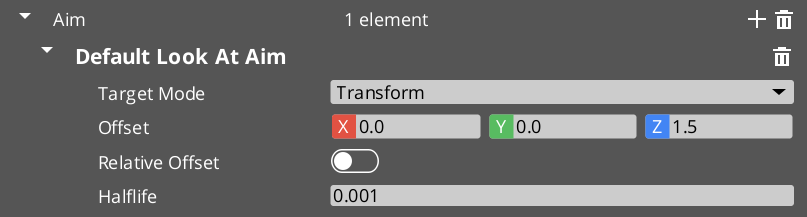
Contents
Aim-Origin Convention
A subtle but important rule: every Aim variant uses ctx.camInitialTM.GetTranslation() as the aim origin — the cam’s current world position at the start of the tick — not state.position (which the Body just wrote this tick).
Aiming from a position the cam hasn’t moved to yet would produce a frame-delayed look-at vector. Using camInitialTM keeps the aim ray geometry consistent with where the cam is actually rendered from.
Author your own aim variants the same way.
Decoupled Ideal Rotation
Same convention as the Body stage. Aim variants hold an internal m_idealRotation slerp working value, separate from state.rotation. Downstream rotation-modifying additives (Noise, Impulse, Tug aim listener) can perturb state.rotation without poisoning next tick’s slerp trajectory.
A m_lastValidRotation field preserves the last non-degenerate rotation for zero-forward recovery (the case where the cam ends up coincident with its look-at target and the forward vector collapses).
DefaultLookAtAim
Straightforward look-at. Aims the camera at a target (with optional offset), slerp-damped.
Kinematic model
lookAtPoint = targetTM.translation + ApplyOffset(offset, targetTM, isRelative)
state.lookAtPoint = lookAtPoint        // sidecar — for downstream Reposition consumers

aimOrigin = ctx.camInitialTM.translation     // NOT state.position
forward   = (lookAtPoint - aimOrigin).GetNormalizedSafe()

if (forward.GetLengthSq() < epsilon):
    targetRot = m_lastValidRotation          // zero-forward recovery
else:
    targetRot = Quaternion::CreateLookAt(forward, +Z)
    m_lastValidRotation = targetRot

if (ctx.snapThisFrame || !m_hasIdeal):
    m_idealRotation = targetRot
    m_hasIdeal      = true
else:
    alpha = HalflifeAlpha(m_halflife, dt)
    m_idealRotation = m_idealRotation.Slerp(targetRot, alpha)

state.rotation = m_idealRotation
Authored fields
| Field | Default | Purpose |
|---|
m_targetMode | Transform | Look-at target routing. |
m_overrideEntity | — | When m_targetMode == Override. |
m_groupTargetName | "" | When m_targetMode == GroupTarget. |
m_offset | (0, 0, 0) | Offset applied to look-at point. |
m_offsetIsRelative | false | World axes (false) or target-relative basis (true). |
m_halflife | 0.1 | Slerp halflife. |
ClampedLookAim
Aims at a target clamped within a pitch / yaw envelope relative to a starting forward captured on first evaluation. Replacement for the retired ClampedLook_PhantomCamComponent.
Used for first-person and constrained-look scenarios — e.g. the cam can rotate ±45° pitch and ±90° yaw from its initial facing, but not beyond.
Two clamp modes
| Mode | Behavior |
|---|
false (world-space, default) | Yaw clamps around world +Z, pitch clamps in the world-vertical plane. Yaw / pitch reconstruction from quaternion. |
true (local-space pivot) | Pivot relative to m_startingForward. Useful when the cam should rotate within a local envelope independent of world axes. |
Kinematic model (world-space mode)
On first Evaluate or ctx.snapThisFrame:
    m_startingForward = ctx.camInitialTM.GetRotation()   // capture once

lookAtPoint = targetTM.translation + offset
forward     = (lookAtPoint - ctx.camInitialTM.translation).GetNormalizedSafe()

// Convert forward to yaw / pitch.
yaw   = atan2(forward.y, forward.x)
pitch = asin(forward.z)

// Clamp to envelope (degrees → radians for comparison).
yaw   = clamp(yaw,   degToRad(m_minRelClamp.z), degToRad(m_maxRelClamp.z))
pitch = clamp(pitch, degToRad(m_minRelClamp.x), degToRad(m_maxRelClamp.x))

// Reconstruct quaternion from clamped angles.
clampedForward = (cos(pitch)*cos(yaw), cos(pitch)*sin(yaw), sin(pitch))
targetRot      = LookAtQuaternion(clampedForward, +Z)

// Slerp damping with decoupled m_idealRotation.
state.rotation = Slerp(m_idealRotation, targetRot, HalflifeAlpha(m_halflife, dt))
Authored fields
| Field | Default | Purpose |
|---|
m_targetMode | Transform | Look-at target routing. |
m_overrideEntity / m_groupTargetName | — | Mode-dependent. |
m_offset | (0, 0, 0) | Look-at offset. |
m_offsetIsRelative | false | Basis. |
m_minRelClamp | (-45, 0, -90) | Lower bound — x = pitch min, z = yaw min. (Layout mirrors the legacy component for scene-data migration.) |
m_maxRelClamp | (45, 0, 90) | Upper bound — x = pitch max, z = yaw max. |
m_localSpace | false | Clamp mode (world-space or local-space pivot). |
m_halflife | 0.1 | Slerp halflife. |
Runtime state
| Field | Purpose |
|---|
m_startingForward | Captured on first Evaluate. The “origin” relative to which the clamp envelope is anchored. |
m_hasStartingForward | True after first capture. |
m_idealRotation | Decoupled slerp working value. |
m_hasIdeal | True after first ideal write. |
m_lastValidRotation | Last non-degenerate rotation, used for zero-forward recovery. |
Extension Surface
Other gems can ship additional aim stage variants. The editor’s type-picker on the cam’s m_aimSlot enumerates all derived IAimStage classes registered through SerializeContext. gs_performer, for example, registers aim stages that read performer head / eye tracking state.
Convention for authoring an aim variant in another gem:
- Header in
Code/Include/<GemName>/Stages/Variants/<MyAim>.h. - Source in
Code/Source/Stages/Variants/<MyAim>.cpp. - Use
AZ_RTTI(<MyAim>, "{UUID}", IAimStage) so the picker finds it. - Reflect with the
FindClassData guard. - Honor the aim-origin convention — use
ctx.camInitialTM.translation, not state.position. - Use the decoupled ideal rotation pattern if you want downstream Noise / Impulse / Tug aim listener to behave well.
See Also
Get GS_PhantomCam
GS_PhantomCam — Explore this gem on the product page and add it to your project.
3.1.3 - Additive Stage Variants
Additive stage catalog — collision and tug listener Reposition stages, Perlin and Impulse Noise stages. Phase semantics, composition rules, per-variant fields.
Additive stages stack — multiple may run per cam. Each declares its phase via GetStage():
Reposition — runs BEFORE noise. Corrections (collision, occlusion, tug reposition). State after this phase is captured as m_stablePose.Noise — runs AFTER reposition. Perturbations (camera shake, drift, impulses). State after this phase is captured as m_finalPose.
The Phantom Camera component partitions additives into m_repositionStages and m_noiseStages once at slot-assign time so per-tick code does not re-check the enum each frame.
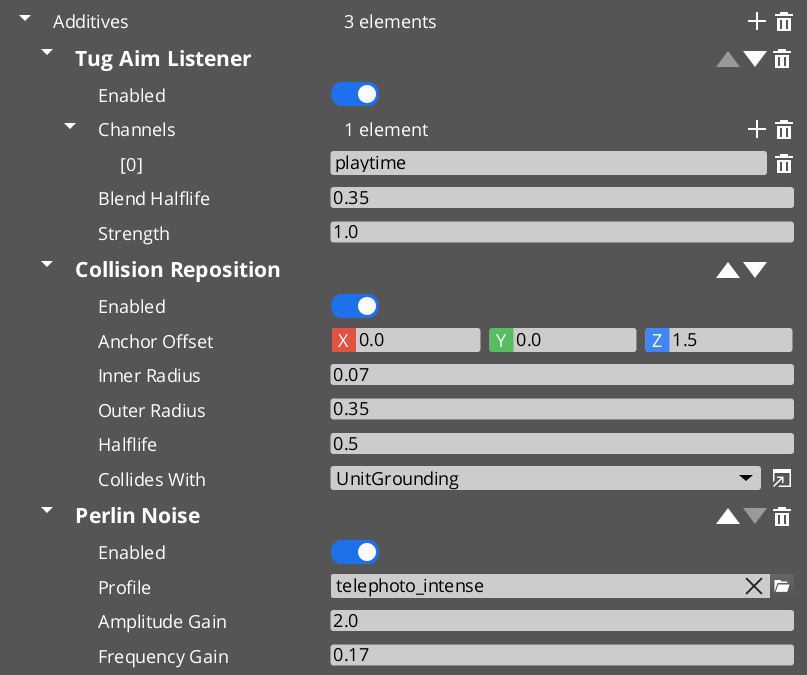
Contents
Reposition Additives
CollisionReposition
Soft / hard sphere collision correction.
Header: Stages/StageDefaults.h · Source: Source/Stages/StageDefaults.cpp
Algorithm
Sphere-cast from (target root + anchorOffset) toward the Body’s ideal cam position (state.position). Two radii define behavior:
- Inner radius — hard clamp. Cam is never permitted closer to the hit surface than this. Correction is immediate.
- Outer radius — soft buffer. Cam glides toward this preferred distance from the wall over
halflife seconds via a damped cached correction delta.
When the Body’s ideal is inside the outer zone (between inner and outer), only the soft correction applies. When it is past the inner zone (closer than inner), hard correction snaps the cam to the inner boundary, and soft continues gliding it toward the outer resting spot.
The cached correction m_appliedCorrection damps cleanly toward zero when the target walks out of collision — no feedback loop fighting the Body’s spring (which runs on its own m_idealPosition per the decoupled-ideal pattern).
Authored fields
| Field | Default | Purpose |
|---|
m_enabled | true | Master toggle. |
m_anchorOffset | (0, 0, 1.5) | Added to target root to produce the cast origin. Typically cam-height so the cast sweeps at cam altitude. |
m_innerRadius | 0.15 | Hard clamp distance. Serialized as "Radius" for back-compat. |
m_outerRadius | 0.45 | Soft buffer distance. Clamped at evaluate time to be ≥ inner. |
m_halflife | 0.15 | Soft correction halflife (0 = snap). |
m_collisionGroupId | (null = All) | UUID reference to a PhysX collision-group preset. Rendered as a dropdown by PhysX’s property handler — matches the “Collides With” field on PhysX colliders. |
OcclusionReposition
Stub. Math is future work. The damping scaffold (m_halflife, m_appliedCorrection) is in place so authored fields are stable when the real implementation lands.
| Field | Default | Purpose |
|---|
m_enabled | true | Master toggle. |
m_halflife | 0.15 | Correction halflife. |
TugAimListener
Reposition-phase consumer of Tug Fields. Slerps state.rotation toward look-at the smoothed tug source point while a TugFieldProxyComponent on the rig is in contact with a tug volume.
Header: Stages/TugListeners.h · Source: Source/Stages/TugListeners.cpp
Derives from the abstract TugListenerBase which holds the channel matching, proxy resolution, active-source cache, and smoothed-influence state.
Authored fields
| Field | Default | Purpose |
|---|
m_enabled | true | Master toggle. |
m_channels | [] | String tags the listener matches against tug volume channels. Crc32-cached at activate. |
m_blendHalflife | 0.15 | Smoothing halflife for influence and source-point. |
m_strength | 1.0 | Per-cam force multiplier. |
Per-tick algorithm
1. ResolveProxy(ctx)
   - If target changed since last tick, walk for proxy descendant.
   - If proxy changed, bind to it and repopulate from volume world.

2. Sum contributions from m_activeSources (weighted by source strength × channel match).
   totalInfluence, weightedSourcePoint = Σ source contributions

3. If totalInfluence == 0 AND m_smoothedInfluence ≈ 0:
     m_dormant = true; early-return.

4. If transitioning out of dormancy:
     m_smoothedSourcePoint = GetSeedSourcePoint(state) — a point along the cam's
     current forward, so the ramp-in produces zero displacement at first engagement.

5. Damp m_smoothedInfluence and m_smoothedSourcePoint toward their target values.

6. ApplyModulation: derive the "natural" rotation from ctx (cam toward primary target)
   rather than reading state.rotation. Avoids compound-feedback issue where prior tug
   modifications would loop into next tick's blend source.
TugBodyListener
Reposition-phase consumer of Tug Fields. Lerps state.position toward the smoothed source point.
Header: Stages/TugListeners.h · Source: Source/Stages/TugListeners.cpp
Same base class, fields, and dormancy semantics as TugAimListener.
Algorithm differences from TugAimListener
| Step | TugBodyListener |
|---|
GetSeedSourcePoint | Returns state.position — first engaged tick produces zero displacement (the cam doesn’t yank). |
ApplyModulation | Derives the natural pose source from ctx.targetTM and the Body’s published state.bodyAnchor sidecar, not state.position directly. Prevents compound feedback. |
A cam can run only the aim listener, only the body listener, both, or neither — each is independent.
Noise Additives
PerlinNoise
Continuous Perlin-noise displacement. Samples a Camera Noise Profile (.camnoiseprofile) through GS_Core::Noise::Perlin1D across six channels (translation X / Y / Z, rotation pitch / yaw / roll).
Header: Stages/NoiseStages.h · Source: Source/Stages/NoiseStages.cpp
Algorithm
m_time += deltaTime

For each of 6 channels in profile:
    sample = Perlin1D(m_time * profile.frequency[i] * m_frequencyGain,
                      profile.octaves[i],
                      profile.persistence[i])
    delta[i] = sample * profile.amplitude[i] * m_amplitudeGain

state.position += (delta[Tx], delta[Ty], delta[Tz])
state.rotation  = state.rotation * Quaternion::CreateFromEuler(
                    delta[Pitch], delta[Yaw], delta[Roll])
Never reads back the committed transform between frames — only adds deltas to state in-flight. Body / Aim ideals stay untouched (decoupled-ideal convention).
Authored fields
| Field | Default | Purpose |
|---|
m_enabled | true | Master toggle. |
m_profile | (asset slot) | .camnoiseprofile asset. |
m_amplitudeGain | 1.0 | Multiplier over profile amplitudes. |
m_frequencyGain | 1.0 | Multiplier over profile frequencies. |
Init contract
Init() force-loads m_profile via AssetManager per the asset-fresh-load pattern.
ImpulseNoise
Event-triggered one-shot noise burst. Same profile schema as PerlinNoise, same layered Perlin math — only the time source differs.
Stays silent until Trigger(strength) fires, then plays a time-windowed burst shaped by an ADSR envelope (GS_Core::Envelope::ADSREnvelope).
Triggered externally via PhantomCameraRequestBus::TriggerCameraImpulse(strength) on the cam — see Phantom Cameras. The author’s own impulse-source detection system (explosions, foot-stomps, gun kicks) decides when and with what strength.
Stacks freely with PerlinNoise on the same cam — baseline handheld sway plus event-driven shake is the canonical configuration.
Algorithm
On Trigger(strength):
    m_elapsed         = 0.0
    m_triggerStrength = strength
    m_active          = true       // overrides any in-progress release

Per tick (if m_active):
    m_elapsed += deltaTime
    envelopeGain = m_envelope.Evaluate(m_elapsed)   // ADSR 0..1
    if (envelopeGain == 0 AND past sustain end):
        m_active = false
    else:
        // Same Perlin sampling as PerlinNoise,
        // scaled by envelopeGain × triggerStrength × m_amplitudeGain.
        Apply position + rotation deltas to state.
Authored fields
| Field | Default | Purpose |
|---|
m_enabled | true | Master toggle. |
m_profile | (asset slot) | .camnoiseprofile. |
m_envelope | (ADSR struct) | Attack / Decay / Sustain level / Sustain duration / Release. See GS_Core::Envelope::ADSREnvelope. |
m_amplitudeGain | 1.0 | Multiplier over profile amplitudes. |
m_frequencyGain | 1.0 | Multiplier over profile frequencies. |
Trigger entry point
void ImpulseNoise::Trigger(float strength);
Called by GS_PhantomCameraComponent::TriggerCameraImpulse(strength) for every ImpulseNoise additive on the cam. strength multiplies amplitude for that specific burst. Pass 1.0 for full profile intensity, smaller for attenuated distance falloff, larger to boost.
The owning component routes the call by walking m_noiseStages and dispatching to each ImpulseNoise it finds via RTTI check. Other noise additive types ignore.
Cross-Variant Summary
| Variant | Phase | Reads ctx natural pose? | Notes |
|---|
CollisionReposition | Reposition | — | PhysX sphere-cast pushback. Soft buffer + hard clamp. |
OcclusionReposition | Reposition | — | Stub. Damping scaffold present. |
TugAimListener | Reposition | Yes (cam-to-target forward) | Slerps rotation toward source. |
TugBodyListener | Reposition | Yes (target / bodyAnchor) | Lerps position toward source. |
PerlinNoise | Noise | — | Continuous Perlin sampled by accumulated time. |
ImpulseNoise | Noise | — | Event-triggered; ADSR-gated. |
See Also
Get GS_PhantomCam
GS_PhantomCam — Explore this gem on the product page and add it to your project.
3.2 - Noise Profiles
CameraNoiseProfile (.camnoiseprofile) — reusable Perlin-noise shape asset for camera shake, handheld feel, and event-triggered impulses.
A Camera Noise Profile is a .camnoiseprofile data asset that defines a layered Perlin-noise shape. It is consumed by the PerlinNoise (continuous) and ImpulseNoise (event-triggered) additive stages. Profiles are reusable — one “Handheld_subtle” profile can drive both a baseline sway and a triggered impact burst at different intensities by adjusting per-stage gains.
Profiles are registered through PhantomCamDataAssetsSystemComponent alongside .camblendprofile and .camorbit. The asset reflects with EnableForAssetEditor so the Asset Editor opens it directly.
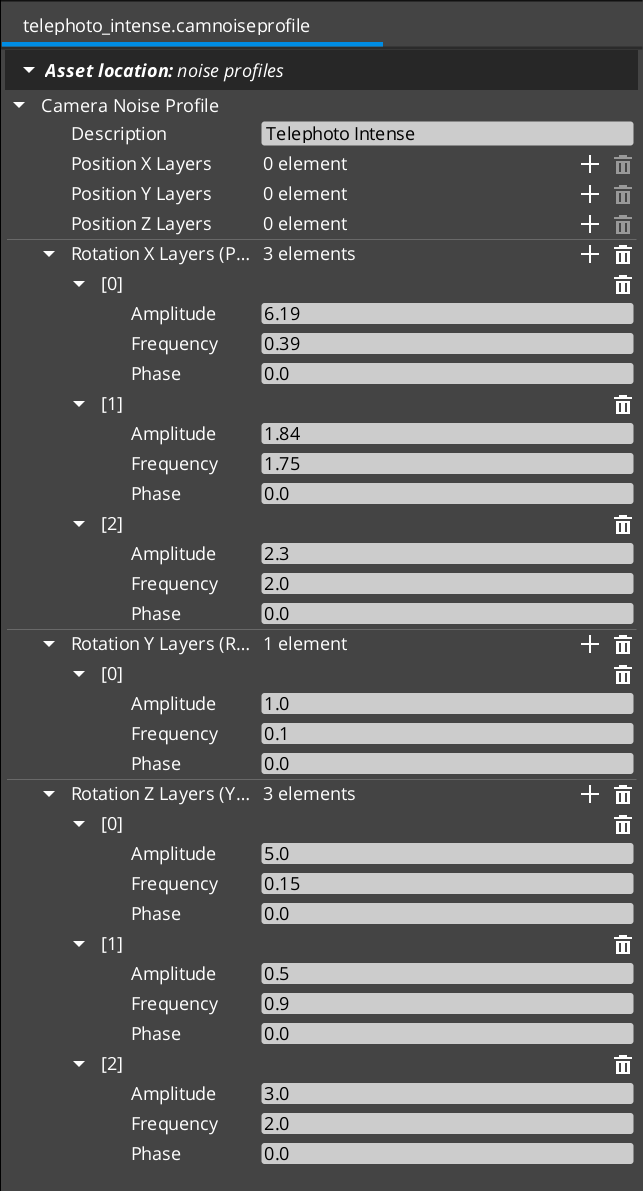
Contents
Authoring Model — Six Per-Axis Layer Stacks
Six independent layer lists, one per axis:
using LayerList = AZStd::vector<GS_Core::Noise::NoiseLayer>;

LayerList m_posX, m_posY, m_posZ;   // position (world-space meters)
LayerList m_rotX, m_rotY, m_rotZ;   // rotation (Euler degrees, applied as multiplicative deltas)
Each layer is a GS_Core::Noise::NoiseLayer carrying amplitude, frequency, and phase. At evaluate time, the noise stage sums every layer’s Perlin1D contribution per axis, scaled by amplitude.
Layered noise is the common authoring rhythm — three layers per axis: one slow / low-frequency layer for sway, one mid layer for flutter, one fast / low-amplitude layer for micro-jitter. Each layer composes additively at evaluate time.
NoiseLayer
The primitive lives in GS_Core:
namespace GS_Core::Noise {
    struct NoiseLayer {
        float m_amplitude = 0.0f;
        float m_frequency = 1.0f;
        float m_phase     = 0.0f;
    };

    // Sums layers via GS_Core::Noise::LayeredPerlin1D.
    // Each layer samples Perlin1D(time * freq + phase) * amp.
}
The same NoiseLayer primitive is used elsewhere in the engine — UI wobble, unit idle jitter, etc. — so multiple subsystems share the underlying Noise utility. The full per-axis evaluation goes through GS_Core::Noise::LayeredPerlin1D documented there.
Unit Conventions
| Axis group | Units | Typical amplitude |
|---|
| Position layers | meters | 0.01 – 0.2 |
| Rotation layers | degrees | 0.1 – 8 |
| Frequency (any axis) | Hz | Handheld profiles 0.1 – 2 Hz; shake / impact 3 – 60 Hz |
Authored Fields
| Field | Default | Purpose |
|---|
m_posX / m_posY / m_posZ | {} | Layer stacks for translation noise (meters). |
m_rotX / m_rotY / m_rotZ | {} | Layer stacks for rotation noise (degrees). |
m_description | "" | Free-form note for preset identity, intent, tweak history. |
Consumption Pattern
A profile is shared across multiple cams / stages. Per-cam intensity dialing happens on the additive stage, not on the profile:
// On a PerlinNoise additive:
m_profile        = (asset slot)            // shared profile reference
m_amplitudeGain  = 1.0                     // per-cam intensity multiplier
m_frequencyGain  = 1.0                     // per-cam speed multiplier
So a single “Handheld_subtle” profile can drive both a subtle baseline sway (m_amplitudeGain = 0.3) and a full-strength impact shake (m_amplitudeGain = 2.0) without re-authoring the profile.
Both consumers honor the same fields:
| Stage | Use | Time source |
|---|
PerlinNoise | Continuous handheld sway, drift | m_time += deltaTime, accumulated since activation |
ImpulseNoise | Event-triggered burst | m_elapsed += deltaTime since Trigger(strength), gated by ADSR envelope |
See Additive Stage Variants for the per-stage kinematic model.
Shipped Presets
The gem ships a starter library of .camnoiseprofile assets in gs_phantomcam/Assets/Noise Profiles/. Drop a preset onto a PerlinNoise or ImpulseNoise stage’s Profile slot for an immediate baseline, then either tune intensity per cam via the stage’s m_amplitudeGain / m_frequencyGain or author project-specific profiles.
Handheld lens family
Three lens characters × two intensities. Rotation-dominant; long-period sway with mid-frequency flutter and a touch of micro-jitter.
| Asset | Use for |
|---|
Normal_Mild.camnoiseprofile | Normal-lens handheld baseline — balanced position and rotation, moderate frequencies. |
Normal_Intense.camnoiseprofile | Aggressive normal-lens handheld — same shape, larger amplitudes. |
Telephoto_Mild.camnoiseprofile | Telephoto-lens handheld baseline — tighter angular response, low position amplitude. |
Telephoto_Intense.camnoiseprofile | Aggressive telephoto handheld — same shape, larger amplitudes. |
Wide_Mild.camnoiseprofile | Wide-lens handheld baseline — translation dominates; rotation low. |
Wide_Intense.camnoiseprofile | Aggressive wide-lens handheld — larger translation amplitudes. |
All-axes shake family
Position + rotation across all six axes. Use for event-triggered impulses (ImpulseNoise) or aggressive ambient shake.
| Asset | Use for |
|---|
6D_Shake.camnoiseprofile | Earthquake / impact aftermath — all six axes, high-frequency micro-jitter on top of mid-frequency sway. |
6D_Wobble.camnoiseprofile | Floaty / dreamlike — all six axes, low-frequency long sway. |
Authoring more
The full per-axis layer values are inspectable in the Asset Editor when you open any preset. To author additional characters — fast-handheld for chase sequences, ultra-mild for cutscenes, gunfire impulse profiles — follow the authoring conventions above starting from a copy of the closest shipped preset.
Creating a Noise Profile
- Open the Asset Editor in O3DE.
- Select New and choose CameraNoiseProfile from the asset type list.
- For each axis where you want noise, add layers via the + button. Three layers per axis is the typical authoring rhythm (slow / mid / fast).
- For each layer:
- Set the Amplitude in axis-appropriate units (meters for position, degrees for rotation).
- Set the Frequency in Hz.
- Optionally set a Phase offset (decorrelates layers from each other when they share frequency).
- Set the Description to record the preset’s intent or tuning history.
- Save the asset.
- Assign the asset to a
PerlinNoise or ImpulseNoise additive stage’s Profile slot.
See Also
Consumers:
Underlying utility:
- GS_Core Noise — the Perlin primitives,
NoiseLayer struct, and LayeredPerlin1D that this asset stores and feeds.
Related assets:
Basics-side authoring guide:
Get GS_PhantomCam
GS_PhantomCam — Explore this gem on the product page and add it to your project.
3.3 - Orbit Profiles
CameraOrbitShape (.camorbit) — parametric orbit-surface asset for DynamicOrbitBody. Three-band power-bulge family with arc-length reparameterization for constant spatial speed.
A Camera Orbit Profile is a .camorbit data asset that defines a parametric orbit surface around a target. It is consumed by the DynamicOrbitBody Body stage variant. Authors define three bands (low / mid / high) of (radius, height) and a Roundness slider that walks a power-bulge family — diamond → sphere → cube — across them. Arc-length reparameterization keeps spatial speed constant as the cam traces the shape, for any roundness value.
Profiles are registered through PhantomCamDataAssetsSystemComponent alongside .camblendprofile and .camnoiseprofile. The asset reflects with EnableForAssetEditor so the Asset Editor opens it directly.
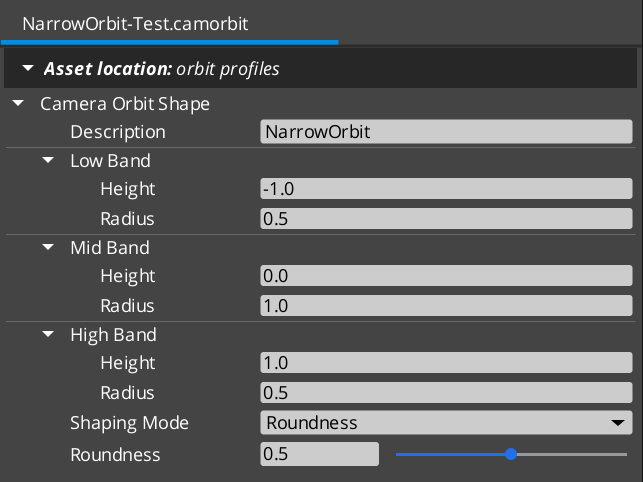
Contents
Three-Band Authoring Model
Authors define three (height, radius) bands around the target:
struct OrbitBand {
    float m_height = 0.0f;   // local-Z offset from cam target (meters)
    float m_radius = 5.0f;   // XY-plane distance from cam target (meters)
};
| Band | Default | Selected at pitch |
|---|
m_lowBand | (-2.0, 4.0) | −π/2 (cam below pivot) |
m_midBand | ( 0.0, 5.0) | 0 (the “centered / level” rest position) |
m_highBand | ( 3.0, 3.0) | +π/2 (cam above pivot) |
Z-up convention. m_height is the local-Z offset from the cam target; m_radius is the XY-plane distance.
Pitch Convention
Pitch ∈ [-π/2, +π/2] radians. Pitch is decoupled from the bands’ authored geometry:
pitch = 0 → mid band exactly (the “centered / level” rest pose).pitch = +π/2 → high band.pitch = −π/2 → low band.
Authors can put m_midBand.m_height at any value — pitch = 0 always selects mid regardless. Positive pitch always moves the cam toward high; negative always toward low. The bands’ actual heights / radii determine the cam’s spatial position; pitch is a band-interpolation parameter, NOT a literal elevation angle.
This decoupling lets authors think in spatial terms (mid is where the cam rests; low / high are the framing extremes) without needing mid.height = 0 for pitch = 0 to mean “level.”
Shape Family — Roundness Power-Bulge
A single m_roundness slider walks a power-bulge family:
pos(t) = chord(t) + p(t) · offset
where:
    chord(t) = lerp(endpoint, opposite endpoint, t)   // straight line low → high
    offset   = mid − midpoint(low, high)              // how far the bulge pokes out at mid
    p(t)     = 1 − |2t − 1|^n                         // bulge envelope
    n        = piecewise-linear in m_roundness         // 0 → 1 → kMaxBulge
p(t) is 0 at endpoints (t = 0 and t = 1) and 1 at midpoint (t = 0.5) for any n.
m_roundness | n | Shape | Description |
|---|
0.0 | 1 | Diamond | Piecewise linear. Sharp corner at mid. Bulge envelope is 1 − |2t − 1| — a tent. |
0.5 | 2 | Sphere | Smooth quadratic through low / mid / high. Bulge envelope is 1 − (2t − 1)². Default. |
1.0 | ~6 (kMaxBulge) | Square / rounded-square | Flat sides, sharp tapers near low / high. Bulge envelope is 1 − |2t − 1|^6 — almost a square wave. |
Mid is always the apex of the bulge for any n. pitch = 0 always lands exactly on mid. Angular velocity stays smooth throughout the slider’s range — no derivative discontinuities.
Curve Mode (Advanced)
For non-monotonic shapes (Bounce, Elastic, Back) that the power-bulge family cannot produce, authors can switch to ShapingMode::Curve and pick a GS_Core::CurveType enum value:
enum class ShapingMode : AZ::u8 {
    Roundness,  // power-bulge family (default)
    Curve,      // CurveType enum (advanced, supports overshoot)
};
When m_shapingMode == Curve, m_curve is consulted instead of m_roundness. The asset’s IsRoundnessVisible / IsCurveVisible predicates hide whichever field doesn’t match the current mode.
Curve mode skips arc-length reparameterization. Overshooting curves expressly want temporal shape, not constant spatial speed.
Arc-Length Reparameterization
EvaluateAtPitch treats input pitch as an arc-length fraction along the (radius, height) curve, not the curve’s intrinsic parameter t.
Why: without reparameterization, the cam covers wildly unequal spatial distances per unit pitch input. On a square shape (high roundness), constant pitch would whip past the tapers near low / high and crawl along the flat sides — feels broken.
With reparameterization:
- Internally sample the raw curve at 64 t-points, building a cumulative-length table.
- For a requested pitch fraction
s ∈ [0, 1], resolve the t such that cumulative arc length up to that t equals s · total length. - Evaluate the raw curve at that
t.
Result: constant pitch input → constant spatial speed of the cam along the orbit surface, for any roundness value.
Arc-length reparameterization is applied in Roundness mode only. Curve mode skips it.
Evaluation Entry Point
void CameraOrbitShape::EvaluateAtPitch(
    float  pitchRad,
    float& outRadius,
    float& outHeight) const;
pitchRad is clamped to [kPitchAtLow, kPitchAtHigh] = [-π/2, +π/2].- Returns
(radius, height) — XY-plane distance from the cam target plus local-Z offset.
The DynamicOrbitBody consumer wraps the call:
shape->EvaluateAtPitch(m_targetPitch, radius, height);
desiredPos = pivot + Vector3(radius * cos(m_targetYaw),
                             radius * sin(m_targetYaw),
                             height);
Constants
static constexpr float kPitchAtLow  = -π/2;
static constexpr float kPitchAtMid  =  0.0;
static constexpr float kPitchAtHigh =  π/2;
Available for editor visualization, body pitch clamping, and adoption-time pitch clamping.
Authored Fields
| Field | Default | Purpose |
|---|
m_lowBand | (-2.0, 4.0) | (height, radius) at pitch = −π/2. |
m_midBand | ( 0.0, 5.0) | (height, radius) at pitch = 0. The rest pose. |
m_highBand | ( 3.0, 3.0) | (height, radius) at pitch = +π/2. |
m_shapingMode | Roundness | Roundness or Curve. |
m_roundness | 0.5 | 0..1. Only visible when m_shapingMode == Roundness. 0 = diamond, 0.5 = sphere, 1 = square. |
m_curve | Linear | GS_Core::CurveType enum. Only visible when m_shapingMode == Curve. |
m_description | "" | Free-form author description. |
Creating an Orbit Profile
- Open the Asset Editor in O3DE.
- Select New and choose CameraOrbitShape from the asset type list.
- Set the three bands:
- Low Band —
(height, radius) for the cam-below-pivot extreme. - Mid Band —
(height, radius) for the cam’s level / rest pose. - High Band —
(height, radius) for the cam-above-pivot extreme.
- Choose a Shaping Mode:
- Roundness (default) — set the slider between 0 (diamond), 0.5 (sphere), 1 (square).
- Curve (advanced) — pick a
CurveType enum value for overshoot / bounce effects. Note that curve mode skips arc-length reparameterization.
- Set the Description to record the preset’s intent.
- Save the asset.
- Assign the asset to a
DynamicOrbitBody stage’s Orbit Shape slot.
See Also
Consumer:
Math primitive:
Related assets:
Get GS_PhantomCam
GS_PhantomCam — Explore this gem on the product page and add it to your project.
4 - Camera Influence Fields
Global and spatial camera influence components — priority modifiers that affect phantom camera selection without changing base priorities. Channel-aware routing via target entity.
Camera Influence Fields modify the effective priority of Phantom Cameras without changing their base priority values. They call AddCameraInfluence(sourceEntity, targetEntity, camName, influence) and RemoveCameraInfluence(sourceEntity, targetEntity) on the Cam Manager bus. The Cam Manager routes the influence to the channel that owns the target entity. Multiple influences on the same camera stack additively within a channel.
There are two influence component types:
- GlobalCameraInfluenceComponent — Applies a priority influence globally for its entire active lifetime. Place this on the StageData entity so it activates and deactivates automatically with the stage.
- CameraInfluenceFieldComponent — Applies a priority influence only when an entity (typically a player unit) enters a defined spatial volume. Requires a PhysX Collider set as a trigger on the same entity. See Physics Trigger Volume Utility.
For usage guides and setup examples, see The Basics: GS_PhantomCam.
Contents
How It Works
Global Influence
The GlobalCameraInfluenceComponent applies a constant priority modifier to a named phantom camera. On Activate(), it calls AddCameraInfluence on the Cam Manager bus. On Deactivate(), it calls RemoveCameraInfluence.
Placement: Add this component to the StageData entity. Because StageData activates at stage load and deactivates at stage unload, the camera influence is automatically scoped to the stage that defines it — no manual enable/disable management needed.
Global influences have no specific target entity, so in multi-channel projects they currently route through the channel-0 fallback. For Tier 3 projects that need a “global” influence applied to every channel, the cleaner pattern is one Global influence per channel — or use the Tug Field model which doesn’t go through the influence bus.
Spatial Influence
The CameraInfluenceFieldComponent uses a PhysX Collider (trigger mode) to detect when an entity enters or exits a defined region. On entry, it adds the influence with the crossing entity as the routing target; on exit, it removes the influence. See Physics Trigger Volume Utility for collider setup.
This is useful for level design — switching to an overhead camera when the player enters a specific room, or boosting a scenic camera in a vista area.
Influence Stacking
Multiple influences can be active on the same camera within a channel simultaneously. The Cam Manager sums all active influences with the base priority to compute the effective priority used during EvaluatePriority. The sourceEntity parameter is the per-channel storage key, so multiple overlapping fields applied to the same channel do not collide.
Channel Routing
The bus signature carries two entity arguments:
AddCameraInfluence(
    AZ::EntityId sourceEntity,   // the field volume's entity (storage key)
    AZ::EntityId targetEntity,   // the entity that triggered the influence (routing key)
    AZStd::string camName,
    AZ::u32 influence);
The Cam Manager looks up the channel via GetChannelForTarget(targetEntity):
| Resolution result | Behavior |
|---|
| Target is bound to a channel | Influence is stored in that channel’s priority table. Only that channel’s arbitration sees the boost. |
| Target is not bound to any channel | Influence is silently dropped. |
This gives clean isolation between players in co-op (player 1 entering a field does not affect player 2’s cam priorities) and natural behavior for non-player triggers (an enemy walking into a player-cam field doesn’t influence anything).
Subtle limitation. If an entity enters a field BEFORE SetTarget runs on its channel, the influence is dropped at trigger-enter time and not replayed when the target is later bound. Acceptable for typical “set target on player spawn” project patterns.
Cam Influence Data
The component authoring surface uses a CamInfluenceData structure to define the effect of one influence.
| Field | Type | Description |
|---|
CameraName | AZStd::string | Entity name of the phantom camera to influence. Must match exactly. |
Influence | AZ::u32 | Priority modifier applied to the named camera’s effective priority during arbitration. |
API Reference
The influence bus methods live on CamManagerRequestBus. Field components call the Cam Manager directly; the influence components do not expose their own request bus for AddCameraInfluence / RemoveCameraInfluence.
Request Bus: CamManagerRequestBus (influence methods)
| Method | Parameters | Returns | Description |
|---|
AddCameraInfluence | AZ::EntityId sourceEntity, AZ::EntityId targetEntity, AZStd::string camName, AZ::u32 influence | void | Adds a priority influence to the named camera in the channel that owns targetEntity. Silently dropped if the target isn’t channel-bound. |
RemoveCameraInfluence | AZ::EntityId sourceEntity, AZ::EntityId targetEntity | void | Removes the influence stored under (sourceEntity, targetEntity). |
Per-component inspection buses (GlobalCameraRequestBus and similar) expose component-local queries (GetGlobalCamera, etc.) for editor and runtime tooling but do not duplicate the influence-add API.
Note. AddCameraInfluence is not exposed to BehaviorContext / Script Canvas. Field components call it via C++ broadcast. Gameplay code that needs to drive influences from SC should author per-component surfaces or use the Tug Field system.
Component Reference
GlobalCameraInfluenceComponent
Applies a camera priority influence globally for its entire active lifetime.
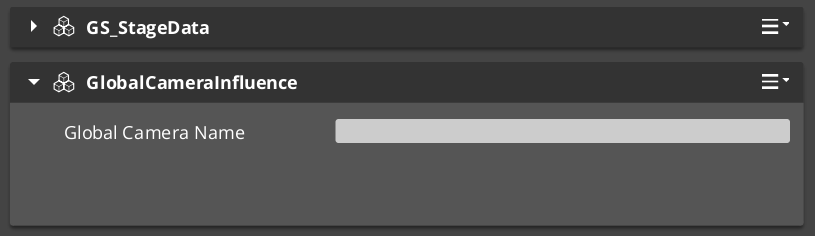
| Property | Type | Description |
|---|
CamInfluenceData | CamInfluenceData | The camera name and influence value to apply. |
Behavior: On Activate(), calls AddCameraInfluence(GetEntityId() /*source*/, AZ::EntityId() /*target*/, camName, influence). The invalid target id causes the influence to route through the channel-0 fallback in single-player projects.
On Deactivate(), calls RemoveCameraInfluence(GetEntityId(), AZ::EntityId()).
Placement: Add to the StageData entity to scope the influence to the stage lifecycle.
CameraInfluenceFieldComponent
Applies a camera priority influence when an entity enters a spatial trigger volume.
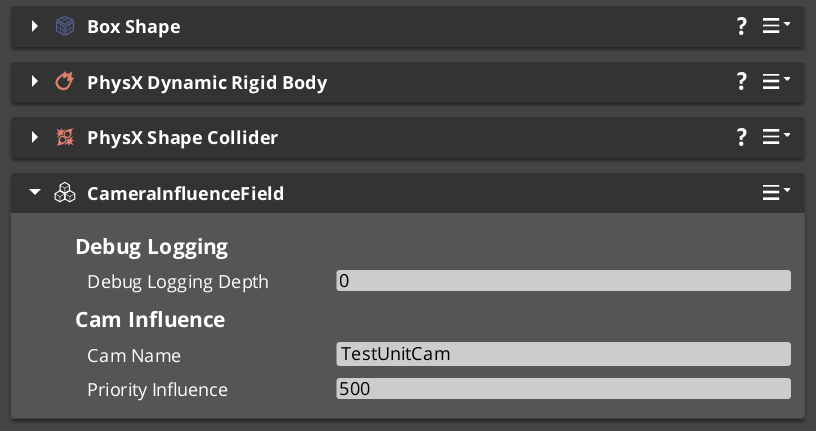
| Property | Type | Description |
|---|
CamInfluenceData | CamInfluenceData | The camera name and influence value to apply when triggered. |
Behavior: Requires a PhysX Collider (trigger) on the same entity. Inherits from GS_Core::PhysicsTriggerComponent for the trigger logic.
TriggerEnter(crossingEntity):
    CamManagerRequestBus::Broadcast(
        AddCameraInfluence,
        GetEntityId(),    // source — this field volume
        crossingEntity,   // target — what walked in (routing key)
        camName,
        influence);

TriggerExit(crossingEntity):
    CamManagerRequestBus::Broadcast(
        RemoveCameraInfluence,
        GetEntityId(),
        crossingEntity);
The crossingEntity is what makes this component channel-aware. In Tier 3 multi-channel projects, only the channel whose target matches the crossing entity sees the influence.
Setup:
- Add CameraInfluenceFieldComponent to an entity.
- Add a PhysX Collider (set as trigger) to the same entity. See Physics Trigger Volume Utility.
- Configure the PhysX collision filter so the collider detects the entities you want to trigger on (typically player units).
- Set the Camera Name to the target phantom camera’s entity name.
- Set the Influence value (positive to boost, negative to reduce priority).
Usage Examples
C++ — Adding an Influence Directly
#include <GS_PhantomCam/GS_CamManagerBus.h>

// Boost "CinematicCam" priority by 50 for player1 during a cutscene.
GS_PhantomCam::CamManagerRequestBus::Broadcast(
    &GS_PhantomCam::CamManagerRequests::AddCameraInfluence,
    AZ::EntityId(GetEntityId()),  // source — your gameplay system's entity
    AZ::EntityId(player1Entity),  // target — routes to player1's channel
    AZStd::string("CinematicCam"),
    AZ::u32(50));

// Remove the boost when the cutscene ends.
GS_PhantomCam::CamManagerRequestBus::Broadcast(
    &GS_PhantomCam::CamManagerRequests::RemoveCameraInfluence,
    AZ::EntityId(GetEntityId()),
    AZ::EntityId(player1Entity));
For a Tier 1 / single-player project, pass AZ::EntityId() for targetEntity to route through channel 0’s fallback.
See Also
For related PhantomCam components:
For related utilities:
For conceptual overviews and usage guides:
Get GS_PhantomCam
GS_PhantomCam — Explore this gem on the product page and add it to your project.
5 - Group Targets
GroupTargetComponent — weighted-centroid focal entity. Computes a centroid from a subject list and writes it to its own transform. Phantom Cameras point at it like any other target.
A Group Target is an entity whose world transform is the weighted centroid of a runtime-editable subject set. Phantom Cameras with CamTargetMode::GroupTarget point at it like any other target. The Cam Manager hosts a global name → entity registry so stages can resolve a group entity by string name without holding a direct reference.
Typical use cases:
- Two-player co-op — a group target tracks both players; the cam follows the group target.
- “Move when group is contained” cinematic cams — frame all subjects, ignore individual wandering.
- Combat encounters with multiple participants — track the weighted centroid of all combatants.
- Collapse-to-single-view in multi-channel projects — pair with a shared TrueUnique cam to detect when all channels converge.
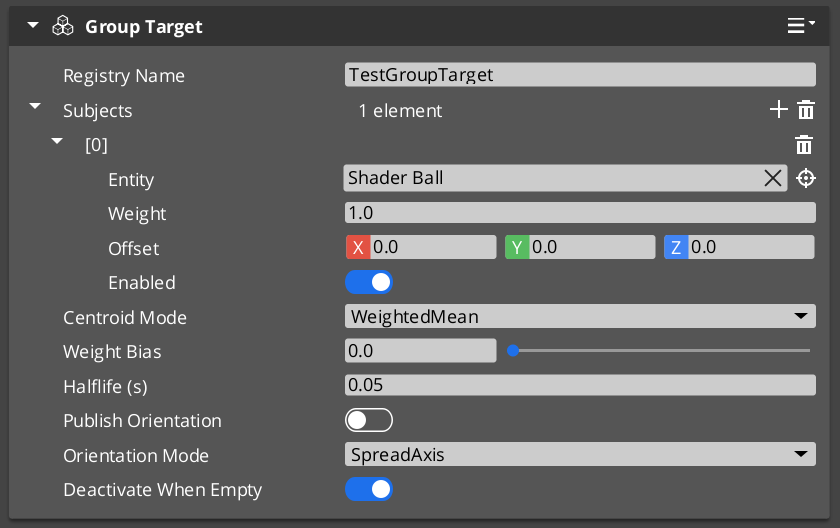
Contents
Registry Pattern
The Cam Manager owns a global name → entity registry for group targets.
On GroupTargetComponent::Activate:
CamManagerRequestBus::Broadcast(
    &CamManagerRequests::RegisterGroupTarget,
    m_name,
    GetEntityId());
On Deactivate:
CamManagerRequestBus::Broadcast(
    &CamManagerRequests::UnregisterGroupTarget,
    GetEntityId());
Stages resolve a group entity via:
AZ::EntityId groupEntity;
CamManagerRequestBus::BroadcastResult(
    groupEntity,
    &CamManagerRequests::FindGroupTargetByName,
    "MyGroup");
The editor dropdown for m_groupTargetName on Body / Aim stages populates from GetRegisteredGroupTargetNames.
See Cam Manager — Group Target Registry for the manager-side bus.
Evaluation Cadence
The component picks one of two cadences automatically:
| Cadence | When | Why |
|---|
| PhysX post-simulate | Any enabled subject is physics-driven (has a RigidBodyRequestBus handler) | Ensures the centroid uses post-simulate positions — no lag against physically-moving subjects. |
| TickBus | No physics subjects | Simple per-frame evaluation. |
Cadence is re-evaluated on every subject mutation (AddSubject, RemoveSubject, SetSubjectEnabled). m_boundToPostSim / m_boundToTick track the current binding.
Centroid Modes
enum class CentroidMode : AZ::u8 {
    WeightedMean,            // Σ(pos · weight) / Σ(weight)
    BoundingBoxCenter,       // (min + max) / 2 of axis-aligned bbox, biased toward weighted mean
    BoundingSphereCenter,    // Welzl-style sphere center, biased toward weighted mean
};
The bounding modes blend toward the weighted mean by m_weightBias ∈ [0, 1]:
m_weightBias = 0 — pure geometric center.m_weightBias = 1 — pure weighted mean.- Intermediate values produce a weighted-biased geometric center.
This lets weights still influence the framing point even when the geometric extent (bbox / sphere) is what really defines the group’s spread.
Orientation Modes
enum class OrientationMode : AZ::u8 {
    Identity,                  // group entity stays at identity rotation
    SpreadAxis,                // forward axis points along the long axis of subjects' spread
    WeightedAverageForward,    // weighted-average of subjects' forward vectors
};
m_publishOrientation is the master toggle. If false, the group entity stays at identity rotation regardless of mode.
Authored Fields
| Field | Default | Purpose |
|---|
m_name | "" | Registry key. Authored once; stages reference by this name. Empty = unregistered. |
m_subjects | {} | List of GroupSubject rows. |
m_mode | WeightedMean | Centroid mode. |
m_weightBias | 0.0 | When mode is not WeightedMean: blend factor toward weighted mean. |
m_smoothingHalflife | 0.0 | Optional centroid damping (0 = no smoothing). |
m_publishOrientation | false | Whether to write rotation to the group entity. |
m_orientationMode | SpreadAxis | Rotation derivation (when publishOrientation enabled). |
m_deactivateWhenEmpty | true | If true and m_subjects becomes empty, the group entity stops ticking — cam bodies see “no target” and fall back to hold-last pose. |
GroupSubject Struct
struct GroupSubject {
    AZ::EntityId  m_entity;
    float         m_weight  = 1.0f;
    AZ::Vector3   m_offset  = (0, 0, 0);   // applied to subject's world pos
    bool          m_enabled = true;
};
Each subject carries an offset and an enabled flag. Toggling m_enabled lets gameplay code temporarily exclude a subject without removing it from the list (cheaper than RemoveSubject + AddSubject since cadence rebind is suppressed).
Request Bus
GroupTargetRequestBus — per-entity addressed (the group’s own entity id).
Subject management
| Method | Use |
|---|
AddSubject(entity, weight) | Add with default offset. |
AddSubjectWithOffset(entity, weight, offset) | Add with custom offset. |
RemoveSubject(entity) | Remove. |
SetSubjectWeight(entity, weight) | Adjust weight. |
SetSubjectEnabled(entity, enabled) | Toggle without removing from list. |
ClearSubjects() | Remove all. |
GetSubjectEntities() | Returns list of EntityIds. |
Mode and smoothing
| Method | Use |
|---|
SetCentroidMode(mode) | Runtime mode swap. |
SetWeightBias(bias) | Adjust bias. |
SetSmoothingHalflife(halflife) | Adjust smoothing. |
SetPublishOrientation(enabled) | Toggle rotation publishing. |
SetOrientationMode(mode) | Runtime orientation mode swap. |
Query / diagnostics
| Method | Use |
|---|
GetCurrentCentroid() | Last evaluated centroid (post-smoothing if enabled). |
IsEvaluatingPostSim() | Diagnostic — returns true if currently bound to PhysX post-sim. |
Cadence-affecting mutations (AddSubject, RemoveSubject, SetSubjectEnabled) automatically call RebindEvaluationCadence.
Evaluation Algorithm
EvaluateCentroid(deltaTime):

    Collect (pos, weight) for every enabled subject:
        pos    = subject.entity.worldTM.translation + subject.offset
        weight = subject.weight

    Compute centroid by mode:
        WeightedMean         → Σ(pos · weight) / Σ(weight)
        BoundingBoxCenter    → lerp((min + max) / 2,  weightedMean, m_weightBias)
        BoundingSphereCenter → lerp(welzlCenter,      weightedMean, m_weightBias)

    If m_smoothingHalflife > 0:
        alpha = HalflifeAlpha(m_smoothingHalflife, deltaTime)
        m_lastCentroid = lerp(m_lastCentroid, centroid, alpha)
    Else:
        m_lastCentroid = centroid

    If m_publishOrientation:
        rotation = ComputeOrientation(positions, weights)
    Else:
        rotation = Identity

    Write (m_lastCentroid, rotation) to GetEntityId()'s TransformBus.
Cam-Side Usage
A Phantom Camera body or aim stage authored with m_targetMode = CamTargetMode::GroupTarget sets m_groupTargetName to the group’s registered name. At runtime, the stage resolves the group entity via the Cam Manager registry:
// In the stage's ResolveTarget or StageHelpers::ResolveStageTargetTM:
AZ::EntityId groupEntity;
CamManagerRequestBus::BroadcastResult(
    groupEntity,
    &CamManagerRequests::FindGroupTargetByName,
    m_groupTargetName);

return groupEntity;   // body / aim then reads this entity's world TM as the target
The same pattern applies to Body stages (for follow) and Aim stages (for look-at) — each can independently target a group.
Pairing with Shared Cams
A GroupTargetComponent paired with a shared TrueUnique cam (see Channels & Instancing — Cam Channel Scope) is the canonical “collapse to one view” trigger:
- The group target tracks all players.
- The shared cam targets the group entity.
- When all rigs / channels select the shared cam (typical at convergence radius),
OnAllChannelsActivatedSharedCam(sharedCam) fires once on the Cam Manager notification bus. - UI switches from split-screen to single-view layout.
See Channels & Instancing — Shared Cams and Collapse Detection for the collapse-detection details.
See Also
Related PhantomCam pages:
Basics-side authoring guide:
Get GS_PhantomCam
GS_PhantomCam — Explore this gem on the product page and add it to your project.
6 - Tug Fields
Spatial cam-pose reposition system — CameraTugVolumeComponent, CameraTugSourceComponent, TugFieldProxyComponent, TugAimListener, TugBodyListener. Decoupled volume / source / proxy, PhysX layer-gated, no central registry.
Tug Fields are a spatial reposition system that modulates the camera’s pose (position and / or rotation) when a designated proxy entity enters a defined volume. Used for environmental cinematography — pulling the cam toward a vista point when the player walks past a railing, slerping the aim toward a focal point as the player passes a mantle, etc.
The system is three-part decoupled:
CameraTugVolumeComponent — spatial gate. Lives on an entity with a PhysX trigger collider on the TugField layer.CameraTugSourceComponent — geometric pull configuration. Decoupled from the volume so the activation region and the focal point can be physically apart.TugFieldProxyComponent — opt-in marker on entities that should engage tug fields. Lives on the target (or its descendant, or a cam-side descendant).
The cam-side consumers are reposition-phase additives:
TugAimListener — slerps state.rotation toward the smoothed source point.TugBodyListener — lerps state.position toward the smoothed source point.
No central registry. Filtering happens at PhysX layer config (TugProxy ↔ TugField collision-group pair). Tug volumes broadcast on a per-proxy TugProxyNotificationBus address; listeners maintain their own active-source cache. Per-tick cost is O(volumes the proxy is in) — independent of total world volume count.
Tug-field m_channels ≠ instancing ChannelId. Tug-field channels are arbitrary string tags (“Cinematic”, “Combat”) that match volumes to listeners. They are unrelated to the integer ChannelIds on the Channels & Instancing page despite the shared word. The codebase reuses the identifier name; the docs make the distinction prominent here.
Contents
CameraTugVolumeComponent
Spatial gate. Wraps GS_Core::PhysicsTriggerComponent. Lives on an entity with a PhysX trigger collider configured on the dedicated TugField layer.
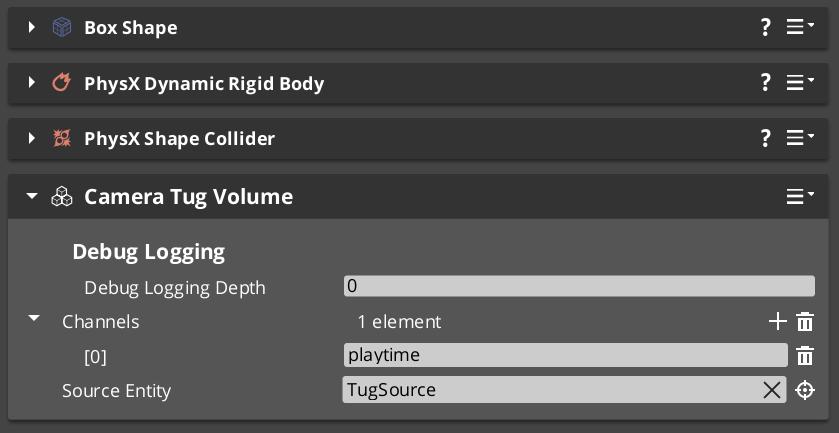
Source resolution rules
The volume’s authored m_sourceEntity:
- Unset → falls back to self (the volume’s own entity).
- Valid + source resolved → uses that entity’s
CameraTugSourceComponent. - Set but unresolvable → field is INERT. Warns once at Activate;
TriggerEnter early-returns without notifying.
Authored fields
| Field | Default | Purpose |
|---|
m_channels | {} | List of channel tag strings (“env”, “cinematic”, etc.). Hashed to Crc32 once at Activate. Listeners filter by intersection. |
m_sourceEntity | (entity slot) | Optional. Unset → use self. |
Per-trigger broadcast
TriggerEnter(proxyEntity):
    if not m_resolvedSource:  return false (inert)
    TugProxyNotificationBus::Event(
        proxyEntity,
        &TugProxyNotifications::OnVolumeEnter,
        GetEntityId() /*volume*/,
        m_channelHashes,
        m_resolvedSource);
    return true

TriggerExit(proxyEntity):
    TugProxyNotificationBus::Event(
        proxyEntity,
        &TugProxyNotifications::OnVolumeExit,
        GetEntityId());
    return true
OnVolumeExit broadcasts unconditionally — listeners that didn’t cache the volume on enter erase a non-existent key (silent no-op).
Request bus
CameraTugVolumeRequestBus — per-entity addressed.
| Method | Use |
|---|
IsProxyInContact(proxyEntity) | Predicate — does this volume currently contain the proxy? |
GetChannelHashes() | Returns the cached Crc32 channel hashes. |
GetResolvedSource() | Returns the resolved source component (or null if inert). |
GetVolumeEntityId() | Returns the volume’s own entity id. |
Used by listeners during proxy rebind to discover volumes already containing a newly-resolved proxy — PhysX doesn’t re-fire enters when the bus reconnects mid-overlap. See Proxy Rebind Walk.
CameraTugSourceComponent
Pure data + helpers that resolve source and destination world-space points. No collider, no triggering.
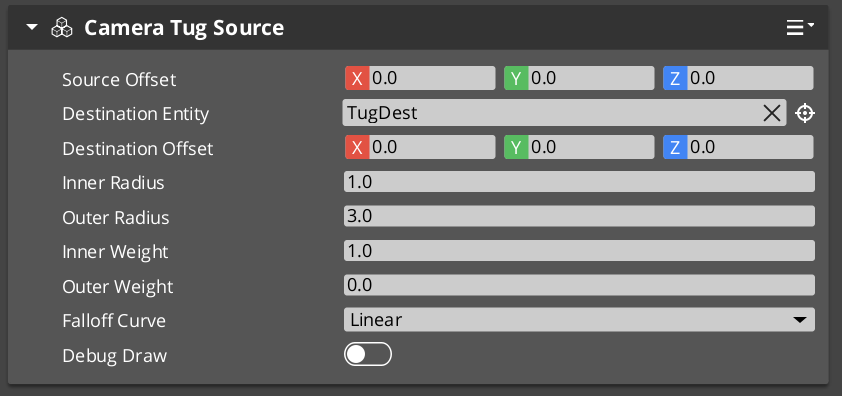
Source vs. destination — fully decoupled
| Concept | Meaning |
|---|
| Source point | Where proximity is measured FROM. The radii are centered on this point; the gravity-well falloff evaluates against the proxy’s distance to it. |
| Destination point | Where the cam is pulled TOWARD. Modulation drags the cam (Body) or its forward (Aim) toward this point, weighted by the proximity-derived influence. |
| Case | Setup |
|---|
| Common — source == destination | Cam pulls toward where proximity is measured. Leave m_destinationEntity unset. |
| Decoupled | Source measured around a doorway threshold; destination 10 m past the doorway pointing at a vista. Set m_destinationEntity to the destination point’s entity. |
| Fallback | If m_destinationEntity is unset, destination = source point. |
Authored fields
| Field | Default | Purpose |
|---|
m_tugPointOffset | (0, 0, 0) | Local-space offset from THIS entity’s transform — places the proximity-reference point distinct from the entity’s pivot. |
m_destinationEntity | (entity slot) | Optional. Valid → destination = that entity’s world TM × m_destinationOffset. |
m_destinationOffset | (0, 0, 0) | Local-space offset from m_destinationEntity. Ignored when unset. |
m_innerRadius | 1.0 m | Deadzone. distance ≤ this = full influence. |
m_outerRadius | 8.0 m | Zero-influence boundary. distance ≥ this = no contribution. |
m_innerWeight | 1.0 | Influence at deadzone (full strength). |
m_outerWeight | 0.0 | Influence at outer boundary. Default zero so engagement ramps smoothly. |
m_falloffCurve | EaseInOutQuadratic | GS_Core::CurveType applied across the outer → inner falloff span. |
Helper methods
AZ::Vector3 GetSourcePoint()      const;
AZ::Vector3 GetDestinationPoint() const;
float GetInnerRadius()  const;
float GetOuterRadius()  const;
float GetInnerWeight()  const;
float GetOuterWeight()  const;
GS_Core::CurveType GetFalloffCurve() const;
Listeners read these directly via a cached pointer (no per-tick bus call).
TugFieldProxyComponent
Lightweight opt-in marker. Functions as a marker + bus address. No fields. No logic beyond existing.
The PhysX trigger collider that actually overlaps tug volumes must be authored alongside this component on the same entity, set to the dedicated TugProxy collision layer.
Authoring placements
| Placement | Use for |
|---|
| On the target entity directly (player root, boss root) | Simple cases. |
| On a child entity of the target | When the proxy should be at chest height, vehicle COM, etc. Tug listeners walk target descendants to find proxies. |
| On the cam entity (or its child) | Fallback for cams that should react to environmental fields without target cooperation. |
TugProxyNotificationBus
Per-entity addressed (the proxy entity’s id).
class TugProxyNotifications : public AZ::EBusTraits
{
public:
    using BusIdType = AZ::EntityId;
    static const AZ::EBusAddressPolicy AddressPolicy = AZ::EBusAddressPolicy::ById;
    static const AZ::EBusHandlerPolicy HandlerPolicy = AZ::EBusHandlerPolicy::Multiple;

    virtual void OnVolumeEnter(
        AZ::EntityId volumeEntity,
        const AZStd::vector<AZ::Crc32>& volumeChannels,
        const CameraTugSourceComponent* source) {}

    virtual void OnVolumeExit(AZ::EntityId volumeEntity) {}
};
Multi-handler so multiple listeners (Body + Aim on the same cam, plus diagnostic tooling) can subscribe at the same proxy address.
Listener Stages
TugAimListener and TugBodyListener are reposition-phase additives — see Additive Stage Variants. Both derive from a shared TugListenerBase that holds the channel-matching, proxy resolution, active-source cache, smoothed-influence state, and the per-tick algorithm.
Shared authored fields
| Field | Default | Purpose |
|---|
m_enabled | true | Master toggle. |
m_channels | {} | Channel tag strings to match against volume channels. Empty = match all. |
m_blendHalflife | 0.25 | Smoothing on engagement / disengagement. |
m_strength | 1.0 | Overall multiplier. |
A cam can run only the aim listener, only the body listener, both, or neither — each is independent.
Per-Tick Algorithm
1. ResolveProxy(ctx)
     Walk target descendants → cam-self descendants → inert.
     If changed since last tick, rebind bus + RepopulateFromVolumeWorld.

2. Sum contributions from m_activeSources:
     For each (volume, source) in m_activeSources:
         distance = (proxy.worldPos - source.GetSourcePoint()).length
         if distance >= source.outerRadius:    skip
         t = (source.outerRadius - distance)
             / (source.outerRadius - source.innerRadius)
         t = ApplyCurve(clamp(t, 0, 1), source.falloffCurve)
         weight = lerp(source.outerWeight, source.innerWeight, t) * m_strength
         contribute (weight, source.GetDestinationPoint())
     totalInfluence, weightedSourcePoint = combined

3. Dormancy check:
     If totalInfluence == 0 AND m_smoothedInfluence ≈ 0:
         m_dormant = true; return.   // full early-exit when settled

4. Dormant → engaged seeding (if transitioning):
     m_smoothedSourcePoint = derived.GetSeedSourcePoint(state)
     // Aim:  point along cam's current forward — zero-displacement transition.
     // Body: state.position — zero-displacement transition.

5. Damping:
     alpha = HalflifeAlpha(m_blendHalflife, dt)
     m_smoothedInfluence   = lerp(m_smoothedInfluence,   totalInfluence,      alpha)
     m_smoothedSourcePoint = lerp(m_smoothedSourcePoint, weightedSourcePoint, alpha)

6. derived.ApplyModulation(state, ctx, m_smoothedInfluence, m_smoothedSourcePoint)
TugAimListener.ApplyModulation
Derives the natural rotation directly from ctx (cam → primary target forward), not from state.rotation. This prevents compound-feedback where prior tug modifications would loop into the next tick’s blend source.
naturalFwd   = (ctx.targetTM.translation - ctx.camInitialTM.translation).normalized
naturalRot   = LookAt(naturalFwd, +Z)
modulatedRot = LookAt((sourcePoint - ctx.camInitialTM.translation).normalized, +Z)
state.rotation = Slerp(naturalRot, modulatedRot, smoothedInfluence * m_strength)
TugBodyListener.ApplyModulation
Derives natural pose source from ctx.targetTM / the Body’s state.bodyAnchor sidecar, not state.position.
naturalPos = state.bodyAnchor       // or ctx.targetTM.translation + body offset
state.position = Lerp(naturalPos, smoothedSourcePoint, smoothedInfluence * m_strength)
Proxy Rebind Walk
When the listener’s resolved proxy changes (target switched, proxy entity destroyed), the listener:
- Unbinds from the old proxy’s
TugProxyNotificationBus. - Clears
m_activeSources cache. - Binds to the new proxy’s bus address.
RepopulateFromVolumeWorld — walks all CameraTugVolumeRequestBus handlers and synthesizes OnVolumeEnter for any that already contain the new proxy.
PhysX does not re-fire enter events when a bus reconnects mid-overlap, so this catchup walk is essential. Without it, a switched proxy would miss every volume it’s already inside until it leaves and re-enters.
PhysX Layer Setup
The system requires a specific PhysX collision-group preset configured at project setup time:
| Layer | Used by | Pair with |
|---|
TugProxy | TugFieldProxyComponent’s sibling collider | TugField |
TugField | CameraTugVolumeComponent’s sibling collider (trigger) | TugProxy |
Both layers overlap only with each other in the collision-group preset. This ensures tug volumes fire triggers only for registered proxies — no general-world filtering needed at runtime.
This is the single most common authoring failure. If you set up volumes and listeners but nothing fires, the PhysX layer config is the first thing to verify. Without the TugProxy ↔ TugField pair, no triggers ever fire.
Authoring Workflow
- Set up PhysX layers (one-time project setup): create
TugProxy and TugField layers; pair them via collision-group preset. - On the player entity (or child): Add
TugFieldProxyComponent + a PhysX trigger collider on the TugProxy layer. - On each level entity that should be a tug field: Add
CameraTugVolumeComponent + a PhysX trigger collider (trigger mode) on the TugField layer. Set m_channels for filtering. - For decoupled source / destination: Add
CameraTugSourceComponent to a separate entity at the focal point; point the volume’s m_sourceEntity at it. Set its m_destinationEntity if the pull point differs from the source. - On the cam: Add
TugAimListener and / or TugBodyListener to the cam’s m_additives. Set the listener’s m_channels to match the volumes’ channels (or leave empty to match all).
See Also
Related PhantomCam pages:
Basics-side authoring guide:
Get GS_PhantomCam
GS_PhantomCam — Explore this gem on the product page and add it to your project.
7 - Camera Input Reader
GS_CameraInputReaderComponent and OrbitInputProvider bus — translates input profile events into per-tick yaw / pitch deltas for DynamicOrbitBody. Per-axis Axis vs Delta style, sensitivity, buffer drain, ResetPendingInput invariant.
The Camera Input Reader translates GS_InputProfile events into per-tick yaw / pitch deltas for the DynamicOrbitBody Body stage. It subclasses GS_Core::GS_InputReaderComponent (inherits profile binding, channel filtering, deadzone handling) and publishes results on the OrbitInputProvider bus that the orbit body polls each tick.
It mirrors the GS_PlayerControllerInputReaderComponent pattern from gs_unit: the parent resolves which named events to fire; the subclass routes those events to the system that consumes them.
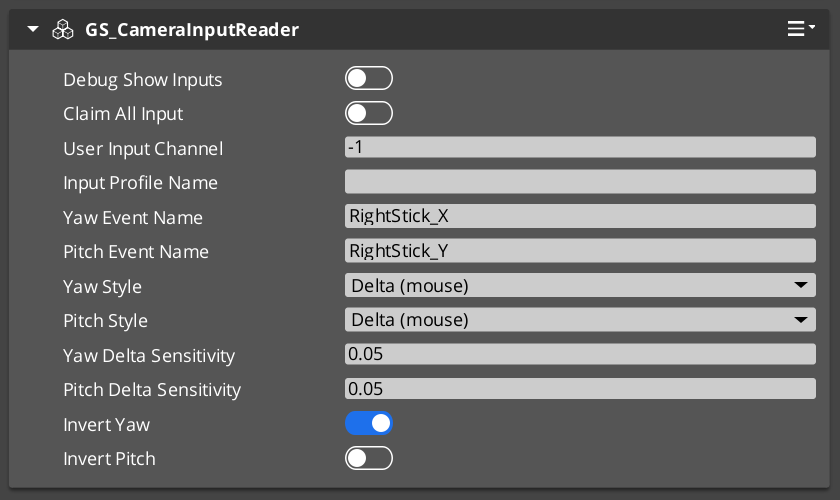
Contents
The Camera Input Reader implements OrbitInputProvider on the cam’s entity address. The DynamicOrbitBody binds to this bus at first Evaluate and polls it every tick.
class OrbitInputProvider : public AZ::EBusTraits
{
public:
    using BusIdType = AZ::EntityId;
    static const AZ::EBusAddressPolicy AddressPolicy = AZ::EBusAddressPolicy::ById;
    static const AZ::EBusHandlerPolicy HandlerPolicy = AZ::EBusHandlerPolicy::Single;

    virtual void GetOrbitInputDelta(float& outYawDelta, float& outPitchDelta) const = 0;
    virtual void ResetPendingInput() = 0;
};
Per-entity addressed, single-handler. The reader component must live on the cam entity (or a child whose ancestor walk resolves to the cam) so the bus address matches ctx.camEntityId.
Each axis (yaw, pitch) authors an independent style. The reader handles the two source semantics differently:
| Style | Source | Behavior |
|---|
Axis | Joystick / continuous analog | Last-write-wins state. Held axis = continuous rotation. The input profile fires StateUpdated each frame and the reader overwrites; release fires value 0 and rotation stops. |
Delta | Mouse / per-frame deltas | Accumulating buffer reset on poll. Per-frame pixel deltas are scaled by sensitivity and accumulated. On poll, the reader returns the accumulated value AND resets the buffer to zero. Mouse rest = no rotation. |
A reader can mix styles — joystick yaw + mouse pitch, for example — by setting m_yawStyle = Axis and m_pitchStyle = Delta.
Authored Fields
| Field | Default | Purpose |
|---|
m_yawEventName | "OrbitYaw" | The named event in the InputProfile that yaw should listen for. |
m_pitchEventName | "OrbitPitch" | Pitch event name. |
m_yawStyle | Axis | Per-axis style (Axis or Delta). |
m_pitchStyle | Axis | Per-axis style. |
m_yawDeltaSensitivity | 0.05 | Pixels-per-frame → axis units. Only used in Delta mode. Default 0.05 means a 20-pixel mouse swing in one frame produces 1.0 axis unit (= one tick at the body’s full m_yawSpeed). |
m_pitchDeltaSensitivity | 0.05 | Same, pitch. |
m_invertYaw | false | Invert yaw axis. |
m_invertPitch | false | Invert pitch axis. |
GS_InputProfile asset assignment is inherited from GS_InputReaderComponent — author the profile separately and reference it in the component’s standard input-profile slot.
Runtime State
mutable float m_pendingYaw   = 0.0f;
mutable float m_pendingPitch = 0.0f;
mutable so the const GetOrbitInputDelta override can reset Delta-mode buffers on poll. Axis-mode buffers are written from HandleFireInput and read back unchanged.
Event Handling
When an InputProfile event fires:
HandleFireInput(eventName, value):
    if eventName == m_yawEventName:
        v = m_invertYaw ? -value : value
        if m_yawStyle == Axis:
            m_pendingYaw = v                              // last-write-wins
        else /* Delta */:
            m_pendingYaw += v * m_yawDeltaSensitivity     // accumulate

    elif eventName == m_pitchEventName:
        v = m_invertPitch ? -value : value
        if m_pitchStyle == Axis:
            m_pendingPitch = v
        else /* Delta */:
            m_pendingPitch += v * m_pitchDeltaSensitivity
Poll Handling
When the body polls the bus:
GetOrbitInputDelta(out outYawDelta, out outPitchDelta):
    outYawDelta   = m_pendingYaw
    outPitchDelta = m_pendingPitch

    if m_yawStyle   == Delta:  m_pendingYaw   = 0.0      // drain on read
    if m_pitchStyle == Delta:  m_pendingPitch = 0.0
Axis-mode buffers are NOT drained on poll — the body’s next tick reads the same held value (consistent with “held stick = continuous rotation”). Delta-mode buffers are drained because mouse-rest must mean no rotation.
ResetPendingInput():
    m_pendingYaw   = 0.0
    m_pendingPitch = 0.0
Called by the DynamicOrbitBody when ctx.snapThisFrame == true. Critical for cams with alwaysUpdate = false:
When such a cam is dormant, mouse motion still accumulates into m_pendingYaw / m_pendingPitch via Delta-mode event handling (the input profile keeps firing). Without the snap-time reset, the cam would “burst” all the accumulated input the moment it became active.
This is defense-in-depth paired with the per-tick drain. The body polls every tick (regardless of whether it integrates the result), so Delta buffers don’t accumulate while the cam ticks but is dormant. ResetPendingInput clears any stragglers at the moment activation snap occurs.
See Phantom Cameras — Execution States for the dormancy + reactivation lifecycle.
DynamicOrbitBody Consumption
// In DynamicOrbitBody::Evaluate:

// 1. Ensure bus binding.
EnsureBusConnected(ctx.camEntityId);

// 2. Poll input deltas every tick (regardless of integration eligibility,
//    so Delta-mode buffers drain whether we integrate or not).
float yawDelta = 0.0f, pitchDelta = 0.0f;
OrbitInputProviderBus::Event(ctx.camEntityId,
    &OrbitInputProvider::GetOrbitInputDelta, yawDelta, pitchDelta);

// 3. Gate integration on input-eligibility predicate.
const bool integrateInput = (ctx.hasFocus || ctx.alwaysUpdate || ctx.blendingOut);

if (integrateInput)
{
    m_targetYaw   += yawDelta   * AZ::DegToRad(m_yawSpeed)   * dt;
    m_targetPitch += pitchDelta * AZ::DegToRad(m_pitchSpeed) * dt;
    // Apply WrapYawToPi + pitch clamp.
}

// 4. On snap: reset reader buffers.
if (ctx.snapThisFrame)
{
    OrbitInputProviderBus::Event(ctx.camEntityId,
        &OrbitInputProvider::ResetPendingInput);
}
Sensitivity vs Halflife vs Speed
A common authoring confusion — three different controls, three different purposes:
| Control | Lives on | Effect | When to tune |
|---|
Sensitivity (m_yawDeltaSensitivity / m_pitchDeltaSensitivity) | Camera Input Reader, Delta mode only | Converts raw input units (pixels) → axis units. “How much axis movement per unit of physical input.” | Mouse feel — pixel-to-rotation conversion. |
Speed (m_yawSpeed / m_pitchSpeed) | DynamicOrbitBody | Degrees / sec per unit axis input. “How fast the cam rotates per unit of axis movement.” | Overall rotation speed at full stick / full mouse delta. |
Halflife (m_blendHalflife) | DynamicOrbitBody | Solver damping — how fast the cam catches up to the target angles. “How responsive the cam feels.” | Visual snap vs glide on the cam’s response. |
Don’t conflate. Sensitivity controls input mapping; Speed controls rotation amount per input; Halflife controls visual responsiveness.
Authoring Workflow
- Place
GS_CameraInputReaderComponent on the cam entity (or its child — the bus is per-entity addressed, so the entity ID must match ctx.camEntityId, which is the cam entity itself). - Assign a
GS_InputProfile asset in the parent’s slot (inherited from GS_InputReaderComponent). - Author profile events named
OrbitYaw and OrbitPitch (or rename the reader’s m_yawEventName / m_pitchEventName to match your profile). - Set per-axis style:
- Mouse-driven cams → both axes
Delta. Tune m_*DeltaSensitivity to taste. - Joystick-driven cams → both axes
Axis. Sensitivity is ignored. - Mixed (mouse for yaw, gamepad stick for pitch) → mix as needed.
- Optionally toggle
m_invertYaw / m_invertPitch.
See Also
Consumer:
Related PhantomCam pages:
Parent input system:
Get GS_PhantomCam
GS_PhantomCam — Explore this gem on the product page and add it to your project.
8 - Templates
ClassWizard templates for GS_PhantomCam — custom phantom camera behaviour components.
All GS_PhantomCam extension types are generated through the ClassWizard CLI. The wizard handles UUID generation, cmake file-list registration, and module descriptor injection automatically.
For usage guides and setup examples, see The Basics: GS_PhantomCam.
python ClassWizard.py \
    --template <TemplateName> \
    --gem <GemPath> \
    --name <SymbolName> \
    [--input-var key=value ...]
Contents
Phantom Camera Component
Template: PhantomCamera
Creates a custom camera behaviour component, a child of GS_PhantomCameraComponent. Multiple camera components can coexist on a Camera Entity; the GS_CamManagerComponent activates them by priority. Override the follow, look-at, and tick virtuals to define custom camera positioning and aiming logic.
Generated files:
Source/${Name}PhantomCamComponent.h/.cpp
CLI:
python ClassWizard.py --template PhantomCamera --gem <GemPath> --name <Name>
Post-generation: None — cmake and module registration are fully automatic. Override the following virtual methods:
| Method | Purpose |
|---|
ProcessPhysicsFollow() | Drive camera position each physics tick using VelocitySpringDamper |
ProcessPhysicsLookAt() | Drive camera rotation using QuaternionSpringDamper |
EvaluateCamTick(dt) | Per-frame camera logic (blend weights, FOV, offsets) |
ProcessTransformFollow() | Position follow when physics is not available |
ProcessTransformLookAt() | Rotation follow when physics is not available |
Extensibility: One component per camera mode (e.g. ThirdPerson, Aim, Dialogue, Cinematic). Components declare incompatibility with GS_PhantomCameraComponentService so only one camera behaviour is active at a time on an entity. Swap active cameras by toggling component activation, or let the CamManager handle priority.
See also: Phantom Cameras — full extension guide with complete header and implementation examples.
See Also
For the full API, component properties, and C++ extension guide:
For all ClassWizard templates across GS_Play gems:
Get GS_PhantomCam
GS_PhantomCam — Explore this gem on the product page and add it to your project.
9 - 3rd Party Implementations
For usage guides and setup examples, see The Basics: GS_PhantomCam.
Get GS_PhantomCam
GS_PhantomCam — Explore this gem on the product page and add it to your project.