GS_Performer
Modular character rendering via skin slots, paper billboard performers, velocity-driven locomotion, head tracking, and audio babble integration.
GS_Performer is the character rendering and presentation gem for GS_Play. It provides a slot-based skinning system for composing modular character appearances at runtime, a paper (billboard) performer system for 2.5D and top-down projects, velocity-driven locomotion parameter hooks, head tracking, and audio babble. The gem depends on GS_Core and integrates optionally with EMotionFX and GS_Unit.
For usage guides and setup examples, see The Basics: GS_Performer.
GS_Performer is in Early Development. Full support planned soon: 2026.
Contents
Manager
The Performer Manager is a GS_Play manager that owns the global performer registry and coordinates skin slot configuration across the level.
| Component | Purpose |
|---|
| GS_PerformerManagerComponent | GS_Play manager. Global performer registry. Coordinates skin slot profiles and performer lookups. |
Performer API
Skin Slots
A slot-based system for composing character appearance from swappable actor meshes and material sets. Each slot holds an actor asset and material list. The handler component manages the full set of slots for a character and applies PerformerSkinSlotsConfigProfile presets.
| Component / Asset | Purpose |
|---|
| PerformerSkinSlotComponent | Individual skin slot. Holds one actor mesh and its material overrides. Addressed by slot ID. |
| SkinSlotHandlerComponent | Manages the full collection of skin slots for a character entity. Applies profile presets. |
| SkinSlotData | Data structure holding actor asset and material asset list for a single slot. |
| PerformerSkinSlotsConfigProfile | Asset class defining a named preset of skin slot assignments. Loaded and applied at runtime. |
Skin Slot API
Billboard-based character rendering for 2.5D and top-down games. The facing handler keeps sprite quads oriented toward the camera or a configurable facing target. A camera-aware variant (in GS_Complete) extends this with PhantomCam integration.
Paper Performer API
Locomotion
Velocity-driven animation parameter hooks. The locomotion component samples entity velocity each tick and pushes values into the animation graph, driving blend trees without manual parameter management.
Performer API
Head Tracking
Procedural head look-at targeting for performer entities. Drives bone orientation toward a world-space target using configurable angle limits and spring damping.
Head Tracking API
Babble
Audio babble synchronized to dialogue typewriter output. The Babble component generates procedural vocalisation tones keyed to speaker identity and tone configuration, complementing the Typewriter system in GS_Cinematics.
Babble API
Installation
GS_Performer requires GS_Core. EMotionFX and GS_Unit are optional integrations.
- Enable GS_Performer and GS_Core in your O3DE project’s gem list.
- Add GS_PerformerManagerComponent to your Game Manager prefab and include it in the Startup Managers list.
- For skin slots, add SkinSlotHandlerComponent to the character root entity, then add one PerformerSkinSlotComponent per modular slot.
- For paper performers, add PaperFacingHandlerComponent to sprite entities that should billboard toward the camera.
- For locomotion, add VelocityLocomotionHookComponent to entities with an EMotionFX actor and configure the parameter name bindings.
See Also
For conceptual overviews and usage guides:
For sub-system references:
For related resources:
Get GS_Performer
GS_Performer — Explore this gem on the product page and add it to your project.
1 - Performer Manager & Skin Slots
Performer manager lifecycle, skin slot system for modular character appearance, and config profile assets.
The Performer Manager and Skin Slot system provide modular character appearance management at runtime. The manager handles global performer registration and lookup. Skin slots define individual mesh/material combinations that can be swapped independently, enabling runtime costume and equipment changes.
For usage guides and setup examples, see The Basics: GS_Performer.
GS_Performer is in Early Development. Full support planned soon: 2026.
Contents
GS_PerformerManagerComponent
Singleton manager extending GS_ManagerComponent. Handles global performer registration, coordinates skin slot configuration across the level, and provides performer lookup.
Bus: PerformerManagerRequestBus (Single, Single)
Skin Slot System
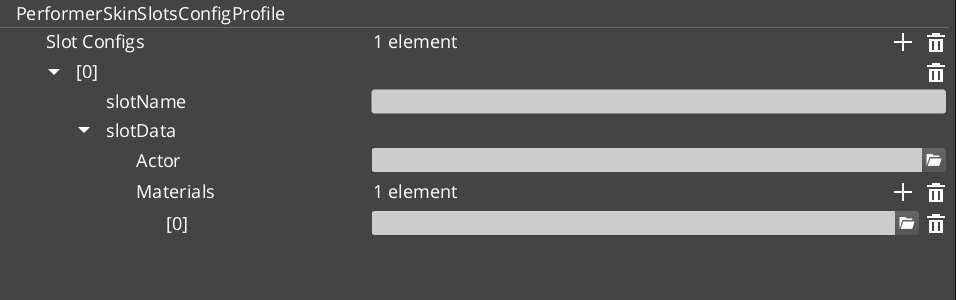
PerformerSkinSlotComponent
Individual skin slot component. Each slot holds one actor mesh asset and its material overrides. Addressed by slot ID.
Bus: PerformerSkinSlotRequestBus (ById, Single)
| Property | Type | Description |
|---|
| Slot Name | AZStd::string | Identifier for this skin slot. |
| Skin Data | SkinSlotData | Actor asset and material list for this slot. |
SkinSlotHandlerComponent
Manages the complete collection of skin slots for a character entity. Applies PerformerSkinSlotsConfigProfile presets to swap entire outfits at once.
Bus: SkinSlotHandlerRequestBus (ById, Single)
Data Types
| Type | Description |
|---|
| SkinSlotData | Actor asset reference + material asset list for a single slot. |
| SkinSlotNameDataPair | Slot name string + SkinSlotData pair for serialization. |
| PerformerSkinSlotsConfigProfile | Asset class defining a named preset of skin slot assignments. Loaded and applied at runtime for outfit/costume changes. |
VelocityLocomotionHookComponent
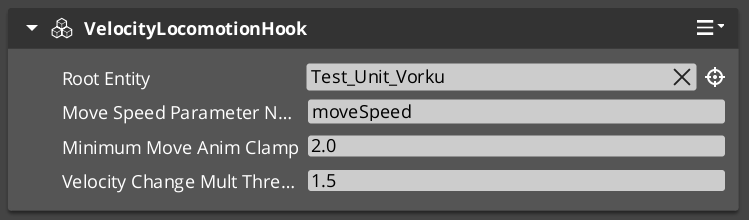
Reads entity velocity each tick and writes locomotion parameters (speed, direction) to the EMotionFX animation graph. Drives blend trees automatically without manual parameter management.
| Property | Type | Description |
|---|
| Speed Parameter | AZStd::string | The EMotionFX parameter name to write speed values into. |
| Direction Parameter | AZStd::string | The EMotionFX parameter name to write direction values into. |
PrefabAnimAssetsReloaderComponent
Hot-reloads prefab animation assets during development without requiring a full level restart.
Setup
- Add GS_PerformerManagerComponent to the Game Manager prefab and include it in the Startup Managers list.
- Add SkinSlotHandlerComponent to the character root entity.
- Add one PerformerSkinSlotComponent per modular slot (head, body, arms, legs, etc.) to child entities.
- Create PerformerSkinSlotsConfigProfile assets in the Asset Editor for each outfit configuration.
- For locomotion, add VelocityLocomotionHookComponent to entities with an EMotionFX actor.
Extension Guide
The Skin Slot system uses the companion component pattern. Custom slot behavior (equipment integration, visual effects on swap) should be added as companion components that listen to SkinSlotHandler bus events on the same entity.
See Also
For related component references:
For conceptual overviews and usage guides:
Get GS_Performer
GS_Performer — Explore this gem on the product page and add it to your project.
2 - Performers
Billboard and 3D character entity types — PaperFacingHandlerComponent for 2.5D rendering and the Avatar pipeline for rigged EMotionFX characters.
The Performers sub-system defines the character entity types in GS_Performer. Each type encapsulates a complete rendering strategy — from the lightweight billboard paper performer to the full 3D avatar pipeline integrating EMotionFX, skin slots, and locomotion.
The performer type determines the fundamental visual structure of the character entity. Performer Features then layer onto it, independent of type.
For usage guides and setup examples, see The Basics: Performers.
GS_Performer is in Early Development. Full support planned soon: 2026.
Contents
Core Pattern
Each performer type is a self-contained entity configuration. The Paper Performer requires only sprite geometry and a facing handler component. The Avatar Performer drives an EMotionFX actor and composes with skin slots and the locomotion hook. Both types participate in Performer Manager registration and support the full Performer Features set.
Billboard-based character rendering for 2.5D and top-down games. The facing handler orients the sprite quad toward the active camera or a configurable target each tick. The base component allows custom facing strategies through extension.
| Component | Purpose | Reference |
|---|
| PaperFacingHandlerBaseComponent | Abstract base for billboard facing logic. Extend to implement custom facing strategies. | Paper Performer |
| PaperFacingHandlerComponent | Concrete implementation. Orients the entity quad toward the active camera each tick. | Paper Performer |
Paper Performer API
The full 3D character pipeline. Drives a rigged EMotionFX actor with support for skin slot equipment, velocity locomotion parameter binding, and animation asset hot-reloading during development.
| Component | Purpose | Reference |
|---|
| VelocityLocomotionHookComponent | Reads entity velocity each tick and writes speed and direction blend parameters to the EMotionFX animation graph. | Avatar Performer |
| PrefabAnimAssetsReloaderComponent | Hot-reloads prefab animation assets without a level restart. Development utility. | Avatar Performer |
Avatar Performer API
Extension Guide
Custom paper facing strategies are supported by extending PaperFacingHandlerBaseComponent. Override the tick method to compute any desired facing rotation and apply it to the entity transform each frame. See Paper Performer API for the full extension walkthrough.
See Also
For conceptual overviews and usage guides:
For related component references:
Get GS_Performer
GS_Performer — Explore this gem on the product page and add it to your project.
2.1 - Avatar Performer
How to work with GS_Play avatar performers.
Avatar Performer Under Construction
Get GS_Performer
GS_Performer — Explore this gem on the product page and add it to your project.
2.2 - Paper Performer
Billboard-based character rendering — paper facing handlers that orient sprite quads toward the camera.
The Paper Performer system provides billboard-based character rendering for 2.5D and top-down games. Facing handler components keep sprite quads oriented toward the camera or a configurable facing target each tick.
For usage guides and setup examples, see The Basics: GS_Performer.
GS_Performer is in Early Development. Full support planned soon: 2026.
Contents
PaperFacingHandlerBaseComponent
Abstract base component for billboard facing logic. Extend this to implement custom facing strategies (face camera, face movement direction, face target entity).
PaperFacingHandlerComponent
Concrete paper-facing implementation. Orients the entity’s quad toward the active camera each tick. Suitable for standard 2.5D billboard characters.
| Property | Type | Description |
|---|
| Face Mode | enum | How the billboard faces: toward camera, along movement direction, or toward a target. |
Camera-Aware Variant
A camera-aware paper facing handler is provided by GS_Complete as a cross-gem component (PhantomCam + Performer):
| Component | Gems | Description |
|---|
| CamCorePaperFacingHandlerComponent | Performer + PhantomCam | Uses CamCore notifications to adjust paper performer facing direction relative to the active phantom camera. |
See Utility: Angles Helper for details.
Extension Guide
Create custom facing strategies by extending PaperFacingHandlerBaseComponent:
- Create a class extending
PaperFacingHandlerBaseComponent. - Override the tick/update method to compute your desired facing rotation.
- Apply the rotation to the entity transform each frame.
See Also
For related component references:
For conceptual overviews and usage guides:
For related resources:
Get GS_Performer
GS_Performer — Explore this gem on the product page and add it to your project.
3 - Performer Features
Universal capabilities for any performer entity — procedural head tracking, typewriter-synchronized babble, and mesh swapping.
Performer Features are components that apply to any performer entity, independent of performer type. They represent capabilities that layer onto the character rather than define it — procedural bone targeting via head tracking, typewriter-synchronized vocalization via babble, and runtime mesh swapping.
The performer type (Paper or Avatar) defines the character’s rendering pipeline. Performer Features extend what that character can do within it.
For usage guides and setup examples, see The Basics: Performer Features.
GS_Performer is in Early Development. Full support planned soon: 2026.
Contents
Head Tracking
Procedural look-at targeting for performer bones. Drives bone orientation toward a world-space target each tick using configurable angle limits and spring damping, enabling characters to naturally track targets, speakers, or points of interest.
| Component | Purpose | Reference |
|---|
| Head Tracking Component | Reads a target position each tick and computes bone rotation within clamped horizontal and vertical limits, smoothed by spring damping. | Head Tracking |
Head Tracking API
Babble
Procedural vocalization tones synchronized to Typewriter text output. Fires audio tone events on each character reveal, keyed to speaker identity, creating the characteristic character-voice effect.
| Component | Purpose | Reference |
|---|
| BabbleComponent | Generates babble tones on OnTypeFired events. Returns BabbleToneEvent for audio playback. Speaker mapped via SpeakerBabbleEvents. | Babble |
Babble API
Mesh Swap
Runtime mesh and material swapping for performer entities. Provides lightweight visual variation without the full slot-based equipment system.
Mesh Swap API
See Also
For conceptual overviews and usage guides:
For related component references:
Get GS_Performer
GS_Performer — Explore this gem on the product page and add it to your project.
3.1 - Locomotion
Velocity-driven animation hooks and prefab animation asset reloading for performer entities.
The Locomotion system bridges entity movement to animation. The VelocityLocomotionHookComponent samples entity velocity each tick and pushes values into the EMotionFX animation graph, driving blend trees without manual parameter management. The PrefabAnimAssetsReloaderComponent supports hot-reloading animation assets during development.
For usage guides and setup examples, see The Basics: GS_Performer.
GS_Performer is in Early Development. Full support planned soon: 2026.
Contents
VelocityLocomotionHookComponent
Reads the entity’s current velocity each tick and writes locomotion parameters (speed, direction) to the EMotionFX animation graph. This drives blend trees automatically — characters walk, run, and idle based on their actual movement speed.
| Property | Type | Description |
|---|
| Speed Parameter | AZStd::string | The EMotionFX parameter name to write speed values into. |
| Direction Parameter | AZStd::string | The EMotionFX parameter name to write direction values into. |
PrefabAnimAssetsReloaderComponent
Hot-reloads prefab animation assets during development without requiring a full level restart. Monitors animation asset files for changes and reapplies them to the entity’s EMotionFX actor.
Setup
- Add VelocityLocomotionHookComponent to an entity with an EMotionFX actor and a movement system (GS_Unit mover or physics rigidbody).
- Configure the speed and direction parameter names to match your EMotionFX blend tree parameters.
- Add PrefabAnimAssetsReloaderComponent during development for faster animation iteration.
See Also
For related component references:
For conceptual overviews and usage guides:
Get GS_Performer
GS_Performer — Explore this gem on the product page and add it to your project.
3.2 - Head Tracking
Procedural head look-at targeting — drives bone orientation toward a world-space target with configurable angle limits and damping.
The Head Tracking system provides procedural head look-at targeting for performer entities. It drives bone orientation toward a world-space target using configurable angle limits and spring damping, enabling characters to naturally track targets, speakers, or points of interest.
For usage guides and setup examples, see The Basics: GS_Performer.
GS_Performer is in Early Development. Full support planned soon: 2026.
Contents
How It Works
The head tracking component reads the target position each tick and computes the desired bone rotation to face it. The rotation is clamped to configurable angle limits (horizontal and vertical) and smoothed via spring damping to avoid snapping.
Setup
- Add the head tracking component to an entity with an EMotionFX actor.
- Configure the target bone (typically the head or neck bone).
- Set angle limits for horizontal and vertical rotation.
- Configure spring damping parameters for smooth tracking.
- Set the look-at target via code or companion component.
See Also
For related component references:
For conceptual overviews and usage guides:
Get GS_Performer
GS_Performer — Explore this gem on the product page and add it to your project.
3.3 - Babble
Audio babble synchronized to dialogue typewriter output — procedural vocalization tones keyed to speaker identity.
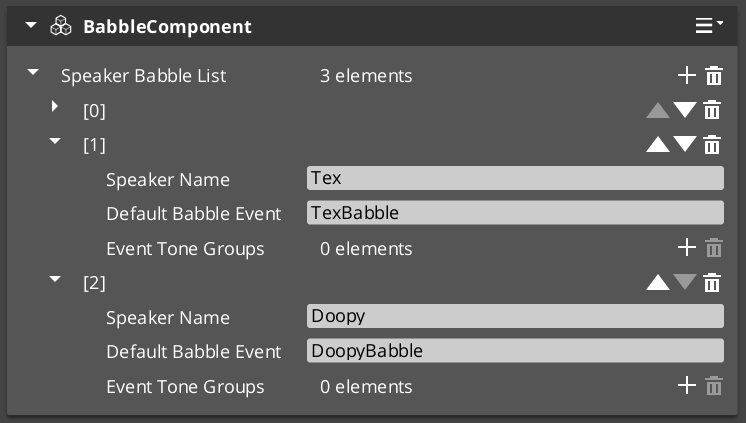
The Babble system generates procedural vocalization tones synchronized to the dialogue Typewriter output. Each speaker can have unique babble tone events that fire with each character reveal, creating the characteristic “character voice” effect used in games like Animal Crossing or Undertale.
For usage guides and setup examples, see The Basics: GS_Performer.
GS_Performer is in Early Development. Full support planned soon: 2026.
Contents
BabbleComponent
Bus: BabbleRequestBus (ById)
| Method | Parameters | Returns | Description |
|---|
GetBabbleEvent | — | BabbleToneEvent | Returns the current babble tone event for audio playback. |
Data Types
| Type | Description |
|---|
| BabbleToneEvent | Audio event configuration for a single babble tone. |
| SpeakerBabbleEvents | Collection of babble events mapped to a specific speaker/actor. |
How It Works
- The TypewriterComponent (GS_Cinematics) reveals text character by character.
- On each
OnTypeFired notification, the BabbleComponent triggers its configured babble tone. - The tone varies based on the speaker’s
SpeakerBabbleEvents configuration. - The result is a procedural “voice” that matches the text reveal rhythm.
See Also
For related component references:
For conceptual overviews and usage guides:
Get GS_Performer
GS_Performer — Explore this gem on the product page and add it to your project.
4 - 3rd Party Implementations
For usage guides and setup examples, see The Basics: GS_Performer.
Get GS_Performer
GS_Performer — Explore this gem on the product page and add it to your project.