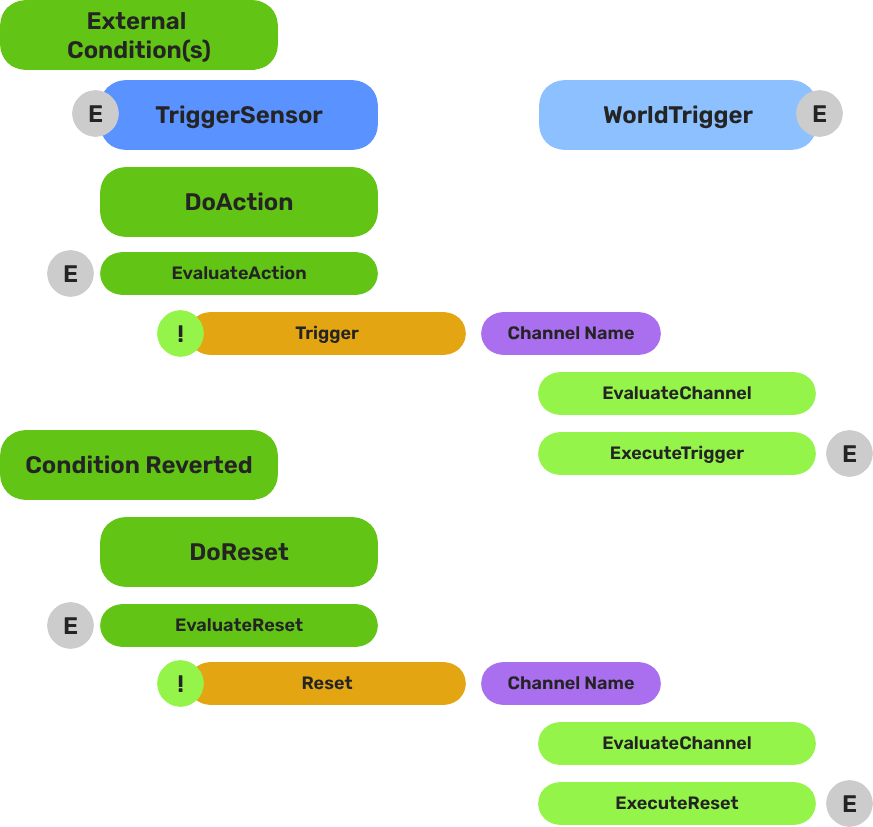
World Triggers
Trigger sensor and world trigger system — event-driven world state changes via composable polymorphic type objects on two container components.
The World Trigger system pairs a TriggerSensorComponent (condition side) with a WorldTriggerComponent (response side) to create event-driven world state changes. Each component owns an array of polymorphic type objects — sensor types define what conditions to evaluate, trigger types define what happens when the condition passes. Any combination of types can be composed on a single entity without scripting.
For usage guides and setup examples, see The Basics: GS_Interaction.
Contents
Architecture
Breakdown
World Triggers split conditions from responses using a polymorphic type/component pattern. The two container components sit on the entity; logic lives in the type objects they own.
| Part | What It Does |
|---|
| TriggerSensorComponent | Owns arrays of TriggerSensorType objects (andConditions, orConditions). Evaluates all conditions and fires WorldTriggerRequestBus::Trigger on success. Automatically activates a PhysicsTriggerComponent if any sensor type requires it. |
| WorldTriggerComponent | Owns an array of WorldTriggerType objects (triggerTypes). On Trigger(), calls Execute() on every type. On Reset(), calls OnReset(). On Activate(), calls OnComponentActivate() for startup initialization. |
No scripting is required for standard patterns. Compose sensor types and trigger types in the editor to cover the majority of interactive world objects.
E Indicates extensible classes and methods.
Patterns - Complete list of system patterns used in GS_Play.
Trigger Sensors
The sensory side. TriggerSensorComponent holds arrays of TriggerSensorType objects that define evaluation logic — collisions, interactions, record conditions. Supports AND conditions (all must pass) and OR conditions (any must pass).
Trigger Sensors API
World Triggers
The response side. WorldTriggerComponent holds an array of WorldTriggerType objects that execute when triggered — toggling entities, setting records, changing stages, logging messages.
World Triggers API
Extension Guide
Use the ClassWizard templates to generate new sensor and trigger type classes — see GS_Interaction Templates:
TriggerSensorType — generates a new TriggerSensorType subclass with EvaluateAction(), EvaluateResetAction(), and lifecycle stubs.WorldTriggerType — generates a new WorldTriggerType subclass with Execute(), OnReset(), and OnComponentActivate() stubs.
Custom Sensor Types
- Create a class extending
TriggerSensorType. - Override
EvaluateAction() to define your condition logic. - Override
EvaluateResetAction() if your type supports reset evaluation. - Override
Activate(entityId) / Deactivate() for lifecycle setup. - If your type needs a physics trigger volume, return
true from NeedsPhysicsTrigger(). - For event-driven types, listen on a bus and call
TriggerSensorRequestBus::DoAction() or DoResetAction() when the event fires. - Reflect the class manually in
GS_InteractionSystemComponent::Reflect().
Custom Trigger Types
- Create a class extending
WorldTriggerType. - Override
Execute(entityId) — implement the world state change here. - Override
OnReset(entityId) to reverse or re-arm the effect. - Override
OnComponentActivate(entityId) for any initial state that must be set at startup. - Reflect the class manually in
GS_InteractionSystemComponent::Reflect().
See Also
For component references:
For related resources:
Get GS_Interaction
GS_Interaction — Explore this gem on the product page and add it to your project.
1 - Trigger Sensors
Trigger sensor component and sensor types — condition evaluation objects for physics, interact, and record-based world trigger activation.
TriggerSensorComponent is the condition container of the World Trigger system. It owns arrays of TriggerSensorType objects that define evaluation logic — collisions, interactions, record checks. When conditions pass, it fires WorldTriggerRequestBus::Trigger on the same entity.
For usage guides and setup examples, see The Basics: GS_Interaction.
Container Component
TriggerSensorComponent
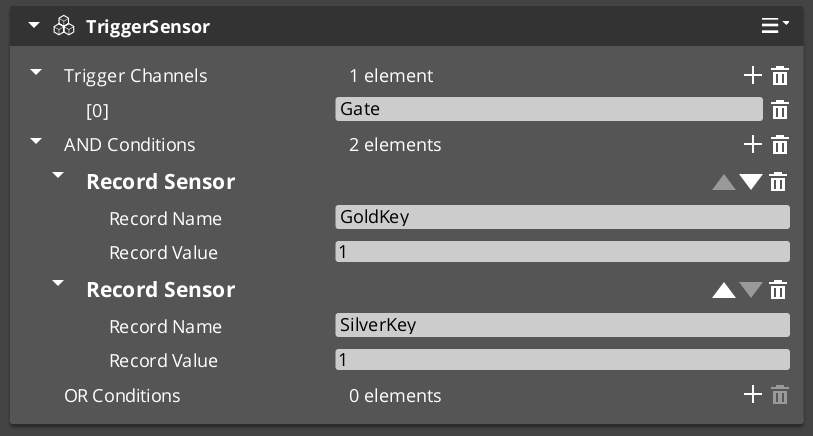
Owns and evaluates all sensor type objects. Not subclassed — extended by adding TriggerSensorType objects to its arrays.
Bus: TriggerSensorRequestBus (ById, Single)
| Field | Type | Description |
|---|
andConditions | vector<TriggerSensorType*> | All types must pass for the trigger to fire. |
orConditions | vector<TriggerSensorType*> | Any type passing is sufficient to fire. |
| Method | Returns | Description |
|---|
DoAction | void | Evaluates all conditions. On pass, fires WorldTriggerRequestBus::Trigger and TriggerSensorNotificationBus::OnTriggered. |
DoResetAction | void | Evaluates reset conditions and fires reset if they pass. |
On Activate, automatically activates a PhysicsTriggerComponent on the entity if any sensor type returns true from NeedsPhysicsTrigger().
Base Type Class
TriggerSensorType
Abstract base for all sensor evaluation logic. Not a component — reflected manually in GS_InteractionSystemComponent::Reflect(). Subclass this to add new condition types.
| Virtual | Returns | Description |
|---|
Activate(entityId) | void | Called when the owning component activates. Connect to buses here. |
Deactivate() | void | Called when the owning component deactivates. Disconnect from buses here. |
EvaluateAction() | bool | Returns true if the condition is currently satisfied. |
EvaluateResetAction() | bool | Returns true if the reset condition is satisfied. Returns true by default. |
NeedsPhysicsTrigger() | bool | Return true to signal that a PhysicsTriggerComponent should be activated. Returns false by default. |
OnTriggerEnter(entity) | void | Called by the physics trigger when an entity enters the volume. |
OnTriggerExit(entity) | void | Called by the physics trigger when an entity exits the volume. |
Stores m_ownerEntityId for calling back to TriggerSensorRequestBus::DoAction() or DoResetAction() from event-driven types.
Built-in Sensor Types
SensorType_Collider
Physics overlap sensor. Returns NeedsPhysicsTrigger() = true, causing the owning component to activate a PhysicsTriggerComponent.
OnTriggerEnter stores the entering entity.OnTriggerExit clears the stored entity.EvaluateAction() returns true while a valid entity is present.EvaluateResetAction() returns true when no entity is present.
SensorType_Record
Fires when a named save record changes to a configured value. Extends RecordKeeperNotificationBus — connects on Activate and fires DoAction automatically when the matching record changes.
EvaluateAction() calls GetRecord and compares against recordValue.
→ Record Sensor Type Reference
| Field | Description |
|---|
recordName | Name of the record to watch. |
recordValue | Value the record must reach to fire. |
SensorType_Interact
Fires when any unit interacts with this entity via the targeting system. Extends InteractTriggerSensorRequestBus.
- On interact: stores
lastCaller and calls DoAction. EvaluateAction() returns true while lastCaller is a valid entity.
SensorType_PlayerInteract
Player-only variant of SensorType_Interact. Extends SensorType_Interact and adds a tag check — lastCaller must have the "Player" tag for the condition to pass.
Extension Guide
To create a custom sensor type:
- Create a class extending
TriggerSensorType. - Override
EvaluateAction() to define when your condition is satisfied. - Override
Activate(entityId) / Deactivate() to connect and disconnect from any buses. - For event-driven evaluation, listen on a bus and call
TriggerSensorRequestBus::DoAction(m_ownerEntityId) when the event fires — the component will run the full evaluation pipeline. - Return
true from NeedsPhysicsTrigger() if your type needs a physics volume. - Reflect the class in
GS_InteractionSystemComponent::Reflect() — types are not components and are not registered via CreateDescriptor().
See Also
Get GS_Interaction
GS_Interaction — Explore this gem on the product page and add it to your project.
1.1 - SensorType_Record
Record-based sensor type — fires when a named RecordKeeper entry reaches a configured value.
For usage guides and setup examples, see The Basics: GS_Interaction.
Overview
SensorType_Record is a TriggerSensorType that fires when a named save record is changed to a configured value. Add it to the andConditions or orConditions array on a TriggerSensorComponent.
Inherits from RecordKeeperNotificationBus — connects automatically on Activate and listens for record changes without polling. When a matching record change arrives, it calls TriggerSensorRequestBus::DoAction on the owning component, which runs the full condition evaluation pipeline.
Fields
| Field | Type | Description |
|---|
recordName | string | Name of the record to watch in the RecordKeeper. |
recordValue | int | Value the record must reach for the condition to pass. |
Evaluation
EvaluateAction() calls RecordKeeperRequestBus::GetRecord(recordName) and compares the result to recordValue. Returns true if they match.
The type self-triggers on record change events — you do not need to poll or script a check manually.
Setup
- Add a
TriggerSensorComponent to your entity. - Add a
SensorType_Record entry to the andConditions or orConditions array. - Set
recordName to the record you want to watch. - Set
recordValue to the value that should fire the trigger. - Add a
WorldTriggerComponent with the desired WorldTriggerType objects to the same entity.
API
From TriggerSensorType:
//! Returns true if the watched record currently matches recordValue.
virtual bool EvaluateAction();

//! Connects to RecordKeeperNotificationBus on component activate.
virtual void Activate(AZ::EntityId entityId);

//! Disconnects from RecordKeeperNotificationBus on component deactivate.
virtual void Deactivate();
From RecordKeeperNotificationBus:
//! Called when any record changes. Fires DoAction if recordName and recordValue match.
virtual void RecordChanged(const AZStd::string& name, int value);
Get GS_Interaction
GS_Interaction — Explore this gem on the product page and add it to your project.
2 - World Triggers
World trigger component and trigger types — response execution objects that change world state when a trigger sensor fires.
WorldTriggerComponent is the response container of the World Trigger system. It owns an array of WorldTriggerType objects that execute when triggered — toggling entities, setting records, changing stages, logging messages.
For usage guides and setup examples, see The Basics: GS_Interaction.
Container Component
WorldTriggerComponent
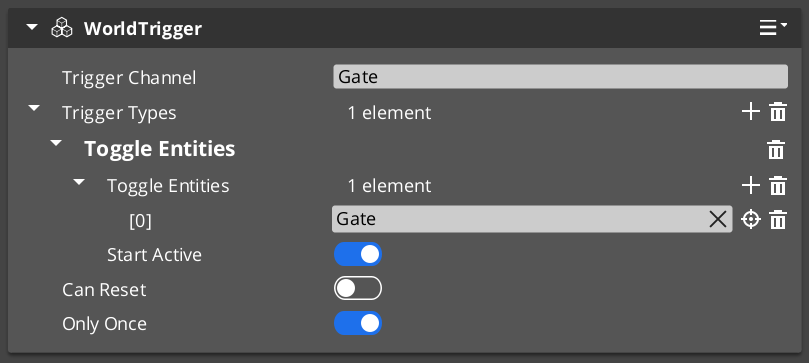
Owns and drives all trigger type objects. Not subclassed — extended by adding WorldTriggerType objects to triggerTypes.
Bus: WorldTriggerRequestBus (ById)
| Field | Type | Description |
|---|
triggerTypes | vector<WorldTriggerType*> | All types are executed on each trigger or reset event. |
| Method | Description |
|---|
Trigger() | Calls Execute(entityId) on every type in triggerTypes. |
Reset() | Calls OnReset(entityId) on every type in triggerTypes. |
On Activate(), calls OnComponentActivate(entityId) on every type — use this for initial state seeding (e.g. entity visibility setup before any trigger fires).
Base Type Class
WorldTriggerType
Abstract base for all trigger response logic. Not a component — reflected manually in GS_InteractionSystemComponent::Reflect(). Subclass this to add new response types.
| Virtual | Parameters | Description |
|---|
OnComponentActivate(entityId) | AZ::EntityId | Called at component activation for startup initialization. |
Execute(entityId) | AZ::EntityId | Called on Trigger(). Implement the world state change here. |
OnReset(entityId) | AZ::EntityId | Called on Reset(). Reverse or re-arm the effect here. |
Built-in Trigger Types
| Type Class | Response |
|---|
| TriggerType_PrintLog | Prints logMessage to the development log on Execute. |
| TriggerType_SetRecord | Sets recordName to recordProgress via the RecordKeeper on Execute. |
| TriggerType_ToggleEntities | Toggles toggleEntities[] active/inactive. OnComponentActivate seeds initial state from startActive. Execute and OnReset invert the state each call. |
| TriggerType_ChangeStage | Queues StageManagerRequestBus::ChangeStageRequest(targetStageName, targetExitPoint) on the next tick via Execute. |
Extension Guide
To create a custom trigger type:
- Create a class extending
WorldTriggerType. - Override
Execute(entityId) — implement your world state change here. - Override
OnReset(entityId) for reversible or re-armable effects. - Override
OnComponentActivate(entityId) if your type needs to set up initial state at startup (e.g. TriggerType_ToggleEntities uses this to seed entity visibility). - Reflect the class in
GS_InteractionSystemComponent::Reflect() — types are not components and are not registered via CreateDescriptor().
See Also
Get GS_Interaction
GS_Interaction — Explore this gem on the product page and add it to your project.